实际游戏开发中,无论是游戏物理的计算,还是游戏逻辑开发,常常会用到平面、射线、球体、包围盒等几何图元,我们实现了几个常用的几何图元类。
第一个我们要介绍的是射线,射线包含了顶点和方向,与数学上的射线不同,我们用到的射线可以有距离限制,射线的参数化表示为p = o + td,p为射线上的点,o为射线的起始位置,d是射线的方向,t是表示射线长度的标量。射线类Ray代码如下:
 1 template <typename T>
 2 class Ray
 3 {
 4 public:
 5     Ray();
 6     Ray(const Vector3<T> &origin, const Vector3<T> &direction);
 7
 8     inline const Vector3<T> &Origin() const { return _Origin; }
 9     inline const Vector3<T> &Direction() const { return _Direction; }
10     inline Vector3<T> &Origin() { return _Origin; }
11     inline Vector3<T> &Direction() { return _Direction; }
12
13     template <typename T1>
14     friend ostream &operator<<(ostream &out, const Ray<T1> &ray);
15 private:
16     Vector3<T> _Origin;
17     Vector3<T> _Direction;
18 };
19
20 template <typename T>
21 Ray<T>::Ray()
22     :_Origin(Vector3<T>(0, 0, 0)), _Direction(Vector3<T>(0, 0, -1))
23 {
24 }
25
26 template <typename T>
27 Ray<T>::Ray(const Vector3<T> &origin, const Vector3<T> &direction)
28     :_Origin(origin), _Direction(direction)
29 {
30 }
31
32 template <typename T>
33 ostream &operator<<(ostream &out, const Ray<T> &ray)
34 {
35     return out << ray._Origin << ", " << ray._Direction;
36 }
37
38 typedef Ray<double> Rayd;
39 typedef Ray<float> Rayf;
这里只是简单的将位置和方向进行封装,注意在构造函数里,我们仅仅是将传入的方向直接赋值而没有进行正规化,如果传入是非单位向量,则射线是有长度的,因此可以根据实际需求传值。通常射线会与其它各种图元进行相交检测,我们将这些检测放到各自的图元类内。
下一个最为常用的图元是平面,参数化的平面方程为pn = d,其中p为平面上任意一点,n为平面的单位法向量,d是平面上任意一点到法线的投影距离,即平面到原点的距离。
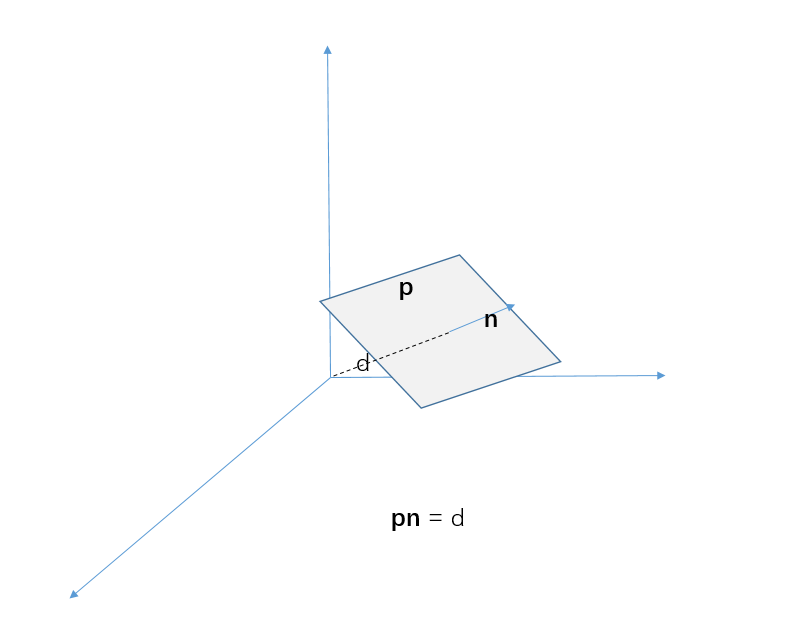
有了平面的定义,我们就可以定义平面类Plane:
 1 template <typename T>
 2 class Plane
 3 {
 4 public:
 5     Plane(const Vector3<T> &normal, T distance);
 6     Plane(const Vector3<T> &normal, const Vector3<T> &point);
 7
 8     T GetSignedDistance(const Vector3<T> &point) const;
 9
10     bool Intersect(const Ray<T> &ray, float *maxDistance = nullptr, Vector3<T> *intersection = nullptr) const;
11     bool Intersect(const Sphere<T> &sphere) const;
12
13     template <typename T1>
14     friend ostream &operator<<(ostream &out, const Plane<T1> &plane);
15
16 private:
17     Vector3<T> _Normal;
18     T _Distance;
19 };
20
21 template <typename T>
22 Plane<T>::Plane(const Vector3<T> &normal, T distance)
23     : _Normal(normal), _Distance(distance)
24 {
25 }
26 template <typename T>
27 Plane<T>::Plane(const Vector3<T> &normal, const Vector3<T> &point)
28     : _Normal(normal), _Distance(point.DotProduct(normal))
29 {
30 }
31
32 template <typename T>
33 T Plane<T>::GetSignedDistance(const Vector3<T> &point) const
34 {
35     /**
36      * p + an = q;
37      * (p + an)*n = q * n;
38      * p * n = (an) * n = q * n;
39      * d + a = q * n;
40      * a = q * n - d
41      */
42     return point.DotProduct(_Normal) - _Distance;
43 }
44
45 template <typename T>
46 bool Plane<T>::Intersect(const Ray<T> &ray, float *maxDistance, Vector3<T> *intersection) const
47 {
48     const Vector3<T> &rayOrigin = ray.Origin();
49     const Vector3<T> &rayDir = ray.Direction();
50     T toPlaneDis = GetSignedDistance(rayOrigin);
51     if (toPlaneDis < 0 /*只和正平面相交*/ || (maxDistance && *maxDistance < toPlaneDis))
52         return false;
53
54     T angleCos = -rayDir.DotProduct(_Normal);
55     //射线方向与平面平行
56     if (FLOAT_EQUAL(angleCos, 0))
57         return false;
58
59     if (intersection)
60     {
61         *intersection = rayOrigin + rayDir * (toPlaneDis / angleCos);
62     }
63
64     return true;
65 }
66
67 template <typename T>
68 bool Plane<T>::Intersect(const Sphere<T> &sphere) const
69 {
70     T distance = GetSignedDistance(sphere.Center());
71     return std::abs(distance) < sphere.Radius;
72 }
73
74 template <typename T1>
75 ostream &operator<<(ostream &out, const Plane<T1> &plane)
76 {
77     out << plane._Normal << ", " << plane._Distance;
78     return out;
79 }
80
81 typedef Plane<double> Planed;
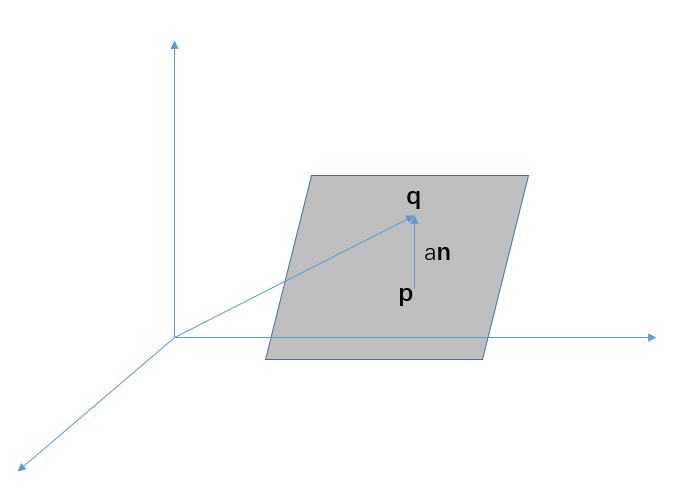
82 typedef Plane<float> Planef;Plane类中GetSignedDistance计算了点到平面的有符号距离,如下图点q的位置为q = p + an,n为平面的法向量,p为q在平面上的最近点,则a为q到平面的距离,等式两边同时与n点乘,即qn = pn + ann,根据平面的定义我们知道pn = d,则a = qn - d,这就是计算点到平面距离的公式,我们也可以这样来理解这个公式,qn为点q在n方向上的投影距离减去平面到原点距离d即是点到平面的有符号距离。
平面的Intersect函数计算了与射线、球体的相交检测,射线与平面的相交检测函数中,射线只能和平面正方向相交,首先计算了射线位置到平面的距离,如果距离为负,则射线点在平面的负半面,不能和平面正面相交。然后利用三角函数计算出射线原点到相交点距离,代入到射线方程中,即可求得射线与平面的相交点。平面和球的相交更为简单,Sphere类通过球所在的位置和半径来定义一个球体。
1 template <typename T>
2 class Sphere
3 {
4 public:
5 Sphere(const Vector3<T> ¢er, T radius);
6
7 inline const Vector3<T> &Center() const { return _Center; }
8 inline const T &Radius() const { return _Radius; }
9 inline Vector3<T> &Center() { return _Center; }
10 inline T &Radius() { return _Radius; }
11 bool Intersect(const Ray<T> &ray, T *maxDistance = nullptr, Vector3<T> *intersection = nullptr) const;
12
13 template <typename T1>
14 friend ostream &operator<<(ostream &out, const Sphere<T1> &sphere);
15
16 private:
17 Vector3<T> _Center;
18 T _Radius;
19 float a;
20 };
21
22 template <typename T>
23 Sphere<T>::Sphere(const Vector3<T> ¢er, T radius)
24 : _Center(center), _Radius(radius)
25 {
26 }
27
28 template <typename T>
29 bool Sphere<T>::Intersect(const Ray<T> &ray, T *maxDistance, Vector3<T> *intersection) const
30 {
31 Vector3<T> rayDir = ray.Direction();
32 rayDir.Normalize();
33 Vector3<T> ray2Center = _Center - ray.Origin();
34 T a = ray2Center.DotProduct(rayDir);
35 T e2 = ray2Center.SqrLength();
36 T a2 = a * a;
37 T radius2 = _Radius * _Radius;
38 T b2 = e2 - a2;
39
40 if (b2 <= radius2)
41 {
42 if (maxDistance || intersection)
43 {
44 //射线点在球内,计算射出时的相交点
45 T t = e2 < radius2 ? a + sqrt(radius2 - b2) : a - sqrt(radius2 - b2);
46 if (maxDistance && *maxDistance < t)
47 return false;
48
49 if (intersection)
50 *intersection = ray.Origin() + ray.Direction() * t;
51 }
52 return true;
53 }
54
55 return false;
56 }
57
58 template <typename T>
59 ostream &operator<<(ostream &out, const Sphere<T> &sphere)
60 {
61 return out << sphere._Center << ", " << sphere._Radius;
62 }
63
64 typedef Sphere<double> Sphered;
65 typedef Sphere<float> Spheref;判断平面和球体相交,只需要计算球中心点到平面的距离(非有符号距离,因为即在平面负方向也会相交)与球体半径的关系即可。同样球体也定义了与射线的相交检测函数如下图,分别是射线原点在球外(上)和球内(下)的情况,这里要计算的是点b的位置。
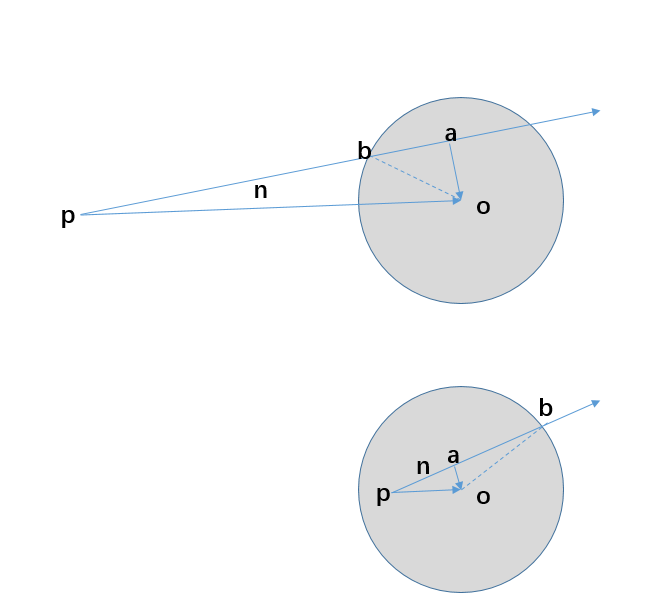
从图中可以看到,射线原点到点b的距离等于射线原点到球心的向量在射线方向上的投影距离加(p在球内)或减(p在球外)ab之间的距离,这里ob的距离为球的半径,通过三角函数即求得ab距离的大小。
另一个常用的图元是AABB(Axis Aligned Bounding Box,轴对齐包围盒),它的每一面都平行于坐标平面,其实现非常简单,只需要指定最小点和最大点即可表示这个包围盒。
  1 template <typename T>
  2 class AABBox
  3 {
  4 public:
  5     AABBox(const Vector3<T> &min, const Vector3<T> &max);
  6     void Union(const Vector3<T> &point);
  7     void Union(const AABBox<T> &box);
  8     inline Vector3<T> Size() const;
  9     inline Vector3<T> Center() const;
 10     Vector3<T> ClosestPointTo(const Vector3<T> &point) const;
 11     bool Contains(const Vector3<T> &point) const;
 12     bool Intersect(const Sphere<T> &sphere) const;
 13     bool Intersect(const Ray<T> &ray, float *maxDistance = nullptr, Vector3<T> *intersection = nullptr) const;
 14     bool Intersect(const AABBox<T> &box, AABBox<T> *intersection = nullptr) const;
 15
 16     template <typename T1>
 17     friend ostream &operator<<(ostream &out, const AABBox<T1> &v);
 18 private:
 19     Vector3<T> _Min;
 20     Vector3<T> _Max;
 21 };
 22
 23 template <typename T>
 24 AABBox<T>::AABBox(const Vector3<T> &min, const Vector3<T> &max)
 25 {
 26     //保证传值不正确时得到合法的aabbox
 27     for (int i = 0; i < 3; ++i)
 28     {
 29         _Min[i] = MIN(min[i], max[i]);
 30         _Max[i] = MAX(min[i], max[i]);
 31     }
 32 }
 33
 34 template <typename T>
 35 void AABBox<T>::Union(const Vector3<T> &point)
 36 {
 37     for (int i = 0; i < 3; ++i)
 38     {
 39         _Min[i] = MIN(_Min[i], point[i]);
 40         _Max[i] = MAX(_Max[i], point[i]);
 41     }
 42 }
 43
 44 template <typename T>
 45 void AABBox<T>::Union(const AABBox<T> &box)
 46 {
 47     for (int i = 0; i < 3; ++i)
 48     {
 49         _Min[i] = MIN(_Min[i], box._Min[i]);
 50         _Max[i] = MAX(_Max[i], box._Max[i]);
 51     }
 52 }
 53
 54 template <typename T>
 55 Vector3<T> AABBox<T>::Size() const
 56 {
 57     return _Max - _Min;
 58 }
 59
 60 template <typename T>
 61 Vector3<T> AABBox<T>::Center() const
 62 {
 63     return (_Max + _Min) * (T)0.5;
 64 }
 65
 66 template <typename T>
 67 Vector3<T> AABBox<T>::ClosestPointTo(const Vector3<T> &point) const
 68 {
 69     Vector3<T> result;
 70     for (int i = 0; i < 3; ++i)
 71     {
 72         if (point[i] < _Min[i])
 73             result[i] = _Min[i];
 74         else if (point[i] > _Max[i])
 75             result[i] = _Max[i];
 76         else
 77             result[i] = point[i];
 78     }
 79     return result;
 80 }
 81
 82 template <typename T>
 83 bool AABBox<T>::Contains(const Vector3<T> &point) const
 84 {
 85     return point.x >= _Min.x && point.y >= _Min.y && point.z >= _Min.z && point.x <= _Max.x && point.y <= _Max.y && point.z <= _Max.z;
 86 }
 87
 88 template <typename T>
 89 bool AABBox<T>::Intersect(const Sphere<T> &sphere) const
 90 {
 91     const Vector3<T> &sphereCenter = sphere.Center();
 92     Vector3<T> closestPoint = ClosestPointTo(sphereCenter);
 93     return (closestPoint - sphereCenter).SqrLength() < sphere.Radius();
 94 }
 95
 96 template <typename T>
 97 bool AABBox<T>::Intersect(const Ray<T> &ray, float *maxDistance, Vector3<T> *intersection) const
 98 {
 99     Plane<T> planes[6] = {Plane<T>(-Vector3<T>::right, _Min), Plane<T>(-Vector3<T>::up, _Min), Plane<T>(-Vector3<T>::forward, _Min),
100         Plane<T>(Vector3<T>::right, _Max), Plane<T>(Vector3<T>::up, _Max), Plane<T>(Vector3<T>::forward, _Max)};
101
102     for (int i = 0; i < 6; ++i)
103     {
104         Vector3<T> intersectPoint;
105         if (planes[i].Intersect(ray, maxDistance, &intersectPoint))
106         {
107             bool contains = Contains(intersectPoint);
108             if (contains)
109             {
110                 if (intersection) *intersection = intersectPoint;
111                 return true;
112             }
113         }
114     }
115
116     return false;
117 }
118
119 template <typename T>
120 bool AABBox<T>::Intersect(const AABBox<T> &box, AABBox *intersection) const
121 {
122     for (int i = 0; i < 3; ++i)
123     {
124         if (_Min[i] > box._Max[i])
125             return false;
126     }
127
128     if (intersection)
129     {
130         for (int i = 0; i < 3; ++i)
131         {
132             intersection->_Min[i] = MAX(_Min[i], box._Min[i]);
133             intersection->_Max[i] = MIN(_Max[i], box._Max[i]);
134         }
135     }
136
137     return true;
138 }
139
140 template <typename T>
141 ostream &operator<<(ostream &out, const AABBox<T> &v)
142 {
143     out << v._Min << ", " << v._Max;
144     return out;
145 }
上面代码中Union方法可以点或另一个AABB合并到当前AABB,当计算一个模型的AABB时,通过Union模型的每一个顶点,可以最终模型的AABB;ClosestPointTo是通过将点推向AABB的各平面计算出点到包含上最近的位置;Contains计算点是否在包含盒内;Intersect的几的个函数是用来计算与球、射线 、其它包围盒的相交性。AABB与球的相交检测是通过计算球心到AABB上最近的点的距离和球的半径来判断的。射线与AABB的相交检测首先计算射线与AABB的哪一个正平面相交,然后判断相交点是否在包围盒上。两个AABB之间的相交检测只需要判断最小点和最大点之间的关系就可以了,同时,将相交部分生成一个新的AABB。
最后在我们还会经常用到三角形,Triangle类代码如下:
/**
   *               _V0
   *                /\
   *             e2/  \e1
   *              /    \
   *          _V1/______\ _V2
   *               e0
   **/
template <typename T>
class Triangle
{
public:
    Triangle(const Vector3<T> &v0, const Vector3<T> &v1, const Vector3<T> v2);
    bool Contains(const Vector3<T> &point) const;
    bool BarycentricCoord(const Vector3<T> &point, Vector3<T> &out) const;
    bool Intersect(const Ray<T> &ray, float *maxDistance = nullptr, Vector3<T> *intersection = nullptr) const;

    Vector3<T> &operator[](int i);
    const Vector3<T> &operator[](int i) const;

    template <typename T1>
    friend ostream &operator<<(ostream &out, const Triangle<T1> &tri);
private:
    union
    {
        struct
        {
            Vector3<T> _V0, _V1, _V2;
        };
        Vector3<T> _V[3];
    };
};

template <typename T>
Triangle<T>::Triangle(const Vector3<T> &v0, const Vector3<T> &v1, const Vector3<T> v2)
    : _V0(v0), _V1(v1), _V2(v2)
{
}

template <typename T>
bool Triangle<T>::BarycentricCoord(const Vector3<T> &point, Vector3<T> &out) const
{
    Vector3<T> e0 = _V2 - _V1;
    Vector3<T> e1 = _V0 - _V2;
    Vector3<T> e2 = _V1 - _V0;
    Vector3<T> v0p = point - _V0;
    Vector3<T> v1p = point - _V1;
    Vector3<T> v2p = point - _V2;

    Vector3<T> dir = e2.CrossProduct(-e1);
    T area012_2 = e2.CrossProduct(-e1).DotProduct(dir);

    // 退化三角形,面积为0
    if (FLOAT_EQUAL(area012_2, 0))
        return false;

    //点在三角形外部时,至少有一个重心坐标值为负,
    T areaP01_2 = e2.CrossProduct(v0p).DotProduct(dir);
    T areaP12_2 = e0.CrossProduct(v1p).DotProduct(dir);
    T areaP20_2 = e1.CrossProduct(v2p).DotProduct(dir);

    T area012_2_inv = (T)1 / area012_2;
    out.x = areaP01_2 * area012_2_inv;
    out.y = areaP12_2 * area012_2_inv;
    out.z = areaP20_2 * area012_2_inv;

    return true;
}

template <typename T>
bool Triangle<T>::Contains(const Vector3<T> &point) const
{
    Vector3<T> e0 = _V2 - _V1;
    Vector3<T> e1 = _V0 - _V2;
    Vector3<T> e2 = _V1 - _V0;

    T area012_2 = e2.CrossProduct(-e1).Length();

    // 退化三角形,面积为0
    if (FLOAT_EQUAL(area012_2, 0))
        return false;

    Vector3<T> v0p = point - _V0;
    Vector3<T> v1p = point - _V1;
    Vector3<T> v2p = point - _V2;

    T areaP01_2 = e2.CrossProduct(v0p).Length();
    T areaP12_2 = e0.CrossProduct(v1p).Length();
    T areaP20_2 = e1.CrossProduct(v2p).Length();

    return FLOAT_EQUAL(areaP01_2 + areaP12_2 + areaP20_2 - area012_2, 0);
}

template <typename T>
bool Triangle<T>::Intersect(const Ray<T> &ray, float *maxDistance, Vector3<T> *intersection) const
{
    Vector3<T> e1 = _V2 - _V0;
    Vector3<T> e2 = _V1 - _V0;

    Vector3<T> normal = e2.CrossProduct(e1);
    Plane<T> plane(normal, _V0);
    Vector3<T> intersectionPoint;
    bool intersetWithPlane = plane.Intersect(ray, maxDistance, &intersectionPoint);
    if (intersetWithPlane)
    {
        bool result = Contains(intersectionPoint);
        if (result && intersection)
        {
            *intersection = intersectionPoint;
        }
        return result;
    }

    return false;
}

template <typename T>
Vector3<T> &Triangle<T>::operator[](int i)
{
    return _V[i];
}

template <typename T>
const Vector3<T> &Triangle<T>::operator[](int i) const
{
    return _V[i];
}

template <typename T>
ostream &operator<<(ostream &out, const Triangle<T> &tri)
{
    return out << tri._V0 << ", " << tri._V1 << ", " << tri._V2;
}

typedef Triangle<double> Triangled;
typedef Triangle<float> Trianglef;
}
这里主要定义了三个函数,分别用来计算点是否在三角形上(Contains)、求点在三角形上的重心坐标(BarycentricCoord)和射线之间的相交检测(Intersect),Contains函数的原理是三角形内任意一点到三个顶点所组成的子三角形面积和等于原三角形的面积。
BarycentricCoord函数用到了子三角形的面积与原角形面积的比来计算重心坐标,三角形平面内任意一点可以用重心坐标来表示,即p = b0v0 + b1v1 + b2v2,如果点不在三角形所在的平面,计算出的为点在三角形所在平面投影点的重心坐标。
以上就是常用的一些基本图元,游戏中还会用到OBB、圆柱、胶囊体内几何图元,这些内容会在将来游戏物理章节用到时再进行补充。
大约一年前,我决定确保每个包含非唯一文本的Flash通知都将从模块中的方法中获取文本。我这样做的最初原因是为了避免一遍又一遍地输入相同的字符串。如果我想更改措辞,我可以在一个地方轻松完成,而且一遍又一遍地重复同一件事而出现拼写错误的可能性也会降低。我最终得到的是这样的:moduleMessagesdefformat_error_messages(errors)errors.map{|attribute,message|"Error:#{attribute.to_s.titleize}#{message}."}enddeferror_message_could_not_find(obje
我正在编写一个包含C扩展的gem。通常当我写一个gem时,我会遵循TDD的过程,我会写一个失败的规范,然后处理代码直到它通过,等等......在“ext/mygem/mygem.c”中我的C扩展和在gemspec的“扩展”中配置的有效extconf.rb,如何运行我的规范并仍然加载我的C扩展?当我更改C代码时,我需要采取哪些步骤来重新编译代码?这可能是个愚蠢的问题,但是从我的gem的开发源代码树中输入“bundleinstall”不会构建任何native扩展。当我手动运行rubyext/mygem/extconf.rb时,我确实得到了一个Makefile(在整个项目的根目录中),然后当
我已经在Sinatra上创建了应用程序,它代表了一个简单的API。我想在生产和开发上进行部署。我想在部署时选择,是开发还是生产,一些方法的逻辑应该改变,这取决于部署类型。是否有任何想法,如何完成以及解决此问题的一些示例。例子:我有代码get'/api/test'doreturn"Itisdev"end但是在部署到生产环境之后我想在运行/api/test之后看到ItisPROD如何实现? 最佳答案 根据SinatraDocumentation:EnvironmentscanbesetthroughtheRACK_ENVenvironm
我们的git存储库中目前有一个Gemfile。但是,有一个gem我只在我的环境中本地使用(我的团队不使用它)。为了使用它,我必须将它添加到我们的Gemfile中,但每次我checkout到我们的master/dev主分支时,由于与跟踪的gemfile冲突,我必须删除它。我想要的是类似Gemfile.local的东西,它将继承从Gemfile导入的gems,但也允许在那里导入新的gems以供使用只有我的机器。此文件将在.gitignore中被忽略。这可能吗? 最佳答案 设置BUNDLE_GEMFILE环境变量:BUNDLE_GEMFI
这似乎非常适得其反,因为太多的gem会在window上破裂。我一直在处理很多mysql和ruby-mysqlgem问题(gem本身发生段错误,一个名为UnixSocket的类显然在Windows机器上不能正常工作,等等)。我只是在浪费时间吗?我应该转向不同的脚本语言吗? 最佳答案 我在Windows上使用Ruby的经验很少,但是当我开始使用Ruby时,我是在Windows上,我的总体印象是它不是Windows原生系统。因此,在主要使用Windows多年之后,开始使用Ruby促使我切换回原来的系统Unix,这次是Linux。Rub
我正在玩HTML5视频并且在ERB中有以下片段:mp4视频从在我的开发环境中运行的服务器很好地流式传输到chrome。然而firefox显示带有海报图像的视频播放器,但带有一个大X。问题似乎是mongrel不确定ogv扩展的mime类型,并且只返回text/plain,如curl所示:$curl-Ihttp://0.0.0.0:3000/pr6.ogvHTTP/1.1200OKConnection:closeDate:Mon,19Apr201012:33:50GMTLast-Modified:Sun,18Apr201012:46:07GMTContent-Type:text/plain
无论您是想搭建桌面端、WEB端或者移动端APP应用,HOOPSPlatform组件都可以为您提供弹性的3D集成架构,同时,由工业领域3D技术专家组成的HOOPS技术团队也能为您提供技术支持服务。如果您的客户期望有一种在多个平台(桌面/WEB/APP,而且某些客户端是“瘦”客户端)快速、方便地将数据接入到3D应用系统的解决方案,并且当访问数据时,在各个平台上的性能和用户体验保持一致,HOOPSPlatform将帮助您完成。利用HOOPSPlatform,您可以开发在任何环境下的3D基础应用架构。HOOPSPlatform可以帮您打造3D创新型产品,HOOPSSDK包含的技术有:快速且准确的CAD
点向量坐标矩阵的几何意义介绍旋转矩阵的几何含义之前,先介绍一下点向量坐标矩阵的几何含义点:在一维空间下就是一个标量,如同一条直线上,以任意某一个位置为0点,以一定的尺度间隔为1,2,3...,相反方向为-1,-2,-3...;如此就形成了一维坐标系,这时候任何一个点都可以用一个数值表示,如点p1=5,即即从原点出发沿着x轴正方向移动5个尺度;点p2=-3,负方向移动3个尺度; 在一维坐标系上过原点做垂直于一维坐标系的直线,则形成了二维坐标系,此时描述一个点需要两个数值来表示点p3=(3,2),即从原点出发沿着x轴正方向移动3个尺度,在此基础上沿着y轴正方向移动两个尺度的位置就是点p3。
在应用开发中,有时候我们需要获取系统的设备信息,用于数据上报和行为分析。那在鸿蒙系统中,我们应该怎么去获取设备的系统信息呢,比如说获取手机的系统版本号、手机的制造商、手机型号等数据。1、获取方式这里分为两种情况,一种是设备信息的获取,一种是系统信息的获取。1.1、获取设备信息获取设备信息,鸿蒙的SDK包为我们提供了DeviceInfo类,通过该类的一些静态方法,可以获取设备信息,DeviceInfo类的包路径为:ohos.system.DeviceInfo.具体的方法如下:ModifierandTypeMethodDescriptionstatic StringgetAbiList()Obt
这篇文章是继上一篇文章“Observability:从零开始创建Java微服务并监控它(一)”的续篇。在上一篇文章中,我们讲述了如何创建一个Javaweb应用,并使用Filebeat来收集应用所生成的日志。在今天的文章中,我来详述如何收集应用的指标,使用APM来监控应用并监督web服务的在线情况。源码可以在地址 https://github.com/liu-xiao-guo/java_observability 进行下载。摄入指标指标被视为可以随时更改的时间点值。当前请求的数量可以改变任何毫秒。你可能有1000个请求的峰值,然后一切都回到一个请求。这也意味着这些指标可能不准确,你还想提取最小/
