1. 准备模板
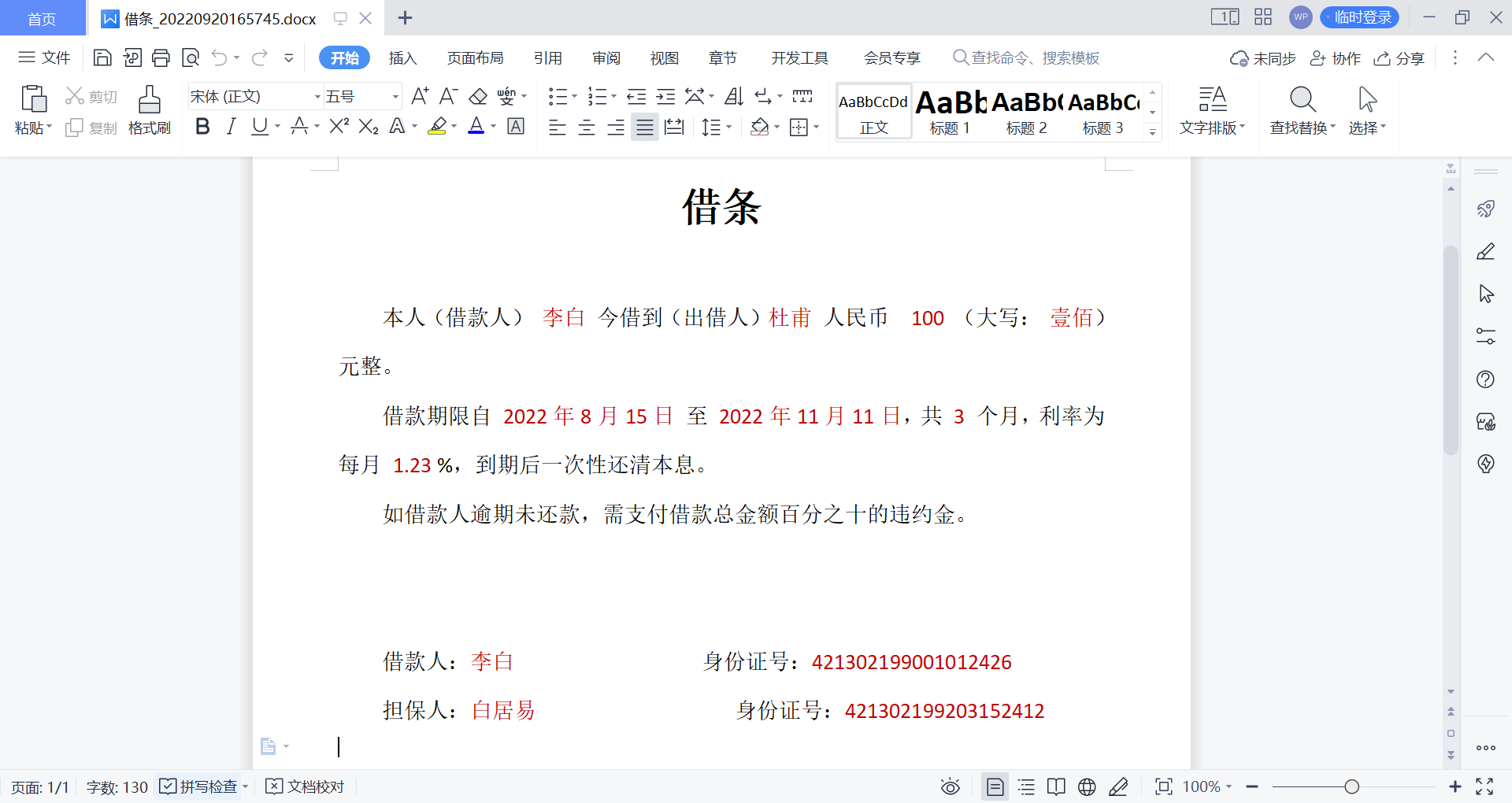
模板 + 数据 = 模型
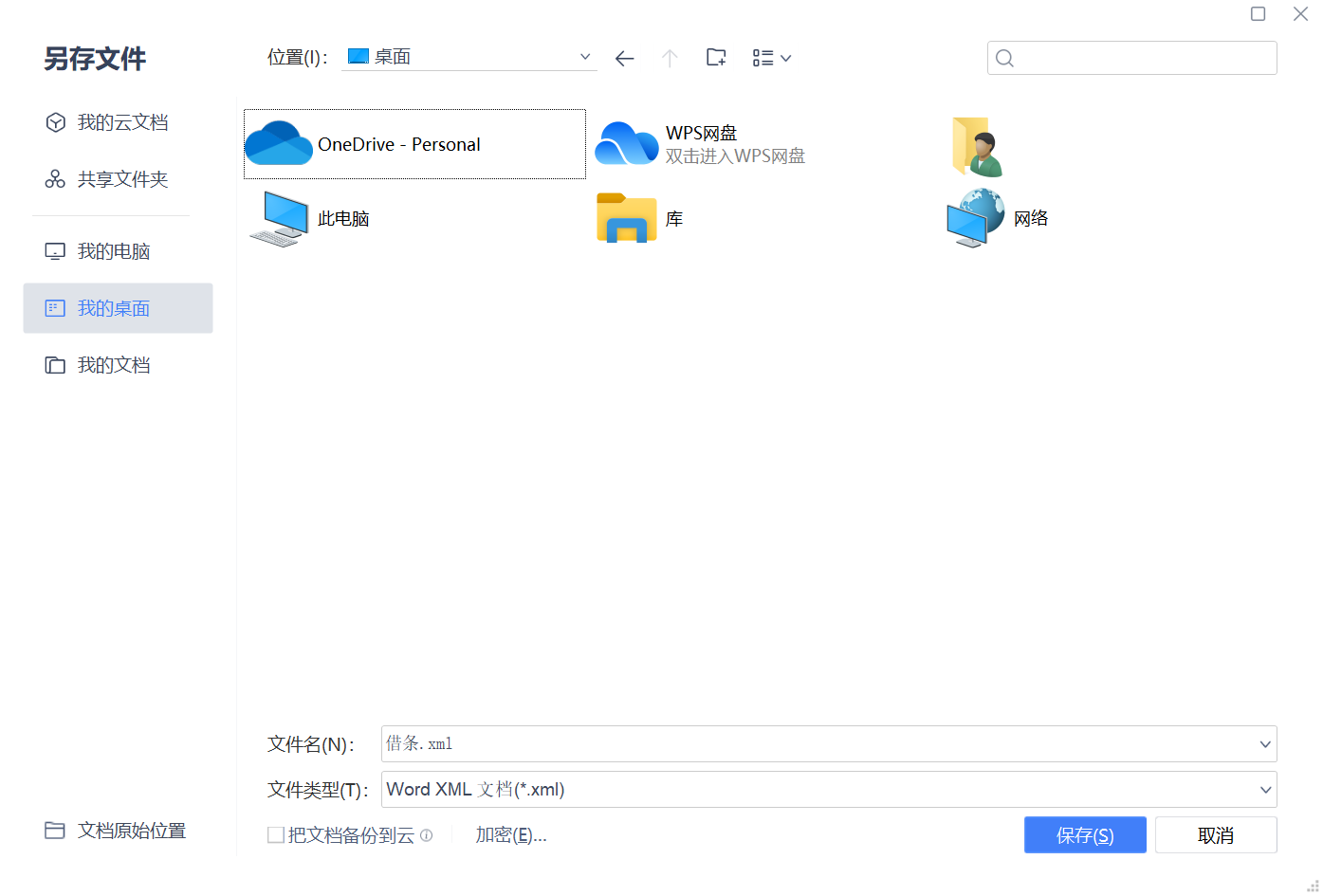
1、将准备好的Word模板文件另存为.xml文件(PS:建议使用WPS来创建Word文件,不建议用Office)

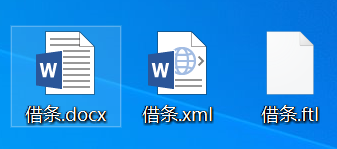
2、将.xml文件重命名为.ftl文件
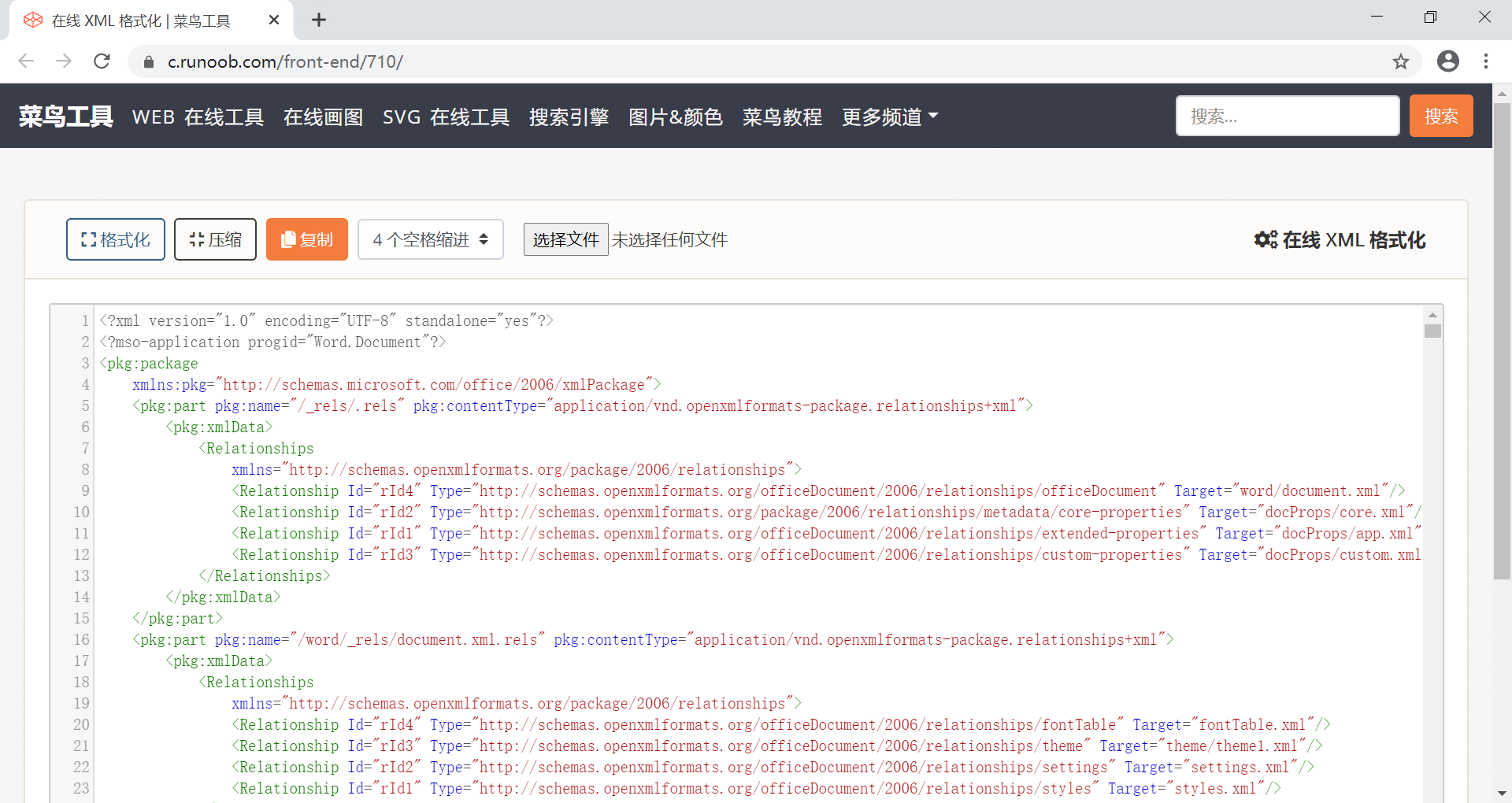
3、用文本编辑器打开.ftl文件,将内容复制出来,格式化一下,再覆盖原来的内容
(PS:格式化一下是为了方便查找并设置变量/占位符,当然设置好模板参数变量以后可以再压缩后再写会.ftl文件)
另外,强烈不建议在word文件中去编辑设置模板变量,因为.docx文件在另存为.xml文件后,原先好好的一个变量可能就被拆开了,建议另存为之后再用文本编辑器打开去编辑。
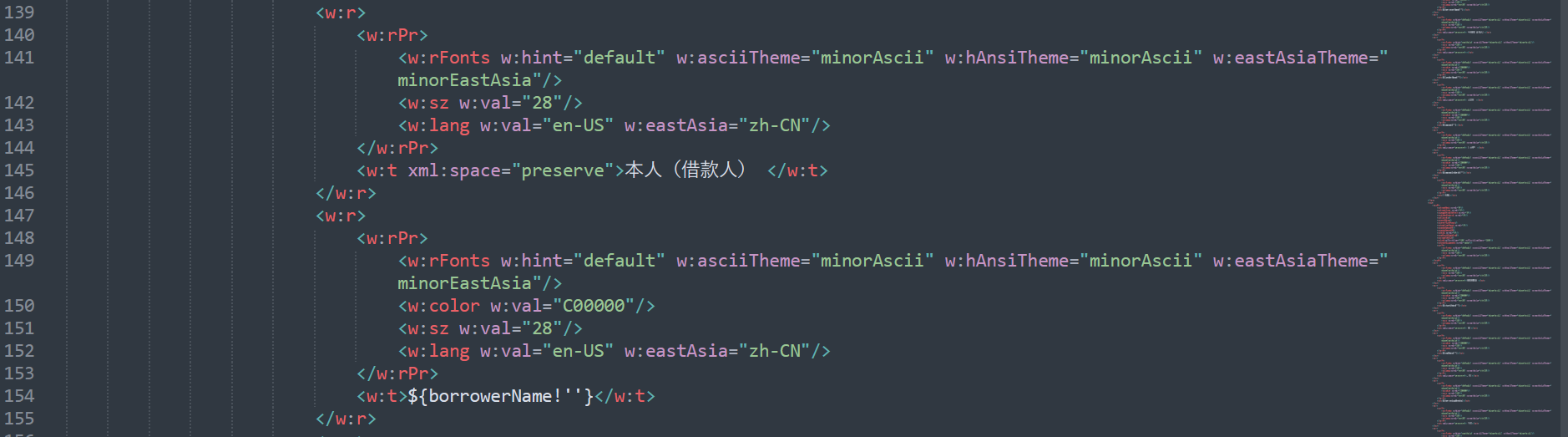
4、设置模板参数(变量/占位符)
2. 代码实现
pom.xml
<?xml version="1.0" encoding="UTF-8"?>
<project xmlns="http://maven.apache.org/POM/4.0.0" xmlns:xsi="http://www.w3.org/2001/XMLSchema-instance"
         xsi:schemaLocation="http://maven.apache.org/POM/4.0.0 https://maven.apache.org/xsd/maven-4.0.0.xsd">
    <modelVersion>4.0.0</modelVersion>
    <parent>
        <groupId>org.springframework.boot</groupId>
        <artifactId>spring-boot-starter-parent</artifactId>
        <version>2.7.3</version>
        <relativePath/> <!-- lookup parent from repository -->
    </parent>
    <groupId>com.example</groupId>
    <artifactId>demo920</artifactId>
    <version>0.0.1-SNAPSHOT</version>
    <name>demo920</name>
    <description>demo920</description>
    <properties>
        <java.version>1.8</java.version>
    </properties>
    <dependencies>
        <dependency>
            <groupId>org.springframework.boot</groupId>
            <artifactId>spring-boot-starter-freemarker</artifactId>
        </dependency>
        <dependency>
            <groupId>org.springframework.boot</groupId>
            <artifactId>spring-boot-starter-web</artifactId>
        </dependency>
        <dependency>
            <groupId>cn.hutool</groupId>
            <artifactId>hutool-core</artifactId>
            <version>5.8.7</version>
        </dependency>
        <dependency>
            <groupId>com.itextpdf</groupId>
            <artifactId>itextpdf</artifactId>
            <version>5.5.13.3</version>
        </dependency>
        <!--<dependency>
            <groupId>com.aspose</groupId>
            <artifactId>aspose-words</artifactId>
            <version>22.9</version>
            <classifier>jdk17</classifier>
        </dependency>-->

        <dependency>
            <groupId>org.projectlombok</groupId>
            <artifactId>lombok</artifactId>
            <optional>true</optional>
        </dependency>
        <dependency>
            <groupId>org.springframework.boot</groupId>
            <artifactId>spring-boot-starter-test</artifactId>
            <scope>test</scope>
        </dependency>
    </dependencies>

    <build>
        <plugins>
            <plugin>
                <groupId>org.springframework.boot</groupId>
                <artifactId>spring-boot-maven-plugin</artifactId>
                <configuration>
                    <excludes>
                        <exclude>
                            <groupId>org.projectlombok</groupId>
                            <artifactId>lombok</artifactId>
                        </exclude>
                    </excludes>
                </configuration>
            </plugin>
        </plugins>
    </build>

</project>
写个类测试一下
package com.example.demo920;

import com.example.demo920.domain.LoanReceipt;

import freemarker.template.Configuration;
import freemarker.template.Template;
import org.junit.jupiter.api.Test;
import org.springframework.boot.test.context.SpringBootTest;

import java.io.BufferedWriter;
import java.io.File;
import java.io.FileOutputStream;
import java.io.OutputStreamWriter;
import java.math.BigDecimal;
import java.nio.file.Path;
import java.nio.file.Paths;
import java.time.LocalDateTime;
import java.time.format.DateTimeFormatter;
import java.util.HashMap;
import java.util.Locale;
import java.util.Map;

@SpringBootTest
class Demo920ApplicationTests {

    private DateTimeFormatter DTF = DateTimeFormatter.ofPattern("yyyyMMddHHmmss", Locale.CHINA);

    @Test
    void contextLoads() {
    }

    @Test
    void testGenerateWord() throws Exception {
        Configuration configuration = new Configuration(Configuration.VERSION_2_3_31);
        configuration.setDefaultEncoding("UTF-8");
        configuration.setClassForTemplateLoading(this.getClass(), "/templates");

        Template template = configuration.getTemplate("借条.ftl");

        Path path = Paths.get("tmp","contract");
        File fileDir = path.toFile();
        if (!fileDir.exists()) {
            fileDir.mkdirs();
        }

        String filename = "借条" + "_" + LocalDateTime.now().format(DTF) + ".docx";
        filename = path.toFile() + File.separator + filename;

        BufferedWriter writer = new BufferedWriter(new OutputStreamWriter(new FileOutputStream(filename)));

//        template.process(getDataMap(), writer);
        template.process(getData(), writer);

        writer.flush();
        writer.close();
    }

    Map<String, Object> getDataMap() {
        Map<String, Object> dataMap = new HashMap<>();
        dataMap.put("borrowerName", "李白");
        dataMap.put("borrowerIdCard", "421302199001012426");
        dataMap.put("lenderName", "杜甫");
        dataMap.put("amount", 100);
        dataMap.put("amountInWords", "壹佰");
        dataMap.put("startDate", "2022年8月15日");
        dataMap.put("endDate", "2022年11月11日");
        dataMap.put("borrowingMonths", 3);
        dataMap.put("interestRate", "1.23");
        dataMap.put("guarantorName", "白居易");
        dataMap.put("guarantorIdCard", "421302199203152412");
        return dataMap;
    }

    LoanReceipt getData() {
        LoanReceipt receipt = new LoanReceipt();
        receipt.setBorrowerName("狄仁杰");
        receipt.setBorrowerIdCard("421302198710121234");
        receipt.setBorrowingMonths(6);
        receipt.setLenderName("李元芳");
        receipt.setAmount(new BigDecimal("101"));
        receipt.setAmountInWords("壹佰零壹");
        receipt.setInterestRate(new BigDecimal("0.6"));
        receipt.setStartDate("2022年1月1日");
        receipt.setEndDate("2022年6月30日");
        receipt.setGuarantorName("武则天");
        receipt.setGuarantorIdCard("421302199101014567");
        return receipt;
    }

}
最主要的是下面两行
//	加载模板
Template template = configuration.getTemplate("借条.ftl");
//	填充数据
template.process(getData(), writer);
数据可以是Map也可以是一个对象
改进一下,将生成文件的操作单独写成一个工具方法
package com.example.demo920.util;

import cn.hutool.core.io.IoUtil;
import freemarker.template.Configuration;
import freemarker.template.Template;
import freemarker.template.TemplateException;

import java.io.*;

public class FreemarkerUtils {

    /**
     * 生成Word
     * @param templateDir   模板所在的目录
     * @param templateName  模板文件名称
     * @param filename      生成的文件(含路径)
     * @param dataModel     模板参数数据
     */
    public static void generateWord(File templateDir, String templateName, String filename, Object dataModel) {
        BufferedWriter writer = null;
        Configuration configuration = new Configuration(Configuration.VERSION_2_3_31);
        configuration.setDefaultEncoding("UTF-8");
        try {
            configuration.setDirectoryForTemplateLoading(templateDir);
            Template template = configuration.getTemplate(templateName);
            writer = new BufferedWriter(new OutputStreamWriter(new FileOutputStream(filename)));
            template.process(dataModel, writer);
            writer.flush();
        } catch (IOException e) {
            throw new RuntimeException(e);
        } catch (TemplateException e) {
            throw new RuntimeException(e);
        } finally {
            IoUtil.close(writer);
        }
    }

}
再测试一下
package com.example.demo920;

import cn.hutool.core.io.IoUtil;
import com.example.demo920.util.FreemarkerUtils;
import com.example.demo920.util.PdfUtils;
import org.junit.jupiter.api.Test;
import org.springframework.util.ResourceUtils;

import java.io.*;
import java.nio.file.Files;
import java.nio.file.Path;
import java.nio.file.Paths;
import java.time.LocalDateTime;
import java.util.HashMap;
import java.util.Map;

public class WordTest {

    /**
     * 1、从文件服务器下载模板文件
     * 2、根据业务类型获取需要填充模板的数据
     * 3、模板+数据  再经过处理生成新的文件
     * 4、将生成后的文件上传到文件服务器,并返回一个文件ID
     * 5、业务可以保存这个文件ID或者文件的路径
     */
    @Test
    void testGenerateWordV1() throws Exception {
        Path tempPath = Paths.get("tmp", "contract2");
        File path = tempPath.toFile();
        if (!path.exists()) {
            path.mkdirs();
        }
        File tempFile = Files.createTempFile(tempPath, "qiantiao", ".docx").toFile();
        System.out.println(tempFile.getParent());
        System.out.println(tempFile.getName());
        FileOutputStream fos = new FileOutputStream(tempFile);


        File templateFile = ResourceUtils.getFile("classpath:templates/借条.ftl");
        FileInputStream fis = new FileInputStream(templateFile);

        IoUtil.copy(fis, fos);

        String filename = "借条" + "_" + System.currentTimeMillis() + ".docx";
        filename = "tmp/contract" + File.separator + filename;

        FreemarkerUtils.generateWord(new File(tempFile.getParent()), tempFile.getName(), filename, getDataMap());
    }

 	/**
     * 获取数据
     */
    Map<String, Object> getDataMap() {
        Map<String, Object> dataMap = new HashMap<>();
        dataMap.put("borrowerName", "李白2");
        dataMap.put("borrowerIdCard", "421302199001012426");
        dataMap.put("lenderName", "杜甫");
        dataMap.put("amount", 100);
        dataMap.put("amountInWords", "壹佰");
        dataMap.put("startDate", "2022年8月15日");
        dataMap.put("endDate", "2022年11月11日");
        dataMap.put("borrowingMonths", 3);
        dataMap.put("interestRate", "1.23");
        dataMap.put("guarantorName", "白居易");
        dataMap.put("guarantorIdCard", "421302199203152412");
        return dataMap;
    }

    @Test
    void testGenerateWord2() throws Exception {
        File templateDir = ResourceUtils.getFile(ResourceUtils.CLASSPATH_URL_PREFIX + "templates");
        String templateName = "借条.ftl";
        String destFilename = "借条" + System.currentTimeMillis() + ".docx";
        Map<String, Object> data = getDataMap();
        FreemarkerUtils.generateWord(templateDir, templateName, destFilename, data);
    }

}
3. PDF文件加水印
有时候,生成或者从服务器下载的文件是需要加水印的,比如标识这个文件是谁下载的之类的
pdf加水印还是比较方便的,用itext组件可以轻松实现
另外,如果最终需要pdf文件,建议直接生成pdf文件,跳过word转pdf的步骤
package com.example.demo920.util;

import cn.hutool.core.io.IoUtil;
import com.aspose.words.Document;
import com.aspose.words.SaveFormat;
import com.itextpdf.text.BaseColor;
import com.itextpdf.text.DocumentException;
import com.itextpdf.text.Element;
import com.itextpdf.text.Image;
import com.itextpdf.text.pdf.*;

import java.io.File;
import java.io.FileInputStream;
import java.io.FileOutputStream;
import java.io.IOException;
import java.time.LocalDateTime;

/**
 * @author chengjiansheng
 * @date 2022/09/21
 */
public class PdfUtils {

    /**
     * Word转PDF
     * https://www.aspose.com/
     * 注意:Aspose.Words 这个组件是收费的,如果购买的话生成的PDF会有水印。
     * 可以去找相应的破解版本,但是我感觉完全可以跳过Word直接生成PDF。
     * 比如,可以通过Freemarker直接生成PDF,或者利用iText通过模板生成PDF
     * @param src
     * @param dest
     */
    public static void wordToPdf(String src, String dest) {
        File file = new File(src);
        if (!file.exists()) {
            throw new RuntimeException("文件不存在");
        }
        FileInputStream fis = null;
        try {
            fis = new FileInputStream(file);
            Document wpd = new Document(fis);
            wpd.save(dest, SaveFormat.PDF);
        } catch (Exception e) {
            throw new RuntimeException(e);
        } finally {
            IoUtil.close(fis);
        }
    }

    /**
     * 加水印
     * @param src   源文件
     * @param dest  目标文件
     * @param text  文字
     * @param imagePath 图片地址
     */
    public static void addWatermark(String src, String dest, String text, String imagePath) {
        try {
            //  待加水印的文件
            PdfReader reader = new PdfReader(src);
            //  加完水印的文件
            PdfStamper stamper = new PdfStamper(reader, new FileOutputStream(dest));
            //  字体
            BaseFont baseFont = BaseFont.createFont("STSong-Light", "UniGB-UCS2-H", BaseFont.NOT_EMBEDDED);
            //  透明度
            PdfGState gs = new PdfGState();
            gs.setFillOpacity(0.4f);
            //  PDF文件总页数
            int total = reader.getNumberOfPages() + 1;
            //  循环对每一页都加水印
            PdfContentByte content;
            for (int i = 1; i < total; i++) {
                //  水印在文本之上
                content = stamper.getOverContent(i);
                content.setGState(gs);

                if (null != imagePath) {
                    Image image = Image.getInstance(imagePath);
//                    image.setAbsolutePosition(150, 150);
//                    image.scaleToFit(300,300);
//                    content.addImage(image);

                    for (int x = 0; x < 700; x = x + 300) {
                        for (int y = 0; y < 900; y = y + 200) {
                            image.setAbsolutePosition(x+50, y+50);
                            image.scaleToFit(100,100);
                            content.addImage(image);
                        }
                    }
                }
                if (null != text) {
                    content.beginText();
                    content.setColorFill(BaseColor.RED);
                    content.setFontAndSize(baseFont, 20);
//                    content.showTextAligned(Element.ALIGN_CENTER, text, 50, 50, 45);

                    for (int x = 0; x < 700; x = x + 300) {
                        for (int y = 0; y < 900; y = y + 200) {
                            //水印内容和水印位置
                            content.showTextAligned(Element.ALIGN_CENTER, "哈哈哈哈哈", x - 20, y + 10, 30);
                            content.showTextAligned(Element.ALIGN_CENTER, LocalDateTime.now().toString(), x, y, 30);
                        }
                    }

                    content.endText();
                }
            }
            stamper.close();
            reader.close();
        } catch (IOException e) {
            throw new RuntimeException(e);
        } catch (DocumentException e) {
            throw new RuntimeException(e);
        }
    }
}
跑一下
@Test
void testWatermark() {
    String src2 = "D:\\借条_2.pdf";
    String dest2 = "D:\\借条_3.pdf";
    String imagePath = "D:\\1.jpg";
    PdfUtils.addWatermark(src2, dest2, "哈哈哈哈哈", imagePath);
}
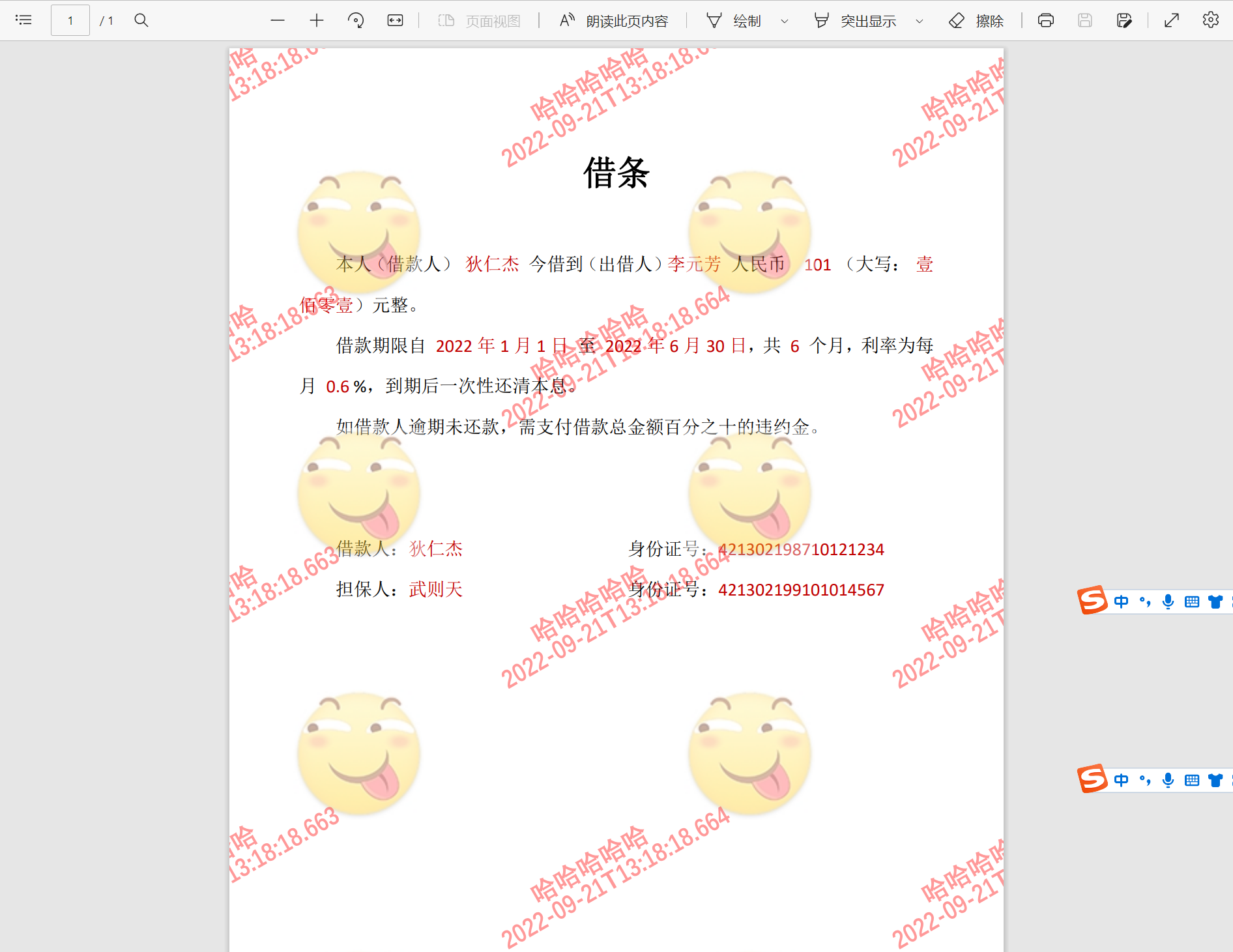
加完水印后效果如图
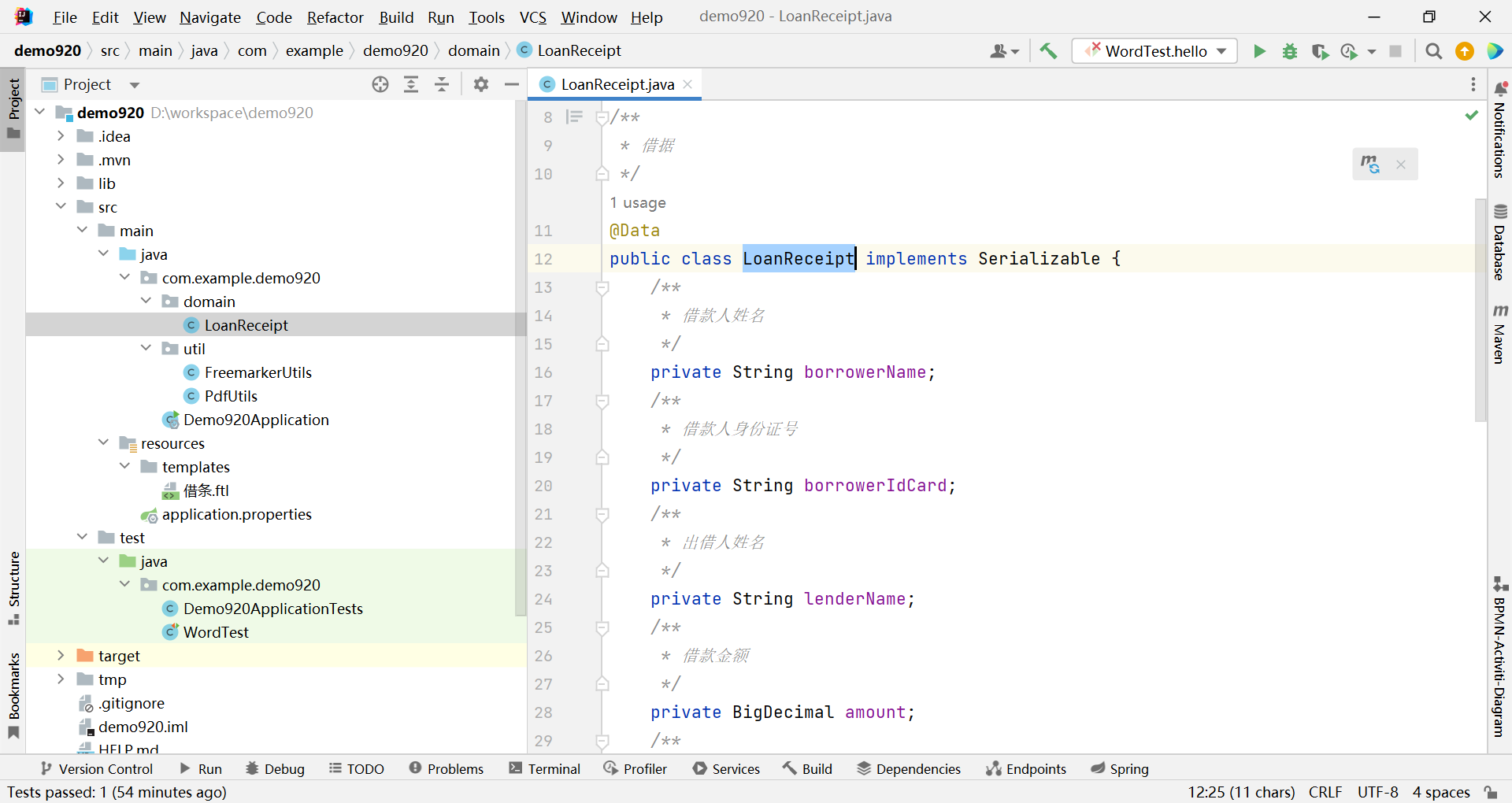
最后,示例项目结构如图
参考:
https://blog.csdn.net/weixin_45103378/article/details/118395284
我有一个Ruby程序,它使用rubyzip压缩XML文件的目录树。gem。我的问题是文件开始变得很重,我想提高压缩级别,因为压缩时间不是问题。我在rubyzipdocumentation中找不到一种为创建的ZIP文件指定压缩级别的方法。有人知道如何更改此设置吗?是否有另一个允许指定压缩级别的Ruby库? 最佳答案 这是我通过查看rubyzip内部创建的代码。level=Zlib::BEST_COMPRESSIONZip::ZipOutputStream.open(zip_file)do|zip|Dir.glob("**/*")d
我试图在一个项目中使用rake,如果我把所有东西都放到Rakefile中,它会很大并且很难读取/找到东西,所以我试着将每个命名空间放在lib/rake中它自己的文件中,我添加了这个到我的rake文件的顶部:Dir['#{File.dirname(__FILE__)}/lib/rake/*.rake'].map{|f|requiref}它加载文件没问题,但没有任务。我现在只有一个.rake文件作为测试,名为“servers.rake”,它看起来像这样:namespace:serverdotask:testdoputs"test"endend所以当我运行rakeserver:testid时
我的目标是转换表单输入,例如“100兆字节”或“1GB”,并将其转换为我可以存储在数据库中的文件大小(以千字节为单位)。目前,我有这个:defquota_convert@regex=/([0-9]+)(.*)s/@sizes=%w{kilobytemegabytegigabyte}m=self.quota.match(@regex)if@sizes.include?m[2]eval("self.quota=#{m[1]}.#{m[2]}")endend这有效,但前提是输入是倍数(“gigabytes”,而不是“gigabyte”)并且由于使用了eval看起来疯狂不安全。所以,功能正常,
Rails2.3可以选择随时使用RouteSet#add_configuration_file添加更多路由。是否可以在Rails3项目中做同样的事情? 最佳答案 在config/application.rb中:config.paths.config.routes在Rails3.2(也可能是Rails3.1)中,使用:config.paths["config/routes"] 关于ruby-on-rails-Rails3中的多个路由文件,我们在StackOverflow上找到一个类似的问题
对于具有离线功能的智能手机应用程序,我正在为Xml文件创建单向文本同步。我希望我的服务器将增量/差异(例如GNU差异补丁)发送到目标设备。这是计划:Time=0Server:hasversion_1ofXmlfile(~800kiB)Client:hasversion_1ofXmlfile(~800kiB)Time=1Server:hasversion_1andversion_2ofXmlfile(each~800kiB)computesdeltaoftheseversions(=patch)(~10kiB)sendspatchtoClient(~10kiBtransferred)Cl
我正在寻找执行以下操作的正确语法(在Perl、Shell或Ruby中):#variabletoaccessthedatalinesappendedasafileEND_OF_SCRIPT_MARKERrawdatastartshereanditcontinues. 最佳答案 Perl用__DATA__做这个:#!/usr/bin/perlusestrict;usewarnings;while(){print;}__DATA__Texttoprintgoeshere 关于ruby-如何将脚
使用带有Rails插件的vim,您可以创建一个迁移文件,然后一次性打开该文件吗?textmate也可以这样吗? 最佳答案 你可以使用rails.vim然后做类似的事情::Rgeneratemigratonadd_foo_to_bar插件将打开迁移生成的文件,这正是您想要的。我不能代表textmate。 关于ruby-使用VimRails,您可以创建一个新的迁移文件并一次性打开它吗?,我们在StackOverflow上找到一个类似的问题: https://sta
在MRIRuby中我可以这样做:deftransferinternal_server=self.init_serverpid=forkdointernal_server.runend#Maketheserverprocessrunindependently.Process.detach(pid)internal_client=self.init_client#Dootherstuffwithconnectingtointernal_server...internal_client.post('somedata')ensure#KillserverProcess.kill('KILL',
我正在使用puppet为ruby程序提供一组常量。我需要提供一组主机名,我的程序将对其进行迭代。在我之前使用的bash脚本中,我只是将它作为一个puppet变量hosts=>"host1,host2"我将其提供给bash脚本作为HOSTS=显然这对ruby不太适用——我需要它的格式hosts=["host1","host2"]自从phosts和putsmy_array.inspect提供输出["host1","host2"]我希望使用其中之一。不幸的是,我终其一生都无法弄清楚如何让它发挥作用。我尝试了以下各项:我发现某处他们指出我需要在函数调用前放置“function_”……这
好的,所以我的目标是轻松地将一些数据保存到磁盘以备后用。您如何简单地写入然后读取一个对象?所以如果我有一个简单的类classCattr_accessor:a,:bdefinitialize(a,b)@a,@b=a,bendend所以如果我从中非常快地制作一个objobj=C.new("foo","bar")#justgaveitsomerandomvalues然后我可以把它变成一个kindaidstring=obj.to_s#whichreturns""我终于可以将此字符串打印到文件或其他内容中。我的问题是,我该如何再次将这个id变回一个对象?我知道我可以自己挑选信息并制作一个接受该信
