本文以统信服务器操作系统1050的各个版本作为演示!!
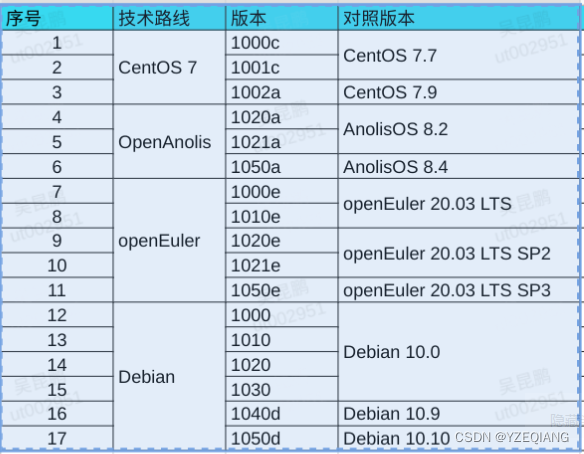
查看服务器版本:
cat /etc/os-version(MinorVersion和EditionName)sudo dnf makecache
sudo dnf install docker-ce -y
执行完 sudo dnf makecache 出现如下报错:
模块依赖问题:
问题: module container-tools:uelc20:2020220902112528:b5192a5c-0.x86_64 conflicts with module(container-tools:an8) provided by container-tools:an8:2020220106133314:b4ae771c-0.x86_64
- module container-tools:an8:2020220106133314:b4ae771c-0.x86_64 conflicts with module(container-tools:uelc20) provided by container-tools:uelc20:2020220902112528:b5192a5c-0.x86_64
- module docker:uelc20:2020220831095116:bd07c72b-0.x86_64 requires module(container-tools:uelc20), but none of the providers can be installed
- conflicting requests
元数据缓存已建立。
# 解决方法:
dnf module reset container-tools -y # container-tools为模块名,可以是多个
1. 安装必要的一些系统工具
sudo dnf install device-mapper-persistent-data lvm2 vim -y
2. 添加软件源
sudo tee /etc/yum.repos.d/docker-ce.repo <<-'EOF'
[docker-ce-stable]
name=Docker-CE-Stable-$basearch
baseurl=https://mirrors.aliyun.com/docker-ce/linux/centos/7/$basearch/stable
enabled=1
gpgcheck=0
[extras]
name=Extras-$basearch
baseurl=https://mirrors.aliyun.com/centos/7/extras/$basearch/
enabled=1
gpgcheck=0
EOF
3. 更新并安装Docker-CE
sudo dnf makecache
sudo dnf install docker-ce -y
# 1 和 2 同上
3. 修改配置文件
sudo sed -i  '9s/centos/centos-altarch/' /etc/yum.repos.d/docker-ce.repo
4. 更新并安装Docker-CE
sudo dnf makecache
sudo dnf install docker-ce -y
1. 安装必要的一些系统工具
sudo apt update
sudo apt install apt-transport-https ca-certificates curl software-properties-common -y
2. 安装GPG证书
curl -fsSL https://mirrors.aliyun.com/docker-ce/linux/ubuntu/gpg | sudo apt-key add -
3. 添加软件源
echo "deb [arch=$(dpkg --print-architecture)] https://mirrors.aliyun.com/docker-ce/linux/debian buster \
stable" | sudo tee /etc/apt/sources.list.d/docker-ce.list
4. 更新并安装Docker-CE
sudo apt update
sudo apt install docker-ce -y
1. 龙芯开源社区下载离线安装
# http://pkg.loongnix.cn/loongnix/pool/main/d/docker-ce/
docker-ce-cli_20.10.3-7.1_loongarch64.deb  docker-ce-rootless-extras_20.10.3-7.1_loongarch64.deb
docker-ce_20.10.3-7.1_loongarch64.deb
# http://pkg.loongnix.cn/loongnix/pool/main/c/containerd.io/
containerd.io_1.4.3-1.lnd.1_loongarch64.deb
2. 安装离线软件包
sudo apt install ./*.deb -y
百度网盘下载链接:https://pan.baidu.com/s/14KwTXBjuBTKu-qCcogsCXw?pwd=yfub
sudo mkdir -p /etc/docker
sudo tee /etc/docker/daemon.json <<-'EOF'
{
  "registry-mirrors": ["https://hub-mirror.c.163.com"]
}
EOF
sudo systemctl daemon-reload
sudo systemctl restart docker
获取阿里云镜像加速:登录到阿里云 --> 控制台 --> 左上角三道线 --> 容器镜像服务 --> 镜像加速器
我正在尝试使用ruby和Savon来使用网络服务。测试服务为http://www.webservicex.net/WS/WSDetails.aspx?WSID=9&CATID=2require'rubygems'require'savon'client=Savon::Client.new"http://www.webservicex.net/stockquote.asmx?WSDL"client.get_quotedo|soap|soap.body={:symbol=>"AAPL"}end返回SOAP异常。检查soap信封,在我看来soap请求没有正确的命名空间。任何人都可以建议我
我想安装一个带有一些身份验证的私有(private)Rubygem服务器。我希望能够使用公共(public)Ubuntu服务器托管内部gem。我读到了http://docs.rubygems.org/read/chapter/18.但是那个没有身份验证-如我所见。然后我读到了https://github.com/cwninja/geminabox.但是当我使用基本身份验证(他们在他们的Wiki中有)时,它会提示从我的服务器获取源。所以。如何制作带有身份验证的私有(private)Rubygem服务器?这是不可能的吗?谢谢。编辑:Geminabox问题。我尝试“捆绑”以安装新的gem..
我想为Heroku构建一个Rails3应用程序。他们使用Postgres作为他们的数据库,所以我通过MacPorts安装了postgres9.0。现在我需要一个postgresgem并且共识是出于性能原因你想要pggem。但是我对我得到的错误感到非常困惑当我尝试在rvm下通过geminstall安装pg时。我已经非常明确地指定了所有postgres目录的位置可以找到但仍然无法完成安装:$envARCHFLAGS='-archx86_64'geminstallpg--\--with-pg-config=/opt/local/var/db/postgresql90/defaultdb/po
我打算为ruby脚本创建一个安装程序,但我希望能够确保机器安装了RVM。有没有一种方法可以完全离线安装RVM并且不引人注目(通过不引人注目,就像创建一个可以做所有事情的脚本而不是要求用户向他们的bash_profile或bashrc添加一些东西)我不是要脚本本身,只是一个关于如何走这条路的快速指针(如果可能的话)。我们还研究了这个很有帮助的问题:RVM-isthereawayforsimpleofflineinstall?但有点误导,因为答案只向我们展示了如何离线在RVM中安装ruby。我们需要能够离线安装RVM本身,并查看脚本https://raw.github.com/wayn
我有一个奇怪的问题:我在rvm上安装了rubyonrails。一切正常,我可以创建项目。但是在我输入“railsnew”时重新启动后,我有“程序'rails'当前未安装。”。SystemUbuntu12.04ruby-v"1.9.3p194"gemlistactionmailer(3.2.5)actionpack(3.2.5)activemodel(3.2.5)activerecord(3.2.5)activeresource(3.2.5)activesupport(3.2.5)arel(3.0.2)builder(3.0.0)bundler(1.1.4)coffee-rails(
我刚刚为fedora安装了emacs。我想用emacs编写ruby。为ruby提供代码提示、代码完成类型功能所需的工具、扩展是什么? 最佳答案 ruby-mode已经包含在Emacs23之后的版本中。不过,它也可以通过ELPA获得。您可能感兴趣的其他一些事情是集成RVM、feature-mode(Cucumber)、rspec-mode、ruby-electric、inf-ruby、rinari(用于Rails)等。这是我当前用于Ruby开发的Emacs配置:https://github.com/citizen428/emacs
我正在尝试在我的centos服务器上安装therubyracer,但遇到了麻烦。$geminstalltherubyracerBuildingnativeextensions.Thiscouldtakeawhile...ERROR:Errorinstallingtherubyracer:ERROR:Failedtobuildgemnativeextension./usr/local/rvm/rubies/ruby-1.9.3-p125/bin/rubyextconf.rbcheckingformain()in-lpthread...yescheckingforv8.h...no***e
我的最终目标是安装当前版本的RubyonRails。我在OSXMountainLion上运行。到目前为止,这是我的过程:已安装的RVM$\curl-Lhttps://get.rvm.io|bash-sstable检查已知(我假设已批准)安装$rvmlistknown我看到当前的稳定版本可用[ruby-]2.0.0[-p247]输入命令安装$rvminstall2.0.0-p247注意:我也试过这些安装命令$rvminstallruby-2.0.0-p247$rvminstallruby=2.0.0-p247我很快就无处可去了。结果:$rvminstall2.0.0-p247Search
我实际上是在尝试使用RVM在我的OSX10.7.5上更新ruby,并在输入以下命令后:rvminstallruby我得到了以下回复:Searchingforbinaryrubies,thismighttakesometime.Checkingrequirementsforosx.Installingrequirementsforosx.Updatingsystem.......Errorrunning'requirements_osx_brew_update_systemruby-2.0.0-p247',pleaseread/Users/username/.rvm/log/138121
由于fast-stemmer的问题,我很难安装我想要的任何rubygem。我把我得到的错误放在下面。Buildingnativeextensions.Thiscouldtakeawhile...ERROR:Errorinstallingfast-stemmer:ERROR:Failedtobuildgemnativeextension./System/Library/Frameworks/Ruby.framework/Versions/2.0/usr/bin/rubyextconf.rbcreatingMakefilemake"DESTDIR="cleanmake"DESTDIR=
