
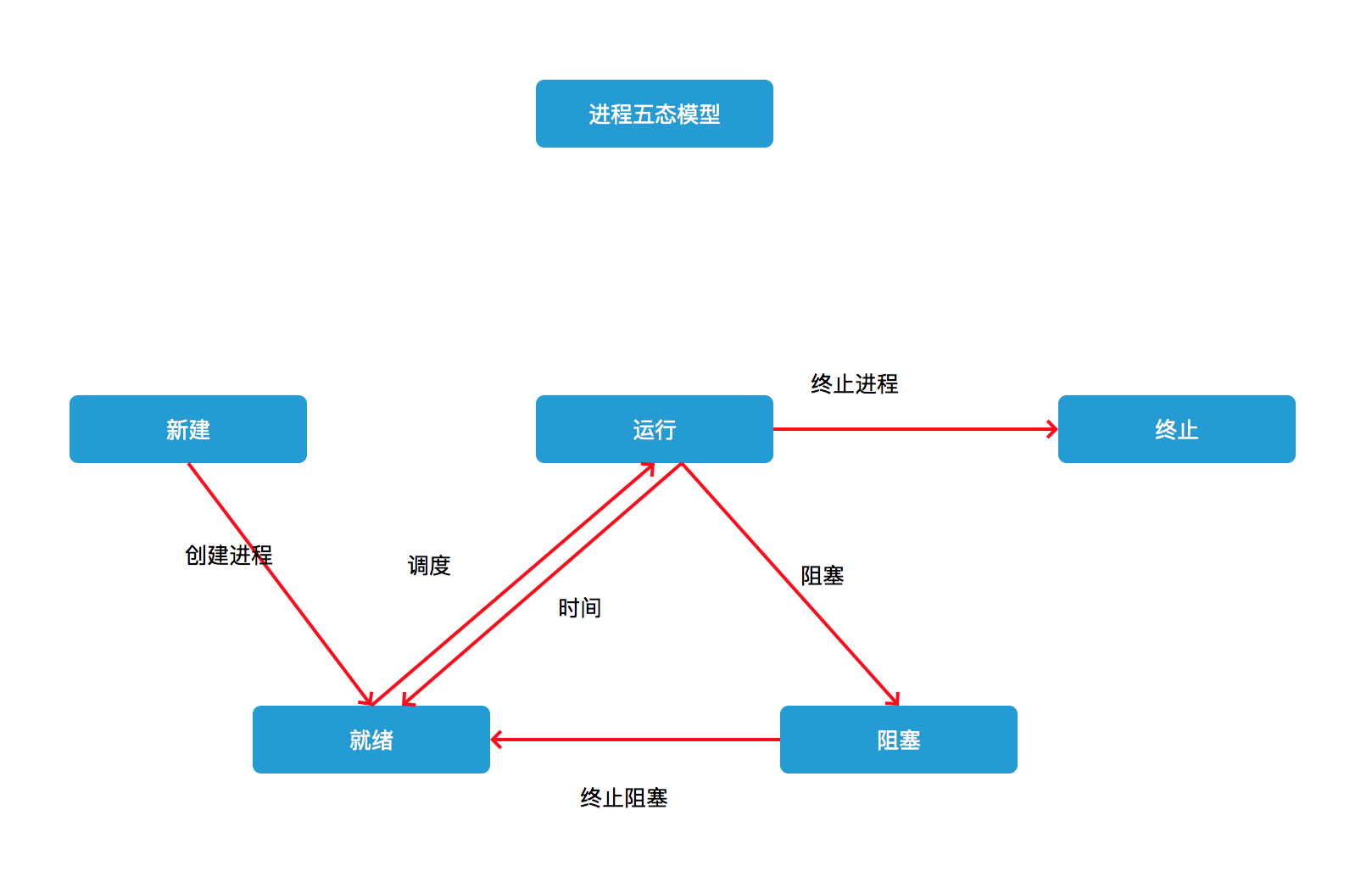
线程是进程的基本执行单元
进程中的所有的任务全部是在线程中完成
 串行 一个任务一个任务执行
 并行  多个任务同时执行
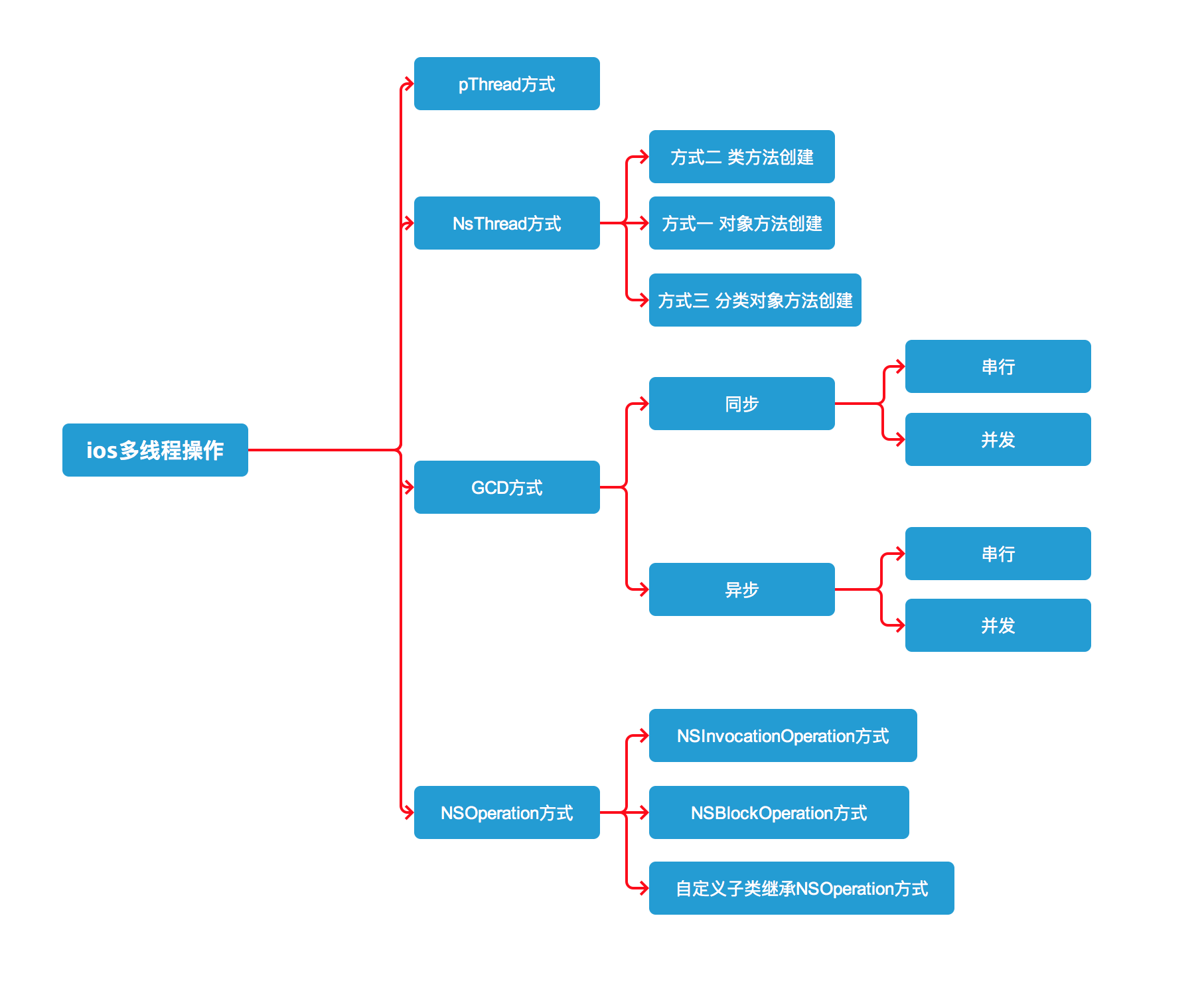
- (void)pThreadClickFunction{
    //创建线程
    pthread_t thread;
    //创建参数
    NSString *str = @"helloWorld";
    //参数1  线程编号的地址
    //参数2  线程的属性
    // 参数3  线程要执行的函数(函数指针)(第三个参数可以,demo,*demo, 一般用&demo)
    // 参数4  线程要执行的函数的参数
    int result = pthread_create(&thread, NULL, &demo, (__bridge void *)(str));
    // __bridge  oc类型到c语言类型的一个转换
    // void *p = (__bridge void *)(str);
    NSLog(@"over %d",result);
}
/// 线程要执行的函数  传参数
void *(demo)(void *param){
    NSString *str = (__bridge NSString *)(param);
    NSLog(@"%@",str);
    return NULL;
}
//创建线程
//参数一 方法执行的对象体
//参数二 执行方法
//参数三 消息体
NSThread *thread = [[NSThread alloc] initWithTarget:self selector:@selector(threadFunction) object:@"alloc"];
    //设置线程name
    thread.name = @"xiaosan";
    //设置线程优先级
    // 线程调用优先级
    // 线程的"优先级"不是决定线程调用顺序的,他是决定线程备CPU调用的频率的
    // 范围在0~1之间,1最高,默认0.5,不建议修改线程优先级
    thread.threadPriority=100;
    //设置栈区大小 默认是512kb
    thread.stackSize=512;
// 手动启动线程
[thread start];
[NSThread detachNewThreadSelector:@selector(threadFunction) toTarget:self withObject:@"detach"];
[self performSelectorInBackground:@selector(threadFunction) withObject:@"perform"];
//方式一
//同步执行任务
 dispatch_sync(globalQueue, ^{
       //执行任务
 });

//方式二
//异步执行任务
dispatch_async(globalQueue, ^{
            //执行任务
 });
//全局并发队列同步执行任务,在主线程执行会导致页面卡顿。
dispatch_queue_t globalQueue =dispatch_get_global_queue(DISPATCH_QUEUE_PRIORITY_DEFAULT, 0);
//获取主线程串行队列
dispatch_queue_t mainQueue = dispatch_get_main_queue();
//自定义串行队列
dispatch_queue_t customMain = dispatch_queue_create("com.example.MyQueue", DISPATCH_QUEUE_SERIAL);
//自定义并行队列
dispatch_queue_t customGlobal = dispatch_queue_create("com.example.MyQueue", DISPATCH_QUEUE_CONCURRENT);
//我们同时执行几个异步任务,他们执行完了,我们有时候还得知道一下,,怎么办呢,这时候,就得用到dispatch_group了,如下编代码这样弄,到最后执行 dispatch_group_notify ,便可
dispatch_queue_t queue = dispatch_get_global_queue(DISPATCH_QUEUE_PRIORITY_DEFAULT, 0);
//创建队列组
dispatch_group_t group = dispatch_group_create();
//添加异步任务
    dispatch_group_async(group, queue, ^{
        NSLog(@"开始执行1");
    });
    dispatch_group_async(group, queue, ^{
        NSLog(@"开始执行2");
    });
    dispatch_group_async(group, queue, ^{
        NSLog(@"开始执行3");
    });

//任务全部执行完毕
dispatch_group_notify(group, queue, ^{
      NSLog(@"全部执行完成,必须在主线程更新UI!!!");
      //主线程更新UI
        dispatch_async(dispatch_get_main_queue(), ^{
            NSLog(@"主线程更新UI完成。");
        });
  });
//创建操作对象,封装要执行的任务
//NSInvocationOperation   封装操作
NSInvocationOperation *operation=[[NSInvocationOperation alloc]initWithTarget:self selector:@selector(threadFunction) object:nil];

//执行操作
[operation start];
//创建NSBlockOperation操作对象
NSBlockOperation *blockOperation=[NSBlockOperation blockOperationWithBlock:^{
        NSLog(@"NSBlockOperation------%@",[NSThread currentThread]);
}];
//开启执行操作
[operation start];
//创建NSOperationQueue
NSOperationQueue * queue=[[NSOperationQueue alloc]init];
//把操作添加到队列中
//第一种方式
    [queue addOperation:operation1];
    [queue addOperation:operation2];
    [queue addOperation:operation3];
//第二种方式
    [queue addOperationWithBlock:^{
        NSLog(@"NSBlockOperation3--4----%@",[NSThread currentThread]);
    }];
//创建NSInvocationOperation对象,封装操作
    NSInvocationOperation *operation1=[[NSInvocationOperation alloc]initWithTarget:self selector:@selector(test1) object:nil];

//创建对象,封装操作
    NSBlockOperation *operation2=[NSBlockOperation blockOperationWithBlock:^{
        NSLog(@"NSBlockOperation3--1----%@",[NSThread currentThread]);
    }];
//向operation2中添加任务
    [operation2 addExecutionBlock:^{
        NSLog(@"NSBlockOperation3--2----%@",[NSThread currentThread]);
    }];

    //创建NSOperationQueue
    NSOperationQueue * queue=[[NSOperationQueue alloc]init];
    //把操作添加到队列中
    [queue addOperation:operation1];
    [queue addOperation:operation2];
#import <Foundation/Foundation.h>


#pragma mark-设置代理和代理方法
@class CustomOperation;
@protocol CustomOperationDelegate <NSObject>
-(void)customOperation:(CustomOperationDelegate*)operation didFished:(NSString *)string;
@end


@interface CustomOperation : NSOperation
@property(nonatomic,strong)id <CustomOperationDelegate> delegate;
@end
#import "CustomOperation.h"

@implementation CustomOperation
-(void)main
{
    //执行耗时操作
    NSString *finishMsg = @"";
    //执行完耗时操作,通知代理
    if ([self.delegate respondsToSelector:@selector(customOperation:didFished:)]) {
        dispatch_async(dispatch_get_main_queue(), ^{//回到主线程,传递数据给代理对象
             [self.delegate downLoadOperation:self didFished: finishMsg];
        });
    }
}
@end
//创建NSInvocationOperation对象,封装操作
    NSInvocationOperation *operation1=[[NSInvocationOperation alloc]initWithTarget:self selector:@selector(test1) object:nil];
    NSInvocationOperation *operation2=[[NSInvocationOperation alloc]initWithTarget:self selector:@selector(test2) object:nil];

//创建对象,封装操作
    NSBlockOperation *operation3=[NSBlockOperation blockOperationWithBlock:^{
        for (int i=0; i<5; i++) {
            NSLog(@"NSBlockOperation3--1----%@",[NSThread currentThread]);
        }
    }];
//添加任务
[operation3 addExecutionBlock:^{
        for (int i=0; i<5; i++) {
        NSLog(@"NSBlockOperation3--2----%@",[NSThread currentThread]);
        }
    }];

    //设置操作依赖
    //先执行operation2,再执行operation1,最后执行operation3
    [operation3 addDependency:operation1];
    [operation1 addDependency:operation2];

//不能是相互依赖
//也就是说不可以是循环依赖
//    [operation3 addDependency:operation1];
//    [operation1 addDependency:operation3];

//创建NSOperationQueue
    NSOperationQueue * queue=[[NSOperationQueue alloc]init];
//把操作添加到队列中
    [queue addOperation:operation1];
    [queue addOperation:operation2];
    [queue addOperation:operation3];
//创建对象,封装操作
    NSBlockOperation *operation=[NSBlockOperation blockOperationWithBlock:^{

            NSLog(@"-operation-执行任务一-%@",[NSThread currentThread]);

    }];

//监听操作的执行完毕
    operation.completionBlock=^{
        //.....下载图片后继续进行的操作
        NSLog(@"--接着执行任务二--");
    };

//创建队列
    NSOperationQueue *queue=[[NSOperationQueue alloc]init];
//把任务添加到队列中(自动执行,自动开线程)
    [queue addOperation:operation];
我试图在一个项目中使用rake,如果我把所有东西都放到Rakefile中,它会很大并且很难读取/找到东西,所以我试着将每个命名空间放在lib/rake中它自己的文件中,我添加了这个到我的rake文件的顶部:Dir['#{File.dirname(__FILE__)}/lib/rake/*.rake'].map{|f|requiref}它加载文件没问题,但没有任务。我现在只有一个.rake文件作为测试,名为“servers.rake”,它看起来像这样:namespace:serverdotask:testdoputs"test"endend所以当我运行rakeserver:testid时
如何使用RSpec::Core::RakeTask初始化RSpecRake任务?require'rspec/core/rake_task'RSpec::Core::RakeTask.newdo|t|#whatdoIputinhere?endInitialize函数记录在http://rubydoc.info/github/rspec/rspec-core/RSpec/Core/RakeTask#initialize-instance_method没有很好的记录;它只是说:-(RakeTask)initialize(*args,&task_block)AnewinstanceofRake
我收到这个错误:RuntimeError(自动加载常量Apps时检测到循环依赖当我使用多线程时。下面是我的代码。为什么会这样?我尝试多线程的原因是因为我正在编写一个HTML抓取应用程序。对Nokogiri::HTML(open())的调用是一个同步阻塞调用,需要1秒才能返回,我有100,000多个页面要访问,所以我试图运行多个线程来解决这个问题。有更好的方法吗?classToolsController0)app.website=array.join(',')putsapp.websiteelseapp.website="NONE"endapp.saveapps=Apps.order("
我正在尝试使用ruby编写一个双线程客户端,一个线程从套接字读取数据并将其打印出来,另一个线程读取本地数据并将其发送到远程服务器。我发现的问题是Ruby似乎无法捕获线程内的错误,这是一个示例:#!/usr/bin/rubyThread.new{loop{$stdout.puts"hi"abc.putsefsleep1}}loop{sleep1}显然,如果我在线程外键入abc.putsef,代码将永远不会运行,因为Ruby将报告“undefinedvariableabc”。但是,如果它在一个线程内,则没有错误报告。我的问题是,如何让Ruby捕获这样的错误?或者至少,报告线程中的错误?
我是ruby的新手,我认为重新构建一个我用C#编写的简单聊天程序是个好主意。我正在使用Ruby2.0.0MRI(Matz的Ruby实现)。问题是我想在服务器运行时为简单的服务器命令提供I/O。这是从示例中获取的服务器。我添加了使用gets()获取输入的命令方法。我希望此方法在后台作为线程运行,但该线程正在阻塞另一个线程。require'socket'#Getsocketsfromstdlibserver=TCPServer.open(2000)#Sockettolistenonport2000defcommandsx=1whilex==1exitProgram=gets.chomp
我写了一个非常简单的rake任务来尝试找到这个问题的根源。namespace:foodotaskbar::environmentdoputs'RUNNING'endend当在控制台中执行rakefoo:bar时,输出为:RUNNINGRUNNING当我执行任何rake任务时会发生这种情况。有没有人遇到过这样的事情?编辑上面的rake任务就是写在那个.rake文件中的所有内容。这是当前正在使用的Rakefile。requireFile.expand_path('../config/application',__FILE__)OurApp::Application.load_tasks这里
我有一个使用PDFKit呈现网页的pdf版本的Rails应用程序。我使用Thin作为开发服务器。问题是当我处于开发模式时。当我使用“bundleexecrailss”启动我的服务器并尝试呈现任何PDF时,整个过程会陷入僵局,因为当您呈现PDF时,会向服务器请求一些额外的资源,如图像和css,看起来只有一个线程.如何配置Rails开发服务器以运行多个工作线程?非常感谢。 最佳答案 我找到的最简单的解决方案是unicorn.geminstallunicorn创建一个unicorn.conf:worker_processes3然后使用它:
我以前没有使用过cron,所以我不能确定我这样做是对的。我想要自动化的任务似乎没有运行。我在终端中执行了这些步骤:sudogeminstall每当切换到应用程序目录无论何时。(这创建了文件schedule.rb)我将此代码添加到schedule.rb:every10.minutesdorunner"User.vote",environment=>"development"endevery:hourdorunner"Digest.rss",:environment=>"development"end我将此代码添加到deploy.rb:after"deploy:symlink","depl
如何在Rake任务中运行Capybara功能?例如:访问('http://google.com')谢谢! 最佳答案 在任务中尝试这样的事情:require'capybara'require'capybara/dsl'Capybara.current_driver=:seleniumBrowser=Class.new{includeCapybara::DSL}page=Browser.new.pagepage.visit("http://www.google.com")puts(page.html)
所以,Ruby1.9.1现在是declaredstable.Rails应该与它一起工作,并且正在慢慢地将gem移植到它。它具有native线程和全局解释器锁(GIL)。自从GIL到位后,原生线程是否比1.9.1中的绿色线程有任何优势? 最佳答案 1.9中的线程是原生的,但它们被“放慢了速度”,一次只允许一个线程运行。这是因为如果线程真的并行运行,它会混淆现有代码。优点:IO现在在线程中是异步的。如果一个线程阻塞在IO上,那么另一个线程将继续执行直到IO完成。C扩展可以使用真正的线程。缺点:任何非线程安全的C扩展都可能存在使用Thre
