 想了解更多关于开源的内容,请访问:51CTO 开源基础软件社区https://ost.51cto.com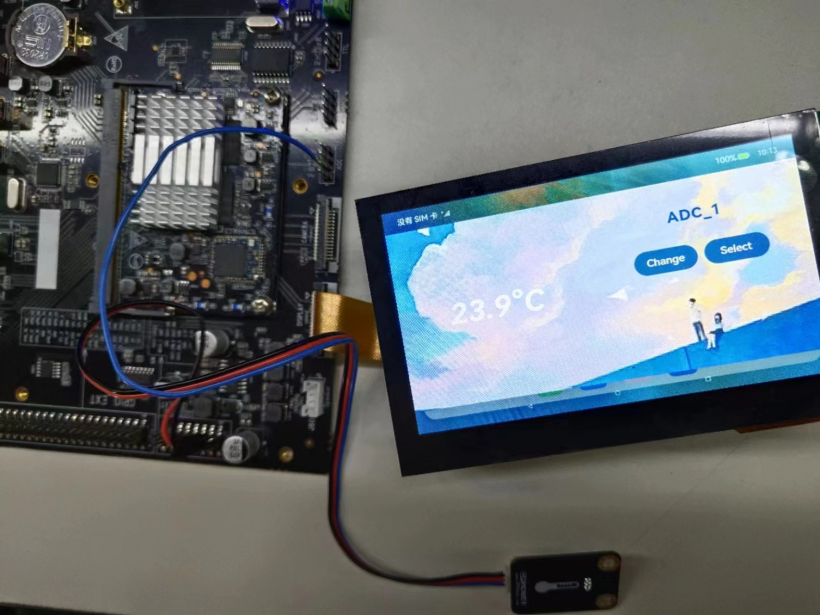
"napisubsys":{
    "path":"vendor/unionman/unionpi_tiger/sample/napi/napisubsys",
    "name":"napisubsys"
}"adc_hdf": {
"variants": [
"phone"
],
"module_list": [
"//vendor/unionman/unionpi_tiger/sample/napi/napisubsys/adc_hdf:adc_hdf"
]
}{
"subsystem": "napisubsys",
"components": [
{
"component": "adc_hdf",
"features": []
}
]
},declare namespace adc_hdf {
function get_adc_value(channel: number): number;
}
export default adc_hdf;#include "adc_hdf.h"
#include "adc_if.h"
#include "hdf_log.h"
#include <cstdio>
namespace adc_hdf {
bool get_adc_value(NUMBER_TYPE_1& channel, NUMBER_TYPE_2& out)
{
int32_t ret;
DevHandle adcHandle = NULL;
uint32_t read_val = 0;
/* 打开ADC设备 */
adcHandle = AdcOpen(ADC_DEVICE_NUM);
if (adcHandle == NULL) {
printf("%s: Open ADC%u fail!", __func__, ADC_DEVICE_NUM);
return false;
}
/* 读取ADC采样值 */
ret = AdcRead(adcHandle, (uint32_t)channel, &read_val);
if (ret != HDF_SUCCESS) {
printf("%s: ADC read fail!:%d", __func__, ret);
AdcClose(adcHandle);
return false;
}
/* 结果返回值 */
out = (NUMBER_TYPE_2)read_val;
printf("ADC read:%d\r\n",read_val);
/* 访问完毕关闭ADC设备 */
AdcClose(adcHandle);
return true;
}
}import("//build/ohos.gni")
ohos_shared_library("adc_hdf")
{
sources = [
"adc_hdf_middle.cpp",
"adc_hdf.cpp",
"tool_utility.cpp",
]
include_dirs = [
".",
"//third_party/node/src",
"//drivers/hdf_core/framework/include/platform"
]
deps=[
"//foundation/arkui/napi:ace_napi",
"//drivers/hdf_core/adapter/uhdf2/platform:libhdf_platform"
]
external_deps = [
"hdf_core:libhdf_utils",
"hiviewdfx_hilog_native:libhilog",
]
remove_configs = [ "//build/config/compiler:no_rtti" ]
cflags=[
]
cflags_cc=[
"-frtti",
]
ldflags = [
]
relative_install_dir = "module"
part_name = "adc_hdf"
subsystem_name = "napisubsys"
}./build.sh --product-name unionpi_tiger./device/board/unionman/unionpi_tiger/common/tools/packer-unionpi.sh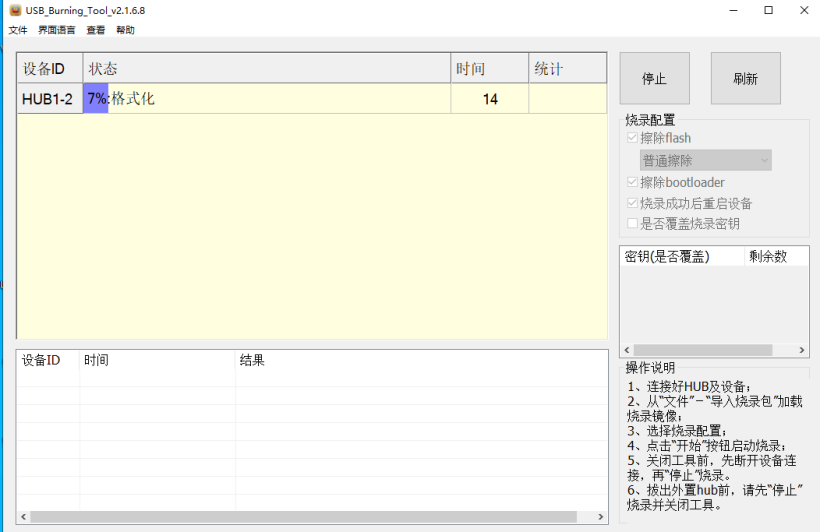 或者使用hdc_std工具:
hdc_std shell mount -o remount,rw /
hdc_std file send libadc_hdf.z.so /system/lib/module/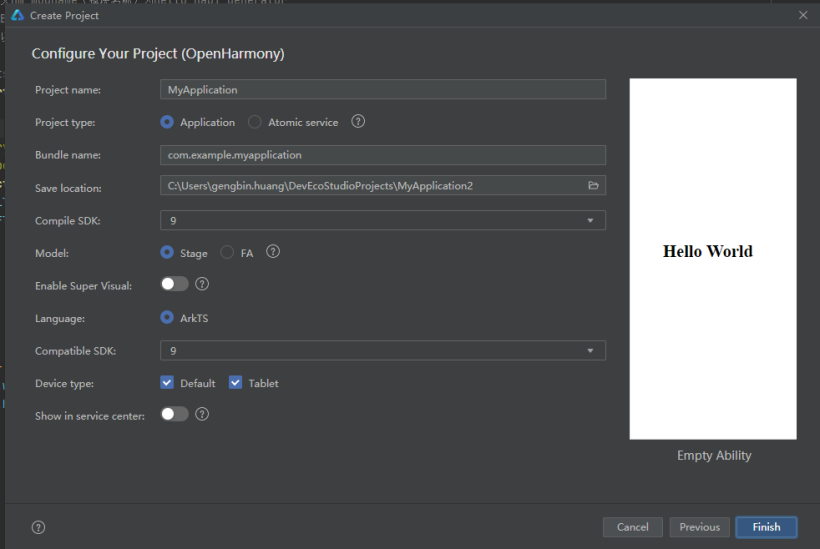 导入外部接口,adc_hdf为上述定义NAPI接口生成的动态库文件名字一致,直接导入会报找不到包,忽略即可,prompt为弹窗组件接口。
// @ts-ignore
import adc_hdf from '@ohos.adc_hdf';
import prompt from '@system.prompt'class MyDataSource implements IDataSource {
private list: string[] = []
private listener: DataChangeListener
constructor(list: string[]) {
this.list = list
}
totalCount(): number {
return this.list.length
}
getData(index: number): any {
return this.list[index]
}
registerDataChangeListener(listener: DataChangeListener): void {
this.listener = listener
}
unregisterDataChangeListener() {
}
}//通道选择组件实现
@Component
struct channel_chose {
private swiperController: SwiperController = new SwiperController()
private data: MyDataSource = new MyDataSource([])
private channelNum: number = 2
private tmp: number = 1
@Link channel: number
//导入轮播内容
aboutToAppear(): void {
let list = []
for (var i = 1; i <= this.channelNum; i++) {
list.push('ADC_' + i.toString());
}
this.data = new MyDataSource(list)
}
build() {
Column({ space: 5 }) {
Swiper(this.swiperController) {
LazyForEach(this.data, (item: string) => {
Text(item)
.borderRadius(10)
.width('80%')
.height(70)
.fontColor('#ff1a5ea4')
.fontWeight(FontWeight.Bolder)
.textAlign(TextAlign.Center)
.fontSize(30)
}, item => item)
}
.cachedCount(2)
.interval(4000)
.indicator(false)
.duration(1000)
.itemSpace(10)
.vertical(true)
.curve(Curve.Linear)
.onChange((index: number) => {
this.tmp = index + 1
})
Row({ space: 12 }) {
Button('Change').backgroundColor('#ff366fb1').fontSize(20).height(50).width(120)
.onClick(() => {
this.swiperController.showNext()
})
Button('Select').backgroundColor('#ff366fb1').fontSize(20).height(50).width(120)
.onClick(() => {
this.channel = this.tmp;
prompt.showToast({ message: 'Select data From ADC_'+this.channel.toString() })
console.info('Select data From Channel_'+this.channel.toString())
})
}.margin(20)
}.width('50%')
}
}@Component
struct show_temperature{
@Link temperature: Number
build(){
Text(this.temperature.toFixed(1)+'°C')
.width('50%')
.fontSize(60)
.fontColor(Color.White)
.fontStyle(FontStyle.Italic)
.textAlign(TextAlign.Center)
.fontWeight(FontWeight.Bold)
}
}@Entry
@Component
struct Index {
@State channel: number = 1
@State adc_val: number = 0
@State temperature: number = 0
private timerId: number = -1
//获取温度传感器ADC采样值并计算温度
private get_adc_value() {
let get_value = adc_hdf.get_adc_value(this.channel-1);
if (get_value <= 1500) {
this.adc_val = get_value;
this.temperature = (this.adc_val / 4096) * 1.8 * 100;
}
else {
this.temperature = 0
prompt.showToast({
message: "获取失败,请检查连线", // 显示文本
duration: 1000, // 显示时长
})
}
}
//程序运行时开启定时器Interval,每隔一秒调用get_adc_value更新温度值
aboutToAppear(): void {
this.timerId = setInterval(() => {
this.get_adc_value()
}, 1000)
}
//销毁定时器
aboutToDisappear() {
if (this.timerId > 0) {
clearTimeout(this.timerId)
this.timerId = -1
}
}
build() {
Row() {
show_temperature({temperature: $temperature})
Column({space:0}){
channel_chose({channel:$channel})
}.height('80%')
}.height('100%')
.backgroundImage($r('app.media.bg')).backgroundImageSize(ImageSize.Cover)
}
}对于具有离线功能的智能手机应用程序,我正在为Xml文件创建单向文本同步。我希望我的服务器将增量/差异(例如GNU差异补丁)发送到目标设备。这是计划:Time=0Server:hasversion_1ofXmlfile(~800kiB)Client:hasversion_1ofXmlfile(~800kiB)Time=1Server:hasversion_1andversion_2ofXmlfile(each~800kiB)computesdeltaoftheseversions(=patch)(~10kiB)sendspatchtoClient(~10kiBtransferred)Cl
我构建了两个需要相互通信和发送文件的Rails应用程序。例如,一个Rails应用程序会发送请求以查看其他应用程序数据库中的表。然后另一个应用程序将呈现该表的json并将其发回。我还希望一个应用程序将存储在其公共(public)目录中的文本文件发送到另一个应用程序的公共(public)目录。我从来没有做过这样的事情,所以我什至不知道从哪里开始。任何帮助,将不胜感激。谢谢! 最佳答案 无论Rails是什么,几乎所有Web应用程序都有您的要求,大多数现代Web应用程序都需要相互通信。但是有一个小小的理解需要你坚持下去,网站不应直接访问彼此
我尝试运行2.x应用程序。我使用rvm并为此应用程序设置其他版本的ruby:$rvmuseree-1.8.7-head我尝试运行服务器,然后出现很多错误:$script/serverNOTE:Gem.source_indexisdeprecated,useSpecification.Itwillberemovedonorafter2011-11-01.Gem.source_indexcalledfrom/Users/serg/rails_projects_terminal/work_proj/spohelp/config/../vendor/rails/railties/lib/r
刚入门rails,开始慢慢理解。有人可以解释或给我一些关于在application_controller中编码的好处或时间和原因的想法吗?有哪些用例。您如何为Rails应用程序使用应用程序Controller?我不想在那里放太多代码,因为据我了解,每个请求都会调用此Controller。这是真的? 最佳答案 ApplicationController实际上是您应用程序中的每个其他Controller都将从中继承的类(尽管这不是强制性的)。我同意不要用太多代码弄乱它并保持干净整洁的态度,尽管在某些情况下ApplicationContr
我是一个Rails初学者,但我想从我的RailsView(html.haml文件)中查看Ruby变量的内容。我试图在ruby中打印出变量(认为它会在终端中出现),但没有得到任何结果。有什么建议吗?我知道Rails调试器,但更喜欢使用inspect来打印我的变量。 最佳答案 您可以在View中使用puts方法将信息输出到服务器控制台。您应该能够在View中的任何位置使用Haml执行以下操作:-puts@my_variable.inspect 关于ruby-on-rails-如何在我的R
我有一个用户工厂。我希望默认情况下确认用户。但是鉴于unconfirmed特征,我不希望它们被确认。虽然我有一个基于实现细节而不是抽象的工作实现,但我想知道如何正确地做到这一点。factory:userdoafter(:create)do|user,evaluator|#unwantedimplementationdetailshereunlessFactoryGirl.factories[:user].defined_traits.map(&:name).include?(:unconfirmed)user.confirm!endendtrait:unconfirmeddoenden
我想使用spawn(针对多个并发子进程)在Ruby中执行一个外部进程,并将标准输出或标准错误收集到一个字符串中,其方式类似于使用Python的子进程Popen.communicate()可以完成的操作。我尝试将:out/:err重定向到一个新的StringIO对象,但这会生成一个ArgumentError,并且临时重新定义$stdxxx会混淆子进程的输出。 最佳答案 如果你不喜欢popen,这是我的方法:r,w=IO.pipepid=Process.spawn(command,:out=>w,:err=>[:child,:out])
按照目前的情况,这个问题不适合我们的问答形式。我们希望答案得到事实、引用或专业知识的支持,但这个问题可能会引发辩论、争论、投票或扩展讨论。如果您觉得这个问题可以改进并可能重新打开,visitthehelpcenter指导。关闭10年前。问题1)我想知道rubyonrails是否有功能类似于primefaces的gem。我问的原因是如果您使用primefaces(http://www.primefaces.org/showcase-labs/ui/home.jsf),开发人员无需担心javascript或jquery的东西。据我所知,JSF是一个规范,基于规范的各种可用实现,prim
是否可以在应用程序中包含的gem代码中知道应用程序的Rails文件系统根目录?这是gem来源的示例:moduleMyGemdefself.included(base)putsRails.root#returnnilendendActionController::Base.send:include,MyGem谢谢,抱歉我的英语不好 最佳答案 我发现解决类似问题的解决方案是使用railtie初始化程序包含我的模块。所以,在你的/lib/mygem/railtie.rbmoduleMyGemclassRailtie使用此代码,您的模块将在
无论您是想搭建桌面端、WEB端或者移动端APP应用,HOOPSPlatform组件都可以为您提供弹性的3D集成架构,同时,由工业领域3D技术专家组成的HOOPS技术团队也能为您提供技术支持服务。如果您的客户期望有一种在多个平台(桌面/WEB/APP,而且某些客户端是“瘦”客户端)快速、方便地将数据接入到3D应用系统的解决方案,并且当访问数据时,在各个平台上的性能和用户体验保持一致,HOOPSPlatform将帮助您完成。利用HOOPSPlatform,您可以开发在任何环境下的3D基础应用架构。HOOPSPlatform可以帮您打造3D创新型产品,HOOPSSDK包含的技术有:快速且准确的CAD
