文章目录
在进行Flash操作时,一般我们需要设计一套Flash抽象层,至少要包括flash的init,read、write、erase这些操作。但每更换一个单片机或者flash器件就要额外去编写flash驱动去适配init,read、write、erase。尽管有会者不难的属性加持,但适配所有的单片机或者flash器件,工作量也可想而知。
本文为大家提供一个适配几乎任意单片机型号的flash驱动,之所以说是几乎,是因为我们这次要借东风,而这个东风就是Keil的FLM文件。
项目开源地址:https://gitee.com/Aladdin-Wang/flash_blob
熟悉Keil的朋友们都知道,当我们要下载编译好的镜像到Flash时,首先要做的一步就是选择合适的Flash下载算法,而这个算法本身就是一个FLM文件:

所谓Flash下载算法,是负责擦除,下载应用数据到flash的一个软件。而Keil往往会集成不少FLM文件以支持大多数的flash型号。
当然,这些算法也是根据不同型号的flash所编写的。只不过,前人们已经为我们种好了大树,我们可以直接在树下乘凉了。
Keil规定了FLM文件的构成,它是一成不变的,我们才可以放心的对文件本身进行解析,并为自己所用。
生成FLM文件的程序中,有两个非常重要的文件,分别是
FlashPrg.c文件包含强制性flash编程函数Init、UnInit、EraseSector和ProgramPage。可选地,根据设备特性,可以实现函数EraseChip、BlankCheck和Verify 。
| Function Name | Indication | Description |
|---|---|---|
| BlankCheck | optional | Check and compare patterns. |
| EraseChip | optional | Delete entire Flash memory content. |
| EraseSector | mandatory | Delete Flash memory content of a specific sector. |
| Init | mandatory | Initialize and prepare device for Flash programming. |
| ProgramPage | mandatory | Write the application into the Flash memory. |
| UnInit | mandatory | De-initialize the microcontroller after one of the Flash programming steps. |
| Verify | optional | Compare Flash memory content with the program code. |
其中有4个是必须要有的,我们来逐一说明:
int Init (unsigned long adr, unsigned long clk, unsigned long fnc);
参数adr指定设备的基址。
参数clk指定用于编程设备的时钟频率。
参数fnc是一个数字:
1 代表擦除。
2代表程序。
3代表验证。
Code Example:
int Init (unsigned long adr, unsigned long clk, unsigned long fnc) {

  // Zero Wait State
  FLASH->ACR  = 0x00000000;

  // Unlock Flash
  FLASH->KEYR = FLASH_KEY1;
  FLASH->KEYR = FLASH_KEY2;

  // Test if IWDG is running (IWDG in HW mode)
  if ((FLASH->OBR & 0x04) == 0x00) {
    // Set IWDG time out to ~32.768 second
    IWDG->KR  = 0x5555; // Enable write access to IWDG_PR and IWDG_RLR
    IWDG->PR  = 0x06;   // Set prescaler to 256
    IWDG->RLR = 4095;   // Set reload value to 4095
  }

  return (0);
}
int ProgramPage ( unsigned long adr, unsigned long sz, unsigned char *buf);
参数adr指定要编程的页面的起始地址。它由主机编程系统与flash页面的起始地址对齐。
参数sz指定数据缓冲区中的数据大小。主机编程系统确保不跨越页面边界。
参数buf指向包含要编程的数据的数据缓冲区。
Code Example:
int ProgramPage (unsigned long adr, unsigned long sz, unsigned char *buf) {

  sz = (sz + 1) & ~1;                           // Adjust size for Half Words

  while (sz) {

    FLASH->CR |=  FLASH_PG;                     // Programming Enabled

    M16(adr) = *((unsigned short *)buf);        // Program Half Word
    while (FLASH->SR & FLASH_BSY);

    FLASH->CR &= ~FLASH_PG;                     // Programming Disabled

    // Check for Errors
    if (FLASH->SR & (FLASH_PGERR | FLASH_WRPRTERR)) {
      FLASH->SR |= FLASH_PGERR | FLASH_WRPRTERR;
      return (1);                               // Failed
    }

    // Go to next Half Word
    adr += 2;
    buf += 2;
    sz  -= 2;
  }

  return (0);                                   // Done
}
int EraseSector (unsigned long adr);
参数adr扇区地址
Code Example:
int EraseSector (unsigned long adr) {

  FLASH->CR |=  FLASH_PER;                      // Page Erase Enabled
  FLASH->AR  =  adr;                            // Page Address
  FLASH->CR |=  FLASH_STRT;                     // Start Erase

  while (FLASH->SR & FLASH_BSY) {
    IWDG->KR = 0xAAAA;                          // Reload IWDG
  }

  FLASH->CR &= ~FLASH_PER;                      // Page Erase Disabled

  return (0);                                   // Done
}
int UnInit (unsigned long fnc);
Code Example
int UnInit (unsigned long fnc) {

  // Lock Flash
  FLASH->CR |=  FLASH_LOCK;

  return (0);
}
文件FlashDev.c包含以下参数定义:
struct FlashDevice const FlashDevice  =  {
   FLASH_DRV_VERS,              // 驱动版本,请勿修改!
   "New Device 256kB Flash" ,    // 设备名称
   ONCHIP,                      // 设备类型
   0x00000000,                  // 设备起始地址
   0x00040000,                  // 以字节为单位的设备大小 (256kB)
   1024,                        // 编程页面大小
   0,                           // 保留,必须为0
   0xFF,                        // 已擦除内存的初始内容
   100,                         // 程序页面超时 100 毫秒
   3000,                        // 擦除扇区超时 3000 毫秒

// 指定扇区的大小和地址
   0x002000, 0x000000,          // 扇区大小 8kB(8 个扇区)
   0x010000, 0x010000,          // 扇区大小 64kB(2 个扇区)
   0x002000, 0x030000,          // 扇区大小 8kB(8 个扇区)
   SECTOR_END
};
Device Name通常显示在工具中,用于识别 Flash 算法。确保此名称反映设备名称。
编程页面大小指定使用函数ProgramPage进行编程 的块大小。对于块大小较小的设备,最好指定物理块大小的倍数,因为这可以减少与目标的通信开销。快速编程的最佳块大小为 1024 字节,但系统本身并不限制此大小值。
下面让我们解析一下现有的FLM文件,以STM32F4xx_1024.FLM为例:
将ARM:CMSIS Pack文件夹(通常在D:\Users\Administrator\AppData\Local\Arm\Packs\Keil\STM32F4xx_DFP\2.15.0\CMSIS\Flash)中的内容复制到一个新文件夹中。
打开命令行工具,输入arm-none-eabi-readelf -a STM32F4xx_1024.FLM:
$ arm-none-eabi-readelf -a STM32F4xx_1024.FLM
ELF Header:
  Magic:   7f 45 4c 46 01 01 01 00 00 00 00 00 00 00 00 00
  Class:                             ELF32
  Data:                              2's complement, little endian
  Version:                           1 (current)
  OS/ABI:                            UNIX - System V
  ABI Version:                       0
  Type:                              EXEC (Executable file)
  Machine:                           ARM
  Version:                           0x1
  Entry point address:               0x0
  Start of program headers:          12172 (bytes into file)
  Start of section headers:          12236 (bytes into file)
  Flags:                             0x5000000, Version5 EABI
  Size of this header:               52 (bytes)
  Size of program headers:           32 (bytes)
  Number of program headers:         2
  Size of section headers:           40 (bytes)
  Number of section headers:         16
  Section header string table index: 15

Section Headers:
  [Nr] Name              Type            Addr     Off    Size   ES Flg Lk Inf Al
  [ 0]                   NULL            00000000 000000 000000 00      0   0  0
  [ 1] PrgCode           PROGBITS        00000000 000034 000144 00  AX  0   0  4
  [ 2] PrgData           PROGBITS        00000144 000178 000004 00  WA  0   0  4
  [ 3] DevDscr           PROGBITS        00000148 00017c 0010a0 00   A  0   0  4
  [ 4] .debug_abbrev     PROGBITS        00000000 00121c 0005a4 00      0   0  1
  [ 5] .debug_frame      PROGBITS        00000000 0017c0 000104 00      0   0  1
  [ 6] .debug_info       PROGBITS        00000000 0018c4 00064c 00      0   0  1
  [ 7] .debug_line       PROGBITS        00000000 001f10 000218 00      0   0  1
  [ 8] .debug_loc        PROGBITS        00000000 002128 0001b8 00      0   0  1
  [ 9] .debug_macinfo    PROGBITS        00000000 0022e0 000614 00      0   0  1
  [10] .debug_pubnames   PROGBITS        00000000 0028f4 000096 00      0   0  1
  [11] .symtab           SYMTAB          00000000 00298c 000110 10     12   9  4
  [12] .strtab           STRTAB          00000000 002a9c 000100 00      0   0  1
  [13] .note             NOTE            00000000 002b9c 00001c 00      0   0  4
  [14] .comment          PROGBITS        00000000 002bb8 000334 00      0   0  1
  [15] .shstrtab         STRTAB          00000000 002eec 0000a0 00      0   0  1
Key to Flags:
  W (write), A (alloc), X (execute), M (merge), S (strings), I (info),
  L (link order), O (extra OS processing required), G (group), T (TLS),
  C (compressed), x (unknown), o (OS specific), E (exclude),
  y (purecode), p (processor specific)

There are no section groups in this file.

Program Headers:
  Type           Offset   VirtAddr   PhysAddr   FileSiz MemSiz  Flg Align
  LOAD           0x000034 0x00000000 0x00000000 0x00148 0x00148 RWE 0x4
  LOAD           0x00017c 0x00000148 0x00000148 0x010a0 0x010a0 R   0x4

 Section to Segment mapping:
  Segment Sections...
   00     PrgCode PrgData
   01     DevDscr

There is no dynamic section in this file.

There are no relocations in this file.

There are no unwind sections in this file.

Symbol table '.symtab' contains 17 entries:
   Num:    Value  Size Type    Bind   Vis      Ndx Name
     0: 00000000     0 NOTYPE  LOCAL  DEFAULT  UND
     1: 00000000     0 NOTYPE  LOCAL  DEFAULT    1 $t
     2: 00000122     0 NOTYPE  LOCAL  DEFAULT    1 $d
     3: 00000144     0 NOTYPE  LOCAL  DEFAULT    2 $d.realdata
     4: 00000148     0 NOTYPE  LOCAL  DEFAULT    3 $d.realdata
     5: 00000000     0 FILE    LOCAL  DEFAULT  ABS FlashPrg.c
     6: 00000000     0 SECTION LOCAL  DEFAULT    1 .text
     7: 00000000     0 FILE    LOCAL  DEFAULT  ABS FlashDev.c
     8: 00000148  4256 SECTION LOCAL  DEFAULT    3 .constdata
     9: 00000000     0 NOTYPE  GLOBAL HIDDEN   ABS BuildAttributes$$THM_ISAv
    10: 00000001    28 FUNC    GLOBAL HIDDEN     1 GetSecNum
    11: 0000001d    46 FUNC    GLOBAL HIDDEN     1 Init
    12: 0000004b    14 FUNC    GLOBAL HIDDEN     1 UnInit
    13: 00000059    44 FUNC    GLOBAL HIDDEN     1 EraseChip
    14: 00000085    76 FUNC    GLOBAL HIDDEN     1 EraseSector
    15: 000000d1    82 FUNC    GLOBAL HIDDEN     1 ProgramPage
    16: 00000148  4256 OBJECT  GLOBAL HIDDEN     3 FlashDevice

No version information found in this file.

Displaying notes found at file offset 0x00002b9c with length 0x0000001c:
  Owner                 Data size       Description
  ARM                  0x0000000c       Unknown note type: (0x40000000)
通过Symbol table信息我们可以找到Init、UnInit、EraseSector和ProgramPage函数所在的位置。
我们还需要根据Section Headers所描述的位置提取出Prgcode(代码),PrgData(数据),DevDscr(设备描述)的信息。
在命令行中输入arm-none-eabi-objdump -s -d STM32F4xx_1024.FLM:-s参数可以将所有段的内容一十六进制方式打印出来,-d参数可以将所有包含指令的段反汇编。
$ arm-none-eabi-objdump -s -d STM32F4xx_1024.FLM

STM32F4xx_1024.FLM:     file format elf32-littlearm

Contents of section PrgCode:
 0000 0003000e 202802d3 4009001d 70471028  .... (..@...pG.(
 0010 02d30009 c01c7047 80087047 42484149  ......pG..pGBHAI
 0020 41604249 41600021 0160c168 f0221143  A`BIA`.!.`.h.".C
 0030 c1604069 800606d4 3e483d49 01600621  .`@i....>H=I.`.!
 0040 41603d49 81600020 70473748 01694205  A`=I.`. pG7H.iB.
 0050 11430161 00207047 10b53348 01690424  .C.a. pG..3H.i.$
 0060 21430161 0169a203 11430161 3349314a  !C.a.i...C.a3I1J
 0070 00e01160 c368db03 fbd40169 a1430161  ...`.h.....i.C.a
 0080 002010bd 30b5fff7 bbff2749 ca68f023  . ..0.....'I.h.#
 0090 1a43ca60 02240c61 0a690007 400e0243  .C.`.$.a.i..@..C
 00a0 0a610869 e2031043 08612448 214a00e0  .a.i...C.a$H!J..
 00b0 1060cd68 ed03fbd4 0869a043 0861c868  .`.h.....i.C.a.h
 00c0 0006000f 03d0c868 1843c860 012030bd  .......h.C.`. 0.
 00d0 70b5154d c91c8908 eb688900 f0263343  p..M.....h...&3C
 00e0 eb600023 2b61164b 17e02c69 1c432c61  .`.#+a.K..,i.C,a
 00f0 14680460 ec68e403 fcd42c69 64086400  .h.`.h....,id.d.
 0100 2c61ec68 2406240f 04d0e868 3043e860  ,a.h$.$....h0C.`
 0110 012070bd 001d121d 091f0029 e5d10020  . p........)...
 0120 70bd0000 23016745 003c0240 ab89efcd  p...#.gE.<.@....
 0130 55550000 00300040 ff0f0000 aaaa0000  UU...0.@........
 0140 01020000                             ....
Contents of section PrgData:
 0144 00000000                             ....
Contents of section DevDscr:
 0148 01015354 4d333246 34787820 466c6173  ..STM32F4xx Flas
 0158 68000000 00000000 00000000 00000000  h...............
 0168 00000000 00000000 00000000 00000000  ................
 0178 00000000 00000000 00000000 00000000  ................
 0188 00000000 00000000 00000000 00000000  ................
 0198 00000000 00000000 00000000 00000000  ................
 01a8 00000000 00000000 00000000 00000000  ................
 01b8 00000000 00000000 00000000 00000000  ................
 01c8 00000100 00000008 00001000 00040000  ................
 01d8 00000000 ff000000 64000000 70170000  ........d...p...
 01e8 00400000 00000000 00000100 00000100  .@..............
 01f8 00000200 00000200 ffffffff ffffffff  ................
我们所需要的正是以上信息,接下来的任务只需要写一个上位机,将以上文件提取出来即可,这个工具我已经写好,如图:

选择STM32F4xx_1024.FLM,生成STM32F4xx_1024.FLM.c文件,然后直接添加到我们的工程中即可,生成的代码如下:
#include "flash_blob.h"

#define OPS_OFFSET ((uint32_t)&flash_code)

#define DEV_OFFSET ((uint32_t)&flash_dev)

#define RAM_OFFSET ((uint32_t)&rw_data)

static const uint32_t flash_code[] =
{
    0X0E000300,0XD3022820,0X1D000940,0X28104770,0X0900D302,0X47701CC0,0X47700880,0X49414842,
    0X49426041,0X21036041,0X68C16001,0X431122F0,0X694060C1,0XD4060680,0X493D483E,0X21066001,
    0X493D6041,0X20006081,0X48374770,0X05426901,0X61014311,0X47702000,0X4833B510,0X24046901,
    0X61014321,0X03A26901,0X61014311,0X4A314933,0X6011E000,0X03DB68C3,0X6901D4FB,0X610143A1,
    0XBD102000,0XF7FFB530,0X4927FFBB,0X23F068CA,0X60CA431A,0X610C2402,0X0700690A,0X43020E40,
    0X6908610A,0X431003E2,0X48246108,0XE0004A21,0X68CD6010,0XD4FB03ED,0X43A06908,0X68C86108,
    0X0F000600,0X68C8D003,0X60C84318,0XBD302001,0X4D15B570,0X08891CC9,0X008968EB,0X433326F0,
    0X230060EB,0X4B16612B,0X692CE017,0X612C431C,0X60046814,0X03E468EC,0X692CD4FC,0X00640864,
    0X68EC612C,0X0F240624,0X68E8D004,0X60E84330,0XBD702001,0X1D121D00,0X29001F09,0X2000D1E5,
    0X0000BD70,0X45670123,0X40023C00,0XCDEF89AB,0X00005555,0X40003000,0X00000FFF,0X0000AAAA,
    0X00000201,0X00000000,
};

static const uint32_t flash_dev[] =
{
    0X54530101,0X4632334D,0X20787834,0X73616C46,0X00000068,0X00000000,0X00000000,0X00000000,
    0X00000000,0X00000000,0X00000000,0X00000000,0X00000000,0X00000000,0X00000000,0X00000000,
    0X00000000,0X00000000,0X00000000,0X00000000,0X00000000,0X00000000,0X00000000,0X00000000,
    0X00000000,0X00000000,0X00000000,0X00000000,0X00000000,0X00000000,0X00000000,0X00000000,
    0X00010000,0X08000000,0X00100000,0X00000400,0X00000000,0X000000FF,0X00000064,0X00001770,
    0X00004000,0X00000000,0X00010000,0X00010000,0X00020000,0X00020000,0XFFFFFFFF,0XFFFFFFFF,
};

static uint32_t rw_data[] =
{
    0X00000000,
};

static flash_blob_device_t  flash_device =
{
    (void*)(OPS_OFFSET + 0X001D),  // Init
    (void*)(OPS_OFFSET + 0X004B),  // UnInit
    (void*)(OPS_OFFSET + 0X0059),  // EraseChip
    (void*)(OPS_OFFSET + 0X0085),  // EraseSector
    (void*)(OPS_OFFSET + 0X00D1),  // ProgramPage
    (void*)(DEV_OFFSET),
    (void*)(RAM_OFFSET),
};
static int flash_blob_device_register(void)
{
    flash_dev_register(&flash_device);
    return 0 ;
}
INIT_BOARD_EXPORT(flash_blob_device_register);
接下来,为了方便后续使用,需要设计一个flash驱动抽象层,代码如下:
flash_blob.h
#ifndef FLASH_BLOB_H
#define FLASH_BLOB_H
#include "rtthread.h"
#include <stdint.h>
#include <stddef.h>
#include <stdbool.h>

#define VERS       1           // Interface Version 1.01

#define UNKNOWN    0           // Unknown
#define ONCHIP     1           // On-chip Flash Memory
#define EXT8BIT    2           // External Flash Device on 8-bit  Bus
#define EXT16BIT   3           // External Flash Device on 16-bit Bus
#define EXT32BIT   4           // External Flash Device on 32-bit Bus
#define EXTSPI     5           // External Flash Device on SPI

#define SECTOR_NUM 16         // Max Number of Sector Items

struct FlashSectors  {
  unsigned long   szSector;    // Sector Size in Bytes
  unsigned long AddrSector;    // Address of Sector
};

typedef struct FlashDevice  {
   unsigned short     Vers;    // Version Number and Architecture
   char       DevName[128];    // Device Name and Description
   unsigned short  DevType;    // Device Type: ONCHIP, EXT8BIT, EXT16BIT, ...
   unsigned long    DevAdr;    // Default Device Start Address
   unsigned long     szDev;    // Total Size of Device
   unsigned long    szPage;    // Programming Page Size
   unsigned long       Res;    // Reserved for future Extension
   unsigned char  valEmpty;    // Content of Erased Memory

   unsigned long    toProg;    // Time Out of Program Page Function
   unsigned long   toErase;    // Time Out of Erase Sector Function

   struct FlashSectors sectors[SECTOR_NUM];
}flash_dev_t;

typedef struct {
	int (*Init)(uint32_t adr, uint32_t clk, uint32_t fnc);
	int (*UnInit)(uint32_t fnc);
    int (*EraseChip)(void);
	int (*EraseSector)(uint32_t adr);
	int (*ProgramPage)(uint32_t adr, uint32_t sz, uint8_t* buf);
}flash_ops_t;

typedef struct
{
    flash_ops_t tFlashops;
    flash_dev_t *ptFlashDev;
    int *pPrgData;
    rt_slist_t slist;
}flash_blob_t;

extern void flash_dev_register(flash_blob_t *ptFlashDevice);
extern bool target_flash_init(uint32_t flash_start, int32_t size);
extern bool target_flash_uninit(uint32_t flash_start);
extern int32_t target_flash_write(uint32_t addr, const uint8_t *buf, int32_t size);
extern int32_t target_flash_erase(uint32_t addr, int32_t size);
extern int32_t target_flash_read(uint32_t addr, const uint8_t *buf, int32_t size);
#endif
flash_blob.c
#include "flash_blob.h"
#include "stdio.h"
#include "stdlib.h"
#include "string.h"

static bool s_bIsInit = false;
static rt_slist_t _slist_head = RT_SLIST_OBJECT_INIT(_slist_head);
register int *pPrgDataBase __asm("r9");

void flash_dev_register(flash_blob_t *ptFlashDevice)
{
    rt_slist_init(&(ptFlashDevice->slist));
    rt_slist_append(&_slist_head, &(ptFlashDevice->slist));
}

static flash_blob_t * flash_dev_find(uint32_t flash_start)
{
    rt_slist_t *node;
    rt_slist_for_each(node, &_slist_head) {
        flash_blob_t *ptFlashDevice = rt_slist_entry(node, flash_blob_t, slist);

        if(flash_start >= ptFlashDevice->ptFlashDev->DevAdr &&
           flash_start < ptFlashDevice->ptFlashDev->DevAdr + ptFlashDevice->ptFlashDev->szDev) {
            return ptFlashDevice;
        }
    }
    return NULL;
}

bool target_flash_init(uint32_t flash_start, int32_t size)
{
    if (flash_start % 4 != 0) {
        LOG_E("flash addr must be 4-byte alignment");
        return NULL;
    }

    flash_blob_t *ptFlashDevice = flash_dev_find(flash_start);

    if(ptFlashDevice != NULL) {
        pPrgDataBase = ptFlashDevice->pPrgData;
        ptFlashDevice->tFlashops.Init(flash_start, 0, 0);
        return true;
    }

    return false;
}

bool target_flash_uninit(uint32_t flash_start)
{
    flash_blob_t *ptFlashDevice = flash_dev_find(flash_start);

    if(ptFlashDevice != NULL) {
        pPrgDataBase = ptFlashDevice->pPrgData;
        ptFlashDevice->tFlashops.UnInit(flash_start);
        return true;
    }

    return true;
}

int target_flash_write(uint32_t addr, const uint8_t *buf, int32_t size)
{
    flash_blob_t *ptFlashDevice = flash_dev_find(addr);

    if(ptFlashDevice != NULL) {
        pPrgDataBase = ptFlashDevice->pPrgData;

        while(size > 0) {
            uint32_t write_size = size > ptFlashDevice->ptFlashDev->szPage ? ptFlashDevice->ptFlashDev->szPage : size;

            if( 0 != ptFlashDevice->tFlashops.ProgramPage(addr, write_size, (uint8_t *)buf)) {
                LOG_E("Programming Failed");
                return -1;
            }

            addr += write_size;
            buf  += write_size;
            size -= write_size;
        }

        return size;
    }

    return -1;
}

int32_t target_flash_read(uint32_t addr, const uint8_t *buf, int32_t size)
{
    flash_blob_t *ptFlashDevice;
    pPrgDataBase = ptFlashDevice->pPrgData;
    return size;
}

int32_t target_flash_erase(uint32_t addr, int32_t size)
{
    int32_t wSector, wRemainLen;
    flash_blob_t *ptFlashDevice = flash_dev_find(addr);

    if(ptFlashDevice != NULL) {
        if (size > ptFlashDevice->ptFlashDev->szDev) {
            LOG_E("erase outrange flash size! addr is (0x%p)\n", (void *)(addr + size));
            return -1;
        }

        pPrgDataBase = ptFlashDevice->pPrgData;
        wRemainLen = size;
        while(wRemainLen > 0) {
            if(0 != ptFlashDevice->tFlashops.EraseSector(addr)) {
                LOG_E("erase Failed! addr is (0x%p)\n", (void *)addr);
                return -1;
            }

            for(wSector = 0; wSector < SECTOR_NUM; wSector++) {
                if(ptFlashDevice->ptFlashDev->sectors[wSector + 1].szSector == 0XFFFFFFFF )
                    break;

                if(((addr - ptFlashDevice->ptFlashDev->DevAdr) < ptFlashDevice->ptFlashDev->sectors[wSector + 1].AddrSector) &&
                   ((addr - ptFlashDevice->ptFlashDev->DevAdr) >= ptFlashDevice->ptFlashDev->sectors[wSector].AddrSector) )
                    break;
            }

            addr += ptFlashDevice->ptFlashDev->sectors[wSector].szSector;
            wRemainLen -= ptFlashDevice->ptFlashDev->sectors[wSector].szSector;
        }

        return size;
    }

    return -1;
}

int32_t target_flash_verify (uint32_t addr, uint8_t *buf, int32_t size)
{

    return size;
}
本项目借用了rtthread的自动初始化机制和链表,所以最快的使用方式是直接作为rtthread的软件包使用,使用方法如下:
1.在rtthread软件包中找到flash_blob,然后添加进工程。
2. 通过tools文件下的工具,生成对应的xxx.FLM.c文件,将xxx.FLM.c添加进工程,如果有多个flash器件,可以连续添加。
注意:多个设备的话每个flash的FlashDevice 的设备起始地址不可重叠,flash抽象层根据地址,自动选择相应的驱动。
3.由于flash驱动需要占用“r9”寄存器,所以需要在编译选项中添加-ffixed-r9(解释看这篇文章的地址无关代码实现)
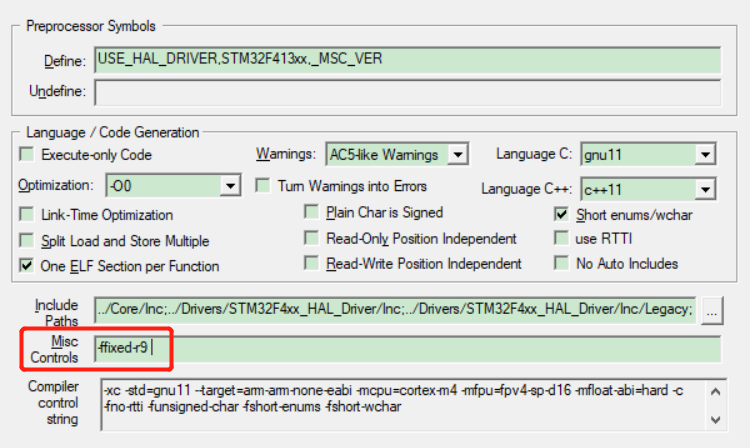
以上步骤完成后,就可以快速使用了,例如将YMODEM接收到的数据,写到flash中,代码如下:
uint8_t *ymodem_call_back_receive(uint8_t *pchBuffer, uint16_t hwSize)
{
    static char *s_pchFileName = NULL, *s_pchFileSize = NULL;
    static uint32_t s_wFileSize = 0, s_wRemainLen = 0, s_wOffSet = 0;

    static enum  {
        START = 0,
        RECEIVE,
        END,
    } s_tState = {START};

    switch(s_tState) {
        case START:
            s_wOffSet = 0;
            s_pchFileName = (char *)&pchBuffer[0];
            s_pchFileSize = (char *)&pchBuffer[strlen(s_pchFileName) + 1];
            s_wFileSize = atol(s_pchFileSize);

            LOG_D("Ymodem file_name:%s", s_pchFileName);
            LOG_D("Ymodem file_size:%d", s_wFileSize);

			if(target_flash_init(APP_PART_ADDR, s_wFileSize) == false) {
				LOG_E("target flash uninit.");
				return NULL;
			}

			if(target_flash_erase(APP_PART_ADDR, s_wFileSize) < 0) {
				LOG_E("target flash erase error.");
				return NULL;
			}

            s_tState = RECEIVE;
            break;

        case RECEIVE:
            s_wRemainLen = s_wFileSize - s_wOffSet;

            if(hwSize > s_wRemainLen) {
                hwSize = s_wRemainLen;
                s_tState = END;
            }

			if(target_flash_write(APP_PART_ADDR + s_wOffSet, pchBuffer, hwSize) < 0) {
				LOG_E("target flash write data error.");
				return NULL;
			}
			s_wOffSet += hwSize;

            break;

        case END:
            target_flash_uninit(APP_PART_ADDR);
            s_tState = START;
            break;
    }

    return s_chBuffer;
}
我有一个Ruby程序,它使用rubyzip压缩XML文件的目录树。gem。我的问题是文件开始变得很重,我想提高压缩级别,因为压缩时间不是问题。我在rubyzipdocumentation中找不到一种为创建的ZIP文件指定压缩级别的方法。有人知道如何更改此设置吗?是否有另一个允许指定压缩级别的Ruby库? 最佳答案 这是我通过查看rubyzip内部创建的代码。level=Zlib::BEST_COMPRESSIONZip::ZipOutputStream.open(zip_file)do|zip|Dir.glob("**/*")d
我试图在一个项目中使用rake,如果我把所有东西都放到Rakefile中,它会很大并且很难读取/找到东西,所以我试着将每个命名空间放在lib/rake中它自己的文件中,我添加了这个到我的rake文件的顶部:Dir['#{File.dirname(__FILE__)}/lib/rake/*.rake'].map{|f|requiref}它加载文件没问题,但没有任务。我现在只有一个.rake文件作为测试,名为“servers.rake”,它看起来像这样:namespace:serverdotask:testdoputs"test"endend所以当我运行rakeserver:testid时
我的目标是转换表单输入,例如“100兆字节”或“1GB”,并将其转换为我可以存储在数据库中的文件大小(以千字节为单位)。目前,我有这个:defquota_convert@regex=/([0-9]+)(.*)s/@sizes=%w{kilobytemegabytegigabyte}m=self.quota.match(@regex)if@sizes.include?m[2]eval("self.quota=#{m[1]}.#{m[2]}")endend这有效,但前提是输入是倍数(“gigabytes”,而不是“gigabyte”)并且由于使用了eval看起来疯狂不安全。所以,功能正常,
Rails2.3可以选择随时使用RouteSet#add_configuration_file添加更多路由。是否可以在Rails3项目中做同样的事情? 最佳答案 在config/application.rb中:config.paths.config.routes在Rails3.2(也可能是Rails3.1)中,使用:config.paths["config/routes"] 关于ruby-on-rails-Rails3中的多个路由文件,我们在StackOverflow上找到一个类似的问题
对于具有离线功能的智能手机应用程序,我正在为Xml文件创建单向文本同步。我希望我的服务器将增量/差异(例如GNU差异补丁)发送到目标设备。这是计划:Time=0Server:hasversion_1ofXmlfile(~800kiB)Client:hasversion_1ofXmlfile(~800kiB)Time=1Server:hasversion_1andversion_2ofXmlfile(each~800kiB)computesdeltaoftheseversions(=patch)(~10kiB)sendspatchtoClient(~10kiBtransferred)Cl
我正在寻找执行以下操作的正确语法(在Perl、Shell或Ruby中):#variabletoaccessthedatalinesappendedasafileEND_OF_SCRIPT_MARKERrawdatastartshereanditcontinues. 最佳答案 Perl用__DATA__做这个:#!/usr/bin/perlusestrict;usewarnings;while(){print;}__DATA__Texttoprintgoeshere 关于ruby-如何将脚
使用带有Rails插件的vim,您可以创建一个迁移文件,然后一次性打开该文件吗?textmate也可以这样吗? 最佳答案 你可以使用rails.vim然后做类似的事情::Rgeneratemigratonadd_foo_to_bar插件将打开迁移生成的文件,这正是您想要的。我不能代表textmate。 关于ruby-使用VimRails,您可以创建一个新的迁移文件并一次性打开它吗?,我们在StackOverflow上找到一个类似的问题: https://sta
在MRIRuby中我可以这样做:deftransferinternal_server=self.init_serverpid=forkdointernal_server.runend#Maketheserverprocessrunindependently.Process.detach(pid)internal_client=self.init_client#Dootherstuffwithconnectingtointernal_server...internal_client.post('somedata')ensure#KillserverProcess.kill('KILL',
好的,所以我的目标是轻松地将一些数据保存到磁盘以备后用。您如何简单地写入然后读取一个对象?所以如果我有一个简单的类classCattr_accessor:a,:bdefinitialize(a,b)@a,@b=a,bendend所以如果我从中非常快地制作一个objobj=C.new("foo","bar")#justgaveitsomerandomvalues然后我可以把它变成一个kindaidstring=obj.to_s#whichreturns""我终于可以将此字符串打印到文件或其他内容中。我的问题是,我该如何再次将这个id变回一个对象?我知道我可以自己挑选信息并制作一个接受该信
我正在编写一个小脚本来定位aws存储桶中的特定文件,并创建一个临时验证的url以发送给同事。(理想情况下,这将创建类似于在控制台上右键单击存储桶中的文件并复制链接地址的结果)。我研究过回形针,它似乎不符合这个标准,但我可能只是不知道它的全部功能。我尝试了以下方法:defauthenticated_url(file_name,bucket)AWS::S3::S3Object.url_for(file_name,bucket,:secure=>true,:expires=>20*60)end产生这种类型的结果:...-1.amazonaws.com/file_path/file.zip.A
