在业务运维场景中,需要对核心的API接口进行拨测。而各个接口需要传递的参数或者接口之间的依赖是比较复杂的,通常接口之间都是通过链式请求来完成一个业务场景。常见的就是先登录,拿到token以后,再进行后续的API请求。postman提供了基于GUI的方式完成这种场景适配,但是对于运维来讲,需要定时的基于策略的形式来对API进行监控。本篇文章就带你从0-1打造API监控体系。
1. Postman使用方法
2. Docker基础知识
1. 从postman导出collection
以下文件以拨测httpbin.org为例,在Postman的GUI工具中导出拨测的json文件(httpbin.json)。示例中包含两个接口,一个模拟认证,一个模拟接口请求
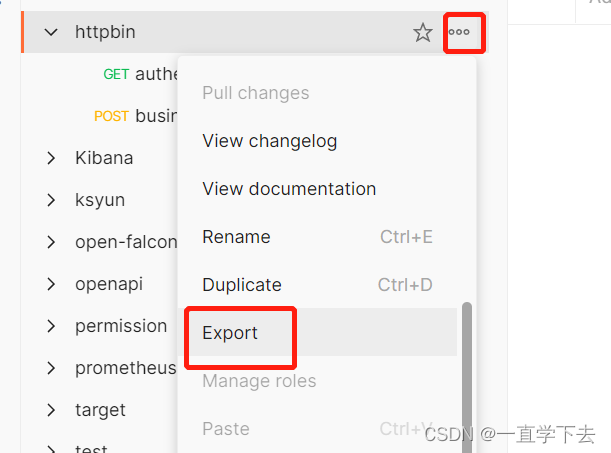
2. 将导出的文件放到docker中运行
docker run -d -p 8080:8080 -v ./httpbin.json:/runner/collection.json kevinniu666/postman-prometheus:1.0.03. 获取拨测指标
curl 10.128.120.52:8080/metrics# TYPE postman_lifetime_runs_total counter
postman_lifetime_runs_total{collection="httpbin"} 1
# TYPE postman_lifetime_iterations_total counter
postman_lifetime_iterations_total{collection="httpbin"} 1
# TYPE postman_lifetime_requests_total counter
postman_lifetime_requests_total{collection="httpbin"} 2
# TYPE postman_stats_iterations_total gauge
postman_stats_iterations_total{collection="httpbin"} 1
# TYPE postman_stats_iterations_failed gauge
postman_stats_iterations_failed{collection="httpbin"} 0
# TYPE postman_stats_requests_total gauge
postman_stats_requests_total{collection="httpbin"} 2
# TYPE postman_stats_requests_failed gauge
postman_stats_requests_failed{collection="httpbin"} 0
# TYPE postman_stats_tests_total gauge
postman_stats_tests_total{collection="httpbin"} 2
# TYPE postman_stats_tests_failed gauge
postman_stats_tests_failed{collection="httpbin"} 0
# TYPE postman_stats_test_scripts_total gauge
postman_stats_test_scripts_total{collection="httpbin"} 4
# TYPE postman_stats_test_scripts_failed gauge
postman_stats_test_scripts_failed{collection="httpbin"} 0
# TYPE postman_stats_assertions_total gauge
postman_stats_assertions_total{collection="httpbin"} 3
# TYPE postman_stats_assertions_failed gauge
postman_stats_assertions_failed{collection="httpbin"} 0
# TYPE postman_stats_transfered_bytes_total gauge
postman_stats_transfered_bytes_total{collection="httpbin"} 794
# TYPE postman_stats_resp_avg gauge
postman_stats_resp_avg{collection="httpbin"} 541
# TYPE postman_stats_resp_min gauge
postman_stats_resp_min{collection="httpbin"} 494
# TYPE postman_stats_resp_max gauge
postman_stats_resp_max{collection="httpbin"} 588
# TYPE postman_request_status_code gauge
postman_request_status_code{request_name="authentication",iteration="0",collection="httpbin"} 200
# TYPE postman_request_resp_time gauge
postman_request_resp_time{request_name="authentication",iteration="0",collection="httpbin"} 588
# TYPE postman_request_resp_size gauge
postman_request_resp_size{request_name="authentication",iteration="0",collection="httpbin"} 54
# TYPE postman_request_status_ok gauge
postman_request_status_ok{request_name="authentication",iteration="0",collection="httpbin"} 1
# TYPE postman_request_failed_assertions gauge
postman_request_failed_assertions{request_name="authentication",iteration="0",collection="httpbin"} 0
# TYPE postman_request_total_assertions gauge
postman_request_total_assertions{request_name="authentication",iteration="0",collection="httpbin"} 1
# TYPE postman_request_status_code gauge
postman_request_status_code{request_name="business-request",iteration="0",collection="httpbin"} 200
# TYPE postman_request_resp_time gauge
postman_request_resp_time{request_name="business-request",iteration="0",collection="httpbin"} 494
# TYPE postman_request_resp_size gauge
postman_request_resp_size{request_name="business-request",iteration="0",collection="httpbin"} 740
# TYPE postman_request_status_ok gauge
postman_request_status_ok{request_name="business-request",iteration="0",collection="httpbin"} 1
# TYPE postman_request_failed_assertions gauge
postman_request_failed_assertions{request_name="business-request",iteration="0",collection="httpbin"} 0
# TYPE postman_request_total_assertions gauge
postman_request_total_assertions{request_name="business-request",iteration="0",collection="httpbin"} 24. 将指标接入prometheus中,prometheus的配置文件中添加以下信息。
  - job_name: http-api-monitor
    scrape_interval: 15s
    scrape_timeout: 10s
    metrics_path: /metrics
    scheme: http
    static_configs:
    - targets:
      - 10.128.120.52:8080 #该ip为容器运行节点IP地址
      labels:
        usage: "httpbin接口拨测"
5. 配置prometheus告警规则,详细的规则,大家可以根据prometheus的指标自己来设置。
  - alert: 接口返回码异常
    expr: postman_request_status_code  != 200
    for: 1m
    labels:
      severity: error
    annotations:
      summary: "接口响应代码非200"
      description: "后端接口拨测失败"
  - alert: 接口返回内容判定失败
    expr: postman_request_failed_assertions  != 0
    for: 1m
    labels:
      severity: error
    annotations:
      summary: "接口返回内容判定失败"
      description: "后端接口postman测试未通过"
接下来的事情就是对接Alertmanager,并把告警发送给运维了。如果需要Grafana的图表,项目中有说明。源代码地址:
整个实现方案的核心是这个容器,它将postman的运行转化成为了prometheus可识别的指标。这个容器的源代码已经在文档中提供了。如果你对nodejs有了解,可以自己去修改源码。该容器可以通过环境变量控制一些行为,列举如下:

放一张产线的业务拨测图表:

在MRIRuby中我可以这样做:deftransferinternal_server=self.init_serverpid=forkdointernal_server.runend#Maketheserverprocessrunindependently.Process.detach(pid)internal_client=self.init_client#Dootherstuffwithconnectingtointernal_server...internal_client.post('somedata')ensure#KillserverProcess.kill('KILL',
我有用于控制用户任务的Rails5API项目,我有以下错误,但并非总是针对相同的Controller和路由。ActionController::RoutingError:uninitializedconstantApi::V1::ApiController我向您描述了一些我的项目,以更详细地解释错误。应用结构路线scopemodule:'api'donamespace:v1do#=>Loginroutesscopemodule:'login'domatch'login',to:'sessions#login',as:'login',via::postend#=>Teamroutessc
在应用开发中,有时候我们需要获取系统的设备信息,用于数据上报和行为分析。那在鸿蒙系统中,我们应该怎么去获取设备的系统信息呢,比如说获取手机的系统版本号、手机的制造商、手机型号等数据。1、获取方式这里分为两种情况,一种是设备信息的获取,一种是系统信息的获取。1.1、获取设备信息获取设备信息,鸿蒙的SDK包为我们提供了DeviceInfo类,通过该类的一些静态方法,可以获取设备信息,DeviceInfo类的包路径为:ohos.system.DeviceInfo.具体的方法如下:ModifierandTypeMethodDescriptionstatic StringgetAbiList()Obt
这篇文章是继上一篇文章“Observability:从零开始创建Java微服务并监控它(一)”的续篇。在上一篇文章中,我们讲述了如何创建一个Javaweb应用,并使用Filebeat来收集应用所生成的日志。在今天的文章中,我来详述如何收集应用的指标,使用APM来监控应用并监督web服务的在线情况。源码可以在地址 https://github.com/liu-xiao-guo/java_observability 进行下载。摄入指标指标被视为可以随时更改的时间点值。当前请求的数量可以改变任何毫秒。你可能有1000个请求的峰值,然后一切都回到一个请求。这也意味着这些指标可能不准确,你还想提取最小/
我正在使用Mandrill的RubyAPIGem并使用以下简单的测试模板:testastic按照Heroku指南中的示例,我有以下Ruby代码:require'mandrill'm=Mandrill::API.newrendered=m.templates.render'test-template',[{:header=>'someheadertext',:main_section=>'Themaincontentblock',:footer=>'asdf'}]mail(:to=>"JaysonLane",:subject=>"TestEmail")do|format|format.h
1.postman介绍Postman一款非常流行的API调试工具。其实,开发人员用的更多。因为测试人员做接口测试会有更多选择,例如Jmeter、soapUI等。不过,对于开发过程中去调试接口,Postman确实足够的简单方便,而且功能强大。2.下载安装官网地址:https://www.postman.com/下载完成后双击安装吧,安装过程极其简单,无需任何操作3.使用教程这里以百度为例,工具使用简单,填写URL地址即可发送请求,在下方查看响应结果和响应状态码常用方法都有支持请求方法:getpostputdeleteGet、Post、Put与Delete的作用get:请求方法一般是用于数据查询,
我正在尝试使用Ruby2.0.0和Rails4.0.0提供的API从imgur中提取图像。我已尝试按照Ruby2.0.0文档中列出的各种方式构建http请求,但均无济于事。代码如下:require'net/http'require'net/https'defimgurheaders={"Authorization"=>"Client-ID"+my_client_id}path="/3/gallery/image/#{img_id}.json"uri=URI("https://api.imgur.com"+path)request,data=Net::HTTP::Get.new(path
Rails相对较新。我正在尝试调用一个API,它应该向我返回一个唯一的URL。我的应用程序中捆绑了HTTParty。我已经创建了一个UniqueNumberController,并且我已经阅读了几个HTTParty指南,直到我想要什么,但也许我只是有点迷路,真的不知道该怎么做。基本上,我需要做的就是调用API,获取它返回的URL,然后将该URL插入到用户的数据库中。谁能给我指出正确的方向或与我分享一些代码? 最佳答案 假设API为JSON格式并返回如下数据:{"url":"http://example.com/unique-url"
关闭。这个问题是opinion-based.它目前不接受答案。想要改进这个问题?更新问题,以便editingthispost可以用事实和引用来回答它.关闭4年前。Improvethisquestion我的公司有一个巨大的数据库,该数据库接收来自多个来源的(许多)事件,用于监控和报告目的。到目前为止,数据中的每个新仪表板或图形都是一个新的Rails应用程序,在巨大的数据库中有额外的表,并且可以完全访问数据库内容。最近,有一个想法让外部(不是我们公司,而是姊妹公司)客户访问我们的数据,并且决定我们应该公开一个只读的RESTfulAPI来查询我们的数据。我的观点是-我们是否也应该为我们的自己
我读了"BingSearchAPI-QuickStart"但我不知道如何在Ruby中发出这个http请求(Weary)如何在Ruby中翻译“Stream_context_create()”?这是什么意思?"BingSearchAPI-QuickStart"我想使用RubySDK,但我发现那些已被弃用前(Rbing)https://github.com/mikedemers/rbing您知道Bing搜索API的最新包装器(仅限Web的结果)吗? 最佳答案 好吧,经过一个小时的挫折,我想出了一个办法来做到这一点。这段代码很糟糕,因为它是
