最近调研了几款 c/c++ 代码静态检查工具,包括 cppcheck、cpplint、cppdepend、splint、tscancode、sonaqube 等,对比后认为 cppcheck 使用起来最方便,检查内容相对全面,支持多平台应用(linux 和 windows),且免费,因此选用 cppcheck 作为 c/c++ 代码静态检查的第一选择。本文对该工具的使用方法进行一个总结介绍。
cppceck 是一个 C/C++ 代码分析工具。与 C/C++ 编译器和许多其他分析工具不同,它不检测语法错误。cppcheck 仅检测编译器通常无法检测到的错误类型。目标是没有误报。
检查结果包括
- error:出现的错误
- warning:为了预防bug防御性编程建议信息越
- style:编码格式问题(没有使用的函数、多余的代码等)
- portablity:移植性警告。该部分如果移植到其他平台上,可能出现兼容性问题
- performance:建议优化该部分代码的性能
- information:一些有趣的信息,可以忽略
检查范围是
- 自动变量检查;
- 数组的边界检查;
- class类检查;
- 过期的函数,废弃函数调用检查;
- 异常内存使用,释放检查;
- 内存泄漏检查,主要是通过内存引用指针;
- 操作系统资源释放检查,中断,文件描述符等;
- 异常STL 函数使用检查;
- 代码格式错误,以及性能因素检查。
cppcheck 官方手册
https://cppcheck.sourceforge.io/manual.html
cppcheck 支持的检查内容列表如下
安装方法很简单,直接通过 apt 即可安装
sudo apt-ge intall cppcheck使用 help 指令查看使用方法,重要的部分标红处理
$ cppcheck --help
Cppcheck - A tool for static C/C++ code analysisSyntax:
cppcheck [OPTIONS] [files or paths]If a directory is given instead of a filename, *.cpp, *.cxx, *.cc, *.c++, *.c,
*.tpp, and *.txx files are checked recursively from the given directory.Options:
--cppcheck-build-dir=<dir>
Analysis output directory. Useful for various data.
Some possible usages are; whole program analysis,
incremental analysis, distributed analysis.
--check-config Check cppcheck configuration. The normal code
analysis is disabled by this flag.
--check-library Show information messages when library files have
incomplete info.
--config-exclude=<dir>
Path (prefix) to be excluded from configuration
checking. Preprocessor configurations defined in
headers (but not sources) matching the prefix will not
be considered for evaluation.
--config-excludes-file=<file>
A file that contains a list of config-excludes
--dump Dump xml data for each translation unit. The dump
files have the extension .dump and contain ast,
tokenlist, symboldatabase, valueflow.
-D<ID> Define preprocessor symbol. Unless --max-configs or
--force is used, Cppcheck will only check the given
configuration when -D is used.
Example: '-DDEBUG=1 -D__cplusplus'.
-U<ID> Undefine preprocessor symbol. Use -U to explicitly
hide certain #ifdef <ID> code paths from checking.
Example: '-UDEBUG'
-E Print preprocessor output on stdout and don't do any
further processing.
--enable=<id> Enable additional checks. The available ids are:
* all
Enable all checks. It is recommended to only
use --enable=all when the whole program is
scanned, because this enables unusedFunction.
* warning
Enable warning messages
* style
Enable all coding style checks. All messages
with the severities 'style', 'performance' and
'portability' are enabled.
* performance
Enable performance messages
* portability
Enable portability messages
* information
Enable information messages
* unusedFunction
Check for unused functions. It is recommend
to only enable this when the whole program is
scanned.
* missingInclude
Warn if there are missing includes. For
detailed information, use '--check-config'.
Several ids can be given if you separate them with
commas. See also --std
--error-exitcode=<n> If errors are found, integer [n] is returned instead of
the default '0'. '1' is returned
if arguments are not valid or if no input files are
provided. Note that your operating system can modify
this value, e.g. '256' can become '0'.
--errorlist Print a list of all the error messages in XML format.
--doc Print a list of all available checks.
--exitcode-suppressions=<file>
Used when certain messages should be displayed but
should not cause a non-zero exitcode.
--file-list=<file> Specify the files to check in a text file. Add one
filename per line. When file is '-,' the file list will
be read from standard input.
-f, --force Force checking of all configurations in files. If used
together with '--max-configs=', the last option is the
one that is effective.
-h, --help Print this help.
-I <dir> Give path to search for include files. Give several -I
parameters to give several paths. First given path is
searched for contained header files first. If paths are
relative to source files, this is not needed.
--includes-file=<file>
Specify directory paths to search for included header
files in a text file. Add one include path per line.
First given path is searched for contained header
files first. If paths are relative to source files,
this is not needed.
--include=<file>
Force inclusion of a file before the checked file. Can
be used for example when checking the Linux kernel,
where autoconf.h needs to be included for every file
compiled. Works the same way as the GCC -include
option.
-i <dir or file> Give a source file or source file directory to exclude
from the check. This applies only to source files so
header files included by source files are not matched.
Directory name is matched to all parts of the path.
--inconclusive Allow that Cppcheck reports even though the analysis is
inconclusive.
There are false positives with this option. Each result
must be carefully investigated before you know if it is
good or bad.
--inline-suppr Enable inline suppressions. Use them by placing one or
more comments, like: '// cppcheck-suppress warningId'
on the lines before the warning to suppress.
-j <jobs> Start <jobs> threads to do the checking simultaneously.
-l <load> Specifies that no new threads should be started if
there are other threads running and the load average is
at least <load>.
--language=<language>, -x <language>
Forces cppcheck to check all files as the given
language. Valid values are: c, c++
--library=<cfg> Load file <cfg> that contains information about types
and functions. With such information Cppcheck
understands your code better and therefore you
get better results. The std.cfg file that is
distributed with Cppcheck is loaded automatically.
For more information about library files, read the
manual.
--output-file=<file> Write results to file, rather than standard error.
--project=<file> Run Cppcheck on project. The <file> can be a Visual
Studio Solution (*.sln), Visual Studio Project
(*.vcxproj), or compile database
(compile_commands.json). The files to analyse,
include paths, defines, platform and undefines in
the specified file will be used.
--max-configs=<limit>
Maximum number of configurations to check in a file
before skipping it. Default is '12'. If used together
with '--force', the last option is the one that is
effective.
--platform=<type>, --platform=<file>
Specifies platform specific types and sizes. The
available builtin platforms are:
* unix32
32 bit unix variant
* unix64
64 bit unix variant
* win32A
32 bit Windows ASCII character encoding
* win32W
32 bit Windows UNICODE character encoding
* win64
64 bit Windows
* avr8
8 bit AVR microcontrollers
* native
Type sizes of host system are assumed, but no
further assumptions.
* unspecified
Unknown type sizes
--plist-output=<path>
Generate Clang-plist output files in folder.
-q, --quiet Do not show progress reports.
-rp, --relative-paths
-rp=<paths>, --relative-paths=<paths>
Use relative paths in output. When given, <paths> are
used as base. You can separate multiple paths by ';'.
Otherwise path where source files are searched is used.
We use string comparison to create relative paths, so
using e.g. ~ for home folder does not work. It is
currently only possible to apply the base paths to
files that are on a lower level in the directory tree.
--report-progress Report progress messages while checking a file.
--rule=<rule> Match regular expression.
--rule-file=<file> Use given rule file. For more information, see:
http://sourceforge.net/projects/cppcheck/files/Articles/
--std=<id> Set standard.
The available options are:
* posix
POSIX compatible code
* c89
C code is C89 compatible
* c99
C code is C99 compatible
* c11
C code is C11 compatible (default)
* c++03
C++ code is C++03 compatible
* c++11
C++ code is C++11 compatible
* c++14
C++ code is C++14 compatible (default)
More than one --std can be used:
'cppcheck --std=c99 --std=posix file.c'
--suppress=<spec> Suppress warnings that match <spec>. The format of
<spec> is:
[error id]:[filename]:[line]
The [filename] and [line] are optional. If [error id]
is a wildcard '*', all error ids match.
--suppressions-list=<file>
Suppress warnings listed in the file. Each suppression
is in the same format as <spec> above.
--template='<text>' Format the error messages. E.g.
'{file}:{line},{severity},{id},{message}' or
'{file}({line}):({severity}) {message}' or
'{callstack} {message}'
Pre-defined templates: gcc, vs, edit.
-v, --verbose Output more detailed error information.
--version Print out version number.
--xml Write results in xml format to error stream (stderr).
--xml-version=<version>
Select the XML file version. Currently only versions 2 is available.
使用示例
(1)检查当前路径下的代码,并输出到 txt 文件
cppcheck . --output-file=err.txt(2)检查某个路径,不输出过程日志
cppcheck --quiet ../myproject/(3)启用所有检查规则,检查某个文件
cppcheck --enable=all --inconclusive --std=posix test.cpp(4)输出 xml 格式的日志文件
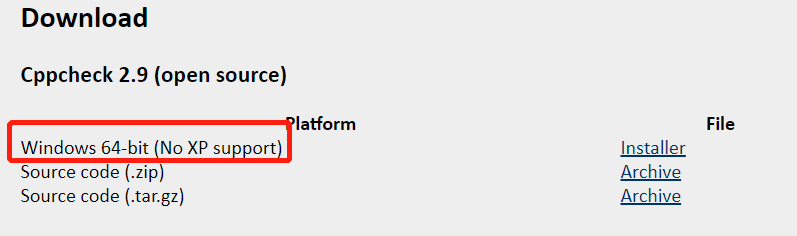
cppcheck src --enable=all --output-file=log.xml --xml在官网下载安装包,双击安装即可
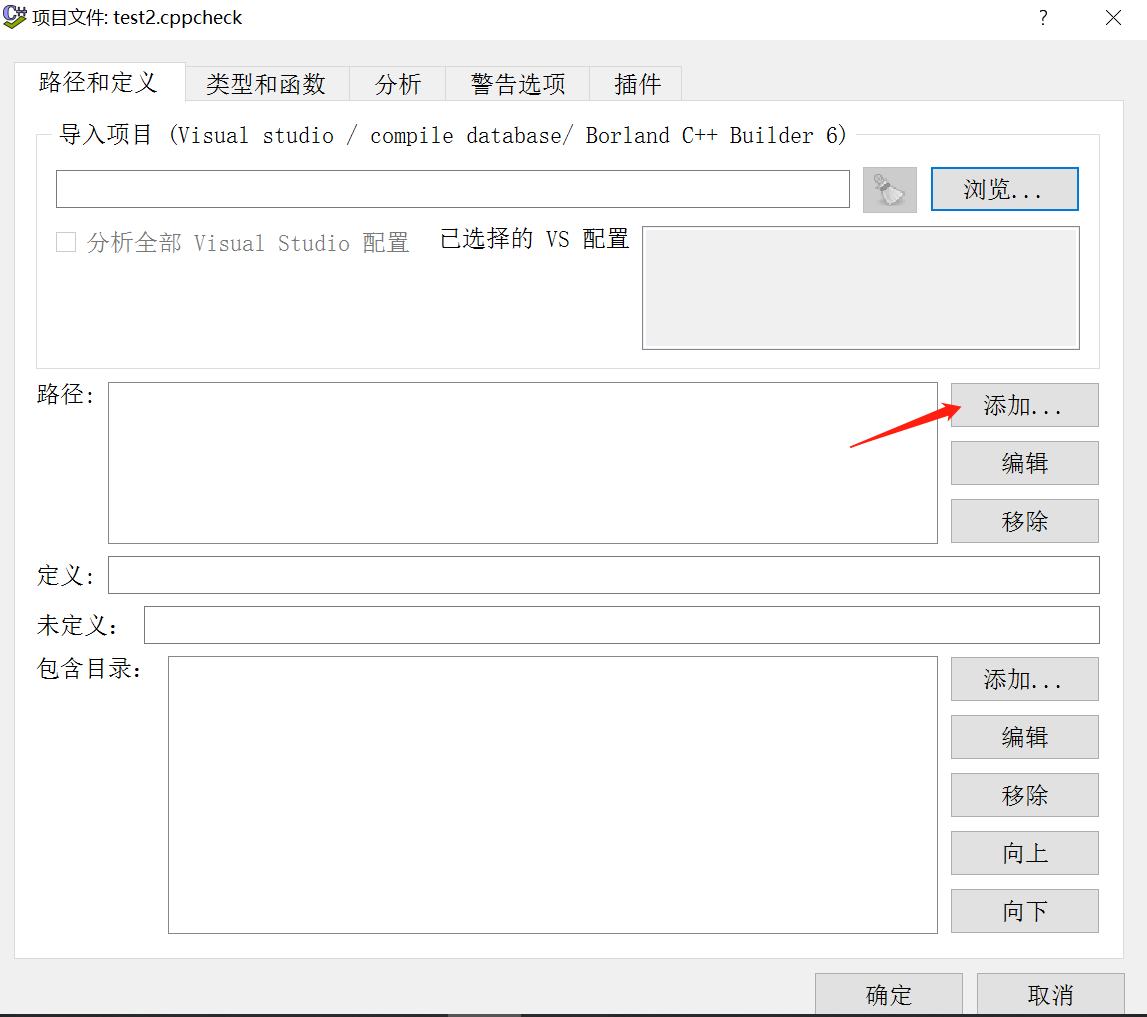
打开 cppcheck 后新建一个扫描项目,导入代码路径
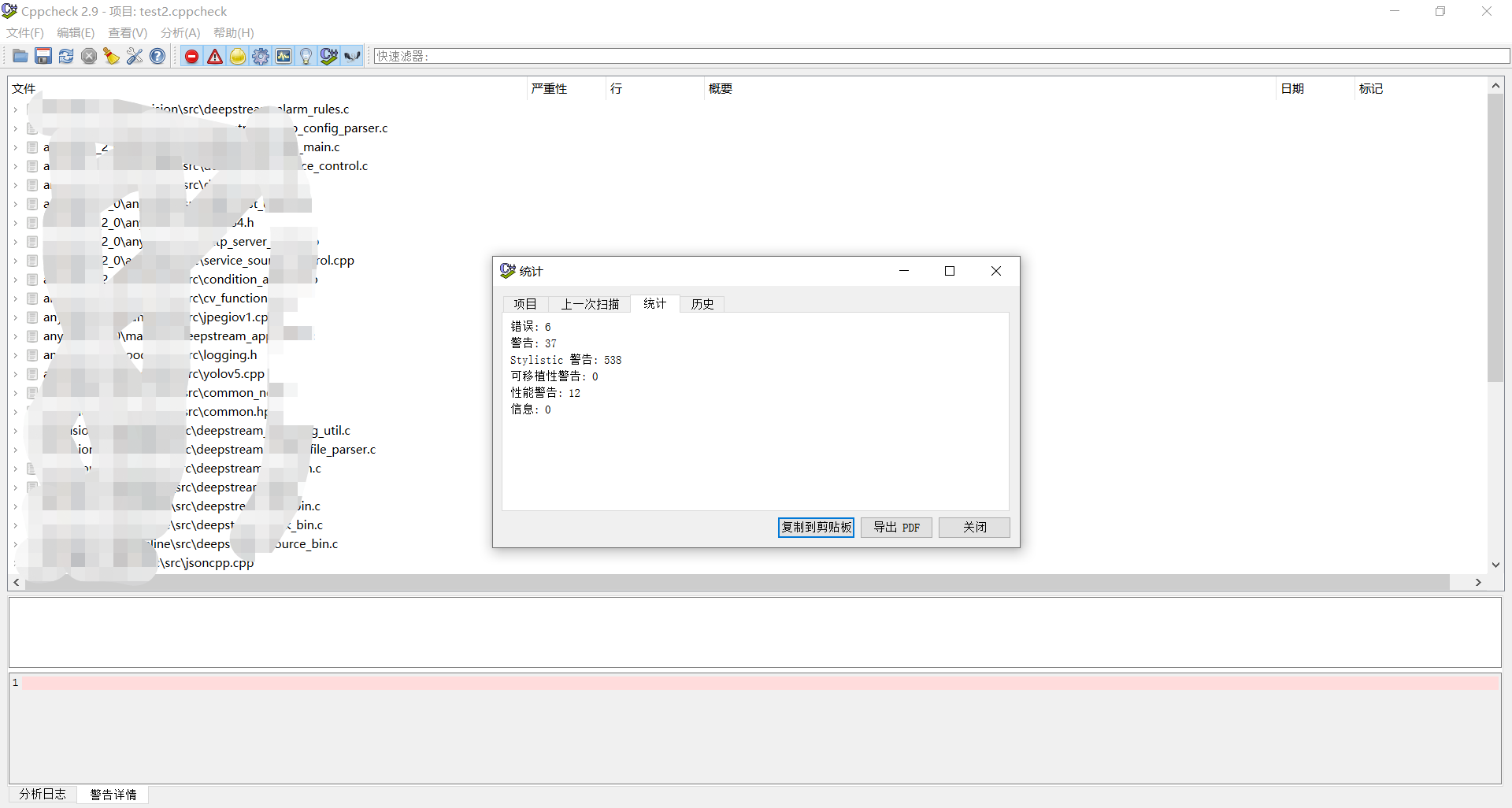
即可开始分析,分析完后可以在 查看--统计--统计 中查看总的扫描结果
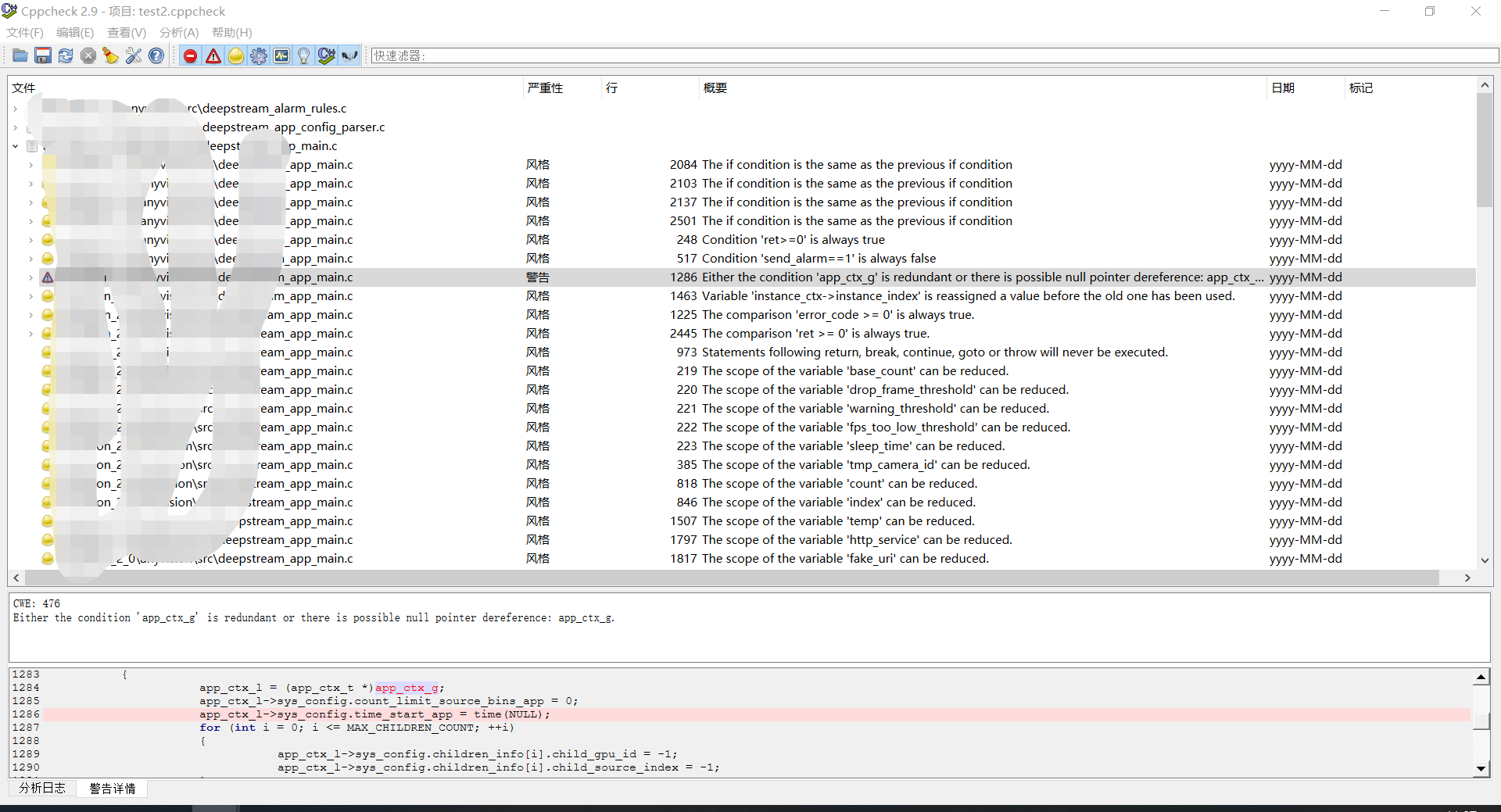
同时可以实时查看每一个告警及错误的内容及对应的代码
在工具栏可以根据严重性进行过滤,比如之关注错误内容

我正在学习如何使用Nokogiri,根据这段代码我遇到了一些问题:require'rubygems'require'mechanize'post_agent=WWW::Mechanize.newpost_page=post_agent.get('http://www.vbulletin.org/forum/showthread.php?t=230708')puts"\nabsolutepathwithtbodygivesnil"putspost_page.parser.xpath('/html/body/div/div/div/div/div/table/tbody/tr/td/div
我有一个Ruby程序,它使用rubyzip压缩XML文件的目录树。gem。我的问题是文件开始变得很重,我想提高压缩级别,因为压缩时间不是问题。我在rubyzipdocumentation中找不到一种为创建的ZIP文件指定压缩级别的方法。有人知道如何更改此设置吗?是否有另一个允许指定压缩级别的Ruby库? 最佳答案 这是我通过查看rubyzip内部创建的代码。level=Zlib::BEST_COMPRESSIONZip::ZipOutputStream.open(zip_file)do|zip|Dir.glob("**/*")d
类classAprivatedeffooputs:fooendpublicdefbarputs:barendprivatedefzimputs:zimendprotecteddefdibputs:dibendendA的实例a=A.new测试a.foorescueputs:faila.barrescueputs:faila.zimrescueputs:faila.dibrescueputs:faila.gazrescueputs:fail测试输出failbarfailfailfail.发送测试[:foo,:bar,:zim,:dib,:gaz].each{|m|a.send(m)resc
很好奇,就使用rubyonrails自动化单元测试而言,你们正在做什么?您是否创建了一个脚本来在cron中运行rake作业并将结果邮寄给您?git中的预提交Hook?只是手动调用?我完全理解测试,但想知道在错误发生之前捕获错误的最佳实践是什么。让我们理所当然地认为测试本身是完美无缺的,并且可以正常工作。下一步是什么以确保他们在正确的时间将可能有害的结果传达给您? 最佳答案 不确定您到底想听什么,但是有几个级别的自动代码库控制:在处理某项功能时,您可以使用类似autotest的内容获得关于哪些有效,哪些无效的即时反馈。要确保您的提
假设我做了一个模块如下:m=Module.newdoclassCendend三个问题:除了对m的引用之外,还有什么方法可以访问C和m中的其他内容?我可以在创建匿名模块后为其命名吗(就像我输入“module...”一样)?如何在使用完匿名模块后将其删除,使其定义的常量不再存在? 最佳答案 三个答案:是的,使用ObjectSpace.此代码使c引用你的类(class)C不引用m:c=nilObjectSpace.each_object{|obj|c=objif(Class===objandobj.name=~/::C$/)}当然这取决于
我正在尝试使用ruby和Savon来使用网络服务。测试服务为http://www.webservicex.net/WS/WSDetails.aspx?WSID=9&CATID=2require'rubygems'require'savon'client=Savon::Client.new"http://www.webservicex.net/stockquote.asmx?WSDL"client.get_quotedo|soap|soap.body={:symbol=>"AAPL"}end返回SOAP异常。检查soap信封,在我看来soap请求没有正确的命名空间。任何人都可以建议我
关闭。这个问题是opinion-based.它目前不接受答案。想要改进这个问题?更新问题,以便editingthispost可以用事实和引用来回答它.关闭4年前。Improvethisquestion我想在固定时间创建一系列低音和高音调的哔哔声。例如:在150毫秒时发出高音调的蜂鸣声在151毫秒时发出低音调的蜂鸣声200毫秒时发出低音调的蜂鸣声250毫秒的高音调蜂鸣声有没有办法在Ruby或Python中做到这一点?我真的不在乎输出编码是什么(.wav、.mp3、.ogg等等),但我确实想创建一个输出文件。
我在我的项目目录中完成了compasscreate.和compassinitrails。几个问题:我已将我的.sass文件放在public/stylesheets中。这是放置它们的正确位置吗?当我运行compasswatch时,它不会自动编译这些.sass文件。我必须手动指定文件:compasswatchpublic/stylesheets/myfile.sass等。如何让它自动运行?文件ie.css、print.css和screen.css已放在stylesheets/compiled。如何在编译后不让它们重新出现的情况下删除它们?我自己编译的.sass文件编译成compiled/t
我想将html转换为纯文本。不过,我不想只删除标签,我想智能地保留尽可能多的格式。为插入换行符标签,检测段落并格式化它们等。输入非常简单,通常是格式良好的html(不是整个文档,只是一堆内容,通常没有anchor或图像)。我可以将几个正则表达式放在一起,让我达到80%,但我认为可能有一些现有的解决方案更智能。 最佳答案 首先,不要尝试为此使用正则表达式。很有可能你会想出一个脆弱/脆弱的解决方案,它会随着HTML的变化而崩溃,或者很难管理和维护。您可以使用Nokogiri快速解析HTML并提取文本:require'nokogiri'h
我想为Heroku构建一个Rails3应用程序。他们使用Postgres作为他们的数据库,所以我通过MacPorts安装了postgres9.0。现在我需要一个postgresgem并且共识是出于性能原因你想要pggem。但是我对我得到的错误感到非常困惑当我尝试在rvm下通过geminstall安装pg时。我已经非常明确地指定了所有postgres目录的位置可以找到但仍然无法完成安装:$envARCHFLAGS='-archx86_64'geminstallpg--\--with-pg-config=/opt/local/var/db/postgresql90/defaultdb/po
