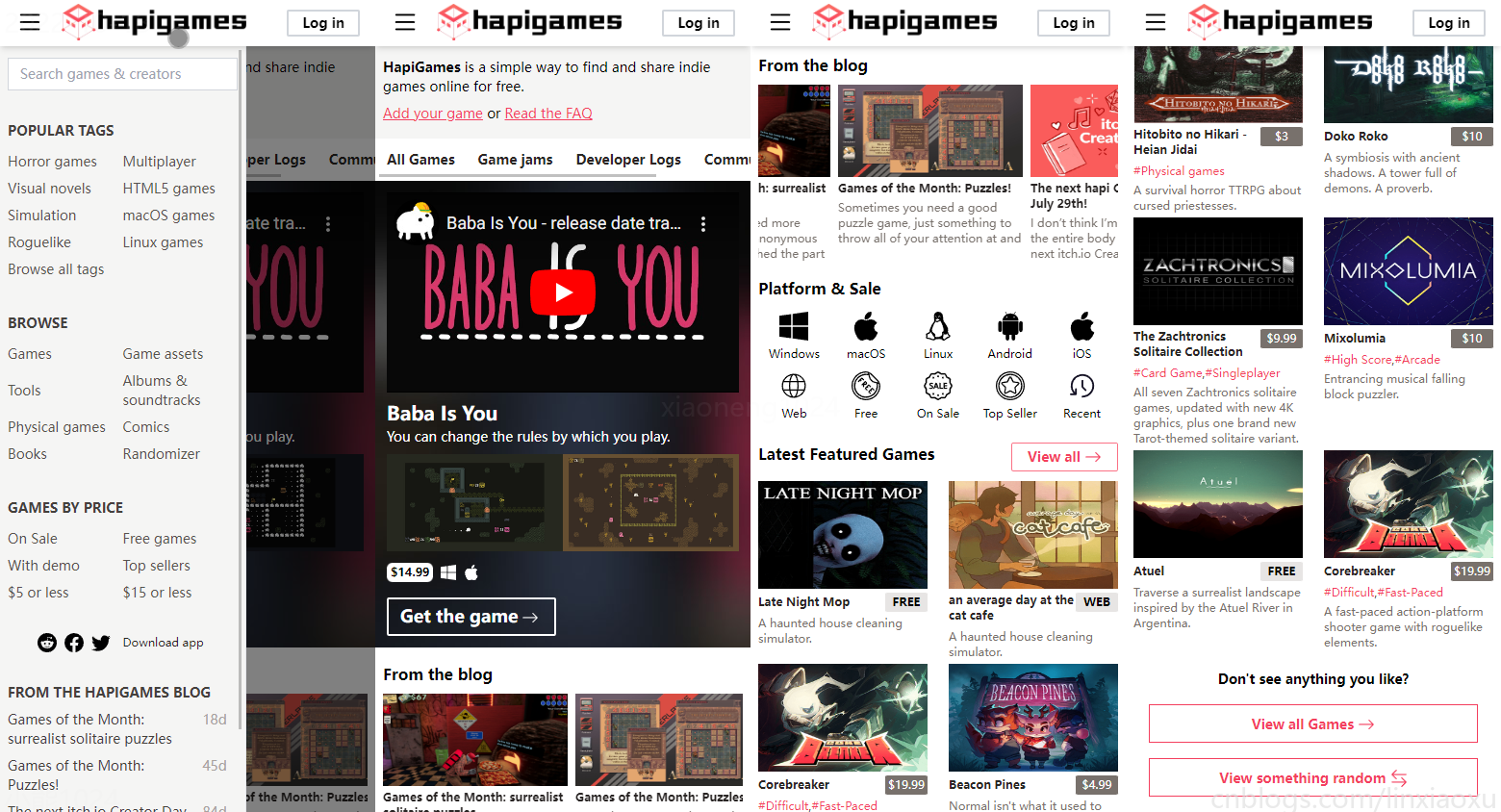
第二期 · 使用 Vue 3.1 + TypeScript + Router + Tailwind.css 仿 itch.io 平台主页。
我的主题 HapiGames 是仿 itch.io 的 indie game hosting marketplace。
alicepolice/Vue at 06 (github.com)
当你掌握一门语言的时候,在写项目之前不妨先看看风格指南吧,前人早为你铺好了路。下面是我自己编写项目代码时没有规范到位的几个点。
Prop 定义应该尽量详细,至少需要指定其类型。Props | Vue.js (vuejs.org)
Vue的选项式API为我们提供了Prop校验,你可以向 props 选项提供一个带有 props 校验选项的对象,当 prop 的校验失败后,Vue 会抛出一个控制台警告 (开发模式)。(如果用ts的话更好)
注意 prop 的校验是在组件实例被创建之前,所以实例的属性 (比如 data、computed 等) 将在 default 或 validator 函数中不可用。
因为 v-for 优先级比 v-if 高,所以每次渲染时必定会遍历数组所有元素。避免 v-if 和 v-for 用在一起
将v-if提取到计算属性后的好处
v-for="item in afterComputed" 之后,在渲染的时候遍历元素少了,渲染更高效。和父组件紧密耦合的子组件应该以父组件名作为前缀命名。紧密耦合的组件名
如果一个组件只在某个父组件的场景下有意义,这层关系应该体现在其名字上。因为编辑器通常会按字母顺序组织文件,所以这样做可以把相关联的文件排在一起。
不建议为了紧密耦合搞目录区分,因为会出现文件名名字相同、IDE侧边栏浏览组件花费时间多的问题。
components/
|- TodoList.vue
|- TodoListItem.vue
|- TodoListItemButton.vue
在单文件组件、字符串模板和 JSX 中没有内容的组件应该是自闭合的——但在 DOM 模板里永远不要这样做。 自闭合组件
<!-- 在单文件组件、字符串模板和 JSX 中 -->
<MyComponent/>

<!-- 在 DOM 模板中 -->
<my-component></my-component>
在声明 prop 的时候,其命名应该始终使用 camelCase,而在模板和 JSX 中应该始终使用 kebab-case。 Prop 名大小写
props: {
  greetingText: String
}
<WelcomeMessage greeting-text="hi"/>
应该把复杂计算属性分割为尽可能多的更简单的 property。 简单的计算属性
好处是易于测试、易于阅读、更好的“拥抱变化”。
单文件组件应该总是让 <script>、<template> 和 <style> 标签的顺序保持一致。且 <style> 要放在最后,因为另外两个标签至少要有一个。 单文件组件的顶级元素的顺序
应该优先通过 prop 和事件进行父子组件之间的通信,而不是
this.$parent或变更 prop。 隐性的父子组件通信
数据流应该是单向的,不要反向修改 props。
为了方便调试,我们在 index.css 下新增一个样式组合,通过添加test类样式类看到块元素的边框。
  .test{
    @apply border border-gray-900
  }
├───assets
│   ├───avater
│   │   用户头像
│   ├───blog
│   │   博文封面图
│   ├───diffuse
│   │   模糊背景
│   ├───game
│   │   游戏封面图
│   ├───logo
│   │   网站logo
│   ├───slideshow
│   │	轮播图样图
│   └───svg
│		很多矢量图
├───components
│   ├───common
│   │       BottomBar.vue
│   │       CommentArea.vue
│   │       SideBar.vue
│   │       SideBarHref.vue
│   │       SlideShow.vue
│   │       TopBar.vue
│   │
│   └───HomeView
│           GameBlog.vue
│           GameInfo.vue
│           GameList.vue
│           HomeFAQ.vue
│           HomeFooter.vue
│           PlatformNavigation.vue
│           TopNavigation.vue
│
├───router
│       index.ts
└───views
        AboutView.vue
        CommentTestView.vue
        HomeLoginView.vue
        HomeView.vue
        LoginView.vue
        RegisterView.vue
在 src/components/common 下新建 TopBar.vue,并移入之前写的 BottomBar.vue。
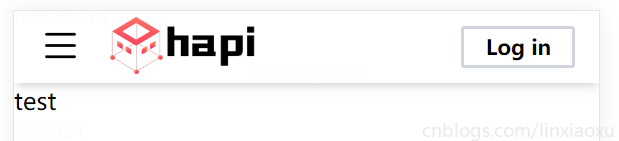
先从网站顶部开始,该组件在每个页面都会显示,并在滚动过程中固定定位。
编写代码,实现顶部栏。
<template>
  <div class="h-12 shadow-md">
    <div class="inline-block h-full w-16">
      <b-icon-list class="text-3xl mt-2 ml-4"></b-icon-list>
    </div>
    <div class="inline-block h-full w-48">
      <img src="@/assets/logo/logo3.png" class="mt-1 h-4/5 w-full" />
    </div>
    <div class="inline-block float-right mt-2.5 mr-4">
      <div
        class="
          border-2 border-gray-300
          px-3.5
          py-0.5
          rounded-sm
          text-sm
          font-bold
        "
      >
        Log in
      </div>
    </div>
  </div>
</template>
我的Vue之旅、05 导航栏、登录、注册 (Mobile) - 小能日记 - 博客园 (cnblogs.com)
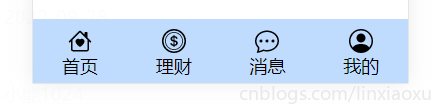
在前一期内容中,我们创建的导航栏是底部导航栏。
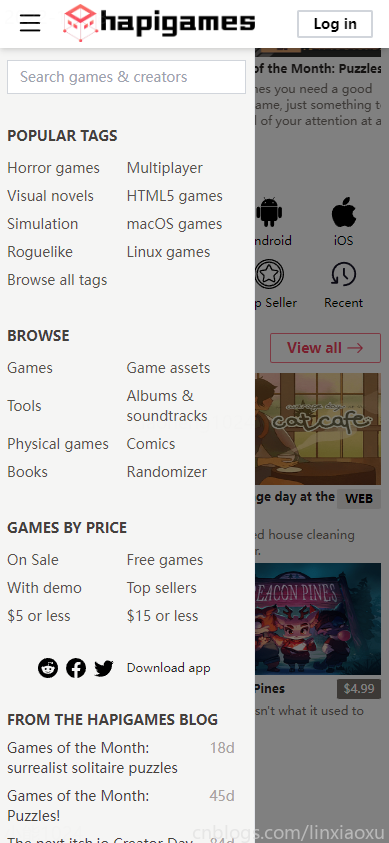
现在我们推倒重来,实现一下侧边导航栏。
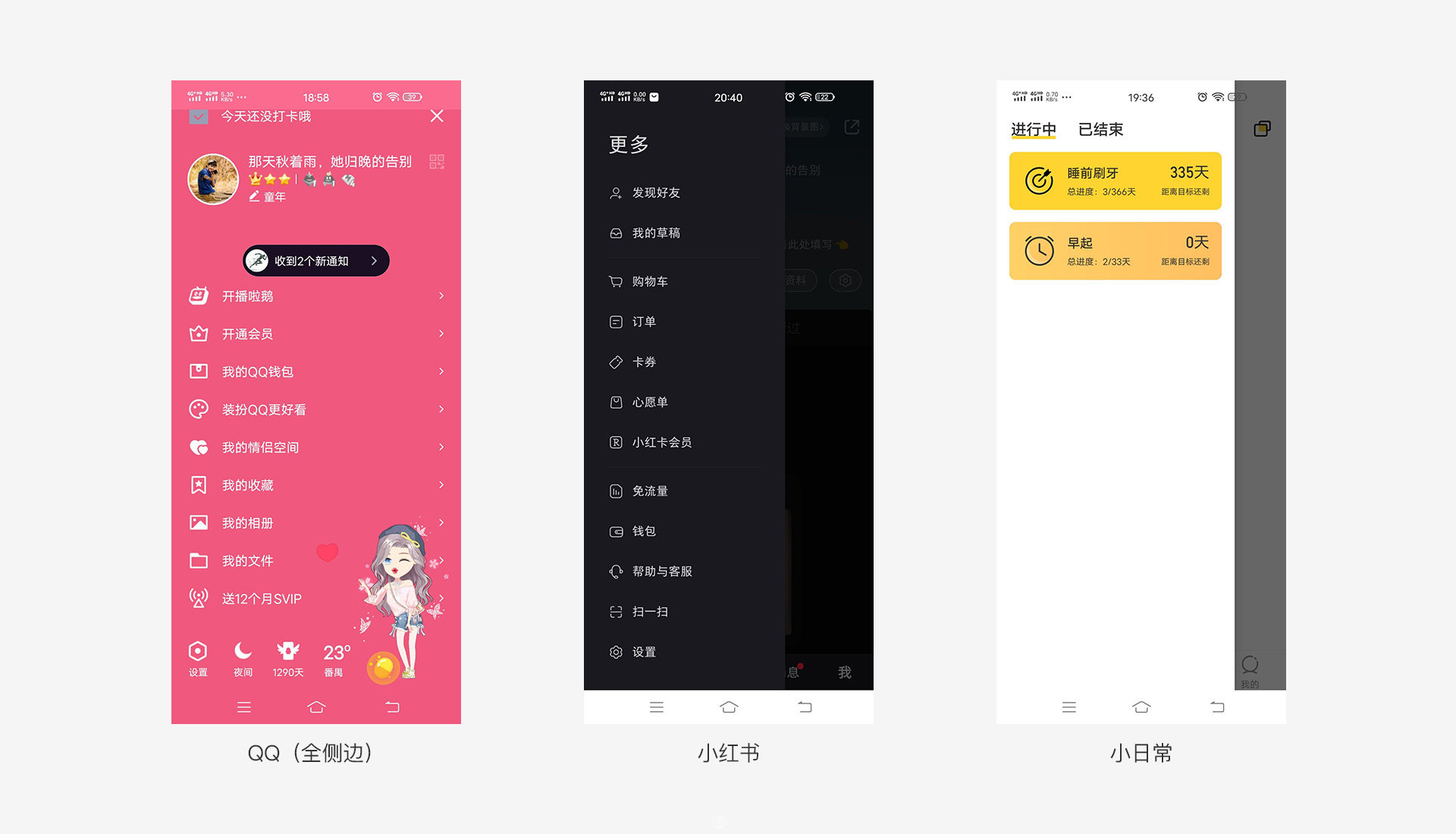
侧边栏导航也叫抽屉式导航是隐藏在界面侧边的位置,一般是通过点击界面左上角的icon弹出,主要承载的内容是除了核心功能意外的主要功能。侧边栏还分全侧边和半侧边。
当我们在App.vue中注释掉现有的底部导航栏,此时会出现错误item.routerName => item对象的类型为 "unknown"。
<template>
  <router-view @set-bottom-flag="setBottomFlag" />
  <!-- <BottomBar v-show="bottomFlag" :items="bottomItems" /> -->
</template>


<script lang="ts">
import { defineComponent } from "vue";
// import BottomBar from "@/components/BottomBar.vue";

export default defineComponent({
  name: "App",
  components: {
    // BottomBar,
  }
  ...
IDE报错并不影响当前Vue实例,因为BottomBar组件并未挂载。但为了去除报错,使用高级类型注释来修改BottomBar.vue。
运行时 props 选项仅支持使用构造函数来作为一个 prop 的类型,没有办法指定多层级对象或函数签名之类的复杂类型。在这里可以使用 PropType 注释复杂的props类型,报错解决。
<script lang="ts">
import { PropType } from "vue";

interface BottomItem {
  text: string;
  icon: string;
  routerName: string;
}
export default {
  props: {
    items: {
      type: Array as PropType<BottomItem[]>,
      required: true,
    },
  },
};
</script>
在 src/components/common 下新建 SideBarHref.vue
侧边导航栏有相似之处,不妨将这一块提取成独立的组件,然后复用三次。
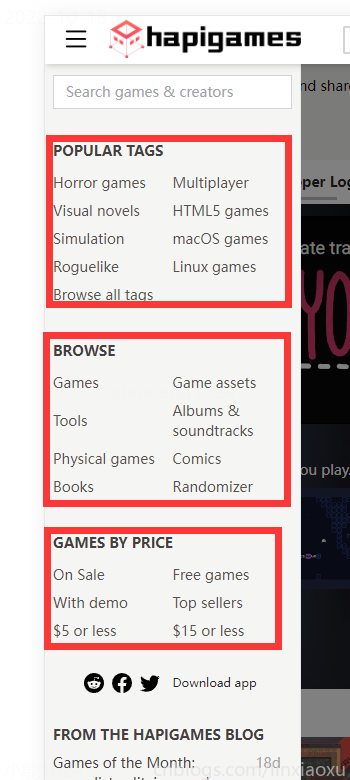
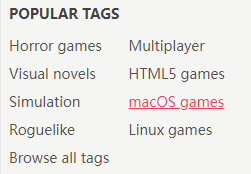
添加样式 hover:text-rose-500 hover:underline,在移动端按下时会改变颜色。
<a :href="value.href">用于临时超链接占位,后续可改为router-link
<template>
  <div class="mt-8 mx-2">
    <div class="font-bold text-stone-700 text-sm">{{ items.title }}</div>
    <div class="w-full text-stone-600 mt-2 text-sm">
      <template v-for="(value, index) in items.items" :key="index">
        <a :href="value.href">
          <div
            class="
              py-1
              inline-block
              w-1/2
              align-middle
              hover:text-rose-500 hover:underline
            "
            v-html="value.text"
          ></div>
        </a>
      </template>
    </div>
  </div>
</template>

<script lang="ts">
import { PropType } from "vue";

interface item {
  text: string;
  href: string;
}

interface items {
  items: item[];
  title: string;
}

export default {
  name: "SideBarHref",
  props: {
    items: { type: Object as PropType<items>, required: true },
  },
};
</script>
在 src/components/common 下新建 SideBar.vue 以下代码片段均为分段表示,不是完整代码。
先写model层(遮蔽层),一般指侧边栏滚出后背景变黑的部分。
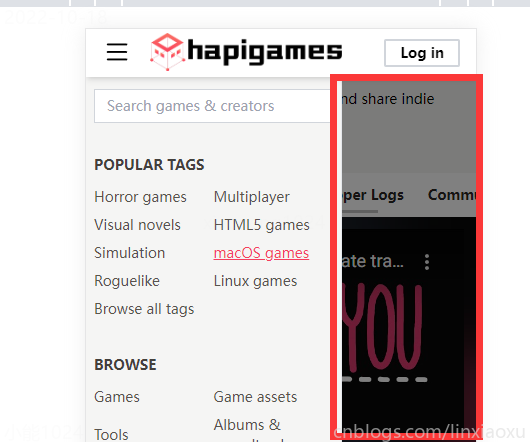
我们使用自定义类名实现过渡动画。类名也是TailWind.css的类样式,给定200毫秒时间,过渡透明度状态。
div嵌套了两层,把opacity-50写到里面的div层能解决opacity-50在外面div层的时候出现背景全黑问题。
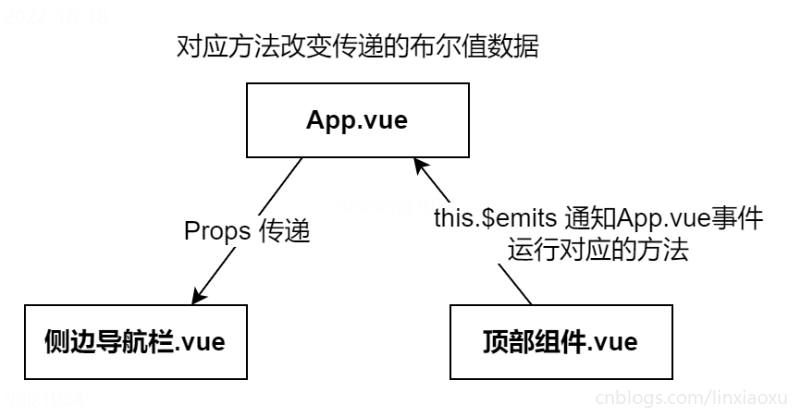
fixed 用于固定遮蔽层。z-30用于设置优先级,先显示在前面。v-show由App.vue传入,顶部组件通知App.vue事件对应的方法修改,进而引发当前transition的过渡。
html - Vue Transition with Tailwind - Stack Overflow
<template>
  <transition
    enter-active-class="duration-200"
    enter-from-class="opacity-0"
    enter-to-class="opacity-100"
    leave-active-class="duration-200"
    leave-to-class="opacity-0"
    leave-from-class="opacity-100"
  >
    <div class="fixed z-30 h-full w-full" v-show="showFlag" id="model">
      <div class="bg-black h-full w-full opacity-50"></div>
    </div>
  </transition>
侧边栏的动画效果跟遮蔽层一个原理,只不过修改成为了移动而不是改变透明度。
overflow-auto 可以让侧边栏在内容溢出时具备滚动条。
 <transition
    enter-active-class="duration-200 ease-out"
    enter-from-class="-translate-x-64"
    enter-to-class="translate-x-0"
    leave-active-class="duration-200 ease-in"
    leave-from-class="translate-x-0"
    leave-to-class="-translate-x-64"
  >
   <div
      class="fixed z-40 top-12 w-64 h-full bg-stone-100 border-r overflow-auto"
      v-show="showFlag"
      id="sideBar"
    >
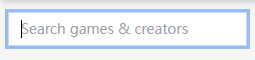
focus:outline-none focus:ring focus:border-blue-200当当前光标指向该input标签时更改样式,让四角发光变蓝。该段代码也可以提取成基本组件。
      <div class="mt-3 mx-2">
        <input
          id="search"
          class="
            bg-white
            focus:outline-none focus:ring focus:border-blue-200
            py-1.5
            pl-3
            w-full
            border border-gray-300
            text-sm
          "
          type="text"
          placeholder="Search games & creators"
          v-model="search"
        />
      </div>
三次复用之前定义的SideBarHref组件,并传入了props
      <SideBarHref :items="popularTags"></SideBarHref>
      <SideBarHref :items="browse"></SideBarHref>
      <SideBarHref :items="gamesByPrice"></SideBarHref>
让图标和下载超链接完全数据化,增加网页动态变化能力。
      <div class="h-20 text-center">
        <div class="pt-6">
          <template v-for="(value, index) in appInfo.apps" :key="index">
            <a :href="value.href">
              <component
                :is="value.icon"
                class="inline m-1 text-xl hover:text-rose-500"
              ></component>
            </a>
          </template>
          <a :href="appInfo.download.href">
            <span
              class="
                text-xs text-stone-800
                mx-2
                hover:text-rose-500 hover:underline
              "
              >{{ appInfo.download.title }}</span
            >
          </a>
        </div>
      </div>
除非结构要改,现在完全可以靠data里的对象数据驱动当前侧边栏的所有内容。
  data() {
    return {
      search: "",
      popularTags: {
        title: "POPULAR TAGS",
        items: [
          { text: "Horror games", href: "" },
          { text: "Multiplayer", href: "" },
          { text: "Visual novels", href: "" },
          { text: "HTML5 games", href: "" },
          { text: "Simulation", href: "" },
          { text: "macOS games", href: "" },
          { text: "Roguelike", href: "" },
          { text: "Linux games", href: "" },
          { text: "Browse all tags", href: "" },
        ],
      },
      browse: {
        title: "BROWSE",
	  ....
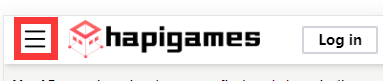
我们的想法是按下顶部组件左边的 list icon,弹出导航栏,再按一次关闭导航栏。
很容易想到父子通信的解决方案,这也是Vue单向数据流的最佳实现。
<template>
  <TopBar @changeSideFlag="changeSideFlag"></TopBar>
  <SideBar :show-flag="sideFlag"></SideBar>
  <div class="absolute top-12 w-full z-10">
    <router-view />
  </div>
</template>

<script lang="ts">
import { defineComponent } from "vue";
import TopBar from "./components/common/TopBar.vue";
import SideBar from "./components/common/SideBar.vue";

export default defineComponent({
  name: "App",
  components: {
    TopBar,
    SideBar,
  },
  data() {
    return {
      sideFlag: false as boolean,
    };
  },
  methods: {
    changeSideFlag(): void {
      this.sideFlag = !this.sideFlag;
    },
  },
});
</script>
App.vue 里的 export default defineComponent({ 是什么?
搭配 TypeScript 使用 Vue | Vue.js (vuejs.org)
defineComponent 是TypeScript独有的,可以根据选项式API的props、data自动推导各个字段的类型,当在生命周期函数、Methods函数、模板表达式中使用这些字段时可以进行类型检查。(不显式引入编译器默认自动引入)
我们将一个主页拆分为各个组件,并完全依托数据驱动,图片仅用来本地测试。
<template>
  <HomeFAQ />
  <TopNavigation :top-navigation="topNavigation"></TopNavigation>
  <GameInfo :game-info="gameInfo"></GameInfo>
  <GameBlog :game-blog="gameBlog"></GameBlog>
  <PlatformNavigation
    :platform-navigation="platformNavigation"
  ></PlatformNavigation>
  <GameList :game-list="latestGames"></GameList>
  <GameList :game-list="mostFeatureGames"></GameList>
  <HomeFooter />
</template>

<script lang="ts">
import { defineComponent } from "vue";
import GameInfo from "../components/HomeView/GameInfo.vue";
import GameBlog from "../components/HomeView/GameBlog.vue";
import HomeFAQ from "../components/HomeView/HomeFAQ.vue";
import TopNavigation from "../components/HomeView/TopNavigation.vue";
import GameList from "../components/HomeView/GameList.vue";
import PlatformNavigation from "../components/HomeView/PlatformNavigation.vue";
import HomeFooter from "../components/HomeView/HomeFooter.vue";

export default defineComponent({
  name: "HomeView",
  components: {
    GameInfo,
    GameBlog,
    HomeFAQ,
    TopNavigation,
    GameList,
    PlatformNavigation,
    HomeFooter,
  },
  data() {
    return {
      topNavigation: [
        { text: "All Games", href: "" },
        { text: "Game jams", href: "" },
        { text: "Developer Logs", href: "" },
        { text: "Community", href: "" },
        { text: "Bundles", href: "" },
      ],
      gameInfo: {
        youtube:
          "https://www.youtube.com/embed/U7MJljsoUSo?autoplay=0&fs=0&iv_load_policy=3&showinfo=0&rel=0&cc_load_policy=0&start=0&end=0",
        title: "Baba Is You",
        desc: "You can change the rules by which you play",
        price: "$14.99",
        platforms: ["b-icon-windows", "b-icon-apple"],
        images: [
          require("@/assets/slideshow/1.png"),
          require("@/assets/slideshow/2.png"),
          require("@/assets/slideshow/3.png"),
          require("@/assets/slideshow/4.png"),
          require("@/assets/slideshow/5.png"),
        ],
      },
      gameBlog: [
        {
          title: "Games of the Month: surrealist solitaire puzzles",
          text: `What’s that? You need more games? I hear you, anonymous hapi fan.
          We’ve reached the part of the year when games start coming out fast`,
          img: require("@/assets/blog/1.jpg"),
        },
        {
          title: "Games of the Month: Puzzles!",
          text: `Sometimes you need a good puzzle game, just something to throw all of
          your attention at and ignore anything else going on. Well if that
          sometime for you is right now, then you’re in luck because in this
          Games of the Month`,
          img: require("@/assets/blog/2.jpg"),
        },
        {
          title: "The next hapi Creator Day is July 29th!",
          text: ` I don’t think I’m allowed to make the entire body of this post “The
          next itch.io Creator Day is taking place on Friday July 29th.” I mean
          it’s true, we are hosting the next itch.io Creator Day on Friday July
          29th but I should probably write more here.`,
          img: require("@/assets/blog/3.jpg"),
        },
      ],
      platformNavigation: [
        {
          title: "Windows",
          href: "",
          img: require("@/assets/svg/windows.svg"),
        },
        {
          title: "macOS",
          href: "",
          img: require("@/assets/svg/apple.svg"),
        },
        {
          title: "Linux",
          href: "",
          img: require("@/assets/svg/linux.svg"),
        },
        {
          title: "Android",
          href: "",
          img: require("@/assets/svg/android.svg"),
        },
        {
          title: "iOS",
          href: "",
          img: require("@/assets/svg/apple.svg"),
        },
        {
          title: "Web",
          href: "",
          img: require("@/assets/svg/web.svg"),
        },
        {
          title: "Free",
          href: "",
          img: require("@/assets/svg/free.svg"),
        },
        {
          title: "On Sale",
          href: "",
          img: require("@/assets/svg/sale.svg"),
        },
        {
          title: "Top Seller",
          href: "",
          img: require("@/assets/svg/star.svg"),
        },
        {
          title: "Recent",
          href: "",
          img: require("@/assets/svg/recent.svg"),
        },
      ],
      latestGames: {
        title: "Latest Featured Games",
        button: {
          title: "View all",
          href: "",
        },
        games: [
          {
            title: "Late Night Mop",
            text: "A haunted house cleaning simulator.",
            img: require("@/assets/game/1.png"),
            price: 0,
          },
          {
            title: "an average day at the cat cafe",
            text: "A haunted house cleaning simulator.",
            img: require("@/assets/game/2.png"),
            price: 0,
            web: true,
          },
          {
            title: "Corebreaker",
            text: "A fast-paced action-platform shooter game with roguelike elements.",
            img: require("@/assets/game/3.png"),
            price: 19.99,
            tags: ["Difficult", "Fast-Paced"],
          },
          {
            title: "Beacon Pines",
            text: "Normal isn't what it used to be.",
            img: require("@/assets/game/4.png"),
            price: 4.99,
          },
          {
            title: "Atuel",
            text: "Traverse a surrealist landscape inspired by the Atuel River in Argentina.",
            img: require("@/assets/game/5.png"),
            price: 0,
          },
        ],
      },
      mostFeatureGames: {
        title: "Most Featured Games",
        button: {
          title: "View all",
          href: "",
        },
        games: [
          {
            title: "Hitobito no Hikari - Heian Jidai",
            text: "A survival horror TTRPG about cursed priestesses.",
            img: require("@/assets/game/6.png"),
            tags: ["Physical games"],
            price: 3,
          },
          {
            title: "Doko Roko",
            text: "A symbiosis with ancient shadows. A tower full of demons. A proverb.",
            img: require("@/assets/game/7.png"),
            price: 10,
          },
          {
            title: "The Zachtronics Solitaire Collection",
            text: "All seven Zachtronics solitaire games, updated with new 4K graphics, plus one brand new Tarot-themed solitaire variant.",
            img: require("@/assets/game/8.png"),
            price: 9.99,
            tags: ["Card Game", "Singleplayer"],
          },
          {
            title: "Mixolumia",
            text: "Entrancing musical falling block puzzler.",
            img: require("@/assets/game/9.png"),
            price: 10,
            tags: ["High Score", "Arcade"],
          },
          {
            title: "Atuel",
            text: "Traverse a surrealist landscape inspired by the Atuel River in Argentina.",
            img: require("@/assets/game/5.png"),
            price: 0,
          },
          {
            title: "Corebreaker",
            text: "A fast-paced action-platform shooter game with roguelike elements.",
            img: require("@/assets/game/3.png"),
            price: 19.99,
            tags: ["Difficult", "Fast-Paced"],
          },
        ],
      },
    };
  },
});
</script>

<template>
  <div class="h-24 p-2 text-sm bg-stone-100">
    <div class="mt-1">
      <b>HapiGames</b> is a simple way to find and share indie games online for
      free.
    </div>
    <div class="mt-2">
      <a class="underline text-rose-500">Add your game</a> or
      <a class="underline text-rose-500">Read the FAQ</a>
    </div>
  </div>
</template>
<script>
export default {
  name: "HomeFAQ",
}
</script>

overflow-x-auto flex flex布局,并在溢出时开启横轴滚动条
whitespace-nowrap 类可以防止换行,让所有元素保持在一行上。
html - Div with horizontal scrolling only - Stack Overflow
<template>
  <div class="overflow-x-auto flex bg-white">
    <template v-for="(value, index) in topNavigation" :key="index">
      <a :href="value.href">
        <div
          class="
            p-3
            font-bold
            text-sm text-stone-800
            hover:text-rose-500
            whitespace-nowrap
          "
        >
          {{ value.text }}
        </div>
      </a>
    </template>
  </div>
</template>
<script lang="ts">
import { PropType } from "vue";

interface TopNavigation {
  text: string;
  href: string;
}

export default {
  name: "topNavigation",
  props: {
    topNavigation: {
      type: Array as PropType<TopNavigation[]>,
      required: true,
    },
  },
};
</script>
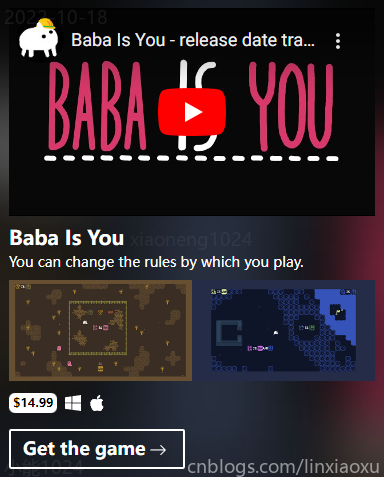
嵌入YOUTUBE视频可参考 youtubeembedcode.com
      <div class="w-full">
        <img :src="currentImg[0]" class="w-1/2 inline-block" />
        <img :src="currentImg[1]" class="w-1/2 inline-block" />
      </div>
用于生成两张轮播图,每四秒切换一次,具体方法如下。注意 currentImg: function (): string[] { 可以给计算属性添加类型检查。
  methods: {
    startSlide: function (): void {
      this.timer = setInterval(this.next, 4000);
    },

    next: function (): void {
      this.currentIndex += 1;
    },
  },
  computed: {
    currentImg: function (): string[] {
      let index = Math.abs(this.currentIndex) % this.gameInfo.images.length;
      let index2 = (index + 1) % this.gameInfo.images.length;
      return [this.gameInfo.images[index], this.gameInfo.images[index2]];
    },
  },
考虑 img 标签的 :src 只能接收 string ,我们假设所有 require 方法获取的图片均为 string 类型。定义prop类型
import { PropType } from "vue";

interface GameInfo {
  youtube: string;
  title: string;
  desc: string;
  price: number;
  platforms: string[];
  images: string[];
}
完整代码如下
<template>
  <div
    class="bg-auto p-1 text-white"
    :style="
      'background-image:url(' + require('@/assets/diffuse/diffuse.jpg') + ')'
    "
  >
    <div class="h-52 m-2">
      <iframe
        class="h-full w-full"
        frameborder="0"
        scrolling="no"
        marginheight="0"
        marginwidth="0"
        type="text/html"
        :src="gameInfo.youtube"
      ></iframe>
    </div>
    <div class="ml-2 font-bold text-xl">{{ gameInfo.title }}</div>
    <div class="ml-2 text-sm">{{ gameInfo.desc }}.</div>
    <div class="m-2">
      <div class="w-full">
        <img :src="currentImg[0]" class="w-1/2 inline-block" />
        <img :src="currentImg[1]" class="w-1/2 inline-block" />
      </div>
    </div>
    <div class="h-8 m-2">
      <div
        class="
          inline-block
          text-black
          bg-white
          rounded-md
          text-xs
          px-1
          py-0.5
          font-bold
        "
      >
        ${{ gameInfo.price }}
      </div>
      <template v-for="(value, index) in gameInfo.platforms" :key="index">
        <component :is="value" class="inline-block ml-2"></component>
      </template>
    </div>
    <div class="h-10 m-2 w-44">
      <div
        class="
          h-full
          text-lg
          font-bold
          py-1
          px-3
          border-2 border-white
          rounded-sm
        "
      >
        <span class="inline-block">Get the game</span>
        <b-icon-arrow-right
          class="inline-block ml-1 text-lg"
        ></b-icon-arrow-right>
      </div>
    </div>
  </div>
</template>
<script lang="ts">
import { PropType } from "vue";

interface GameInfo {
  youtube: string;
  title: string;
  desc: string;
  price: number;
  platforms: string[];
  images: string[];
}

export default {
  name: "GameInfo",
  props: {
    gameInfo: {
      type: Object as PropType<GameInfo>,
      required: true,
    },
  },
  data() {
    return {
      timer: null as unknown,
      currentIndex: 0,
    };
  },
  mounted() {
    this.startSlide();
  },
  methods: {
    startSlide: function (): void {
      this.timer = setInterval(this.next, 4000);
    },

    next: function (): void {
      this.currentIndex += 1;
    },
  },
  computed: {
    currentImg: function (): string[] {
      let index = Math.abs(this.currentIndex) % this.gameInfo.images.length;
      let index2 = (index + 1) % this.gameInfo.images.length;
      return [this.gameInfo.images[index], this.gameInfo.images[index2]];
    },
  },
};
</script>
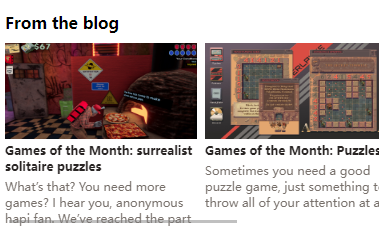
<template>
  <div class="m-2 mt-4">
    <div class="font-bold">From the blog</div>
    <div class="overflow-x-auto flex mt-2">
      <template v-for="(value, index) in gameBlog" :key="index">
        <div class="w-48 flex-shrink-0 mr-2">
          <img class="h-24 w-full" :src="value.img" />
          <div class="text-xs font-bold mt-1 text-stone-800 whitespace-normal">
            {{ value.title }}
          </div>
          <div class="h-12 text-xs overflow-clip mt-1 text-stone-500">
            {{ value.text }}
          </div>
        </div>
      </template>
    </div>
  </div>
</template>
<script lang="ts">
import { PropType } from "vue";

interface GameBlog {
  title: string;
  text: string;
  img: string;
}

export default {
  name: "GameBlog",
  props: {
    gameBlog: {
      type: Array as PropType<GameBlog[]>,
      required: true,
    },
  },
};
</script>
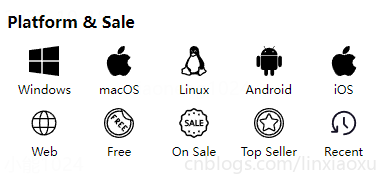
<template>
  <div class="m-2 mt-4">
    <div class="font-bold inline-block">Platform & Sale</div>
    <div class="flex mt-2 flex-wrap">
      <a
        :href="value.href"
        v-for="(value, index) in platformNavigation"
        :key="index"
        class="w-1/5 flex-shrink-0 hover:text-rose-500"
      >
        <div>
          <img :src="value.img" class="w-2/5 mx-auto mt-1" />
          <div class="text-center m-1.5 text-xs">{{ value.title }}</div>
        </div>
      </a>
    </div>
  </div>
</template>
<script lang="ts">
import { PropType } from "vue";

interface platformNavigation {
  title: string;
  href: string;
  img: string;
}

export default {
  name: "PlatformNavigation",
  props: {
    platformNavigation: {
      type: Array as PropType<platformNavigation[]>,
      required: true,
    },
  },
  data() {
    return {};
  },
};
</script>
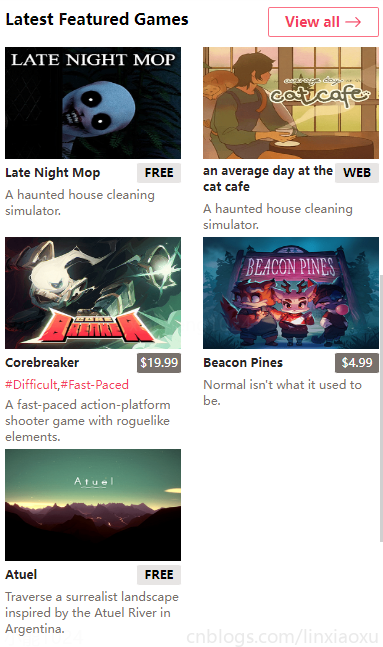
规定了比较复杂的传入prop类型,考虑到tags可能为空,在原来的模板外层div做v-if判断,否则会ts报错value.tags可能为undefined。
interface Game {
  title: string;
  text: string;
  img: string;
  price: number;
  web?: boolean;
  tags?: string[];
}

interface GameList {
  title: string;
  button: {
    title: string;
    href: string;
  };
  games: Game[];
}
<div class="text-xs font-normal mt-1" v-if="value.tags">
  <template v-for="(tag, index) in value.tags" :key="index">
    <a class="text-rose-500" href="">#{{ tag }}</a>
    <template v-if="index != value.tags.length - 1">,</template>
  </template>
</div>
完整代码
<template>
  <div class="m-2 mt-4">
    <div>
      <div class="font-bold inline-block">{{ gameList.title }}</div>

      <div v-if="gameList.button" class="float-right">
        <div
          class="
            border border-rose-400
            text-sm
            font-bold
            text-rose-500
            rounded-sm
            px-4
            py-1
            active:bg-rose-400 active:text-white
          "
        >
          {{ gameList.button.title }}
          <b-icon-arrow-right
            class="inline-block text-lg align-text-top"
          ></b-icon-arrow-right>
        </div>
      </div>

      <div class="w-full mt-4 flex flex-wrap justify-between">
        <template v-for="(value, index) in gameList.games" :key="index">
          <div class="w-44 inline-block align-top">
            <img class="h-28 w-full" :src="value.img" />
            <div
              class="text-xs font-bold mt-1 text-stone-800 w-3/4 inline-block"
            >
              {{ value.title }}
            </div>
            <div
              class="
                inline-block
                w-1/4
                align-top
                text-xs
                bg-stone-200
                rounded-sm
                py-0.5
                mt-1
                text-center
                font-bold
              "
              :class="{ 'bg-stone-500': value.price != 0 }"
            >
              <span v-if="value.web">WEB</span>
              <span v-else-if="value.price == 0">FREE</span>
              <span v-else-if="value.price != 0" class="font-normal text-white"
                >${{ value.price }}</span
              >
            </div>
            <div class="text-xs font-normal mt-1" v-if="value.tags">
              <template v-for="(tag, index) in value.tags" :key="index">
                <a class="text-rose-500" href="">#{{ tag }}</a>
                <template v-if="index != value.tags.length - 1">,</template>
              </template>
            </div>
            <div class="text-xs font-normal text-stone-500 mt-1">
              {{ value.text }}
            </div>
            <div class="my-1"></div>
          </div>
        </template>
      </div>
    </div>
  </div>
</template>
<script lang="ts">
import { PropType } from "vue";

interface Game {
  title: string;
  text: string;
  img: string;
  price: number;
  web?: boolean;
  tags?: string[];
}

interface GameList {
  title: string;
  button: {
    title: string;
    href: string;
  };
  games: Game[];
}

export default {
  name: "GameList",
  props: {
    gameList: {
      type: Object as PropType<GameList>,
      required: true,
    },
  },
};
</script>
<template>
  <div class="mx-2 my-4">
    <div class="text-center font-bold text-sm">
      Don't see anything you like?
    </div>
    <div
      class="
        w-11/12
        h-10
        pt-2.5
        text-center
        m-auto
        mt-4
        border border-rose-500
        font-bold
        text-sm text-rose-500
      "
    >
      View all Games
      <b-icon-arrow-right
        class="inline-block text-lg align-text-top"
      ></b-icon-arrow-right>
    </div>
    <div
      class="
        w-11/12
        h-10
        pt-2.5
        text-center
        m-auto
        mt-4
        border border-rose-500
        font-bold
        text-sm text-rose-500
      "
    >
      View something random
      <b-icon-arrow-left-right
        class="inline-block text-lg align-text-top"
      ></b-icon-arrow-left-right>
    </div>
  </div>
</template>
<script>
export default {
  name: "HomeFooter",
  props: {
  }
}
</script>
这里列举我在开发过程遇到的一些问题,也许能帮助到你。
明明 yarn serve 成功了,并显示如下内容,但连接网页还是转圈圈。尝试重启电脑后重新 yarn serve
  App running at:
  - Local:   http://localhost:8080/
得到如下报错
ERROR Error: The project seems to require yarn but it's not installed.
解决方法:删除当前目录下的 yarn.lock 文件,命令行输入 npm install -g yarn
解决方法:修改 <script> 为 <script lang="ts">
Bootstrap Icons · Official open source SVG icon library for Bootstrap (getbootstrap.com)
Working with props declaration in Vue 3 + Typescript - DEV Community ????
单组件的编写 | Vue3 入门指南与实战案例 (chengpeiquan.com)
vue3中的组件定义中defineComponent作用? - #2 由 cuidong - 中文 - Vue Forum (vuejs.org)
使用 CSS 实现垂直居中的8种方法_wincheshe的博客-CSDN博客_css垂直居中
前端 - vue如何动态加载本地图片_个人文章 - SegmentFault 思否
我有一个模型:classItem项目有一个属性“商店”基于存储的值,我希望Item对象对特定方法具有不同的行为。Rails中是否有针对此的通用设计模式?如果方法中没有大的if-else语句,这是如何干净利落地完成的? 最佳答案 通常通过Single-TableInheritance. 关于ruby-on-rails-Rails-子类化模型的设计模式是什么?,我们在StackOverflow上找到一个类似的问题: https://stackoverflow.co
我将应用程序升级到Rails4,一切正常。我可以登录并转到我的编辑页面。也更新了观点。使用标准View时,用户会更新。但是当我添加例如字段:name时,它不会在表单中更新。使用devise3.1.1和gem'protected_attributes'我需要在设备或数据库上运行某种更新命令吗?我也搜索过这个地方,找到了许多不同的解决方案,但没有一个会更新我的用户字段。我没有添加任何自定义字段。 最佳答案 如果您想允许额外的参数,您可以在ApplicationController中使用beforefilter,因为Rails4将参数
我是一个Rails初学者,但我想从我的RailsView(html.haml文件)中查看Ruby变量的内容。我试图在ruby中打印出变量(认为它会在终端中出现),但没有得到任何结果。有什么建议吗?我知道Rails调试器,但更喜欢使用inspect来打印我的变量。 最佳答案 您可以在View中使用puts方法将信息输出到服务器控制台。您应该能够在View中的任何位置使用Haml执行以下操作:-puts@my_variable.inspect 关于ruby-on-rails-如何在我的R
这里有一个很好的答案解释了如何在Ruby中下载文件而不将其加载到内存中:https://stackoverflow.com/a/29743394/4852737require'open-uri'download=open('http://example.com/image.png')IO.copy_stream(download,'~/image.png')我如何验证下载文件的IO.copy_stream调用是否真的成功——这意味着下载的文件与我打算下载的文件完全相同,而不是下载一半的损坏文件?documentation说IO.copy_stream返回它复制的字节数,但是当我还没有下
我喜欢使用Textile或Markdown为我的项目编写自述文件,但是当我生成RDoc时,自述文件被解释为RDoc并且看起来非常糟糕。有没有办法让RDoc通过RedCloth或BlueCloth而不是它自己的格式化程序运行文件?它可以配置为自动检测文件后缀的格式吗?(例如README.textile通过RedCloth运行,但README.mdown通过BlueCloth运行) 最佳答案 使用YARD直接代替RDoc将允许您包含Textile或Markdown文件,只要它们的文件后缀是合理的。我经常使用类似于以下Rake任务的东西:
我正在尝试解析一个文本文件,该文件每行包含可变数量的单词和数字,如下所示:foo4.500bar3.001.33foobar如何读取由空格而不是换行符分隔的文件?有什么方法可以设置File("file.txt").foreach方法以使用空格而不是换行符作为分隔符? 最佳答案 接受的答案将slurp文件,这可能是大文本文件的问题。更好的解决方案是IO.foreach.它是惯用的,将按字符流式传输文件:File.foreach(filename,""){|string|putsstring}包含“thisisanexample”结果的
rails中是否有任何规定允许站点的所有AJAXPOST请求在没有authenticity_token的情况下通过?我有一个调用Controller方法的JqueryPOSTajax调用,但我没有在其中放置任何真实性代码,但调用成功。我的ApplicationController确实有'request_forgery_protection'并且我已经改变了config.action_controller.consider_all_requests_local在我的environments/development.rb中为false我还搜索了我的代码以确保我没有重载ajaxSend来发送
我只想对我一直在思考的这个问题有其他意见,例如我有classuser_controller和classuserclassUserattr_accessor:name,:usernameendclassUserController//dosomethingaboutanythingaboutusersend问题是我的User类中是否应该有逻辑user=User.newuser.do_something(user1)oritshouldbeuser_controller=UserController.newuser_controller.do_something(user1,user2)我
1.错误信息:Errorresponsefromdaemon:Gethttps://registry-1.docker.io/v2/:net/http:requestcanceledwhilewaitingforconnection(Client.Timeoutexceededwhileawaitingheaders)或者:Errorresponsefromdaemon:Gethttps://registry-1.docker.io/v2/:net/http:TLShandshaketimeout2.报错原因:docker使用的镜像网址默认为国外,下载容易超时,需要修改成国内镜像地址(首先阿里
目录前言滤波电路科普主要分类实际情况单位的概念常用评价参数函数型滤波器简单分析滤波电路构成低通滤波器RC低通滤波器RL低通滤波器高通滤波器RC高通滤波器RL高通滤波器部分摘自《LC滤波器设计与制作》,侵权删。前言最近需要学习放大电路和滤波电路,但是由于只在之前做音乐频谱分析仪的时候简单了解过一点点运放,所以也是相当从零开始学习了。滤波电路科普主要分类滤波器:主要是从不同频率的成分中提取出特定频率的信号。有源滤波器:由RC元件与运算放大器组成的滤波器。可滤除某一次或多次谐波,最普通易于采用的无源滤波器结构是将电感与电容串联,可对主要次谐波(3、5、7)构成低阻抗旁路。无源滤波器:无源滤波器,又称
