unity渲染管线及升级URP
Unity引擎的渲染管线主要分为"渲染核心库"与"渲染策略"两个部分, “渲染核心库”是Unity把基于OpenGL/DirectX把渲染相关的接口函数封装成API,这部分Unity引擎写好后作为核心的API渲染库。”渲染策略”指的是Unity引擎绘制整个游戏场景的时候,如何处理多相机,多光源,阴影投射,物体绘制,雾,自发光等。这个就叫做渲染策略,渲染管线基于一种渲染策略,调用渲染核心库中的API,把整个游戏场景绘制出来。
渲染管线通过执行 剔除、渲染、后处理 来获取场景的内容,并将这些内容显示在屏幕上。不同的渲染管线具有不同的功能和性能特征,并且适用于不同的游戏、应用程序和平台。
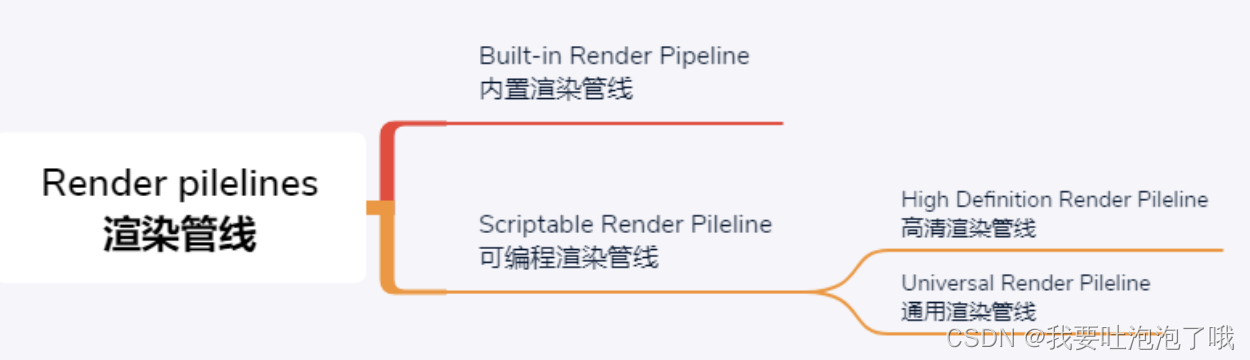
URP相对内置管线的优点:
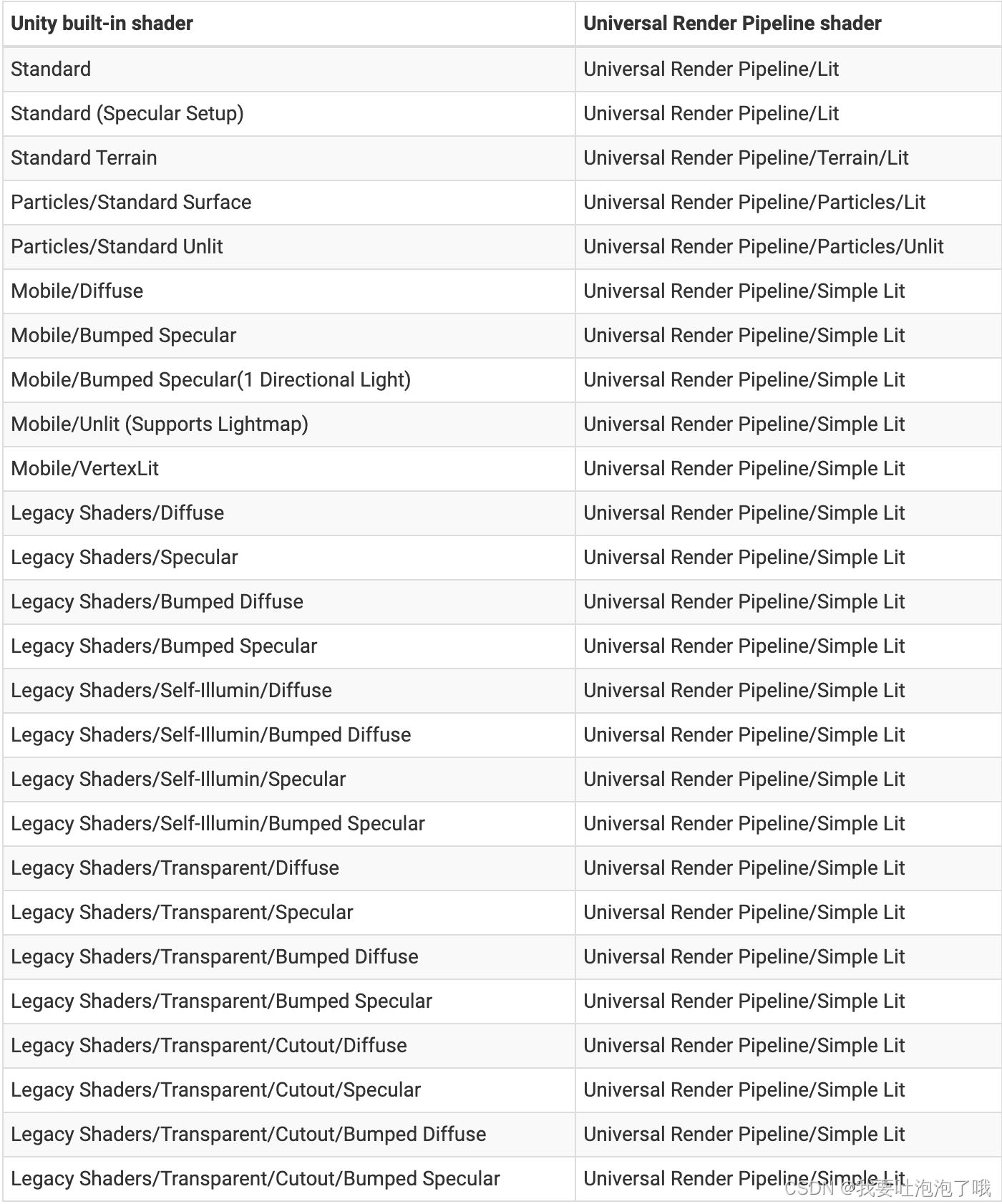
与默认管线功能对比见URP与内置渲染管线功能对照表
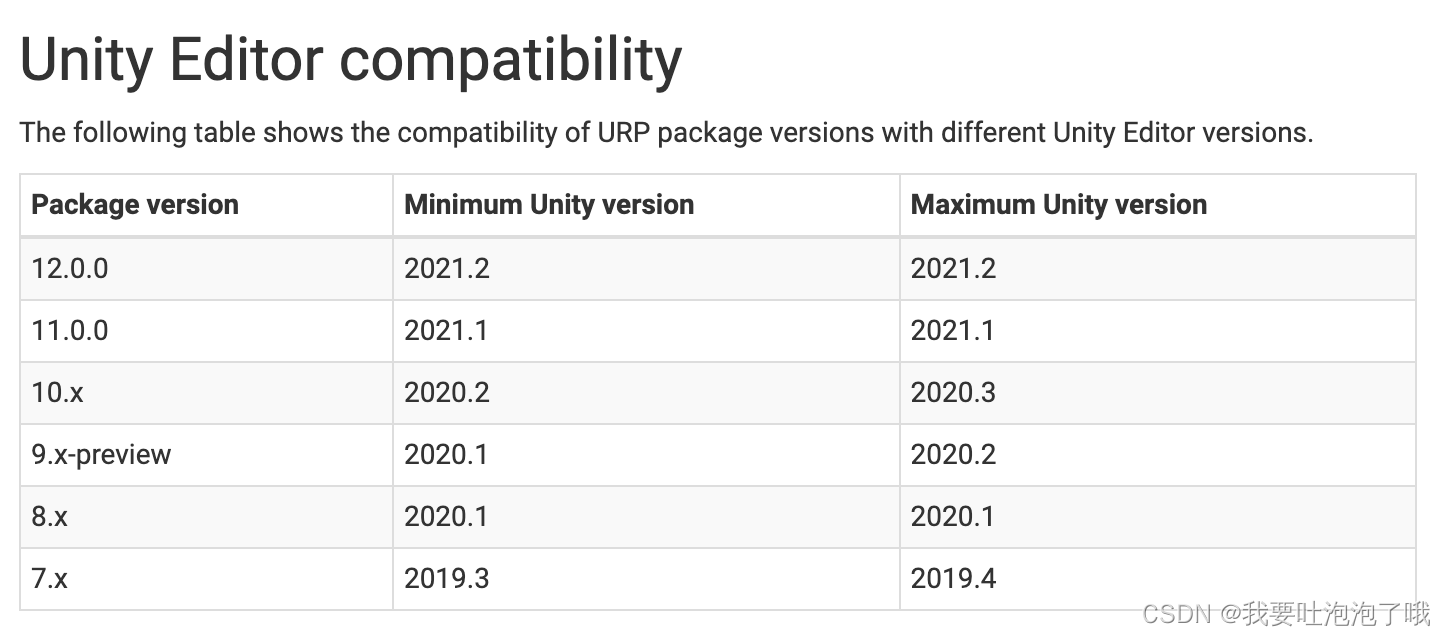
URP与unity版本对应:
| Built-in | URP |
|---|---|
| CGPROGRAM、HLSLPROGRAM | HLSLPROGRAM |
| ENDCG、ENDHLSL | ENDHLSL |
| CGINCLUDE、HLSLINCLUDE | HLSLINCLUDE |
TEXTURE2D(_BaseMap);
SAMPLER(sampler_BaseMap);

CBUFFER_START(UnityPerMaterial)
    half4 _BaseColor;
    float4 _BaseMap_ST;
CBUFFER_END
| \ | Built-in | URP |
|---|---|---|
| Core | Unity.cginc | Packages/com.unity.render-pipelines.universal/ShaderLibrary/Core.hlsl |
| Light | AutoLight.cginc | Packages/com.unity.render-pipelines.universal/ShaderLibrary/Lighting.hlsl |
| Shadows | AutoLight.cginc | Packages/com.unity.render-pipelines.universal/ShaderLibrary/Shadows.hlsl |
| Surface shaders | Lighting.cginc | URP内没有,可以参考该github项目 |
#include "Packages/com.unity.render-pipelines.universal/ShaderLibrary/Core.hlsl"
| Built-in | URP |
|---|---|
| ForwardBase | UniversalForward |
| ForwardAdd | 移除,开启关键字_ADDITIONAL_LIGHTS解决 |
| Deferred 以及相关 | URP12.0支持 |
| Vertex and related | 移除 |
| ShadowCaster | ShadowCaster |
| MotionVectors | 暂不支持 |
#pragma multi_compile _ _MAIN_LIGHT_SHADOWS
#pragma multi_compile _ _MAIN_LIGHT_SHADOWS_CASCADE
#pragma multi_compile _ _ADDITIONAL_LIGHTS_VERTEX _ADDITIONAL_LIGHTS
#pragma multi_compile _ _ADDITIONAL_LIGHT_SHADOWS
#pragma multi_compile _ _SHADOWS_SOFT
#pragma multi_compile _ _MIXED_LIGHTING_SUBTRACTIVE
| Built-in | URP |
|---|---|
| UNITY_PROJ_COORD(a) | 移除,改用 a.xy/a.w |
| UNITY_INITIALIZE_OUTPUT(type, name) | ZERO_INITIALIZE(type, name) |
参考Packages/com.unity.render-pipelines.universal/ShaderLibrary/Shadows.hlsl
| Built-in | URP |
|---|---|
| UNITY_DECLARE_SHADOWMAP(tex) | TEXTURE2D_SHADOW_PARAM(textureName, samplerName) |
| UNITY_SAMPLE_SHADOW(tex, uv) | SAMPLE_TEXTURE2D_SHADOW(textureName, samplerName, coord3) |
| UNITY_SAMPLE_SHADOW_PROJ(tex, uv) | SAMPLE_TEXTURE2D_SHADOW(textureName, samplerName, coord4.xyz/coord4.w) |
| UNITY_SHADOW_COORDS(x) | float4 shadowCoord : TEXCOORD##x |
| TRANSFER_SHADOW(a) | a.shadowCoord = TransformWorldToShadowCoord(worldSpacePosition) |
| SHADOWS_SCREEN | 移除了 |
| Built-in | URP |
|---|---|
| UNITY_DECLARE_TEX2D(name) | TEXTURE2D(textureName); SAMPLER(samplerName); |
| UNITY_DECLARE_TEX2D_NOSAMPLER(name) | TEXTURE2D(textureName); |
| UNITY_DECLARE_TEX2DARRAY(name) | TEXTURE2D_ARRAY(textureName); SAMPLER(samplerName); |
| UNITY_SAMPLE_TEX2D(name, uv) | SAMPLE_TEXTURE2D(textureName, samplerName, coord2) |
| UNITY_SAMPLE_TEX2D_SAMPLER(name, samplername, uv) | SAMPLE_TEXTURE2D(textureName, samplerName, coord2) |
| UNITY_SAMPLE_TEX2DARRAY(name, uv) | SAMPLE_TEXTURE2D_ARRAY(textureName, samplerName, coord2, index) |
| UNITY_SAMPLE_TEX2DARRAY_LOD(name, uv, lod) | SAMPLE_TEXTURE2D_ARRAY_LOD(textureName, samplerName, coord2, index, lod) |
| UNITY_INITIALIZE_OUTPUT(name) | ZERO_INITIALIZE(name) |
| Built-in | URP |
|---|---|
| UNITY_LIGHTMODEL_AMBIENT | half3(unity_SHAr.w,unity_SHAr.w,unity_SHAr.w); |
| UNITY_FOG_COORDS(x) | 用float fogCoord : TEXCOORD##x; |
| UNITY_TRANSFER_FOG(o, outpos) | o.fogCoord = ComputeFogFactor(clipSpacePosition.z); |
| UNITY_APPLY_FOG(coord, col) | color = MixFog(color, i.fogCoord); |
| Built-in | URP |
|---|---|
| float4 UnityObjectToClipPos(float3 pos) | float4 TransformObjectToHClip(float3 positionOS) |
| float4 UnityWorldToClipPos(float3 pos) | float4 TransformWorldToHClip(float3 positionWS) |
| float3 UnityObjectToViewPos(float3 pos) | TransformWorldToView(TransformObjectToWorld(positionOS)) |
| float3 UnityObjectToWorldNormal(in float3 norm) | float3 TransformObjectToWorldNormal(float3 normalOS,bool doNormalize = true) |
| float3 UnityWorldSpaceViewDir (float4 v) | _WorldSpaceCameraPos.xyz - positionWS |
| float3 UnityObjectToWorldDir (float4 v) | float3 TransformObjectToWorldDir(real3 dirOS) |
| Built-in | URP |
|---|---|
| float3 ObjSpaceViewDir (float4 v) | TransformWorldToObject(GetCameraPositionWS()) - objectSpacePosition; |
| float2 ParallaxOffset (half h, half height, half3 viewDir) | 移除了。可以从UnityCG.cginc复制过来 |
| fixed Luminance (fixed3 c) | real Luminance(real3 linearRgb) |
| fixed3 DecodeLightmap (fixed4 color) | real3 DecodeLightmap(real4 encodedIlluminance, real4 decodeInstructions) |
| float4 EncodeFloatRGBA (float v) | 移除了。可以从UnityCG.cginc复制过来 |
| float DecodeFloatRGBA (float4 enc) | 移除了。可以从UnityCG.cginc复制过来 |
| float2 EncodeFloatRG (float v) | 移除了。可以从UnityCG.cginc复制过来 |
| float DecodeFloatRG (float2 enc) | 移除了。可以从UnityCG.cginc复制过来 |
| float2 EncodeViewNormalStereo (float3 n) | 移除了。可以从UnityCG.cginc复制过来 |
| float3 DecodeViewNormalStereo (float4 enc4) | 移除了。可以从UnityCG.cginc复制过来 |
| Built-in | URP |
|---|---|
| float3 WorldSpaceLightDir(float4 v) | _MainLightPosition.xyz - TransformObjectToWorld(objectSpacePosition) |
| float3 ObjSpaceLightDir (float4 v) | TransformWorldToObject(_MainLightPosition.xyz) - objectSpacePosition |
| float3 Shade4PointLights (…) | 用half3 VertexLighting(float3 positionWS, half3 normalWS) |
| Built-in | URP |
|---|---|
| float4 ComputeScreenPos (float4 clipPos) | float4 ComputeScreenPos(float4 positionCS) |
| float4 ComputeGrabScreenPos (float4 clipPos) | 移除了 |
| Built-in | URP |
|---|---|
| float3 ShadeVertexLights (float4 vertex, float3 normal) | 用half3(unity_SHAr.w, unity_SHAg.w, unity_SHAb.w) + VertexLighting(…) |
可直接使用 _CameraDepthTexture来采样深度纹理,也可使用SampleSceneDepth(…) 和 LoadSceneDepth(…)来采样。
| Built-in | URP |
|---|---|
| LinearEyeDepth (sceneZ) | LinearEyeDepth(sceneZ, _ZBufferParams) |
| Linear01Depth (sceneZ) | Linear01Depth(sceneZ, _ZBufferParams) |
| Built-in | URP |
|---|---|
| shadeSH9 (float4 normal) | SampleSH(normal) |
| unity_ColorSpaceLuminance | 用Luminance() |
| Built-in | URP |
|---|---|
| _LightColor0 | _MainLightColor |
| _WorldSpaceLightPos0 | _MainLightPosition |
| _LightMatrix0 | 移除了。目前尚不支持 |
| unity_4LightPosX0, unity_4LightPosY0, unity_4LightPosZ0 | 在URP中,其他光源存储在数组/缓冲区中(取决于平台)。使用Light GetAdditionalLight(uint i, float3 positionWS)获取光源信息 |
| unity_4LightAtten0 | 同上 |
| unity_LightColor | 同上) |
| unity_WorldToShadow | float4x4 _MainLightWorldToShadow[MAX_SHADOW_CASCADES + 1] 或者_AdditionalLightsWorldToShadow[MAX_VISIBLE_LIGHTS] |
使用循环所有其他灯光–GetAdditionalLight(),查询其他灯光计数–GetAdditionalLightsCount()。
beginCameraRendering(ScriptableRenderContext context, Camera camera)
endCameraRendering(ScriptableRenderContext context, Camera camera)
beginFrameRendering(ScriptableRenderContext context,Camera[] cameras)
endFrameRendering(ScriptableRenderContext context,Camera[] cameras)
void OnEnable()
{
    RenderPipelineManager.beginCameraRendering += MyCameraRendering;
}

void OnDisable()
{
    RenderPipelineManager.beginCameraRendering -= MyCameraRendering;
}

void MyCameraRendering(ScriptableRenderContext context, Camera camera)
{
    ...
    if(camera == myEffectCamera)
    {
    ...
    UniversalRenderPipeline.RenderSingleCamera(context, camera);
    }
    ...
}
尝试通过RVM将RubyGems升级到版本1.8.10并出现此错误:$rvmrubygemslatestRemovingoldRubygemsfiles...Installingrubygems-1.8.10forruby-1.9.2-p180...ERROR:Errorrunning'GEM_PATH="/Users/foo/.rvm/gems/ruby-1.9.2-p180:/Users/foo/.rvm/gems/ruby-1.9.2-p180@global:/Users/foo/.rvm/gems/ruby-1.9.2-p180:/Users/foo/.rvm/gems/rub
我想要做的是有2个不同的Controller,client和test_client。客户端Controller已经构建,我想创建一个test_clientController,我可以使用它来玩弄客户端的UI并根据需要进行调整。我主要是想绕过我在客户端中内置的验证及其对加载数据的管理Controller的依赖。所以我希望test_clientController加载示例数据集,然后呈现客户端Controller的索引View,以便我可以调整客户端UI。就是这样。我在test_clients索引方法中试过这个:classTestClientdefindexrender:template=>
在我的Controller中,我通过以下方式在我的index方法中支持HTML和JSON:respond_todo|format|format.htmlformat.json{renderjson:@user}end在浏览器中拉起它时,它会自然地以HTML呈现。但是,当我对/user资源进行内容类型为application/json的curl调用时(因为它是索引方法),我仍然将HTML作为响应。如何获取JSON作为响应?我还需要说明什么? 最佳答案 您应该将.json附加到请求的url,提供的格式在routes.rb的路径中定义。这
我在我的Rails项目中使用Pow和powifygem。现在我尝试升级我的ruby版本(从1.9.3到2.0.0,我使用RVM)当我切换ruby版本、安装所有gem依赖项时,我通过运行railss并访问localhost:3000确保该应用程序正常运行以前,我通过使用pow访问http://my_app.dev来浏览我的应用程序。升级后,由于错误Bundler::RubyVersionMismatch:YourRubyversionis1.9.3,butyourGemfilespecified2.0.0,此url不起作用我尝试过的:重新创建pow应用程序重启pow服务器更新战俘
我实际上是在尝试使用RVM在我的OSX10.7.5上更新ruby,并在输入以下命令后:rvminstallruby我得到了以下回复:Searchingforbinaryrubies,thismighttakesometime.Checkingrequirementsforosx.Installingrequirementsforosx.Updatingsystem.......Errorrunning'requirements_osx_brew_update_systemruby-2.0.0-p247',pleaseread/Users/username/.rvm/log/138121
我最近决定从我的系统中卸载RVM。在thispage提出的一些论点说服我:实际上,我的决定是,我根本不想担心Ruby的多个版本。我只想使用1.9.2-p290版本而不用担心其他任何事情。但是,当我在我的Mac上运行ruby--version时,它告诉我我的版本是1.8.7。我四处寻找如何简单地从我的Mac上卸载这个Ruby,但奇怪的是我没有找到任何东西。似乎唯一想卸载Ruby的人运行linux,而使用Mac的每个人都推荐RVM。如何从我的Mac上卸载Ruby1.8.7?我想升级到1.9.2-p290版本,并且我希望我的系统上只有一个版本。 最佳答案
无论您是想搭建桌面端、WEB端或者移动端APP应用,HOOPSPlatform组件都可以为您提供弹性的3D集成架构,同时,由工业领域3D技术专家组成的HOOPS技术团队也能为您提供技术支持服务。如果您的客户期望有一种在多个平台(桌面/WEB/APP,而且某些客户端是“瘦”客户端)快速、方便地将数据接入到3D应用系统的解决方案,并且当访问数据时,在各个平台上的性能和用户体验保持一致,HOOPSPlatform将帮助您完成。利用HOOPSPlatform,您可以开发在任何环境下的3D基础应用架构。HOOPSPlatform可以帮您打造3D创新型产品,HOOPSSDK包含的技术有:快速且准确的CAD
?博客主页:https://xiaoy.blog.csdn.net?本文由呆呆敲代码的小Y原创,首发于CSDN??学习专栏推荐:Unity系统学习专栏?游戏制作专栏推荐:游戏制作?Unity实战100例专栏推荐:Unity实战100例教程?欢迎点赞?收藏⭐留言?如有错误敬请指正!?未来很长,值得我们全力奔赴更美好的生活✨------------------❤️分割线❤️-------------------------
本教程将在Unity3D中混合Optitrack与数据手套的数据流,在人体运动的基础上,添加双手手指部分的运动。双手手背的角度仍由Optitrack提供,数据手套提供双手手指的角度。 01 客户端软件分别安装MotiveBody与MotionVenus并校准人体与数据手套。MotiveBodyMotionVenus数据手套使用、校准流程参照:https://gitee.com/foheart_1/foheart-h1-data-summary.git02 数据转发打开MotiveBody软件的Streaming,开始向Unity3D广播数据;MotionVenus中设置->选项选择Unit
目录1.AdmobSDK下载地址2.将下载好的unityPackagesdk导入到unity里编辑 3.解析依赖到项目中
