文章目录
下载
https://www.elastic.co/cn/downloads/past-releases/elasticsearch-8-5-3
https://www.elastic.co/cn/downloads/past-releases/kibana-8-5-3
解压,点击 D:\elasticsearch-8.5.3\bin\elasticsearch.bat 启动后会报错
修改配置 "D:\elasticsearch-8.5.3\config\elasticsearch.yml" 配置文件会多出来一些配置
学习环境下,全部改为false即可
# Enable security features
xpack.security.enabled: False

xpack.security.enrollment.enabled: False

# Enable encryption for HTTP API client connections, such as Kibana, Logstash, and Agents
xpack.security.http.ssl:
  enabled: False
  keystore.path: certs/http.p12

# Enable encryption and mutual authentication between cluster nodes
xpack.security.transport.ssl:
  enabled: False
  verification_mode: certificate
  keystore.path: certs/transport.p12
  truststore.path: certs/transport.p12
再重新启动 ES
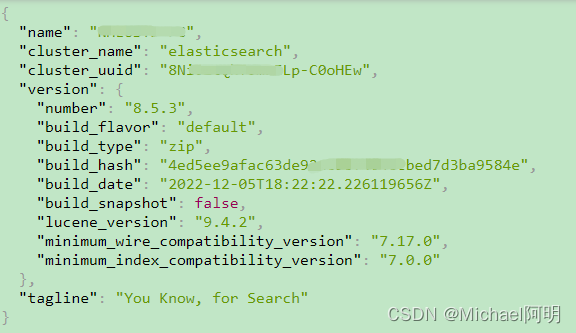
在浏览器输入 http://localhost:9200/
看见 json,就算安装好了
点击 "D:\kibana-8.5.3\bin\kibana.bat"
http://localhost:5601/app/dev_tools#/console
测试
写入 doc
put product/_doc/1
{
  "name": "apple",
  "price": 5.6
}
返回
{
  "_index": "product",
  "_id": "1",
  "_version": 3,
  "result": "updated",
  "_shards": {
    "total": 2,
    "successful": 1,
    "failed": 0
  },
  "_seq_no": 2,
  "_primary_term": 1
}
查询 doc
get /product/_doc/1
返回
{
  "_index": "product",
  "_id": "1",
  "_version": 3,
  "_seq_no": 2,
  "_primary_term": 1,
  "found": true,
  "_source": {
    "name": "apple",
    "price": 5.6
  }
}
查看所有 index
get _cat/indices
从 index 中 from 第几个数据开始,size 个docs
GET kibana_sample_data_logs/_search?from=1&size=2
创建 index
PUT test_index
{
  "settings":{
    "number_of_shards": 1,
    "number_of_replicas": 1
  }
}
删除 index
DELETE test_index
创建完 index 后,主分片数量、index名、字段类型 不可以再修改
重新创建文档,只会带过来 doc,属性设置不会带过来
POST _reindex
{
  "source": {
    "index": "test_index"
  },
  "dest": {
    "index": "new_test_index"
  }
}
检查 index 是否存在
head new_test_index
创建发生在 主分片(可读可写)
操作类型:
PUT test_index/_doc/1?op_type=create
{
  "name": "test1"
}
id 1 的 doc 已存在,create 报错
{
  "error": {
    "root_cause": [
      {
        "type": "version_conflict_engine_exception",
        "reason": "[1]: version conflict, document already exists (current version [1])",
        "index_uuid": "ntM1X5SOTxiz8tRVwdHK6g",
        "shard": "0",
        "index": "test_index"
      }
    ],
    "type": "version_conflict_engine_exception",
    "reason": "[1]: version conflict, document already exists (current version [1])",
    "index_uuid": "ntM1X5SOTxiz8tRVwdHK6g",
    "shard": "0",
    "index": "test_index"
  },
  "status": 409
}
index 操作,替换 doc
PUT test_index/_doc/1?op_type=index
{
  "name": "test_new"
}
{
  "_index": "test_index",
  "_id": "1",
  "_version": 2,
  "result": "updated",
  "_shards": {
    "total": 2,
    "successful": 1,
    "failed": 0
  },
  "_seq_no": 1,
  "_primary_term": 1
}
POST 可以自动生成 随机 id
POST test_index/_doc/
{
  "name": "test_new"
}
{
  "_index": "test_index",
  "_id": "YrdpU4UBIo5EnYllVY0M",
  "_version": 1,
  "result": "created",
  "_shards": {
    "total": 2,
    "successful": 1,
    "failed": 0
  },
  "_seq_no": 4,
  "_primary_term": 1
}
_source=false(不返回 source),不写的话,默认为 trueGET test_index/_doc/1?_source=false
{
  "_index": "test_index",
  "_id": "1",
  "_version": 4,
  "_seq_no": 3,
  "_primary_term": 1,
  "found": true
}
GET test_index/_source/1
{
  "name": "test_new"
}
DELETE test_index/_doc/5
{
  "_index": "test_index",
  "_id": "5",
  "_version": 1,
  "result": "not_found",  # id 5 的不存在
  "_shards": {
    "total": 2,
    "successful": 1,
    "failed": 0
  },
  "_seq_no": 6,
  "_primary_term": 1
}
{
  "_index": "test_index",
  "_id": "1",
  "_version": 1,
  "result": "deleted",  # id 1 的存在,删除掉了
  "_shards": {
    "total": 2,
    "successful": 1,
    "failed": 0
  },
  "_seq_no": 7,
  "_primary_term": 1
}
先添加一个 doc
POST test_index/_doc/1
{
  "name": "test_new",
  "value": 99
}
再查询
GET test_index/_doc/1
更新部分字段
POST test_index/_update/1
{
  "doc": {
    "value": 100
  }
}
再查询
{
  "_index": "test_index",
  "_id": "1",
  "_version": 2,
  "_seq_no": 10,
  "_primary_term": 1,
  "found": true,
  "_source": {
    "name": "test_new",
    "value": 100
  }
}
我在开发的Rails3网站的一些搜索功能上遇到了一个小问题。我有一个简单的Post模型,如下所示:classPost我正在使用acts_as_taggable_on来更轻松地向我的帖子添加标签。当我有一个标记为“rails”的帖子并执行以下操作时,一切正常:@posts=Post.tagged_with("rails")问题是,我还想搜索帖子的标题。当我有一篇标题为“Helloworld”并标记为“rails”的帖子时,我希望能够通过搜索“hello”或“rails”来找到这篇帖子。因此,我希望标题列的LIKE语句与acts_as_taggable_on提供的tagged_with方法
我想为Heroku构建一个Rails3应用程序。他们使用Postgres作为他们的数据库,所以我通过MacPorts安装了postgres9.0。现在我需要一个postgresgem并且共识是出于性能原因你想要pggem。但是我对我得到的错误感到非常困惑当我尝试在rvm下通过geminstall安装pg时。我已经非常明确地指定了所有postgres目录的位置可以找到但仍然无法完成安装:$envARCHFLAGS='-archx86_64'geminstallpg--\--with-pg-config=/opt/local/var/db/postgresql90/defaultdb/po
我打算为ruby脚本创建一个安装程序,但我希望能够确保机器安装了RVM。有没有一种方法可以完全离线安装RVM并且不引人注目(通过不引人注目,就像创建一个可以做所有事情的脚本而不是要求用户向他们的bash_profile或bashrc添加一些东西)我不是要脚本本身,只是一个关于如何走这条路的快速指针(如果可能的话)。我们还研究了这个很有帮助的问题:RVM-isthereawayforsimpleofflineinstall?但有点误导,因为答案只向我们展示了如何离线在RVM中安装ruby。我们需要能够离线安装RVM本身,并查看脚本https://raw.github.com/wayn
我有一个奇怪的问题:我在rvm上安装了rubyonrails。一切正常,我可以创建项目。但是在我输入“railsnew”时重新启动后,我有“程序'rails'当前未安装。”。SystemUbuntu12.04ruby-v"1.9.3p194"gemlistactionmailer(3.2.5)actionpack(3.2.5)activemodel(3.2.5)activerecord(3.2.5)activeresource(3.2.5)activesupport(3.2.5)arel(3.0.2)builder(3.0.0)bundler(1.1.4)coffee-rails(
我刚刚为fedora安装了emacs。我想用emacs编写ruby。为ruby提供代码提示、代码完成类型功能所需的工具、扩展是什么? 最佳答案 ruby-mode已经包含在Emacs23之后的版本中。不过,它也可以通过ELPA获得。您可能感兴趣的其他一些事情是集成RVM、feature-mode(Cucumber)、rspec-mode、ruby-electric、inf-ruby、rinari(用于Rails)等。这是我当前用于Ruby开发的Emacs配置:https://github.com/citizen428/emacs
我正在尝试在我的centos服务器上安装therubyracer,但遇到了麻烦。$geminstalltherubyracerBuildingnativeextensions.Thiscouldtakeawhile...ERROR:Errorinstallingtherubyracer:ERROR:Failedtobuildgemnativeextension./usr/local/rvm/rubies/ruby-1.9.3-p125/bin/rubyextconf.rbcheckingformain()in-lpthread...yescheckingforv8.h...no***e
我的最终目标是安装当前版本的RubyonRails。我在OSXMountainLion上运行。到目前为止,这是我的过程:已安装的RVM$\curl-Lhttps://get.rvm.io|bash-sstable检查已知(我假设已批准)安装$rvmlistknown我看到当前的稳定版本可用[ruby-]2.0.0[-p247]输入命令安装$rvminstall2.0.0-p247注意:我也试过这些安装命令$rvminstallruby-2.0.0-p247$rvminstallruby=2.0.0-p247我很快就无处可去了。结果:$rvminstall2.0.0-p247Search
我实际上是在尝试使用RVM在我的OSX10.7.5上更新ruby,并在输入以下命令后:rvminstallruby我得到了以下回复:Searchingforbinaryrubies,thismighttakesometime.Checkingrequirementsforosx.Installingrequirementsforosx.Updatingsystem.......Errorrunning'requirements_osx_brew_update_systemruby-2.0.0-p247',pleaseread/Users/username/.rvm/log/138121
由于fast-stemmer的问题,我很难安装我想要的任何rubygem。我把我得到的错误放在下面。Buildingnativeextensions.Thiscouldtakeawhile...ERROR:Errorinstallingfast-stemmer:ERROR:Failedtobuildgemnativeextension./System/Library/Frameworks/Ruby.framework/Versions/2.0/usr/bin/rubyextconf.rbcreatingMakefilemake"DESTDIR="cleanmake"DESTDIR=
当我尝试安装Ruby时遇到此错误。我试过查看this和this但无济于事➜~brewinstallrubyWarning:YouareusingOSX10.12.Wedonotprovidesupportforthispre-releaseversion.Youmayencounterbuildfailuresorotherbreakages.Pleasecreatepull-requestsinsteadoffilingissues.==>Installingdependenciesforruby:readline,libyaml,makedepend==>Installingrub
