Elasticsearch 是一个实时分布式搜索和分析引擎,一般用于全文搜索、结构化搜索,分析或者三者混用。
它的底层是基于Apache Lucene(TM)的开源搜索引擎,但是lucene只是一个库,需要java开发然后集成到应用。

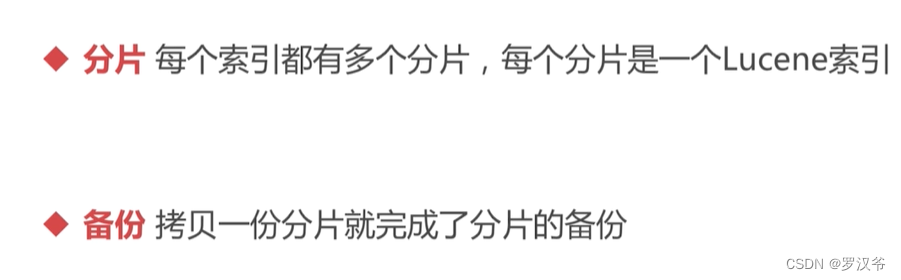
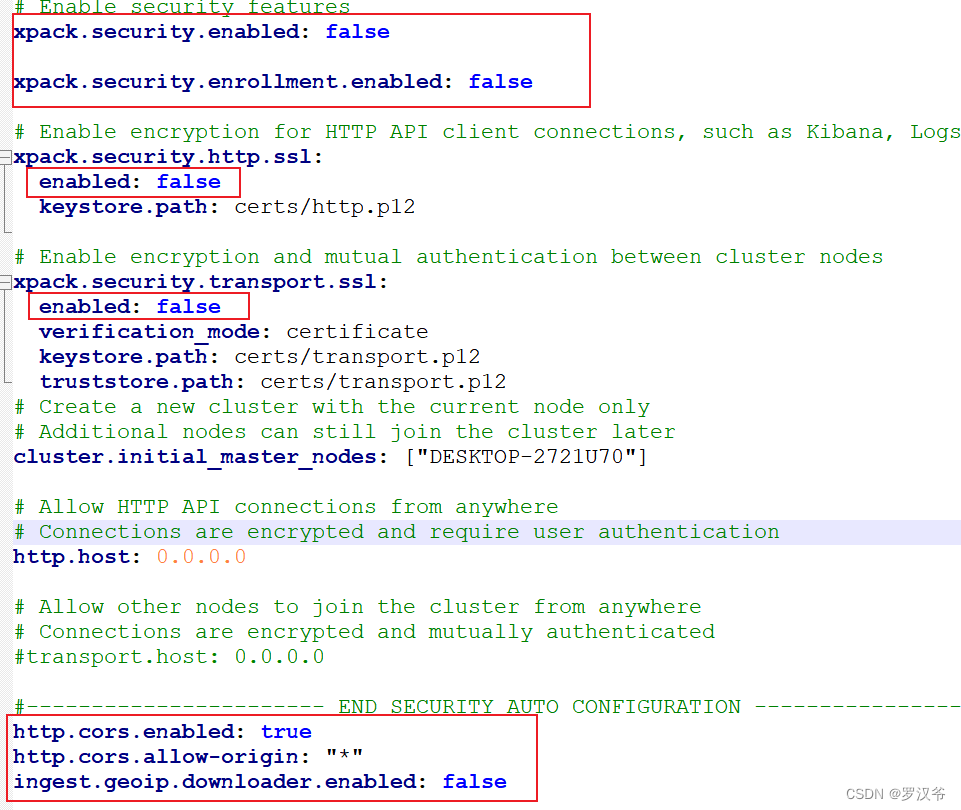
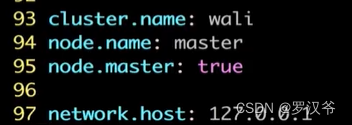
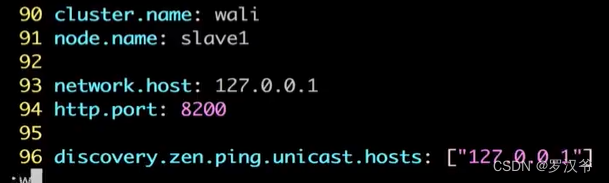
修改config/elasticsearch.yml

windows安装
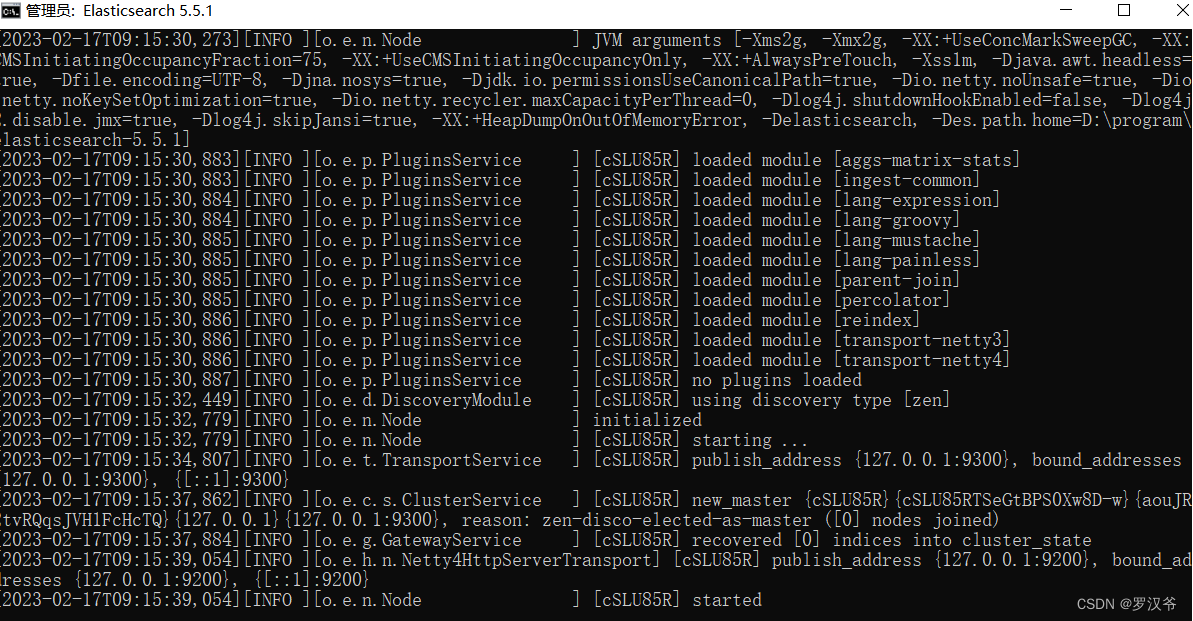
启动
# 后台启动
./bin/elasticsearch -d
https://github.com/mobz/elasticsearch-head
下载解压。
安装node8+
cd根目录,npm install
解决:前端npm install 报错PhantomJS not found on PATH
https://blog.csdn.net/qq_34254090/article/details/120313282
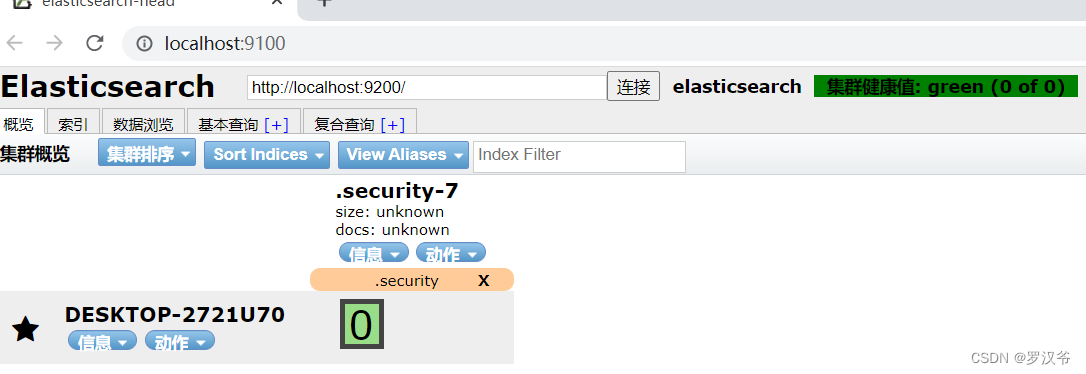
npm run start
https://www.bbsmax.com/A/kmzL44gGzG/
https://blog.csdn.net/weixin_47600880/article/details/119034733

{
    "settings": {
    	"number_of_shards": 3,
    	"number_of_replicas": 1
    },
    "mappings": {
    	"properties": {
    		"name": {
    			"type": "text"
    		},
    		"age": {
    			"type": "integer"
    		}
    	}
    }
}
参数说明:
number_of_shards:索引分片数量
number_of_replicas:索引备份数量
mappings:索引结构化格式映射关键字
properties:设置索引的属性
插入文档
http://localhost:9200/people/_doc/1/
更新文档
http://localhost:9200/people/_update/1
查询文档
http://localhost:9200/people/_doc/1
http://localhost:9200/people/_search
{
	"query": {
		"match_all": {}
	}
}
http://localhost:9200/people/_search{
"query": {
"match": {
"name": "治"
}
},
"from": 1,
"size": 1,
"sort": [
{
"_id": {
"order": "asc"
}
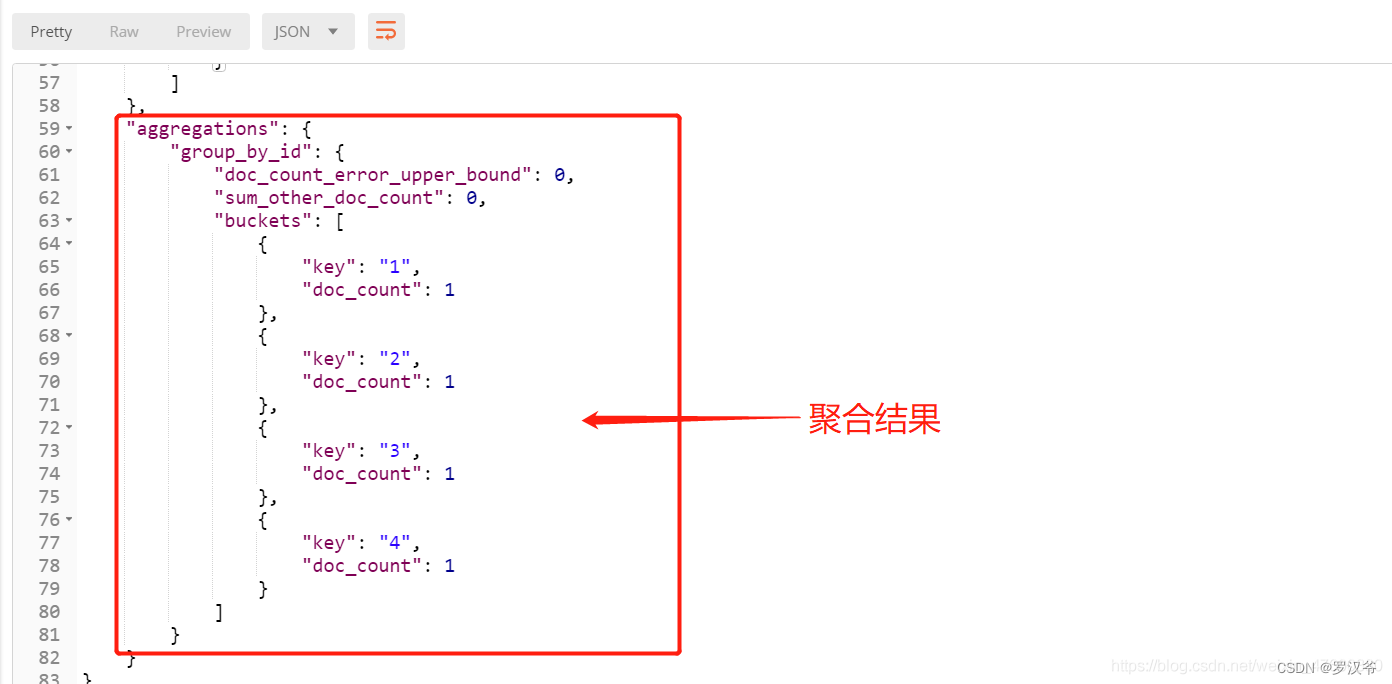
http://localhost:9200/people/_search{
"aggs": {
"group_by_id": {
"terms": {
"field": "_id"
}
}
}
}

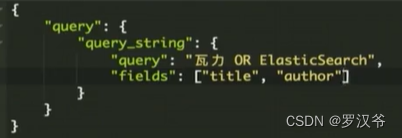
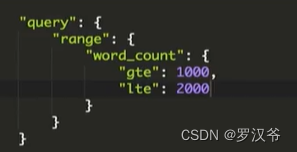
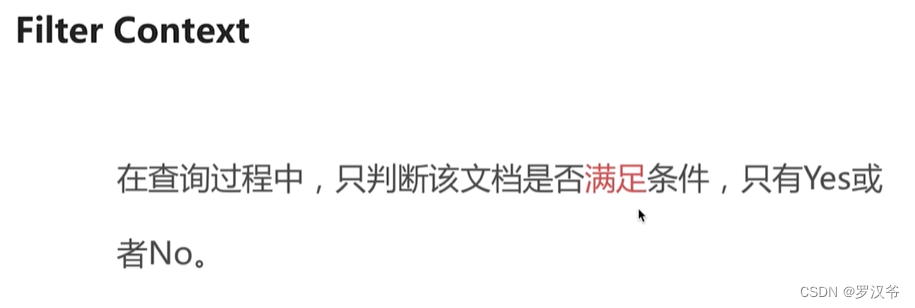
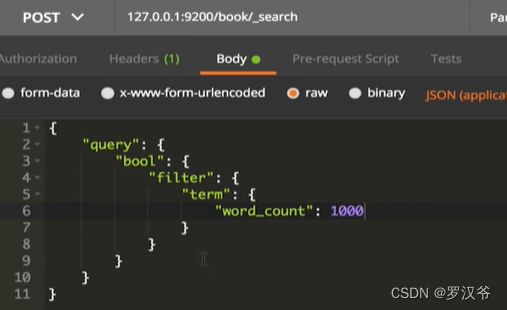
依赖:SpringBoot 2.3.7.RELEASE + ElasticSearch 8.1.1
<?xml version="1.0" encoding="UTF-8"?>
<project xmlns="http://maven.apache.org/POM/4.0.0"
         xmlns:xsi="http://www.w3.org/2001/XMLSchema-instance"
         xsi:schemaLocation="http://maven.apache.org/POM/4.0.0 http://maven.apache.org/xsd/maven-4.0.0.xsd">
    <modelVersion>4.0.0</modelVersion>

    <groupId>com.test.java</groupId>
    <artifactId>springboot_es_house</artifactId>
    <version>1.0-SNAPSHOT</version>

    <properties>
        <java.version>1.8</java.version>
        <project.build.sourceEncoding>UTF-8</project.build.sourceEncoding>
        <project.reporting.outputEncoding>UTF-8</project.reporting.outputEncoding>
        <spring-boot.version>2.3.7.RELEASE</spring-boot.version>
    </properties>

    <dependencyManagement>
        <dependencies>
            <dependency>
                <groupId>org.springframework.boot</groupId>
                <artifactId>spring-boot-dependencies</artifactId>
                <version>${spring-boot.version}</version>
                <type>pom</type>
                <scope>import</scope>
            </dependency>
        </dependencies>
    </dependencyManagement>

    <dependencies>
        <!--Spring Boot Web-->
        <dependency>
            <groupId>org.springframework.boot</groupId>
            <artifactId>spring-boot-starter-web</artifactId>
        </dependency>

        <!--<dependency>
            <groupId>org.springframework.boot</groupId>
            <artifactId>spring-boot-starter-data-elasticsearch</artifactId>
        </dependency>-->

        <dependency>
            <groupId>com.alibaba</groupId>
            <artifactId>fastjson</artifactId>
            <version>1.2.44</version>
        </dependency>

        <dependency>
            <groupId>org.projectlombok</groupId>
            <artifactId>lombok</artifactId>
            <version>1.18.12</version>
            <scope>provided</scope>
        </dependency>

        <dependency>
            <groupId>co.elastic.clients</groupId>
            <artifactId>elasticsearch-java</artifactId>
            <version>8.1.1</version>
        </dependency>

        <dependency>
            <groupId>jakarta.json</groupId>
            <artifactId>jakarta.json-api</artifactId>
            <version>2.0.1</version>
        </dependency>

        <dependency>
            <groupId>org.springframework.boot</groupId>
            <artifactId>spring-boot-starter-test</artifactId>
            <scope>test</scope>
        </dependency>
    </dependencies>

    <build>
        <plugins>
            <plugin>
                <groupId>org.apache.maven.plugins</groupId>
                <artifactId>maven-compiler-plugin</artifactId>
                <configuration>
                    <source>1.8</source>
                    <target>1.8</target>
                </configuration>
            </plugin>
        </plugins>
    </build>
</project>
package com.test.java.config;

import co.elastic.clients.elasticsearch.ElasticsearchClient;
import co.elastic.clients.json.jackson.JacksonJsonpMapper;
import co.elastic.clients.transport.ElasticsearchTransport;
import co.elastic.clients.transport.rest_client.RestClientTransport;
import org.apache.http.HttpHost;
import org.elasticsearch.client.RestClient;
import org.springframework.context.annotation.Bean;
import org.springframework.context.annotation.Configuration;

/**
 * @Author laoxu
 * @Date 2023/2/17 15:06
 * @Desc 配置ES客户端
 */
@Configuration
public class ESConfig {
    @Bean
    public ElasticsearchClient elasticsearchClient(){
        RestClient client = RestClient.builder(new HttpHost("localhost", 9200,"http")).build();
        ElasticsearchTransport transport = new RestClientTransport(client,new JacksonJsonpMapper());

        return new ElasticsearchClient(transport);
    }
}
package com.test.java.entity;

import com.fasterxml.jackson.annotation.JsonIgnoreProperties;
import lombok.AllArgsConstructor;
import lombok.Data;
import lombok.NoArgsConstructor;

import java.math.BigDecimal;

/**
 * @Author laoxu
 * @Date 2023/2/17 15:26
 * @Desc 商品实体类
 */
@Data
@NoArgsConstructor
@AllArgsConstructor
@JsonIgnoreProperties(ignoreUnknown = true)
public class Product {
    private String productName;
    private double price;
    private Integer stock;

    public String geIndexId() {
        int id = 1;
        id += id;
        String indexId = String.valueOf(id);
        return indexId;
    }
}
package com.test.java;

import co.elastic.clients.elasticsearch.ElasticsearchClient;
import co.elastic.clients.elasticsearch._types.query_dsl.MatchQuery;
import co.elastic.clients.elasticsearch._types.query_dsl.Query;
import co.elastic.clients.elasticsearch._types.query_dsl.RangeQuery;
import co.elastic.clients.elasticsearch.core.*;
import co.elastic.clients.elasticsearch.core.bulk.BulkResponseItem;
import co.elastic.clients.elasticsearch.core.search.Hit;
import co.elastic.clients.elasticsearch.core.search.TotalHits;
import co.elastic.clients.elasticsearch.core.search.TotalHitsRelation;
import co.elastic.clients.elasticsearch.indices.*;
import co.elastic.clients.elasticsearch.indices.ExistsRequest;
import co.elastic.clients.json.JsonData;
import co.elastic.clients.transport.endpoints.BooleanResponse;
import com.test.java.entity.Product;
import org.junit.Test;
import org.junit.runner.RunWith;
import org.springframework.beans.factory.annotation.Autowired;
import org.springframework.boot.test.context.SpringBootTest;
import org.springframework.test.context.junit4.SpringRunner;

import java.io.IOException;
import java.util.ArrayList;
import java.util.List;
import java.util.UUID;

/**
 * @Author laoxu
 * @Date 2023/2/17 15:28
 * @Desc 测试ES增删改查API
 */
@RunWith(SpringRunner.class)
@SpringBootTest
public class ESApiTest {
    @Autowired
    private ElasticsearchClient esClient;

    /**
     * 判断索引是否存在
     * @throws IOException
     */
    @Test
    public void existsIndex() throws IOException {
        ExistsRequest existsRequest = new ExistsRequest.Builder().index("product").build();
        BooleanResponse existsResponse = esClient.indices().exists(existsRequest);
        System.out.println("是否存在:"+existsResponse.value());
    }
    /**
     * 创建索引
     * 创建索引时,必须是小写,否则创建报错
     * @throws IOException
     */
    @Test
    public void createIndex() throws IOException {
        CreateIndexRequest createIndexRequest = new CreateIndexRequest.Builder().index("product").build();
        CreateIndexResponse createIndexResponse = esClient.indices().create(createIndexRequest);
        System.out.println("是否成功:"+createIndexResponse.acknowledged());
    }

    /**
     * 删除索引
     * @throws IOException
     */
    @Test
    public void deleteIndex() throws IOException {
        DeleteIndexRequest deleteIndexRequest = new DeleteIndexRequest.Builder().index("product").build();
        DeleteIndexResponse deleteIndexResponse = esClient.indices().delete(deleteIndexRequest);
        System.out.println("是否成功:"+deleteIndexResponse.acknowledged());
    }

    /**
     * 同步方式
     * 向索引中添加信息,此操作不存在索引时会直接创建索引,使用时需要各种校验使逻辑更严谨
     * @throws IOException
     */
    @Test
    public void setIndex() throws IOException {
        Product product = new Product("帽子",44.5,9);
        IndexRequest<Product> indexRequest = new IndexRequest.Builder<Product>().index("product")
                .id(String.valueOf(product.getStock()))
                .document(product)
                .build();
        IndexResponse indexResponse = esClient.index(indexRequest);
        System.out.println(indexResponse);
    }

    /**
     * 批量写入数据
     * @throws IOException
     */
    @Test
    public void bulkIndex() throws IOException{
        List<Product> products = new ArrayList<Product>();
        products.add(new Product("香烟",135,1));
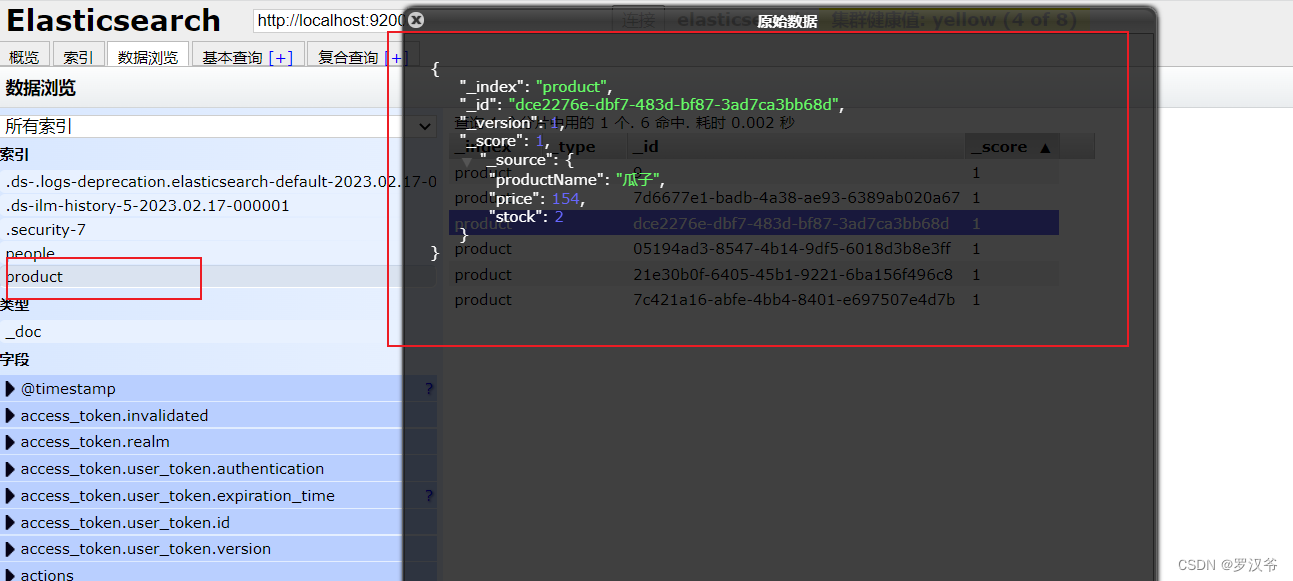
        products.add(new Product("瓜子",154,2));
        products.add(new Product("矿泉水",613,3));
        products.add(new Product("酱油",72,4));
        products.add(new Product("大米",771,5));
        BulkRequest.Builder bk = new BulkRequest.Builder();
        int indexId = 4;
        for (Product product:products) {
            bk.operations(op->op.index(i->i.index("product")
                    .id(UUID.randomUUID().toString())
                    .document(product)));
        }
        BulkResponse response = esClient.bulk(bk.build());
        if (response.errors()) {
            System.out.println("Bulk had errors");
            for (BulkResponseItem item: response.items()) {
                if (item.error() != null) {
                    System.out.println(item.error().reason());
                }
            }
        }
    }

    /**
     * 根据索引文档id获取文档信息
     * @throws IOException
     */
    @Test
    public void getIndexById() throws IOException {
        GetRequest getRequest = new GetRequest.Builder().index("product")
                .id("9")
                .build();
        GetResponse<Product> response = esClient.get(getRequest, Product.class);
        if (response.found()) {
            Product product = response.source();
            System.out.println("Product name " + product.getProductName());
            System.out.println("Product price " + product.getPrice());
        } else {
            System.out.println("Product not found");
        }
    }

    /**
     * 简单查询文档信息
     * @throws IOException
     */
    @Test
    public void getSearch() throws IOException{
        /*此处 .from(1).size(2) 表示分页查询,从第一页开始查询,大小为两条*/
        SearchRequest searchRequest = new SearchRequest.Builder().index("product")
                .query(q -> q.match(m -> m.field("productName").query("烟"))).from(1).size(2).build();

        SearchResponse<Product> response = esClient.search(searchRequest,Product.class);

        TotalHits total = response.hits().total();
        boolean isExactResult = total.relation() == TotalHitsRelation.Eq;

        if (isExactResult) {
            System.out.println("There are " + total.value() + " results");
        } else {
            System.out.println("There are more than " + total.value() + " results");
        }

        List<Hit<Product>> hits = response.hits().hits();
        for (Hit<Product> hit: hits) {
            Product product = hit.source();
            System.out.println("Found product " + product.getProductName() + ", score " + hit.score());
        }
    }

    /**
     * 多条件嵌套查询文档信息
     * @throws IOException
     */
    @Test
    public void getSearchs() throws IOException{
        String productName = "衣服";
        double price = 115;

        //按照产品名称搜索
        Query byname = MatchQuery.of(m -> m.field("productName")
                .query(productName))._toQuery();

        //按照产品价格搜索
        Query byprice = RangeQuery.of(r -> r
                .field("price")
                .gte(JsonData.of(price))
        )._toQuery();

        //结合名称和价格查询
        SearchResponse<Product> response = esClient.search(s -> s
                        .index("product")
                        .query(q -> q
                                .bool(b -> b
                                        .must(byname)
                                        .must(byprice)
                                )
                        )
                        .from(1)
                        .size(2),
                Product.class
        );

        List<Hit<Product>> hits = response.hits().hits();
        for (Hit<Product> hit : hits){
            Product product = hit.source();
            System.out.println(product.getProductName()+" "+product.getPrice());
        }
    }

}
我想为Heroku构建一个Rails3应用程序。他们使用Postgres作为他们的数据库,所以我通过MacPorts安装了postgres9.0。现在我需要一个postgresgem并且共识是出于性能原因你想要pggem。但是我对我得到的错误感到非常困惑当我尝试在rvm下通过geminstall安装pg时。我已经非常明确地指定了所有postgres目录的位置可以找到但仍然无法完成安装:$envARCHFLAGS='-archx86_64'geminstallpg--\--with-pg-config=/opt/local/var/db/postgresql90/defaultdb/po
我打算为ruby脚本创建一个安装程序,但我希望能够确保机器安装了RVM。有没有一种方法可以完全离线安装RVM并且不引人注目(通过不引人注目,就像创建一个可以做所有事情的脚本而不是要求用户向他们的bash_profile或bashrc添加一些东西)我不是要脚本本身,只是一个关于如何走这条路的快速指针(如果可能的话)。我们还研究了这个很有帮助的问题:RVM-isthereawayforsimpleofflineinstall?但有点误导,因为答案只向我们展示了如何离线在RVM中安装ruby。我们需要能够离线安装RVM本身,并查看脚本https://raw.github.com/wayn
我有一个奇怪的问题:我在rvm上安装了rubyonrails。一切正常,我可以创建项目。但是在我输入“railsnew”时重新启动后,我有“程序'rails'当前未安装。”。SystemUbuntu12.04ruby-v"1.9.3p194"gemlistactionmailer(3.2.5)actionpack(3.2.5)activemodel(3.2.5)activerecord(3.2.5)activeresource(3.2.5)activesupport(3.2.5)arel(3.0.2)builder(3.0.0)bundler(1.1.4)coffee-rails(
我刚刚为fedora安装了emacs。我想用emacs编写ruby。为ruby提供代码提示、代码完成类型功能所需的工具、扩展是什么? 最佳答案 ruby-mode已经包含在Emacs23之后的版本中。不过,它也可以通过ELPA获得。您可能感兴趣的其他一些事情是集成RVM、feature-mode(Cucumber)、rspec-mode、ruby-electric、inf-ruby、rinari(用于Rails)等。这是我当前用于Ruby开发的Emacs配置:https://github.com/citizen428/emacs
我正在尝试在我的centos服务器上安装therubyracer,但遇到了麻烦。$geminstalltherubyracerBuildingnativeextensions.Thiscouldtakeawhile...ERROR:Errorinstallingtherubyracer:ERROR:Failedtobuildgemnativeextension./usr/local/rvm/rubies/ruby-1.9.3-p125/bin/rubyextconf.rbcheckingformain()in-lpthread...yescheckingforv8.h...no***e
我的最终目标是安装当前版本的RubyonRails。我在OSXMountainLion上运行。到目前为止,这是我的过程:已安装的RVM$\curl-Lhttps://get.rvm.io|bash-sstable检查已知(我假设已批准)安装$rvmlistknown我看到当前的稳定版本可用[ruby-]2.0.0[-p247]输入命令安装$rvminstall2.0.0-p247注意:我也试过这些安装命令$rvminstallruby-2.0.0-p247$rvminstallruby=2.0.0-p247我很快就无处可去了。结果:$rvminstall2.0.0-p247Search
我实际上是在尝试使用RVM在我的OSX10.7.5上更新ruby,并在输入以下命令后:rvminstallruby我得到了以下回复:Searchingforbinaryrubies,thismighttakesometime.Checkingrequirementsforosx.Installingrequirementsforosx.Updatingsystem.......Errorrunning'requirements_osx_brew_update_systemruby-2.0.0-p247',pleaseread/Users/username/.rvm/log/138121
由于fast-stemmer的问题,我很难安装我想要的任何rubygem。我把我得到的错误放在下面。Buildingnativeextensions.Thiscouldtakeawhile...ERROR:Errorinstallingfast-stemmer:ERROR:Failedtobuildgemnativeextension./System/Library/Frameworks/Ruby.framework/Versions/2.0/usr/bin/rubyextconf.rbcreatingMakefilemake"DESTDIR="cleanmake"DESTDIR=
我在app/helpers/sessions_helper.rb中有一个帮助程序文件,其中包含一个方法my_preference,它返回当前登录用户的首选项。我想在集成测试中访问该方法。例如,这样我就可以在测试中使用getuser_path(my_preference)。在其他帖子中,我读到这可以通过在测试文件中包含requiresessions_helper来实现,但我仍然收到错误NameError:undefinedlocalvariableormethod'my_preference'.我做错了什么?require'test_helper'require'sessions_hel
当我尝试安装Ruby时遇到此错误。我试过查看this和this但无济于事➜~brewinstallrubyWarning:YouareusingOSX10.12.Wedonotprovidesupportforthispre-releaseversion.Youmayencounterbuildfailuresorotherbreakages.Pleasecreatepull-requestsinsteadoffilingissues.==>Installingdependenciesforruby:readline,libyaml,makedepend==>Installingrub
