学生成绩管理系统课程设计
1 信息需求
对学校而言,学生成绩管理是管理工作中重要的一环,但是高校学生的成绩管理工作量大、繁杂,人工处理非常困难。因此,借助于强大计算机的处理能力,能够把人从繁重的成绩管理工作中解脱出来,并且更加准确、安全、清晰的管理环境。
2 功能需求
能够进行数据库的数据定义、数据操纵、数据控制等处理功能。具体功能应包括:可提供课程安排、课程成绩数据的添加、插入、删除、更新、查询,学生及教职工基本信息查询的功能。
3 安全性与完整性要求
对于学生成绩管理系统数据库来讲,由于其主要数据是学生成绩,只能由本人以及所教老师及教务处知道,因此做好数据安全性是重中之重。另外,要求所有在校学生的信息都要录入其中,并且要设计好个别情况。
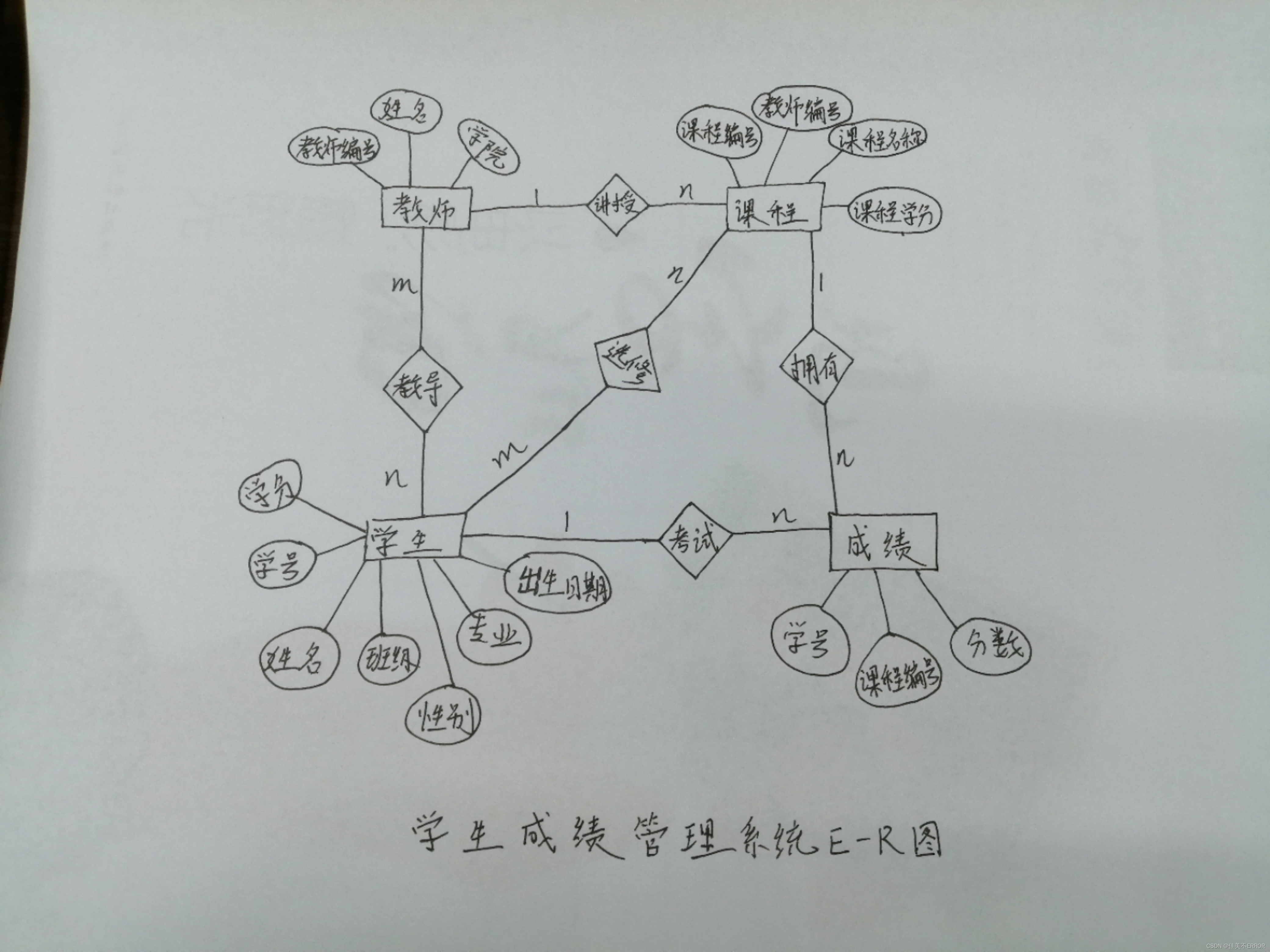
一位学生会被多位老师教导,一位老师会教导多位学生,所有学生与教师之间是多对多(m:n)的关系;
一位学生可能会选修多门课程,一门课程会被多位学生选修,所以学生与课程之间是多对多(m:n)的关系;
一位学生会有多项成绩(具体指某学生一门课程的分数),一项成绩仅被一位学生拥有,所以学生与成绩是一对多(1:n)的关系;
一位教师会讲授多门课程,一门课程会被一位教师讲授,所以教师与课程的关系是一对多(1:n)的关系;
一门课程拥有多项成绩,一项成绩仅被一门课程拥有,所以课程与成绩的关系是一对多(1:n)的关系;
学生(学号、姓名、班级、性别、专业、出生日期、学分);
老师(教师编号、姓名、学院);
课程(课程编号、教师编号、课程名称、课程学分);
成绩(学号、课程编号、分数);
根据题目要求可以简化成三个表:
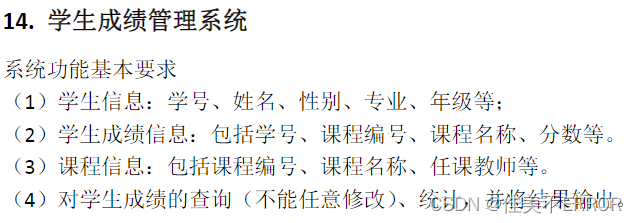
1.student 表:学号(sno)、姓名(sname)、性别(ssex)、专业(sdept),此为联系“student表”所对应的关系模式,学号为该关系的候选码,满足第三范式。
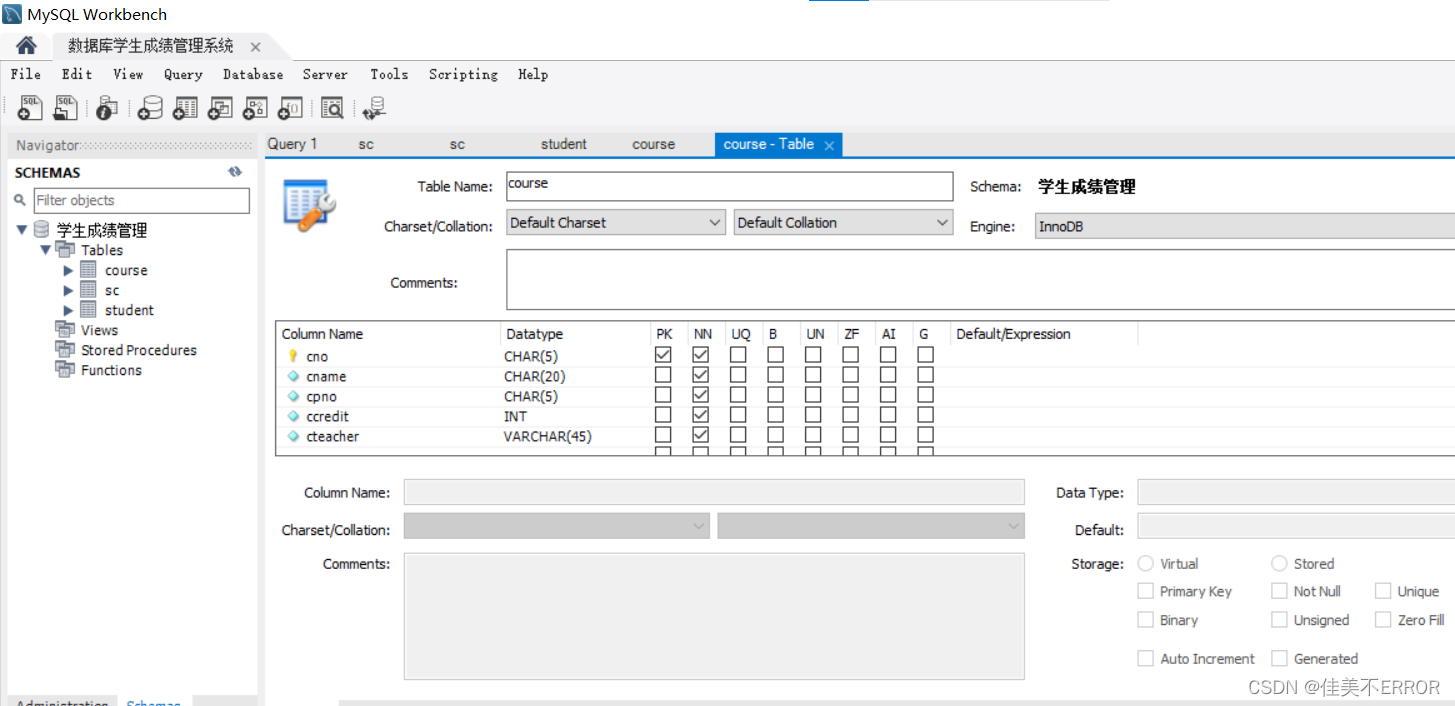
2.course表:课程编号(cno)、教师(cteacher)、课程名称(cname)、先修课课程号(cpno)、学分(ccredit),此为联系“course表”所对应的关系模式,课程编号和教师编号为该关系的候选码,满足第三范式。
3.sc表:学号(sno)、课程编号(cno)、分数(grade),此为联系“sc表”所对应的关系模式,学号和课程编号为该关系的候选码,满足第三范式。
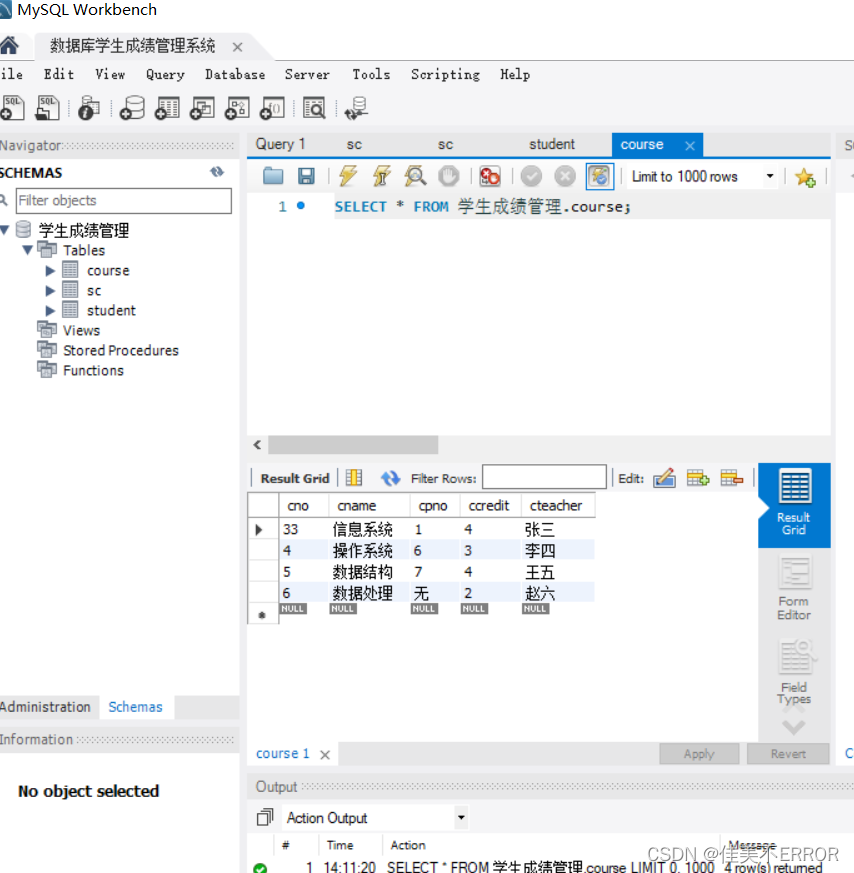
创建course表
属性依次为:课程号、课程名、先修课课程号、学分、教师
主键为课程号
创建student表
属性依次为:学号、姓名、性别、年龄、所在系系名
主键为学号
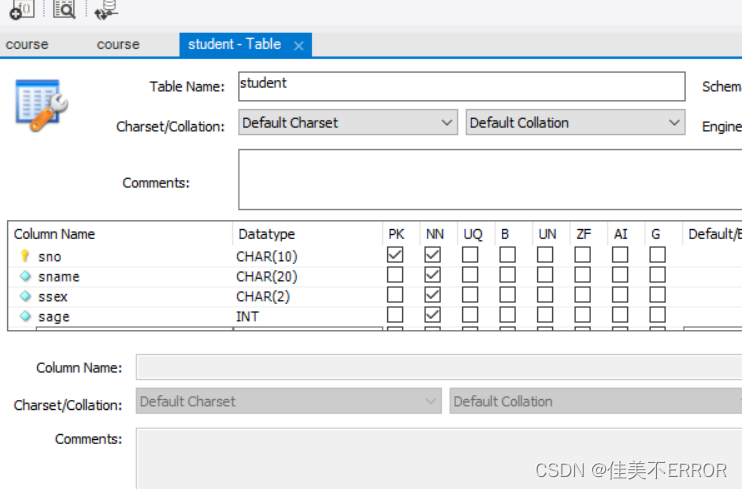
sdept char(15) null勾选
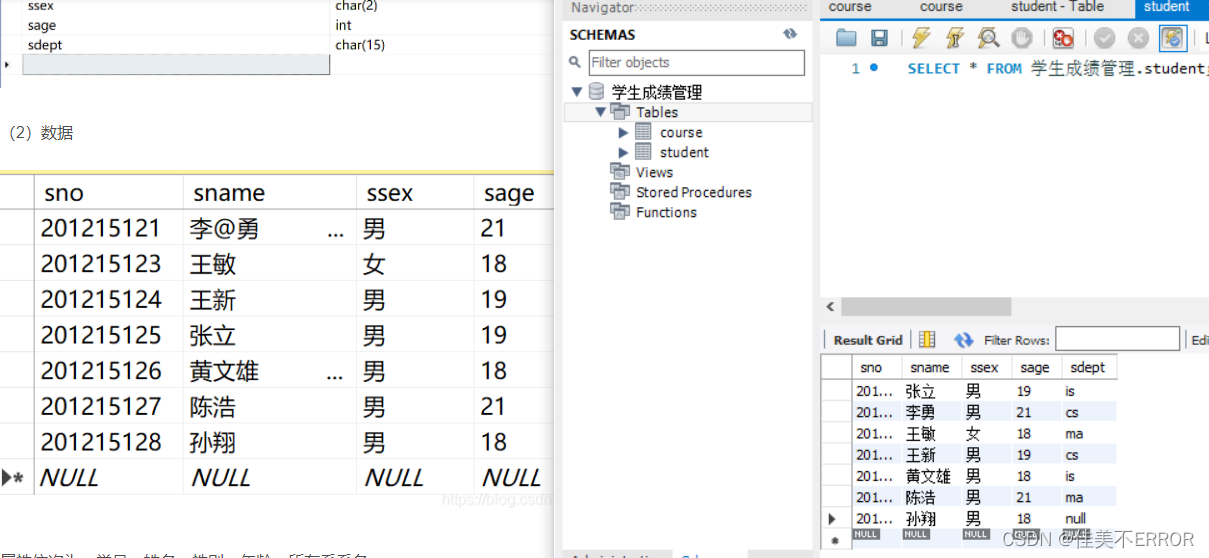
注意学号不要写重复,会报错
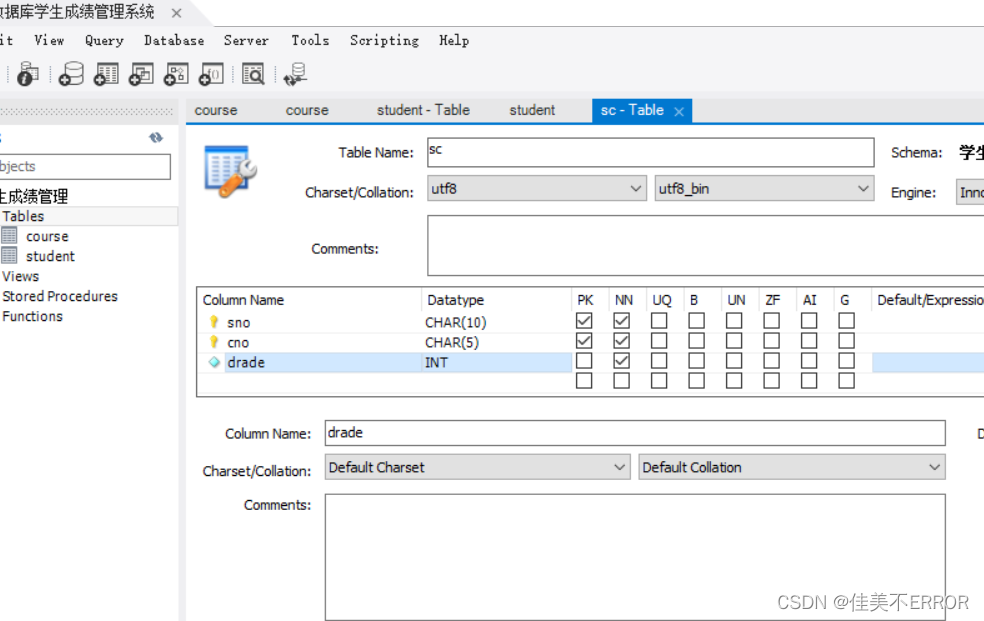
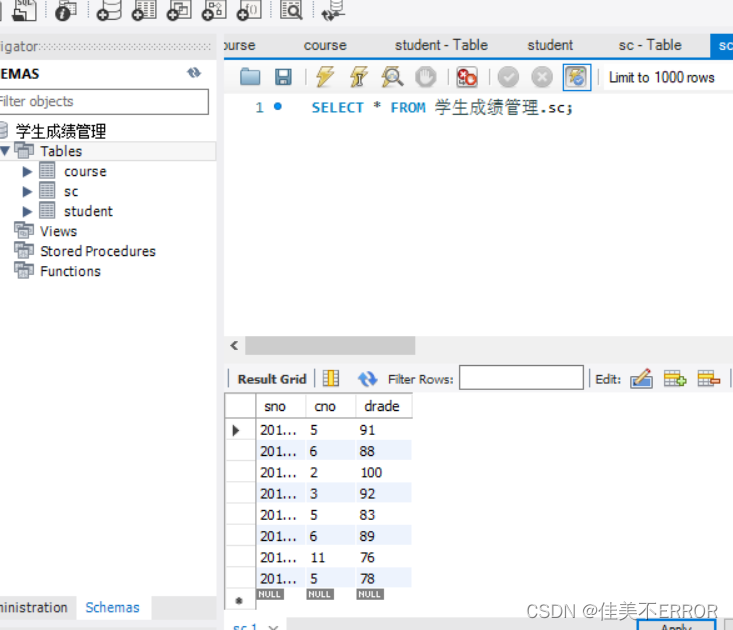
创建sc表,表示选课关系
属性依次为学号、课程号、分数
主键为学号、课程号
数据库链接到idea
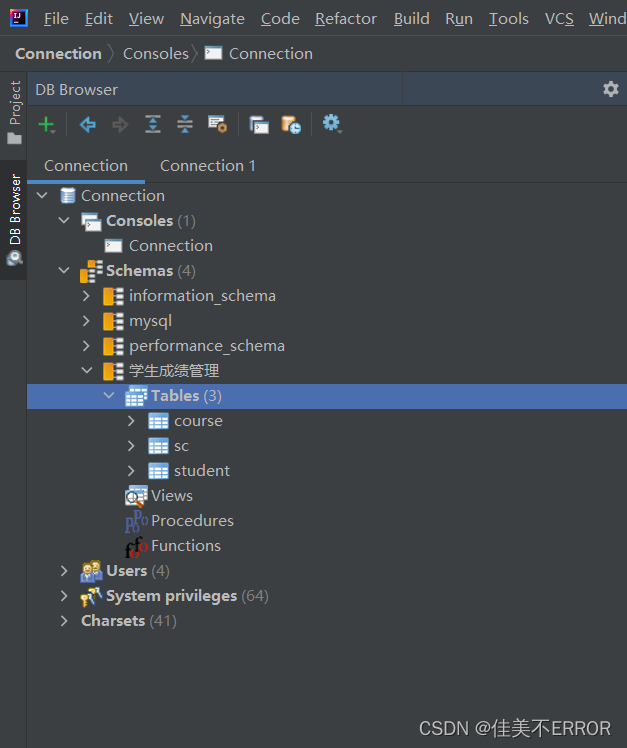
idea没有database的下载:
File+settings+editor+plugins+database navigator+apply+ok
出现感叹号:进connection+properties+serverTimezone+Asia/Shanghai+test connection
主代码再最后面
AddC
/*
AddC
*/
package sc;
import java.awt.*;
import javax.swing.*;
import java.sql.*;
import java.awt.event.*;

public class AddC extends JPanel implements ActionListener{
    JTextField 课程号,课程名,先修课课程号,学分;
    JButton 录入;

    public AddC(){
        try {UIManager.setLookAndFeel(UIManager.getSystemLookAndFeelClassName());}
        catch(Exception e){System.err.println("不能设置外观:   "+e);}

        课程号=new JTextField(12);
        课程名=new JTextField(12);
        先修课课程号=new JTextField(12);
        学分=new JTextField(12);
        录入=new JButton("录入");
        录入.addActionListener(this);

        Box box1=Box.createHorizontalBox();//横放box
        Box box2=Box.createHorizontalBox();
        Box box3=Box.createHorizontalBox();
        Box box4=Box.createHorizontalBox();
        Box box5=Box.createHorizontalBox();
        Box box6=Box.createHorizontalBox();
        box1.add(new JLabel("课程号:"));
        box1.add(课程号);
        box2.add(new JLabel("课程名:"));
        box2.add(课程名);
        box3.add(new JLabel("先修课课程号:"));
        box3.add(先修课课程号);
        box4.add(new JLabel("学分:"));
        box4.add(学分);
        box6.add(录入);
        Box boxH=Box.createVerticalBox();//竖放box
        boxH.add(box1);
        boxH.add(box2);
        boxH.add(box3);
        boxH.add(box4);
        boxH.add(box5);
        boxH.add(box6);
        boxH.add(Box.createVerticalGlue());
        JPanel messPanel=new JPanel();
        messPanel.add(boxH);
        setLayout(new BorderLayout());
        add(messPanel,BorderLayout.CENTER);
        validate();
    }
    public void actionPerformed(ActionEvent c){
        Object obj=c.getSource();
        if(obj==录入){
            if(课程号.getText().equals("")||课程名.getText().equals("")||先修课课程号.getText().equals("")||学分.getText().equals("")){
                JOptionPane.showMessageDialog(this,"学生信息请填满再录入!" );
            }
            Statement stmt=null;
            ResultSet rs=null,rs1=null;
            String sql,sql1;
            sql1="select * from Course where Cno='"+课程号.getText()+"'";
            sql="insert into Course values('"+课程号.getText()+"','"+课程名.getText()+"','"+先修课课程号.getText()+"','"+学分.getText()+"')";
            try{
                Connection dbConn1=CONN();
                stmt=(Statement)dbConn1.createStatement(ResultSet.TYPE_SCROLL_INSENSITIVE,ResultSet.CONCUR_READ_ONLY);
                rs1=stmt.executeQuery(sql1);
                if(rs1.next()){JOptionPane.showMessageDialog(this,"该课号以存在,无法添加");}
                else{
                    stmt.executeUpdate(sql);
                    JOptionPane.showMessageDialog(this,"添加成功");
                }
                rs1.close();

                stmt.close();
            }
            catch(SQLException e){
                System.out.print("SQL Exception occur.Message is:"+e.getMessage());
            }
        }
    }
    public static Connection CONN(){
        String driverName = "com.microsoft.sqlserver.jdbc.SQLServerDriver";   //加载JDBC驱动
        String dbURL = "jdbc:sqlserver://主机名:1433; DatabaseName=数据库名";   //连接服务器和数据库test
        String userName = "sa";   //默认用户名
        String userPwd = "密码";   //密码
        Connection dbConn=null;

        try {
            Class.forName(driverName);
            dbConn = DriverManager.getConnection(dbURL, userName, userPwd);
            System.out.println("Connection Successful!");   //如果连接成功 控制台输出Connection Successful!
        } catch (Exception e) {
            e.printStackTrace();
        }
        return dbConn;
    }

}
AddS
/*
AddS
*/
package sc;
import java.awt.*;
import javax.swing.*;
import java.sql.*;
import java.awt.event.*;


public  class AddS extends JPanel implements ActionListener{
    JTextField 学号,姓名,性别,年龄,所在系系名;
    JButton 录入;

    public AddS(){
        try {UIManager.setLookAndFeel(UIManager.getSystemLookAndFeelClassName());}
        catch(Exception e){System.err.println("不能设置外观:   "+e);}

        学号=new JTextField(12);
        姓名=new JTextField(12);
        性别=new JTextField(12);
        年龄=new JTextField(12);
        所在系系名=new JTextField(12);
        录入=new JButton("录入");
        录入.addActionListener(this);

        Box box1=Box.createHorizontalBox();//横放box
        Box box2=Box.createHorizontalBox();
        Box box3=Box.createHorizontalBox();
        Box box4=Box.createHorizontalBox();
        Box box5=Box.createHorizontalBox();
        Box box6=Box.createHorizontalBox();
        box1.add(new JLabel("学号:"/*,JLabel.CENTER*/));
        box1.add(学号);
        box2.add(new JLabel("姓名:"/*,JLabel.CENTER*/));
        box2.add(姓名);
        box3.add(new JLabel("性别:"/*,JLabel.CENTER*/));
        box3.add(性别);
        box4.add(new JLabel("年龄:"/*,JLabel.CENTER*/));
        box4.add(年龄);
        box5.add(new JLabel("所在系系名:"/*,JLabel.CENTER*/));
        box5.add(所在系系名);
        box6.add(录入);
        Box boxH=Box.createVerticalBox();//竖放box
        boxH.add(box1);
        boxH.add(box2);
        boxH.add(box3);
        boxH.add(box4);
        boxH.add(box5);
        boxH.add(box6);
        boxH.add(Box.createVerticalGlue());
        JPanel messPanel=new JPanel();
        messPanel.add(boxH);
        setLayout(new BorderLayout());
        add(messPanel,BorderLayout.CENTER);
        validate();
    }
    public void actionPerformed(ActionEvent c){
        Object obj=c.getSource();
        if(obj==录入){
            if(学号.getText().equals("")||姓名.getText().equals("")||性别.getText().equals("")||年龄.getText().equals("")||所在系系名.getText().equals("")){
                JOptionPane.showMessageDialog(this,"学生信息请填满再录入!" );
            }
            Statement stmt=null;
            ResultSet rs1=null;
            String sql,sql1;
            sql1="select * from Student where Sno='"+学号.getText()+"'";
            sql="insert into Student values('"+学号.getText()+"','"+姓名.getText()+"','"+性别.getText()+"','"+年龄.getText()+"','"+所在系系名.getText()+"')";
            try{
                Connection dbConn1=CONN();
                stmt=(Statement)dbConn1.createStatement(ResultSet.TYPE_SCROLL_INSENSITIVE,ResultSet.CONCUR_READ_ONLY);
                rs1=stmt.executeQuery(sql1);
                if(rs1.next()){JOptionPane.showMessageDialog(this,"该学号已经存在,无法添加");}
                else{
                    stmt.executeUpdate(sql);
                    JOptionPane.showMessageDialog(this,"添加成功");
                }
                rs1.close();
                stmt.close();
            }
            catch(SQLException e){
                System.out.print("SQL Exception occur.Message is:"+e.getMessage());
            }
        }
    }
    public static Connection CONN(){
        String driverName = "com.microsoft.sqlserver.jdbc.SQLServerDriver";   //加载JDBC驱动
        String dbURL = "jdbc:sqlserver://主机名:1433; DatabaseName=数据库名";   //连接服务器和数据库test
        String userName = "sa";   //默认用户名
        String userPwd = "密码";   //密码
        Connection dbConn=null;

        try {
            Class.forName(driverName);
            dbConn = DriverManager.getConnection(dbURL, userName, userPwd);
            System.out.println("Connection Successful!");   //如果连接成功 控制台输出Connection Successful!
        } catch (Exception e) {
            e.printStackTrace();
        }
        return dbConn;
    }

}
AddSC
/*
AddSC
*/
package sc;

import java.awt.*;

import javax.swing.*;

import java.sql.*;
import java.util.*;
import javax.swing.filechooser.*;
import java.io.*;
import java.awt.event.*;

public class AddSC extends JPanel implements ActionListener{
    JTextField 课程号,学号,成绩;
    JButton 录入;

    public AddSC(){
        try {UIManager.setLookAndFeel(UIManager.getSystemLookAndFeelClassName());}
        catch(Exception e){System.err.println("不能设置外观:   "+e);}

        课程号=new JTextField(12);
        学号=new JTextField(12);
        成绩=new JTextField(12);
        录入=new JButton("录入");
        录入.addActionListener(this);

        Box box1=Box.createHorizontalBox();//横放box
        Box box2=Box.createHorizontalBox();
        Box box3=Box.createHorizontalBox();
        Box box4=Box.createHorizontalBox();
        box1.add(new JLabel("课号:"));
        box1.add(课程号);
        box2.add(new JLabel("学号:"));
        box2.add(学号);
        box3.add(new JLabel("成绩:"));
        box3.add(成绩);
        box4.add(录入);
        Box boxH=Box.createVerticalBox();//竖放box
        boxH.add(box1);
        boxH.add(box2);
        boxH.add(box3);
        boxH.add(box4);
        boxH.add(Box.createVerticalGlue());
        JPanel messPanel=new JPanel();
        messPanel.add(boxH);
        setLayout(new BorderLayout());
        add(messPanel,BorderLayout.CENTER);
        validate();
    }
    public void actionPerformed(ActionEvent c){
        Object obj=c.getSource();
        if(obj==录入){
            if(课程号.getText().equals("")||学号.getText().equals("")){
                JOptionPane.showMessageDialog(this,"填写课号与学号才能录入!" );
            }
            else
            {
                Statement stmt=null;
                ResultSet rs=null,rs1=null,rsC=null,rsS=null;
                String sql,sql1,sqlS,sqlC;
                sqlC="select * from Course where Cno='"+课程号.getText()+"'";
                sqlS="select * from Student where Sno='"+学号.getText()+"'";
                sql1="select * from SC where Cno='"+课程号.getText()+"' and Sno='"+学号.getText()+"'";
                sql="insert into SC values('"+学号.getText()+"','"+课程号.getText()+"','"+成绩.getText()+"')";
                try{
                    Connection dbConn1=CONN();
                    stmt=(Statement)dbConn1.createStatement(ResultSet.TYPE_SCROLL_INSENSITIVE,ResultSet.CONCUR_READ_ONLY);
                    rsC=stmt.executeQuery(sqlC);
                    if(rsC.next()){
                        rsS=stmt.executeQuery(sqlS);
                        if(rsS.next()){
                            rs1=stmt.executeQuery(sql1);
                            if(rs1.next()){JOptionPane.showMessageDialog(this,"该学生以选该课程号,无法添加");}
                            else{
                                stmt.executeUpdate(sql);
                                JOptionPane.showMessageDialog(this,"添加成功");
                            }
                            rs1.close();
                        }
                        else{JOptionPane.showMessageDialog(this,"该学生不存在,无法添加");}
                        rsS.close();
                    }
                    else{JOptionPane.showMessageDialog(this,"该课程不存在,无法添加");}
                    rsC.close();
                    stmt.close();
                }
                catch(SQLException e){
                    System.out.print("SQL Exception occur.Message is:"+e.getMessage());
                }
            }
        }
    }
    public static Connection CONN(){
        String driverName = "com.microsoft.sqlserver.jdbc.SQLServerDriver";   //加载JDBC驱动
        String dbURL = "jdbc:sqlserver://主机名:1433; DatabaseName=数据库名";   //连接服务器和数据库test
        String userName = "sa";   //默认用户名
        String userPwd = "密码";   //密码
        Connection dbConn=null;

        try {
            Class.forName(driverName);
            dbConn = DriverManager.getConnection(dbURL, userName, userPwd);
            System.out.println("Connection Successful!");   //如果连接成功 控制台输出Connection Successful!
        } catch (Exception e) {
            e.printStackTrace();
        }
        return dbConn;
    }

}
DelC
/*
DelC
*/
package sc;

import java.awt.*;
import java.awt.event.*;
import java.sql.*;
import javax.swing.*;
public class DelC extends JPanel implements ActionListener{
    String save=null;
    JTextField 课号1,课程号,课程名,先修课课程号,学分;
    JButton 删除,查找;

    public DelC(){
        try {UIManager.setLookAndFeel(UIManager.getSystemLookAndFeelClassName());}
        catch(Exception e){System.err.println("不能设置外观:   "+e);}

        课号1=new JTextField(12);
        课程号=new JTextField(12);
        课程名=new JTextField(12);
        先修课课程号=new JTextField(12);
        学分=new JTextField(12);
        删除=new JButton("删除");
        查找=new JButton("查找");

        Box box1=Box.createHorizontalBox();//横放box
        Box box2=Box.createHorizontalBox();
        Box box3=Box.createHorizontalBox();
        Box box4=Box.createHorizontalBox();
        Box box5=Box.createHorizontalBox();
        Box box6=Box.createHorizontalBox();
        Box box7=Box.createHorizontalBox();
        box1.add(new JLabel("课程号:",JLabel.CENTER));
        box1.add(课程号);
        box2.add(new JLabel("课程名:",JLabel.CENTER));
        box2.add(课程名);
        box3.add(new JLabel("先修课课程号:",JLabel.CENTER));
        box3.add(先修课课程号);
        box4.add(new JLabel("学分:",JLabel.CENTER));
        box4.add(学分);
        box6.add(删除);
        box7.add(new JLabel("课号:",JLabel.CENTER));
        box7.add(课号1);
        box7.add(查找);
        Box boxH=Box.createVerticalBox();//竖放box
        boxH.add(box1);
        boxH.add(box2);
        boxH.add(box3);
        boxH.add(box4);
        boxH.add(box5);
        boxH.add(box6);
        //boxH.add(box7);
        boxH.add(Box.createVerticalGlue());

        删除.addActionListener(this);
        查找.addActionListener(this);

        JPanel picPanel=new JPanel();
        JPanel messPanel=new JPanel();
        messPanel.add(box7);
        picPanel.add(boxH);
        setLayout(new BorderLayout());
        JSplitPane splitV=new JSplitPane(JSplitPane.VERTICAL_SPLIT,messPanel,picPanel);//分割
        add(splitV,BorderLayout.CENTER);
        validate();

    }
    public void actionPerformed(ActionEvent e){
        Object obj=e.getSource();
        Statement stmt=null;
        ResultSet rs=null,rs1=null;
        String sql=null,sql1=null,sqlSC=null;
        if(obj==查找){if(课号1.getText().equals(""))JOptionPane.showMessageDialog(this,"请填写查询的课号!" );
        else{
            sql1="select * from Course where Cno='"+课号1.getText()+"'";
            try{
                Connection dbConn1=CONN();
                stmt=(Statement)dbConn1.createStatement(ResultSet.TYPE_SCROLL_INSENSITIVE,ResultSet.CONCUR_READ_ONLY);
                rs1=stmt.executeQuery(sql1);
                if(rs1.next()){课程号.setText(rs1.getString("Cno").trim());
                    课程名.setText(rs1.getString("Cname").trim());
                    先修课课程号.setText(rs1.getString("Cpno").trim());
                    学分.setText(rs1.getString("Ccredit").trim());
                    save=课号1.getText().trim();
                }
                else{JOptionPane.showMessageDialog(this,"没有这个课号的课程" );}
                stmt.close();
                rs1.close();
            }catch(SQLException e1){
                System.out.print("SQL Exception occur.Message is:"+e1.getMessage());
            }
        }
        }
        else{
            if(obj==删除){if(save==null)JOptionPane.showMessageDialog(this,"还没查找需要修改的课程" );
            else{sql="delete from Course where Cno='"+save+"'";
                sqlSC="delete from SC where Cno='"+save+"'";
                try{
                    Connection dbConn1=CONN();
                    stmt=(Statement)dbConn1.createStatement(ResultSet.TYPE_SCROLL_INSENSITIVE,ResultSet.CONCUR_READ_ONLY);
                    stmt.executeUpdate(sql);
                    stmt.executeUpdate(sqlSC);
                    save=null;
                    JOptionPane.showMessageDialog(this,"删除完成" );
                    课程号.setText("");
                    课程名.setText("");
                    先修课课程号.setText("");
                    学分.setText("");
                    stmt.close();
                }catch(SQLException e1){
                    System.out.print("SQL Exception occur.Message is:"+e1.getMessage());
                }
            }
            }
        }
    }

    //	连接数据库方法
    public static Connection CONN(){
        String driverName = "com.microsoft.sqlserver.jdbc.SQLServerDriver";   //加载JDBC驱动
        String dbURL = "jdbc:sqlserver://主机名:1433; DatabaseName=数据库名";   //连接服务器和数据库test
        String userName = "sa";   //默认用户名
        String userPwd = "密码";   //密码
        Connection dbConn=null;

        try {
            Class.forName(driverName);
            dbConn = DriverManager.getConnection(dbURL, userName, userPwd);
            System.out.println("Connection Successful!");   //如果连接成功 控制台输出Connection Successful!
        } catch (Exception e) {
            e.printStackTrace();
        }
        return dbConn;
    }

}
DelS
/*
DelS
*/
package sc;

import java.awt.*;
import java.awt.event.*;
import java.sql.*;
import javax.swing.*;


public class DelS extends JPanel implements ActionListener{
    String save=null;
    JTextField 学号1,学号,姓名,性别,年龄,所在系系名;
    JButton 删除,查找;

    public DelS(){
        try {UIManager.setLookAndFeel(UIManager.getSystemLookAndFeelClassName());}
        catch(Exception e){System.err.println("不能设置外观:   "+e);}

        学号1=new JTextField(12);
        学号=new JTextField(12);
        姓名=new JTextField(12);
        性别=new JTextField(12);
        年龄=new JTextField(12);
        所在系系名=new JTextField(12);
        删除=new JButton("删除");
        查找=new JButton("查找");

        Box box1=Box.createHorizontalBox();//横放box
        Box box2=Box.createHorizontalBox();
        Box box3=Box.createHorizontalBox();
        Box box4=Box.createHorizontalBox();
        Box box5=Box.createHorizontalBox();
        Box box6=Box.createHorizontalBox();
        Box box7=Box.createHorizontalBox();

        box1.add(new JLabel("学号:",JLabel.CENTER));
        box1.add(学号);
        box2.add(new JLabel("姓名:",JLabel.CENTER));
        box2.add(姓名);
        box3.add(new JLabel("性别:",JLabel.CENTER));
        box3.add(性别);
        box4.add(new JLabel("年龄:",JLabel.CENTER));
        box4.add(年龄);
        box5.add(new JLabel("所在系系名:",JLabel.CENTER));
        box5.add(所在系系名);
        box6.add(删除);
        box7.add(new JLabel("学号:",JLabel.CENTER));
        box7.add(学号1);
        box7.add(查找);
        Box boxH=Box.createVerticalBox();//竖放box
        boxH.add(box1);
        boxH.add(box2);
        boxH.add(box3);
        boxH.add(box4);
        boxH.add(box5);
        boxH.add(box6);

        boxH.add(Box.createVerticalGlue());

        删除.addActionListener(this);
        查找.addActionListener(this);

        JPanel picPanel=new JPanel();
        JPanel messPanel=new JPanel();
        messPanel.add(box7);
        picPanel.add(boxH);
        setLayout(new BorderLayout());
        JSplitPane splitV=new JSplitPane(JSplitPane.VERTICAL_SPLIT,messPanel,picPanel);//分割
        add(splitV,BorderLayout.CENTER);
        validate();
    }
    public void actionPerformed(ActionEvent e){
        Object obj=e.getSource();
        Statement stmt=null;
        ResultSet rs=null,rs1=null;
        String sql=null,sql1=null,sqlSC=null;

        if(obj==查找){if(学号1.getText().equals(""))JOptionPane.showMessageDialog(this,"请填写查询的学号!" );
        else{
            sql1="select * from Student where Sno='"+学号1.getText()+"'";
            try{
                Connection dbConn1=CONN();
                stmt=(Statement)dbConn1.createStatement(ResultSet.TYPE_SCROLL_INSENSITIVE,ResultSet.CONCUR_READ_ONLY);
                rs1=stmt.executeQuery(sql1);
                if(rs1.next()){学号.setText(rs1.getString("Sno").trim());
                    姓名.setText(rs1.getString("Sname").trim());
                    性别.setText(rs1.getString("Ssex").trim());
                    年龄.setText(rs1.getString("Sage").trim());
                    所在系系名.setText(rs1.getString("Sdept").trim());
                    save=学号1.getText().trim();
                }
                else{JOptionPane.showMessageDialog(this,"没有这个学号的学生" );}
                stmt.close();
                rs1.close();
            }catch(SQLException e1){
                System.out.print("SQL Exception occur.Message is:"+e1.getMessage());
            }
        }
        }
        else{
            if(obj==删除){if(save==null)JOptionPane.showMessageDialog(this,"还没查找需要修改的学生" );
            else{sql="delete from Student where Sno='"+save+"'";
                sqlSC="delete from SC where Sno='"+save+"'";
                try{
                    Connection dbConn1=CONN();
                    stmt=(Statement)dbConn1.createStatement(ResultSet.TYPE_SCROLL_INSENSITIVE,ResultSet.CONCUR_READ_ONLY);
                    stmt.executeUpdate(sql);
                    stmt.executeUpdate(sqlSC);
                    save=null;
                    JOptionPane.showMessageDialog(this,"删除完成" );
                    学号.setText("");
                    姓名.setText("");
                    性别.setText("");
                    年龄.setText("");
                    所在系系名.setText("");

                    stmt.close();
                }catch(SQLException e1){
                    System.out.print("SQL Exception occur.Message is:"+e1.getMessage());
                }
            }
            }
        }
    }
    public static Connection CONN(){
        String driverName = "com.microsoft.sqlserver.jdbc.SQLServerDriver";   //加载JDBC驱动
        String dbURL = "jdbc:sqlserver://主机名:1433; DatabaseName=数据库名";   //连接服务器和数据库test
        String userName = "sa";   //默认用户名
        String userPwd = "密码";   //密码
        Connection dbConn=null;

        try {
            Class.forName(driverName);
            dbConn = DriverManager.getConnection(dbURL, userName, userPwd);
            System.out.println("Connection Successful!");   //如果连接成功 控制台输出Connection Successful!
        } catch (Exception e) {
            e.printStackTrace();
        }
        return dbConn;
    }

}
DelSC
/*
DelSC
*/
package sc;

import java.awt.*;
import java.awt.event.*;
import java.sql.*;
import javax.swing.*;

public class DelSC extends JPanel implements ActionListener{
    String saveC=null;
    String saveS=null;
    JTextField 课号1,学号1,学号,课程号,成绩;
    JButton 删除,查找;

    public DelSC(){
        try {UIManager.setLookAndFeel(UIManager.getSystemLookAndFeelClassName());}
        catch(Exception e){System.err.println("不能设置外观:   "+e);}

        学号1=new JTextField(12);
        课号1=new JTextField(12);
        课程号=new JTextField(12);
        学号=new JTextField(12);
        成绩=new JTextField(12);
        删除=new JButton("删除");
        查找=new JButton("查找");

        Box box1=Box.createHorizontalBox();//横放box
        Box box2=Box.createHorizontalBox();
        Box box3=Box.createHorizontalBox();
        Box box4=Box.createHorizontalBox();
        Box box5=Box.createHorizontalBox();
        box1.add(new JLabel("课程号:",JLabel.CENTER));
        box1.add(课程号);
        box2.add(new JLabel("学号:",JLabel.CENTER));
        box2.add(学号);
        box3.add(new JLabel("成绩:",JLabel.CENTER));
        box3.add(成绩);
        box4.add(删除);
        box5.add(new JLabel("课号:",JLabel.CENTER));
        box5.add(课号1);
        box5.add(new JLabel("学号:",JLabel.CENTER));
        box5.add(学号1);
        box5.add(查找);
        Box boxH=Box.createVerticalBox();//竖放box
        boxH.add(box1);
        boxH.add(box2);
        boxH.add(box3);
        boxH.add(box4);
        boxH.add(Box.createVerticalGlue());

        删除.addActionListener(this);
        查找.addActionListener(this);

        JPanel picPanel=new JPanel();
        JPanel messPanel=new JPanel();
        messPanel.add(box5);
        picPanel.add(boxH);
        setLayout(new BorderLayout());
        JSplitPane splitV=new JSplitPane(JSplitPane.VERTICAL_SPLIT,messPanel,picPanel);//分割
        add(splitV,BorderLayout.CENTER);
        validate();

    }
    public void actionPerformed(ActionEvent e){
        Object obj=e.getSource();
        Statement stmt=null;
        ResultSet rs=null,rs1=null;
        String sql=null,sql1=null;

        if(obj==查找){if(课号1.getText().equals("")||学号1.getText().equals(""))JOptionPane.showMessageDialog(this,"请填写完成查询的信息!" );
        else{

            sql1="select * from SC where Cno='"+课号1.getText()+"' and Sno='"+学号1.getText()+"'";
            try{
                Connection dbConn1=CONN();
                stmt=(Statement)dbConn1.createStatement(ResultSet.TYPE_SCROLL_INSENSITIVE,ResultSet.CONCUR_READ_ONLY);
                rs1=stmt.executeQuery(sql1);
                if(rs1.next()){课程号.setText(rs1.getString("Cno").trim());
                    学号.setText(rs1.getString("Sno").trim());
                    成绩.setText(rs1.getString("grade").trim());
                    saveC=课号1.getText().trim();
                    saveS=学号1.getText().trim();
                }
                else{JOptionPane.showMessageDialog(this,"没有这个课号的学生" );}
                stmt.close();
                rs1.close();
            }catch(SQLException e1){
                System.out.print("SQL Exception occur.Message is:"+e1.getMessage());
            }
        }
        }
        else{
            if(obj==删除){if(saveC==null||saveS==null)JOptionPane.showMessageDialog(this,"还没查找需要修改的学生/课程" );
            else{sql="delete from SC where Cno='"+saveC+"' and Sno='"+saveS+"'";
                try{
                    Connection dbConn1=CONN();
                    stmt=(Statement)dbConn1.createStatement(ResultSet.TYPE_SCROLL_INSENSITIVE,ResultSet.CONCUR_READ_ONLY);
                    stmt.executeUpdate(sql);
                    saveC=null;
                    saveS=null;
                    JOptionPane.showMessageDialog(this,"删除完成" );
                    课程号.setText("");
                    学号.setText("");
                    成绩.setText("");
                    stmt.close();
                }catch(SQLException e1){
                    System.out.print("SQL Exception occur.Message is:"+e1.getMessage());
                }
            }
            }
        }
    }
    public static Connection CONN(){
        String driverName = "com.microsoft.sqlserver.jdbc.SQLServerDriver";   //加载JDBC驱动
        String dbURL = "jdbc:sqlserver://主机名:1433; DatabaseName=数据库名";   //连接服务器和数据库test
        String userName = "sa";   //默认用户名
        String userPwd = "密码";   //密码
        Connection dbConn=null;

        try {
            Class.forName(driverName);
            dbConn = DriverManager.getConnection(dbURL, userName, userPwd);
            System.out.println("Connection Successful!");   //如果连接成功 控制台输出Connection Successful!
        } catch (Exception e) {
            e.printStackTrace();
        }
        return dbConn;
    }

}
SelC
/*
SelC
*/
package sc;
import java.sql.*;
import java.awt.*;
import java.awt.event.*;
import javax.swing.*;

import java.util.*;

public class SelC extends JFrame {
    Vector rowData, columnNames;
    Statement stmt=null;
    String sql=null;
    JTable jt = null;
    JScrollPane jsp = null;
    PreparedStatement ps=null;
    ResultSet rs=null;
    public SelC(String sql1){
        columnNames = new Vector();
        // 设置列名
        columnNames.add("课程号");
        columnNames.add("课程名");
        columnNames.add("先修课课程号");
        columnNames.add("学分");
        rowData=new Vector();
        sql=sql1;
        try{
            Connection dbConn1=CONN();
            stmt=(Statement)dbConn1.createStatement(ResultSet.TYPE_SCROLL_INSENSITIVE,ResultSet.CONCUR_READ_ONLY);
            rs=stmt.executeQuery(sql);

            while(rs.next()){
                Vector hang = new Vector();
                hang.add(rs.getString("Cno"));System.out.print(rs.getString("Cno"));
                hang.add(rs.getString("Cname"));System.out.print(rs.getString("Cname"));
                hang.add(rs.getString("Cpno"));System.out.print(rs.getString("Cpno"));
                hang.add(rs.getString("Ccredit"));System.out.print(rs.getString("Ccredit"));
                rowData.add(hang);}
            jt=new JTable(rowData,columnNames);
            jsp=new JScrollPane(jt);
            this.add(jsp);
            this.setSize(400,300);
            this.setVisible(true);
        }catch(SQLException e1){
            System.out.print("SQL Exception occur.Message is:"+e1.getMessage());
        }
    }
    public static Connection CONN(){
        String driverName = "com.microsoft.sqlserver.jdbc.SQLServerDriver";   //加载JDBC驱动
        String dbURL = "jdbc:sqlserver://主机名:1433; DatabaseName=数据库名";   //连接服务器和数据库test
        String userName = "sa";   //默认用户名
        String userPwd = "密码";   //密码
        Connection dbConn=null;

        try {
            Class.forName(driverName);
            dbConn = DriverManager.getConnection(dbURL, userName, userPwd);
            System.out.println("Connection Successful!");   //如果连接成功 控制台输出Connection Successful!
        } catch (Exception e) {
            e.printStackTrace();
        }
        return dbConn;
    }

}
SelS
/*
SelS
*/
package sc;
import java.awt.*;
import java.awt.event.*;
import java.sql.*;
import javax.swing.*;
public class SelS extends JPanel implements ActionListener{
JTextField 学号,姓名,性别,年龄,所在系系名;
JButton 查找;
JTextField 课程号,课程名,先修课课程号,学分;
JButton 查找1;
JTextField 课号1,学号1,成绩;
JButton 查找2;
public SelS (){
学号=new JTextField(12);
姓名=new JTextField(12);
性别=new JTextField(12);
年龄=new JTextField(12);
所在系系名=new JTextField(12);
课程号=new JTextField(12);
课程名=new JTextField(12);
先修课课程号=new JTextField(12);
学分=new JTextField(12);
课号1=new JTextField(12);
学号1=new JTextField(12);
成绩=new JTextField(12);
查找=new JButton("查找学生信息");
查找1=new JButton("查找课程信息");
查找2=new JButton("查找选课信息");
Box box1=Box.createHorizontalBox();//横放box
Box box2=Box.createHorizontalBox();
Box box4=Box.createHorizontalBox();
Box box5=Box.createHorizontalBox();
Box box6=Box.createHorizontalBox();
Box box7=Box.createHorizontalBox();
box1.add(new JLabel("学号:",JLabel.CENTER));
box1.add(学号);
box1.add(new JLabel("姓名:",JLabel.CENTER));
box1.add(姓名);
box1.add(new JLabel("性别:",JLabel.CENTER));
box1.add(性别);
box1.add(new JLabel("年龄:",JLabel.CENTER));
box1.add(年龄);
box1.add(new JLabel("所在系系名:",JLabel.CENTER));
box1.add(所在系系名);
box2.add(查找);
box4.add(new JLabel("课程号:",JLabel.CENTER));
box4.add(课程号);
box4.add(new JLabel("课程名:",JLabel.CENTER));
box4.add(课程名);
box4.add(new JLabel("先修课课程号:",JLabel.CENTER));
box4.add(先修课课程号);
box4.add(new JLabel("学分:",JLabel.CENTER));
box4.add(学分);
box6.add(查找1);
box5.add(new JLabel("课程号:",JLabel.CENTER));
box5.add(课号1);
box5.add(new JLabel("学号:",JLabel.CENTER));
box5.add(学号1);
box5.add(new JLabel("成绩:",JLabel.CENTER));
box5.add(成绩);
box7.add(查找2);
Box boxH1=Box.createVerticalBox();//竖放box
boxH1.add(box1);
boxH1.add(box2);
boxH1.add(Box.createVerticalGlue());
Box boxH2=Box.createVerticalBox();//竖放box
boxH2.add(box4);
boxH2.add(box6);
boxH2.add(Box.createVerticalGlue());
Box boxH3=Box.createVerticalBox();//竖放box
boxH3.add(box5);
boxH3.add(box7);
boxH3.add(Box.createVerticalGlue());
查找.addActionListener(this);
查找1.addActionListener(this);
查找2.addActionListener(this);
JPanel messPanel=new JPanel();
JPanel picPanel=new JPanel();
JPanel threePanel=new JPanel();
messPanel.add(boxH1);
picPanel.add(boxH2);
threePanel.add(boxH3);
setLayout(new BorderLayout());
JSplitPane splitV=new JSplitPane(JSplitPane.VERTICAL_SPLIT,messPanel,picPanel);//分割
add(splitV,BorderLayout.CENTER);
JSplitPane splitV1=new JSplitPane(JSplitPane.VERTICAL_SPLIT,splitV,threePanel);//分割
add(splitV1,BorderLayout.CENTER);
validate();
}
public void actionPerformed(ActionEvent c){
Object obj=c.getSource();
Statement stmt=null;
ResultSet rs=null;
int row=0;
int i=0;
String sql=null;
//Student K;
SelC K1;
SelS K2;
if(obj==查找){
if(学号.getText().equals("")&&姓名.getText().equals("")&&性别.getText().equals("")&&年龄.getText().equals("")&&所在系系名.getText().equals("")){
sql="select * from Student ";System.out.print("00");//00
}
else if(学号.getText().equals("")){
if(姓名.getText().equals("")){
if(性别.getText().equals("")){
if(年龄.getText().equals("")) {
sql="select * from Student where Sdept like'%"+所在系系名.getText()+"%'";System.out.print("10");
}
else {
if(所在系系名.getText().equals("")) {
sql="select * from Student where Sage like'%"+年龄.getText()+"%'";System.out.print("10");
}
else {sql="select * from Student where Sage like'%"+年龄.getText()+"%'and Sdept like '%"+所在系系名.getText()+"%'";}
}
}
else {
if(年龄.getText().equals("")) {
if(所在系系名.getText().equals("")) {
sql="select * from Student where Ssex like'%"+性别.getText()+"%'";System.out.print("10");
}
else {sql="select * from Student where Ssex like'%"+性别.getText()+"%'and Sdept like '%"+所在系系名.getText()+"%'";}
}
else {
if(所在系系名.getText().equals("")) {
sql="select * from Student where Sage like'%"+年龄.getText()+"%'and Ssex like '%"+性别.getText()+"%'";System.out.print("10");
}
else {sql="select * from Student where Sage like'%"+年龄.getText()+"%'and Ssex like '%"+性别.getText()+"%'and Sdept like '%"+所在系系名.getText()+"%'";}
}
}
}
else{
if(性别.getText().equals("")){
if(年龄.getText().equals("")) {
if(所在系系名.getText().equals("")) {
sql="select * from Student where Sname like'%"+姓名.getText()+"%'";System.out.print("10");
}
else {sql="select * from Student where Sname like'%"+姓名.getText()+"%'and Sdept like '%"+所在系系名.getText()+"%'";}
}
else {
if(所在系系名.getText().equals("")) {
sql="select * from Student where Sname like'%"+姓名.getText()+"%'and Sage like '%"+年龄.getText()+"%'";System.out.print("10");
}
else {sql="select * from Student where Sname like'%"+姓名.getText()+"%'and Sage like '%"+年龄.getText()+"%'and Sdept like '%"+所在系系名.getText()+"%'";}
}
}
else {
if(年龄.getText().equals("")) {
if(所在系系名.getText().equals("")) {
sql="select * from Student where Ssex like'%"+性别.getText()+"%'and Sname like '%"+姓名.getText()+"%'";System.out.print("10");
}
else {sql="select * from Student where Ssex like'%"+性别.getText()+"%'and Sdept like '%"+所在系系名.getText()+"%'and Sname like '%"+姓名.getText()+"%'";}
}
else {
if(所在系系名.getText().equals("")) {
sql="select * from Student where Sage like'%"+年龄.getText()+"%'and Ssex like '%"+性别.getText()+"%'and Sname like '%"+姓名.getText()+"%'";System.out.print("10");
}
else {sql="select * from Student where Sage like'%"+年龄.getText()+"%'and Ssex like '%"+性别.getText()+"%'and Sdept like '%"+所在系系名.getText()+"%'and Sname like '%"+姓名.getText()+"%'";}
}
}
}
}
else{
if(姓名.getText().equals("")){
if(性别.getText().equals("")){
if(年龄.getText().equals("")) {
if(所在系系名.getText().equals("")) {
sql="select * from Student where Sno like'%"+学号.getText()+"%'";System.out.print("10");
}
else {sql="select * from Student where Sno like'%"+学号.getText()+"%'and Sdept like '%"+所在系系名.getText()+"%'";}
}
else {
if(所在系系名.getText().equals("")) {
sql="select * from Student where Sage like'%"+年龄.getText()+"%'and Sno like '%"+学号.getText()+"%'";System.out.print("10");
}
else {sql="select * from Student where Sage like'%"+年龄.getText()+"%'and Sdept like '%"+所在系系名.getText()+"%'and Sno like '%"+姓名.getText()+"%'";}
}
}
else {
if(年龄.getText().equals("")) {
if(所在系系名.getText().equals("")) {
sql="select * from Student where Ssex like'%"+性别.getText()+"%'and Sno like '%"+学号.getText()+"%'";System.out.print("10");
}
else {sql="select * from Student where Ssex like'%"+性别.getText()+"%'and Sdept like '%"+所在系系名.getText()+"%'and Sno like '%"+学号.getText()+"%'";}
}
else {
if(所在系系名.getText().equals("")) {
sql="select * from Student where Sage like'%"+年龄.getText()+"%'and Ssex like '%"+性别.getText()+"%'and Sno like '%"+学号.getText()+"%'";System.out.print("10");
}
else {sql="select * from Student where Sage like'%"+年龄.getText()+"%'and Ssex like '%"+性别.getText()+"%'and Sdept like '%"+所在系系名.getText()+"%'and Sno like '%"+学号.getText()+"%'";}
}
}
}
else{
if(性别.getText().equals("")){
if(年龄.getText().equals("")) {
if(所在系系名.getText().equals("")) {
sql="select * from Student where Sname like'%"+姓名.getText()+"%'and Sno like '%"+学号.getText()+"%'";System.out.print("10");
}
else {sql="select * from Student where Sname like'%"+姓名.getText()+"%'and Sdept like '%"+所在系系名.getText()+"%'and Sno like '%"+学号.getText()+"%'";}
}
else {
if(所在系系名.getText().equals("")) {
sql="select * from Student where Sname like'%"+姓名.getText()+"%'and Sage like '%"+年龄.getText()+"%'and Sno like '%"+学号.getText()+"%'";System.out.print("10");
}
else {sql="select * from Student where Sname like'%"+姓名.getText()+"%'and Sage like '%"+年龄.getText()+"%'and Sdept like '%"+所在系系名.getText()+"%'and Sno like '%"+学号.getText()+"%'";}
}
}
else {
if(年龄.getText().equals("")) {
if(所在系系名.getText().equals("")) {
sql="select * from Student where Ssex like'%"+性别.getText()+"%'and Sname like '%"+姓名.getText()+"%'and Sno like '%"+学号.getText()+"%'";System.out.print("10");
}
else {sql="select * from Student where Ssex like'%"+性别.getText()+"%'and Sdept like '%"+所在系系名.getText()+"%'and Sname like '%"+姓名.getText()+"%'and Sno like '%"+学号.getText()+"%'";}
}
else {
if(所在系系名.getText().equals("")) {
sql="select * from Student where Sage like'%"+年龄.getText()+"%'and Ssex like '%"+性别.getText()+"%'and Sname like '%"+姓名.getText()+"%'and Sno like '%"+学号.getText()+"%'";System.out.print("10");
}
else {sql="select * from Student where Sage like'%"+年龄.getText()+"%'and Ssex like '%"+性别.getText()+"%'and Sdept like '%"+所在系系名.getText()+"%'and Sname like '%"+姓名.getText()+"%'and Sno like '%"+学号.getText()+"%'";}
}
}
}
}
//K=new Student(sql);
}
else{if(obj==查找1){
if(课程号.getText().equals("")&&课程名.getText().equals("")&&先修课课程号.getText().equals("")&&学分.getText().equals("")){
sql="select * from Course ";System.out.print("00");//00
}
else if(课程号.getText().equals("")){
if(课程名.getText().equals("")){
if(先修课课程号.getText().equals("")){
sql="select * from Course where Ccredit like'%"+学分.getText()+"%'";System.out.print("10");
}
else {
if(学分.getText().equals("")) {sql="select * from Course where Cpno like'%"+先修课课程号.getText()+"%'";System.out.print("10");}
else {sql="select * from Course where Cpno like'%"+先修课课程号.getText()+"%'and Ccredit like '%"+学分.getText()+"%'";}
}
}
else {
if(先修课课程号.getText().equals("")&&学分.getText().equals("")){
sql="select * from Course where Cno like'%"+课程号.getText()+"%'";System.out.print("10");
}
else {
if(先修课课程号.getText().equals("")){
sql="select * from Course where Ccredit like'%"+学分.getText()+"%'and Cno like '%"+课程号.getText()+"%'";System.out.print("10");
}
else {
if(学分.getText().equals("")) {sql="select * from Course where Cpno like'%"+先修课课程号.getText()+"%'and Cno like '%"+课程号.getText()+"%'";System.out.print("10");}
else {sql="select * from Course where Cpno like'%"+先修课课程号.getText()+"%'and Cno like '%"+课程号.getText()+"%'and Ccredit like '%"+学分.getText()+"%'";}
}
}
}
}
else {
if(课程名.getText().equals("")){
if(先修课课程号.getText().equals("")){
if(学分.getText().equals("")) {
sql="select * from Course where Cno like'%"+课程号.getText()+"%'";System.out.print("10");
}
else {sql="select * from Course where Ccredit like'%"+学分.getText()+"%'and Cno like '%"+课程号.getText()+"%'";System.out.print("10");}
}
else {
if(学分.getText().equals("")) {
sql="select * from Course where Cpno like'%"+先修课课程号.getText()+"%'and Cno like '%"+课程号.getText()+"%'";System.out.print("10");
}
else {sql="select * from Course where Ccredit like'%"+学分.getText()+"%'and Cpno like '%"+先修课课程号.getText()+"%'and Cno like '%"+课程号.getText()+"%'";System.out.print("10");}
}
}
else {
if(先修课课程号.getText().equals("")){
if(学分.getText().equals("")) {
sql="select * from Course where Cno like'%"+课程号.getText()+"%'and Cname like '%"+课程名.getText()+"%'";System.out.print("10");
}
else {sql="select * from Course where Ccredit like'%"+学分.getText()+"%'and Cno like '%"+课程号.getText()+"%'and Cname like '%"+课程名.getText()+"%'";System.out.print("10");}
}
else {
if(学分.getText().equals("")) {
sql="select * from Course where Cpno like'%"+先修课课程号.getText()+"%'and Cno like '%"+课程号.getText()+"%'and Cname like '%"+课程名.getText()+"%'";System.out.print("10");
}
else {sql="select * from Course where Ccredit like'%"+学分.getText()+"%'and Cpno like '%"+先修课课程号.getText()+"%'and Cno like '%"+课程号.getText()+"%'and Cname like '%"+课程名.getText()+"%'";System.out.print("10");}
}
}
}
K1=new SelC(sql);}
else{if(obj==查找2){
if(课号1.getText().equals("")&&学号1.getText().equals("")&&成绩.getText().equals("")){
sql="select SC.Cno,Cname,SC.Sno,Sname,grade from SC,Course,Student where Course.Cno=SC.Cno and Student.Sno=SC.Sno";System.out.print("000");//000
}
else{
if(课号1.getText().equals("")){
if(学号1.getText().equals("")){
sql="select SC.Cno,Cname,SC.Sno,Sname,grade from SC,Course,Student where grade like'%"+成绩.getText()+"%' and Course.Cno=SC.Cno and Student.Sno=SC.Sno";System.out.print("001");}
else{if(成绩.getText().equals("")){sql="select SC.Cno,Cname,SC.Sno,Sname,grade from SC,Course,Student where SC.Sno like'%"+学号1.getText()+"%' and Course.Cno=SC.Cno and Student.Sno=SC.Sno";System.out.print("010");}
else{sql="select SC.Cno,Cname,SC.Sno,Sname,grade from SC,Course,Student where SC.Sno like'%"+学号1.getText()+"%'and grade like'%"+成绩.getText()+"%' and Course.Cno=SC.Cno and Student.Sno=SC.Sno";System.out.print("011");}}}
else{if(学号1.getText().equals("")){
if(成绩.getText().equals("")){sql="select SC.Cno,Cname,SC.Sno,Sname,grade from SC,Course,Student where SC.Cno like'%"+课号1.getText()+"%' and Course.Cno=SC.Cno and Student.Sno=SC.Sno";System.out.print("100");}
else{sql="select SC.Cno,Cname,SC.Sno,Sname,grade from SC,Course,Student where SC.Cno like'%"+课号1.getText()+"%' and grade like'%"+成绩.getText()+"%' and Course.Cno=SC.Cno and Student.Sno=SC.Sno";System.out.print("101");}}
else{if(成绩.getText().equals("")){sql="select SC.Cno,Cname,SC.Sno,Sname,grade from SC,Course,Student where SC.Cno like'%"+课号1.getText()+"%' and SC.Sno like'%"+学号1.getText()+"%' and Course.Cno=SC.Cno and Student.Sno=SC.Sno";System.out.print("110");}
else{sql="select SC.Cno,Cname,SC.Sno,Sname,grade from SC,Course,Student where SC.Cno like'%"+课号1.getText()+"%' and SC.Sno like'%"+学号1.getText()+"%' and grade like'%"+成绩.getText()+"%' and Course.Cno=SC.Cno and Student.Sno=SC.Sno";System.out.print("111");}}}
}
K2=new SelS();
}
}
}
}
}
SelSC
/*
SelSC
*/
package sc;


import java.sql.*;
import javax.swing.*;
//import connection.java;
import java.util.*;

public class SelSC extends JFrame {
    Vector rowData, columnNames;
    Statement stmt=null;
    String sql=null;
    JTable jt = null;
    JScrollPane jsp = null;
    PreparedStatement ps=null;
    ResultSet rs=null;
    public SelSC(String sql1){
        columnNames = new Vector();
        // 设置列名
        columnNames.add("课程号");

        columnNames.add("学号");

        columnNames.add("成绩");

        rowData=new Vector();
        sql=sql1;
        try{
            Connection dbConn1=CONN();
            stmt=(Statement)dbConn1.createStatement(ResultSet.TYPE_SCROLL_INSENSITIVE,ResultSet.CONCUR_READ_ONLY);
            rs=stmt.executeQuery(sql);

            while(rs.next()){
                Vector hang = new Vector();
                hang.add(rs.getString("Sno"));System.out.print(rs.getString("Sno"));
                hang.add(rs.getString("Cno"));System.out.print(rs.getString("Cno"));


                hang.add(rs.getString("grade"));System.out.println(rs.getString("grade"));
                rowData.add(hang);}
            jt=new JTable(rowData,columnNames);
            jsp=new JScrollPane(jt);
            this.add(jsp);
            this.setSize(400,300);
            this.setVisible(true);
        }catch(SQLException e1){
            System.out.print("SQL Exception occur.Message is:"+e1.getMessage());
        }
    }
    public static Connection CONN(){
        String driverName = "com.microsoft.sqlserver.jdbc.SQLServerDriver";   //加载JDBC驱动
        String dbURL = "jdbc:sqlserver://主机名:1433; DatabaseName=数据库名";   //连接服务器和数据库test
        String userName = "sa";   //默认用户名
        String userPwd = "密码";   //密码
        Connection dbConn=null;

        try {
            Class.forName(driverName);
            dbConn = DriverManager.getConnection(dbURL, userName, userPwd);
            System.out.println("Connection Successful!");   //如果连接成功 控制台输出Connection Successful!
        } catch (Exception e) {
            e.printStackTrace();
        }
        return dbConn;
    }

}
UpdateC
/*
UpdateC
*/
package sc;

import java.awt.*;
import java.awt.event.*;
import java.sql.*;
import javax.swing.*;

public class UpdateC extends JPanel implements ActionListener{
    String save=null;
    JTextField 课号1,课程号,课程名,先修课课程号,学分;
    JButton 修改,查找;

    public UpdateC(){
        try {UIManager.setLookAndFeel(UIManager.getSystemLookAndFeelClassName());}
        catch(Exception e){System.err.println("不能设置外观:   "+e);}

        课号1=new JTextField(12);
        课程号=new JTextField(12);
        课程名=new JTextField(12);
        先修课课程号=new JTextField(12);
        学分=new JTextField(12);
        修改=new JButton("修改");
        查找=new JButton("查找");

        Box box1=Box.createHorizontalBox();//横放box
        Box box2=Box.createHorizontalBox();
        Box box3=Box.createHorizontalBox();
        Box box4=Box.createHorizontalBox();
        Box box5=Box.createHorizontalBox();
        Box box6=Box.createHorizontalBox();
        Box box7=Box.createHorizontalBox();
        box1.add(new JLabel("课程号:",JLabel.CENTER));
        box1.add(课程号);
        box2.add(new JLabel("课程名:",JLabel.CENTER));
        box2.add(课程名);
        box3.add(new JLabel("先修课课程号:",JLabel.CENTER));
        box3.add(先修课课程号);
        box4.add(new JLabel("学分:",JLabel.CENTER));
        box4.add(学分);
        box6.add(修改);
        box7.add(new JLabel("课号:",JLabel.CENTER));
        box7.add(课号1);
        box7.add(查找);
        Box boxH=Box.createVerticalBox();//竖放box
        boxH.add(box1);
        boxH.add(box2);
        boxH.add(box3);
        boxH.add(box4);
        boxH.add(box5);
        boxH.add(box6);


        修改.addActionListener(this);
        查找.addActionListener(this);


        boxH.add(Box.createVerticalGlue());
        JPanel picPanel=new JPanel();
        JPanel messPanel=new JPanel();
        messPanel.add(box7);
        picPanel.add(boxH);
        setLayout(new BorderLayout());
        JSplitPane splitV=new JSplitPane(JSplitPane.VERTICAL_SPLIT,messPanel,picPanel);//分割
        add(splitV,BorderLayout.CENTER);
        validate();
    }

    public void actionPerformed(ActionEvent e){
        Object obj=e.getSource();
        Statement stmt=null;
        ResultSet rs=null,rs1=null;
        String sql=null,sql1=null,sqlSC=null;

        if(obj==查找){if(课号1.getText().equals(""))JOptionPane.showMessageDialog(this,"请填写查询的课号!" );
        else{
            sql1="select * from Course where Cno='"+课号1.getText()+"'";
            try{
                Connection dbConn1=CONN();
                stmt=(Statement)dbConn1.createStatement(ResultSet.TYPE_SCROLL_INSENSITIVE,ResultSet.CONCUR_READ_ONLY);
                rs1=stmt.executeQuery(sql1);
                if(rs1.next()){课程号.setText(rs1.getString("Cno").trim());
                    课程名.setText(rs1.getString("Cname").trim());
                    先修课课程号.setText(rs1.getString("Cpno").trim());
                    学分.setText(rs1.getString("Ccredit").trim());
                    save=课号1.getText();
                }
                else{JOptionPane.showMessageDialog(this,"没有这个课号的课程" );}
                stmt.close();
                rs1.close();
            }catch(SQLException e1){
                System.out.print("SQL Exception occur.Message is:"+e1.getMessage());
            }
        }
        }
        else{
            if(obj==修改){if(save==null){JOptionPane.showMessageDialog(this,"还没查找需要修改的课程" );}
            else{
                if(课程号.getText().equals("")||课程名.getText().equals("")||先修课课程号.getText().equals("")||学分.getText().equals("")){
                    JOptionPane.showMessageDialog(this,"课程信息填满才能修改!" );
                }
                else{sql="update Course set Cno='"+课程号.getText()+"',Cname='"+课程名.getText()+"',Cpno='"+先修课课程号.getText()+"',Ccredit='"+学分.getText()+"' where Cno='"+save+"'";
                    if(save.trim().equals(课程号.getText().trim())){
                        try{
                            Connection dbConn1=CONN();
                            stmt=(Statement)dbConn1.createStatement(ResultSet.TYPE_SCROLL_INSENSITIVE,ResultSet.CONCUR_READ_ONLY);
                            stmt.executeUpdate(sql);
                            save=null;
                            JOptionPane.showMessageDialog(this,"修改完成" );
                            课程号.setText("");
                            课程名.setText("");
                            stmt.close();
                        }catch(SQLException e1){
                            System.out.print("SQL Exception occur.Message is:"+e1.getMessage());
                        }
                    }
                    else{sql1="select * from Course where Cno='"+课程号.getText()+"'";
                        try{
                            Connection dbConn1=CONN();
                            stmt=(Statement)dbConn1.createStatement(ResultSet.TYPE_SCROLL_INSENSITIVE,ResultSet.CONCUR_READ_ONLY);
                            rs1=stmt.executeQuery(sql1);
                            if(rs1.next()){  	JOptionPane.showMessageDialog(this,"已存在此课号课程" );
                            }
                            else{sqlSC="update SC set Cno='"+课程号.getText()+"' where Cno='"+save+"'";
                                stmt.executeUpdate(sql);
                                stmt.executeUpdate(sqlSC);
                                save=null;
                                JOptionPane.showMessageDialog(null,"修改完成" );
                                课程号.setText("");
                                课程名.setText("");
                                先修课课程号.setText("");
                                学分.setText("");}
                            stmt.close();
                            rs1.close();
                        }catch(SQLException e1){
                            System.out.print("SQL Exception occur.Message is:"+e1.getMessage());
                        }
                    }
                }}}}
    }
    public static Connection CONN(){
        String driverName = "com.microsoft.sqlserver.jdbc.SQLServerDriver";   //加载JDBC驱动
        String dbURL = "jdbc:sqlserver://主机名:1433; DatabaseName=数据库名";   //连接服务器和数据库test
        String userName = "sa";   //默认用户名
        String userPwd = "密码";   //密码
        Connection dbConn=null;

        try {
            Class.forName(driverName);
            dbConn = DriverManager.getConnection(dbURL, userName, userPwd);
            System.out.println("Connection Successful!");   //如果连接成功 控制台输出Connection Successful!
        } catch (Exception e) {
            e.printStackTrace();
        }
        return dbConn;
    }

}
UpdateS
/*
UpdateS
*/
package sc;

import java.awt.*;
import java.awt.event.*;
import java.sql.*;
import javax.swing.*;

public class UpdateS extends JPanel implements ActionListener{
    String save=null;
    JTextField 学号1,学号,姓名,性别,年龄,所在系系名;
    JButton 修改,查找;

    public UpdateS(){
        try {UIManager.setLookAndFeel(UIManager.getSystemLookAndFeelClassName());}
        catch(Exception e){System.err.println("不能设置外观:   "+e);}

        学号1=new JTextField(12);
        学号=new JTextField(12);
        姓名=new JTextField(12);
        性别=new JTextField(12);
        年龄=new JTextField(12);
        所在系系名=new JTextField(12);
        修改=new JButton("修改");
        查找=new JButton("查找");

        Box box1=Box.createHorizontalBox();//横放box
        Box box2=Box.createHorizontalBox();
        Box box3=Box.createHorizontalBox();
        Box box4=Box.createHorizontalBox();
        Box box5=Box.createHorizontalBox();
        Box box6=Box.createHorizontalBox();
        Box box7=Box.createHorizontalBox();
        box1.add(new JLabel("学号:",JLabel.CENTER));
        box1.add(学号);
        box2.add(new JLabel("姓名:",JLabel.CENTER));
        box2.add(姓名);
        box3.add(new JLabel("性别:",JLabel.CENTER));
        box3.add(性别);
        box4.add(new JLabel("年龄:",JLabel.CENTER));
        box4.add(年龄);
        box5.add(new JLabel("所在系系名:",JLabel.CENTER));
        box5.add(所在系系名);
        box6.add(修改);
        box7.add(new JLabel("学号:",JLabel.CENTER));
        box7.add(学号1);
        box7.add(查找);

        修改.addActionListener(this);
        查找.addActionListener(this);

        Box boxH=Box.createVerticalBox();//竖放box
        boxH.add(box1);
        boxH.add(box2);
        boxH.add(box3);
        boxH.add(box4);
        boxH.add(box5);
        boxH.add(box6);
        boxH.add(Box.createVerticalGlue());
        JPanel picPanel=new JPanel();
        JPanel messPanel=new JPanel();
        messPanel.add(box7);
        picPanel.add(boxH);
        setLayout(new BorderLayout());
        JSplitPane splitV=new JSplitPane(JSplitPane.VERTICAL_SPLIT,messPanel,picPanel);//分割
        add(splitV,BorderLayout.CENTER);
        validate();
    }

    public void actionPerformed(ActionEvent e){
        Object obj=e.getSource();
        Statement stmt=null;
        ResultSet rs=null,rs1=null;
        String sql=null,sql1=null,sqlSC;

        if(obj==查找){if(学号1.getText().equals(""))JOptionPane.showMessageDialog(this,"请填写查询的学号!" );
        else{

            sql1="select * from Student where Sno='"+学号1.getText()+"'";
            try{
                Connection dbConn1=CONN();
                stmt=(Statement)dbConn1.createStatement(ResultSet.TYPE_SCROLL_INSENSITIVE,ResultSet.CONCUR_READ_ONLY);
                rs1=stmt.executeQuery(sql1);
                if(rs1.next()){学号.setText(rs1.getString("Sno").trim());
                    姓名.setText(rs1.getString("Sname").trim());
                    性别.setText(rs1.getString("Ssex").trim());
                    年龄.setText(rs1.getString("Sage").trim());
                    所在系系名.setText(rs1.getString("Sdept").trim());
                    save=学号1.getText();
                }
                else{JOptionPane.showMessageDialog(this,"没有这个学号的学生" );}
                stmt.close();
                rs1.close();
            }catch(SQLException e1){
                System.out.print("SQL Exception occur.Message is:"+e1.getMessage());
            }
        }
        }
        else{
            if(obj==修改){if(save==null){JOptionPane.showMessageDialog(this,"还没查找需要修改的学生" );}
            else{
                if(学号.getText().equals("")||姓名.getText().equals("")||性别.getText().equals("")||年龄.getText().equals("")||所在系系名.getText().equals("")){
                    JOptionPane.showMessageDialog(this,"学生信息填满才能修改!" );
                }
                else{sql="update Student set Sno='"+学号.getText()+"',Sname='"+姓名.getText()+"',Ssex='"+性别.getText()+"',Sage='"+年龄.getText()+"',Sdept='"+所在系系名.getText()+"'where Sno='"+save+"'";
                    if(save.trim().equals(学号.getText().trim())){
                        try{
                            Connection dbConn1=CONN();
                            stmt=(Statement)dbConn1.createStatement(ResultSet.TYPE_SCROLL_INSENSITIVE,ResultSet.CONCUR_READ_ONLY);
                            stmt.executeUpdate(sql);
                            save=null;
                            JOptionPane.showMessageDialog(this,"修改完成" );
                            学号.setText("");
                            姓名.setText("");
                            性别.setText("");
                            年龄.setText("");
                            所在系系名.setText("");
                            stmt.close();
                        }catch(SQLException e1){
                            System.out.print("SQL Exception occur.Message is:"+e1.getMessage());
                        }
                    }
                    else{sql1="select * from Student where Sno='"+学号.getText()+"'";
                        try{
                            Connection dbConn1=CONN();
                            stmt=(Statement)dbConn1.createStatement(ResultSet.TYPE_SCROLL_INSENSITIVE,ResultSet.CONCUR_READ_ONLY);
                            rs1=stmt.executeQuery(sql1);
                            if(rs1.next()){  	JOptionPane.showMessageDialog(this,"已存在此学号学生" );
                            }
                            else{
                                sqlSC="update SC set Sno='"+学号.getText()+"' where Sno='"+save+"'";
                                stmt.executeUpdate(sql);
                                stmt.executeUpdate(sqlSC);
                                save=null;
                                JOptionPane.showMessageDialog(null,"修改完成" );
                                学号.setText("");
                                姓名.setText("");
                                性别.setText("");
                                年龄.setText("");
                                所在系系名.setText("");}
                            stmt.close();
                            rs1.close();
                        }catch(SQLException e1){
                            System.out.print("SQL Exception occur.Message is:"+e1.getMessage());
                        }

                    }

                }}}}
    }
    public static Connection CONN(){
        String driverName = "com.microsoft.sqlserver.jdbc.SQLServerDriver";   //加载JDBC驱动
        String dbURL = "jdbc:sqlserver://主机名:1433; DatabaseName=数据库名";   //连接服务器和数据库test
        String userName = "sa";   //默认用户名
        String userPwd = "密码";   //密码
        Connection dbConn=null;

        try {
            Class.forName(driverName);
            dbConn = DriverManager.getConnection(dbURL, userName, userPwd);
            System.out.println("Connection Successful!");   //如果连接成功 控制台输出Connection Successful!
        } catch (Exception e) {
            e.printStackTrace();
        }
        return dbConn;
    }

}
UpdateSC
/*
UpdateSC
*/
package sc;


import java.awt.*;
import java.awt.event.*;
import java.sql.*;

import javax.swing.*;
public class UpdateSC extends JPanel implements ActionListener{
    String saveC=null;
    String saveS=null;
    JTextField 课号1,学号1,学号,课程号,成绩;
    JButton 修改,查找;

    public UpdateSC(){
        try {UIManager.setLookAndFeel(UIManager.getSystemLookAndFeelClassName());}
        catch(Exception e){System.err.println("不能设置外观:   "+e);}

        学号1=new JTextField(12);
        课号1=new JTextField(12);
        课程号=new JTextField(12);
        学号=new JTextField(12);
        成绩=new JTextField(12);
        修改=new JButton("修改");
        查找=new JButton("查找");

        Box box1=Box.createHorizontalBox();//横放box
        Box box2=Box.createHorizontalBox();
        Box box3=Box.createHorizontalBox();
        Box box4=Box.createHorizontalBox();
        Box box5=Box.createHorizontalBox();
        box1.add(new JLabel("课程号:",JLabel.CENTER));
        box1.add(课程号);
        box2.add(new JLabel("学号:",JLabel.CENTER));
        box2.add(学号);
        box3.add(new JLabel("成绩:",JLabel.CENTER));
        box3.add(成绩);
        box4.add(修改);
        box5.add(new JLabel("课号:",JLabel.CENTER));
        box5.add(课号1);
        box5.add(new JLabel("学号:",JLabel.CENTER));
        box5.add(学号1);
        box5.add(查找);
        Box boxH=Box.createVerticalBox();//竖放box
        boxH.add(box1);
        boxH.add(box2);
        boxH.add(box3);
        boxH.add(box4);
        boxH.add(Box.createVerticalGlue());

        修改.addActionListener(this);
        查找.addActionListener(this);

        JPanel picPanel=new JPanel();
        JPanel messPanel=new JPanel();
        messPanel.add(box5);
        picPanel.add(boxH);
        setLayout(new BorderLayout());
        JSplitPane splitV=new JSplitPane(JSplitPane.VERTICAL_SPLIT,messPanel,picPanel);//分割
        add(splitV,BorderLayout.CENTER);
        validate();
    }
    public void actionPerformed(ActionEvent e){
        Object obj=e.getSource();
        Statement stmt=null;
        ResultSet rs=null,rs1=null,rsC=null,rsS=null;
        String sql,sql1,sqlS,sqlC;

        if(obj==查找){if(课号1.getText().equals("")||学号1.getText().equals(""))JOptionPane.showMessageDialog(this,"请填写完成查询的信息!" );
        else{
            sql1="select * from SC where Cno='"+课号1.getText()+"' and Sno='"+学号1.getText()+"'";
            try{
                Connection dbConn1=CONN();
                stmt=(Statement)dbConn1.createStatement(ResultSet.TYPE_SCROLL_INSENSITIVE,ResultSet.CONCUR_READ_ONLY);
                rs1=stmt.executeQuery(sql1);
                if(rs1.next()){课程号.setText(rs1.getString("Cno").trim());
                    学号.setText(rs1.getString("Sno").trim());
                    成绩.setText(rs1.getString("grade").trim());
                    saveC=课号1.getText().trim();
                    saveS=学号1.getText().trim();
                }
                else{JOptionPane.showMessageDialog(this,"没有这个课号的学生" );}
                stmt.close();
                rs1.close();
            }catch(SQLException e1){
                System.out.print("SQL Exception occur.Message is:"+e1.getMessage());
            }
        }
        }

        else{
            if(obj==修改){if(saveC==null||saveS==null)JOptionPane.showMessageDialog(this,"还没查找需要修改的学生/课程" );
            else{
                if(课程号.getText().equals("")||学号.getText().equals("")){
                    JOptionPane.showMessageDialog(this,"课程信息填满才能修改!" );
                }
                else{
                    sqlC="select * from Course where Cno='"+课程号.getText()+"'";
                    sqlS="select * from Student where Sno='"+学号.getText()+"'";
                    sql1="select * from SC where Cno='"+课程号.getText()+"' and Sno='"+学号.getText()+"'";
                    sql="update SC set Cno='"+课程号.getText()+"',Sno='"+学号.getText()+"',grade='"+成绩.getText()+"' where Cno='"+saveC+"' and Sno='"+saveS+"'";
                    try{
                        Connection dbConn1=CONN();
                        stmt=(Statement)dbConn1.createStatement(ResultSet.TYPE_SCROLL_INSENSITIVE,ResultSet.CONCUR_READ_ONLY);
                        rsC=stmt.executeQuery(sqlC);
                        if(rsC.next()){
                            rsS=stmt.executeQuery(sqlS);
                            if(rsS.next()){
                                if(课程号.getText().trim().equals(saveC)&& 学号.getText().trim().equals(saveS)){
                                    stmt.executeUpdate(sql);
                                    JOptionPane.showMessageDialog(this,"添加成功");
                                    saveC=null;
                                    saveS=null;
                                }
                                else{rs1=stmt.executeQuery(sql1);
                                    if(rs1.next()){JOptionPane.showMessageDialog(this,"学生与课程号以存在,无法修改");}
                                    else{
                                        stmt.executeUpdate(sql);
                                        JOptionPane.showMessageDialog(this,"添加成功");
                                        saveC=null;
                                        saveS=null;
                                    }
                                    rs1.close();
                                }
                            }
                            else{JOptionPane.showMessageDialog(this,"该学生不存在,无法修改");}
                            rsS.close();
                        }
                        else{JOptionPane.showMessageDialog(this,"该课程不存在,无法修改");}
                        rsC.close();
                        stmt.close();
                    }
                    catch(SQLException e1){
                        System.out.print("SQL Exception occur.Message is:"+e1.getMessage());
                    }
                }
            }
            }
        }
    }
    public static Connection CONN(){
        String driverName = "com.microsoft.sqlserver.jdbc.SQLServerDriver";   //加载JDBC驱动
        String dbURL = "jdbc:sqlserver://主机名:1433; DatabaseName=数据库名";   //连接服务器和数据库test
        String userName = "sa";   //默认用户名
        String userPwd = "密码";   //密码
        Connection dbConn=null;

        try {
            Class.forName(driverName);
            dbConn = DriverManager.getConnection(dbURL, userName, userPwd);
            System.out.println("Connection Successful!");   //如果连接成功 控制台输出Connection Successful!
        } catch (Exception e) {
            e.printStackTrace();
        }
        return dbConn;
    }

}
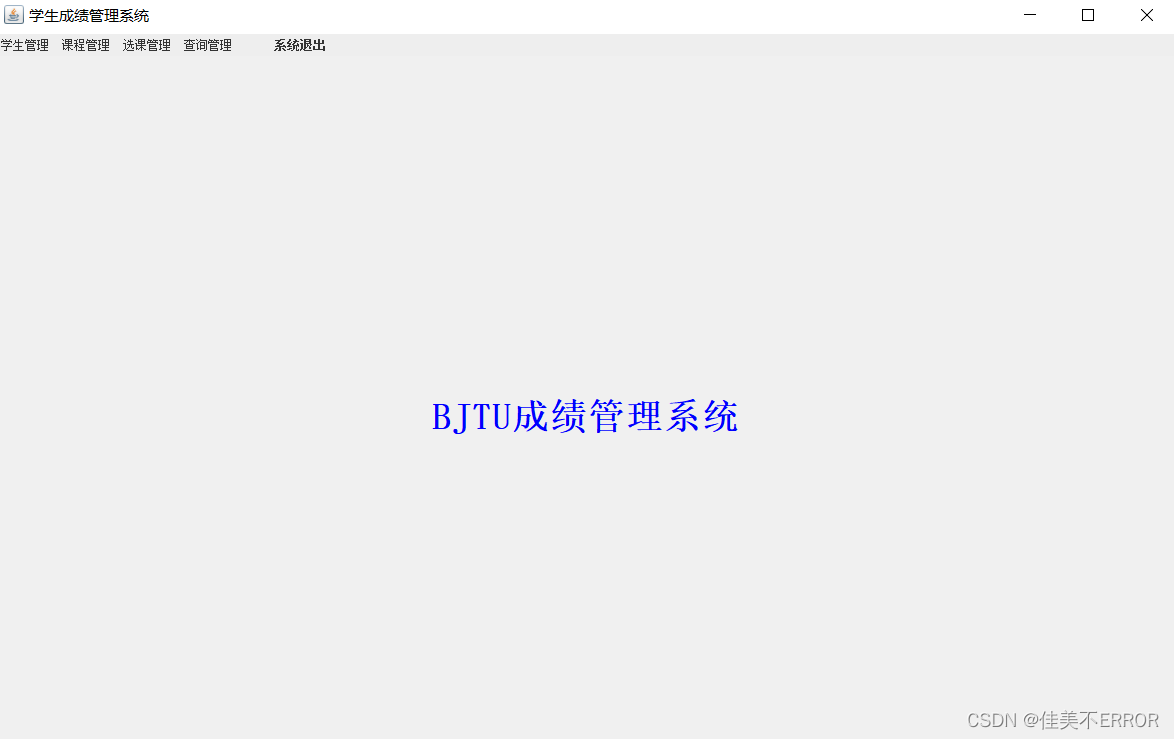
Menu
package sc;
import java.awt.*;
import java.awt.event.*;
import javax.swing.*;

public class Menu extends JFrame implements ActionListener{
    AddS 增加学生界面;
    UpdateS 修改学生界面;
    DelS 删除学生界面;
    AddC 增加课程界面;
    DelC 删除课程界面;
    UpdateC 修改课程界面;
    AddSC 增加选课界面;
    DelSC 删除选课界面;
    UpdateSC 修改选课界面;
    SelS 学生查询界面;
    JPanel pCenter;
    CardLayout card=null;
    JLabel label=null;
    JMenuBar mb=new JMenuBar();//菜单栏
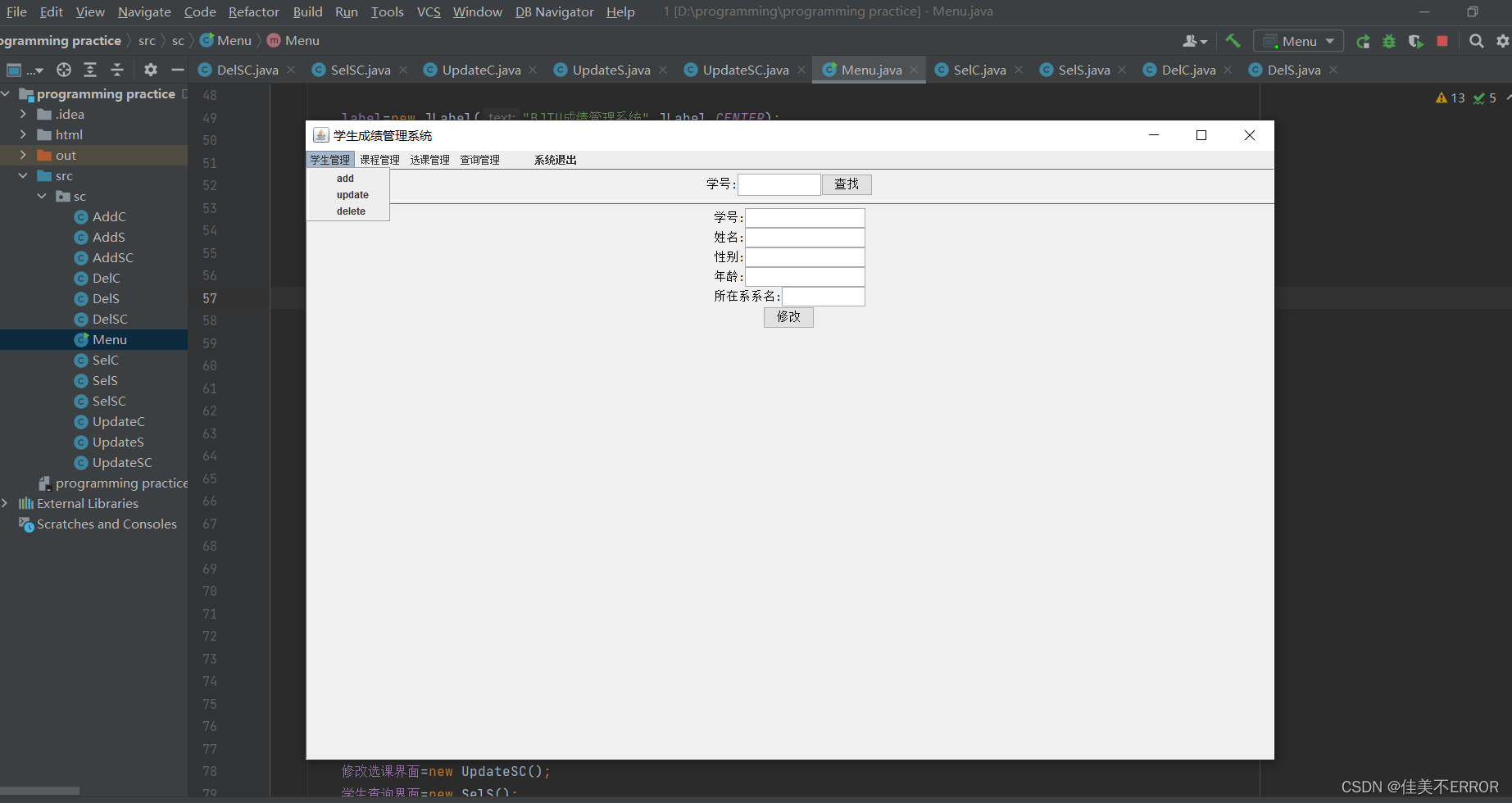
    JMenu m1=new JMenu("学生管理");
    JMenuItem add1=new JMenuItem("add   ");
    JMenuItem updata1=new JMenuItem("update   ");
    JMenuItem delete1=new JMenuItem("delete   ");
    JMenu m2=new JMenu("课程管理");
    JMenuItem add2=new JMenuItem("add   ");
    JMenuItem updata2=new JMenuItem("update   ");
    JMenuItem delete2=new JMenuItem("delete   ");
    JMenu m3=new JMenu("选课管理");
    JMenuItem add3=new JMenuItem("add   ");
    JMenuItem updata3=new JMenuItem("update   ");
    JMenuItem delete3=new JMenuItem("delete   ");
    JMenu m4=new JMenu("查询管理");
    JMenuItem 学生查询=new JMenuItem("查询信息   ");
    JMenuItem m5=new JMenuItem("系统退出");
    Font t=new Font ("sanerif",Font.PLAIN,12);
    public Menu (){
        this.setTitle("学生成绩管理系统");
        try {UIManager.setLookAndFeel(UIManager.getSystemLookAndFeelClassName());}
        catch(Exception e){System.err.println("不能设置外观:   "+e);}
        //组合菜单
        addMenu1();
        addMenu2();
        addMenu3();
        addMenu4();
        addJMenuBar();
        setJMenuBar(mb);

        label=new JLabel("BJTU成绩管理系统",JLabel.CENTER);
        label.setFont(new Font("宋体",Font.BOLD,36));
        label.setHorizontalTextPosition(SwingConstants.CENTER);
        label.setForeground(Color.blue);
        //点击事件
        add1.addActionListener(this);
        updata1.addActionListener(this);
        delete1.addActionListener(this);
        m5.addActionListener(this);
        add2.addActionListener(this);
        delete2.addActionListener(this);
        updata2.addActionListener(this);
        add3.addActionListener(this);
        delete3.addActionListener(this);
        updata3.addActionListener(this);
        学生查询.addActionListener(this);

        card=new CardLayout();
        pCenter=new JPanel();
        pCenter.setLayout(card);

        增加学生界面=new AddS();
        修改学生界面=new UpdateS();
        删除学生界面=new DelS();
        增加课程界面=new AddC();
        删除课程界面=new DelC();
        修改课程界面=new UpdateC();
        增加选课界面=new AddSC();
        删除选课界面=new DelSC();
        修改选课界面=new UpdateSC();
        学生查询界面=new SelS();

        pCenter.add("欢迎界面",label);
        pCenter.add("增加学生界面",增加学生界面);
        pCenter.add("修改学生界面",修改学生界面);
        pCenter.add("删除学生界面",删除学生界面);
        pCenter.add("增加课程界面",增加课程界面);
        pCenter.add("删除课程界面",删除课程界面);
        pCenter.add("修改课程界面",修改课程界面);
        pCenter.add("增加选课界面",增加选课界面);
        pCenter.add("删除选课界面",删除选课界面);
        pCenter.add("修改选课界面",修改选课界面);
        pCenter.add("学生查询界面", 学生查询界面);

        add(pCenter,BorderLayout.CENTER);
        validate();
        setVisible(true);
        setBounds(400,150,1200,790);
        setDefaultCloseOperation(JFrame.EXIT_ON_CLOSE);
        addWindowListener(new WindowAdapter(){//关闭程序时的操作
            public void windowClosing(WindowEvent e){System.exit(0);}
        });
        validate();
    }

    private void addJMenuBar() {
        mb.add(m1);mb.add(m2);mb.add(m3);mb.add(m4);mb.add(m5);
    }
    private void addMenu4() {
        m4.add(学生查询);
        m4.setFont(t);
    }
    private void addMenu3() {
        m3.add(add3);
        m3.add(updata3);
        m3.add(delete3);
        m3.setFont(t);
    }
    private void addMenu2() {//将菜单加入到菜单栏中
        m2.add(add2);
        m2.add(updata2);
        m2.add(delete2);
        m2.setFont(t);
    }
    private void addMenu1() {
        m1.add(add1);
        m1.add(updata1);
        m1.add(delete1);
        m1.setFont(t);//字体
    }

    public void actionPerformed(ActionEvent e){
        Object obj=e.getSource();
        if(obj==m5){System.exit(0);}
        else{if(obj==add1){
            card.show(pCenter,"增加学生界面");
        }
        else{if(obj==updata1){
            card.show(pCenter,"修改学生界面");
        }
        else{if(obj==delete1){
            card.show(pCenter, "删除学生界面");
        }
        else{if(obj==add2){
            card.show(pCenter, "增加课程界面");
        }
        else{if(obj==delete2){
            card.show(pCenter, "删除课程界面");
        }
        else{if(obj==updata2){
            card.show(pCenter, "修改课程界面");
        }
        else{if(obj==add3){
            card.show(pCenter, "增加选课界面");
        }
        else{if(obj==delete3){
            card.show(pCenter, "删除选课界面");
        }
        else{if(obj==updata3){
            card.show(pCenter, "修改选课界面");
        }
        else{if(obj==学生查询){
            card.show(pCenter, "学生查询界面");
        }}
        }}}}}}}}}}
    public static void main(String[] args) {
    new Menu();
    }
}
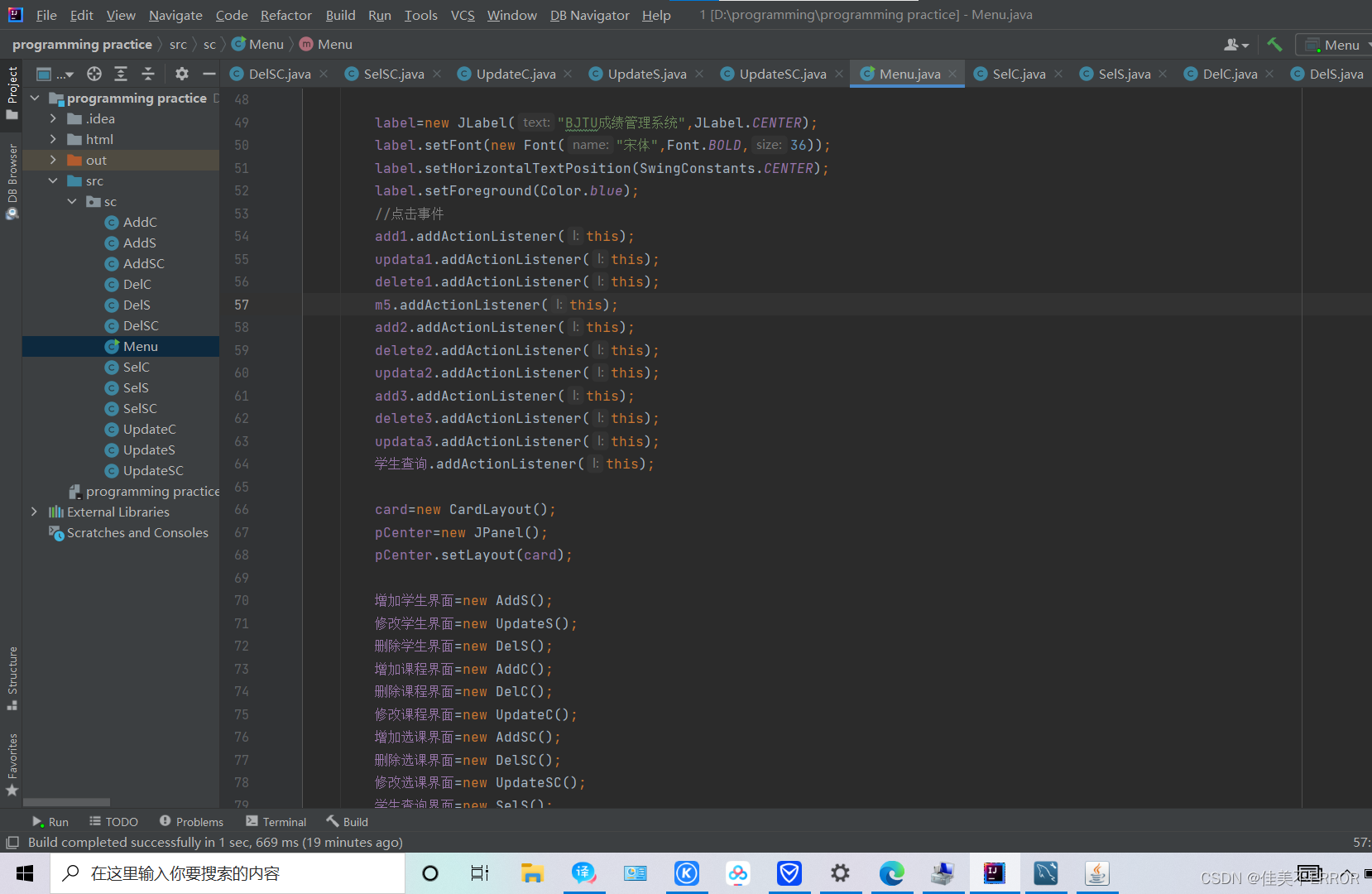
File+settings+editor+plugins+database navigator+apply+ok
出现感叹号:
进connection+properties+serverTimezone+Asia/Shanghai+test connection
按老师要求还是进行一点语句补充吧(如果觉得费钱就把重复的代码保留一个表的,其他的做文字说明就可以了)
建表:
CREATE TABLE student(
sno CHAR(10),
sname VARCHAR(20),
ssex CHAR(2),
sage INT,
sdept CHAR(15)
);
增:
insert into 表名(属性1,属性2)value ('内容1','内容2')
删:
delete from 表名 where 学号='****'
改:
update 表名 set 成绩=NULL
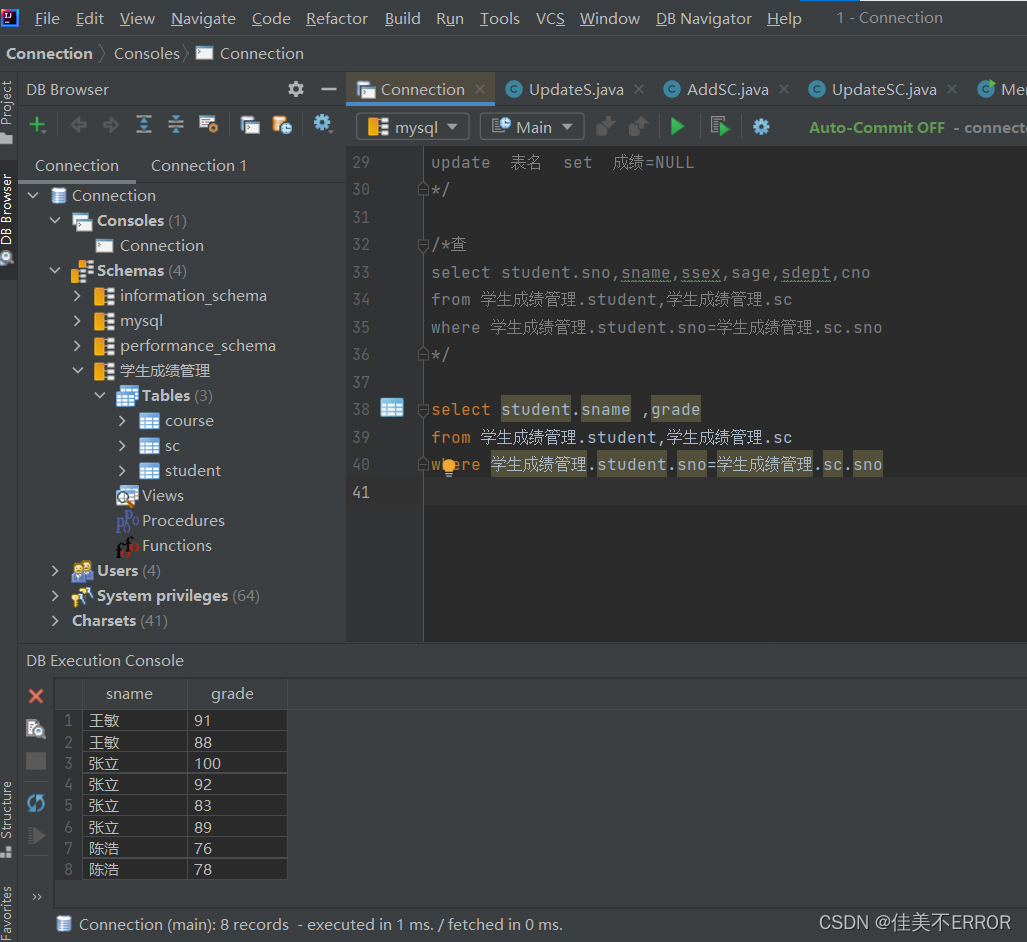
查:
select student.sno,sname,ssex,sage,sdept,cno
from 学生成绩管理.student,学生成绩管理.sc
where 学生成绩管理.student.sno=学生成绩管理.sc.sno
对成绩的查询:
select student.sname ,grade
from 学生成绩管理.student,学生成绩管理.sc
where 学生成绩管理.student.sno=学生成绩管理.sc.sno
//不优秀的学生学号、课程号、成绩
select sno,cno,grade
from 学生成绩管理.sc
where grade<80;

//不优秀课程的学生学号
select distinct sno
from 学生成绩管理.sc
where grade<80;

//所有课程信息及选修该课程的学生学号及成绩
select cname,sno,grade
from 学生成绩管理.sc,学生成绩管理.course
where 学生成绩管理.course.cno =学生成绩管理.sc.cno

/*选修5号课程成绩80分以上学生学号姓名及成绩
select student.sno,sname,grade
from 学生成绩管理.sc
where 学生成绩管理.student.sno=学生成绩管理.sc.sno
and sc.cno='5'
and sc.grade>80
*/

//每个学生及选修课程名及成绩
select student.sno,sname,cname,sc.grade
from 学生成绩管理.student,学生成绩管理.sc,学生成绩管理.course
where student.sno=sc.sno
and sc.cno=course.cno
对成绩的统计:
1、使用MAX ()函数统计某个字段最大数据;
2、使用MIN ()函数统计某个字段最小数据;
3、使用COUNT ()函数统计查询结果的行数;
4、使用SUM ()函数统计数据之和;
5、使用AVG ()函数统计平均数。 MySQL MAX () 函数
好了好了就到这里,答辩讲解需求分析和E-R图为主,明天答辩祝我自己好运,过过过
我正在使用i18n从头开始构建一个多语言网络应用程序,虽然我自己可以处理一大堆yml文件,但我说的语言(非常)有限,最终我想寻求外部帮助帮助。我想知道这里是否有人在使用UI插件/gem(与django上的django-rosetta不同)来处理多个翻译器,其中一些翻译器不愿意或无法处理存储库中的100多个文件,处理语言数据。谢谢&问候,安德拉斯(如果您已经在rubyonrails-talk上遇到了这个问题,我们深表歉意) 最佳答案 有一个rails3branchofthetolkgem在github上。您可以通过在Gemfi
我主要使用Ruby来执行此操作,但到目前为止我的攻击计划如下:使用gemsrdf、rdf-rdfa和rdf-microdata或mida来解析给定任何URI的数据。我认为最好映射到像schema.org这样的统一模式,例如使用这个yaml文件,它试图描述数据词汇表和opengraph到schema.org之间的转换:#SchemaXtoschema.orgconversion#data-vocabularyDV:name:namestreet-address:streetAddressregion:addressRegionlocality:addressLocalityphoto:i
有时我需要处理键/值数据。我不喜欢使用数组,因为它们在大小上没有限制(很容易不小心添加超过2个项目,而且您最终需要稍后验证大小)。此外,0和1的索引变成了魔数(MagicNumber),并且在传达含义方面做得很差(“当我说0时,我的意思是head...”)。散列也不合适,因为可能会不小心添加额外的条目。我写了下面的类来解决这个问题:classPairattr_accessor:head,:taildefinitialize(h,t)@head,@tail=h,tendend它工作得很好并且解决了问题,但我很想知道:Ruby标准库是否已经带有这样一个类? 最佳
我安装了ruby版本管理器,并将RVM安装的ruby实现设置为默认值,这样'哪个ruby'显示'~/.rvm/ruby-1.8.6-p383/bin/ruby'但是当我在emacs中打开inf-ruby缓冲区时,它使用安装在/usr/bin中的ruby。有没有办法让emacs像shell一样尊重ruby的路径?谢谢! 最佳答案 我创建了一个emacs扩展来将rvm集成到emacs中。如果您有兴趣,可以在这里获取:http://github.com/senny/rvm.el
是否有简单的方法来更改默认ISO格式(yyyy-mm-dd)的ActiveAdmin日期过滤器显示格式? 最佳答案 您可以像这样为日期选择器提供额外的选项,而不是覆盖js:=f.input:my_date,as::datepicker,datepicker_options:{dateFormat:"mm/dd/yy"} 关于ruby-on-rails-事件管理员日期过滤器日期格式自定义,我们在StackOverflow上找到一个类似的问题: https://s
我正在尝试使用Curbgem执行以下POST以解析云curl-XPOST\-H"X-Parse-Application-Id:PARSE_APP_ID"\-H"X-Parse-REST-API-Key:PARSE_API_KEY"\-H"Content-Type:image/jpeg"\--data-binary'@myPicture.jpg'\https://api.parse.com/1/files/pic.jpg用这个:curl=Curl::Easy.new("https://api.parse.com/1/files/lion.jpg")curl.multipart_form_
无论您是想搭建桌面端、WEB端或者移动端APP应用,HOOPSPlatform组件都可以为您提供弹性的3D集成架构,同时,由工业领域3D技术专家组成的HOOPS技术团队也能为您提供技术支持服务。如果您的客户期望有一种在多个平台(桌面/WEB/APP,而且某些客户端是“瘦”客户端)快速、方便地将数据接入到3D应用系统的解决方案,并且当访问数据时,在各个平台上的性能和用户体验保持一致,HOOPSPlatform将帮助您完成。利用HOOPSPlatform,您可以开发在任何环境下的3D基础应用架构。HOOPSPlatform可以帮您打造3D创新型产品,HOOPSSDK包含的技术有:快速且准确的CAD
电脑0x0000001A蓝屏错误怎么U盘重装系统教学分享。有用户电脑开机之后遇到了系统蓝屏的情况。系统蓝屏问题很多时候都是系统bug,只有通过重装系统来进行解决。那么蓝屏问题如何通过U盘重装新系统来解决呢?来看看以下的详细操作方法教学吧。 准备工作: 1、U盘一个(尽量使用8G以上的U盘)。 2、一台正常联网可使用的电脑。 3、ghost或ISO系统镜像文件(Win10系统下载_Win10专业版_windows10正式版下载-系统之家)。 4、在本页面下载U盘启动盘制作工具:系统之家U盘启动工具。 U盘启动盘制作步骤: 注意:制作期间,U盘会被格式化,因此U盘中的重要文件请注
在应用开发中,有时候我们需要获取系统的设备信息,用于数据上报和行为分析。那在鸿蒙系统中,我们应该怎么去获取设备的系统信息呢,比如说获取手机的系统版本号、手机的制造商、手机型号等数据。1、获取方式这里分为两种情况,一种是设备信息的获取,一种是系统信息的获取。1.1、获取设备信息获取设备信息,鸿蒙的SDK包为我们提供了DeviceInfo类,通过该类的一些静态方法,可以获取设备信息,DeviceInfo类的包路径为:ohos.system.DeviceInfo.具体的方法如下:ModifierandTypeMethodDescriptionstatic StringgetAbiList()Obt
本教程将在Unity3D中混合Optitrack与数据手套的数据流,在人体运动的基础上,添加双手手指部分的运动。双手手背的角度仍由Optitrack提供,数据手套提供双手手指的角度。 01 客户端软件分别安装MotiveBody与MotionVenus并校准人体与数据手套。MotiveBodyMotionVenus数据手套使用、校准流程参照:https://gitee.com/foheart_1/foheart-h1-data-summary.git02 数据转发打开MotiveBody软件的Streaming,开始向Unity3D广播数据;MotionVenus中设置->选项选择Unit
