文章目录
org.elasticsearch.ElasticsearchSecurityException: invalid SSL configuration for xpack.security.transport.ssl - server ssl configuration requires a key and certificate, but these have not been configured; you must set either
查看日志如下提示:

【报错解析】:
xpack.security.transport.ssl的SSL配置无效——服务器SSL配置需要密钥和证书,但这些还没有配置;
【解决方案】:
创建CA证书
bin/elasticsearch-certutil ca

生成节点使用的证书
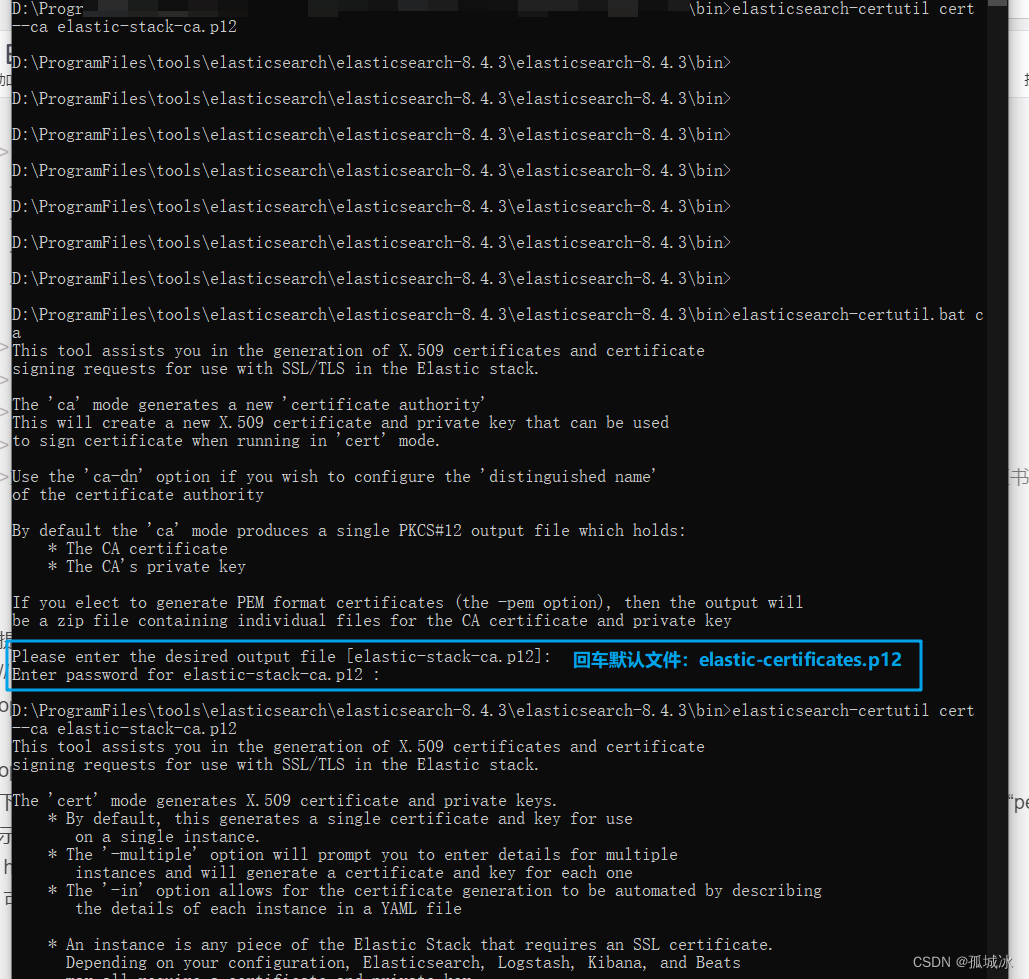
bin/elasticsearch-certutil cert --ca elastic-stack-ca.p12
./bin/elasticsearch-certutil cert
–ca elastic-stack-ca.p12
–dns localhost
–ip 127.0.0.1,::1
–out config/certs/node-1.p12
–ca为CA证书路径名称
-dns为节点DNS
–ip为节点ip
–out为生成节点证书的路径和名称等,输出文件是PKCS#12密钥库,其中包括节点证书,节点密钥和CA证书
或者使用命令 bin/elasticsearch-certutil cert --ca elastic-stack-ca.p12 效果跟上面这个一样,生成一个p12结尾的证书
提取出pem证书
// elastic-certificates.p12为上一步节点证书
openssl pkcs12 -in elastic-certificates.p12 -cacerts -nokeys -out elastic-ca.pem
openssl安装:
下载并安装perl,地址(http://www.activestate.com/activeperl/downloads/) ,进入perl安装目录的eg文件夹,执行“perl example.pl”若显示“Hello from ActivePerl!”,则说明Perl安装成功。
http://slproweb.com/products/Win32OpenSSL.html
可以参考:https://blog.csdn.net/houjixin/article/details/25806151
elasticsearch各节点为xpack.security.transport添加密码
bin/elasticsearch-keystore add xpack.security.transport.ssl.keystore.secure_password
bin/elasticsearch-keystore add xpack.security.transport.ssl.truststore.secure_password
bin/elasticsearch-setup-passwords interactive
#集群名字,目前是单节点
cluster.name: “test”
#节点名
node.name: “es_test”
#配置可进行数据交互的ip
network.host: 0.0.0.0
#允许http跨域访问,es_head插件必须开启
http.cors.enabled: true
http.cors.allow-origin: “*”
#数据存储路径
path.data: /usr/share/elasticsearch/dat
#日志存储路径
path.logs: /usr/share/elasticsearch/logs
#不锁定jvm内存
bootstrap.memory_lock: false
#备份库
path.repo: [“/usr/share/elasticsearch/data/backup”]
#主节点
cluster.initial_master_nodes: [“es_test”]
#es_head连接时读取用户名密码
http.cors.allow-headers:
Authorization,X-Requested-With,Content-Length,Content-Type
#开启密码认证
xpack.security.enabled: true
xpack.license.self_generated.type: basic
xpack.security.transport.ssl.enabled: true
xpack.security.transport.ssl.verification_mode: certificate
xpack.security.transport.ssl.keystore.path:【es的安装路径】/config/XXX/elastic-certificates.p12
Linux:----------> /usr/share/elasticsearch/config/certs/elastic-certificates.p12
xpack.security.transport.ssl.truststore.path:【es的安装路径】/config/XXX/elastic-certificates.p12
Linux:----------> /usr/share/elasticsearch/config/certs/elastic-certificates.p12
failed to load SSL configuration [xpack.security.transport.ssl] - cannot read configured [PKCS12] keystore (as a truststore)
&&
rm]
[2022-11-07T14:09:56,518][ERROR][o.e.b.Elasticsearch ] [LAPTOP-U6I6PKVV] fatal exception while booting Elasticsearchorg.elasticsearch.ElasticsearchSecurityException: failed to load SSL configuration [xpack.security.transport.ssl] - cannot specify both [certificate] and [keystore.path]
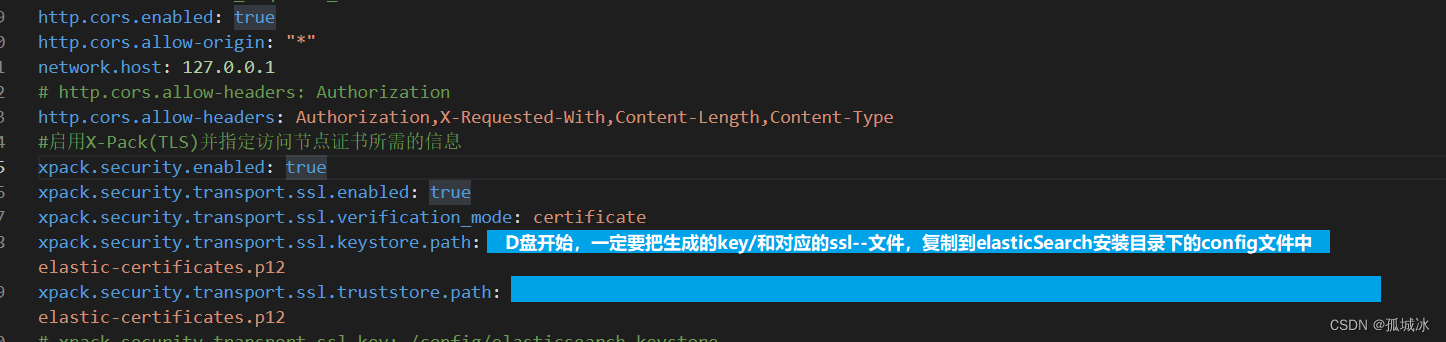
设置文件路径的,只配置这两个:
xpack.security.transport.ssl.keystore.path:
xpack.security.transport.ssl.truststore.path:
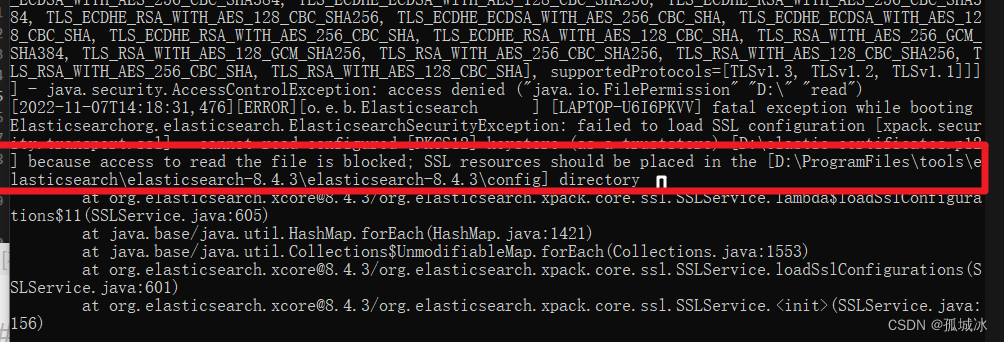
文件路径window环境下路径问题:默认是从D盘开始的,一定要设定在有效的elasticSearch文件安装的目录下的config文件夹下,才会识别成功:
例如:
xpack.security.transport.ssl.keystore.path: /AA/BB/CC/ElasticSearch/config/XX.p12
# 识别的路径为:
D:\AA\BB\CC\ElasticSearch\config\XX.p12
【报错】:ElasticsearchSecurityException[failed to load SSL configuration [xpack.security.transport.ssl]]; nested: ElasticsearchException[failed to initialize SSL TrustManager - not permitted to read truststore file
【解决方法】:
配置elastic-certificates.p12的文件权限即可
chmod 777 elastic-certificates.p12
elasticsearch.username: "kibana_system"
elasticsearch.password: "your_password"
设置账号密码后:
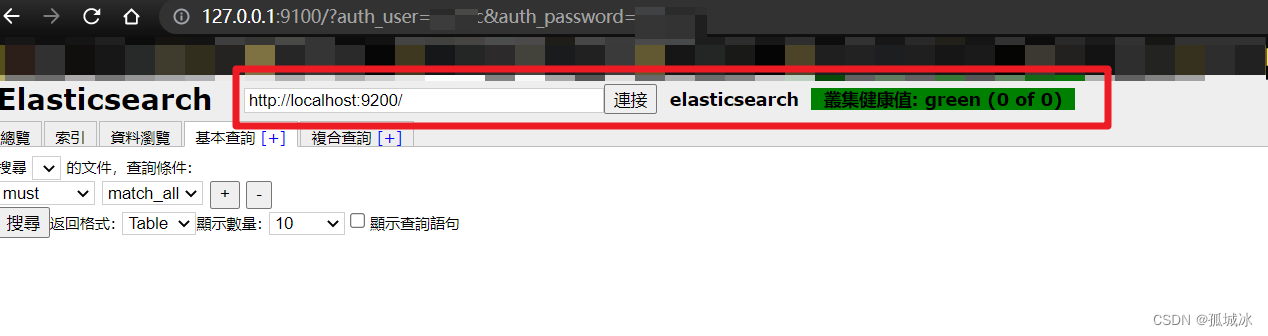
9200 ,有弹窗,可以直接输入账号密码
http://elastic登入名:elastic密码@localhost:9200
http://localhost:9200/
http://127.0.0.1:9100/?auth_user=elastic登入名&auth_password=elastic密码
参考链接:
https://www.cnblogs.com/hahaha111122222/p/12053605.html
https://zhuanlan.zhihu.com/p/386532618
https://www.cnblogs.com/genqkun/p/15440025.html
https://www.cnblogs.com/dengbangpang/p/12953845.html
我需要在客户计算机上运行Ruby应用程序。通常需要几天才能完成(复制大备份文件)。问题是如果启用sleep,它会中断应用程序。否则,计算机将持续运行数周,直到我下次访问为止。有什么方法可以防止执行期间休眠并让Windows在执行后休眠吗?欢迎任何疯狂的想法;-) 最佳答案 Here建议使用SetThreadExecutionStateWinAPI函数,使应用程序能够通知系统它正在使用中,从而防止系统在应用程序运行时进入休眠状态或关闭显示。像这样的东西:require'Win32API'ES_AWAYMODE_REQUIRED=0x0
我主要使用Ruby来执行此操作,但到目前为止我的攻击计划如下:使用gemsrdf、rdf-rdfa和rdf-microdata或mida来解析给定任何URI的数据。我认为最好映射到像schema.org这样的统一模式,例如使用这个yaml文件,它试图描述数据词汇表和opengraph到schema.org之间的转换:#SchemaXtoschema.orgconversion#data-vocabularyDV:name:namestreet-address:streetAddressregion:addressRegionlocality:addressLocalityphoto:i
这似乎非常适得其反,因为太多的gem会在window上破裂。我一直在处理很多mysql和ruby-mysqlgem问题(gem本身发生段错误,一个名为UnixSocket的类显然在Windows机器上不能正常工作,等等)。我只是在浪费时间吗?我应该转向不同的脚本语言吗? 最佳答案 我在Windows上使用Ruby的经验很少,但是当我开始使用Ruby时,我是在Windows上,我的总体印象是它不是Windows原生系统。因此,在主要使用Windows多年之后,开始使用Ruby促使我切换回原来的系统Unix,这次是Linux。Rub
之前在培训新生的时候,windows环境下配置opencv环境一直教的都是网上主流的vsstudio配置属性表,但是这个似乎对新生来说难度略高(虽然个人觉得完全是他们自己的问题),加之暑假之后对cmake实在是爱不释手,且这样配置确实十分简单(其实都不需要配置),故斗胆妄言vscode下配置CV之法。其实极为简单,图比较多所以很长。如果你看此文还配不好,你应该思考一下是不是自己的问题。闲话少说,直接开始。0.CMkae简介有的人到大二了都不知道cmake是什么,我不说是谁。CMake是一个开源免费并且跨平台的构建工具,可以用简单的语句来描述所有平台的编译过程。它能够根据当前所在平台输出对应的m
深度学习部署:Windows安装pycocotools报错解决方法1.pycocotools库的简介2.pycocotools安装的坑3.解决办法更多Ai资讯:公主号AiCharm本系列是作者在跑一些深度学习实例时,遇到的各种各样的问题及解决办法,希望能够帮助到大家。ERROR:Commanderroredoutwithexitstatus1:'D:\Anaconda3\python.exe'-u-c'importsys,setuptools,tokenize;sys.argv[0]='"'"'C:\\Users\\46653\\AppData\\Local\\Temp\\pip-instal
我在目录“C:\DocumentsandSettings\test.exe”中有一个文件,但是当我用单引号编写命令时`C:\DocumentsandSettings\test.exe(我无法在此框中显示),用于在Ruby中执行命令,我无法这样做,我收到的错误是找不到文件或目录。我尝试用“//”和“\”替换“\”,但似乎没有任何效果。我也使用过系统、IO.popen和exec命令,但所有的努力都是徒劳的。exec命令还使程序退出,这是我不想发生的。提前致谢。 最佳答案 反引号环境就像双引号,所以反斜杠用于转义。此外,Ruby会将空格解
不知何故,我似乎无法获得包含我的聚合的响应...使用curl它按预期工作:HBZUMB01$curl-XPOST"http://localhost:9200/contents/_search"-d'{"size":0,"aggs":{"sport_count":{"value_count":{"field":"dwid"}}}}'我收到回复:{"took":4,"timed_out":false,"_shards":{"total":5,"successful":5,"failed":0},"hits":{"total":90,"max_score":0.0,"hits":[]},"a
1.回顾.TransportServicepublicclassTransportServiceextendsAbstractLifecycleComponentTransportService:方法:1publicfinalTextendsTransportResponse>voidsendRequest(finalTransport.Connectionconnection,finalStringaction,finalTransportRequestrequest,finalTransportRequestOptionsoptions,TransportResponseHandlerT>
我在安装“redcarpet”gem时遇到以下错误。它在我friend的机器上安装没有问题。(我想安装它来运行yard)ruby版本:1.9.3命令输出:D:\Learning\Common_POM_FW\SampleProjects>yard[error]:Missing'redcarpet'gemforMarkdownformatting.Installitwith`geminstallredcarpet`D:\Learning\Common_POM_FW\SampleProjects>geminstallredcarpetTemporarilyenhancingPATHtoinc
我们正在开发一个需要推送通知的WP8应用程序。为了测试它,我们使用CURL命令行运行推送通知POST请求,确保它实际连接,使用客户端SSL证书进行身份验证并发送正确的数据。我们确实知道,当我们收到对设备的推送时,这项工作是有效的。这是我们一直用于测试目的的CURL命令:curl--certclient_cert.pem-v-H"Content-Type:text/xml"-H"X-WindowsPhone-Target:Toast"-H"X-NotificationClass:2"-XPOST-d"MytitleMysubtitle"https://db3.notify.live.ne
