steven@wangyuxiangdeMacBook-Pro ~ java -version
java version "1.8.0_211"
Java(TM) SE Runtime Environment (build 1.8.0_211-b12)
Java HotSpot(TM) 64-Bit Server VM (build 25.211-b12, mixed mode)使用brew安装flink,命令如下:
brew install apache-flinksteven@wangyuxiangdeMacBook-Pro ~ flink -v
Version: 1.13.2, Commit ID: 5f007ff
steven@wangyuxiangdeMacBook-Pro ~ brew info apache-flink
apache-flink: stable 1.13.2 (bottled), HEAD
Scalable batch and stream data processing
https://flink.apache.org/
/usr/local/Cellar/apache-flink/1.13.2 (164 files, 325.3MB) *
Poured from bottle on 2022-05-13 at 15:52:56
From: https://github.com/Homebrew/homebrew-core/blob/HEAD/Formula/apache-flink.rb
License: Apache-2.0
==> Dependencies
Required: openjdk@11 ✔
==> Options
--HEAD
Install HEAD version
==> Analytics
install: 449 (30 days), 1,388 (90 days), 6,005 (365 days)
install-on-request: 451 (30 days), 1,392 (90 days), 5,997 (365 days)
build-error: 0 (30 days)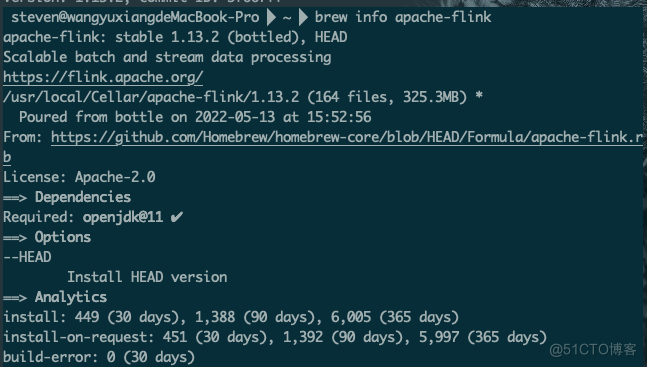
cd /usr/local/Cellar/apache-flink/1.13.2/
./libexec/bin/start-cluster.sh
steven@wangyuxiangdeMacBook-Pro /usr/local/Cellar/apache-flink/1.13.2 ./libexec/bin/start-cluster.sh
\Starting cluster.
Starting standalonesession daemon on host wangyuxiangdeMacBook-Pro.local.
Starting taskexecutor daemon on host wangyuxiangdeMacBook-Pro.local.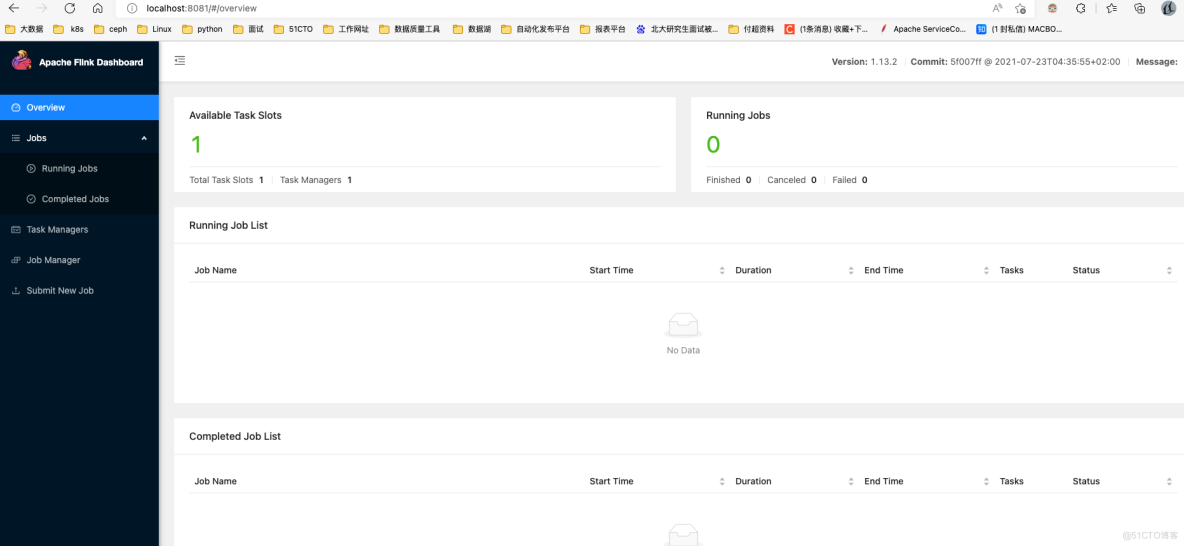
cd /usr/local/Cellar/apache-flink/1.13.2/
./libexec/bin/stop-cluster.shpackage com.dangbei.flink_test.wordcount;
import org.apache.flink.api.common.functions.FlatMapFunction;
import org.apache.flink.streaming.api.datastream.DataStream;
import org.apache.flink.streaming.api.environment.StreamExecutionEnvironment;
import org.apache.flink.util.Collector;
import org.apache.flink.api.java.tuple.Tuple2;
public class Test_WordCount {
public static void main(String[] args) throws Exception {
// 创建Flink的代码执行实时流处理上下文环境变量
StreamExecutionEnvironment env = StreamExecutionEnvironment.getExecutionEnvironment();
// 定义读取数据机器主机名称和端口
String host = "localhost";
int port = 9000;
// 获取输入对应的socket输入的实时流数据
DataStream<String> inputLineDataStream = env.socketTextStream(host, port);
// 对数据集进行多个算子处理,按空白符号分词展开,并转换成(word, 1)二元组进行统计
DataStream<Tuple2<String, Integer>> resultStream = inputLineDataStream.flatMap(new FlatMapFunction<String, Tuple2<String, Integer>>() {
public void flatMap(String line, Collector<Tuple2<String, Integer>> out)throws Exception {
// 按空白符号分词
String[] wordArray = line.split("\\s");
// 遍历所有word,包成二元组输出
for (String word : wordArray) {
out.collect(new Tuple2<String, Integer>(
word, 1));
}
}
}).keyBy(0) // 返回的是一个一个的(word,1)的二元组,按照第一个位置的word分组,因为此实时流是无界的,即数据并不完整,故不用group
// by而是用keyBy来代替
.sum(1); // 将第二个位置上的freq=1的数据求和
// 打印出来计算出来的(word,freq)的统计结果对
resultStream.print();
// 正式启动实时流处理引擎
env.execute();
}
}
<project xmlns="http://maven.apache.org/POM/4.0.0"
xmlns:xsi="http://www.w3.org/2001/XMLSchema-instance"
xsi:schemaLocation="http://maven.apache.org/POM/4.0.0 http://maven.apache.org/xsd/maven-4.0.0.xsd">
<modelVersion>4.0.0</modelVersion>
<groupId>com.dangbei</groupId>
<artifactId>flink_test</artifactId>
<version>1.0</version>
<packaging>jar</packaging>
<name>Flink Quickstart Job</name>
<properties>
<project.build.sourceEncoding>UTF-8</project.build.sourceEncoding>
<flink.version>1.13.2</flink.version>
<java.version>1.8</java.version>
<scala.binary.version>2.11</scala.binary.version>
<maven.compiler.source>${java.version}</maven.compiler.source>
<maven.compiler.target>${java.version}</maven.compiler.target>
<hadoop.version>3.0.0</hadoop.version>
<flink.shaded.version>9.0</flink.shaded.version>
</properties>
<dependencies>
<dependency>
<groupId>org.apache.flink</groupId>
<artifactId>flink-java</artifactId>
<version>1.13.2</version>
</dependency>
<dependency>
<groupId>org.apache.flink</groupId>
<artifactId>flink-streaming-java_2.12</artifactId>
<version>1.13.2</version>
</dependency>
<dependency>
<groupId>org.apache.flink</groupId>
<artifactId>flink-clients_2.12</artifactId>
<version>1.13.2</version>
</dependency>
<dependency>
<groupId>org.apache.hadoop</groupId>
<artifactId>hadoop-client</artifactId>
<version>3.1.3</version>
</dependency>
<dependency>
<groupId>mysql</groupId>
<artifactId>mysql-connector-java</artifactId>
<version>5.1.49</version>
</dependency>
<dependency>
<groupId>com.alibaba.ververica</groupId>
<artifactId>flink-connector-mysql-cdc</artifactId>
<version>1.2.0</version>
</dependency>
<dependency>
<groupId>com.alibaba</groupId>
<artifactId>fastjson</artifactId>
<version>1.2.75</version>
</dependency>
</dependencies>
<build>
<plugins>
<plugin>
<groupId>org.apache.maven.plugins</groupId>
<artifactId>maven-assembly-plugin</artifactId>
<version>3.0.0</version>
<configuration>
<descriptorRefs>
<descriptorRef>jar-with-dependencies</descriptorRef>
</descriptorRefs>
</configuration>
<executions>
<execution>
<id>make-assembly</id>
<phase>package</phase>
<goals>
<goal>single</goal>
</goals>
</execution>
</executions>
</plugin>
</plugins>
</build>
</project>1.监听9000端口并输入内容
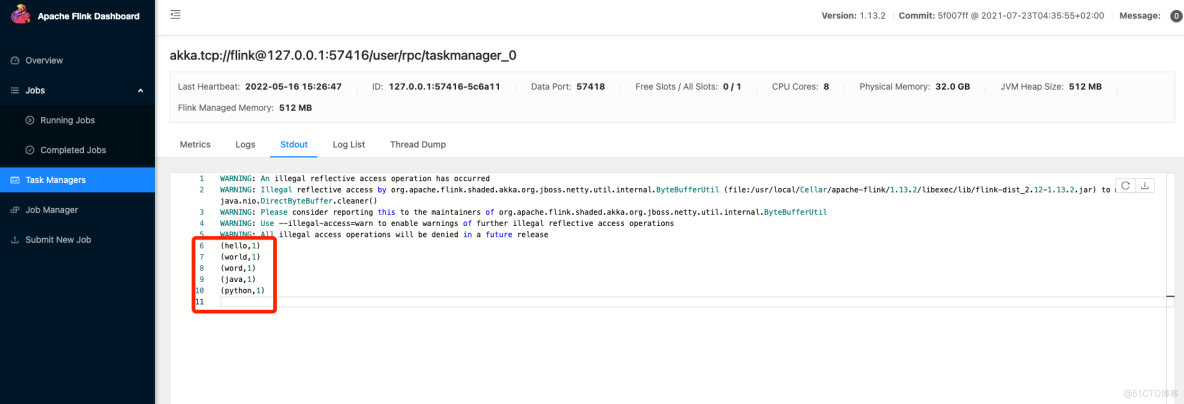
nc -l 9000
输入如下内容:
hello
world
word
java
python2.提交命令如下:
./bin/flink run -c com.dangbei.flink_test.wordcount.Test_WordCount /Users/steven/flinkjob/flink_test/target/flink_test-1.0-jar-with-dependencies.jar
package com.dangbei.flink_test.wordcount;
import org.apache.flink.api.common.functions.FlatMapFunction;
import org.apache.flink.api.java.DataSet;
import org.apache.flink.api.java.ExecutionEnvironment;
import org.apache.flink.util.Collector;
import org.apache.flink.api.java.tuple.Tuple2;
public class WordCount {
public static void main(String[] args) throws Exception {
// 1.获取运⾏环境
ExecutionEnvironment env = ExecutionEnvironment.getExecutionEnvironment();
// 2.创建数据集
DataSet<String> text = env.fromElements("java java scala", "scala java python");
// 3.flatMap将数据转成⼤写并以空格进⾏分割
// 4.groupBy归纳相同的key,sum将value相加
DataSet<Tuple2<String, Integer>> counts = text.flatMap(new FlatMapFunction<String, Tuple2<String, Integer>>() {
public void flatMap(String s, Collector<Tuple2<String, Integer>> out) throws Exception {
String[] value = s.toLowerCase().split(" ");
for (String word : value) {
out.collect(new Tuple2<String, Integer>(word, 1));
}
}
})
.groupBy(0)
.sum(1);
// 4.打印
counts.print();
}
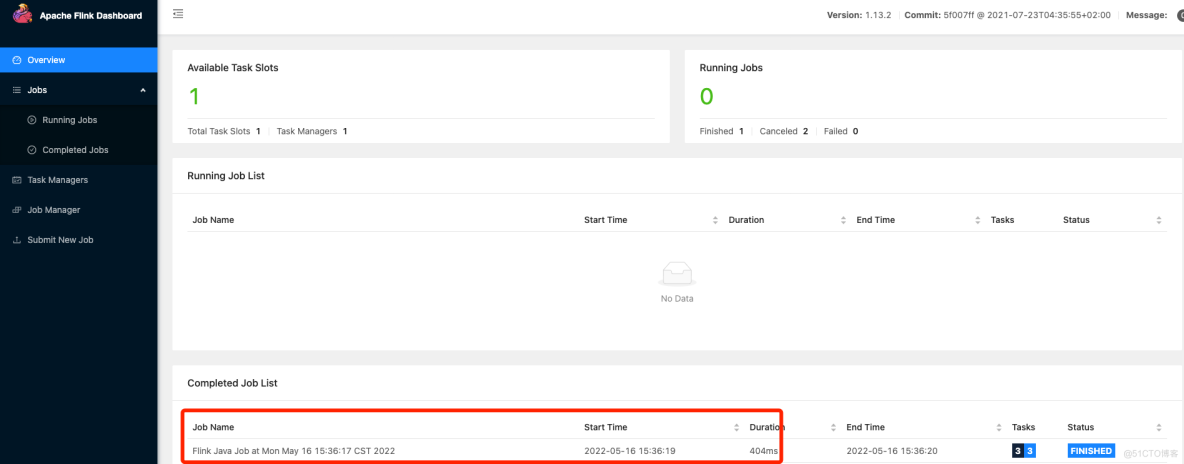
}./bin/flink run -c com.dangbei.flink_test.wordcount.WordCount /Users/steven/flinkjob/flink_test/target/flink_test-1.0-jar-with-dependencies.jar
 注意:在提交任务的时候,一定要加上类,不然会报错如下:
steven-Pro /usr/local/Cellar/apache-flink/1.13.2 ./bin/flink run /Users/steven/flinkjob/flink_test/target/flink_test-1.0-jar-with-dependencies.jar
------------------------------------------------------------
The program finished with the following exception:
org.apache.flink.client.program.ProgramInvocationException: Neither a 'Main-Class', nor a 'program-class' entry was found in the jar file.
at org.apache.flink.client.program.PackagedProgram.getEntryPointClassNameFromJar(PackagedProgram.java:437)
at org.apache.flink.client.program.PackagedProgram.<init>(PackagedProgram.java:158)
at org.apache.flink.client.program.PackagedProgram.<init>(PackagedProgram.java:65)
at org.apache.flink.client.program.PackagedProgram$Builder.build(PackagedProgram.java:691)
at org.apache.flink.client.cli.CliFrontend.buildProgram(CliFrontend.java:851)
at org.apache.flink.client.cli.CliFrontend.getPackagedProgram(CliFrontend.java:271)
at org.apache.flink.client.cli.CliFrontend.run(CliFrontend.java:245)
at org.apache.flink.client.cli.CliFrontend.parseAndRun(CliFrontend.java:1054)
at org.apache.flink.client.cli.CliFrontend.lambda$main$10(CliFrontend.java:1132)
at org.apache.flink.runtime.security.contexts.NoOpSecurityContext.runSecured(NoOpSecurityContext.java:28)
at org.apache.flink.client.cli.CliFrontend.main(CliFrontend.java:1132)很好奇,就使用rubyonrails自动化单元测试而言,你们正在做什么?您是否创建了一个脚本来在cron中运行rake作业并将结果邮寄给您?git中的预提交Hook?只是手动调用?我完全理解测试,但想知道在错误发生之前捕获错误的最佳实践是什么。让我们理所当然地认为测试本身是完美无缺的,并且可以正常工作。下一步是什么以确保他们在正确的时间将可能有害的结果传达给您? 最佳答案 不确定您到底想听什么,但是有几个级别的自动代码库控制:在处理某项功能时,您可以使用类似autotest的内容获得关于哪些有效,哪些无效的即时反馈。要确保您的提
我想为Heroku构建一个Rails3应用程序。他们使用Postgres作为他们的数据库,所以我通过MacPorts安装了postgres9.0。现在我需要一个postgresgem并且共识是出于性能原因你想要pggem。但是我对我得到的错误感到非常困惑当我尝试在rvm下通过geminstall安装pg时。我已经非常明确地指定了所有postgres目录的位置可以找到但仍然无法完成安装:$envARCHFLAGS='-archx86_64'geminstallpg--\--with-pg-config=/opt/local/var/db/postgresql90/defaultdb/po
我打算为ruby脚本创建一个安装程序,但我希望能够确保机器安装了RVM。有没有一种方法可以完全离线安装RVM并且不引人注目(通过不引人注目,就像创建一个可以做所有事情的脚本而不是要求用户向他们的bash_profile或bashrc添加一些东西)我不是要脚本本身,只是一个关于如何走这条路的快速指针(如果可能的话)。我们还研究了这个很有帮助的问题:RVM-isthereawayforsimpleofflineinstall?但有点误导,因为答案只向我们展示了如何离线在RVM中安装ruby。我们需要能够离线安装RVM本身,并查看脚本https://raw.github.com/wayn
我正在编写一个包含C扩展的gem。通常当我写一个gem时,我会遵循TDD的过程,我会写一个失败的规范,然后处理代码直到它通过,等等......在“ext/mygem/mygem.c”中我的C扩展和在gemspec的“扩展”中配置的有效extconf.rb,如何运行我的规范并仍然加载我的C扩展?当我更改C代码时,我需要采取哪些步骤来重新编译代码?这可能是个愚蠢的问题,但是从我的gem的开发源代码树中输入“bundleinstall”不会构建任何native扩展。当我手动运行rubyext/mygem/extconf.rb时,我确实得到了一个Makefile(在整个项目的根目录中),然后当
我有一个奇怪的问题:我在rvm上安装了rubyonrails。一切正常,我可以创建项目。但是在我输入“railsnew”时重新启动后,我有“程序'rails'当前未安装。”。SystemUbuntu12.04ruby-v"1.9.3p194"gemlistactionmailer(3.2.5)actionpack(3.2.5)activemodel(3.2.5)activerecord(3.2.5)activeresource(3.2.5)activesupport(3.2.5)arel(3.0.2)builder(3.0.0)bundler(1.1.4)coffee-rails(
我刚刚为fedora安装了emacs。我想用emacs编写ruby。为ruby提供代码提示、代码完成类型功能所需的工具、扩展是什么? 最佳答案 ruby-mode已经包含在Emacs23之后的版本中。不过,它也可以通过ELPA获得。您可能感兴趣的其他一些事情是集成RVM、feature-mode(Cucumber)、rspec-mode、ruby-electric、inf-ruby、rinari(用于Rails)等。这是我当前用于Ruby开发的Emacs配置:https://github.com/citizen428/emacs
我有一个围绕一些对象的包装类,我想将这些对象用作散列中的键。包装对象和解包装对象应映射到相同的键。一个简单的例子是这样的:classAattr_reader:xdefinitialize(inner)@inner=innerenddefx;@inner.x;enddef==(other)@inner.x==other.xendenda=A.new(o)#oisjustanyobjectthatallowso.xb=A.new(o)h={a=>5}ph[a]#5ph[b]#nil,shouldbe5ph[o]#nil,shouldbe5我试过==、===、eq?并散列所有无济于事。
我有一些Ruby代码,如下所示:Something.createdo|x|x.foo=barend我想编写一个测试,它使用double代替block参数x,这样我就可以调用:x_double.should_receive(:foo).with("whatever").这可能吗? 最佳答案 specify'something'dox=doublex.should_receive(:foo=).with("whatever")Something.should_receive(:create).and_yield(x)#callthere
我正在尝试在我的centos服务器上安装therubyracer,但遇到了麻烦。$geminstalltherubyracerBuildingnativeextensions.Thiscouldtakeawhile...ERROR:Errorinstallingtherubyracer:ERROR:Failedtobuildgemnativeextension./usr/local/rvm/rubies/ruby-1.9.3-p125/bin/rubyextconf.rbcheckingformain()in-lpthread...yescheckingforv8.h...no***e
我的最终目标是安装当前版本的RubyonRails。我在OSXMountainLion上运行。到目前为止,这是我的过程:已安装的RVM$\curl-Lhttps://get.rvm.io|bash-sstable检查已知(我假设已批准)安装$rvmlistknown我看到当前的稳定版本可用[ruby-]2.0.0[-p247]输入命令安装$rvminstall2.0.0-p247注意:我也试过这些安装命令$rvminstallruby-2.0.0-p247$rvminstallruby=2.0.0-p247我很快就无处可去了。结果:$rvminstall2.0.0-p247Search
