目录
给女神表白的程序
🌹 在您的电脑上创建 love 文件夹 (存放所有的资源和代码)
🌹 在 love 文件夹中创建 images 文件夹 (存放图片资源)
🌹 在 love 文件夹中创建 js 文件夹 (存放 js 代码资源)
🌹 在 love 文件夹中创建 index.html 文件 (存放 js 代码资源)
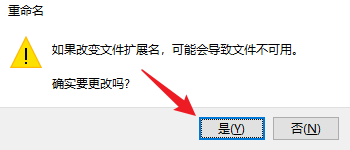
🌹 在 images 文件夹中放入下面的两张图片【把一张图片命名为a8.png、另一张图片命名为a8b.png】


🌹 在 js 文件夹中创建lib文件夹
🌹 在 lib 文件夹中导入下面的两个文件(我认为这就是一个装逼程序,没有必要了解代码😅😀)具体资源看后面的百度网盘
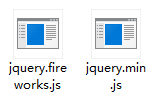
🌹 在 index.html 文件中粘贴下面的代码
<!DOCTYPE html>
<html lang="en">
<head>
<meta charset="UTF-8">
<meta content="width=device-width,initial-scale=1.0,maximum-scale=1.0,user-scalable=no" name="viewport">
<title>forever love</title>
</head>

<script src="js/lib/jquery.min.js" type="text/javascript"></script>
<script src="js/lib/jquery.fireworks.js" type="text/javascript"></script>

<style type="text/css">
*{ -webkit-tap-highlight-color:rgba(0,0,0,0); -webkit-box-sizing: border-box; box-sizing: border-box; }
html{ width: 100%; height: 100%; }
body{ max-width: 600px; margin: 0 auto; background: #0b3443; color: #f0f0f0;}
.share_img{ width: 0; height: 0; overflow: hidden; opacity: 0; }
.content{ padding: 80px 20px;}
.text_wrapper{ display: -webkit-box; display: flex; }
.text_wrapper .text{ padding-top: 20px; padding-left: 20px; }
.hide{ display: none !important; }
p{ margin: 0; }
.btn-groups{ padding-right: 20px; text-align: center; }
.heart-btn{ display: inline-block; animation: breath 0.8s linear 0s infinite both; -webkit-animation: breath 0.8s linear 0s infinite both; }
.btn{ position: relative; display: inline-block; width: 60px; height: 60px; margin: 0 30px; transform: rotate(45deg); -webkit-transform: rotate(45deg);}
.btn span{ display: block; width: 100%; height: 100%; line-height: 60px; margin-top: -10px; margin-left: -10px; text-align: center; transform: rotate(-45deg); -webkit-transform: rotate(-45deg); }
.btn-a{ background: #d26ae5; }
.btn-b{ background: #c9c9c9; }
.btn-a:before{ content: ''; position: absolute; display: block; width: 30px; height: 60px; background: #d26ae5; left: -29px; top: 0; border-top-left-radius: 60px; border-bottom-left-radius: 60px; }
.btn-a:after{ content: ''; position: absolute; display: block; width: 60px; height: 30px; background: #d26ae5; left: 0; top: -29px; border-top-left-radius: 60px; border-top-right-radius: 60px;}
.btn-b:before{ content: ''; position: absolute; display: block; width: 30px; height: 60px; background: #c9c9c9; left: -29px; top: 0; border-top-left-radius: 60px; border-bottom-left-radius: 60px; }
.btn-b:after{ content: ''; position: absolute; display: block; width: 60px; height: 30px; background: #c9c9c9; left: 0; top: -29px; border-top-left-radius: 60px; border-top-right-radius: 60px;}
.container{  }
.container .mask{ position: absolute; top: 0; left: 0; right: 0; bottom: 0; background: rgba(0,0,0,0.3); }
.container .modal{ width: 80%; height: 160px; position: absolute; top: 50%; left: 50%; padding: 20px 15px; border-radius: 5px; transform: translate(-50%, -70%); -webkit-transform: translate(-50%,-70%); background: #f3f3f3;}
.container .modal p{ margin-top: 20px; margin-bottom: 20px; font-size: 16px; color: #353535; text-align: center;}
.confirm{ display: block; width: 120px; height: 40px; margin: 0 auto; border: none; font-size: 16px; border-radius: 5px; color: #ffffff; background: #f45cae; }
.type_words{ padding: 12px 20px; }
@keyframes breath {
	0% {
		transform: scale3d(1,1,1);
		-webkit-transform: scale3d(1,1,1);
		transform-origin: 50% 50%;
	}
	50%{
		transform: scale3d(1.02,1.02,1.02);
		-webkit-transform: scale3d(1.02,1.02,1.02);
		transform-origin: 50% 50%;
	}
	100%{
		transform: scale3d(1,1,1);
		-webkit-transform: scale3d(1,1,1);
		transform-origin: 50% 50%;
	}
}
</style>

<script type="text/javascript">
$(function() {
	$('#yes').click(function(event) {
		modal('我就知道小姐姐您一定会愿意的。(^_^)', function() {
			$('.page_one').addClass('hide');
			$('.page_two').removeClass('hide');
			// typeWrite();
			fireworks();

		});
	});
	$('#no').click(function(event) {
		modal('明人不说暗话我喜欢你!', A);
	});
});

function A() {
	modal('程序员工资挺高的可以养活你!', B);
}

function B() {
	modal('口红包包都给你买', C);
}

function C() {
	modal('请不要拒绝我', D);
}

function D() {
	modal('拒绝我,不存在的', E);
}

function E() {
	modal('这辈子都不可能让你离开我', F);
}

function F() {
	modal('跟我走吧', G);
}

function G() {
	modal('房产证上写你名', H);
}

function H() {
	modal('饭肯定是我做 碗也是我洗', I);
}

function I() {
	modal('指东绝不往西!', J)
}

function J() {
	modal('行,我们去民政局登记吧', function() {
		fireworks();
	});
}

function fireworks() {
	$('.page_one').addClass('hide');
	$('.page_two').removeClass('hide');
	$('.page_two').fireworks({
	  sound: false,
	  opacity: 0.9,
	  width: '100%',
	  height: '100%'
	});
}

function modal(content, callback) {
	var tpl = '<div class="container">'+
							'<div class="mask"></div>'+
							'<div class="modal">'+
								'<p>'+ content +'</p>'+
								'<button type="button" id="confirm" class="confirm">确定</button>'+
							'</div>'+
						'</div>';
	$('body').append(tpl);
	$(document).on('click', '.confirm', function() {
		$('.container').remove();
		callback();
	});
}

var myWords = '有人说,人的一生会遇到2920万人,而两个人相爱的概率只有0.000049。在这茫茫人海中,两个人能相遇就值得感激,能相爱更是一种难得。所以,我很庆幸上天让我遇见了你。我希望有个如你一般的人,能看完我写过的所有状态,读完我所有的日志,看完我从小到大的照片,试着听我喜欢的歌。如果可以,甚至陪我去我喜欢的地方,只想弥补错过你的青春。';
var x = 0;
var speed = 150;
var current = 0;
function typeWrite(){
	$('.type_words').html(myWords.substring(0, x++)+'_');
	var timer = setTimeout("typeWrite()", speed);
	if (x == myWords.length) {
		x = myWords.length;
		clearTimeout(timer)
	}
}

</script>
<body>

<div class="share_img"><img src="images/a8b.png" alt=""></div>

<div class="page_one">
	<div class="content">
		<div class="text_wrapper">
			<img src="images/a8.png" alt="">
			<div class="text">
				小姐姐,我好喜欢你,你愿意做我女朋友吗?
			</div>
		</div>
	</div>
	<div class="btn-groups">
		<div class="heart-btn">
			<div id="yes" class="btn btn-a"><span>愿意</span></div>
		</div>
		<div id="no" class="btn btn-b"><span>不愿意</span></div>
	</div>
</div>
<div class="page_two hide">
	<div class="type_words"></div>
</div>

</body>
</html>
❤️ 可以修改上面的文字,指定给某个人表白
❤️ 上述完成后,可双击index.html执行代码
❤️ 完整内容可通过下面的百度网盘进行下载哦!【给个❤️吧】
链接:https://pan.baidu.com/s/1jl89wxaYDRmdxLj04aUeYw
提取码:1qrm
❤️ 实话说,这些都是装逼程序,我也看不懂
❤️ 无论如何,可以装逼就可以了
🎄 博主自己创建了一个生成表白二维码的网址
🎄 下面教大家如何使用
🎄 ① 点击下面的链接
http://gqok.xyz/admin/LoveYou/1/name.html
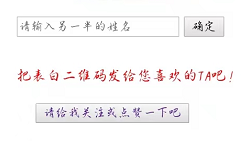
🎄 ② 输入名字、点击确定、点击【生成表白二维码的链接】
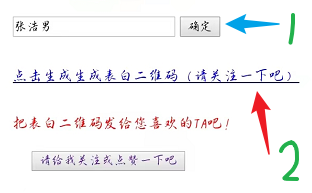
🎄 ③ 把表白二维码分享给对方
❤️ 愿表白成功哦!
我需要在客户计算机上运行Ruby应用程序。通常需要几天才能完成(复制大备份文件)。问题是如果启用sleep,它会中断应用程序。否则,计算机将持续运行数周,直到我下次访问为止。有什么方法可以防止执行期间休眠并让Windows在执行后休眠吗?欢迎任何疯狂的想法;-) 最佳答案 Here建议使用SetThreadExecutionStateWinAPI函数,使应用程序能够通知系统它正在使用中,从而防止系统在应用程序运行时进入休眠状态或关闭显示。像这样的东西:require'Win32API'ES_AWAYMODE_REQUIRED=0x0
我想将html转换为纯文本。不过,我不想只删除标签,我想智能地保留尽可能多的格式。为插入换行符标签,检测段落并格式化它们等。输入非常简单,通常是格式良好的html(不是整个文档,只是一堆内容,通常没有anchor或图像)。我可以将几个正则表达式放在一起,让我达到80%,但我认为可能有一些现有的解决方案更智能。 最佳答案 首先,不要尝试为此使用正则表达式。很有可能你会想出一个脆弱/脆弱的解决方案,它会随着HTML的变化而崩溃,或者很难管理和维护。您可以使用Nokogiri快速解析HTML并提取文本:require'nokogiri'h
Rackup通过Rack的默认处理程序成功运行任何Rack应用程序。例如:classRackAppdefcall(environment)['200',{'Content-Type'=>'text/html'},["Helloworld"]]endendrunRackApp.new但是当最后一行更改为使用Rack的内置CGI处理程序时,rackup给出“NoMethodErrorat/undefinedmethod`call'fornil:NilClass”:Rack::Handler::CGI.runRackApp.newRack的其他内置处理程序也提出了同样的反对意见。例如Rack
我想用ruby编写一个小的命令行实用程序并将其作为gem分发。我知道安装后,Guard、Sass和Thor等某些gem可以从命令行自行运行。为了让gem像二进制文件一样可用,我需要在我的gemspec中指定什么。 最佳答案 Gem::Specification.newdo|s|...s.executable='name_of_executable'...endhttp://docs.rubygems.org/read/chapter/20 关于ruby-在Ruby中编写命令行实用程序
我构建了两个需要相互通信和发送文件的Rails应用程序。例如,一个Rails应用程序会发送请求以查看其他应用程序数据库中的表。然后另一个应用程序将呈现该表的json并将其发回。我还希望一个应用程序将存储在其公共(public)目录中的文本文件发送到另一个应用程序的公共(public)目录。我从来没有做过这样的事情,所以我什至不知道从哪里开始。任何帮助,将不胜感激。谢谢! 最佳答案 无论Rails是什么,几乎所有Web应用程序都有您的要求,大多数现代Web应用程序都需要相互通信。但是有一个小小的理解需要你坚持下去,网站不应直接访问彼此
我尝试运行2.x应用程序。我使用rvm并为此应用程序设置其他版本的ruby:$rvmuseree-1.8.7-head我尝试运行服务器,然后出现很多错误:$script/serverNOTE:Gem.source_indexisdeprecated,useSpecification.Itwillberemovedonorafter2011-11-01.Gem.source_indexcalledfrom/Users/serg/rails_projects_terminal/work_proj/spohelp/config/../vendor/rails/railties/lib/r
刚入门rails,开始慢慢理解。有人可以解释或给我一些关于在application_controller中编码的好处或时间和原因的想法吗?有哪些用例。您如何为Rails应用程序使用应用程序Controller?我不想在那里放太多代码,因为据我了解,每个请求都会调用此Controller。这是真的? 最佳答案 ApplicationController实际上是您应用程序中的每个其他Controller都将从中继承的类(尽管这不是强制性的)。我同意不要用太多代码弄乱它并保持干净整洁的态度,尽管在某些情况下ApplicationContr
在我的Controller中,我通过以下方式在我的index方法中支持HTML和JSON:respond_todo|format|format.htmlformat.json{renderjson:@user}end在浏览器中拉起它时,它会自然地以HTML呈现。但是,当我对/user资源进行内容类型为application/json的curl调用时(因为它是索引方法),我仍然将HTML作为响应。如何获取JSON作为响应?我还需要说明什么? 最佳答案 您应该将.json附加到请求的url,提供的格式在routes.rb的路径中定义。这
所以我在关注Railscast,我注意到在html.erb文件中,ruby代码有一个微弱的背景高亮效果,以区别于其他代码HTML文档。我知道Ryan使用TextMate。我正在使用SublimeText3。我怎样才能达到同样的效果?谢谢! 最佳答案 为SublimeText安装ERB包。假设您安装了SublimeText包管理器*,只需点击cmd+shift+P即可获得命令菜单,然后键入installpackage并选择PackageControl:InstallPackage获取包管理器菜单。在该菜单中,键入ERB并在看到包时选择
我是一个Rails初学者,但我想从我的RailsView(html.haml文件)中查看Ruby变量的内容。我试图在ruby中打印出变量(认为它会在终端中出现),但没有得到任何结果。有什么建议吗?我知道Rails调试器,但更喜欢使用inspect来打印我的变量。 最佳答案 您可以在View中使用puts方法将信息输出到服务器控制台。您应该能够在View中的任何位置使用Haml执行以下操作:-puts@my_variable.inspect 关于ruby-on-rails-如何在我的R
