一个WEB服务器需要解析客户端(浏览器)发来的请求,两种常见的请求方式是GET和POST。
GET的请求格式:
key=value的形式传递,参数与参数之间使用"&"进行连接。GET /signin?next=%2F HTTP/2\r\n
Host: www.zhihu.com\r\n
User-Agent: Mozilla/5.0\r\n
Accept: */*\r\n
Accept-Language: zh-CN\r\n
Accept-Encoding: gzip, deflate\r\n
Connection: keep-alive\r\n
Upgrade-Insecure-Requests: 1\r\n
Cache-Control: max-age=0\r\n
TE: trailers\r\n
\r\nPOST的请求格式:
key=value的形式传递,参数与参数之间使用"&"进行连接POST /login HTTP/1.1\r\n
Host: 127.0.0.1:8888\r\n
User-Agent: Mozilla/5.0\r\n
Accept: */*\r\n
Accept-Language: zh-CN\r\n
Accept-Encoding: gzip, deflate\r\n
Content-Type: application/x-www-form-urlencoded\r\n
Content-Length: 29\r\n
Connection: keep-alive\r\n
\r\n
username=root&password=123456key=value的形式传递,参数与参数之间使用"&"进行连接。
使用状态机和正则表达式完成了对HTTP请求报文的解析,支持解析GET报文和POST报文(仅限Content-Type: application/x-www-form-urlencoded)。
由于计划完成的web服务器需要实现展示主页(GET)、用户登录(POST)、用户注册(POST)、获取图片(GET)、获取视频(GET)五个功能,所以web服务器的请求解析模块满足:
若为GET请求,可根据状态行信息,完成对请求内容地址的转换,以及请求头内其他内容的提取。
若为POST请求,可根据请求参数,完成登录和注册这两个功能(登录:根据后台数据库表中的信息判断用户名与密码是否正确;注册:向后台数据库表中插入符合条件的新用户名和密码)。
状态机流程:
enum PARSE_STATE
    {
        REQUEST_LINE,
        HEADERS,
        BODY,
        FINISH
    };
如果为GET请求: REQUEST_LINE——>HEADERS——>FINISH;
如果为POST请求:REQUEST_LINE——>HEADERS——>BODY——>FINISH。
用到的正则表达式:
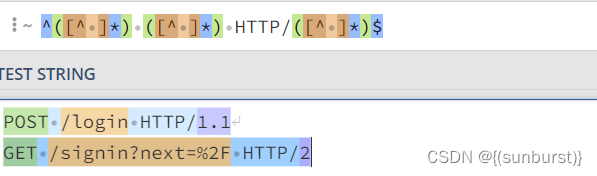
1、^([^ ]*) ([^ ]*) HTTP/([^ ]*)$ 匹配状态行
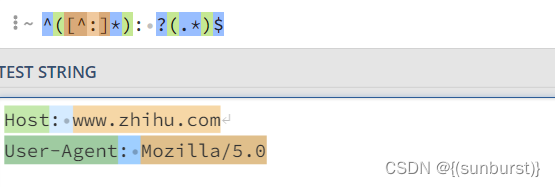
2、^([^:]*): ?(.*)$ 匹配请求头内的XXX: XXXX字段
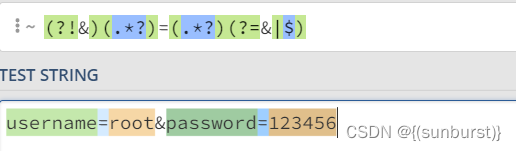
3、(?!&)(.*?)=(.*?)(?=&|$) 匹配POST的请求参数
#ifndef HTTPREQUEST_H
#define HTTPREQUEST_H

#include <unordered_set>
#include <unordered_map>
#include <string>
#include <regex>
#include <algorithm>
#include <memory>
#include <mysql/mysql.h>

#include "buffer.h"
#include "log.h"
#include "sqlconnpool.h"
using std::string;

class HttpRequest
{
public:
    enum PARSE_STATE//解析流程的状态
    {
        REQUEST_LINE,
        HEADERS,
        BODY,
        FINISH
    };
    HttpRequest();
    ~HttpRequest()=default;

    bool parse(Buffer& buffer);//解析全过程
    const string& getMethod() const;
    const string& getPath() const;
    const string& getVersion() const;
    bool isKeepAlive() const;

private:
    void parseRequestLine(const string& line);//解析状态行
    void parseHeader(const string& line);//解析请求头
    void parseBody(const string& line);//解析请求体

    void parsePath();//解析请求路径
    void parsePost();//解析POST请求
    void parseUrlencoded();//解析POST请求的请求参数
    bool userVertify(const string& username,const string& password,int tag);//身份验证
    PARSE_STATE state;
    string method;
    string path;
    string version;
    string body;
    std::unordered_map<string,string> header;//存储请求头字段
    std::unordered_map<string,string> post; //存储POST请求参数
    static const std::unordered_set<string> DEFAULT_HTML;
    static const std::unordered_map<string,int> DEFAULT_HTML_TAG;
};

#endif // !HTTPREQUEST_H#include "httprequest.h"
const std::unordered_set<string> HttpRequest::DEFAULT_HTML=
{"/home","/register","/login","/video","/picture"};
const std::unordered_map<string,int> HttpRequest::DEFAULT_HTML_TAG=
{{"/register.html", 0},{"/login.html", 1}};
HttpRequest::HttpRequest()
{
Log::getInstance()->init();
init();
}
void HttpRequest::init()
{
method="";
path="";
version="";
body="";
state = REQUEST_LINE;
header.clear();
post.clear();
}
bool HttpRequest::parse(Buffer& buffer)
{
if(buffer.readableBytes()<=0)
return false;
while(buffer.readableBytes()&&state!=FINISH)
{
const char CRLF[3]="\r\n";
const char* lineEnd=std::search(buffer.peek(),static_cast<const char*>(buffer.beginWrite()),CRLF,CRLF+2);
string line(buffer.peek(),lineEnd);
switch (state)
{
case REQUEST_LINE:
parseRequestLine(line);
parsePath();
break;
case HEADERS:
parseHeader(line);
break;
case BODY:
parseBody(line);
break;
default:
break;
}
if(lineEnd==buffer.beginWrite())//解析完请求体(不由"\r\n"结尾)
break;
buffer.retrieveUntil(lineEnd+2);//解析完一行Headers(由"\r\n"结尾)
}
return true;
}
void HttpRequest::parsePath()
{
if(path=="/")
path="/home.html";
else
if(DEFAULT_HTML.count(path))
path+=".html";
}
void HttpRequest::parseRequestLine(const string& line)
{
std::regex patten("^([^ ]*) ([^ ]*) HTTP/([^ ]*)$");
std::smatch match;
if(!std::regex_match(line,match,patten))
{
LOG_ERROR("%s","Parse RequestLine Error");
}
method=match[1];
path=match[2];
version=match[3];
state=HEADERS;
}
void HttpRequest::parseHeader(const string& line)
{
std::regex patten("^([^:]*): ?(.*)$");
std::smatch match;
if(std::regex_match(line,match,patten))
{
header[match[1]]=match[2];
}
else
{
state=BODY;
}
}
void HttpRequest::parseBody(const string& line)
{
body=line;
parsePost();
state=FINISH;
}
void HttpRequest::parsePost()
{
if(method=="POST"&&header["Content-Type"]=="application/x-www-form-urlencoded")
{
parseUrlencoded();
if(DEFAULT_HTML_TAG.count(path))
{
int tag=DEFAULT_HTML_TAG.find(path)->second;
if(userVertify(post["username"],post["password"],tag))
{
path="/home.html";
}
else
{
path="/error.html";
}
}
}
}
void HttpRequest::parseUrlencoded()
{
std::regex patten("(?!&)(.*?)=(.*?)(?=&|$)");
std::smatch match;
string::const_iterator begin=body.begin();
string::const_iterator end=body.end();
while(std::regex_search(begin,end,match,patten))
{
post[match[1]]=match[2];
begin=match[0].second;
}
}
bool HttpRequest::userVertify(const string& username,const string& password,int tag)
{
SqlConnPool* pool = SqlConnPool::getInstance();
std::shared_ptr<SqlConn> conn=pool->getConn();
string order1="SELECT username,password FROM user WHERE username='"+username+"' LIMIT 1";
string order2="INSERT INTO user(username, password) VALUES('"+username+"','"+password+"')";
MYSQL_RES* res=conn->query(order1);
string user;
string pwd;
MYSQL_ROW row=nullptr;
while((row=mysql_fetch_row(res))!=nullptr)
{
user=row[0];
pwd=row[1];
}
if(tag)//登录
{
if(pwd!=password)//密码错误
{
LOG_ERROR("%s","Password Error");
return false;
}
LOG_INFO("%s Login Success",username);
}
else//注册
{
if(!user.empty())//用户名已被使用
{
LOG_ERROR("%s","Username Used");
return false;
}
if(!conn->update(order2))//数据库插入失败
{
LOG_ERROR("%s","Insert Error");
return false;
}
LOG_INFO("%s Register Success",username);
}
mysql_free_result(res);
return true;
}
const string& HttpRequest::getMethod() const
{
return method;
}
const string& HttpRequest::getPath() const
{
return path;
}
const string& HttpRequest::getVersion() const
{
return version;
}
bool HttpRequest::isKeepAlive() const
{
if(header.count("Connection"))
{
return header.find("Connection")->second=="keep-alive";
}
return false;
}
分别解析GET请求和POST请求,根据解析内容进行判断。
#include "httprequest.h"
#include <iostream>
using namespace std;
void testPost()
{
    HttpRequest request;
    Buffer input;
    input.append("POST /login HTTP/1.1\r\n"
            "Host: 127.0.0.1:8888\r\n"
            "User-Agent: Mozilla/5.0\r\n"
            "Accept: text/html,application/xhtml+xml,application/xml;q=0.9,image/webp,image/apng,*/*;q=0.8,application/signed-exchange;v=b3;q=0.9\r\n"
            "Accept-Language: zh-CN,zh;q=0.9,en;q=0.8,en-GB;q=0.7,en-US;q=0.6\r\n"
            "Accept-Encoding: gzip, deflate\r\n"
            "Content-Type: application/x-www-form-urlencoded\r\n"
            "Content-Length: 29\r\n"
            "Connection: keep-alive\r\n"
            "\r\n"
            "username=root&password=123456");
    request.parse(input);
    cout<<"method:"<<request.getMethod()<<endl;
    cout<<"path:"<<request.getPath()<<endl;
    cout<<"version:"<<request.getVersion()<<endl;
    if(request.isKeepAlive())
        cout<<"isKeepAlive"<<endl;
}

void testGet()
{
    HttpRequest request;
    Buffer input;
    input.append("GET /signin?next=%2F HTTP/2\r\n"
            "Host: www.zhihu.com\r\n"
            "User-Agent: Mozilla/5.0 (X11; Linux x86_64; rv:91.0) Gecko/20100101 Firefox/91.0\r\n"
            "Accept: text/html,application/xhtml+xml,application/xml;q=0.9,image/webp,*/*;q=0.8\r\n"
            "Accept-Language: zh-CN,zh;q=0.8,zh-TW;q=0.7,zh-HK;q=0.5,en-US;q=0.3,en;q=0.2\r\n"
            "Accept-Encoding: gzip, deflate, br\r\n"
            "Connection: keep-alive\r\n"
            "Upgrade-Insecure-Requests: 1\r\n"
            "Cache-Control: max-age=0\r\n"
            "TE: trailers\r\n"
            "\r\n");
    request.parse(input);
    cout<<"method:"<<request.getMethod()<<endl;
    cout<<"path:"<<request.getPath()<<endl;
    cout<<"version:"<<request.getVersion()<<endl;
    if(request.isKeepAlive())
        cout<<"isKeepAlive"<<endl;
}

int main()
{
    cout<<"POST------------------------------------------"<<endl;
    testPost();
    cout<<"GET-------------------------------------------"<<endl;
    testGet();
}
运行结果:
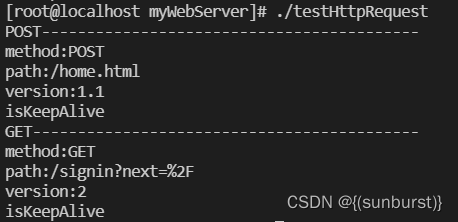
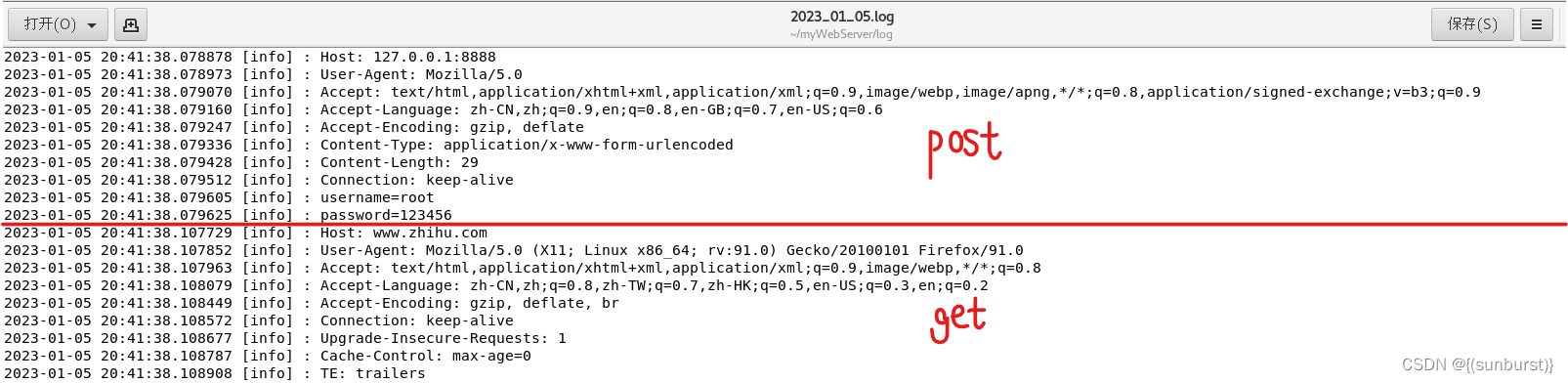
由日志信息可以判断,对GET和POST的请求解析正确。
Makefile
CXX = g++
CFLAGS = -std=c++14 -O2 -Wall -g

TARGET = testHttpRequest
OBJS =  buffer.cpp log.cpp blockqueue.h\
		sqlconn.cpp sqlconnpool.cpp httprequest.cpp\
        testHttpRequest.cpp

all: $(OBJS)
	$(CXX) $(CFLAGS) $(OBJS) -o $(TARGET)  -pthread -L/usr/lib64/mysql -lmysqlclient

clean:
	rm -rf $(OBJS) $(TARGET)
数据库连接池(C++11实现)_{(sunburst)}的博客-CSDN博客
同步+异步日志系统(C++实现)_{(sunburst)}的博客-CSDN博客_c++ 异步日志
缓冲区Buffer类的设计(参考Muduo实现)_{(sunburst)}的博客-CSDN博客
基于C++11实现的阻塞队列(BlockQueue)_{(sunburst)}的博客-CSDN博客_c++11 阻塞队列
我有一个字符串input="maybe(thisis|thatwas)some((nice|ugly)(day|night)|(strange(weather|time)))"Ruby中解析该字符串的最佳方法是什么?我的意思是脚本应该能够像这样构建句子:maybethisissomeuglynightmaybethatwassomenicenightmaybethiswassomestrangetime等等,你明白了......我应该一个字符一个字符地读取字符串并构建一个带有堆栈的状态机来存储括号值以供以后计算,还是有更好的方法?也许为此目的准备了一个开箱即用的库?
我正在尝试设置一个puppet节点,但rubygems似乎不正常。如果我通过它自己的二进制文件(/usr/lib/ruby/gems/1.8/gems/facter-1.5.8/bin/facter)在cli上运行facter,它工作正常,但如果我通过由rubygems(/usr/bin/facter)安装的二进制文件,它抛出:/usr/lib/ruby/1.8/facter/uptime.rb:11:undefinedmethod`get_uptime'forFacter::Util::Uptime:Module(NoMethodError)from/usr/lib/ruby
我主要使用Ruby来执行此操作,但到目前为止我的攻击计划如下:使用gemsrdf、rdf-rdfa和rdf-microdata或mida来解析给定任何URI的数据。我认为最好映射到像schema.org这样的统一模式,例如使用这个yaml文件,它试图描述数据词汇表和opengraph到schema.org之间的转换:#SchemaXtoschema.orgconversion#data-vocabularyDV:name:namestreet-address:streetAddressregion:addressRegionlocality:addressLocalityphoto:i
我正在使用ruby1.9解析以下带有MacRoman字符的csv文件#encoding:ISO-8859-1#csv_parse.csvName,main-dialogue"Marceu","Giveittohimóhe,hiswife."我做了以下解析。require'csv'input_string=File.read("../csv_parse.rb").force_encoding("ISO-8859-1").encode("UTF-8")#=>"Name,main-dialogue\r\n\"Marceu\",\"Giveittohim\x97he,hiswife.\"\
是的,我知道最好使用webmock,但我想知道如何在RSpec中模拟此方法:defmethod_to_testurl=URI.parseurireq=Net::HTTP::Post.newurl.pathres=Net::HTTP.start(url.host,url.port)do|http|http.requestreq,foo:1endresend这是RSpec:let(:uri){'http://example.com'}specify'HTTPcall'dohttp=mock:httpNet::HTTP.stub!(:start).and_yieldhttphttp.shou
我知道您通常应该在Rails中使用新建/创建和编辑/更新之间的链接,但我有一个情况需要其他东西。无论如何我可以实现同样的连接吗?我有一个模型表单,我希望它发布数据(类似于新View如何发布到创建操作)。这是我的表格prohibitedthisjobfrombeingsaved: 最佳答案 使用:url选项。=form_for@job,:url=>company_path,:html=>{:method=>:post/:put} 关于ruby-on-rails-rails:Howtomak
在我的Controller中,我通过以下方式在我的index方法中支持HTML和JSON:respond_todo|format|format.htmlformat.json{renderjson:@user}end在浏览器中拉起它时,它会自然地以HTML呈现。但是,当我对/user资源进行内容类型为application/json的curl调用时(因为它是索引方法),我仍然将HTML作为响应。如何获取JSON作为响应?我还需要说明什么? 最佳答案 您应该将.json附加到请求的url,提供的格式在routes.rb的路径中定义。这
我正在阅读SandiMetz的POODR,并且遇到了一个我不太了解的编码原则。这是代码:classBicycleattr_reader:size,:chain,:tire_sizedefinitialize(args={})@size=args[:size]||1@chain=args[:chain]||2@tire_size=args[:tire_size]||3post_initialize(args)endendclassMountainBike此代码将为其各自的属性输出1,2,3,4,5。我不明白的是查找方法。当一辆山地自行车被实例化时,因为它没有自己的initialize方法
rails中是否有任何规定允许站点的所有AJAXPOST请求在没有authenticity_token的情况下通过?我有一个调用Controller方法的JqueryPOSTajax调用,但我没有在其中放置任何真实性代码,但调用成功。我的ApplicationController确实有'request_forgery_protection'并且我已经改变了config.action_controller.consider_all_requests_local在我的environments/development.rb中为false我还搜索了我的代码以确保我没有重载ajaxSend来发送
我目前正在使用以下方法获取页面的源代码:Net::HTTP.get(URI.parse(page.url))我还想获取HTTP状态,而无需发出第二个请求。有没有办法用另一种方法做到这一点?我一直在查看文档,但似乎找不到我要找的东西。 最佳答案 在我看来,除非您需要一些真正的低级访问或控制,否则最好使用Ruby的内置Open::URI模块:require'open-uri'io=open('http://www.example.org/')#=>#body=io.read[0,50]#=>"["200","OK"]io.base_ur
