素材来源:华为路由器配置指南
一边学习一边整理试验笔记,并与大家分享,侵权即删,谢谢支持!
附上汇总贴:玩转华为ENSP模拟器系列 | 合集_COCOgsta的博客-CSDN博客_华为模拟器实验
目标
本举例介绍通过配置LLDP基本功能,使得NMS可以获取到网络的拓扑信息。
组网需求
如图1所示,DeviceA和DeviceB、DeviceC之间有可达链路,DeviceA、DeviceC与NMS之间有可达路由。在配置LLDP功能之前,DeviceA无法获取DeviceB和DeviceC的状态信息,NMS也不能通过SNMP报文获取DeviceA、DeviceB和DeviceC之间的拓扑结构信息。
配置LLDP功能之后,设备间可以通过交互LLDP报文获取彼此的状态信息。同时NMS可以通过LLDP管理IP地址查找DeviceA、DeviceB和DeviceC,获取它们之间的拓扑信息。
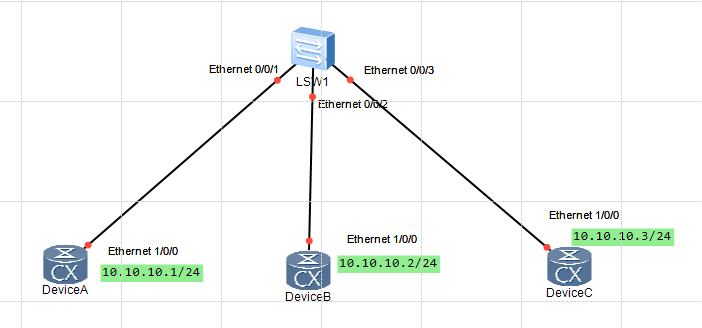
配置思路
操作步骤
配置DeviceA
DeviceA:
sysname DeviceA
lldp enable
配置DeviceB
DeviceB:
sysname DeviceB
lldp enable
配置DeviceC
DeviceC:
sysname DeviceC
lldp enable
配置DeviceA的管理IP地址为10.10.10.1。
DeviceA:
lldp management-address 10.10.10.1
配置DeviceB的管理IP地址为10.10.10.2。
DeviceB:
lldp management-address 10.10.10.2
配置DeviceC的管理IP地址为10.10.10.3。
DeviceC:
lldp management-address 10.10.10.3
配置DeviceA发送LLDP报文的周期和延迟时间。
DeviceA:
lldp message-transmission interval 60
lldp message-transmission delay 9
配置DeviceB和DeviceC发送LLDP报文的周期和延迟时间,参见DeviceA的配置。
配置DeviceA
DeviceA:
snmp-agent trap enable feature-name lldp
lldp trap-interval 10
配置DeviceB和DeviceC,参见DeviceA的配置
查看DeviceA的LLDP是否使能、LLDP管理地址是否配置、LLDP告警功能是否使能以及LLDP属性的值是否为所配置的值。
查看DeviceA的本地LLDP信息。
[~DeviceA] display lldp local
System information
--------------------------------------------------------------------------
Chassis type                       :macAddress
Chassis ID                         :707b-e820-49d4
System name                        :DeviceA
System description                 :Huawei Versatile Routing Platform Software
VRP (R) software, Version 8.180 (CX V800R011C00SPC607B607)
Copyright (C) 2012-2018 Huawei Technologies Co., Ltd.
HUAWEI CX
System capabilities supported      :bridge router
System capabilities enabled        :bridge router
LLDP Up time                       :2019-10-30 09:59:07
System configuration
--------------------------------------------------------------------------
LLDP Status                        :enabled              (default is disabled)
LLDP Message Tx Interval           :60                   (default is 30s)
LLDP Message Tx Hold Multiplier    :4                    (default is 4)
LLDP Refresh Delay                 :2                    (default is 2s)
LLDP Tx Delay                      :9                    (default is 2s)
LLDP Notification Interval         :10                   (default is 5s)
LLDP Notification Enable           :enabled              (default is disabled)
Management Address                 :ipv4: 10.10.10.1
LLDP Fast Message Count            :4                    (default is 4)
Remote Table Statistics:
--------------------------------------------------------------------------
Remote Table Last Change Time      :0 days, 0 hours, 32 minutes, 29 seconds
Remote Neighbors Added             :2
Remote Neighbors Deleted           :0
Remote Neighbors Dropped           :0
Remote Neighbors Aged              :0
Total Neighbors                    :2
Port information:
--------------------------------------------------------------------------
Interface Ethernet1/0/0:
LLDP Enable Status                 :txAndRx              (default is disabled)
Total Neighbors                    :0
Port ID subtype                    :interfaceName
Port ID                            :Ethernet1/0/0
Port description                   :
Port and Protocol VLAN ID(PPVID)   :unsupported
Port VLAN ID(PVID)                 :0
VLAN name of VLAN                  :--
Protocol identity                  :STP RSTP/MSTP LACP EthOAM
Auto-negotiation supported         :Yes
Auto-negotiation enabled           :Yes
OperMau                            :speed (100) /duplex (Auto)
Link aggregation supported         :Yes
Link aggregation enabled           :No
Aggregation port ID                :0
Maximum frame Size                 :9216
Device discovery protocol TLV
Serial number                      :--
Interface index                    :--
IPv4 address                       :--
MAC address                        :--
Interface Ethernet1/0/1:
LLDP Enable Status                 :txAndRx              (default is disabled)
Total Neighbors                    :0
Port ID subtype                    :interfaceName
Port ID                            :Ethernet1/0/1
Port description                   :
Port and Protocol VLAN ID(PPVID)   :unsupported
Port VLAN ID(PVID)                 :0
VLAN name of VLAN                  :--
Protocol identity                  :STP RSTP/MSTP LACP EthOAM
Auto-negotiation supported         :Yes
Auto-negotiation enabled           :Yes
OperMau                            :speed (100) /duplex (Auto)
Link aggregation supported         :Yes
Link aggregation enabled           :No
Aggregation port ID                :0
Maximum frame Size                 :9216
Device discovery protocol TLV
Serial number                      :--
Interface index                    :--
IPv4 address                       :--
MAC address                        :--
Interface Ethernet1/0/2:
LLDP Enable Status                 :txAndRx              (default is disabled)
Total Neighbors                    :0
Port ID subtype                    :interfaceName
Port ID                            :Ethernet1/0/2
Port description                   :
Port and Protocol VLAN ID(PPVID)   :unsupported
Port VLAN ID(PVID)                 :0
VLAN name of VLAN                  :--
Protocol identity                  :STP RSTP/MSTP LACP EthOAM
Auto-negotiation supported         :Yes
Auto-negotiation enabled           :Yes
OperMau                            :speed (100) /duplex (Auto)
Link aggregation supported         :Yes
Link aggregation enabled           :No
Aggregation port ID                :0
Maximum frame Size                 :9216
Device discovery protocol TLV
Serial number                      :--
Interface index                    :--
IPv4 address                       :--
MAC address                        :--

Interface Ethernet1/0/3:
LLDP Enable Status                 :txAndRx              (default is disabled)
Total Neighbors                    :0
Port ID subtype                    :interfaceName
Port ID                            :Ethernet1/0/3
Port description                   :
Port and Protocol VLAN ID(PPVID)   :unsupported
Port VLAN ID(PVID)                 :0
VLAN name of VLAN                  :--
Protocol identity                  :STP RSTP/MSTP LACP EthOAM
Auto-negotiation supported         :Yes
Auto-negotiation enabled           :Yes
OperMau                            :speed (100) /duplex (Auto)
Link aggregation supported         :Yes
Link aggregation enabled           :No
Aggregation port ID                :0
Maximum frame Size                 :9216
Device discovery protocol TLV
Serial number                      :--
Interface index                    :--
IPv4 address                       :--
MAC address                        :--
Interface Ethernet1/0/4:
LLDP Enable Status                 :txAndRx              (default is disabled)
Total Neighbors                    :0
Port ID subtype                    :interfaceName
Port ID                            :Ethernet1/0/4
Port description                   :
Port and Protocol VLAN ID(PPVID)   :unsupported
Port VLAN ID(PVID)                 :0
VLAN name of VLAN                  :--
Protocol identity                  :STP RSTP/MSTP LACP EthOAM
Auto-negotiation supported         :Yes
Auto-negotiation enabled           :Yes
OperMau                            :speed (100) /duplex (Auto)
Link aggregation supported         :Yes
Link aggregation enabled           :No
Aggregation port ID                :0
Maximum frame Size                 :9216

Device discovery protocol TLV
Serial number                      :--
Interface index                    :--
IPv4 address                       :--
MAC address                        :--
Interface Ethernet1/0/5:
LLDP Enable Status                 :txAndRx              (default is disabled)
Total Neighbors                    :0
Port ID subtype                    :interfaceName
Port ID                            :Ethernet1/0/5
Port description                   :
Port and Protocol VLAN ID(PPVID)   :unsupported
Port VLAN ID(PVID)                 :0
VLAN name of VLAN                  :--
Protocol identity                  :STP RSTP/MSTP LACP EthOAM
Auto-negotiation supported         :Yes
Auto-negotiation enabled           :Yes
OperMau                            :speed (100) /duplex (Auto)
Link aggregation supported         :Yes
Link aggregation enabled           :No
Aggregation port ID                :0
Maximum frame Size                 :9216
Device discovery protocol TLV
Serial number                      :--
Interface index                    :--
IPv4 address                       :--
MAC address                        :--
Interface Ethernet1/0/6:
LLDP Enable Status                 :txAndRx              (default is disabled)
Total Neighbors                    :0
Port ID subtype                    :interfaceName
Port ID                            :Ethernet1/0/6
Port description                   :
Port and Protocol VLAN ID(PPVID)   :unsupported
Port VLAN ID(PVID)                 :0
VLAN name of VLAN                  :--
Protocol identity                  :STP RSTP/MSTP LACP EthOAM
Auto-negotiation supported         :Yes
Auto-negotiation enabled           :Yes
OperMau                            :speed (100) /duplex (Auto)
Link aggregation supported         :Yes
Link aggregation enabled           :No
Aggregation port ID                :0
Maximum frame Size                 :9216
Device discovery protocol TLV
Serial number                      :--
Interface index                    :--
IPv4 address                       :--
MAC address                        :--
Interface Ethernet1/0/7:
LLDP Enable Status                 :txAndRx              (default is disabled)
Total Neighbors                    :0
Port ID subtype                    :interfaceName
Port ID                            :Ethernet1/0/7
Port description                   :
Port and Protocol VLAN ID(PPVID)   :unsupported
Port VLAN ID(PVID)                 :0
VLAN name of VLAN                  :--
Protocol identity                  :STP RSTP/MSTP LACP EthOAM
Auto-negotiation supported         :Yes
Auto-negotiation enabled           :Yes
OperMau                            :speed (100) /duplex (Auto)
Link aggregation supported         :Yes
Link aggregation enabled           :No
Aggregation port ID                :0
Maximum frame Size                 :9216
Device discovery protocol TLV
Serial number                      :--
Interface index                    :--
IPv4 address                       :--
MAC address                        :--
Interface Ethernet1/0/8:
LLDP Enable Status                 :txAndRx              (default is disabled)
Total Neighbors                    :0
Port ID subtype                    :interfaceName
Port ID                            :Ethernet1/0/8
Port description                   :

Port and Protocol VLAN ID(PPVID)   :unsupported
Port VLAN ID(PVID)                 :0
VLAN name of VLAN                  :--
Protocol identity                  :STP RSTP/MSTP LACP EthOAM
Auto-negotiation supported         :Yes
Auto-negotiation enabled           :Yes
OperMau                            :speed (100) /duplex (Auto)
Link aggregation supported         :Yes
Link aggregation enabled           :No
Aggregation port ID                :0
Maximum frame Size                 :9216
Device discovery protocol TLV
Serial number                      :--
Interface index                    :--
IPv4 address                       :--
MAC address                        :--
Interface Ethernet1/0/9:
LLDP Enable Status                 :txAndRx              (default is disabled)
Total Neighbors                    :0
Port ID subtype                    :interfaceName
Port ID                            :Ethernet1/0/9
Port description                   :
Port and Protocol VLAN ID(PPVID)   :unsupported
Port VLAN ID(PVID)                 :0
VLAN name of VLAN                  :--
Protocol identity                  :STP RSTP/MSTP LACP EthOAM
Auto-negotiation supported         :Yes
Auto-negotiation enabled           :Yes
OperMau                            :speed (100) /duplex (Auto)
Link aggregation supported         :Yes
Link aggregation enabled           :No
Aggregation port ID                :0
Maximum frame Size                 :9216
Device discovery protocol TLV
Serial number                      :--
Interface index                    :--
IPv4 address                       :--
MAC address                        :--
Interface GigabitEthernet0/0/0:
LLDP Enable Status                 :txAndRx              (default is disabled)
Total Neighbors                    :2
Port ID subtype                    :interfaceName
Port ID                            :GigabitEthernet0/0/0
Port description                   :
Port and Protocol VLAN ID(PPVID)   :unsupported
Port VLAN ID(PVID)                 :0
VLAN name of VLAN                  :--
Protocol identity                  :STP RSTP/MSTP LACP EthOAM
Auto-negotiation supported         :No
Auto-negotiation enabled           :No
OperMau                            :speed (100) /duplex (Auto)
Link aggregation supported         :Yes
Link aggregation enabled           :No
Aggregation port ID                :0
Maximum frame Size                 :0
Device discovery protocol TLV
Serial number                      :--
Interface index                    :--
IPv4 address                       :--
MAC address                        :--
[~DeviceA]
查看DeviceA的邻居设备的LLDP信息。
[~DeviceA]dis lldp neighbor interface GigabitEthernet 0/0/0
GigabitEthernet0/0/0 has 2 neighbor(s):
Neighbor index                     :1
Chassis type                       :macAddress
Chassis ID                         :707b-e8d4-4d26
Port ID type                       :interfaceName
Port ID                            :GigabitEthernet0/0/0
Port description                   :--
System name                        :DeviceB
System description                 :Huawei Versatile Routing Platform Software
VRP (R) software, Version 8.180 (CX V800R011C00SPC607B607)
Copyright (C) 2012-2018 Huawei Technologies Co., Ltd.
HUAWEI CX
System capabilities supported      :bridge router
System capabilities enabled        :bridge router
Management address type            :ipv4
Management address                 :10.10.10.2
Expired time                       :183s
Port VLAN ID(PVID)                 :--
Port and Protocol VLAN ID(PPVID)   :--
Port and Protocol VLAN supported   :--
Port and Protocol VLAN enabled     :--
VLAN name of VLAN                  :--
Protocol identity                  :--
Auto-negotiation supported         :--
Auto-negotiation enabled           :--
OperMau                            :speed (--) /duplex (--)
Link aggregation supported         :--
Link aggregation enabled           :--
Aggregation port ID                :--
Maximum frame Size                 :--
Discovered time                    :2019-10-30 09:58:51
Device discovery protocol TLV
Serial number                      :--
Interface index                    :--
IPv4 address                       :--
MAC address                        :--
Neighbor index                     :2
Chassis type                       :macAddress
Chassis ID                         :707b-e825-2640
Port ID type                       :interfaceName
Port ID                            :GigabitEthernet0/0/0
Port description                   :--
System name                        :DeviceC
System description                 :Huawei Versatile Routing Platform Software
VRP (R) software, Version 8.180 (CX V800R011C00SPC607B607)
Copyright (C) 2012-2018 Huawei Technologies Co., Ltd.
HUAWEI CX
System capabilities supported      :bridge router
System capabilities enabled        :bridge router
Management address type            :ipv4
Management address                 :10.10.10.3
Expired time                       :238s
Port VLAN ID(PVID)                 :--
Port and Protocol VLAN ID(PPVID)   :--
Port and Protocol VLAN supported   :--
Port and Protocol VLAN enabled     :--
VLAN name of VLAN                  :--
Protocol identity                  :--
Auto-negotiation supported         :--
Auto-negotiation enabled           :--
OperMau                            :speed (--) /duplex (--)
Link aggregation supported         :--
Link aggregation enabled           :--
Aggregation port ID                :--
Maximum frame Size                 :--
Discovered time                    :2019-10-30 10:31:17
Device discovery protocol TLV
Serial number                      :--
Interface index                    :--
IPv4 address                       :--
MAC address                        :--
[~DeviceA]
[~DeviceA]
查看DeviceB和DeviceC的LLDP功能是否使能、LLDP管理地址是否配置,参见查看DeviceA的配置信息的过程。
关闭。这个问题是opinion-based.它目前不接受答案。想要改进这个问题?更新问题,以便editingthispost可以用事实和引用来回答它.关闭4年前。Improvethisquestion我想在固定时间创建一系列低音和高音调的哔哔声。例如:在150毫秒时发出高音调的蜂鸣声在151毫秒时发出低音调的蜂鸣声200毫秒时发出低音调的蜂鸣声250毫秒的高音调蜂鸣声有没有办法在Ruby或Python中做到这一点?我真的不在乎输出编码是什么(.wav、.mp3、.ogg等等),但我确实想创建一个输出文件。
是的,我知道最好使用webmock,但我想知道如何在RSpec中模拟此方法:defmethod_to_testurl=URI.parseurireq=Net::HTTP::Post.newurl.pathres=Net::HTTP.start(url.host,url.port)do|http|http.requestreq,foo:1endresend这是RSpec:let(:uri){'http://example.com'}specify'HTTPcall'dohttp=mock:httpNet::HTTP.stub!(:start).and_yieldhttphttp.shou
这里是Ruby新手。完成一些练习后碰壁了。练习:计算一系列成绩的字母等级创建一个方法get_grade来接受测试分数数组。数组中的每个分数应介于0和100之间,其中100是最大分数。计算平均分并将字母等级作为字符串返回,即“A”、“B”、“C”、“D”、“E”或“F”。我一直返回错误:avg.rb:1:syntaxerror,unexpectedtLBRACK,expecting')'defget_grade([100,90,80])^avg.rb:1:syntaxerror,unexpected')',expecting$end这是我目前所拥有的。我想坚持使用下面的方法或.join,
只是想确保我理解了事情。据我目前收集到的信息,Cucumber只是一个“包装器”,或者是一种通过将事物分类为功能和步骤来组织测试的好方法,其中实际的单元测试处于步骤阶段。它允许您根据事物的工作方式组织您的测试。对吗? 最佳答案 有点。它是一种组织测试的方式,但不仅如此。它的行为就像最初的Rails集成测试一样,但更易于使用。这里最大的好处是您的session在整个Scenario中保持透明。关于Cucumber的另一件事是您(应该)从使用您的代码的浏览器或客户端的角度进行测试。如果您愿意,您可以使用步骤来构建对象和设置状态,但通常您
华为OD机试题本篇题目:明明的随机数题目输入描述输出描述:示例1输入输出说明代码编写思路最近更新的博客华为od2023|什么是华为od,od薪资待遇,od机试题清单华为OD机试真题大全,用Python解华为机试题|机试宝典【华为OD机试】全流程解析+经验分享,题型分享,防作弊指南华为o
system-view进入系统视图quit退到系统视图sysname交换机命名vlan20创建vlan(进入vlan20)displayvlan显示vlanundovlan20删除vlan20displayvlan20显示vlan里的端口20Interfacee1/0/24进入端口24portlink-typeaccessvlan20把当前端口放入vlan20undoporte1/0/10删除当前VLAN端口10displaycurrent-configuration显示当前配置02配置交换机支持TELNETinterfacevlan1进入VLAN1ipaddress192.168.3.100
在应用开发中,有时候我们需要获取系统的设备信息,用于数据上报和行为分析。那在鸿蒙系统中,我们应该怎么去获取设备的系统信息呢,比如说获取手机的系统版本号、手机的制造商、手机型号等数据。1、获取方式这里分为两种情况,一种是设备信息的获取,一种是系统信息的获取。1.1、获取设备信息获取设备信息,鸿蒙的SDK包为我们提供了DeviceInfo类,通过该类的一些静态方法,可以获取设备信息,DeviceInfo类的包路径为:ohos.system.DeviceInfo.具体的方法如下:ModifierandTypeMethodDescriptionstatic StringgetAbiList()Obt
?博客主页:https://xiaoy.blog.csdn.net?本文由呆呆敲代码的小Y原创,首发于CSDN??学习专栏推荐:Unity系统学习专栏?游戏制作专栏推荐:游戏制作?Unity实战100例专栏推荐:Unity实战100例教程?欢迎点赞?收藏⭐留言?如有错误敬请指正!?未来很长,值得我们全力奔赴更美好的生活✨------------------❤️分割线❤️-------------------------
项目介绍随着我国经济迅速发展,人们对手机的需求越来越大,各种手机软件也都在被广泛应用,但是对于手机进行数据信息管理,对于手机的各种软件也是备受用户的喜爱小学生兴趣延时班预约小程序的设计与开发被用户普遍使用,为方便用户能够可以随时进行小学生兴趣延时班预约小程序的设计与开发的数据信息管理,特开发了小程序的设计与开发的管理系统。小学生兴趣延时班预约小程序的设计与开发的开发利用现有的成熟技术参考,以源代码为模板,分析功能调整与小学生兴趣延时班预约小程序的设计与开发的实际需求相结合,讨论了小学生兴趣延时班预约小程序的设计与开发的使用。开发环境开发说明:前端使用微信微信小程序开发工具:后端使用ssm:VU
基础版云数据库RDS的产品系列包括基础版、高可用版、集群版、三节点企业版,本文介绍基础版实例的相关信息。RDS基础版实例也称为单机版实例,只有单个数据库节点,计算与存储分离,性价比超高。说明RDS基础版实例只有一个数据库节点,没有备节点作为热备份,因此当该节点意外宕机或者执行重启实例、变更配置、版本升级等任务时,会出现较长时间的不可用。如果业务对数据库的可用性要求较高,不建议使用基础版实例,可选择其他系列(如高可用版),部分基础版实例也支持升级为高可用版。基础版与高可用版的对比拓扑图如下所示。优势 性能由于不提供备节点,主节点不会因为实时的数据库复制而产生额外的性能开销,因此基础版的性能相对于
