D:\programfiles\miniconda\envs\py38torch_gpu\python.exe G:/spd-yolov5/SPD-Conv-main/YOLOv5-SPD/train.py --data ../air-filter/data.yaml --cfg models/space_depth_s.yaml --batch-size 32
train: weights=yolov5s.pt, cfg=models/space_depth_s.yaml, data=../air-filter/data.yaml, hyp=data\hyps\hyp.scratch.yaml, epochs=100, batch_size=32, imgsz=640, rect=False, resume=False, nosave=False, noval=False, noautoanchor=False, evolve=None, bucket=, cache=None, image_weights=False, device=, multi_scale=False, single_cls=False, adam=False, sync_bn=False, workers=0, project=runs\train, name=exp, exist_ok=False, quad=False, linear_lr=False, label_smoothing=0.0, patience=100, freeze=0, save_period=-1, local_rank=-1, entity=None, upload_dataset=False, bbox_interval=-1, artifact_alias=latest
github: skipping check (not a git repository), for updates see https://github.com/ultralytics/yolov5
requirements: tqdm>=4.64.0 not found and is required by YOLOv5, attempting auto-update...
WARNING: Ignoring invalid distribution -pencv-contrib-python (d:\programfiles\miniconda\envs\py38torch_gpu\lib\site-packages)
ERROR: Invalid requirement: "'tqdm"
WARNING: Ignoring invalid distribution -pencv-contrib-python (d:\programfiles\miniconda\envs\py38torch_gpu\lib\site-packages)
WARNING: Ignoring invalid distribution -pencv-contrib-python (d:\programfiles\miniconda\envs\py38torch_gpu\lib\site-packages)
WARNING: Ignoring invalid distribution -pencv-contrib-python (d:\programfiles\miniconda\envs\py38torch_gpu\lib\site-packages)
requirements: Command 'pip install 'tqdm>=4.64.0'' returned non-zero exit status 1.
requirements: tqdm>=4.64.0 not found and is required by YOLOv5, attempting auto-update...
WARNING: Ignoring invalid distribution -pencv-contrib-python (d:\programfiles\miniconda\envs\py38torch_gpu\lib\site-packages)
ERROR: Invalid requirement: "'tqdm"
WARNING: Ignoring invalid distribution -pencv-contrib-python (d:\programfiles\miniconda\envs\py38torch_gpu\lib\site-packages)
WARNING: Ignoring invalid distribution -pencv-contrib-python (d:\programfiles\miniconda\envs\py38torch_gpu\lib\site-packages)
WARNING: Ignoring invalid distribution -pencv-contrib-python (d:\programfiles\miniconda\envs\py38torch_gpu\lib\site-packages)
requirements: Command 'pip install 'tqdm>=4.64.0'' returned non-zero exit status 1.
file found
file found
file found
Traceback (most recent call last):
File "G:/spd-yolov5/SPD-Conv-main/YOLOv5-SPD/train.py", line 632, in <module>
main(opt)
File "G:/spd-yolov5/SPD-Conv-main/YOLOv5-SPD/train.py", line 505, in main
check_file(opt.data), check_yaml(opt.cfg), check_yaml(opt.hyp), str(opt.weights), str(opt.project) # checks
File "G:\spd-yolov5\SPD-Conv-main\YOLOv5-SPD\utils\general.py", line 306, in check_yaml
return check_file(file, suffix)
File "G:\spd-yolov5\SPD-Conv-main\YOLOv5-SPD\utils\general.py", line 327, in check_file
assert len(files), f'File not found: {file}' # assert file was found
AssertionError: File not found: data\hyps\hyp.scratch.yaml
requirements: Command 'pip install 'tqdm>=4.64.0'' returned non-zero exit status 1.
file found
file found
file found
在train.py文件同级目录下,缺少相应的requirements.txt文件,需要补充相应requirements.txt文件
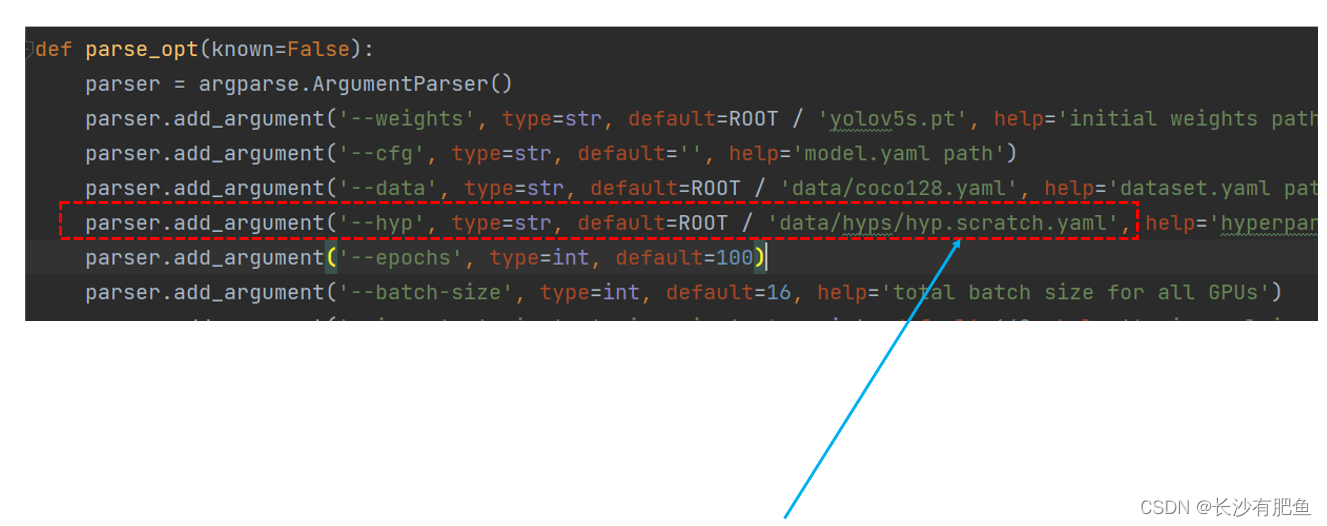
AssertionError: File not found: data\hyps\hyp.scratch.yaml
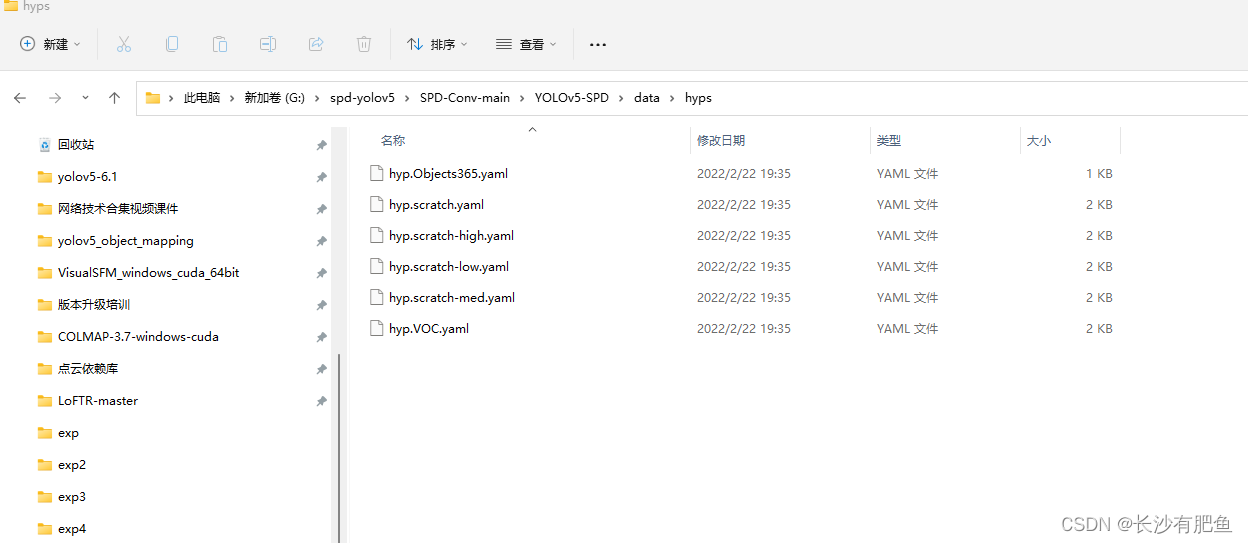
在对应的文件夹下,缺少相应的文件,可以重新命名一个或者直接在train.py文件中修改
我有一大串格式化数据(例如JSON),我想使用Psychinruby同时保留格式转储到YAML。基本上,我希望JSON使用literalstyle出现在YAML中:---json:|{"page":1,"results":["item","another"],"total_pages":0}但是,当我使用YAML.dump时,它不使用文字样式。我得到这样的东西:---json:!"{\n\"page\":1,\n\"results\":[\n\"item\",\"another\"\n],\n\"total_pages\":0\n}\n"我如何告诉Psych以想要的样式转储标量?解
“输出”是一个序列化的OpenStruct。定义标题try(:output).try(:data).try(:title)结束什么会更好?:) 最佳答案 或者只是这样:deftitleoutput.data.titlerescuenilend 关于ruby-on-rails-更好的替代方法try(:output).try(:data).try(:name)?,我们在StackOverflow上找到一个类似的问题: https://stackoverflow.c
我想让一个yaml对象引用另一个,如下所示:intro:"Hello,dearuser."registration:$introThanksforregistering!new_message:$introYouhaveanewmessage!上面的语法只是它如何工作的一个例子(这也是它在thiscpanmodule中的工作方式。)我正在使用标准的rubyyaml解析器。这可能吗? 最佳答案 一些yaml对象确实引用了其他对象:irb>require'yaml'#=>trueirb>str="hello"#=>"hello"ir
是否可以在PyYAML或Ruby的Psych引擎中禁用创建anchor和引用(并有效地显式列出冗余数据)?也许我在网上搜索时遗漏了一些东西,但在Psych中似乎没有太多可用的选项,而且我也无法确定PyYAML是否允许这样做.基本原理是我必须序列化一些数据并将其以可读的形式传递给一个不是真正的技术同事进行手动验证。有些数据是多余的,但我需要以最明确的方式列出它们以提高可读性(anchor和引用是提高效率的好概念,但不是人类可读性)。Ruby和Python是我选择的工具,但如果有其他一些相当简单的方法来“展开”YAML文档,它可能就可以了。 最佳答案
我正在使用ruby2.1.0我有一个json文件。例如:test.json{"item":[{"apple":1},{"banana":2}]}用YAML.load加载这个文件安全吗?YAML.load(File.read('test.json'))我正在尝试加载一个json或yaml格式的文件。 最佳答案 YAML可以加载JSONYAML.load('{"something":"test","other":4}')=>{"something"=>"test","other"=>4}JSON将无法加载YAML。JSON.load("
在Rails控制台中执行类似yGrau.all的命令时,我得到这些奇怪的!binary字符串而不是属性名称。知道如何解决这个问题吗?谢谢。irb(main):003:0>yGrau.all←[1m←[36mGrauLoad(0.0ms)←[0m←[1mSELECT"graus".*FROM"gr←[1m←[35mEXPLAIN(0.0ms)←[0mEXPLAINQUERYPLANSELECT"grauEXPLAINfor:SELECT"graus".*FROM"graus"0|0|0|SCANTABLEgraus(~1000000rows)----!ruby/object:Grauat
我在en:语言环境中有一个字符串display_device:toplay:getplayer冒号给我的错误是cannotloadtranslationsfromC:/DocumentsandSettings/rajg/discoveryaws/branches/internationalization/config/locales/en.yml,expectedittoreturnahash,butdoesnot我怎样才能让它工作? 最佳答案 如果你用这样的引号将它括起来,你可以在你的字符串中转义冒号(和其他“重要”字符):dis
例如,如果我有YAML文件en:questions:new:'NewQuestion'other:recent:'Recent'old:'Old'这最终会变成一个json对象,例如{'questions.new':'NewQuestion','questions.other.recent':'Recent','questions.other.old':'Old'} 最佳答案 由于问题是关于在Rails应用程序上使用YAML文件进行i18n,因此值得注意i18ngem提供了一个辅助模块I18n::Backend::Flatten完全像
这是我的YAML文件“test.yml”:---alpha:100.0beta:200.0gama:300.0---3...第一个文档是一个散列。第二个文档是一个整数。我正在尝试将它们作为散列和整数加载到Ruby程序中。这是我目前的尝试:require'yaml'variables=YAML.load_file('test.yml')putsvariables.inspect 最佳答案 要访问单个文件中的多个YAML文档,请使用load_stream方法(正如“matt”在对其他答案之一的评论中提到的):YAML.load_stre
我正在为我正在处理的一些新ChefRecipe编写InSpec测试。我想利用Recipe使用的data_bags遍历数据包项。我不知道如何在我的InSpec测试中访问它们!这些Recipe使用了search、data_bag和data_bag_item方法。但是这些方法在我的InSpec测试中似乎不可用。我怀疑这些是ChefDSL特定的方法?data_bags的源代码受源代码控制,因此我可以在我的本地文件系统上访问它们的json。如何使用InSpec语法访问Chef_zero中的这些数据包?我在网上找到了几个示例,但我没有看到data_bags实际上是如何由chef_zero加载的,以
