除了设置文字大小,文字颜色也经常需要修改,毕竟Android默认的灰色文字不够醒目。在Java代码中调 用setTextColor方法即可设置文本颜色,具体在Color类中定义了12种颜色,详细的取值说明见下表
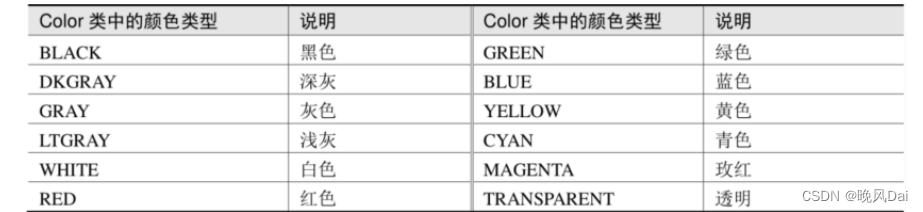
比如以下代码便将文本视图的文字颜色改成了绿色:
// 从布局文件中获取名为tv_code_system的文本视图

TextView tv_code_system = findViewById(R.id.tv_code_system);

// 将tv_code_system的文字颜色设置系统自带的绿色

tv_code_system.setTextColor(Color.GREEN);
( 完整代码见下文)
可是XML文件无法引用Color类的颜色常量,为此Android制定了一套规范的编码标准,将色值交由透明 度alpha和RGB三原色(红色red、绿色green、蓝色blue)联合定义。该标准又有八位十六进制数与六 位十六进制数两种表达方式,例如八位编码FFEEDDCC中,FF表示透明度,EE表示红色的浓度,DD表示 绿色的浓度,CC表示蓝色的浓度。透明度为FF表示完全不透明,为00表示完全透明。RGB三色的数值越 大,表示颜色越浓,也就越暗;数值越小,表示颜色越淡,也就越亮。RGB亮到极致就是白色,暗到极 致就是黑色。 至于六位十六进制编码,则有两种情况,它在XML文件中默认不透明(等价于透明度为FF),而在代码 中默认透明(等价于透明度为00)。以下代码给两个文本视图分别设置六位色值与八位色值,注意添加0x前缀表示十六进制数:
// 从布局文件中获取名为tv_code_six的文本视图

TextView tv_code_six = findViewById(R.id.tv_code_six);

// 将tv_code_six的文字颜色设置为透明的绿色,透明就是看不到

tv_code_six.setTextColor(0x00ff00);

// 从布局文件中获取名为tv_code_eight的文本视图

TextView tv_code_eight = findViewById(R.id.tv_code_eight);

// 将tv_code_eight的文字颜色设置为不透明的绿色,即正常的绿色

tv_code_eight.setTextColor(0xff00ff00);
运行测试App,发现tv_code_six控件的文本不见了(其实是变透明了),而tv_code_eight控件的文本显 示正常的绿色。 在XML文件中可通过属性android:textColor设置文字颜色,但要给色值添加井号前缀“#”,设定好文本颜 色的TextView标签示例如下:(完整代码见下文)
<TextView

        android:id="@+id/tv_xml"

        android:layout_width="wrap_content"

        android:layout_height="wrap_content"

        android:text="布局文件设置六位文字颜色"

        android:textColor="#00ff00"

        android:textSize="17sp" />
就像字符串资源那样,Android把颜色也当作一种资源,打开res/values目录下的colors.xml,发现里面 已经定义了3种颜色:
<resources>

    <color name="colorPrimary">#008577</color>

    <color name="colorPrimaryDark">#00574B</color>

    <color name="colorAccent">#D81B60</color>
</resources>
那么先在resources节点内部补充如下的绿色常量定义:
<color name="green">#00ff00</color>
然后回到XML布局文件,把android:textColor的属性值改为“@color/颜色名称”,也就是android:textColor="@color/green",修改之后的标签TextView如下所示:
<TextView

        android:id="@+id/tv_values"

        android:layout_width="wrap_content"

        android:layout_height="wrap_content"

        android:text="资源文件引用六位文字颜色"

        android:textColor="@color/green"

        android:textSize="17sp" />
不仅文字颜色,还有背景颜色也会用到上述的色值定义,在XML文件中通过属android:background设 置控件的背景颜色。Java代码则有两种方式设置背景颜色,倘若色值来源于Color类或十六进制数,则调 用setBackgroundColor方法设置背景;倘若色值来源于colors.xml中的颜色资源,则调用setBackgroundResource方法,以“R.color.颜色名称”的格式设置背景。下面是两种方式的背景设定代码 例子:
// 从布局文件中获取名叫tv_code_background的文本视图

TextView tv_code_background = findViewById(R.id.tv_code_background);

// 将tv_code_background的背景颜色设置为绿色

tv_code_background.setBackgroundColor(Color.GREEN); // 在代码中定义的色值

tv_code_background.setBackgroundResource(R.color.green); // 颜色来源于资源文件注意属性android:background和setBackgroundResource方法,它俩用来设置控件的背景,不单单是 背景颜色,还包括背景图片。在设置背景图片之前,先将图片文件放到res/drawable***目录(以drawable开头的目录,不仅仅是drawable目录),然后把android:background的属性值改为“@drawable/不含扩展名的图片名称”,或者调用setBackgroundResource方法填入“R.drawable.不含扩 展名的图片名称”
完整代码如下:
layout\activity_text_color.xml
<?xml version="1.0" encoding="utf-8"?>
<LinearLayout xmlns:android="http://schemas.android.com/apk/res/android"
    android:layout_width="match_parent"
    android:layout_height="match_parent"
    android:gravity="center"
    android:orientation="vertical">
    <TextView
        android:id="@+id/tv_code_system"
        android:layout_width="wrap_content"
        android:layout_height="wrap_content"
        android:text="代码设置系统自带的颜色"
        android:textSize="17sp"/>
    <TextView
        android:id="@+id/tv_code_eight"
        android:layout_width="wrap_content"
        android:layout_height="wrap_content"
        android:text="代码设置八位文字颜色"
        android:textSize="17sp"/>
    <TextView
        android:id="@+id/tv_code_six"
        android:layout_width="wrap_content"
        android:layout_height="wrap_content"
        android:text="代码设置六位文字颜色"
        android:textSize="17sp"/>
    <TextView
        android:id="@+id/tv_code_xml"
        android:layout_width="wrap_content"
        android:layout_height="wrap_content"
        android:text="布局文件设置六位文字颜色"
        android:textSize="17sp"
        android:textColor="#00ff00"/>
    <TextView
        android:id="@+id/tv_values"
        android:layout_width="wrap_content"
        android:layout_height="wrap_content"
        android:text="资源文件引用六位文字颜色"
        android:textSize="17sp"
        android:textColor="@color/green"/>
    <TextView
        android:id="@+id/tv_code_background"
        android:layout_width="wrap_content"
        android:layout_height="wrap_content"
        android:text="背景设置为绿色"
        android:textSize="17sp"/>
    <!-- android:textColor="@color/green" -->
</LinearLayout>
layout\activity_text_color.xml的视图:
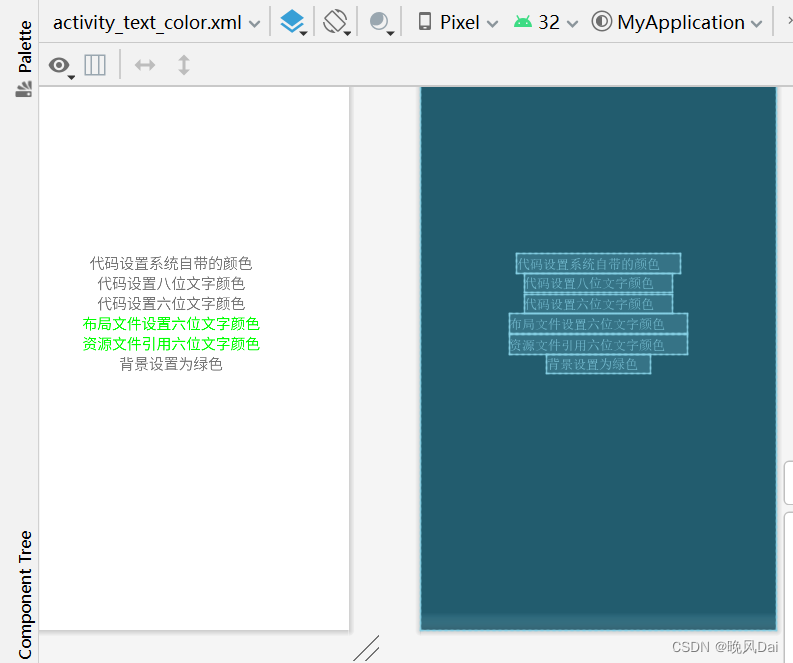
TextColorActivity.java
package com.example.chapter03;

import androidx.appcompat.app.AppCompatActivity;

import android.graphics.Color;
import android.os.Bundle;
import android.widget.TextView;

public class TextColorActivity extends AppCompatActivity {

    @Override
    protected void onCreate(Bundle savedInstanceState) {
        super.onCreate(savedInstanceState);
        setContentView(R.layout.activity_text_color);
        //从布局文件中获取名叫tv_code_system的文本视图
        TextView tv_code_system = findViewById(R.id.tv_code_system);
        //将tv_code_system的文本颜色设置系统自带的绿色
        tv_code_system.setTextColor(Color.GREEN);
        //从布局文件中获取名叫tv_code_eight的文本视图
        TextView tv_code_eight = findViewById(R.id.tv_code_eight);
        //将tv_code_eight的文件颜色设置为不透明的绿色,即正常的绿色
        tv_code_eight.setTextColor(0xff00ff00);
        //从布局文件中获取名叫tv_code_six的文本视图
        TextView tv_code_six = findViewById(R.id.tv_code_six);
        //将tv_code_eight的文件颜色设置为透明的绿色,透明就是看不到
        tv_code_six.setTextColor(0x00ff00);
        //从布局文件中获取名叫tv_code_background的文本视图
        TextView tv_code_background = findViewById(R.id.tv_code_background);
        //将tv_code_background的背景颜色设置绿色
        tv_code_background.setBackgroundColor(Color.GREEN);
       //tv_code_background.setTextColor(R.color.green);
    }
}
values/colors.xml
<?xml version="1.0" encoding="utf-8"?>
<resources>
    <color name="purple_200">#FFBB86FC</color>
    <color name="purple_500">#FF6200EE</color>
    <color name="purple_700">#FF3700B3</color>
    <color name="teal_200">#FF03DAC5</color>
    <color name="teal_700">#FF018786</color>
    <color name="black">#FF000000</color>
    <color name="white">#FFFFFFFF</color>
    <color name="green">#00ff00</color>
</resources>
虚拟机运行结果:
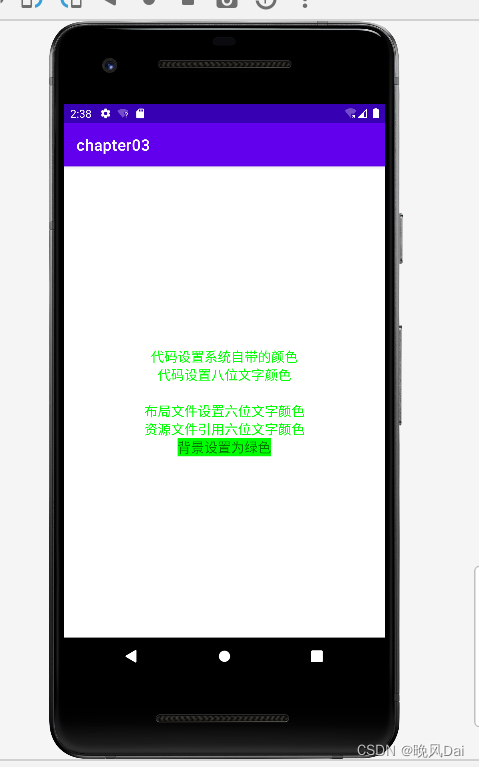
感谢观看!!!
我有一个Ruby程序,它使用rubyzip压缩XML文件的目录树。gem。我的问题是文件开始变得很重,我想提高压缩级别,因为压缩时间不是问题。我在rubyzipdocumentation中找不到一种为创建的ZIP文件指定压缩级别的方法。有人知道如何更改此设置吗?是否有另一个允许指定压缩级别的Ruby库? 最佳答案 这是我通过查看rubyzip内部创建的代码。level=Zlib::BEST_COMPRESSIONZip::ZipOutputStream.open(zip_file)do|zip|Dir.glob("**/*")d
我需要在客户计算机上运行Ruby应用程序。通常需要几天才能完成(复制大备份文件)。问题是如果启用sleep,它会中断应用程序。否则,计算机将持续运行数周,直到我下次访问为止。有什么方法可以防止执行期间休眠并让Windows在执行后休眠吗?欢迎任何疯狂的想法;-) 最佳答案 Here建议使用SetThreadExecutionStateWinAPI函数,使应用程序能够通知系统它正在使用中,从而防止系统在应用程序运行时进入休眠状态或关闭显示。像这样的东西:require'Win32API'ES_AWAYMODE_REQUIRED=0x0
我在使用omniauth/openid时遇到了一些麻烦。在尝试进行身份验证时,我在日志中发现了这一点:OpenID::FetchingError:Errorfetchinghttps://www.google.com/accounts/o8/.well-known/host-meta?hd=profiles.google.com%2Fmy_username:undefinedmethod`io'fornil:NilClass重要的是undefinedmethodio'fornil:NilClass来自openid/fetchers.rb,在下面的代码片段中:moduleNetclass
我想将html转换为纯文本。不过,我不想只删除标签,我想智能地保留尽可能多的格式。为插入换行符标签,检测段落并格式化它们等。输入非常简单,通常是格式良好的html(不是整个文档,只是一堆内容,通常没有anchor或图像)。我可以将几个正则表达式放在一起,让我达到80%,但我认为可能有一些现有的解决方案更智能。 最佳答案 首先,不要尝试为此使用正则表达式。很有可能你会想出一个脆弱/脆弱的解决方案,它会随着HTML的变化而崩溃,或者很难管理和维护。您可以使用Nokogiri快速解析HTML并提取文本:require'nokogiri'h
我得到了一个包含嵌套链接的表单。编辑时链接字段为空的问题。这是我的表格:Editingkategori{:action=>'update',:id=>@konkurrancer.id})do|f|%>'Trackingurl',:style=>'width:500;'%>'Editkonkurrence'%>|我的konkurrencer模型:has_one:link我的链接模型:classLink我的konkurrancer编辑操作:defedit@konkurrancer=Konkurrancer.find(params[:id])@konkurrancer.link_attrib
我主要使用Ruby来执行此操作,但到目前为止我的攻击计划如下:使用gemsrdf、rdf-rdfa和rdf-microdata或mida来解析给定任何URI的数据。我认为最好映射到像schema.org这样的统一模式,例如使用这个yaml文件,它试图描述数据词汇表和opengraph到schema.org之间的转换:#SchemaXtoschema.orgconversion#data-vocabularyDV:name:namestreet-address:streetAddressregion:addressRegionlocality:addressLocalityphoto:i
Rackup通过Rack的默认处理程序成功运行任何Rack应用程序。例如:classRackAppdefcall(environment)['200',{'Content-Type'=>'text/html'},["Helloworld"]]endendrunRackApp.new但是当最后一行更改为使用Rack的内置CGI处理程序时,rackup给出“NoMethodErrorat/undefinedmethod`call'fornil:NilClass”:Rack::Handler::CGI.runRackApp.newRack的其他内置处理程序也提出了同样的反对意见。例如Rack
我想用ruby编写一个小的命令行实用程序并将其作为gem分发。我知道安装后,Guard、Sass和Thor等某些gem可以从命令行自行运行。为了让gem像二进制文件一样可用,我需要在我的gemspec中指定什么。 最佳答案 Gem::Specification.newdo|s|...s.executable='name_of_executable'...endhttp://docs.rubygems.org/read/chapter/20 关于ruby-在Ruby中编写命令行实用程序
我正在编写一个包含C扩展的gem。通常当我写一个gem时,我会遵循TDD的过程,我会写一个失败的规范,然后处理代码直到它通过,等等......在“ext/mygem/mygem.c”中我的C扩展和在gemspec的“扩展”中配置的有效extconf.rb,如何运行我的规范并仍然加载我的C扩展?当我更改C代码时,我需要采取哪些步骤来重新编译代码?这可能是个愚蠢的问题,但是从我的gem的开发源代码树中输入“bundleinstall”不会构建任何native扩展。当我手动运行rubyext/mygem/extconf.rb时,我确实得到了一个Makefile(在整个项目的根目录中),然后当
我构建了两个需要相互通信和发送文件的Rails应用程序。例如,一个Rails应用程序会发送请求以查看其他应用程序数据库中的表。然后另一个应用程序将呈现该表的json并将其发回。我还希望一个应用程序将存储在其公共(public)目录中的文本文件发送到另一个应用程序的公共(public)目录。我从来没有做过这样的事情,所以我什至不知道从哪里开始。任何帮助,将不胜感激。谢谢! 最佳答案 无论Rails是什么,几乎所有Web应用程序都有您的要求,大多数现代Web应用程序都需要相互通信。但是有一个小小的理解需要你坚持下去,网站不应直接访问彼此
