当我们使用el-select选择器下拉数据很大的时候,会出现页面卡顿,甚至卡死的情况,用户体验很不好。我目前采取的方案是使用虚拟列表的方式去处理这个问题。
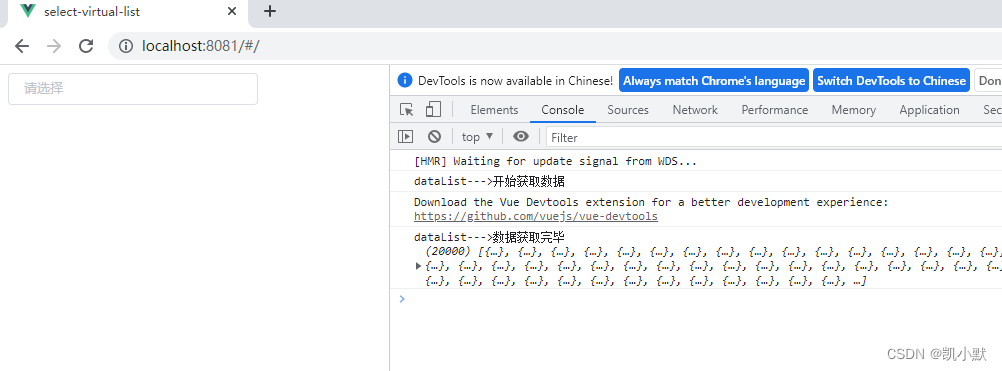
数据获取完毕:
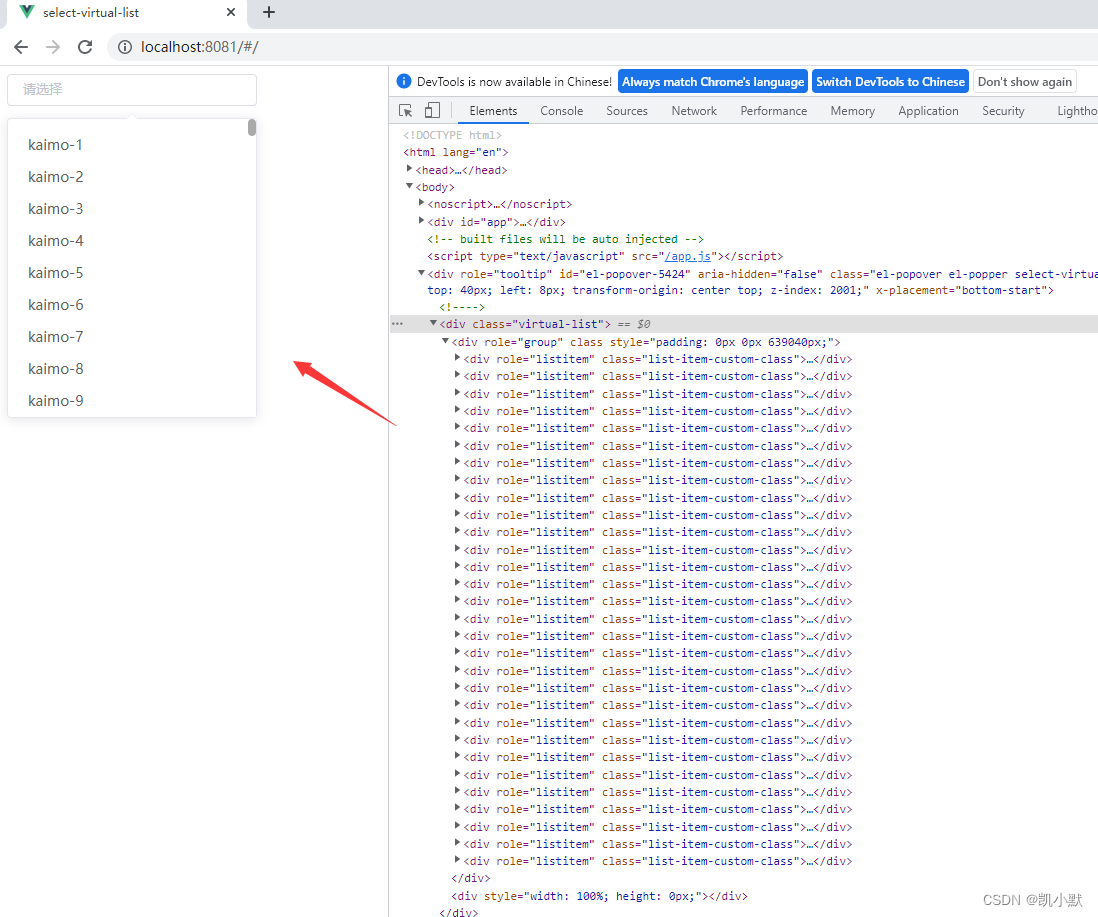
点击输入框:我们可以看到 2 万条数据只展示了 30 条。
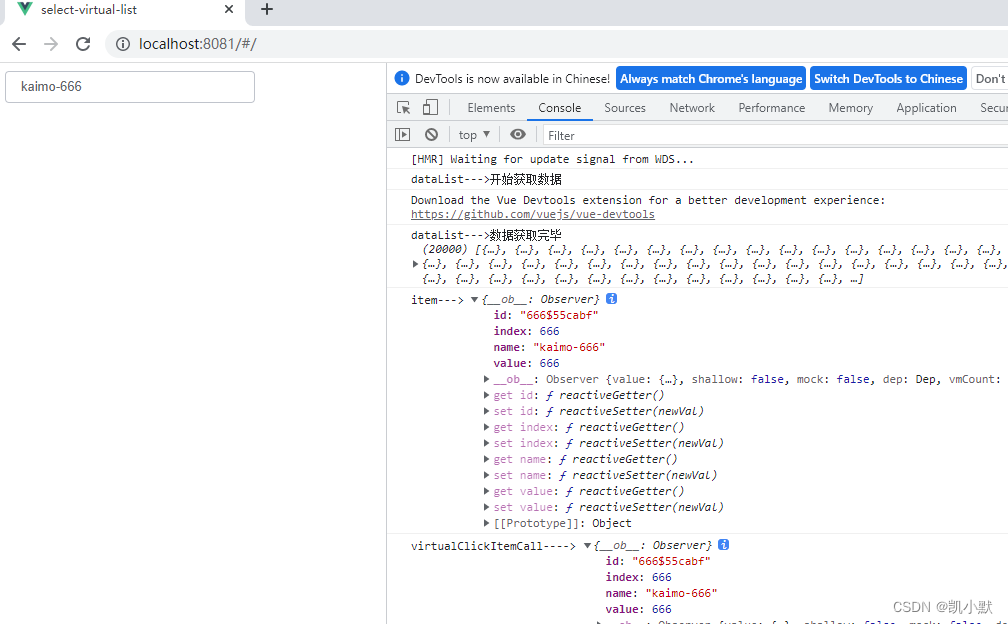
我们滚动找到 kaimo-666,选择它
我们再次点击输入框,我们以及定位到了 kaimo-666 这个位置
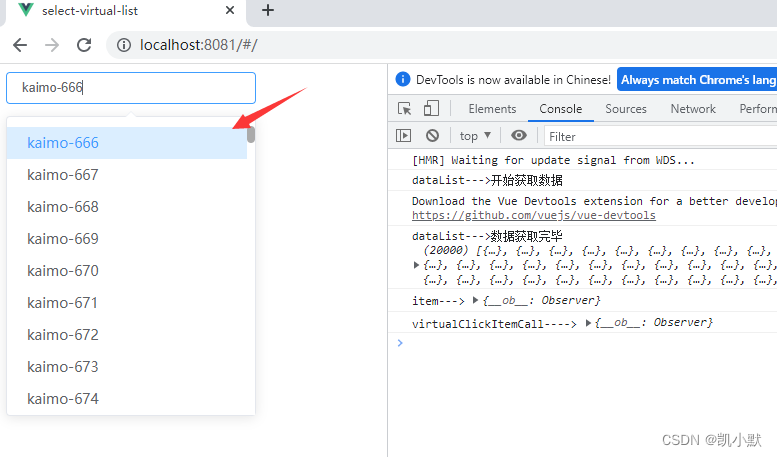
另外拓展了点击项目跟输入框数据改变的事件
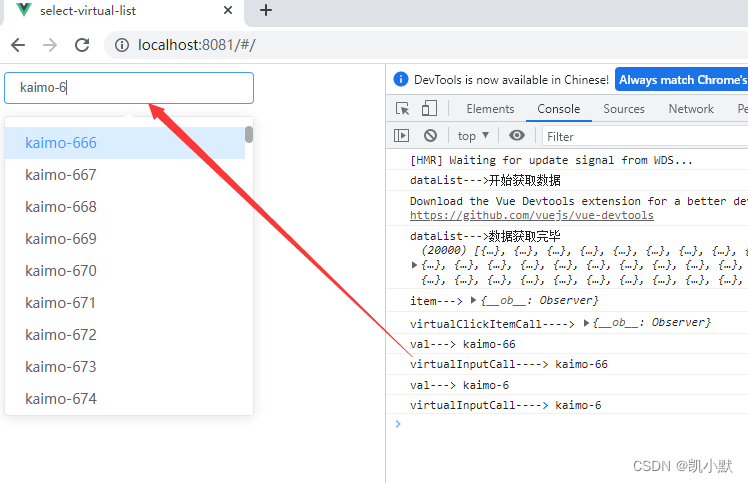
我基于 vue-virtual-scroll-list 跟 element-ui 实现了下拉虚拟列表,解决下拉选择框数据量大时卡顿问题。
代码地址:https://github.com/kaimo313/select-virtual-list
虚拟列表是按需显示的一种技术,可以根据用户的滚动,不必渲染所有列表项,而只是渲染可视区域内的一部分列表元素的技术。
虚拟列表原理:
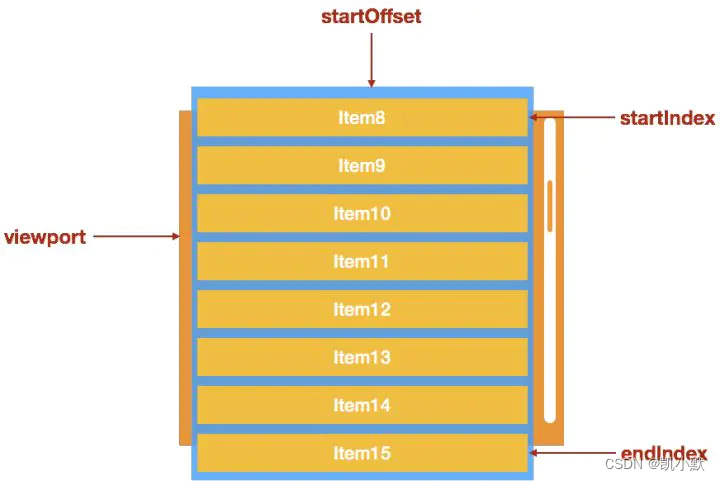
如图所示,当列表中有成千上万个列表项的时候,我们如果采用虚拟列表来优化。就需要只渲染可视区域( viewport )内的 item8 到 item15 这8个列表项。由于列表中一直都只是渲染8个列表元素,这也就保证了列表的性能。
这里我们使用 vue-virtual-scroll-list 轮子,一个 vue 组件支持大量数据列表,具有高滚动性能。
npm i element-ui vue-virtual-scroll-list --save
里面的一些参数可以参考文档:https://github.com/tangbc/vue-virtual-scroll-list/blob/master/README.md
Required props:

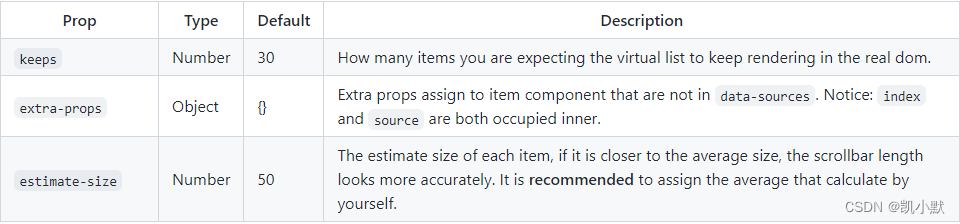
Commonly used:
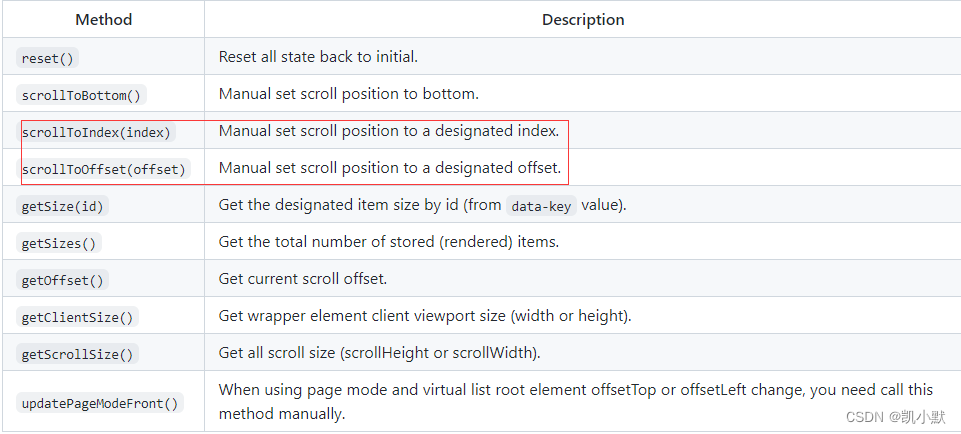
Public methods:You can call these methods via ref:
比如:定位到选择的项目时,我就使用了下面两个方法。
另外事件的发射参考了:https://tangbc.github.io/vue-virtual-scroll-list/#/keep-state
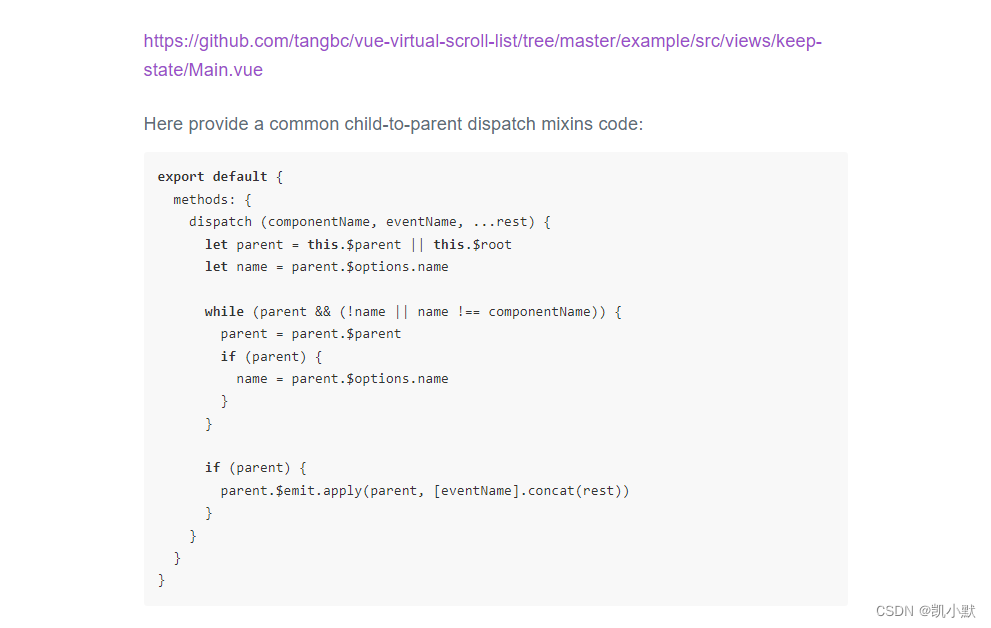
这里我们使用 el-popover 跟 el-input 加上 vue-virtual-scroll-list 去实现自定义虚拟选择器组件 select-virtual-list。
新建文件 src\components\SelectVirtualList\index.vue
<template>
    <el-popover
        v-model="visibleVirtualList"
        popper-class="select-virtual-list-popover"
        trigger="click"
        placement="bottom-start"
        :width="width">
        <virtual-list v-if="visibleVirtualList"
            ref="virtualListRef"
            class="virtual-list"
            :data-key="'id'"
            :keeps="keeps"
            :data-sources="dataList"
            :data-component="itemComponent"
            :extra-props="{ curId }"
            :estimate-size="estimateSize"
            :item-class="'list-item-custom-class'"
        ></virtual-list>
        <el-input slot="reference"
            v-model="curValue"
            :style="`width:${width}px;`"
            :size="size"
            :placeholder="placeholder"
            @input="handleInput"
        ></el-input>
    </el-popover>
</template>

<script>
import VirtualList from 'vue-virtual-scroll-list';
import VirtualItem from './VirtualItem.vue';
export default {
    name: 'SelectVirtualList',
    props: {
        width: {
            type: Number,
            default: 250
        },
        size: {
            type: String,
            default: "small"
        },
        placeholder: {
            type: String,
            default: "请选择"
        },
        dataList: {
            type: Array,
            default: () => {
                return [];
            }
        },
        // 虚拟列表在真实 dom 中保持渲染的项目数量
        keeps: {
            type: Number,
            default: 30
        },
        // 每个项目的估计大小,如果更接近平均大小,则滚动条长度看起来更准确。 建议分配自己计算的平均值。
        estimateSize: {
            type: Number,
            default: 32
        },
        // input输入触发方法
        virtualInputCall: Function,
        // 点击每个项目触发方法
        virtualClickItemCall: Function
    },
    components: {
        VirtualList
    },
    watch: {
        visibleVirtualList(n) {
            if(n) {
                // 当展示虚拟列表时,需要定位到选择的位置
                this.$nextTick(() => {
                    let temp = this.curIndex ? this.curIndex : 0;
                    // 方法一:手动设置滚动位置到指定索引。
                    this.$refs.virtualListRef.scrollToIndex(temp - 1);
                    // 方法二:手动将滚动位置设置为指定的偏移量。
                    // this.$refs.virtualListRef.scrollToOffset(this.estimateSize * (temp - 1));
                })
            }
        }
    },
    data () {
        return {
            curId: "", // 当前选择的 id
            curValue: "", // 当前选择的值
            curIndex: null, // 当前选择的索引
            visibleVirtualList: false, // 是否显示虚拟列表
            itemComponent: VirtualItem, // 由 vue 创建/声明的渲染项组件,它将使用 data-sources 中的数据对象作为渲染道具并命名为:source。
        };
    },
    created() {
        // 监听点击子组件
        this.$on('clickVirtualItem', (item) => {
            this.curId = item.id;
            this.curValue = item.name;
            this.curIndex = item.index;
            this.visibleVirtualList = false;
            console.log("item--->", item)
            this.virtualClickItemCall && this.virtualClickItemCall(item);
        })
    },
    methods: {
        // 输入框改变
        handleInput(val) {
            console.log("val--->", val);
            if(!val) {
                this.curId = "";
                this.curIndex = null;
            }
            this.virtualInputCall && this.virtualInputCall(val);
        }
    }
};
</script>

<style lang='scss'>
.el-popover.el-popper.select-virtual-list-popover {
    height: 300px;
    padding: 0;
    border: 1px solid #E4E7ED;
    border-radius: 4px;
    background-color: #FFFFFF;
    box-shadow: 0 2px 12px 0 rgba(0, 0, 0, 0.1);
    box-sizing: border-box;
    .virtual-list {
        width: 100%;
        height: calc(100% - 20px);
        padding: 10px 0;
        overflow-y: auto;
    }
}
::-webkit-scrollbar {
    width: 8px;
    height: 8px;
    background-color: #fff;
}
::-webkit-scrollbar-thumb {
    background-color: #aaa !important;
    border-radius: 10px !important;
}
::-webkit-scrollbar-track {
    background-color: transparent !important;
    border-radius: 10px !important;
    -webkit-box-shadow: none !important;
}
</style>
新建子组件文件 src\components\SelectVirtualList\VirtualItem.vue
<template>
    <div :class="['virtual-item', {'is-selected': curId === source.id}]" @click="handleClick">
        <span>{{source.name}}</span>
    </div>
</template>

<script>

export default {
    name: 'VirtualItem',
    props: {
        curId: {
            type: String,
            default: ""
        },
        source: {
            type: Object,
            default () {
                return {}
            }
        },
    },
    methods: {
        dispatch(componentName, eventName, ...rest) {
            let parent = this.$parent || this.$root;
            let name = parent.$options.name;
            while (parent && (!name || name !== componentName)) {
                parent = parent.$parent;
                if (parent) {
                    name = parent.$options.name;
                }
            }
            if (parent) {
                parent.$emit.apply(parent, [eventName].concat(rest));
            }
        },
        handleClick() {
            // 通知 SelectVirtualList 组件,点击了项目
            this.dispatch('SelectVirtualList', 'clickVirtualItem', this.source);
        }
    }
}
</script>

<style lang="scss" scoped>
.virtual-item {
    font-size: 14px;
    padding: 0 20px;
    position: relative;
    white-space: nowrap;
    overflow: hidden;
    text-overflow: ellipsis;
    color: #606266;
    height: 32px;
    line-height: 32px;
    box-sizing: border-box;
    cursor: pointer;
    &:hover {
        background-color: #eee;
    }
    &.is-selected {
        color: #409EFF;
        background-color: #dbeeff;
    }
}
</style>
新建文件:src\views\demo.vue
<template>
    <select-virtual-list
        :width="250"
        size="small"
        placeholder="请选择"
        :dataList="dataList"
        :keeps="30"
        :estimateSize="32"
        :virtualInputCall="virtualInputCall"
        :virtualClickItemCall="virtualClickItemCall"
    ></select-virtual-list>
</template>

<script>
import SelectVirtualList from '../components/SelectVirtualList/index.vue';
// 获取模拟数据
import { getList } from '../utils/list.js';

export default {
    data () {
        return {
            dataList: [],
        }
    },
    components: {
        SelectVirtualList
    },
    created() {
        // 2 秒返回 2 万条数据
        console.log("dataList--->开始获取数据");
        getList(20000, 2000).then(res => {
            this.dataList = res;
            console.log("dataList--->数据获取完毕", res);
        })
    },
    methods: {
        // 输入回调
        virtualInputCall(val) {
            console.log("virtualInputCall---->", val);
            // ...
        },
        // 点击项目回调
        virtualClickItemCall(item) {
            console.log("virtualClickItemCall---->", item);
            // ...
        }
    }
}
</script>
添加模拟接口方法:src\utils\list.js
/**
 * @description 获取模拟数据
 *      @param {Number} num 需要获取数据的数量
 *      @param {Number} time 需要延迟的毫秒数
*/
export function getList(num = 10000, time) {
    return new Promise((resolve, reject) => {
        setTimeout(() => {
            const tempArr = []
            let count = num;
            while (count--) {
                const index = num - count;
                tempArr.push({
                    id: `${index}$${Math.random().toString(16).substr(9)}`,
                    index,
                    name: `kaimo-${index}`,
                    value: index
                })
            }
            resolve(tempArr);
        }, time);
    })
}
我想为Heroku构建一个Rails3应用程序。他们使用Postgres作为他们的数据库,所以我通过MacPorts安装了postgres9.0。现在我需要一个postgresgem并且共识是出于性能原因你想要pggem。但是我对我得到的错误感到非常困惑当我尝试在rvm下通过geminstall安装pg时。我已经非常明确地指定了所有postgres目录的位置可以找到但仍然无法完成安装:$envARCHFLAGS='-archx86_64'geminstallpg--\--with-pg-config=/opt/local/var/db/postgresql90/defaultdb/po
尝试通过RVM将RubyGems升级到版本1.8.10并出现此错误:$rvmrubygemslatestRemovingoldRubygemsfiles...Installingrubygems-1.8.10forruby-1.9.2-p180...ERROR:Errorrunning'GEM_PATH="/Users/foo/.rvm/gems/ruby-1.9.2-p180:/Users/foo/.rvm/gems/ruby-1.9.2-p180@global:/Users/foo/.rvm/gems/ruby-1.9.2-p180:/Users/foo/.rvm/gems/rub
我的最终目标是安装当前版本的RubyonRails。我在OSXMountainLion上运行。到目前为止,这是我的过程:已安装的RVM$\curl-Lhttps://get.rvm.io|bash-sstable检查已知(我假设已批准)安装$rvmlistknown我看到当前的稳定版本可用[ruby-]2.0.0[-p247]输入命令安装$rvminstall2.0.0-p247注意:我也试过这些安装命令$rvminstallruby-2.0.0-p247$rvminstallruby=2.0.0-p247我很快就无处可去了。结果:$rvminstall2.0.0-p247Search
由于fast-stemmer的问题,我很难安装我想要的任何rubygem。我把我得到的错误放在下面。Buildingnativeextensions.Thiscouldtakeawhile...ERROR:Errorinstallingfast-stemmer:ERROR:Failedtobuildgemnativeextension./System/Library/Frameworks/Ruby.framework/Versions/2.0/usr/bin/rubyextconf.rbcreatingMakefilemake"DESTDIR="cleanmake"DESTDIR=
关闭。这个问题需要detailsorclarity.它目前不接受答案。想改进这个问题吗?通过editingthispost添加细节并澄清问题.关闭8年前。Improvethisquestion在首页我有:汽车:VolvoSaabMercedesAudistatic_pages_spec.rb中的测试代码:it"shouldhavetherightselect"dovisithome_pathit{shouldhave_select('cars',:options=>['volvo','saab','mercedes','audi'])}end响应是rspec./spec/request
当我尝试安装Ruby时遇到此错误。我试过查看this和this但无济于事➜~brewinstallrubyWarning:YouareusingOSX10.12.Wedonotprovidesupportforthispre-releaseversion.Youmayencounterbuildfailuresorotherbreakages.Pleasecreatepull-requestsinsteadoffilingissues.==>Installingdependenciesforruby:readline,libyaml,makedepend==>Installingrub
我正在尝试使用boilerpipe来自JRuby。我看过guide从JRuby调用Java,并成功地将它与另一个Java包一起使用,但无法弄清楚为什么同样的东西不能用于boilerpipe。我正在尝试基本上从JRuby中执行与此Java等效的操作:URLurl=newURL("http://www.example.com/some-location/index.html");Stringtext=ArticleExtractor.INSTANCE.getText(url);在JRuby中试过这个:require'java'url=java.net.URL.new("http://www
我意识到这可能是一个非常基本的问题,但我现在已经花了几天时间回过头来解决这个问题,但出于某种原因,Google就是没有帮助我。(我认为部分问题在于我是一个初学者,我不知道该问什么......)我也看过O'Reilly的RubyCookbook和RailsAPI,但我仍然停留在这个问题上.我找到了一些关于多态关系的信息,但它似乎不是我需要的(尽管如果我错了请告诉我)。我正在尝试调整MichaelHartl'stutorial创建一个包含用户、文章和评论的博客应用程序(不使用脚手架)。我希望评论既属于用户又属于文章。我的主要问题是:我不知道如何将当前文章的ID放入评论Controller。
状态:我正在构建一个应用程序,其中需要一个可供用户选择颜色的字段,该字段将包含RGB颜色代码字符串。我已经测试了一个看起来很漂亮但效果不佳的。它是“挑剔的颜色”,并托管在此存储库中:https://github.com/Astorsoft/picky-color.在这里我打开一个关于它的一些问题的问题。问题:请建议我在Rails3应用程序中使用一些颜色选择器。 最佳答案 也许页面上的列表jQueryUIDevelopment:ColorPicker为您提供开箱即用的产品。原因是jQuery现在包含在Rails3应用程序中,因此使用基
首先回顾一下拉格朗日定理的内容:函数f(x)是在闭区间[a,b]上连续、开区间(a,b)上可导的函数,那么至少存在一个,使得:通过这个表达式我们可以知道,f(x)是函数的主体,a和b可以看作是主体函数f(x)中所取的两个值。那么可以有, 也就意味着我们可以用来替换 这种替换可以用在求某些多项式差的极限中。方法: 外层函数f(x)是一致的,并且h(x)和g(x)是等价无穷小。此时,利用拉格朗日定理,将原式替换为 ,再进行求解,往往会省去复合函数求极限的很多麻烦。使用要注意:1.要先找到主体函数f(x),即外层函数必须相同。2.f(x)找到后,复合部分是等价无穷小。3.要满足作差的形式。如果是加
