文章目录
在ubuntu虚拟机里面的/etc/profile添加Tina SDK使用的交叉编译器
# T113-s3 Tina-Linux Path
export PATH=$PATH:/home/liefyuan/Liefyuan/Tina-Linux/Tina-Linux/prebuilt/gcc/linux-x86/arm/toolchain-sunxi-musl/toolchain/bin
生效一下:
source /etc/profile
查看交叉编译器有没有生效:
liefyuan@ubuntu:~$ arm-openwrt-linux-gcc -v
Reading specs from /home/liefyuan/Liefyuan/Tina-Linux/Tina-Linux/prebuilt/gcc/linux-x86/arm/toolchain-sunxi-musl/toolchain/bin/../lib/gcc/arm-openwrt-linux-muslgnueabi/6.4.1/specs
COLLECT_GCC=arm-openwrt-linux-muslgnueabi-gcc.bin
COLLECT_LTO_WRAPPER=/home/liefyuan/Liefyuan/Tina-Linux/Tina-Linux/prebuilt/gcc/linux-x86/arm/toolchain-sunxi-musl/toolchain/bin/../libexec/gcc/arm-openwrt-linux-muslgnueabi/6.4.1/lto-wrapper
Target: arm-openwrt-linux-muslgnueabi
Configured with: /home/xuqiang/workspace/tina-old/out/v853-perf1/compile_dir/toolchain/gcc-linaro-6.4-2017.11/configure --with-bugurl=https://dev.openwrt.org/ --with-pkgversion='OpenWrt/Linaro GCC 6.4-2017.11 2017-11' --prefix=/home/xuqiang/workspace/tina-old/out/v853-perf1/staging_dir/toolchain --build=x86_64-linux-gnu --host=x86_64-linux-gnu --target=arm-openwrt-linux-muslgnueabi --with-gnu-ld --enable-target-optspace --enable-libgomp --disable-libmudflap --disable-multilib --disable-nls --without-isl --without-cloog --with-host-libstdcxx=-lstdc++ --with-gmp=/home/xuqiang/workspace/tina-old/out/host --with-mpfr=/home/xuqiang/workspace/tina-old/out/host --with-mpc=/home/xuqiang/workspace/tina-old/out/host --disable-decimal-float --with-diagnostics-color=auto-if-env --disable-libssp --enable-__cxa_atexit --with-cpu=cortex-a7 --with-fpu=neon --with-float=hard --with-headers=/home/xuqiang/workspace/tina-old/out/v853-perf1/staging_dir/toolchain/include --disable-libsanitizer --enable-languages=c,c++ --enable-shared --enable-threads --with-slibdir=/home/xuqiang/workspace/tina-old/out/v853-perf1/staging_dir/toolchain/lib --enable-lto --with-libelf=/home/xuqiang/workspace/tina-old/out/host
Thread model: posix
gcc version 6.4.1 (OpenWrt/Linaro GCC 6.4-2017.11 2017-11)
OK!没有问题。
注意:Tina系统默认会编译自带的tslib
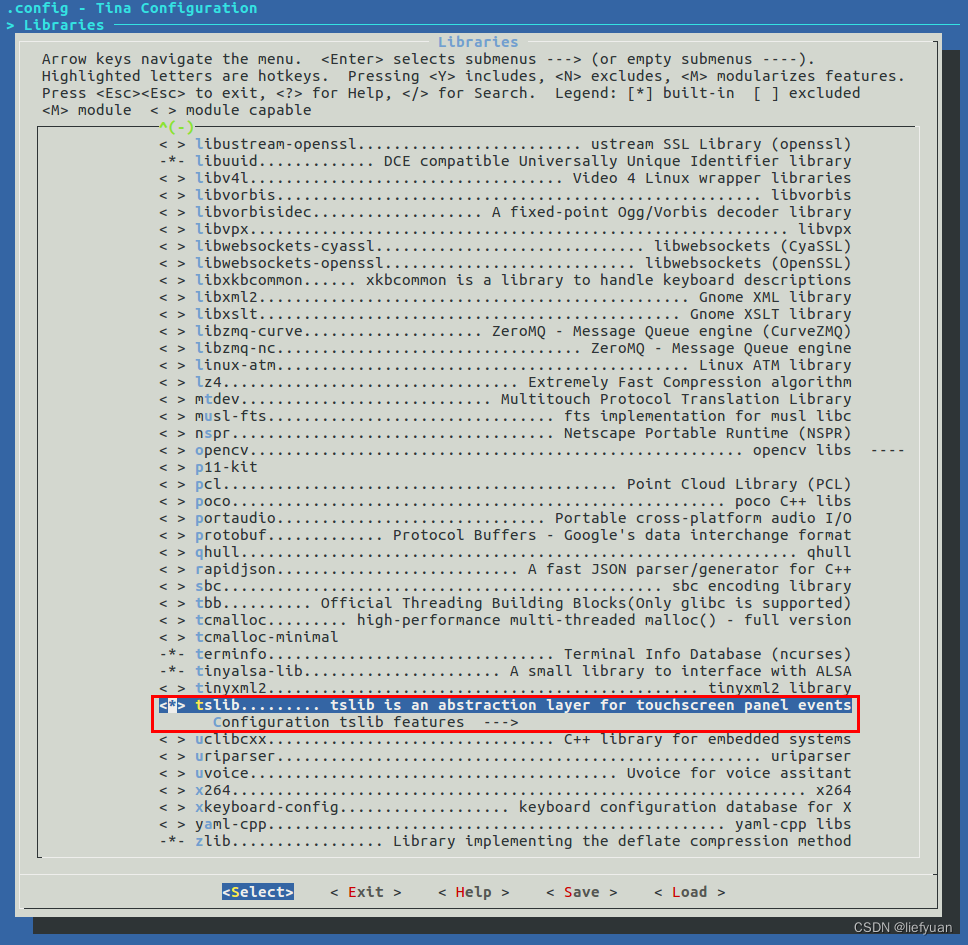
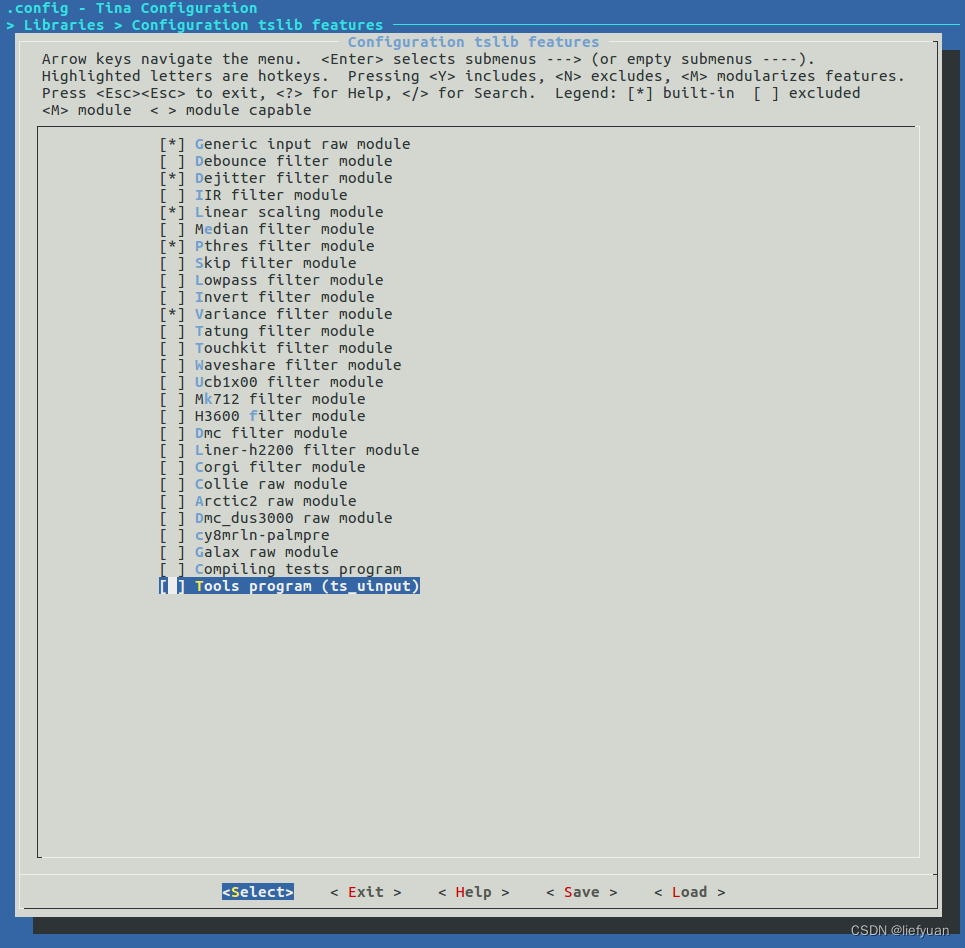
文件系统里面的文件目录在:
root@TinaLinux:/# ls /usr/bin
MtpTools             du                   readlink
alsamixer            etf                  rfcomm
alsaucm              find                 seq
amixer               free                 strace
aplay                hciattach            time
arecord              hciconfig            top
awk                  hcidump              tr
basename             hcitool              ts_calibrate
bccmd                hex2hcd              ts_finddev
bdaddr               hexdump              ts_harvest
bluemoon             hotplug.sh           ts_print
brcm_patchram_plus   iperf3               ts_print_mt
btattach             iwinfo               ts_print_raw
btmon                jshn                 ts_test
callgrind_annotate   jsonfilter           ts_test_mt
callgrind_control    killall              ts_verify
cg_annotate          l2ping               valgrind
cg_diff              l2test               valgrind-di-server
cg_merge             ldd                  valgrind-listener
ciptool              logger               vgdb
curl                 lv_examples          wget
cut                  md5sum               which
diff                 monitor-selfboot.sh  xargs
dirname              ms_print
dropbearconvert      rctest
Tina系统里面自带的GUI选项里面有qt,但是我从来没有编译成功过!
不得已,使用独立编译。
参考我的这个博客:https://liefyuan.blog.csdn.net/article/details/118164826
参考另一位大神的:https://blog.csdn.net/weixin_43094346/article/details/126099432
源码地址:https://download.qt.io/archive/qt/5.12/5.12.9/single/
解压:
tar -xf qt-everywhere-src-5.12.9.tar.xz
需要花点时间才能解压完毕。
vim qtbase/mkspecs/linux-arm-gnueabi-g++/qmake.conf
#
# qmake configuration for building with arm-linux-gnueabi-g++
#

MAKEFILE_GENERATOR      = UNIX
CONFIG                 += incremental
QMAKE_INCREMENTAL_STYLE = sublib

QT_QPA_DEFAULT_PLATFORM = linuxfb
QMAKE_CFLAGS += -O2 -march=armv7-a -mtune=cortex-a7 -mfpu=neon -mfloat-abi=hard
QMAKE_CXXFLAGS += -O2 -march=armv7-a -mtune=cortex-a7 -mfpu=neon -mfloat-abi=hard

include(../common/linux.conf)
include(../common/gcc-base-unix.conf)
include(../common/g++-unix.conf)

# modifications to g++.conf
QMAKE_CC                = /home/liefyuan/Liefyuan/Tina-Linux/Tina-Linux/prebuilt/gcc/linux-x86/arm/toolchain-sunxi-musl/toolchain/bin/arm-openwrt-linux-gcc
QMAKE_CXX               = /home/liefyuan/Liefyuan/Tina-Linux/Tina-Linux/prebuilt/gcc/linux-x86/arm/toolchain-sunxi-musl/toolchain/bin/arm-openwrt-linux-g++
QMAKE_LINK              = /home/liefyuan/Liefyuan/Tina-Linux/Tina-Linux/prebuilt/gcc/linux-x86/arm/toolchain-sunxi-musl/toolchain/bin/arm-openwrt-linux-g++
QMAKE_LINK_SHLIB        = /home/liefyuan/Liefyuan/Tina-Linux/Tina-Linux/prebuilt/gcc/linux-x86/arm/toolchain-sunxi-musl/toolchain/bin/arm-openwrt-linux-g++

# modifications to linux.conf
QMAKE_AR                = arm-openwrt-linux-ar cqs
QMAKE_OBJCOPY           = arm-openwrt-linux-objcopy
QMAKE_NM                = arm-openwrt-linux-nm -P
QMAKE_STRIP             = arm-openwrt-linux-strip
load(qt_config)
#
# qmake configuration for building with arm-linux-gnueabi-g++
#

MAKEFILE_GENERATOR      = UNIX
CONFIG                 += incremental
QMAKE_INCREMENTAL_STYLE = sublib

include(../common/linux.conf)
include(../common/gcc-base-unix.conf)
include(../common/g++-unix.conf)

# modifications to g++.conf
QMAKE_CC                = /home/liefyuan/Liefyuan/Tina-Linux/Tina-Linux/prebuilt/gcc/linux-x86/arm/toolchain-sunxi-musl/toolchain/bin/arm-openwrt-linux-gcc
QMAKE_CXX               = /home/liefyuan/Liefyuan/Tina-Linux/Tina-Linux/prebuilt/gcc/linux-x86/arm/toolchain-sunxi-musl/toolchain/bin/arm-openwrt-linux-g++
QMAKE_LINK              = /home/liefyuan/Liefyuan/Tina-Linux/Tina-Linux/prebuilt/gcc/linux-x86/arm/toolchain-sunxi-musl/toolchain/bin/arm-openwrt-linux-g++
QMAKE_LINK_SHLIB        = /home/liefyuan/Liefyuan/Tina-Linux/Tina-Linux/prebuilt/gcc/linux-x86/arm/toolchain-sunxi-musl/toolchain/bin/arm-openwrt-linux-g++

# modifications to linux.conf
QMAKE_AR                = /home/liefyuan/Liefyuan/Tina-Linux/Tina-Linux/prebuilt/gcc/linux-x86/arm/toolchain-sunxi-musl/toolchain/bin/arm-openwrt-linux-ar cqs
QMAKE_OBJCOPY           = /home/liefyuan/Liefyuan/Tina-Linux/Tina-Linux/prebuilt/gcc/linux-x86/arm/toolchain-sunxi-musl/toolchain/bin/arm-openwrt-linux-objcopy
QMAKE_NM                = /home/liefyuan/Liefyuan/Tina-Linux/Tina-Linux/prebuilt/gcc/linux-x86/arm/toolchain-sunxi-musl/toolchain/bin/arm-openwrt-linux-nm -P
QMAKE_STRIP             = /home/liefyuan/Liefyuan/Tina-Linux/Tina-Linux/prebuilt/gcc/linux-x86/arm/toolchain-sunxi-musl/toolchain/bin/arm-openwrt-linux-strip
load(qt_config)
上面两种配置都可以。
运行
./autoconfigure.sh
vi autoconfigure.sh
#!/bin/sh
export STAGING_DIR=/home/liefyuan/Liefyuan/Tina-Linux/Tina-Linux/prebuilt/gcc/linux-x86/arm/toolchain-sunxi-musl/toolchain/arm-openwrt-linux-muslgnueabi/bin/
./configure \
-prefix /opt/qt5.12.9-arm-t113 \
-opensource \
-confirm-license \
-release \
-strip \
-shared \
-xplatform linux-arm-gnueabi-g++ \
-optimized-qmake \
-c++std c++11 \
--rpath=no \
-pch \
-skip qt3d \
-skip qtactiveqt \
-skip qtandroidextras \
-skip qtcanvas3d \
-skip qtconnectivity \
-skip qtdatavis3d \
-skip qtdoc \
-skip qtgamepad \
-skip qtlocation \
-skip qtmacextras \
-skip qtnetworkauth \
-skip qtpurchasing \
-skip qtremoteobjects \
-skip qtscript \
-skip qtscxml \
-skip qtsensors \
-skip qtspeech \
-skip qtsvg \
-skip qttools \
-skip qttranslations \
-skip qtwayland \
-skip qtwebengine \
-skip qtwebview \
-skip qtwinextras \
-skip qtx11extras \
-skip qtxmlpatterns \
-make libs \
-make examples \
-nomake tools -nomake tests \
-gui \
-widgets \
-dbus-runtime \
--glib=no \
--iconv=no \
--pcre=qt \
--zlib=qt \
-no-openssl \
--freetype=qt \
--harfbuzz=qt \
-no-opengl \
-linuxfb \
--xcb=no \
-tslib \
--libpng=qt \
--libjpeg=qt \
--sqlite=qt \
-plugin-sql-sqlite \
-I/opt/tslib-t113/include \
-L/opt/tslib-t113/lib \
-plugin-sql-sqlite \
-I/home/liefyuan/Liefyuan/Tina-Linux/Tina-Linux/out/t113-mq_r/staging_dir/target/usr/include/ \
-I/home/liefyuan/Liefyuan/Tina-Linux/Tina-Linux/out/t113-mq_r/staging_dir/target/usr/include/allwinner/ \
-I/home/liefyuan/Liefyuan/Tina-Linux/Tina-Linux/out/t113-mq_r/staging_dir/target/usr/include/allwinner/include/ \
-L/home/liefyuan/Liefyuan/Tina-Linux/Tina-Linux/out/t113-mq_r/staging_dir/target/usr/lib/ \
-recheck-all
其中以下部分为编者个人的路径,请修改成个人路径。
赋予脚本可执行权限。
chmod +x autoconfigure.sh
直接执行 autoconfigure.sh执行脚本。配置需要一段时间,请耐心等待!
sudo ./autoconfigure.sh
配置成功的日志请查看附加:Qt 配置成功的日志:
time make
注意不要多核编译(-jN),多核编译会报错
sudo make install
安装某就是之前配置中的目录。
arm-openwrt-linux-muslgnueabi-g++.bin: warning: environment variable 'STAGING_DIR' not defined
arm-openwrt-linux-muslgnueabi-g++.bin: warning: environment variable 'STAGING_DIR' not defined
.obj/qlogging.o: In function `qFormatLogMessage(QtMsgType, QMessageLogContext const&, QString const&)':
qlogging.cpp:(.text+0x434c): undefined reference to `backtrace'
qlogging.cpp:(.text+0x440c): undefined reference to `backtrace_symbols'
collect2: error: ld returned 1 exit status
Makefile:1331: recipe for target '../../lib/libQt5Core.so.5.12.9' failed
make[3]: *** [../../lib/libQt5Core.so.5.12.9] Error 1
make[3]: Leaving directory '/home/liefyuan/qt-src/qt-everywhere-src-5.12.9/qtbase/src/corelib'
Makefile:226: recipe for target 'sub-corelib-make_first' failed
make[2]: *** [sub-corelib-make_first] Error 2
make[2]: Leaving directory '/home/liefyuan/qt-src/qt-everywhere-src-5.12.9/qtbase/src'
Makefile:50: recipe for target 'sub-src-make_first' failed
make[1]: *** [sub-src-make_first] Error 2
make[1]: Leaving directory '/home/liefyuan/qt-src/qt-everywhere-src-5.12.9/qtbase'
Makefile:58: recipe for target 'module-qtbase-make_first' failed
make: *** [module-qtbase-make_first] Error 2

real	0m36.333s
user	7m11.851s
sys	0m52.516s
编译窗口命令行跑一下:
export STAGING_DIR=/home/liefyuan/Liefyuan/Tina-Linux/Tina-Linux/out/t113-mq_r/staging_dir
测试一下:
liefyuan@ubuntu:~$ echo $STAGING_DIR
:/home/liefyuan/Liefyuan/Tina-Linux/Tina-Linux/out/t113-mq_r/staging_dir
进行这步以后删除Qt文件夹,重新解压出来重新编译配置编译。
神奇的是使用读卡器将安装好的Qt文件夹拷贝到启动卡的根文件系统目录上去都有问题:
tar: qt5.12.9-arm-t113/qml/QtCharts/libqtchartsqml2.so: Cannot open: No such file or directory
tar: qt5.12.9-arm-t113/qml: Cannot mkdir: No space left on device
tar: qt5.12.9-arm-t113/qml/QtCharts/plugins.qmltypes: Cannot open: No such file or directory
tar: Exiting with failure status due to previous errors
内存不够?可是我的根文件系统有1.1GB呢!
看一下:
liefyuan@ubuntu:/media/liefyuan/57f8f4bc-abf4-655f-bf67-946fc0f9f25b/opt/qt5.12.9-arm-t113/examples$ df -i
Filesystem      Inodes   IUsed   IFree IUse% Mounted on
udev           1784537     520 1784017    1% /dev
tmpfs          1792228     786 1791442    1% /run
/dev/sda1      6496256 2324896 4171360   36% /
tmpfs          1792228       9 1792219    1% /dev/shm
tmpfs          1792228       5 1792223    1% /run/lock
tmpfs          1792228      17 1792211    1% /sys/fs/cgroup
tmpfs          1792228      35 1792193    1% /run/user/1000
/dev/sdb1            0       0       0     - /media/liefyuan/Volumn
/dev/sdb5         6016    6016       0  100% /media/liefyuan/57f8f4bc-abf4-655f-bf67-946fc0f9f25b
/dev/sdb7         6288      11    6277    1% /media/liefyuan/280c157f-8c2e-4d5e-a838-c73b3e13d956
/dev/sdb8      1819680      11 1819669    1% /media/liefyuan/fcb51570-6dd7-4b8d-b0f7-2c15b18cac56
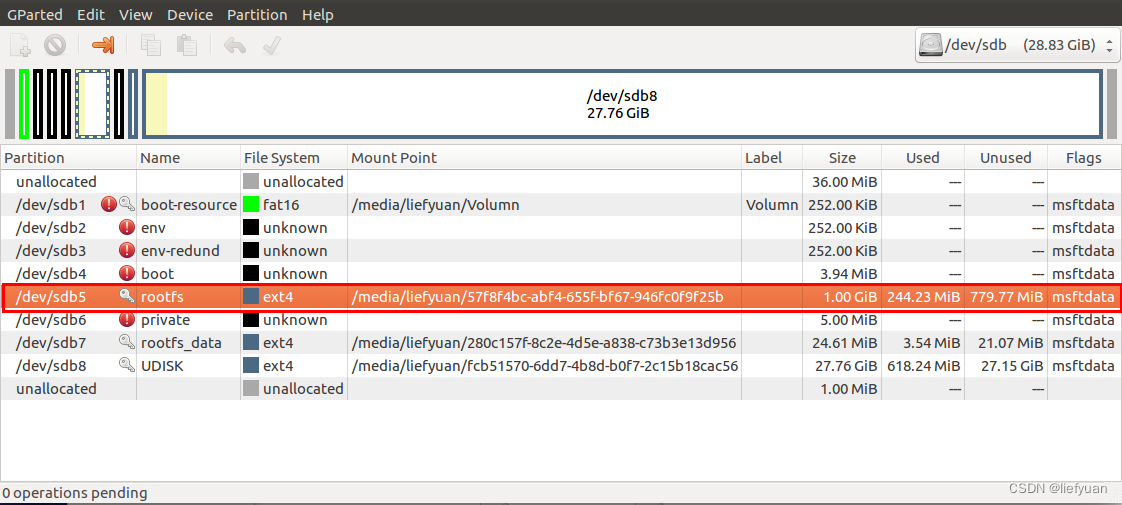
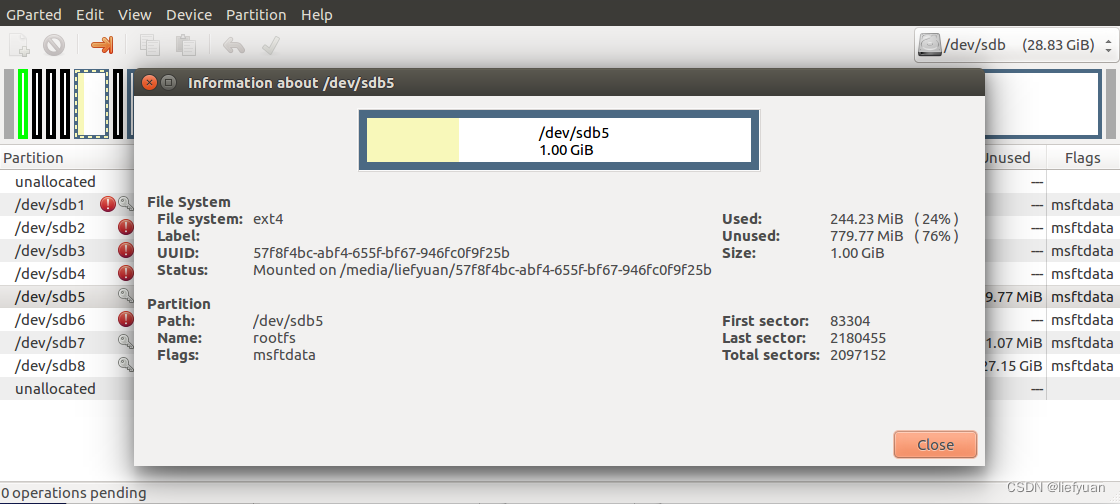
对应:
/dev/sdb5 6016 6016 0 100% /media/liefyuan/57f8f4bc-abf4-655f-bf67-946fc0f9f25b
妈耶,inodes资源耗尽了!
为啥我这个分区是1GB,但是可用的inodes才6016呢?
Tina SDK配置文件系统的时候里面有个默认值
 把这个6000改成100000就可以了。
#!/bin/sh
echo "------run profile file-----"
[ -f /etc/banner ] && cat /etc/banner
[ -e /tmp/.failsafe ] && cat /etc/banner.failsafe
fgrep -sq '/ overlay ro,' /proc/mounts && {
	echo 'Your JFFS2-partition seems full and overlayfs is mounted read-only.'
	echo 'Please try to remove files from /overlay/upper/... and reboot!'
}

export PATH="/usr/sbin:/usr/bin:/sbin:/bin"
export HOME=$(grep -e "^${USER:-root}:" /etc/passwd | cut -d ":" -f 6)
export HOME=${HOME:-/root}
export PS1='\u@\h:\w\$ '
export LD_LIBRARY_PATH=/usr/lib/eyesee-mpp:${LD_LIBRARY_PATH}

# 使用Tina系统默认的tslib
export TSLIB_CALIBFILE=/etc/pointercal
export TSLIB_CONFFILE=/etc/ts.conf
export TSLIB_PLUGINDIR=/usr/lib/ts
export TSLIB_CONSOLEDEVICE=none
export TSLIB_FBDEVICE=/dev/fb0
export TSLIB_TSDEVICE=/dev/input/event1

export QT_ROOT=/opt/qt5.12.9-arm-t113
export LD_LIBRARY_PATH=$QT_ROOT/lib:$QT_ROOT/plugins/platforms
export QT_QPA_PLATFORM_PLUGIN_PATH=$QT_ROOT/plugins
export QT_PLUGIN_PATH=$QT_ROOT/plugins
export QT_QPA_PLATFORM=linuxfb:tty=/dev/fb0
export QT_QPA_FONTDIR=$QT_ROOT/lib/fonts
export QT_QPA_GENERIC_PLUGINS=tslib:$TSLIB_TSDEVICE
#export QT_QPA_FB_TSLIB=1
export QML2_IMPORT_PATH=$QT_ROOT/qml
export QT_QPA_EGLFS_TSLIB=1
#export QT_DEBUG_PLUGINS=1
export XDG_RUNTIME_DIR=/usr/lib/
export RUNLEVEL=3


ulimit -c unlimited
grep debugfs /proc/filesystems && mount -t debugfs none /sys/kernel/debug
alias usbhost="cat /sys/devices/platform/soc@3000000/soc@3000000:usbc0@0/usb_host"
alias usbdevice="cat /sys/devices/platform/soc@3000000/soc@3000000:usbc0@0/usb_device"
[ -x /bin/more ] || alias more=less
[ -x /usr/bin/vim ] && alias vi=vim || alias vim=vi

[ -z "$KSH_VERSION" -o \! -s /etc/mkshrc ] || . /etc/mkshrc

[ -x /usr/bin/arp ] || arp() { cat /proc/net/arp; }
[ -x /usr/bin/ldd ] || ldd() { LD_TRACE_LOADED_OBJECTS=1 $*; }

[ -n "$FAILSAFE" ] || {
	for FILE in /etc/profile.d/*.sh; do
		[ -e "$FILE" ] && . "$FILE"
	done
	unset FILE
}
[ -x /bin/ll ] || alias ll='ls -al'
在最末尾添加如下语句,会在qtcreator启动时,列出详细的错误提示。
export QT_DEBUG_PLUGINS=1
运行报错:
root@TinaLinux:/opt/qt5.12.9-arm-t113/examples/widgets/widgets/analogclock# ./analogclock
Error loading shared library libstdc++.so.6: No such file or directory (needed by ./analogclock)
Error loading shared library libstdc++.so.6: No such file or directory (needed by /opt/qt5.12.9-arm-t113/lib/libQt5Widgets.so.5)
Error loading shared library libstdc++.so.6: No such file or directory (needed by /opt/qt5.12.9-arm-t113/lib/libQt5Gui.so.5)
Error loading shared library libstdc++.so.6: No such file or directory (needed by /opt/qt5.12.9-arm-t113/lib/libQt5Core.so.5)
Error relocating /opt/qt5.12.9-arm-t113/lib/libQt5Widgets.so.5: _ZSt17__throw_bad_allocv: symbol not found
默认没有触摸驱动的
修改设备树:Tina-Linux/device/config/chips/t113/configs/mq_r/board.dts
原版的:我的五寸屏幕会闪屏,需要修改适配!
参考这篇:Mangopi MQ-R:T113-s3(四)Tina系统 适配LCD屏幕
Qt 配置成功的日志:
liefyuan@ubuntu:~/qt-src/qt-everywhere-src-5.12.9$ sudo ./autoconfigure.sh
+ cd qtbase
+ /home/liefyuan/qt-src/qt-everywhere-src-5.12.9/qtbase/configure -top-level -prefix /opt/qt5.12.9-arm-t113 -opensource -confirm-license -release -strip -shared -xplatform linux-arm-gnueabi-g++ -optimized-qmake -c++std c++11 --rpath=no -pch -skip qt3d -skip qtactiveqt -skip qtandroidextras -skip qtcanvas3d -skip qtconnectivity -skip qtdatavis3d -skip qtdoc -skip qtgamepad -skip qtlocation -skip qtmacextras -skip qtnetworkauth -skip qtpurchasing -skip qtremoteobjects -skip qtscript -skip qtscxml -skip qtsensors -skip qtspeech -skip qtsvg -skip qttools -skip qttranslations -skip qtwayland -skip qtwebengine -skip qtwebview -skip qtwinextras -skip qtx11extras -skip qtxmlpatterns -make libs -make examples -nomake tools -nomake tests -gui -widgets -dbus-runtime --glib=no --iconv=no --pcre=qt --zlib=qt -no-openssl --freetype=qt --harfbuzz=qt -no-opengl -linuxfb --xcb=no -tslib --libpng=qt --libjpeg=qt --sqlite=qt -plugin-sql-sqlite -I/opt/tslib-t113/include -L/opt/tslib-t113/lib -recheck-all
Creating qmake...
.Done.
Info: creating stash file /home/liefyuan/qt-src/qt-everywhere-src-5.12.9/.qmake.stash

This is the Qt Open Source Edition.

You have already accepted the terms of the Open Source license.

Running configuration tests...
Checking for gold linker... no
Checking for machine tuple... yes
Checking for valid makespec... yes
Checking for target architecture... arm
Checking for host architecture... x86_64
Checking for alloca() in alloca.h... yes
Checking for C99 support... yes
Checking for C11 support... yes
Checking for new dtags support... yes
Checking for pkg-config... no
Checking for D-Bus >= 1.2 (host)... yes
Checking for udev... no
Checking for POSIX fallocate()... yes
Checking for precompiled header support... yes
Checking for RDRAND instruction... no
Checking for symbol visibility support... yes
Checking for -Bsymbolic-functions support... no
Checking for STL compatibility... yes
Checking for clock_gettime()... yes
Checking for POSIX monotonic clock... yes
Checking for C++11 <future>... yes
Checking for dlopen()... yes
Checking for eventfd... yes
Checking for futimens()... yes
Checking for getauxval()... yes
Checking for getentropy()... yes
Checking for GNU libc... no
Checking for ICU... no
Checking for inotify... yes
Checking for SysV IPC... yes
Checking for linkat()... yes
Checking for ppoll()... yes
Checking for renameat2()... no
Checking for slog2... no
Checking for statx() in libc... no
Checking for 64 bit atomics... yes
Checking for DoubleConversion... no
Checking for O_CLOEXEC... yes
Checking for C++11 <random>... yes
Checking for working std::atomic for function pointers... yes
Checking for getifaddrs()... yes
Checking for IPv6 ifname... yes
Checking for Linux AF_NETLINK sockets... yes
Checking for KMS... no
Checking for OpenVG... no
Checking for evdev... yes
Checking for GBM... no
Checking for LinuxFB... yes
Checking for mtdev... no
Checking for default QPA platform... xcb
Checking for tslib... yes
Checking for Vulkan... no
Checking for XLib... no
Checking for xkbcommon >= 0.5.0... no
Checking for CUPS... no
Checking for DB2 (IBM)... no
Checking for InterBase... no
Checking for MySQL... no
Checking for OCI (Oracle)... no
Checking for ODBC... no
Checking for PostgreSQL... no
Checking for SQLite (version 2)... no
Checking for TDS (Sybase)... no
Checking for Socket CAN... yes
Checking for Socket CAN FD... yes
Checking for jasper... no
Checking for mng... no
Checking for tiff... no
Checking for webp... no
Checking for C++14 make_unique()... no
Checking for Direct3D 12... no
Checking for ALSA... no
Checking for GStreamer 1.0... no
Checking for GStreamer 0.10... no
Checking for Video for Linux... yes
Checking for OpenAL... no
Checking for PulseAudio >= 0.9.10... no
Checking for libresourceqt5... no
Done running configuration tests.

Configure summary:

Building on: linux-g++ (x86_64, CPU features: mmx sse sse2)
Building for: linux-arm-gnueabi-g++ (arm, CPU features: neon)
Target compiler: gcc 6.4.1
Configuration: cross_compile compile_examples enable_new_dtags largefile neon precompile_header shared release c++11 concurrent dbus no-pkg-config reduce_exports release_tools stl
Build options:
  Mode ................................... release; optimized tools
  Optimize release build for size ........ no
  Building shared libraries .............. yes
  Using C standard ....................... C11
  Using C++ standard ..................... C++11
  Using ccache ........................... no
  Using gold linker ...................... no
  Using new DTAGS ........................ yes
  Using precompiled headers .............. yes
  Using LTCG ............................. no
  Target compiler supports:
    NEON ................................. yes
  Build parts ............................ libs examples
Qt modules and options:
  Qt Concurrent .......................... yes
  Qt D-Bus ............................... yes
  Qt D-Bus directly linked to libdbus .... no
  Qt Gui ................................. yes
  Qt Network ............................. yes
  Qt Sql ................................. yes
  Qt Testlib ............................. yes
  Qt Widgets ............................. yes
  Qt Xml ................................. yes
Support enabled for:
  Using pkg-config ....................... no
  udev ................................... no
  Using system zlib ...................... no
Qt Core:
  DoubleConversion ....................... yes
    Using system DoubleConversion ........ no
  GLib ................................... no
  iconv .................................. no
  ICU .................................... no
  Tracing backend ........................ <none>
  Logging backends:
    journald ............................. no
    syslog ............................... no
    slog2 ................................ no
  Using system PCRE2 ..................... no
Qt Network:
  getifaddrs() ........................... yes
  IPv6 ifname ............................ yes
  libproxy ............................... no
  Linux AF_NETLINK ....................... yes
  OpenSSL ................................ no
    Qt directly linked to OpenSSL ........ no
  OpenSSL 1.1 ............................ no
  DTLS ................................... no
  SCTP ................................... no
  Use system proxies ..................... yes
Qt Gui:
  Accessibility .......................... yes
  FreeType ............................... yes
    Using system FreeType ................ no
  HarfBuzz ............................... yes
    Using system HarfBuzz ................ no
  Fontconfig ............................. no
  Image formats:
    GIF .................................. yes
    ICO .................................. yes
    JPEG ................................. yes
      Using system libjpeg ............... no
    PNG .................................. yes
      Using system libpng ................ no
  EGL .................................... no
  OpenVG ................................. no
  OpenGL:
    Desktop OpenGL ....................... no
    OpenGL ES 2.0 ........................ no
    OpenGL ES 3.0 ........................ no
    OpenGL ES 3.1 ........................ no
    OpenGL ES 3.2 ........................ no
  Vulkan ................................. no
  Session Management ..................... yes
Features used by QPA backends:
  evdev .................................. yes
  libinput ............................... no
  INTEGRITY HID .......................... no
  mtdev .................................. no
  tslib .................................. yes
  xkbcommon .............................. no
  X11 specific:
    XLib ................................. no
    XCB Xlib ............................. no
    EGL on X11 ........................... no
QPA backends:
  DirectFB ............................... no
  EGLFS .................................. no
  LinuxFB ................................ yes
  VNC .................................... yes
  Mir client ............................. no
Qt Sql:
  SQL item models ........................ yes
Qt Widgets:
  GTK+ ................................... no
  Styles ................................. Fusion Windows
Qt PrintSupport:
  CUPS ................................... no
Qt Sql Drivers:
  DB2 (IBM) .............................. no
  InterBase .............................. no
  MySql .................................. no
  OCI (Oracle) ........................... no
  ODBC ................................... no
  PostgreSQL ............................. no
  SQLite2 ................................ no
  SQLite ................................. yes
    Using system provided SQLite ......... no
  TDS (Sybase) ........................... no
Qt Testlib:
  Tester for item models ................. yes
Qt SerialBus:
  Socket CAN ............................. yes
  Socket CAN FD .......................... yes
Further Image Formats:
  JasPer ................................. no
  MNG .................................... no
  TIFF ................................... yes
    Using system libtiff ................. no
  WEBP ................................... yes
    Using system libwebp ................. no
Qt QML:
  QML network support .................... yes
  QML debugging and profiling support .... yes
  QML sequence object .................... yes
  QML list model ......................... yes
  QML XML http request ................... yes
  QML Locale ............................. yes
  QML delegate model ..................... yes
Qt Quick:
  Direct3D 12 ............................ no
  AnimatedImage item ..................... yes
  Canvas item ............................ yes
  Support for Qt Quick Designer .......... yes
  Flipable item .......................... yes
  GridView item .......................... yes
  ListView item .......................... yes
  TableView item ......................... yes
  Path support ........................... yes
  PathView item .......................... yes
  Positioner items ....................... yes
  Repeater item .......................... yes
  ShaderEffect item ...................... yes
  Sprite item ............................ yes
Qt Quick Controls 2:
  Styles ................................. Default Fusion Imagine Material Universal
Qt Quick Templates 2:
  Hover support .......................... yes
  Multi-touch support .................... yes
Qt Multimedia:
  ALSA ................................... no
  GStreamer 1.0 .......................... no
  GStreamer 0.10 ......................... no
  Video for Linux ........................ yes
  OpenAL ................................. no
  PulseAudio ............................. no
  Resource Policy (libresourceqt5) ....... no
  Windows Audio Services ................. no
  DirectShow ............................. no
  Windows Media Foundation ............... no

Note: Also available for Linux: linux-clang linux-icc

Note: -optimized-tools is not useful in -release mode.

WARNING: Cross compiling without sysroot. Disabling pkg-config

Qt is now configured for building. Just run 'make'.
Once everything is built, you must run 'make install'.
Qt will be installed into '/opt/qt5.12.9-arm-t113'.

Prior to reconfiguration, make sure you remove any leftovers from
the previous build.

liefyuan@ubuntu:~/qt-src/qt-everywhere-src-5.12.9
make[4]: Entering directory '/home/liefyuan/qt-src/qt-everywhere-src-5.12.9/qtcharts/examples/charts/datetimeaxis'
/home/liefyuan/Liefyuan/Tina-Linux/Tina-Linux/prebuilt/gcc/linux-x86/arm/toolchain-sunxi-musl/toolchain/bin/arm-openwrt-linux-g++ -c -pipe -O2 -fno-exceptions -Wall -W -D_REENTRANT -fPIC -DQT_NO_EXCEPTIONS -D_LARGEFILE64_SOURCE -D_LARGEFILE_SOURCE -DQT_NO_DEBUG -DQT_CHARTS_LIB -DQT_WIDGETS_LIB -DQT_GUI_LIB -DQT_CORE_LIB -I. -I../../../include -I../../../include/QtCharts -I/home/liefyuan/qt-src/qt-everywhere-src-5.12.9/qtbase/include -I/home/liefyuan/qt-src/qt-everywhere-src-5.12.9/qtbase/include/QtWidgets -I/home/liefyuan/qt-src/qt-everywhere-src-5.12.9/qtbase/include/QtGui -I/home/liefyuan/qt-src/qt-everywhere-src-5.12.9/qtbase/include/QtCore -I.moc -I/opt/tslib-t113/include -I/home/liefyuan/Liefyuan/Tina-Linux/Tina-Linux/out/t113-mq_r/staging_dir/target/usr/include -I/home/liefyuan/Liefyuan/Tina-Linux/Tina-Linux/out/t113-mq_r/staging_dir/target/usr/include/allwinner -I/home/liefyuan/Liefyuan/Tina-Linux/Tina-Linux/out/t113-mq_r/staging_dir/target/usr/include/allwinner/include -I/home/liefyuan/qt-src/qt-everywhere-src-5.12.9/qtbase/mkspecs/linux-arm-gnueabi-g++ -o .obj/main.o main.cpp
/home/liefyuan/qt-src/qt-everywhere-src-5.12.9/qtbase/bin/rcc -name sundata sundata.qrc -o .rcc/qrc_sundata.cpp
/home/liefyuan/Liefyuan/Tina-Linux/Tina-Linux/prebuilt/gcc/linux-x86/arm/toolchain-sunxi-musl/toolchain/bin/arm-openwrt-linux-g++ -c -pipe -O2 -fno-exceptions -Wall -W -D_REENTRANT -fPIC -DQT_NO_EXCEPTIONS -D_LARGEFILE64_SOURCE -D_LARGEFILE_SOURCE -DQT_NO_DEBUG -DQT_CHARTS_LIB -DQT_WIDGETS_LIB -DQT_GUI_LIB -DQT_CORE_LIB -I. -I../../../include -I../../../include/QtCharts -I/home/liefyuan/qt-src/qt-everywhere-src-5.12.9/qtbase/include -I/home/liefyuan/qt-src/qt-everywhere-src-5.12.9/qtbase/include/QtWidgets -I/home/liefyuan/qt-src/qt-everywhere-src-5.12.9/qtbase/include/QtGui -I/home/liefyuan/qt-src/qt-everywhere-src-5.12.9/qtbase/include/QtCore -I.moc -I/opt/tslib-t113/include -I/home/liefyuan/Liefyuan/Tina-Linux/Tina-Linux/out/t113-mq_r/staging_dir/target/usr/include -I/home/liefyuan/Liefyuan/Tina-Linux/Tina-Linux/out/t113-mq_r/staging_dir/target/usr/include/allwinner -I/home/liefyuan/Liefyuan/Tina-Linux/Tina-Linux/out/t113-mq_r/staging_dir/target/usr/include/allwinner/include -I/home/liefyuan/qt-src/qt-everywhere-src-5.12.9/qtbase/mkspecs/linux-arm-gnueabi-g++ -o .obj/qrc_sundata.o .rcc/qrc_sundata.cpp
/home/liefyuan/Liefyuan/Tina-Linux/Tina-Linux/prebuilt/gcc/linux-x86/arm/toolchain-sunxi-musl/toolchain/bin/arm-openwrt-linux-g++ -Wl,-O1 -Wl,--enable-new-dtags -o datetimeaxis .obj/main.o .obj/qrc_sundata.o   -L/opt/tslib-t113/lib -L/home/liefyuan/Liefyuan/Tina-Linux/Tina-Linux/out/t113-mq_r/staging_dir/target/usr/lib/ /home/liefyuan/qt-src/qt-everywhere-src-5.12.9/qtcharts/lib/libQt5Charts.so /home/liefyuan/qt-src/qt-everywhere-src-5.12.9/qtbase/lib/libQt5Widgets.so /home/liefyuan/qt-src/qt-everywhere-src-5.12.9/qtbase/lib/libQt5Gui.so /home/liefyuan/qt-src/qt-everywhere-src-5.12.9/qtbase/lib/libQt5Core.so -lpthread
make[4]: Leaving directory '/home/liefyuan/qt-src/qt-everywhere-src-5.12.9/qtcharts/examples/charts/datetimeaxis'
make[3]: Leaving directory '/home/liefyuan/qt-src/qt-everywhere-src-5.12.9/qtcharts/examples/charts'
make[2]: Leaving directory '/home/liefyuan/qt-src/qt-everywhere-src-5.12.9/qtcharts/examples'
make[1]: Leaving directory '/home/liefyuan/qt-src/qt-everywhere-src-5.12.9/qtcharts'

real	59m17.425s
user	53m38.097s
sys	6m8.486s
从给定URL下载文件并立即将其上传到AmazonS3的更直接的方法是什么(+将有关文件的一些信息保存到数据库中,例如名称、大小等)?现在,我既不使用Paperclip,也不使用Carrierwave。谢谢 最佳答案 简单明了:require'open-uri'require's3'amazon=S3::Service.new(access_key_id:'KEY',secret_access_key:'KEY')bucket=amazon.buckets.find('image_storage')url='http://www.ex
我正在编写一个小脚本来定位aws存储桶中的特定文件,并创建一个临时验证的url以发送给同事。(理想情况下,这将创建类似于在控制台上右键单击存储桶中的文件并复制链接地址的结果)。我研究过回形针,它似乎不符合这个标准,但我可能只是不知道它的全部功能。我尝试了以下方法:defauthenticated_url(file_name,bucket)AWS::S3::S3Object.url_for(file_name,bucket,:secure=>true,:expires=>20*60)end产生这种类型的结果:...-1.amazonaws.com/file_path/file.zip.A
我发现ActiveRecord::Base.transaction在复杂方法中非常有效。我想知道是否可以在如下事务中从AWSS3上传/删除文件:S3Object.transactiondo#writeintofiles#raiseanexceptionend引发异常后,每个操作都应在S3上回滚。S3Object这可能吗?? 最佳答案 虽然S3API具有批量删除功能,但它不支持事务,因为每个删除操作都可以独立于其他操作成功/失败。该API不提供任何批量上传功能(通过PUT或POST),因此每个上传操作都是通过一个独立的API调用完成的
在Rails4.0.2中,我使用s3_direct_upload和aws-sdkgems直接为s3存储桶上传文件。在开发环境中它工作正常,但在生产环境中它会抛出如下错误,ActionView::Template::Error(noimplicitconversionofnilintoString)在View中,create_cv_url,:id=>"s3_uploader",:key=>"cv_uploads/{unique_id}/${filename}",:key_starts_with=>"cv_uploads/",:callback_param=>"cv[direct_uplo
我正在尝试编写一个将文件上传到AWS并公开该文件的Ruby脚本。我做了以下事情:s3=Aws::S3::Resource.new(credentials:Aws::Credentials.new(KEY,SECRET),region:'us-west-2')obj=s3.bucket('stg-db').object('key')obj.upload_file(filename)这似乎工作正常,除了该文件不是公开可用的,而且我无法获得它的公共(public)URL。但是当我登录到S3时,我可以正常查看我的文件。为了使其公开可用,我将最后一行更改为obj.upload_file(file
我不知道为什么,但是当我设置这个设置时它无法编译设置:static_cache_control,[:public,:max_age=>300]这是我得到的syntaxerror,unexpectedtASSOC,expecting']'(SyntaxError)set:static_cache_control,[:public,:max_age=>300]^我只想将“过期”header设置为css、javaascript和图像文件。谢谢。 最佳答案 我猜您使用的是Ruby1.8.7。Sinatra文档中显示的语法似乎是在Ruby1.
我有一个应用程序可以读取文件的内容并为其编制索引。我将它们存储在磁盘本身中,但现在我使用的是AmazonS3,因此以下方法不再适用。事情是这样的:defperform(docId)@document=Document.find(docId)if@document.file?#Youshould'tcreateanewversion@document.versionlessdo|doc|@document.file_content=Cloudoc::Extractor.new.extract(@document.file.file)@document.saveendendend@docu
电脑0x0000001A蓝屏错误怎么U盘重装系统教学分享。有用户电脑开机之后遇到了系统蓝屏的情况。系统蓝屏问题很多时候都是系统bug,只有通过重装系统来进行解决。那么蓝屏问题如何通过U盘重装新系统来解决呢?来看看以下的详细操作方法教学吧。 准备工作: 1、U盘一个(尽量使用8G以上的U盘)。 2、一台正常联网可使用的电脑。 3、ghost或ISO系统镜像文件(Win10系统下载_Win10专业版_windows10正式版下载-系统之家)。 4、在本页面下载U盘启动盘制作工具:系统之家U盘启动工具。 U盘启动盘制作步骤: 注意:制作期间,U盘会被格式化,因此U盘中的重要文件请注
在应用开发中,有时候我们需要获取系统的设备信息,用于数据上报和行为分析。那在鸿蒙系统中,我们应该怎么去获取设备的系统信息呢,比如说获取手机的系统版本号、手机的制造商、手机型号等数据。1、获取方式这里分为两种情况,一种是设备信息的获取,一种是系统信息的获取。1.1、获取设备信息获取设备信息,鸿蒙的SDK包为我们提供了DeviceInfo类,通过该类的一些静态方法,可以获取设备信息,DeviceInfo类的包路径为:ohos.system.DeviceInfo.具体的方法如下:ModifierandTypeMethodDescriptionstatic StringgetAbiList()Obt
在前面两节的例子中,主界面窗口的尺寸和标签控件显示的矩形区域等,都是用C++代码编写的。窗口和控件的尺寸都是预估的,控件如果多起来,那就不好估计每个控件合适的位置和大小了。用C++代码编写图形界面的问题就是不直观,因此Qt项目开发了专门的可视化图形界面编辑器——QtDesigner(Qt设计师)。通过QtDesigner就可以很方便地创建图形界面文件*.ui,然后将ui文件应用到源代码里面,做到“所见即所得”,大大方便了图形界面的设计。本节就演示一下QtDesigner的简单使用,学习拖拽控件和设置控件属性,并将ui文件应用到Qt程序代码里。使用QtDesigner设计界面在开始菜单中找到「Q
