文章目录
上一篇文章中介绍了音视频的各种编码参数的概念,这里介绍一下如何通过ffmpeg库获取一个视频文件的各种音视频编码参数。在对视频文件进行处理和转码的时候这些参数很重要。
视频编码参数主要包括:帧率、分辨率、编码格式、码率等,对应的概念如下。
帧率(Frame Rate)
每秒显示帧数(Frames Per Second)。电影的帧率一般是25fps和29.97fps,3D游戏要保持流畅则需要30fps以上的效果。
分辨率
指视频宽高的像素数值。标准1080P的分辨率为1920×1080,帧率为60fps,也就是真高清。而最常见的网络传播的1080P高清片帧率通常为 23.976 fps。
封装格式
多媒体封装格式也称多媒体容器 (Multimedia Container),它不同于H.264、 AAC这类编码格式,它只是为多媒体编码提供了一个“外壳”,也就是所谓的视频格式。如MP4、AVI、MKV、FLV、WMA等。
码率(Bit Rate)
指视频或音频文件在单位时间内使用的数据流量(单位通常是Kbps也就是千比特每秒)。通常2000kbps~3000kbps就已经足以将画质效果表现到极致了。码率参数与视频文件最终体积大小有直接性的关系。
编码格式
所谓视频编码方式就是指通过压缩技术,将原始视频格式的文件转换成另一种视频格式文件的方式。视频流传输中最为重要的编解码标准有国际电联的H.261、H.263、H.264。
通过ffmpeg获取视频编码参数的方法如下所示:
#include "libavutil/log.h"
#include "libavformat/avformat.h"
#include "libavcodec/avcodec.h"

//按照固定格式打印
static void print_fps(double d, const char *postfix)
{
	uint64_t v = lrintf(d * 100);
	if (!v)
		av_log(NULL, AV_LOG_INFO, "%1.4f %s", d, postfix);
	else if (v % 100)
		av_log(NULL, AV_LOG_INFO, "%3.2f %s", d, postfix);
	else if (v % (100 * 1000))
		av_log(NULL, AV_LOG_INFO, "%1.0f %s", d, postfix);
	else
		av_log(NULL, AV_LOG_INFO, "%1.0fk %s", d / 1000, postfix);
}

int main(int argc, char* argv[])
{
	int ret;
	int streams;
	char buf[256];
	AVFormatContext *fmt_ctx = NULL;
	AVCodecContext *avctx = NULL;
	const AVInputFormat *fmt = NULL;

	//设置日志的输出级别
	av_log_set_level(AV_LOG_INFO);

	//打开视频的上下文
	//@1音视频上下文
	//@2文件路径
	//@3文件格式(不指定根据文件名判断)
	//@4获取配置项的字典
	ret = avformat_open_input(&fmt_ctx, "./test.mp4", fmt, NULL);
	if (ret < 0)
	{
		av_log(NULL, AV_LOG_ERROR, "Can't open file:%s\n", av_err2str(ret));
		return -1;
	}

	//获取封装格式
	const char* format_name = fmt_ctx->iformat->name;

	//通过上下文获取视频时长
	if (fmt_ctx->duration != AV_NOPTS_VALUE)
	{
		int64_t hours, mins, secs, us;
		int64_t duration = fmt_ctx->duration + (fmt_ctx->duration <= INT64_MAX - 5000 ? 5000 : 0);
		secs = duration / AV_TIME_BASE;
		us = duration % AV_TIME_BASE;
		mins = secs / 60;
		secs %= 60;
		hours = mins / 60;
		mins %= 60;
		av_log(NULL, AV_LOG_INFO, "duration:  %02"PRId64":%02"PRId64":%02"PRId64".%02"PRId64"\n", hours, mins, secs,
			(100 * us) / AV_TIME_BASE);
	}
	else
	{
		av_log(NULL, AV_LOG_INFO, "N/A");
	}

	//查看视频文件中流的个数
	streams = fmt_ctx->nb_streams;
	av_log(NULL, AV_LOG_INFO, "file has:%d streams\n",streams);

	//查看流的类型,判断是视频流还是音频流
	for (int index = 0; index < streams; ++index)
	{
		const AVStream *stream = fmt_ctx->streams[index];
		if (stream->codecpar->codec_type == AVMEDIA_TYPE_VIDEO)
		{
			av_log(NULL, AV_LOG_INFO, "streams %d is Video Stream\n",index);
		}
		else if (stream->codecpar->codec_type == AVMEDIA_TYPE_AUDIO)
		{
			av_log(NULL, AV_LOG_INFO, "streams %d is Audio Stream\n",index);
		}
	}

	//获取视频帧率fps
	const AVStream *stream = fmt_ctx->streams[0];
	double fps = av_q2d(stream->avg_frame_rate);
	print_fps(fps, "fps\n");


	//获取流的类型名称(video/audio)
	avctx = avcodec_alloc_context3(NULL);
	ret = avcodec_parameters_to_context(avctx, stream->codecpar);
	const char* codec_type = av_get_media_type_string(avctx->codec_type);

	//获取视频编码类型(h264/h265)
	const char*codec_name = avcodec_get_name(avctx->codec_id);
	av_log(NULL, AV_LOG_INFO, "stream type:%s, stream codec:%s\n", codec_type,codec_name);

	//获得视频的码率
	int bitrate = avctx->bit_rate;
	av_log(NULL, AV_LOG_INFO,"%"PRId64" kb/s\n", bitrate / 1000);

	//获取视频的分辨率
	int width = avctx->width;
	int height = avctx->height;
	av_log(NULL, AV_LOG_INFO, "%dx%d\n", width, height);
	avcodec_free_context(&avctx);

	//关闭上下文
	avformat_close_input(&fmt_ctx);
	getchar();
}
音频编码参数主要包括:声道数、码率、采样率、采样位数等,对应的概念如下。
声道数
现在主要有单声道和双声道之分。双声道又称为立体声,在硬件中要占两条线路,音质、音色好,但立体声数字化后所占空间比单声道多一倍。
码率
比特率也叫码率,指音乐每秒播放的数据量,单位用bit表示。一般mp3在128比特率左右为益。
采样率
指每秒钟取得声音样本的次数,22050 的采样频率是常用的,44100已是CD音质。为了保证声音不失真,采样频率应该在40kHz左右。
采样位数
采样位数也叫采样大小或量化位数。它是用来衡量声音波动变化的一个参数,也就是声卡的分辨率或可以理解为声卡处理声音的解析度。它的数值越大,分辨率也就越高,常见的声卡主要有8位和16位两种。
通过ffmpeg获取音频编码参数方法如下所示:
#include "libavutil/log.h"
#include "libavformat/avformat.h"
#include "libavcodec/avcodec.h"

//按照固定格式打印
static void print_fps(double d, const char *postfix)
{
	uint64_t v = lrintf(d * 100);
	if (!v)
		av_log(NULL, AV_LOG_INFO, "%1.4f %s", d, postfix);
	else if (v % 100)
		av_log(NULL, AV_LOG_INFO, "%3.2f %s", d, postfix);
	else if (v % (100 * 1000))
		av_log(NULL, AV_LOG_INFO, "%1.0f %s", d, postfix);
	else
		av_log(NULL, AV_LOG_INFO, "%1.0fk %s", d / 1000, postfix);
}

int main(int argc, char* argv[])
{
	int ret;
	int streams;
	char buf[256];
	AVFormatContext *fmt_ctx = NULL;
	AVCodecContext *avctx = NULL;
	const AVInputFormat *fmt = NULL;

	//设置日志的输出级别
	av_log_set_level(AV_LOG_INFO);

	//打开视频的上下文
	//@1音视频上下文
	//@2文件路径
	//@3文件格式(不指定根据文件名判断)
	//@4获取配置项的字典
	ret = avformat_open_input(&fmt_ctx, "./test.mp4", fmt, NULL);
	if (ret < 0)
	{
		av_log(NULL, AV_LOG_ERROR, "Can't open file:%s\n", av_err2str(ret));
		return -1;
	}

	//获取封装格式
	const char* format_name = fmt_ctx->iformat->name;

	//通过上下文获取视频时长
	if (fmt_ctx->duration != AV_NOPTS_VALUE)
	{
		int64_t hours, mins, secs, us;
		int64_t duration = fmt_ctx->duration + (fmt_ctx->duration <= INT64_MAX - 5000 ? 5000 : 0);
		secs = duration / AV_TIME_BASE;
		us = duration % AV_TIME_BASE;
		mins = secs / 60;
		secs %= 60;
		hours = mins / 60;
		mins %= 60;
		av_log(NULL, AV_LOG_INFO, "duration:  %02"PRId64":%02"PRId64":%02"PRId64".%02"PRId64"\n", hours, mins, secs,
			(100 * us) / AV_TIME_BASE);
	}
	else
	{
		av_log(NULL, AV_LOG_INFO, "N/A");
	}

	//查看视频文件中流的个数
	streams = fmt_ctx->nb_streams;
	av_log(NULL, AV_LOG_INFO, "file has:%d streams\n",streams);

	//查看流的类型,判断是视频流还是音频流
	for (int index = 0; index < streams; ++index)
	{
		const AVStream *stream = fmt_ctx->streams[index];
		if (stream->codecpar->codec_type == AVMEDIA_TYPE_VIDEO)
		{
			av_log(NULL, AV_LOG_INFO, "streams %d is Video Stream\n",index);
		}
		else if (stream->codecpar->codec_type == AVMEDIA_TYPE_AUDIO)
		{
			av_log(NULL, AV_LOG_INFO, "streams %d is Audio Stream\n",index);
		}
	}
	//获取音频流的类型名称(video/audio)
	const AVStream *audio_stream = fmt_ctx->streams[1];
	avctx = avcodec_alloc_context3(NULL);
	ret = avcodec_parameters_to_context(avctx, audio_stream->codecpar);
	const char* audio_codec_type = av_get_media_type_string(avctx->codec_type);

	//获取音频流的编码类型
	const char*audio_codec_name = avcodec_get_name(avctx->codec_id);
	av_log(NULL, AV_LOG_INFO, "audio stream type:%s, stream codec:%s\n", audio_codec_type, audio_codec_name);

	//获得音频流的码率
	int audio_bitrate = avctx->bit_rate;
	av_log(NULL, AV_LOG_INFO, "%"PRId64" kb/s\n", audio_bitrate / 1000);

	//获得音频的采样率
	int sample_rate = avctx->sample_rate;
	av_log(NULL, AV_LOG_INFO, "%dHZ\n",sample_rate);

	//采样位数
	int sample_bits = avctx->bits_per_coded_sample;
	av_log(NULL, AV_LOG_INFO, "%d\n", sample_bits);

	//获取音频的通道数量
	char channel_buf[512];
	ret = av_channel_layout_describe(&avctx->ch_layout, channel_buf, sizeof(channel_buf));
	avcodec_free_context(&avctx);

	//关闭上下文
	avformat_close_input(&fmt_ctx);
	getchar();
}
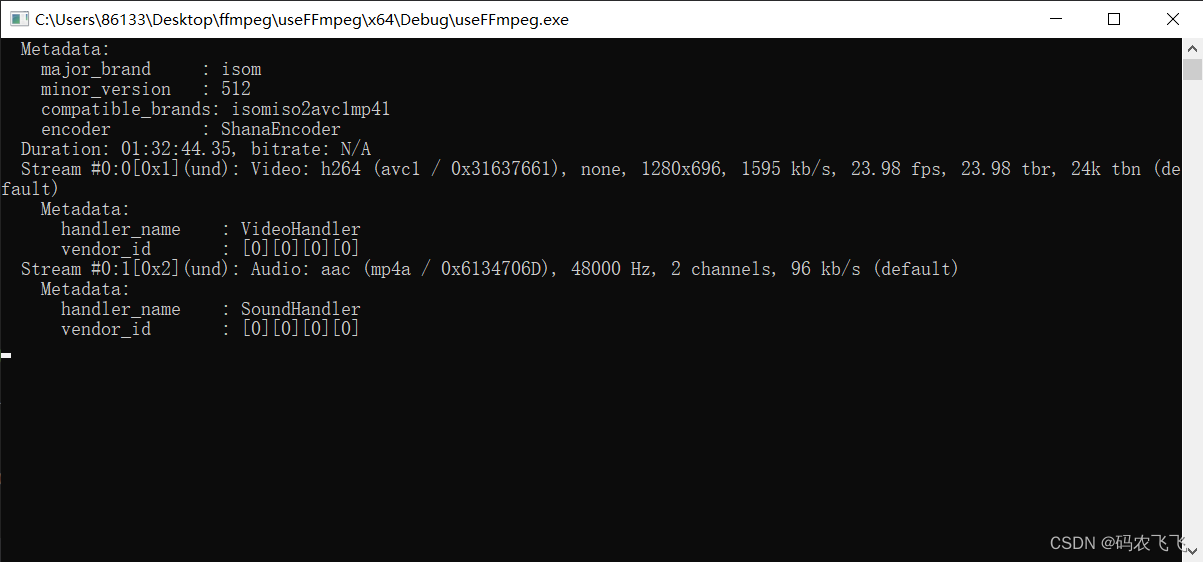
除了上面的方法之外,ffmpeg还提供了一个直接输出视频文件编码参数的接口,该接口可以直接输出音视频信息到终端,对应的接口调用方法如下:
#include "libavutil/log.h"
#include "libavformat/avformat.h"
#include "libavcodec/avcodec.h"

int main(int argc, char* argv[])
{
	int ret;
	int streams;
	char buf[256];
	AVFormatContext *fmt_ctx = NULL;
	AVCodecContext *avctx = NULL;
	const AVInputFormat *fmt = NULL;

	//设置日志的输出级别
	av_log_set_level(AV_LOG_INFO);

	//打开视频的上下文
	//@1音视频上下文
	//@2文件路径
	//@3文件格式(不指定根据文件名判断)
	//@4获取配置项的字典
	ret = avformat_open_input(&fmt_ctx, "./test.mp4", fmt, NULL);
	if (ret < 0)
	{
		av_log(NULL, AV_LOG_ERROR, "Can't open file:%s\n", av_err2str(ret));
		return -1;
	}
	//输出视频信息参数
	//@1上下文
	//@2文件索引
	//@3文件路径
	//@4输入流还是输出流
	av_dump_format(fmt_ctx, 0, "./test.mp4", 0);
	//关闭上下文
	avformat_close_input(&fmt_ctx);
	getchar();
}
输出结果如下所示:
我正在使用的第三方API的文档状态:"[O]urAPIonlyacceptspaddedBase64encodedstrings."什么是“填充的Base64编码字符串”以及如何在Ruby中生成它们。下面的代码是我第一次尝试创建转换为Base64的JSON格式数据。xa=Base64.encode64(a.to_json) 最佳答案 他们说的padding其实就是Base64本身的一部分。它是末尾的“=”和“==”。Base64将3个字节的数据包编码为4个编码字符。所以如果你的输入数据有长度n和n%3=1=>"=="末尾用于填充n%
我正在使用ruby1.9解析以下带有MacRoman字符的csv文件#encoding:ISO-8859-1#csv_parse.csvName,main-dialogue"Marceu","Giveittohimóhe,hiswife."我做了以下解析。require'csv'input_string=File.read("../csv_parse.rb").force_encoding("ISO-8859-1").encode("UTF-8")#=>"Name,main-dialogue\r\n\"Marceu\",\"Giveittohim\x97he,hiswife.\"\
exe应该在我打开页面时运行。异步进程需要运行。有什么方法可以在ruby中使用两个参数异步运行exe吗?我已经尝试过ruby命令-system()、exec()但它正在等待过程完成。我需要用参数启动exe,无需等待进程完成是否有任何rubygems会支持我的问题? 最佳答案 您可以使用Process.spawn和Process.wait2:pid=Process.spawn'your.exe','--option'#Later...pid,status=Process.wait2pid您的程序将作为解释器的子进程执行。除
我有一些Ruby代码,如下所示:Something.createdo|x|x.foo=barend我想编写一个测试,它使用double代替block参数x,这样我就可以调用:x_double.should_receive(:foo).with("whatever").这可能吗? 最佳答案 specify'something'dox=doublex.should_receive(:foo=).with("whatever")Something.should_receive(:create).and_yield(x)#callthere
我正在为一个项目制作一个简单的shell,我希望像在Bash中一样解析参数字符串。foobar"helloworld"fooz应该变成:["foo","bar","helloworld","fooz"]等等。到目前为止,我一直在使用CSV::parse_line,将列分隔符设置为""和.compact输出。问题是我现在必须选择是要支持单引号还是双引号。CSV不支持超过一个分隔符。Python有一个名为shlex的模块:>>>shlex.split("Test'helloworld'foo")['Test','helloworld','foo']>>>shlex.split('Test"
我不确定传递给方法的对象的类型是否正确。我可能会将一个字符串传递给一个只能处理整数的函数。某种运行时保证怎么样?我看不到比以下更好的选择:defsomeFixNumMangler(input)raise"wrongtype:integerrequired"unlessinput.class==FixNumother_stuffend有更好的选择吗? 最佳答案 使用Kernel#Integer在使用之前转换输入的方法。当无法以任何合理的方式将输入转换为整数时,它将引发ArgumentError。defmy_method(number)
两者都可以defsetup(options={})options.reverse_merge:size=>25,:velocity=>10end和defsetup(options={}){:size=>25,:velocity=>10}.merge(options)end在方法的参数中分配默认值。问题是:哪个更好?您更愿意使用哪一个?在性能、代码可读性或其他方面有什么不同吗?编辑:我无意中添加了bang(!)...并不是要询问nobang方法与bang方法之间的区别 最佳答案 我倾向于使用reverse_merge方法:option
有没有办法在这个简单的get方法中添加超时选项?我正在使用法拉第3.3。Faraday.get(url)四处寻找,我只能先发起连接后应用超时选项,然后应用超时选项。或者有什么简单的方法?这就是我现在正在做的:conn=Faraday.newresponse=conn.getdo|req|req.urlurlreq.options.timeout=2#2secondsend 最佳答案 试试这个:conn=Faraday.newdo|conn|conn.options.timeout=20endresponse=conn.get(url
我有一个只接受一个参数的方法:defmy_method(number)end如果使用number调用方法,我该如何引发错误??通常,我如何定义方法参数的条件?比如我想在调用的时候报错:my_method(1) 最佳答案 您可以添加guard在函数的开头,如果参数无效则引发异常。例如:defmy_method(number)failArgumentError,"Inputshouldbegreaterthanorequalto2"ifnumbereputse.messageend#=>Inputshouldbegreaterthano
我有一个存储主机名的Ruby数组server_names。如果我打印出来,它看起来像这样:["hostname.abc.com","hostname2.abc.com","hostname3.abc.com"]相当标准。我想要做的是获取这些服务器的IP(可能将它们存储在另一个变量中)。看起来IPSocket类可以做到这一点,但我不确定如何使用IPSocket类遍历它。如果它只是尝试像这样打印出IP:server_names.eachdo|name|IPSocket::getaddress(name)pnameend它提示我没有提供服务器名称。这是语法问题还是我没有正确使用类?输出:ge
