文章目录
| 操作系统版本 | MacOS Monterey12.5.1 |
|---|---|
| mysql版本 | Mysql8.0.30 |
官网下载地址:https://dev.mysql.com/downloads/mysql/
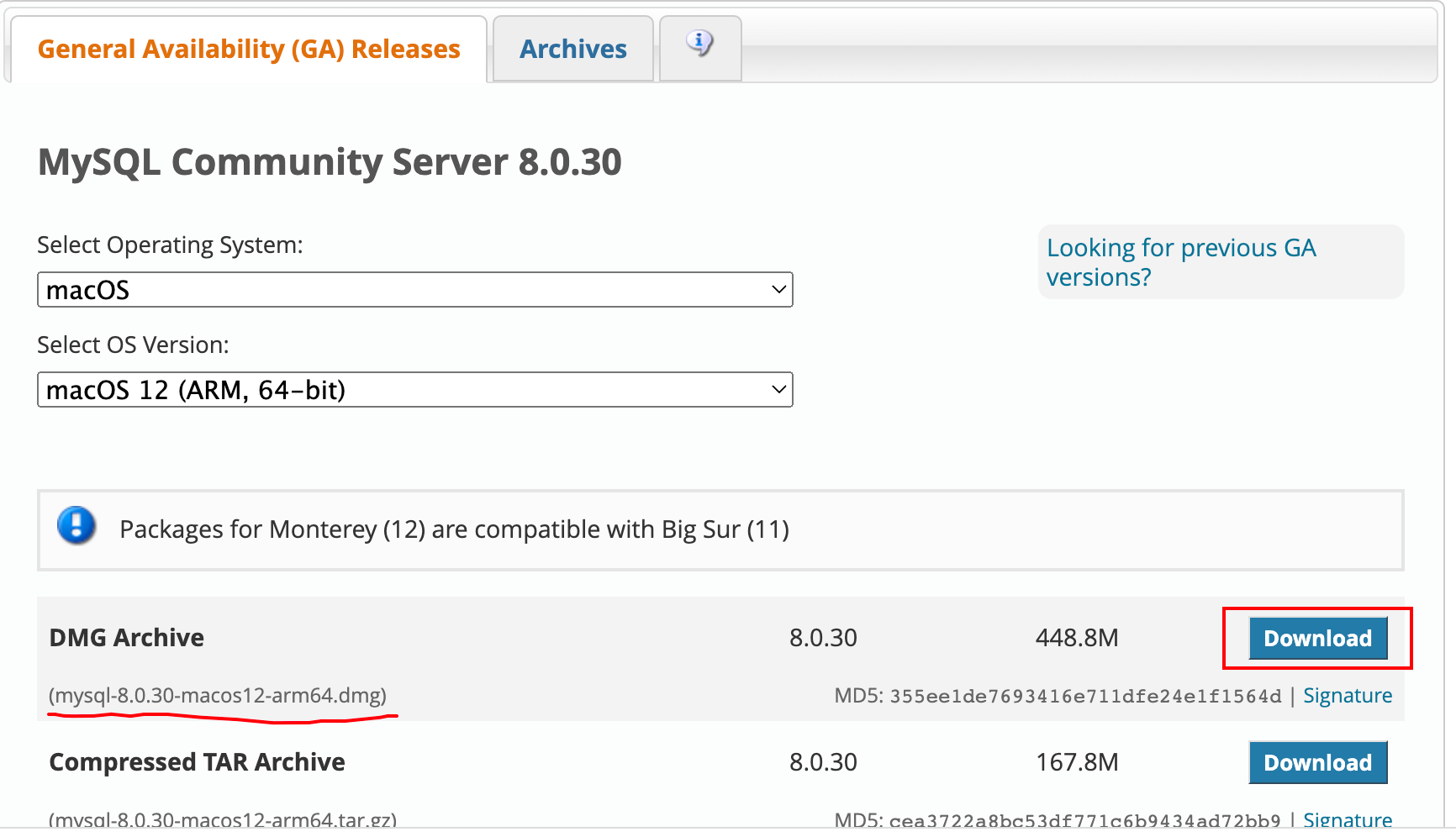
如上图所示,因为我们下载的是dmg文件,所以安装非常简单,只需要一路点下一步就好了。
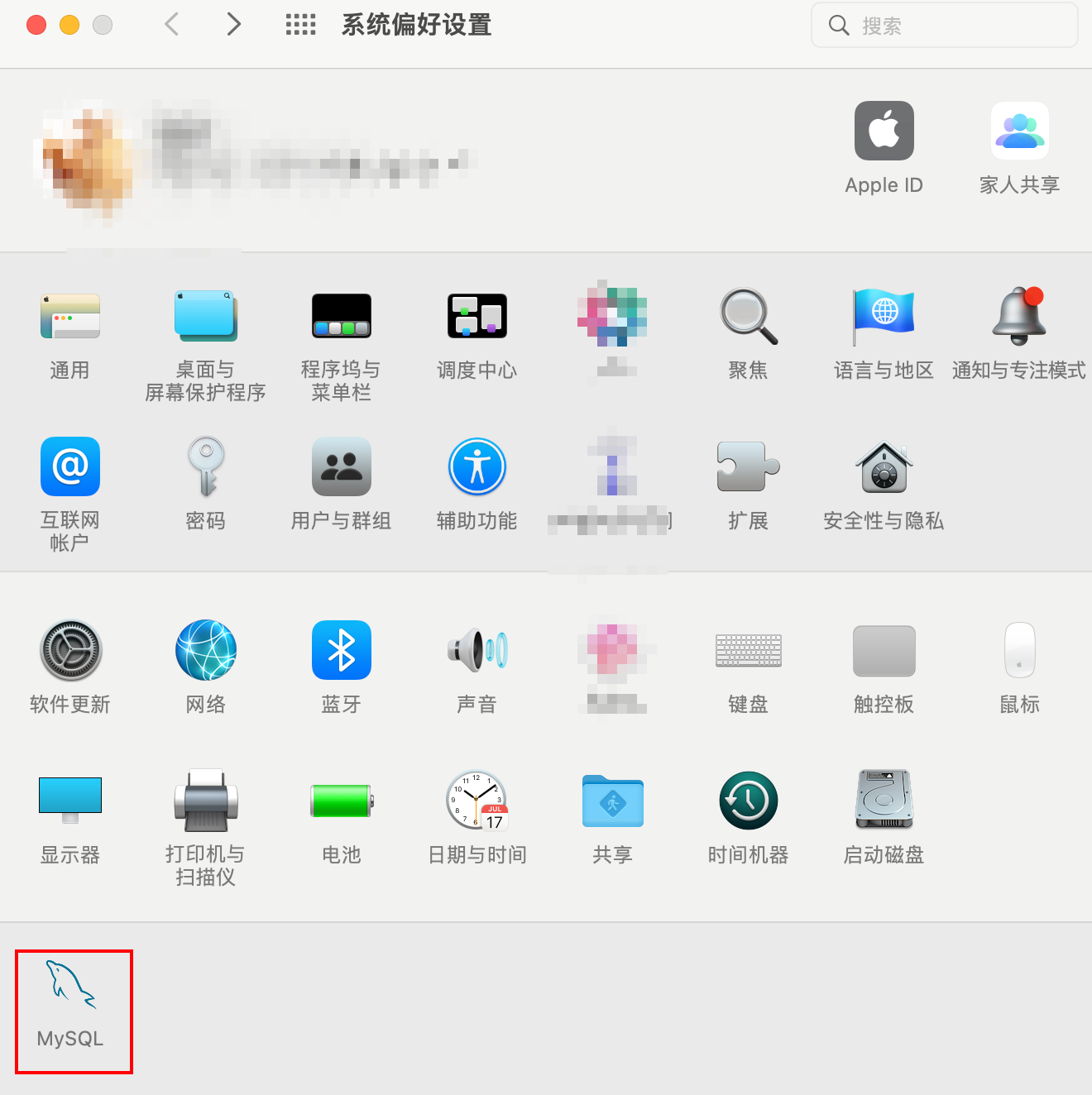
默认安装完后我们打开电脑的系统偏好设置,可以看到如下图标:
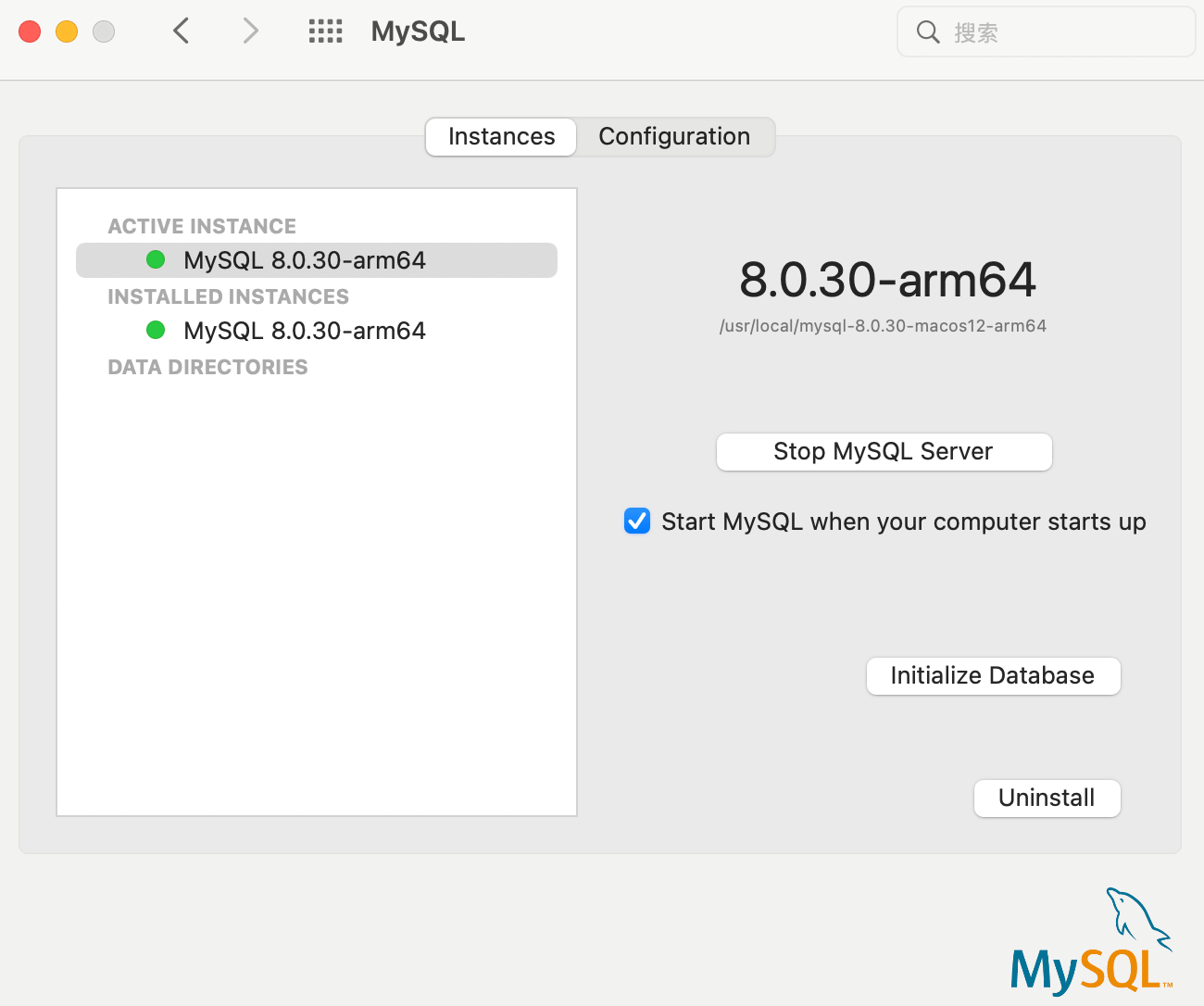
点击这个图标,我们可以看到我们的mysql已经启动了,如果没有启动,可以点击Start MySQL Server这个按钮
说明:
Mysql默认安装路径为:/usr/local/mysql;
Mysql安装后不会生成my.cnf文件;
Mysql安装后默认是区分大小写的,要想不区分大小写,必须删除/usr/local/mysql/data目录,自己编写my.cnf配置文件,并在my.cnf文件中增加参数
lower_case_table_names = 1,然后重新初始化数据库,最后重启Mysql服务;
我们上面说了,默认情况下安装Mysql后不会生成my.cnf配置文件,但是有些参数我们需要修改,比如:默认端口、最大连接数、大小写敏感等。
有些版本安装后可能会在support-file 文件目录下生成my-default.cnf文件,如果有这个文件,我们可以自己复制该文件,并重命名为my.cnf,如果没有就需要我们手动创建了,我就是自己创建的,文件内容如下,供参考:
# Example MySQL config file for small systems.
#
# This is for a system with little memory (<= 64M) where MySQL is only used
# from time to time and it's important that the mysqld daemon
# doesn't use much resources.
#
# MySQL programs look for option files in a set of
# locations which depend on the deployment platform.
# You can copy this option file to one of those
# locations. For information about these locations, see:
# http://dev.mysql.com/doc/mysql/en/option-files.html
#
# In this file, you can use all long options that a program supports.
# If you want to know which options a program supports, run the program
# with the "--help" option.
# The following options will be passed to all MySQL clients
[client]
default-character-set=utf8
#password = your_password
port        = 3336
socket      = /tmp/mysql.sock
# Here follows entries for some specific programs
# The MySQL server
[mysqld]
default-storage-engine=INNODB
character-set-server=utf8
collation-server=utf8_general_ci
port        = 13306        # 我修改了默认端口
socket      = /tmp/mysql.sock
lower_case_table_names = 1    # 是否对sql语句大小写敏感,1表示不敏感,即不区分大小写
skip-external-locking
key_buffer_size = 16K
max_allowed_packet = 1M
table_open_cache = 4
sort_buffer_size = 64K
read_buffer_size = 256K
read_rnd_buffer_size = 256K
net_buffer_length = 2K
thread_stack = 256K   # 该字段根据需要修改,默认是128K,我的是因为启动报了这个字段的错导致启动失败,所以我改成256K了

# Don't listen on a TCP/IP port at all. This can be a security enhancement,
# if all processes that need to connect to mysqld run on the same host.
# All interaction with mysqld must be made via Unix sockets or named pipes.
# Note that using this option without enabling named pipes on Windows
# (using the "enable-named-pipe" option) will render mysqld useless!
#
#skip-networking
server-id   = 1
# Uncomment the following if you want to log updates
#log-bin=mysql-bin
# binary logging format - mixed recommended
#binlog_format=mixed
# Causes updates to non-transactional engines using statement format to be
# written directly to binary log. Before using this option make sure that
# there are no dependencies between transactional and non-transactional
# tables such as in the statement INSERT INTO t_myisam SELECT * FROM
# t_innodb; otherwise, slaves may diverge from the master.
#binlog_direct_non_transactional_updates=TRUE
# Uncomment the following if you are using InnoDB tables
#innodb_data_home_dir = /usr/local/mysql/data
#innodb_data_file_path = ibdata1:10M:autoextend
#innodb_log_group_home_dir = /usr/local/mysql/data
# You can set .._buffer_pool_size up to 50 - 80 %
# of RAM but beware of setting memory usage too high
#innodb_buffer_pool_size = 16M
#innodb_additional_mem_pool_size = 2M
# Set .._log_file_size to 25 % of buffer pool size
#innodb_log_file_size = 5M
#innodb_log_buffer_size = 8M
#innodb_flush_log_at_trx_commit = 1
#innodb_lock_wait_timeout = 50
[mysqldump]
quick
max_allowed_packet = 16M
[mysql]
no-auto-rehash
# Remove the next comment character if you are not familiar with SQL
#safe-updates
[myisamchk]
key_buffer_size = 8M
sort_buffer_size = 8M
[mysqlhotcopy]
interactive-timeout
前面说到默认Mysql安装后是区分大小写的,需要我们修改my.cnf配置文件,修改完后还需要重新初始化mysql,下面假设我们已经修改好了my.cnf配置文件,现在说说如何初始化数据库。
如果已经有数据了必须先做好备份,具体如何备份我在这就不具体说了;
删除/usr/local/mysql/data目录;
点击系统偏好设置,点击左下角的mysql图标,选择Configuration,下面勾选Configuration File,并在后面选择我们编写好的my.cnf配置文件,点击提交;
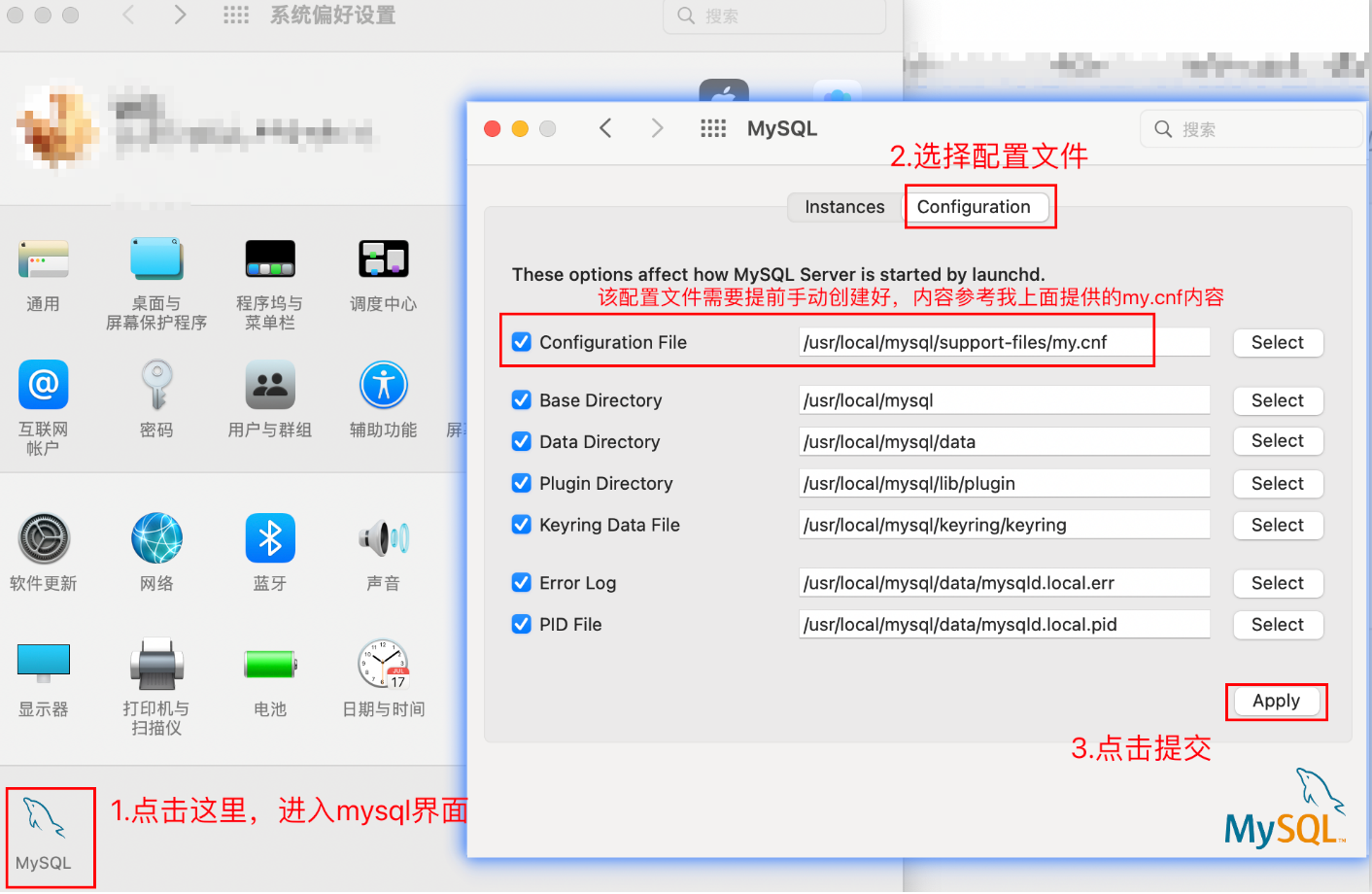
再回到Instances页面,点击Initialize Database,设置root密码,勾选Load configuraction file,点击OK,这样就开始初始化了。
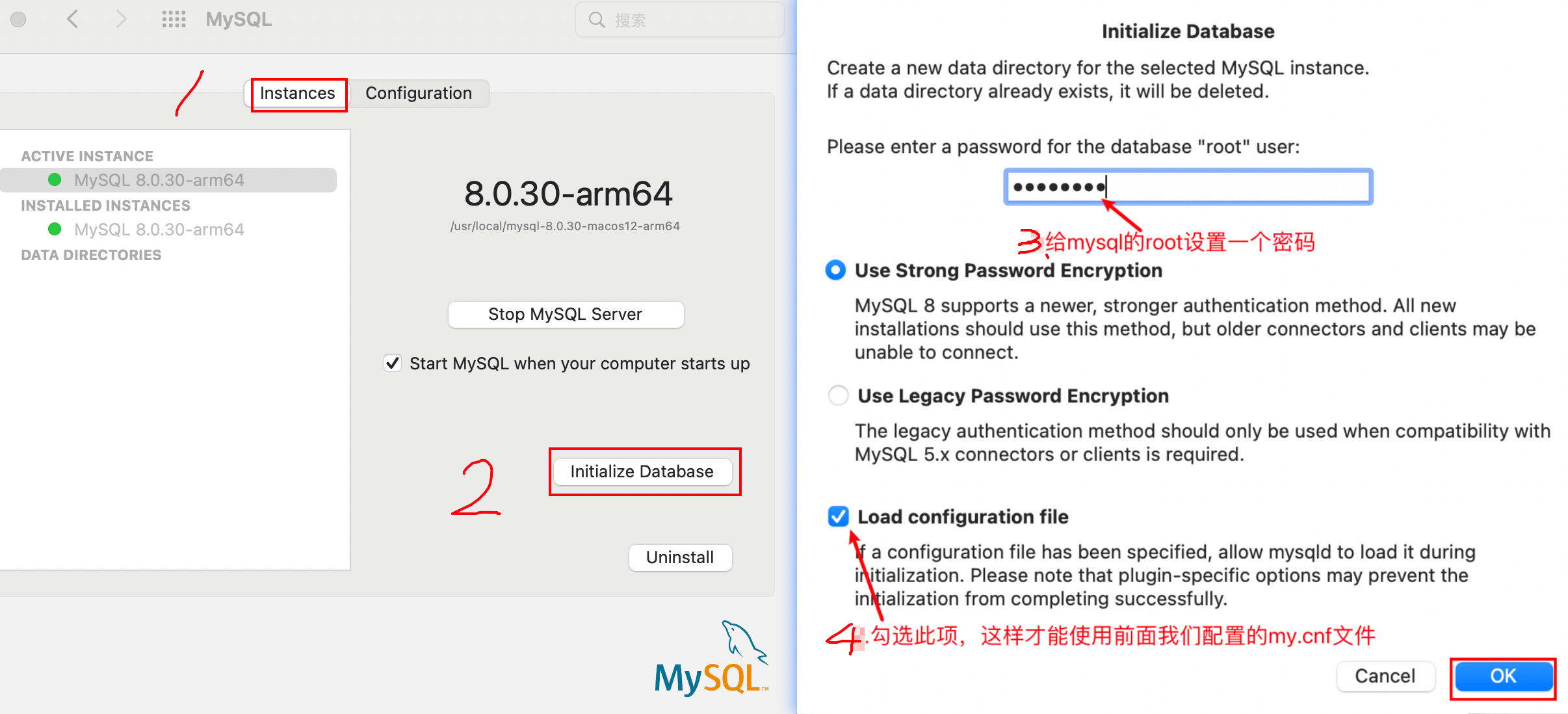
如果拿我上面的my.cnf配置文件,正常情况下初始化就不会有问题了,我们的数据库也就能支持不区分大小写了。
初始化时报如下错误
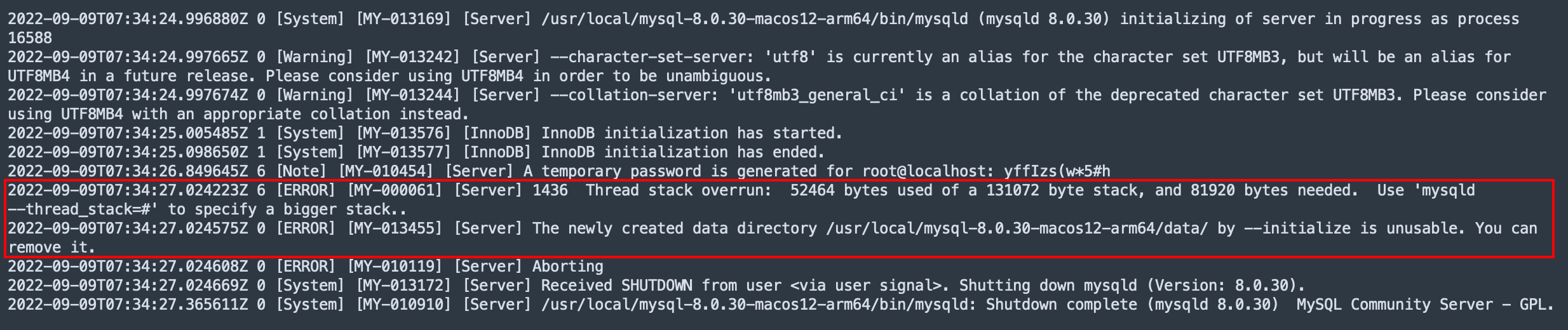
如上报错有两个错误信息
第一个是说my.cnf配置文件中【mysqld】节点下的thread_stack字段值设置太小;
第二个是说/usr/local/mysql-8.0.30-macos12-arm64/data/目录不可用,需要我们先删除,然后再进行初始化;
所以我们的解决方案就是
将mysqld】节点下的thread_stack字段值改大
thread_stack = 256K # 原来设置的是128K
删除/usr/local/mysql-8.0.30-macos12-arm64/data/目录
我的目标是转换表单输入,例如“100兆字节”或“1GB”,并将其转换为我可以存储在数据库中的文件大小(以千字节为单位)。目前,我有这个:defquota_convert@regex=/([0-9]+)(.*)s/@sizes=%w{kilobytemegabytegigabyte}m=self.quota.match(@regex)if@sizes.include?m[2]eval("self.quota=#{m[1]}.#{m[2]}")endend这有效,但前提是输入是倍数(“gigabytes”,而不是“gigabyte”)并且由于使用了eval看起来疯狂不安全。所以,功能正常,
我想为Heroku构建一个Rails3应用程序。他们使用Postgres作为他们的数据库,所以我通过MacPorts安装了postgres9.0。现在我需要一个postgresgem并且共识是出于性能原因你想要pggem。但是我对我得到的错误感到非常困惑当我尝试在rvm下通过geminstall安装pg时。我已经非常明确地指定了所有postgres目录的位置可以找到但仍然无法完成安装:$envARCHFLAGS='-archx86_64'geminstallpg--\--with-pg-config=/opt/local/var/db/postgresql90/defaultdb/po
我打算为ruby脚本创建一个安装程序,但我希望能够确保机器安装了RVM。有没有一种方法可以完全离线安装RVM并且不引人注目(通过不引人注目,就像创建一个可以做所有事情的脚本而不是要求用户向他们的bash_profile或bashrc添加一些东西)我不是要脚本本身,只是一个关于如何走这条路的快速指针(如果可能的话)。我们还研究了这个很有帮助的问题:RVM-isthereawayforsimpleofflineinstall?但有点误导,因为答案只向我们展示了如何离线在RVM中安装ruby。我们需要能够离线安装RVM本身,并查看脚本https://raw.github.com/wayn
我有一个奇怪的问题:我在rvm上安装了rubyonrails。一切正常,我可以创建项目。但是在我输入“railsnew”时重新启动后,我有“程序'rails'当前未安装。”。SystemUbuntu12.04ruby-v"1.9.3p194"gemlistactionmailer(3.2.5)actionpack(3.2.5)activemodel(3.2.5)activerecord(3.2.5)activeresource(3.2.5)activesupport(3.2.5)arel(3.0.2)builder(3.0.0)bundler(1.1.4)coffee-rails(
我刚刚为fedora安装了emacs。我想用emacs编写ruby。为ruby提供代码提示、代码完成类型功能所需的工具、扩展是什么? 最佳答案 ruby-mode已经包含在Emacs23之后的版本中。不过,它也可以通过ELPA获得。您可能感兴趣的其他一些事情是集成RVM、feature-mode(Cucumber)、rspec-mode、ruby-electric、inf-ruby、rinari(用于Rails)等。这是我当前用于Ruby开发的Emacs配置:https://github.com/citizen428/emacs
我正在尝试在我的centos服务器上安装therubyracer,但遇到了麻烦。$geminstalltherubyracerBuildingnativeextensions.Thiscouldtakeawhile...ERROR:Errorinstallingtherubyracer:ERROR:Failedtobuildgemnativeextension./usr/local/rvm/rubies/ruby-1.9.3-p125/bin/rubyextconf.rbcheckingformain()in-lpthread...yescheckingforv8.h...no***e
我有一个在Linux服务器上运行的ruby脚本。它不使用rails或任何东西。它基本上是一个命令行ruby脚本,可以像这样传递参数:./ruby_script.rbarg1arg2如何将参数抽象到配置文件(例如yaml文件或其他文件)中?您能否举例说明如何做到这一点?提前谢谢你。 最佳答案 首先,您可以运行一个写入YAML配置文件的独立脚本:require"yaml"File.write("path_to_yaml_file",[arg1,arg2].to_yaml)然后,在您的应用中阅读它:require"yaml"arg
我的最终目标是安装当前版本的RubyonRails。我在OSXMountainLion上运行。到目前为止,这是我的过程:已安装的RVM$\curl-Lhttps://get.rvm.io|bash-sstable检查已知(我假设已批准)安装$rvmlistknown我看到当前的稳定版本可用[ruby-]2.0.0[-p247]输入命令安装$rvminstall2.0.0-p247注意:我也试过这些安装命令$rvminstallruby-2.0.0-p247$rvminstallruby=2.0.0-p247我很快就无处可去了。结果:$rvminstall2.0.0-p247Search
我实际上是在尝试使用RVM在我的OSX10.7.5上更新ruby,并在输入以下命令后:rvminstallruby我得到了以下回复:Searchingforbinaryrubies,thismighttakesometime.Checkingrequirementsforosx.Installingrequirementsforosx.Updatingsystem.......Errorrunning'requirements_osx_brew_update_systemruby-2.0.0-p247',pleaseread/Users/username/.rvm/log/138121
由于fast-stemmer的问题,我很难安装我想要的任何rubygem。我把我得到的错误放在下面。Buildingnativeextensions.Thiscouldtakeawhile...ERROR:Errorinstallingfast-stemmer:ERROR:Failedtobuildgemnativeextension./System/Library/Frameworks/Ruby.framework/Versions/2.0/usr/bin/rubyextconf.rbcreatingMakefilemake"DESTDIR="cleanmake"DESTDIR=
