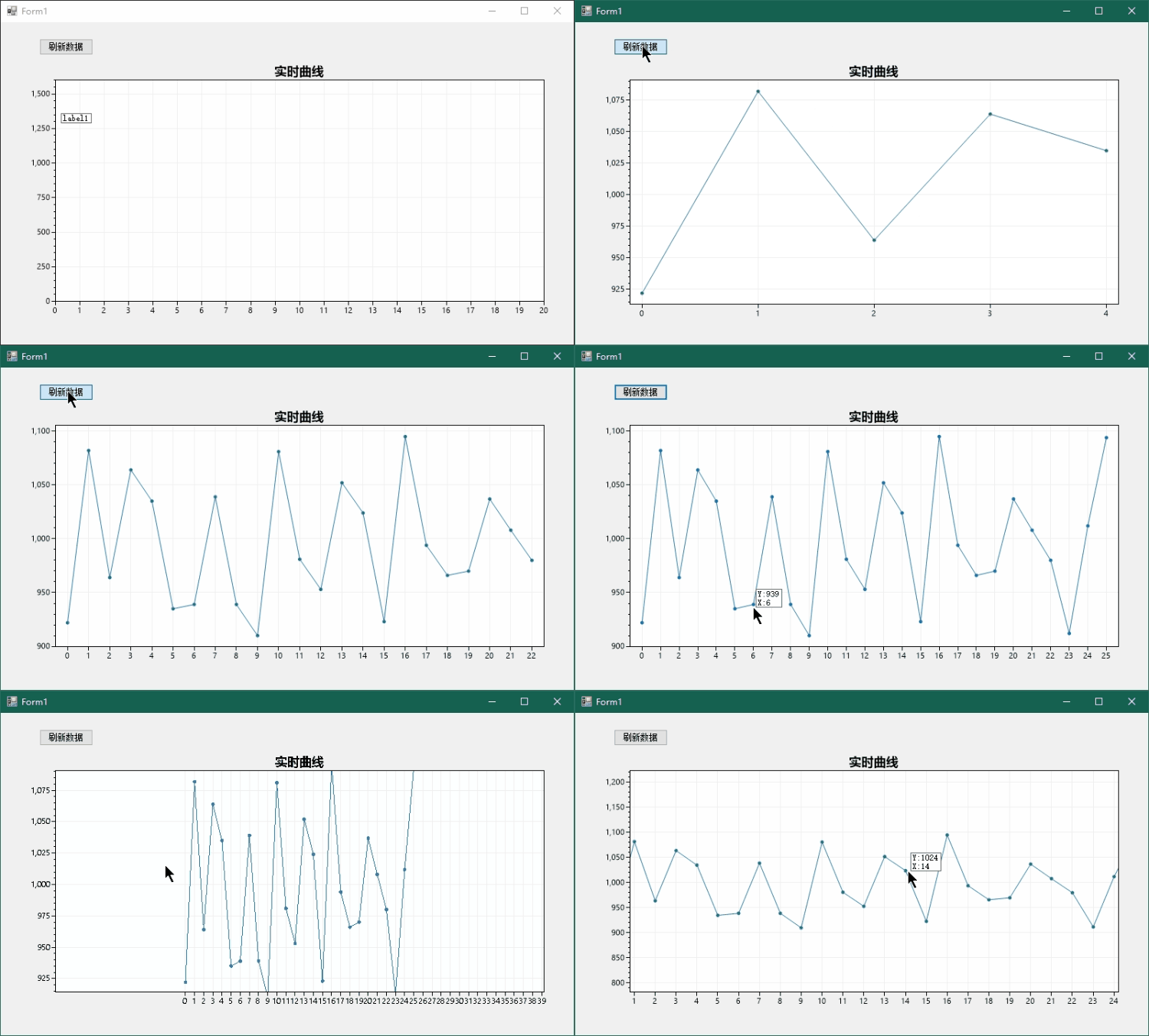
ScottPlot是个非常不错的开源图表库,官方的例程也比较丰富,本文简单举例说明如何获取鼠标处的数值,和官方示例ShowValueOnHover2类似。
创建空白的Winform桌面程序
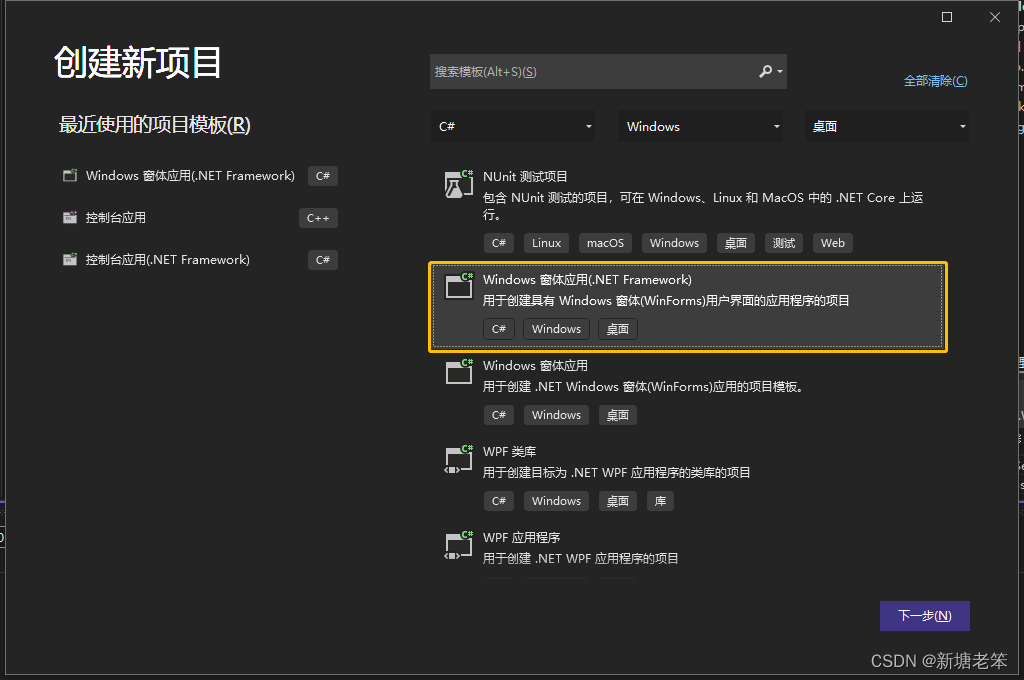
引入ScottPlot库
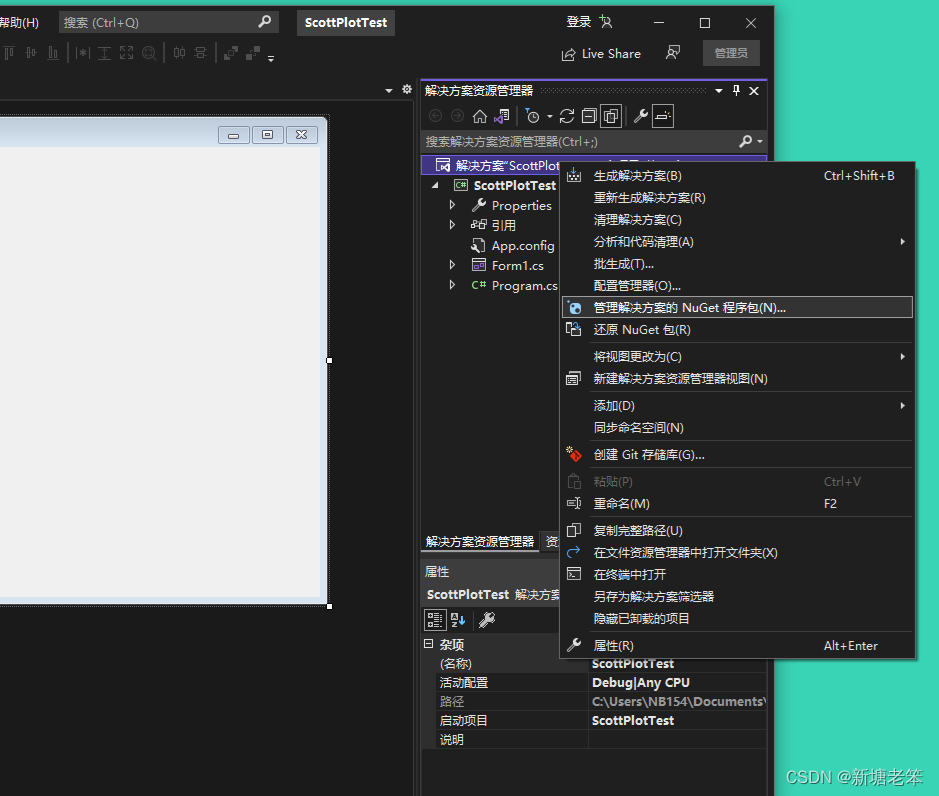
右键解决方案,点击Nuget程序包管理,搜索完整名ScottPlot:
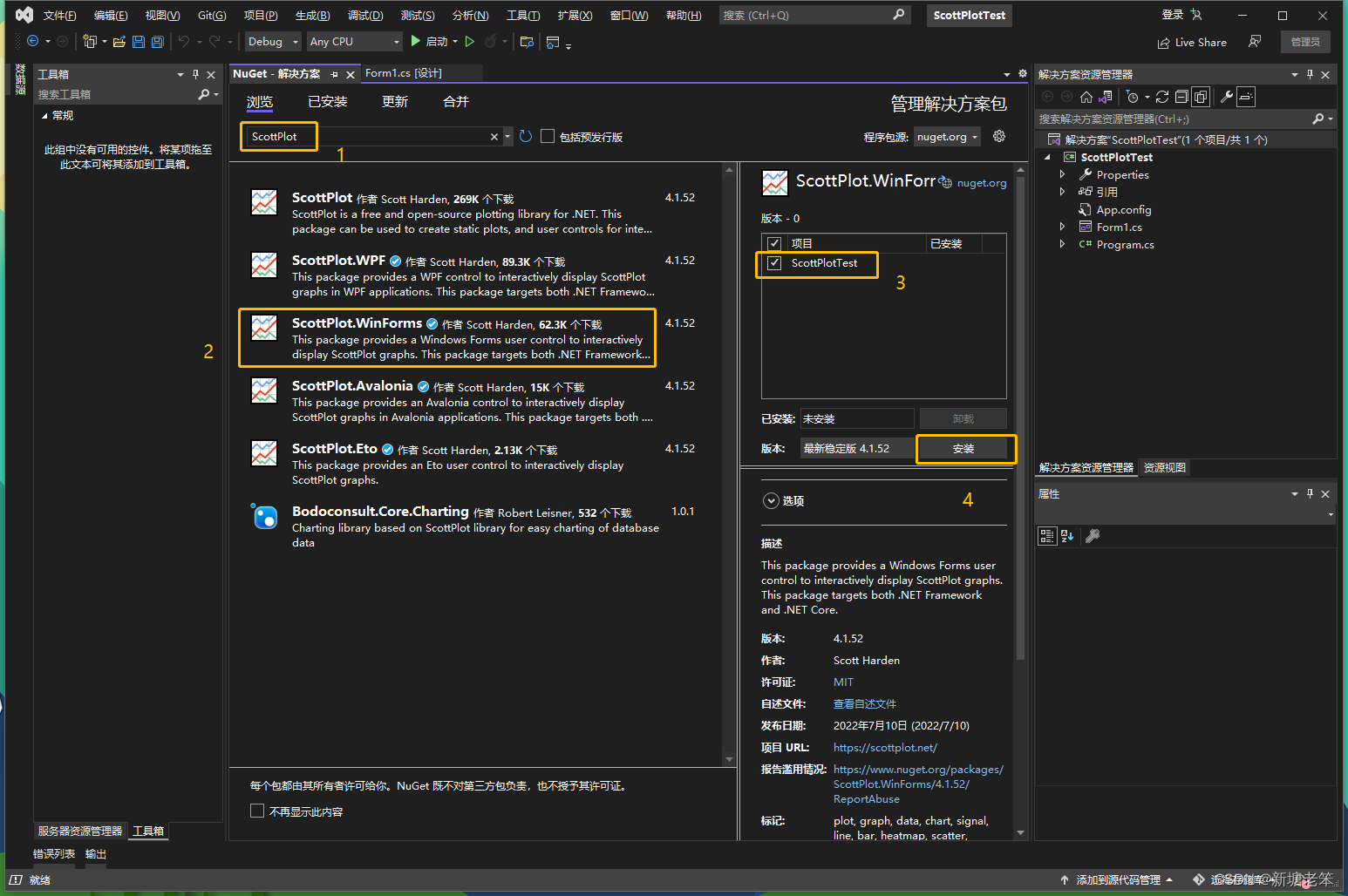
引入完成之后设计窗口的工具箱中会出现FromsPlot控件,将其拖放到设计界面中,这里再加两个控件:
Button用于点击产生随机数据,Label用于显示鼠标位置的数值,初始位置随意,程序里我们让它跟随鼠标在适当的位置显示。
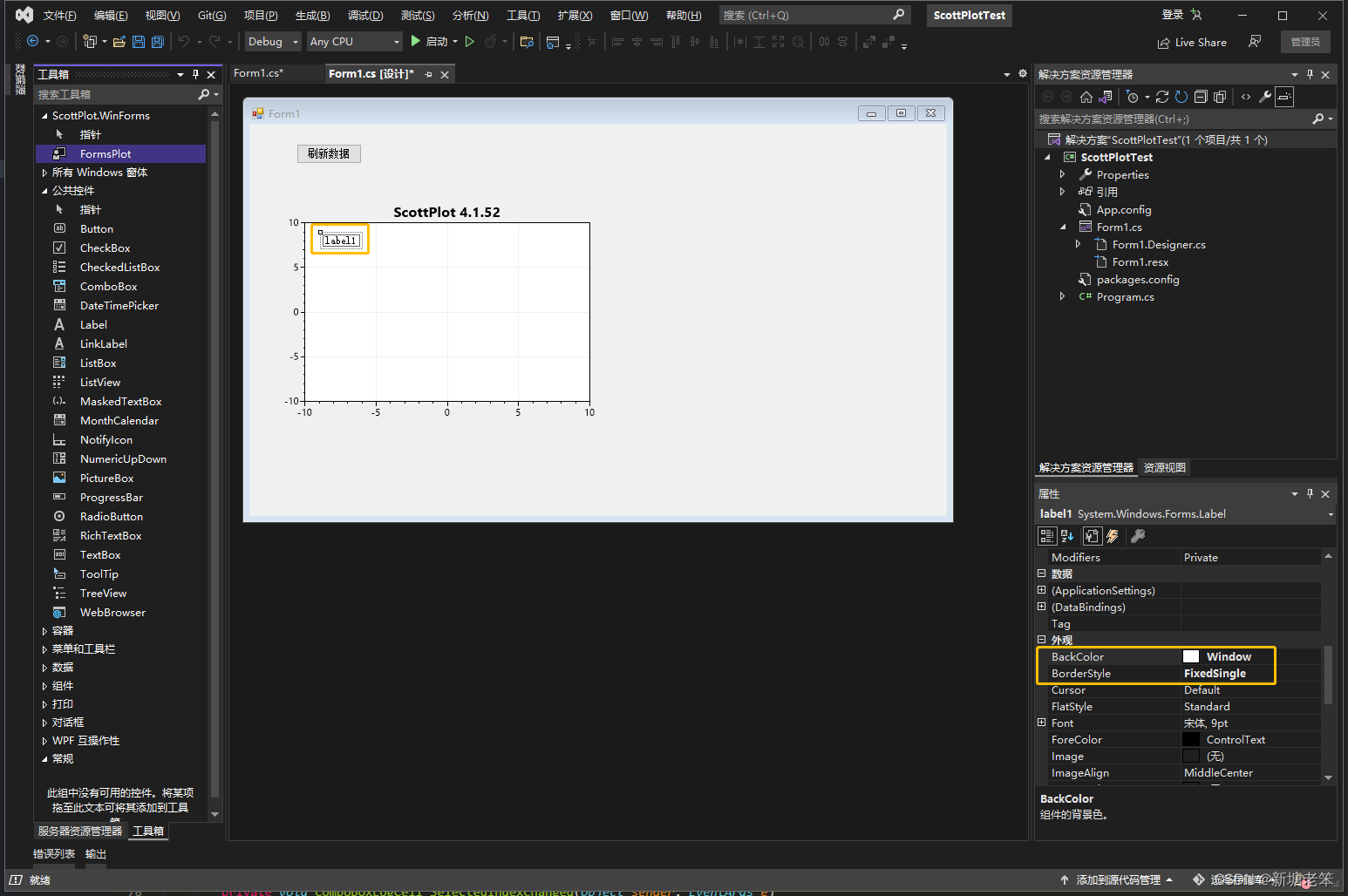
图中更改了Label的背景色和边框样式,这样看起来好看些。
双击添加的刷新Button可快速添加监听并进入代码编辑模式。
using System;
using System.Collections.Generic;
using System.ComponentModel;
using System.Data;
using System.Drawing;
using System.Linq;
using System.Text;
using System.Threading.Tasks;
using System.Windows.Forms;

namespace ScottPlotTest
{
    public partial class Form1 : Form
    {
        public const int MAX_LOG_LENGHT = 1000;

        private double[] values = new double[MAX_LOG_LENGHT];
        private int dataCnt = 0;
        private ScottPlot.Plottable.SignalPlot signalPlot;
        public Form1()
        {
            InitializeComponent();

            /*
             * 1.设置数据源,自定义X轴标签
             */
            var plt = formsPlot1.Plot;
            plt.Title("实时曲线");
            plt.SetAxisLimitsY(0, 1600);
            plt.SetAxisLimitsX(0, 20);
            signalPlot = plt.AddSignal(values);
            signalPlot.MaxRenderIndex = dataCnt;
            //生成X轴标签
            double[] labelPositions = new double[MAX_LOG_LENGHT];
            string[] labelsXAxis = new string[MAX_LOG_LENGHT];
            for (int i = 0; i < MAX_LOG_LENGHT; i++)
            {
                labelsXAxis[i] = i.ToString();
                labelPositions[i] = i;
            }
            plt.XTicks(labelPositions, labelsXAxis);
            formsPlot1.Refresh();

            //鼠标移动监听
            formsPlot1.MouseMove += FormsPlot1_MouseMove;
        }

        protected override void OnSizeChanged(EventArgs e)
        {
            base.OnSizeChanged(e);
            /*
             * 2.自动适应窗口大小
             */
            formsPlot1.Location = new Point(12, 51);
            formsPlot1.Width = Size.Width - 48;
            formsPlot1.Height = Size.Height - 108;
        }

        private void FormsPlot1_MouseMove(object sender, MouseEventArgs e)
        {
            /*
             * 3.计算鼠标处的值并通过Label显示
             */
            label1.Visible = false;
            Point mouseLocation = e.Location;
            double xCoordinate = formsPlot1.Plot.GetCoordinateX(mouseLocation.X);
            int xAxis = Math.Abs((int)Math.Round(xCoordinate));
            if (xAxis < dataCnt)
            {
                int y = (int)formsPlot1.Plot.GetPixelY(values[xAxis]);
                if (Math.Abs(mouseLocation.Y - y) < 16)
                {
                    label1.Text = "Y:" + y.ToString()
                        + "\nX:" + xAxis.ToString();
                    //调整label到合适位置
                    mouseLocation.Y += label1.Height;
                    mouseLocation.X += 16;
                    label1.Location = mouseLocation;
                    label1.Visible = true;
                }
            }
        }

        private void Button1_Click(object sender, EventArgs e)
        {
            /*
             * 4.生成随机数据
             */
            GetData();
            formsPlot1.Plot.AxisAuto();
            formsPlot1.Refresh();
        }

        private void GetData()
        {
            Random rand = new Random();
            values[dataCnt] = 1000 + rand.Next(-100, 100);
            signalPlot.MaxRenderIndex = dataCnt;
            dataCnt++;
            if(MAX_LOG_LENGHT == dataCnt)
            {
                dataCnt = 0;
            }
        }
    }
}
代码做了4件事:
1.设置数据源;自定义X轴标签,只显示整数。
2.自动适应窗口大小。
3.计算鼠标处的值并通过Label显示。
4.生成随机数据。
我们重点看如何获取鼠标处的值,通过GetCoordinateX()获取X轴鼠标像素点对应的图标曲线坐标的值,然后取最近的整数,这个数就是数据的索引,这里就得到了X-Y对的值。但我们需要鼠标指到数据点附近时才显示,所以接下来通过GetPixelY()获取Y轴坐标数值对应的像素值,在距离16个像素范围内就显示Label,否则就不显示。
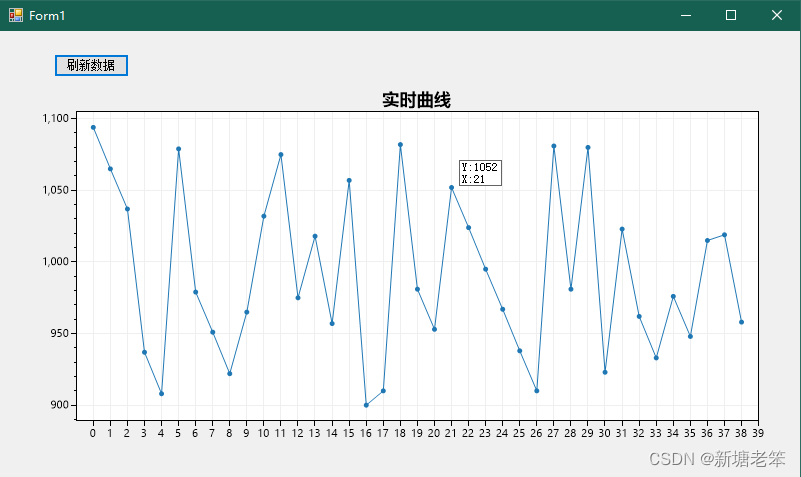
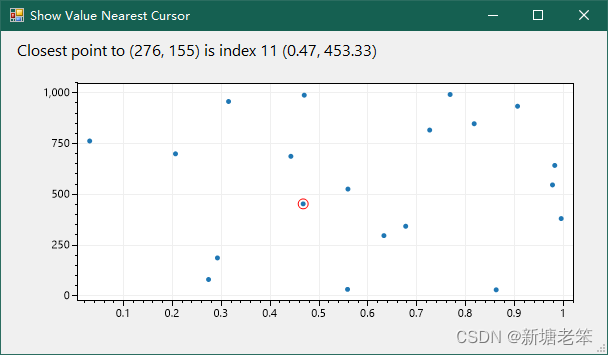
官方Demo的ShowValueOnHover2即是显示鼠标处数值示例,源码如下:
private void formsPlot1_MouseMove(object sender, MouseEventArgs e)
{
	// determine point nearest the cursor
	(double mouseCoordX, double mouseCoordY) = formsPlot1.GetMouseCoordinates();
	double xyRatio = formsPlot1.Plot.XAxis.Dims.PxPerUnit / formsPlot1.Plot.YAxis.Dims.PxPerUnit;
	(double pointX, double pointY, int pointIndex) = MyScatterPlot.GetPointNearest(mouseCoordX, mouseCoordY, xyRatio);

	// place the highlight over the point of interest
	HighlightedPoint.X = pointX;
	HighlightedPoint.Y = pointY;
	HighlightedPoint.IsVisible = true;

	// render if the highlighted point chnaged
	if (LastHighlightedIndex != pointIndex)
	{
		LastHighlightedIndex = pointIndex;
		formsPlot1.Refresh();
	}

	// update the GUI to describe the highlighted point
	label1.Text = $"Closest point to ({e.X:N0}, {e.Y:N0}) " +
		$"is index {pointIndex} ({pointX:N2}, {pointY:N2})";
}
效果图:
我得到了一个包含嵌套链接的表单。编辑时链接字段为空的问题。这是我的表格:Editingkategori{:action=>'update',:id=>@konkurrancer.id})do|f|%>'Trackingurl',:style=>'width:500;'%>'Editkonkurrence'%>|我的konkurrencer模型:has_one:link我的链接模型:classLink我的konkurrancer编辑操作:defedit@konkurrancer=Konkurrancer.find(params[:id])@konkurrancer.link_attrib
我主要使用Ruby来执行此操作,但到目前为止我的攻击计划如下:使用gemsrdf、rdf-rdfa和rdf-microdata或mida来解析给定任何URI的数据。我认为最好映射到像schema.org这样的统一模式,例如使用这个yaml文件,它试图描述数据词汇表和opengraph到schema.org之间的转换:#SchemaXtoschema.orgconversion#data-vocabularyDV:name:namestreet-address:streetAddressregion:addressRegionlocality:addressLocalityphoto:i
我希望我的UserPrice模型的属性在它们为空或不验证数值时默认为0。这些属性是tax_rate、shipping_cost和price。classCreateUserPrices8,:scale=>2t.decimal:tax_rate,:precision=>8,:scale=>2t.decimal:shipping_cost,:precision=>8,:scale=>2endendend起初,我将所有3列的:default=>0放在表格中,但我不想要这样,因为它已经填充了字段,我想使用占位符。这是我的UserPrice模型:classUserPrice回答before_val
所以我在关注Railscast,我注意到在html.erb文件中,ruby代码有一个微弱的背景高亮效果,以区别于其他代码HTML文档。我知道Ryan使用TextMate。我正在使用SublimeText3。我怎样才能达到同样的效果?谢谢! 最佳答案 为SublimeText安装ERB包。假设您安装了SublimeText包管理器*,只需点击cmd+shift+P即可获得命令菜单,然后键入installpackage并选择PackageControl:InstallPackage获取包管理器菜单。在该菜单中,键入ERB并在看到包时选择
我试图在索引页中创建一个超链接,但它没有显示,也没有给出任何错误。这是我的index.html.erb代码。ListingarticlesTitleTextssss我检查了我的路线,我认为它们也没有问题。PrefixVerbURIPatternController#Actionwelcome_indexGET/welcome/index(.:format)welcome#indexarticlesGET/articles(.:format)articles#indexPOST/articles(.:format)articles#createnew_articleGET/article
我是rails的新手,想在form字段上应用验证。myviewsnew.html.erb.....模拟.rbclassSimulation{:in=>1..25,:message=>'Therowmustbebetween1and25'}end模拟Controller.rbclassSimulationsController我想检查模型类中row字段的整数范围,如果不在范围内则返回错误信息。我可以检查上面代码的范围,但无法返回错误消息提前致谢 最佳答案 关键是您使用的是模型表单,一种显示ActiveRecord模型实例属性的表单。c
有没有办法在这个简单的get方法中添加超时选项?我正在使用法拉第3.3。Faraday.get(url)四处寻找,我只能先发起连接后应用超时选项,然后应用超时选项。或者有什么简单的方法?这就是我现在正在做的:conn=Faraday.newresponse=conn.getdo|req|req.urlurlreq.options.timeout=2#2secondsend 最佳答案 试试这个:conn=Faraday.newdo|conn|conn.options.timeout=20endresponse=conn.get(url
我有一个存储主机名的Ruby数组server_names。如果我打印出来,它看起来像这样:["hostname.abc.com","hostname2.abc.com","hostname3.abc.com"]相当标准。我想要做的是获取这些服务器的IP(可能将它们存储在另一个变量中)。看起来IPSocket类可以做到这一点,但我不确定如何使用IPSocket类遍历它。如果它只是尝试像这样打印出IP:server_names.eachdo|name|IPSocket::getaddress(name)pnameend它提示我没有提供服务器名称。这是语法问题还是我没有正确使用类?输出:ge
我想获取模块中定义的所有常量的值:moduleLettersA='apple'.freezeB='boy'.freezeendconstants给了我常量的名字:Letters.constants(false)#=>[:A,:B]如何获取它们的值的数组,即["apple","boy"]? 最佳答案 为了做到这一点,请使用mapLetters.constants(false).map&Letters.method(:const_get)这将返回["a","b"]第二种方式:Letters.constants(false).map{|c
我安装了ruby版本管理器,并将RVM安装的ruby实现设置为默认值,这样'哪个ruby'显示'~/.rvm/ruby-1.8.6-p383/bin/ruby'但是当我在emacs中打开inf-ruby缓冲区时,它使用安装在/usr/bin中的ruby。有没有办法让emacs像shell一样尊重ruby的路径?谢谢! 最佳答案 我创建了一个emacs扩展来将rvm集成到emacs中。如果您有兴趣,可以在这里获取:http://github.com/senny/rvm.el
