目录
mac docker安装nacos异常
ERROR org.springframework.boot.SpringApplication - Application run failed
com.alibaba.nacos.api.exception.runtime.NacosRuntimeException: ErrCode:500, ErrMsg:Function not implemented
at com.alibaba.nacos.core.listener.StartingApplicationListener.loadPreProperties(StartingApplicationListener.java:161)
at com.alibaba.nacos.core.listener.StartingApplicationListener.environmentPrepared(StartingApplicationListener.java:100)
at com.alibaba.nacos.core.code.SpringApplicationRunListener.environmentPrepared(SpringApplicationRunListener.java:65)
at org.springframework.boot.SpringApplicationRunListeners.environmentPrepared(SpringApplicationRunListeners.java:53)
at org.springframework.boot.SpringApplication.prepareEnvironment(SpringApplication.java:342)
at org.springframework.boot.SpringApplication.run(SpringApplication.java:305)
at org.springframework.boot.SpringApplication.run(SpringApplication.java:1215)
at org.springframework.boot.SpringApplication.run(SpringApplication.java:1204)
at com.alibaba.nacos.Nacos.main(Nacos.java:35)
at sun.reflect.NativeMethodAccessorImpl.invoke0(Native Method)
at sun.reflect.NativeMethodAccessorImpl.invoke(NativeMethodAccessorImpl.java:62)
at sun.reflect.DelegatingMethodAccessorImpl.invoke(DelegatingMethodAccessorImpl.java:43)
at java.lang.reflect.Method.invoke(Method.java:498)
at org.springframework.boot.loader.MainMethodRunner.run(MainMethodRunner.java:49)
at org.springframework.boot.loader.Launcher.launch(Launcher.java:108)
at org.springframework.boot.loader.Launcher.launch(Launcher.java:58)
at org.springframework.boot.loader.PropertiesLauncher.main(PropertiesLauncher.java:467)
Caused by: com.alibaba.nacos.api.exception.NacosException: java.io.IOException: Function not implemented
at com.alibaba.nacos.sys.file.WatchFileCenter$WatchDirJob.<init>(WatchFileCenter.java:189)
at com.alibaba.nacos.sys.file.WatchFileCenter.registerWatcher(WatchFileCenter.java:97)
at com.alibaba.nacos.core.listener.StartingApplicationListener.registerWatcher(StartingApplicationListener.java:167)
at com.alibaba.nacos.core.listener.StartingApplicationListener.loadPreProperties(StartingApplicationListener.java:159)
... 16 common frames omitted
Caused by: java.io.IOException: Function not implemented
at sun.nio.fs.LinuxWatchService.<init>(LinuxWatchService.java:64)
at sun.nio.fs.LinuxFileSystem.newWatchService(LinuxFileSystem.java:47)
at com.alibaba.nacos.sys.file.WatchFileCenter$WatchDirJob.<init>(WatchFileCenter.java:184)
... 19 common frames omitted 出现这个的原因是,mac(m1我的是)jdk没有这个实现类,所以在执行的时候报错
修改完后,保存,重启docker服务
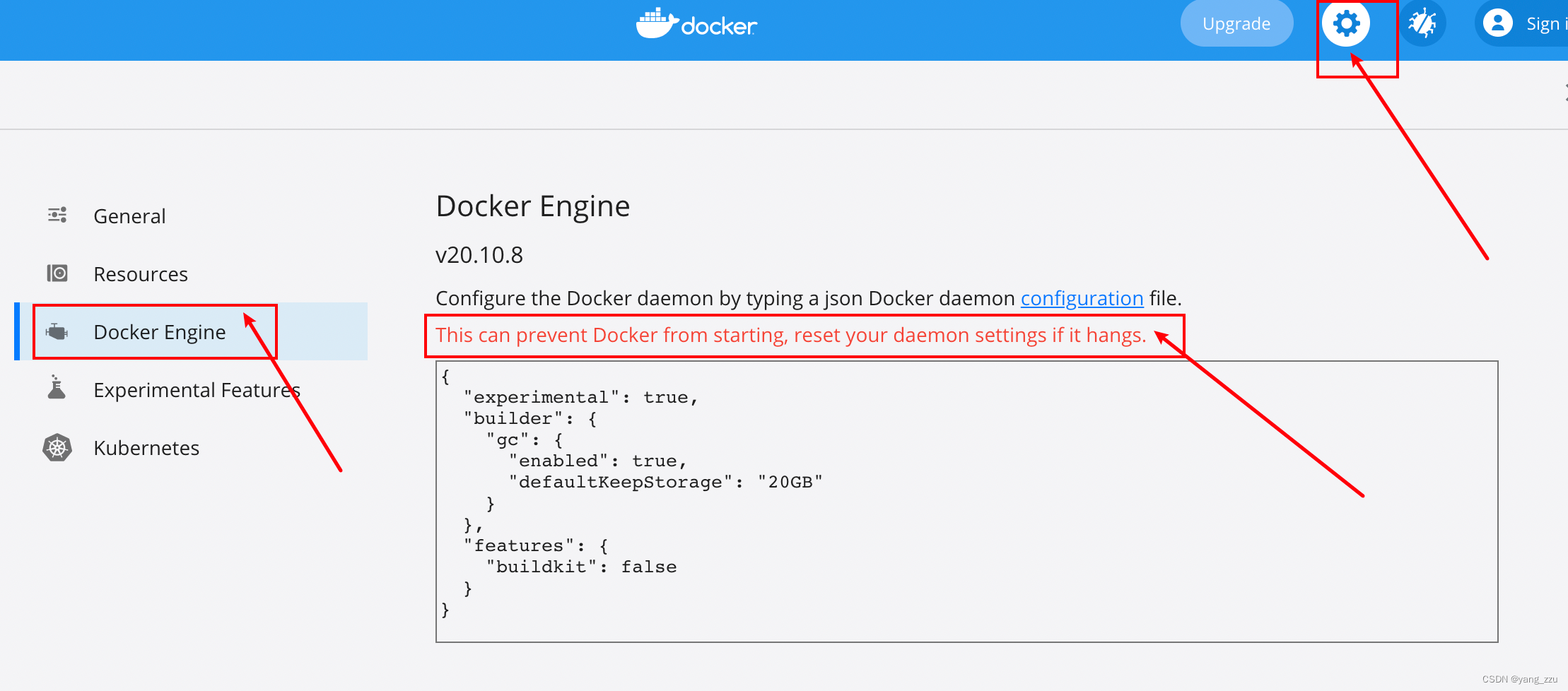
{
  "experimental": true,
  "builder": {
    "gc": {
      "enabled": true,
      "defaultKeepStorage": "20GB"
    }
  },
  "features": {
    "buildkit": false
  }
}git clone https://github.com/nacos-group/nacos-docker.git
FROM openjdk:8u312-jdk-slim-bullseye AS build-env-java
#FROM condaforge/mambaforge:4.9.2-5 as conda

MAINTAINER pader "huangmnlove@163.com"

# set environment
ENV MODE="cluster" \
    PREFER_HOST_MODE="ip"\
    BASE_DIR="/home/nacos" \
    CLASSPATH=".:/home/nacos/conf:$CLASSPATH" \
    CLUSTER_CONF="/home/nacos/conf/cluster.conf" \
    FUNCTION_MODE="all" \
    JAVA_HOME="/usr/local/openjdk-8" \
    NACOS_USER="nacos" \
    JAVA="/usr/local/openjdk-8/bin/java" \
    JVM_XMS="256m" \
    JVM_XMX="256m" \
    JVM_XMN="128m" \
    JVM_MS="128m" \
    JVM_MMS="128m" \
    NACOS_DEBUG="n" \
    TOMCAT_ACCESSLOG_ENABLED="false" \
    TIME_ZONE="Asia/Shanghai"

ARG NACOS_VERSION=2.1.1
ARG HOT_FIX_FLAG=""

RUN echo $NACOS_VERSION
WORKDIR $BASE_DIR

RUN apt-get update
RUN apt-get -y install wget


#RUN set -x \
#    && yum update -y \
#    && yum install -y java-8u312-jdk-slim-bullseye java-8u312-jdk-slim-bullseye-devel wget iputils nc  vim libcurl
RUN wget  https://github.com/alibaba/nacos/releases/download/${NACOS_VERSION}${HOT_FIX_FLAG}/nacos-server-${NACOS_VERSION}.tar.gz -P /home
RUN tar -xzvf /home/nacos-server-${NACOS_VERSION}.tar.gz -C /home \
    && rm -rf /home/nacos-server-${NACOS_VERSION}.tar.gz /home/nacos/bin/* /home/nacos/conf/*.properties /home/nacos/conf/*.example /home/nacos/conf/nacos-mysql.sql
#RUN yum autoremove -y wget \
#    && ln -snf /usr/share/zoneinfo/$TIME_ZONE /etc/localtime && echo $TIME_ZONE > /etc/timezone \
#    && yum clean all

RUN ln -snf /usr/share/zoneinfo/$TIME_ZONE /etc/localtime && echo $TIME_ZONE > /etc/timezone

#拷贝本地文件数据 到 容器文件夹内(前面的是本地文件可以使用绝对路径, 可以使用相对路径(相对build文件夹的路径))
#COPY nacos/target/* /home/nacos/target/
#COPY nacos/conf/* /home/nacos/conf/


ADD bin/docker-startup.sh bin/docker-startup.sh
ADD conf/application.properties conf/application.properties


# set startup log dir
RUN mkdir -p logs \
	&& cd logs \
	&& touch start.out \
	&& ln -sf /dev/stdout start.out \
	&& ln -sf /dev/stderr start.out
RUN chmod +x bin/docker-startup.sh

EXPOSE 8848
ENTRYPOINT ["bin/docker-startup.sh"]
在该文件夹下执行命令 /nacos-docker/build
docker build -t nacos/nacos-server:v2.1.1 .
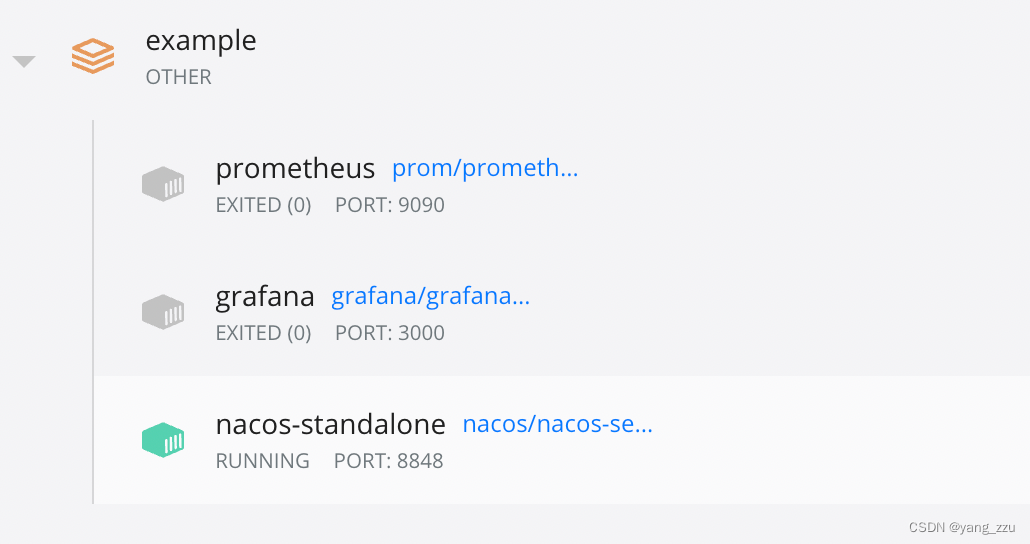
standalone-derby.yaml 使用的是docker-compose对多个服务(nacos, prometheus, grafana)进行启动,如果只需启动nacos则将其他的服务配置注释掉即可
在该文件夹下执行命令 /nacos-docker
docker-compose -f example/standalone-derby.yaml up
我想为Heroku构建一个Rails3应用程序。他们使用Postgres作为他们的数据库,所以我通过MacPorts安装了postgres9.0。现在我需要一个postgresgem并且共识是出于性能原因你想要pggem。但是我对我得到的错误感到非常困惑当我尝试在rvm下通过geminstall安装pg时。我已经非常明确地指定了所有postgres目录的位置可以找到但仍然无法完成安装:$envARCHFLAGS='-archx86_64'geminstallpg--\--with-pg-config=/opt/local/var/db/postgresql90/defaultdb/po
我打算为ruby脚本创建一个安装程序,但我希望能够确保机器安装了RVM。有没有一种方法可以完全离线安装RVM并且不引人注目(通过不引人注目,就像创建一个可以做所有事情的脚本而不是要求用户向他们的bash_profile或bashrc添加一些东西)我不是要脚本本身,只是一个关于如何走这条路的快速指针(如果可能的话)。我们还研究了这个很有帮助的问题:RVM-isthereawayforsimpleofflineinstall?但有点误导,因为答案只向我们展示了如何离线在RVM中安装ruby。我们需要能够离线安装RVM本身,并查看脚本https://raw.github.com/wayn
我有一个奇怪的问题:我在rvm上安装了rubyonrails。一切正常,我可以创建项目。但是在我输入“railsnew”时重新启动后,我有“程序'rails'当前未安装。”。SystemUbuntu12.04ruby-v"1.9.3p194"gemlistactionmailer(3.2.5)actionpack(3.2.5)activemodel(3.2.5)activerecord(3.2.5)activeresource(3.2.5)activesupport(3.2.5)arel(3.0.2)builder(3.0.0)bundler(1.1.4)coffee-rails(
我刚刚为fedora安装了emacs。我想用emacs编写ruby。为ruby提供代码提示、代码完成类型功能所需的工具、扩展是什么? 最佳答案 ruby-mode已经包含在Emacs23之后的版本中。不过,它也可以通过ELPA获得。您可能感兴趣的其他一些事情是集成RVM、feature-mode(Cucumber)、rspec-mode、ruby-electric、inf-ruby、rinari(用于Rails)等。这是我当前用于Ruby开发的Emacs配置:https://github.com/citizen428/emacs
我正在尝试在我的centos服务器上安装therubyracer,但遇到了麻烦。$geminstalltherubyracerBuildingnativeextensions.Thiscouldtakeawhile...ERROR:Errorinstallingtherubyracer:ERROR:Failedtobuildgemnativeextension./usr/local/rvm/rubies/ruby-1.9.3-p125/bin/rubyextconf.rbcheckingformain()in-lpthread...yescheckingforv8.h...no***e
我的最终目标是安装当前版本的RubyonRails。我在OSXMountainLion上运行。到目前为止,这是我的过程:已安装的RVM$\curl-Lhttps://get.rvm.io|bash-sstable检查已知(我假设已批准)安装$rvmlistknown我看到当前的稳定版本可用[ruby-]2.0.0[-p247]输入命令安装$rvminstall2.0.0-p247注意:我也试过这些安装命令$rvminstallruby-2.0.0-p247$rvminstallruby=2.0.0-p247我很快就无处可去了。结果:$rvminstall2.0.0-p247Search
我实际上是在尝试使用RVM在我的OSX10.7.5上更新ruby,并在输入以下命令后:rvminstallruby我得到了以下回复:Searchingforbinaryrubies,thismighttakesometime.Checkingrequirementsforosx.Installingrequirementsforosx.Updatingsystem.......Errorrunning'requirements_osx_brew_update_systemruby-2.0.0-p247',pleaseread/Users/username/.rvm/log/138121
由于fast-stemmer的问题,我很难安装我想要的任何rubygem。我把我得到的错误放在下面。Buildingnativeextensions.Thiscouldtakeawhile...ERROR:Errorinstallingfast-stemmer:ERROR:Failedtobuildgemnativeextension./System/Library/Frameworks/Ruby.framework/Versions/2.0/usr/bin/rubyextconf.rbcreatingMakefilemake"DESTDIR="cleanmake"DESTDIR=
我正在学习Rails,并阅读了关于乐观锁的内容。我已将类型为integer的lock_version列添加到我的articles表中。但现在每当我第一次尝试更新记录时,我都会收到StaleObjectError异常。这是我的迁移:classAddLockVersionToArticle当我尝试通过Rails控制台更新文章时:article=Article.first=>#我这样做:article.title="newtitle"article.save我明白了:(0.3ms)begintransaction(0.3ms)UPDATE"articles"SET"title"='dwdwd
在Cooper的书BeginningRuby中,第166页有一个我无法重现的示例。classSongincludeComparableattr_accessor:lengthdef(other)@lengthother.lengthenddefinitialize(song_name,length)@song_name=song_name@length=lengthendenda=Song.new('Rockaroundtheclock',143)b=Song.new('BohemianRhapsody',544)c=Song.new('MinuteWaltz',60)a.betwee
