实现关键:
1、wx.getBackgroundAudioManager()
2、在app.json中配置:"requiredBackgroundModes": ["audio"]
界面
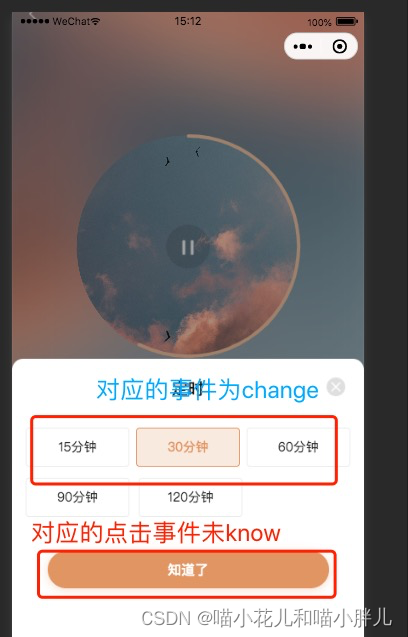
具体实现步骤:
======****进度条组件

wxml
<view class="circle_box" style="{{size}}px;height:{{size}}px">
    <!-- <canvas class="circle_bg" canvas-id="{{draw}}bg" style="{{size + 10}}px;height:{{size + 10}}px"></canvas>  -->
    <canvas class="circle_draw" canvas-id="{{draw}}" style="{{size }}px;height:{{size }}px"></canvas>
    <!-- <text class='circle_txt'> {{txt}}%  </text>   -->
</view>
wxss
.circle_box,.circle_draw{
  width: 100%;
  top: 50%;
  left:50%;
  transform: translate(-50%,-50%);
  position: absolute;
}
.circle_bg{
  width: 100%;
  top: 50%;
  left:50%;
  transform: translate(-50%,-50%);
  position: absolute;
}
.circle_box{
  top: 50%;
  left:50%;
  transform: translate(-50%,-50%);
  display: flex;
  flex-direction: row;
  justify-content: center;
  align-items: center;
  position: absolute;
  width: 100%;
  z-index: 1001;
}
.circle_txt{
  position: absolute;
  font-size: 28rpx;
}
js
Component({
  options: {
    multipleSlots: true // 在组件定义时的选项中启用多slot支持
  },
  properties: {
    draw: {//画板元素名称id
      type: String,
      value: 'draw'
    },
    per: { //百分比 通过此值转换成step
      type: String,
      value: '0'
    },
    r: {//半径
      type: String,
      value: '50'
    }

  },

  observers: {
    "per": function (val) {
      // this.attached()
      this.init()
    }
  },

  data: { /*  私有数据,可用于模版渲染 */
    step: 1, //用来算圆的弧度0-2
    size: 0, //画板大小
    screenWidth: 750, //实际设备的宽度
    txt: 0
  },
  methods: {
    // 初始化
    init() {
      const _this = this;
      //获取屏幕宽度
      wx.getSystemInfo({
        success: function (res) {
          _this.setData({
            screenWidth: res.windowWidth
          });
        },
      });
      //初始化
      const el = _this.data.draw; //画板元素
      const per = _this.data.per; //圆形进度
      const r = Number(_this.data.r); //圆形半径

      _this.setData({
        step: (2 * Number(_this.data.per)) / 100,
        txt: _this.data.per
      });


      //获取屏幕宽度(并把真正的半径px转成rpx)
      let rpx = (_this.data.screenWidth / 750) * r;
      //计算出画板大小
      this.setData({
        size: rpx * 2
      });
      const w = 4;//圆形的宽度
      // console.log("step", _this.data.step)

      //组件入口,调用下面即可绘制 背景圆环和彩色圆环。
      _this.drawCircleBg(el + 'bg', rpx, w);//绘制 背景圆环
      _this.drawCircle(el, rpx, w, _this.data.step);//绘制 彩色圆环
    },

    /**
     * el:画圆的元素
     * r:圆的半径
     * w:圆的宽度
     * 功能:画背景
     */
    drawCircleBg: function (el, r, w) {
      const ctx = wx.createCanvasContext(el, this);
      ctx.setLineWidth(w);// 设置圆环的宽度
      ctx.setStrokeStyle('#E5E5E5'); // 设置圆环的颜色
      ctx.setLineCap('round') // 设置圆环端点的形状
      ctx.beginPath();//开始一个新的路径
      ctx.arc(r, r, r - w, 0, 2 * Math.PI, false);
      //设置一个原点(110,110),半径为100的圆的路径到当前路径
      ctx.stroke();//对当前路径进行描边
      ctx.draw();

    },
    /**
 * el:画圆的元素
 * r:圆的半径
 * w:圆的宽度
 * step:圆的弧度 (0-2)
 * 功能:彩色圆环
 */
    drawCircle: function (el, r, w, step) {
      var context = wx.createCanvasContext(el, this);
      // 设置渐变
      var gradient = context.createLinearGradient(2 * r, r, 0);
      gradient.addColorStop("0", "#F1CAAD");
      gradient.addColorStop("0.5", "#F1CAAD");
      gradient.addColorStop("1.0", "#F1CAAD");
      context.setLineWidth(w);
      context.setStrokeStyle(gradient);
      context.setLineCap('round')
      context.beginPath();//开始一个新的路径
      // step 从0到2为一周
      context.arc(r, r, r - w, -Math.PI / 2, step * Math.PI - Math.PI / 2, false);
      context.stroke();//对当前路径进行描边
      context.draw()
    }

  },

  lifetimes: {
    // 生命周期函数,可以为函数,或一个在methods段中定义的方法名
    attached: function () {
      this.init()
    }

  }


})
json
{
    "component": true,
    "usingComponents": {}
}
======****调用部分
wxml
 <view class="playBox">
        <circle draw='circwewle1' class="mycanvas" per="{{ percentage }}" r='242' />
        <image mode="aspectFill" class="playbg {{isPlay&&'disc-animate'}}" src="{{ detailObj.playerdiagram }}"></image>
        <image mode="aspectFill"
            src="{{  isPlay ? 'https://laikangland-dev.oss-cn-beijing.aliyuncs.com/202209081030199l40.png?Expires=2293324220&OSSAccessKeyId=LTAIykCrXSP1fmei&Signature=Tc7RjNRt7VnPQdFxPgtob76AVE0%3D' : 'https://laikangland-dev.oss-cn-beijing.aliyuncs.com/20220908103053X31u.png?Expires=2293324253&OSSAccessKeyId=LTAIykCrXSP1fmei&Signature=eIFRbPEqzCCtptvNtb3Y3VJER%2Bg%3D' }}"
            data-src="{{ detailObj.resUrl }}" class="play" catchtap="playMusic"></image>
    </view>
less
 .playBox {
        width: 484rpx;
        display: flex;
        align-items: center;
        justify-content: center;
        height: 484rpx;
        border-radius: 50%;
        margin-bottom: 140rpx;
        position: relative;
        // overflow: hidden;
        // border: 8rpx solid #F1CAAD;
        .playbg {
            width: 475rpx;
            height: 475rpx;
            // top: 50%;
            // left: 50%;
            position: absolute;
            transform: rotate(0deg)
            // translate(-50%,-50%)
        }

        .disc-animate {
            animation: rotate 3s 0s linear infinite;
        }

        .play {
            width: 96rpx;
            height: 96rpx;
            z-index: 1002;
            border-radius: 50%;
        }
    }
json
{
    "usingComponents": {
      "circle": "/components/circle/circle"
    },
    "navigationStyle":"custom"
  }
js
1、在onLoad中创建播放对象
data: {
        detailObj: null,
        tabIndex: null,
        tab: [15, 30, 60, 90, 120],
        isPlay: false,//是否播放
        countdown: null, //倒计时
        percentage: null //当前进度
},
 onLoad(options) {
        let platform;
        wx.getSystemInfo({
            success: function (res) {
                platform = res.platform
            }
        });
        this.platform = platform
        let detailObj = JSON.parse(decodeURIComponent(options.item))
        this.data.audioCtx = wx.getBackgroundAudioManager()
        this.data.audioCtx.title = detailObj.name
        this.setData({ customTopHeiht: app.globalData.customTopHeiht, detailObj, showTip: detailObj.announcements ? true : false })
        // 创建播放对象
        this.createPlay()
    },
onShow() {

        // this.createPlay()
        if (wx.getStorageSync("nowTime")) {
            this.newTime = wx.getStorageSync("nowTime")
            let tabIndex = Number(wx.getStorageSync("tabIndex"))
            this.setData({ tabIndex })
            this.countDown(this.data.tab[tabIndex])
        }else {
            this.setData({ tabIndex: null })
        }
        if(wx.getStorageSync("fmtCurrentTime")) {
            this.fmtCurrentTime  = wx.getStorageSync("fmtCurrentTime")
        }
    },
2、将播放的步骤封装成一个方法
注意事项:
1、代码中的src为需要播放的地址
2、为了防止中文的地址在ios中无法播放,需要对其通过encodeURIComponent进行转码处理
3、必须设置title,否则无法播放
  // 创建播放音乐对象
     createPlay() {
        let src = this.data.detailObj.resUrl
        src = src.indexOf('ai-algorithm-nlp') >= 0 ? src.slice(0, src.indexOf('ai-algorithm-nlp') + 6) + encodeURIComponent(src.slice(src.indexOf('ai-algorithm-nlp') + 6)) : src;
        this.data.audioCtx.src = src
        if (app.globalData.tabIndex || app.globalData.tabIndex == 0) {
            this.setData({ isPlay: true, tabIndex: app.globalData.tabIndex })
        }
        if(wx.getStorageSync('nowTime') && (this.data.countdown&&this.data.countdown.sec <= 0)) {
            this.setData({ tabIndex: null })
            this.data.audioCtx.stop()
        }else {
            setTimeout(() => {
                this.data.audioCtx.play()
            }, 300)
        }

        // 监听音乐播放
        this.data.audioCtx.onPlay(() => {
            this.handleList(true)
            this.setData({ isPlay: true })
        })
        // 监听音乐暂停
        this.data.audioCtx.onPause(() => {
            this.handleList(false)
            this.setData({ isPlay: false })
        })
        // 监听音乐停止
        this.data.audioCtx.onStop(() => {
            this.handleList(false)
            this.setData({ isPlay: false })
        })
        // 监听音乐结束
        this.data.audioCtx.onEnded(() => {
            console.log("音乐结束")
            // 循环播放
            this.data.audioCtx.pause()
            this.data.audioCtx.play()
        })
        // 监听播放进度
        this.data.audioCtx.onTimeUpdate(() => {
            let fmtCurrentTime = this.fmtCurrentTime ? this.fmtCurrentTime : moment(this.data.audioCtx.currentTime * 1000).format("mm");
            let tabIndex = this.data.tabIndex
            let time = this.data.tab[tabIndex]
            app.globalData.tabIndex = tabIndex
            wx.setStorageSync("fmtCurrentTime",fmtCurrentTime)
            let percentage = (this.data.audioCtx.currentTime/this.data.audioCtx.duration)*100
            this.setData({ percentage: percentage+''})
            // console.log("percentage",percentage)
            if(this.fmtCurrentTime && wx.getStorageSync('nowTime') && this.data.countdown) {
                if (Number(this.data.countdown.sec) <= 0) {
                    // 定时结束
                    console.log("定时结束")
                    this.setData({ isPlay: false,tabIndex: null })
                    this.data.audioCtx.stop()
                }
            }else {
                if (wx.getStorageSync('nowTime')&&Number(fmtCurrentTime) >= time) {
                    // 定时结束
                    console.log("定时结束")
                    this.setData({ isPlay: false,tabIndex: null })
                    this.data.audioCtx.stop()
                }
            }


        })
        if (this.data.detailObj.isPlay) {
            this.data.audioCtx.src = this.data.detailObj.resUrl
            // this.data.audioCtx.pause()
            this.data.audioCtx.play()
            this.setData({ isPlay: true })
        }
    },
3、处理播放按钮点击时对应的事件
  // 播放音乐
    playMusic(e) {
        this.setData({ isPlay: !this.data.isPlay })
        // let src = e.currentTarget.dataset.src
        // src = src.indexOf('ai-algorithm-nlp') >= 0 ? src.slice(0,src.indexOf('ai-algorithm-nlp')+6) + encodeURIComponent(src.slice(src.indexOf('ai-algorithm-nlp') + 6 )) : src;
        // this.data.audioCtx.src = src
        // this.data.audioCtx.src = 'https://video.laikang.com/68514b723d30472ba691c9b91b529631/4b8b9e29983c41848d01e173a115bc68-a186ac753c224d0a3647598c3ba3aab6-ld.mp4'
        if (this.data.isPlay) {
            this.data.audioCtx.pause()
            this.data.audioCtx.play()

        } else {
            this.setData({ isPlay: false })
            this.data.audioCtx.pause()
        }

    },
4、处理定时弹框关闭对应事件
 know() {
        if (this.data.isWho != 1) {
            clearInterval(this.data.timer)
            this.setData({ countdown: null })
            this.newTime = moment(new Date()).format('YYYY-MM-DD HH:mm:ss')
            wx.setStorageSync("nowTime", this.newTime); //定时
            wx.setStorageSync("tabIndex", this.data.tabIndex);
            this.countDown(this.data.tab[this.data.tabIndex])
        }
        this.setData({ isWho: null })
    },
4、处理定时时间切换事件
 change(e) {
        let tabIndex = e.currentTarget.dataset.index
        app.globalData.tabIndex = tabIndex
        this.setData({ tabIndex })
    },
5、处理定时器以及倒计时回显
 countDown: function (time) {
        let that = this,
            countdown = this.data.countdown
        // let num = 0;
        clearInterval(this.data.timer)
        that.data.timer = setInterval(function () {
            let createdTime = that.newTime
            if (that.platform == 'ios') {
                createdTime = createdTime.replace(/-/g, '/')
            }
            // 30分钟-半小时
            let lastTime = new Date(new Date(createdTime).getTime() + (1 / 60) * time * 3600 * 1000)
            let nowTime = new Date()
            let flag = that.compareDate(lastTime,nowTime)
            if (flag > 0) {
                countdown = that.myFunction(nowTime,lastTime)
            } else {
                countdown = null
                // 定时结束清除定时时间
                wx.removeStorageSync("fmtCurrentTime")
                wx.removeStorageSync('nowTime')
                wx.removeStorageSync('tabIndex')
                clearInterval(that.data.timer)
            }
            that.setData({ countdown })
        }, 1000)
    },
    myFunction(startDate, endDate) {
        let min = Math.floor((new Date(endDate).getTime() - new Date(startDate).getTime()) / 60000)
        let sec = Math.floor((new Date(endDate).getTime() - new Date(startDate).getTime()) / 1000)
        let tmp = min <= 0 ? sec : sec%60 >= 0 ?sec%60 : sec
        let str = min > 0 ? `${min}:${ tmp }` : `${min}:${sec }`
        return { str,sec }
    },

    // 比较两个日期的小
    compareDate(date1, date2) {
        let tmp1 = date1.getTime();
        let tmp2 = date2.getTime();
        return tmp1 - tmp2
    },
我正在尝试设置一个puppet节点,但rubygems似乎不正常。如果我通过它自己的二进制文件(/usr/lib/ruby/gems/1.8/gems/facter-1.5.8/bin/facter)在cli上运行facter,它工作正常,但如果我通过由rubygems(/usr/bin/facter)安装的二进制文件,它抛出:/usr/lib/ruby/1.8/facter/uptime.rb:11:undefinedmethod`get_uptime'forFacter::Util::Uptime:Module(NoMethodError)from/usr/lib/ruby
我在我的项目中添加了一个系统来重置用户密码并通过电子邮件将密码发送给他,以防他忘记密码。昨天它运行良好(当我实现它时)。当我今天尝试启动服务器时,出现以下错误。=>BootingWEBrick=>Rails3.2.1applicationstartingindevelopmentonhttp://0.0.0.0:3000=>Callwith-dtodetach=>Ctrl-CtoshutdownserverExiting/Users/vinayshenoy/.rvm/gems/ruby-1.9.3-p0/gems/actionmailer-3.2.1/lib/action_mailer
我想向我的Controller传递一个参数,它是一个简单的复选框,但我不知道如何在模型的form_for中引入它,这是我的观点:{:id=>'go_finance'}do|f|%>Transferirde:para:Entrada:"input",:placeholder=>"Quantofoiganho?"%>Saída:"output",:placeholder=>"Quantofoigasto?"%>Nota:我想做一个额外的复选框,但我该怎么做,模型中没有一个对象,而是一个要检查的对象,以便在Controller中创建一个ifelse,如果没有检查,请帮助我,非常感谢,谢谢
我已经从我的命令行中获得了一切,所以我可以运行rubymyfile并且它可以正常工作。但是当我尝试从sublime中运行它时,我得到了undefinedmethod`require_relative'formain:Object有人知道我的sublime设置中缺少什么吗?我正在使用OSX并安装了rvm。 最佳答案 或者,您可以只使用“require”,它应该可以正常工作。我认为“require_relative”仅适用于ruby1.9+ 关于ruby-主要:Objectwhenrun
我有一个用户工厂。我希望默认情况下确认用户。但是鉴于unconfirmed特征,我不希望它们被确认。虽然我有一个基于实现细节而不是抽象的工作实现,但我想知道如何正确地做到这一点。factory:userdoafter(:create)do|user,evaluator|#unwantedimplementationdetailshereunlessFactoryGirl.factories[:user].defined_traits.map(&:name).include?(:unconfirmed)user.confirm!endendtrait:unconfirmeddoenden
我有一些代码在几个不同的位置之一运行:作为具有调试输出的命令行工具,作为不接受任何输出的更大程序的一部分,以及在Rails环境中。有时我需要根据代码的位置对代码进行细微的更改,我意识到以下样式似乎可行:print"Testingnestedfunctionsdefined\n"CLI=trueifCLIdeftest_printprint"CommandLineVersion\n"endelsedeftest_printprint"ReleaseVersion\n"endendtest_print()这导致:TestingnestedfunctionsdefinedCommandLin
我有一个只接受一个参数的方法:defmy_method(number)end如果使用number调用方法,我该如何引发错误??通常,我如何定义方法参数的条件?比如我想在调用的时候报错:my_method(1) 最佳答案 您可以添加guard在函数的开头,如果参数无效则引发异常。例如:defmy_method(number)failArgumentError,"Inputshouldbegreaterthanorequalto2"ifnumbereputse.messageend#=>Inputshouldbegreaterthano
我使用Ember作为我的前端和GrapeAPI来为我的API提供服务。前端发送类似:{"service"=>{"name"=>"Name","duration"=>"30","user"=>nil,"organization"=>"org","category"=>nil,"description"=>"description","disabled"=>true,"color"=>nil,"availabilities"=>[{"day"=>"Saturday","enabled"=>false,"timeSlots"=>[{"startAt"=>"09:00AM","endAt"=>
我想获取模块中定义的所有常量的值:moduleLettersA='apple'.freezeB='boy'.freezeendconstants给了我常量的名字:Letters.constants(false)#=>[:A,:B]如何获取它们的值的数组,即["apple","boy"]? 最佳答案 为了做到这一点,请使用mapLetters.constants(false).map&Letters.method(:const_get)这将返回["a","b"]第二种方式:Letters.constants(false).map{|c
我正在阅读一本关于Ruby的书,作者在编写类初始化定义时使用的形式与他在本书前几节中使用的形式略有不同。它看起来像这样:classTicketattr_accessor:venue,:datedefinitialize(venue,date)self.venue=venueself.date=dateendend在本书的前几节中,它的定义如下:classTicketattr_accessor:venue,:datedefinitialize(venue,date)@venue=venue@date=dateendend在第一个示例中使用setter方法与在第二个示例中使用实例变量之间是
