📃个人主页: 不断前进的皮卡丘
🌞博客描述: 梦想也许遥不可及,但重要的是追梦的过程,用博客记录自己的成长,记录自己一步一步向上攀登的印记
🔥网站推荐:千里之行,始于足下。每天坚持刷题,巩固所学知识,也为将来找工作,面试做好准备----- 刷题神器
文章是看楠哥的视频写的笔记
这篇博客内容把Spring的基本知识点都讲到了,篇幅比较长,大家可以用于复习,也可以在学习相关知识点的时候,来看看对应内容。对于一些难点,IOC,AOP等,我通过流程图,代码,文字结合来进行讲解,可以更好的理解
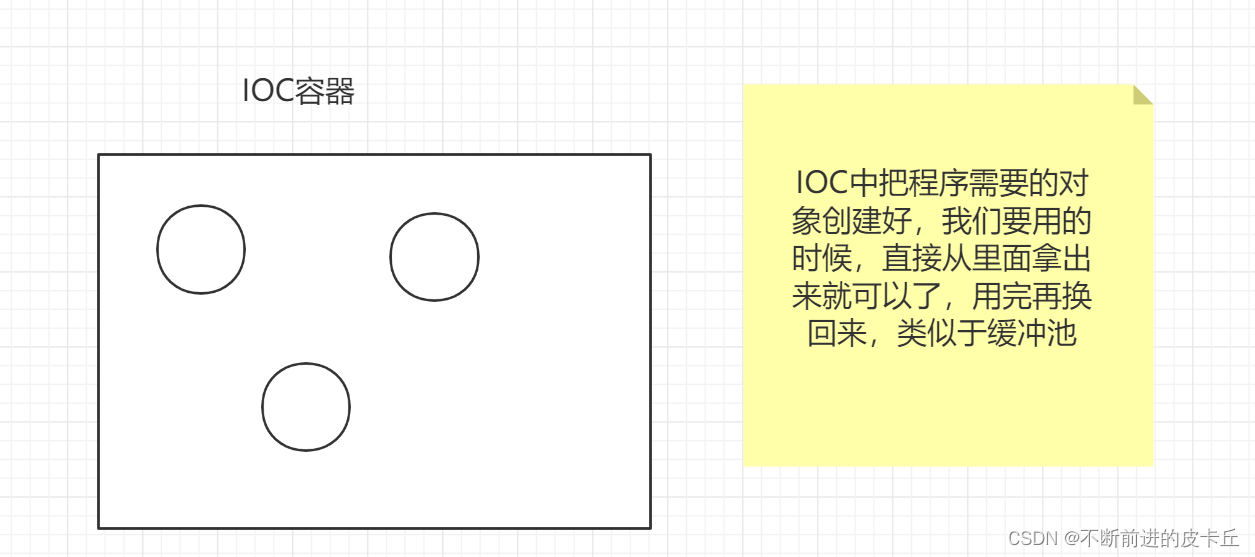
传统开发中,需要调用对象的时候,需要调用者手动来创建被调用者的实例,即对象是由调用者new出来的
但是在Spring框架中,创建对象的工作不再由调用者来完成,而是交给IOC容器来创建,再推送给调用者,整个流程完成反转,所以是控制反转
就比如说假设买东西,以前我们需要自己去超市买东西,但是现在我们可以不用自己去超市,我们只要把购物袋放在家门口,IOC就会自己去把我们想要的东西买回来,然后放在袋子里面,我们打开袋子拿起来用就可以了
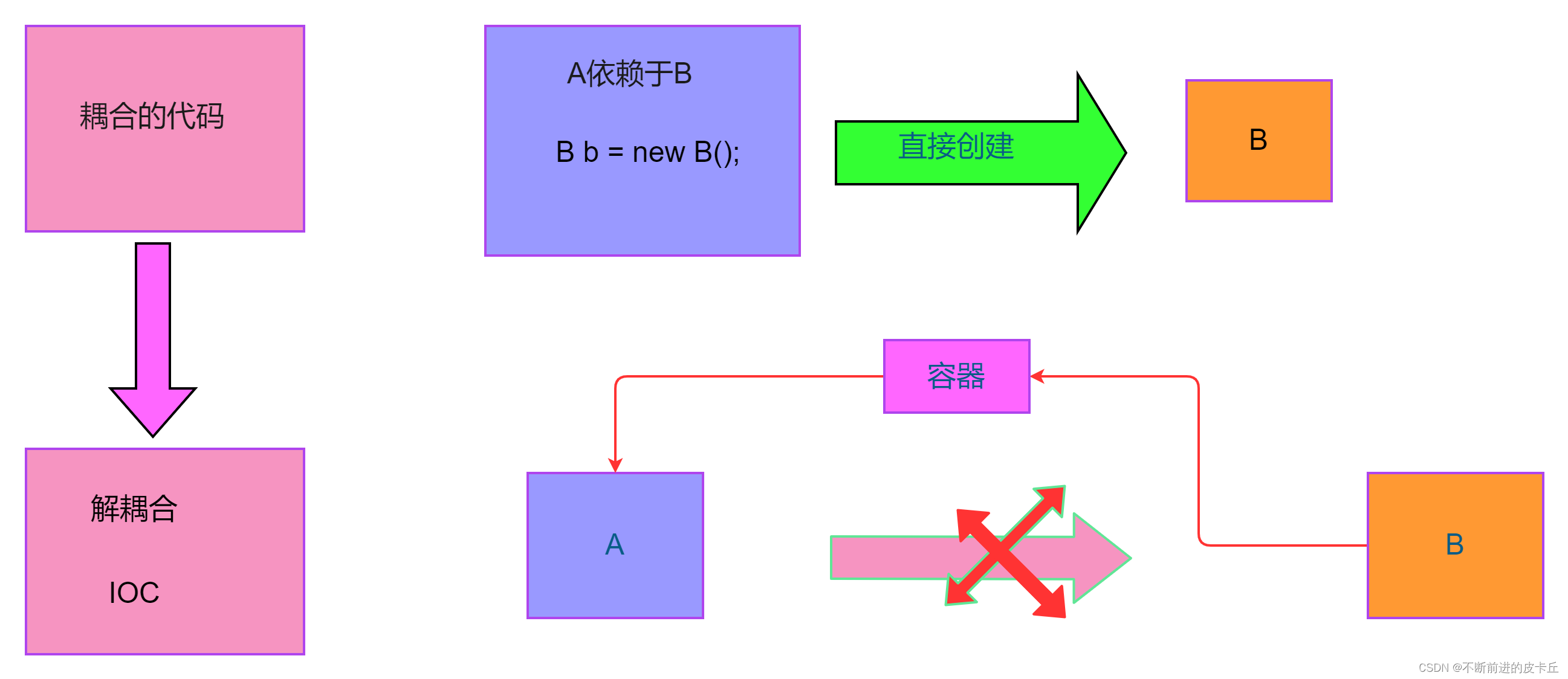
IOC的特点是解耦合。
比如说A需要用到B,传统的开发,我们要直接创建B的实例,但是在Spring中,IOC这个容器会创建B的实例,然后把这个B注入到A
<?xml version="1.0" encoding="UTF-8"?>
<project xmlns="http://maven.apache.org/POM/4.0.0"
         xmlns:xsi="http://www.w3.org/2001/XMLSchema-instance"
         xsi:schemaLocation="http://maven.apache.org/POM/4.0.0 http://maven.apache.org/xsd/maven-4.0.0.xsd">
    <modelVersion>4.0.0</modelVersion>

    <groupId>org.example</groupId>
    <artifactId>springioc</artifactId>
    <version>1.0-SNAPSHOT</version>

    <properties>
        <maven.compiler.source>8</maven.compiler.source>
        <maven.compiler.target>8</maven.compiler.target>
    </properties>
    <dependencies>
        <dependency>
            <groupId>org.springframework</groupId>
            <artifactId>spring-context</artifactId>
            <version>5.3.18</version>
        </dependency>
    </dependencies>

</project>
public class Student {
    private long id;
    private String name;
    private int age;

    public long getId() {
        return id;
    }

    public void setId(long id) {
        this.id = id;
    }

    public String getName() {
        return name;
    }

    public void setName(String name) {
        this.name = name;
    }

    public int getAge() {
        return age;
    }

    public void setAge(int age) {
        this.age = age;
    }

    @Override
    public String toString() {
        return "Student{" +
                "id=" + id +
                ", name='" + name + '\'' +
                ", age=" + age +
                '}';
    }
}
<?xml version="1.0" encoding="UTF-8"?>
<beans xmlns="http://www.springframework.org/schema/beans"
       xmlns:xsi="http://www.w3.org/2001/XMLSchema-instance"
       xsi:schemaLocation="http://www.springframework.org/schema/beans http://www.springframework.org/schema/beans/spring-beans.xsd">

    <bean id="stu" class="com.zyh.pojo.Student"></bean>
</beans>
        Student stu =new Student();
        stu .setAge(25);
        stu.setId(1001);
        stu.setName("张三");
        System.out.println(stu);
bean标签来创建对象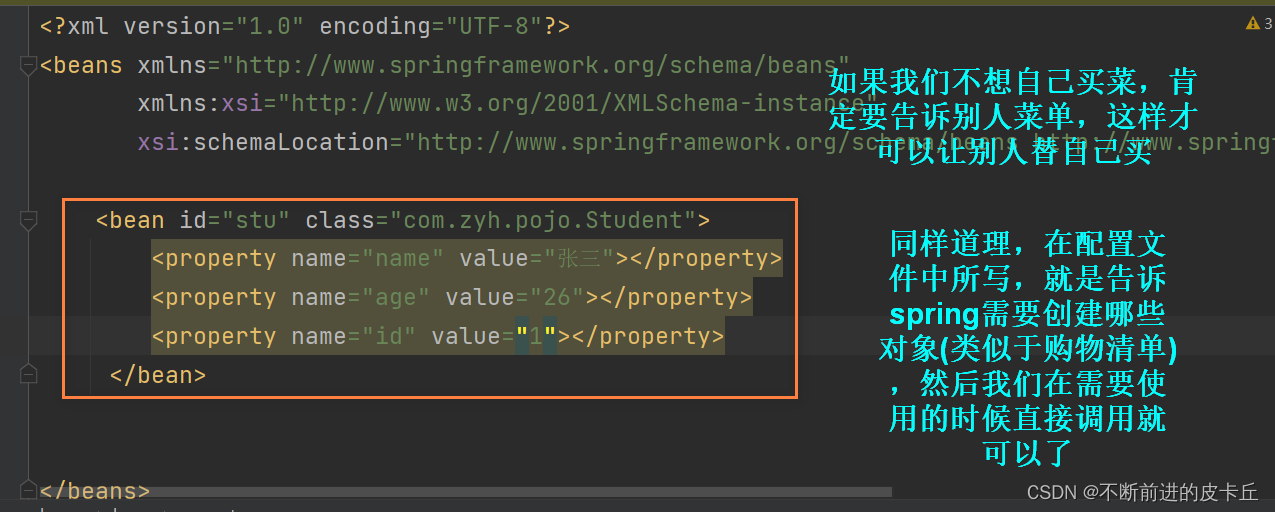
//读取配置文件
        ClassPathXmlApplicationContext applicationContext = new ClassPathXmlApplicationContext("applicationContext.xml");
        Student stu = applicationContext.getBean("stu", Student.class);
        System.out.println(stu);
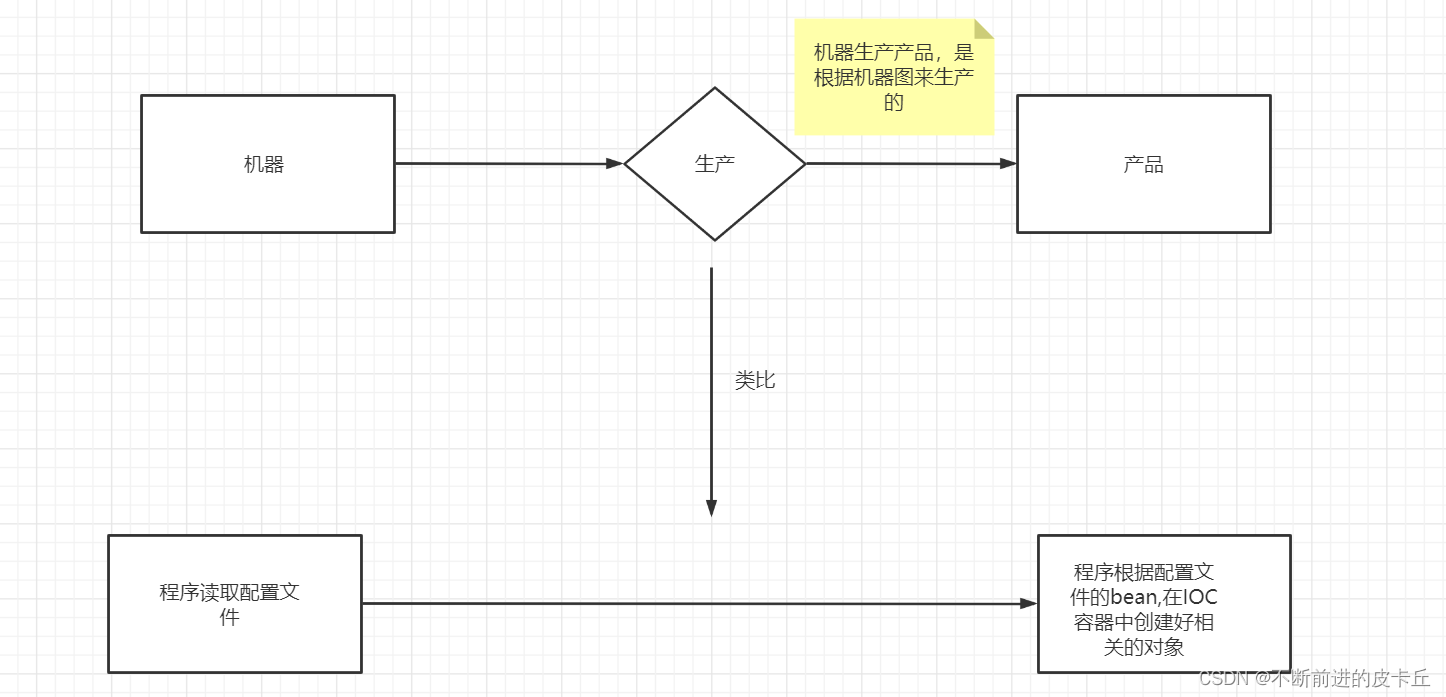
bean标签来完成对象的管理id:对象名class:对象的模板类(所有交给IOC容器来管理的类必须要有无参构造函数,因为Spring底层是通过反射机制来创建对象,调用的是无参构造)property标签完成赋值
name:成员变量名value:成员变量值(基本数据类型,String可以直接赋值,如果是其他引用类型不可以通过value赋值)ref:把IOC中的另一个bean赋给当前成员变量(DI)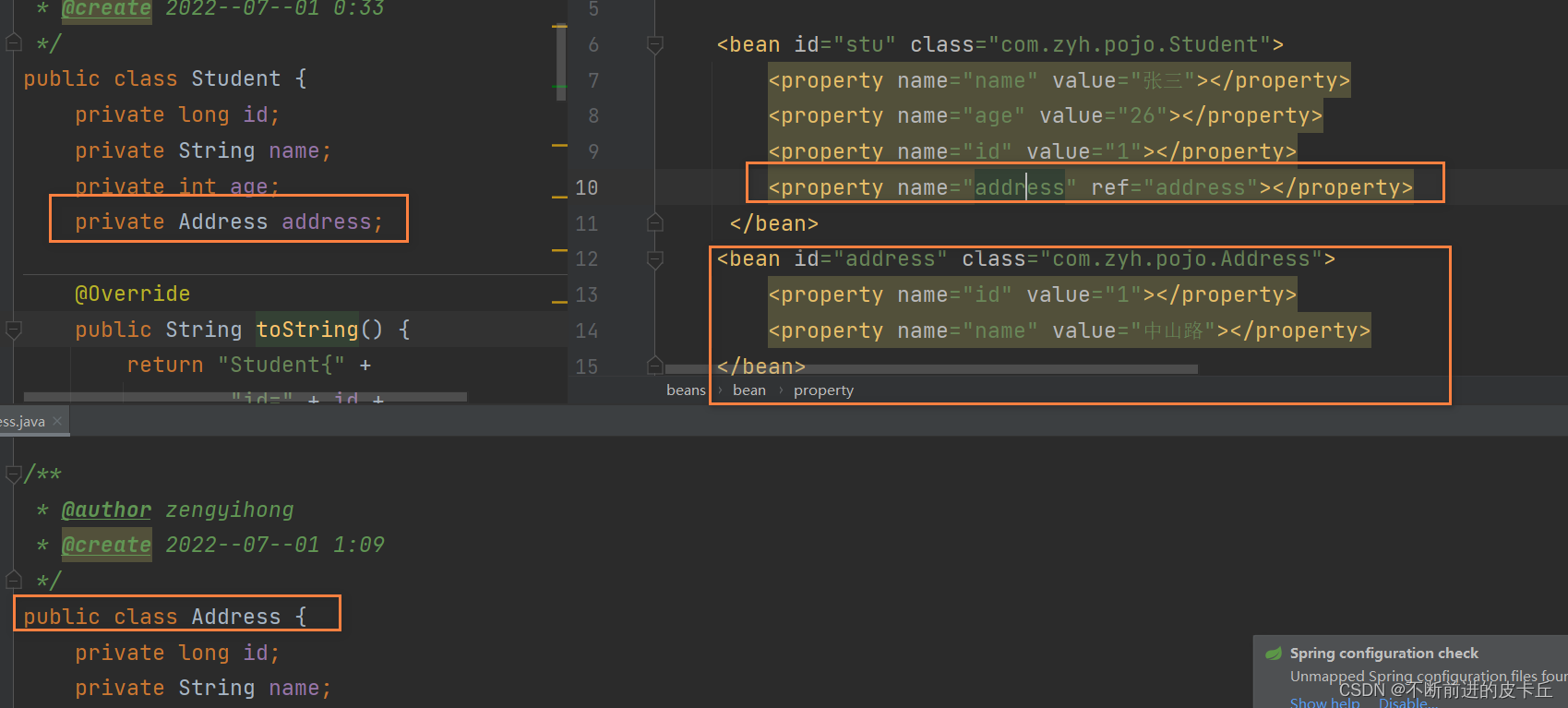
无参构造函数(需要提供对应的set方法)
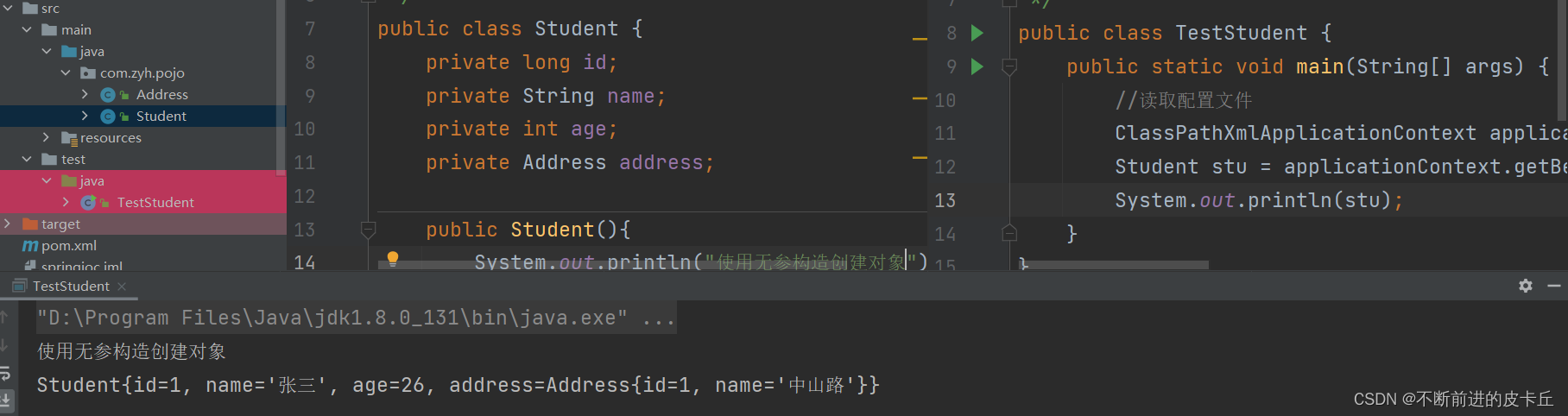
有参构造函数
  <bean id="stu1" class="com.zyh.pojo.Student">
        <constructor-arg name="id" value="1">  </constructor-arg>
        <constructor-arg name="name" value="李四"></constructor-arg>
    </bean>
  <bean id="stu1" class="com.zyh.pojo.Student">
        <constructor-arg index=0 value="1">  </constructor-arg>
        <constructor-arg index=1 value="李四"></constructor-arg>
    </bean>
Student stu = (Student)applicationContext.getBean("stu");
Student stu = applicationContext.getBean( Student.class);
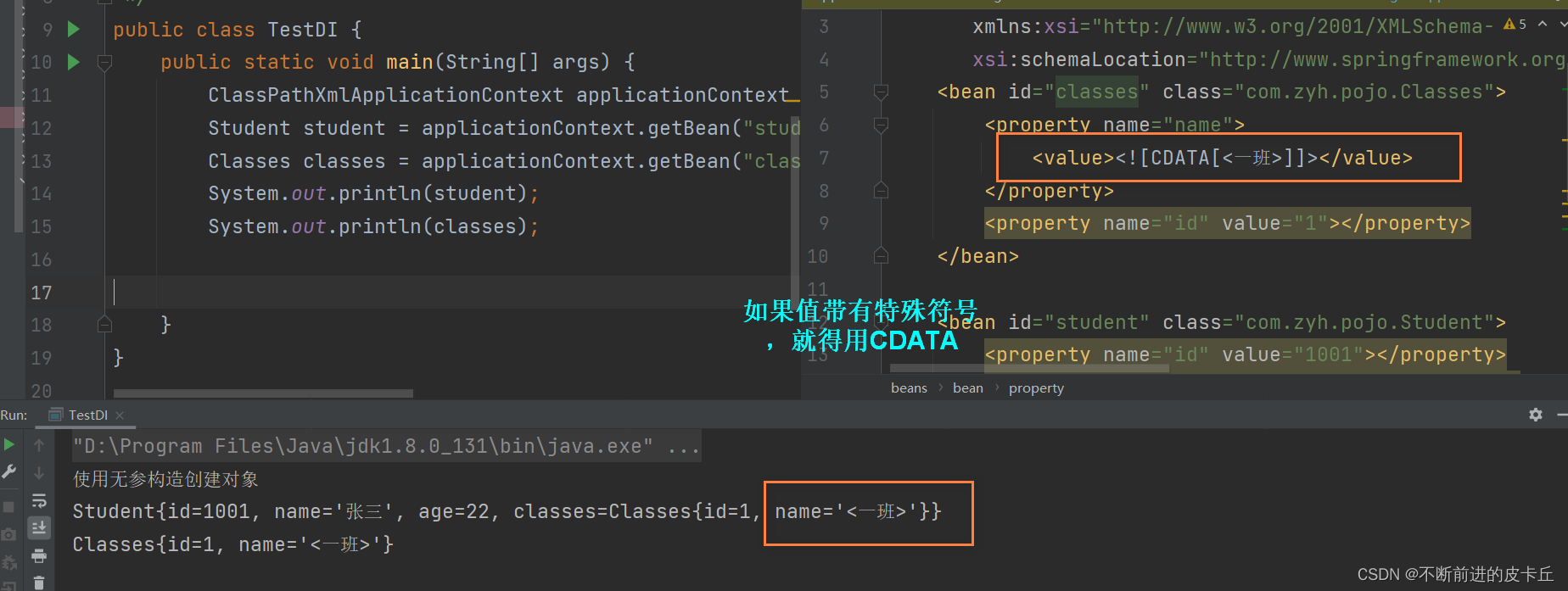
public class Classes {
    private Integer id;
    private String name;
    还有对应的get,set方法
}
public class Student {
    private long id;
    private String name;
    private int age;
    private Classes classes;

    public Student(){
        System.out.println("使用无参构造创建对象");
    }
    public Student(long id,String name){
        this.id = id;
        this.name = name;
    }
    public Classes getClasses() {
        return classes;
    }

    public void setClasses(Classes classes) {
        this.classes = classes;
    }

    public long getId() {
        return id;
    }

    public void setId(long id) {
        this.id = id;
    }

    public String getName() {
        return name;
    }

    public void setName(String name) {
        this.name = name;
    }

    public int getAge() {
        return age;
    }

    public void setAge(int age) {
        this.age = age;
    }

    @Override
    public String toString() {
        return "Student{" +
                "id=" + id +
                ", name='" + name + '\'' +
                ", age=" + age +
                ", classes=" + classes +
                '}';
    }
}
applicationContext-di.xml
<?xml version="1.0" encoding="UTF-8"?>
<beans xmlns="http://www.springframework.org/schema/beans"
       xmlns:xsi="http://www.w3.org/2001/XMLSchema-instance"
       xsi:schemaLocation="http://www.springframework.org/schema/beans http://www.springframework.org/schema/beans/spring-beans.xsd">
    <bean id="classes" class="com.zyh.pojo.Classes">
        <property name="name" value="1班"></property>
        <property name="id" value="1"></property>
    </bean>

    <bean id="student" class="com.zyh.pojo.Student">
        <property name="id" value="1001"></property>
        <property name="name" value="张三"></property>
        <property name="age" value="22"></property>
        <property name="classes" ref="classes"></property>
    </bean>


</beans>
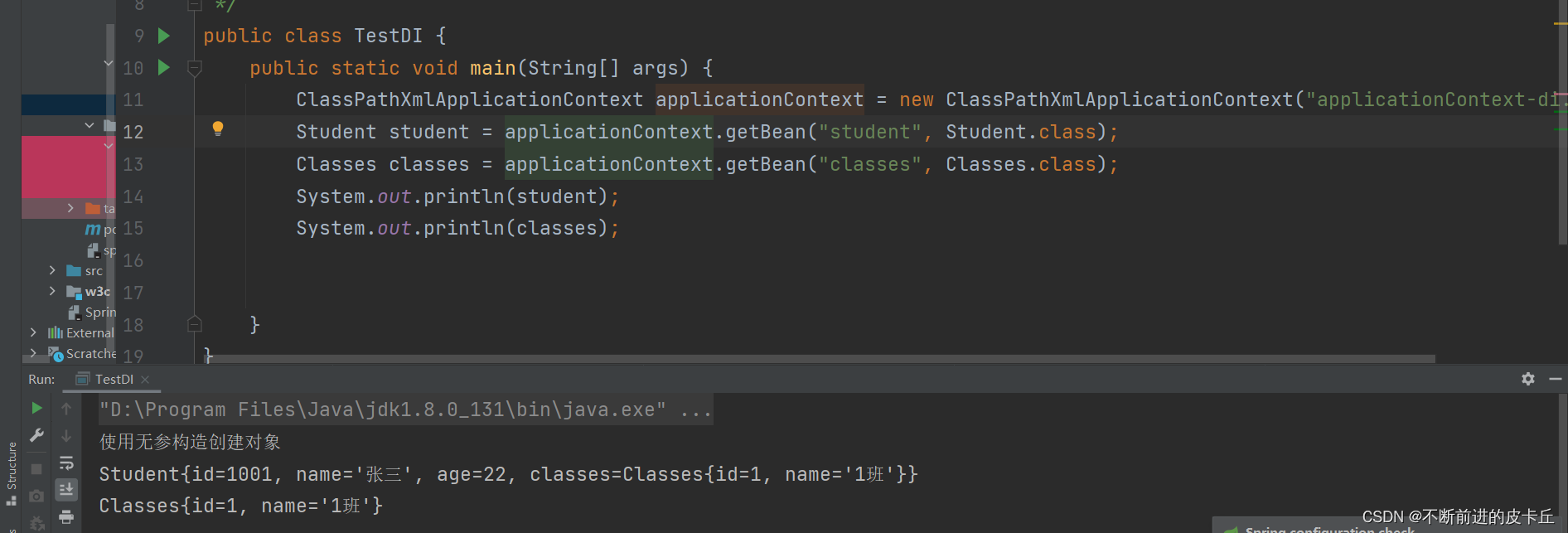
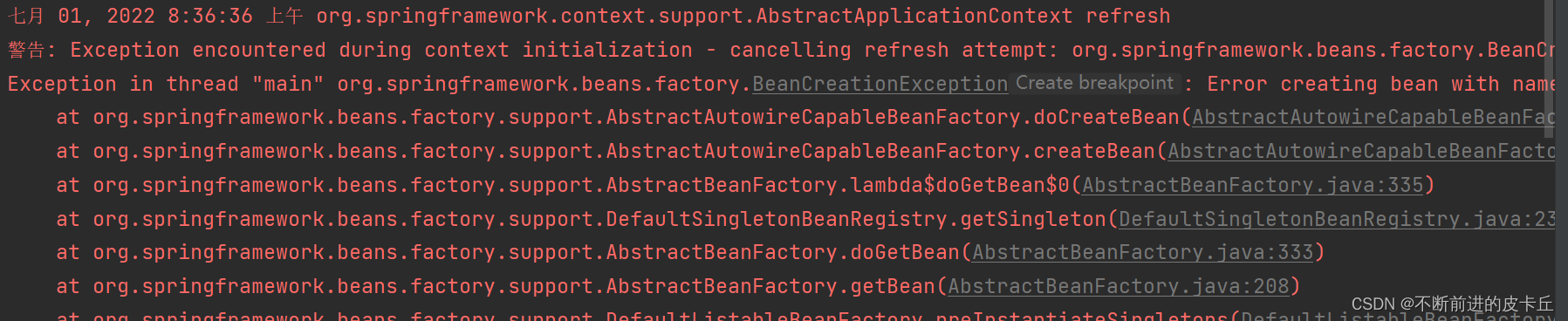
bean之间的级联需要使用ref属性,而不能用value属性,否则会抛出类型转换异常

<?xml version="1.0" encoding="UTF-8"?>
<beans xmlns="http://www.springframework.org/schema/beans"
       xmlns:xsi="http://www.w3.org/2001/XMLSchema-instance"
       xsi:schemaLocation="http://www.springframework.org/schema/beans http://www.springframework.org/schema/beans/spring-beans.xsd">
    <bean id="classes" class="com.zyh.pojo.Classes">
        <property name="name" value="1班"></property>
        <property name="id" value="1"></property>
        <property name="studentList">
            <list>
                <ref bean="student"></ref>
                <ref bean="student2"></ref>
            </list>
        </property>
    </bean>

    <bean id="student" class="com.zyh.pojo.Student">
        <property name="id" value="100"></property>
        <property name="name" value="张三"></property>
        <property name="age" value="22"></property>
        <property name="classes" ref="classes"></property>
    </bean>
    <bean id="student2" class="com.zyh.pojo.Student">
        <property name="id" value="200"></property>
        <property name="age" value="18"></property>
        <property name="name" value="李四"></property>
        <property name="classes" ref="classes"></property>
    </bean>


</beans>
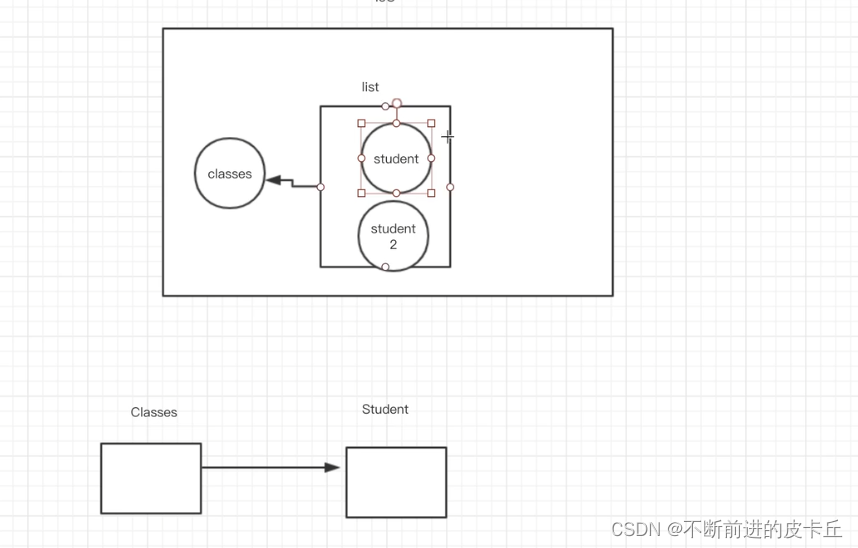
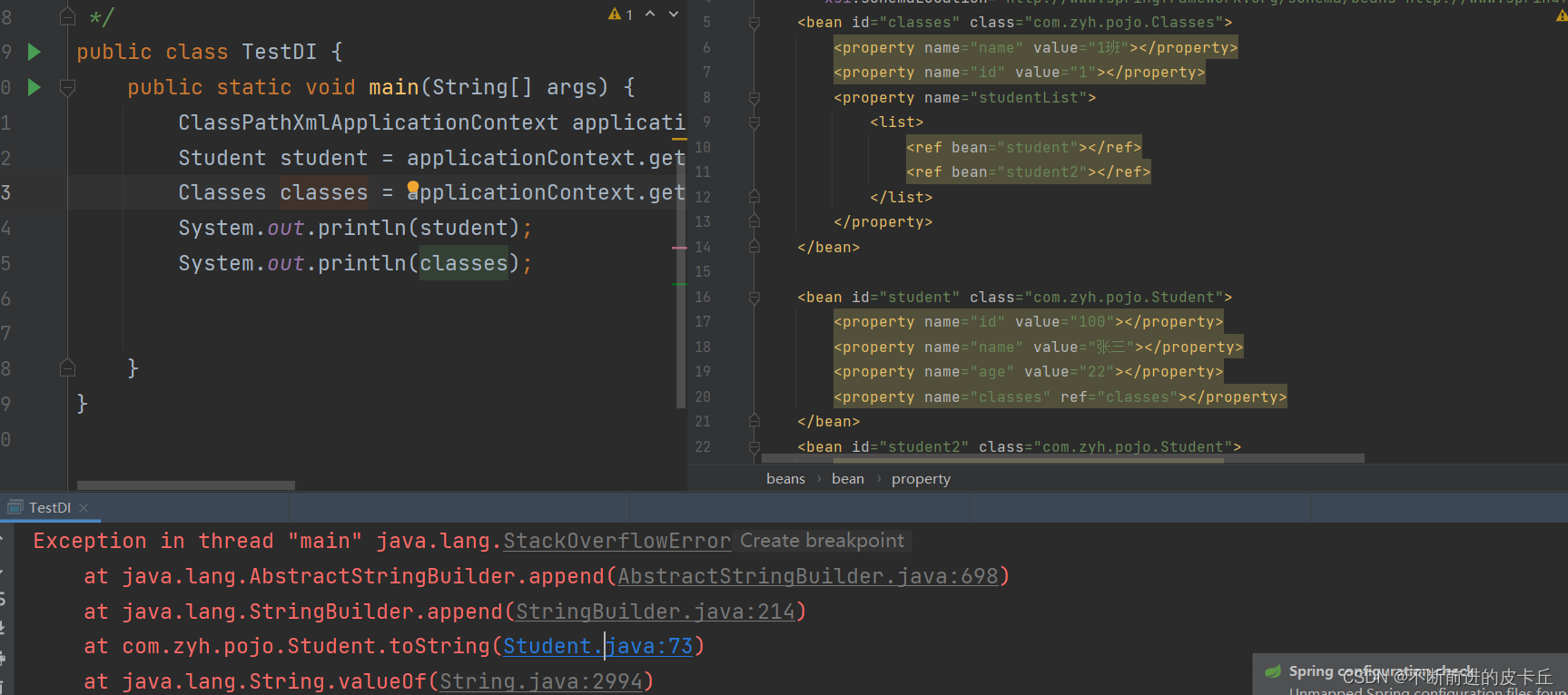
如果把学生装到班级里面,又把班级装到学生里面,就导致无限递归循环装配,最终栈溢出
bean是根据scope来生成的,表示bean的作用域,scope有4种类型
singleton,单例,表示通过Spring容器获取的对象是唯一的,是默认值
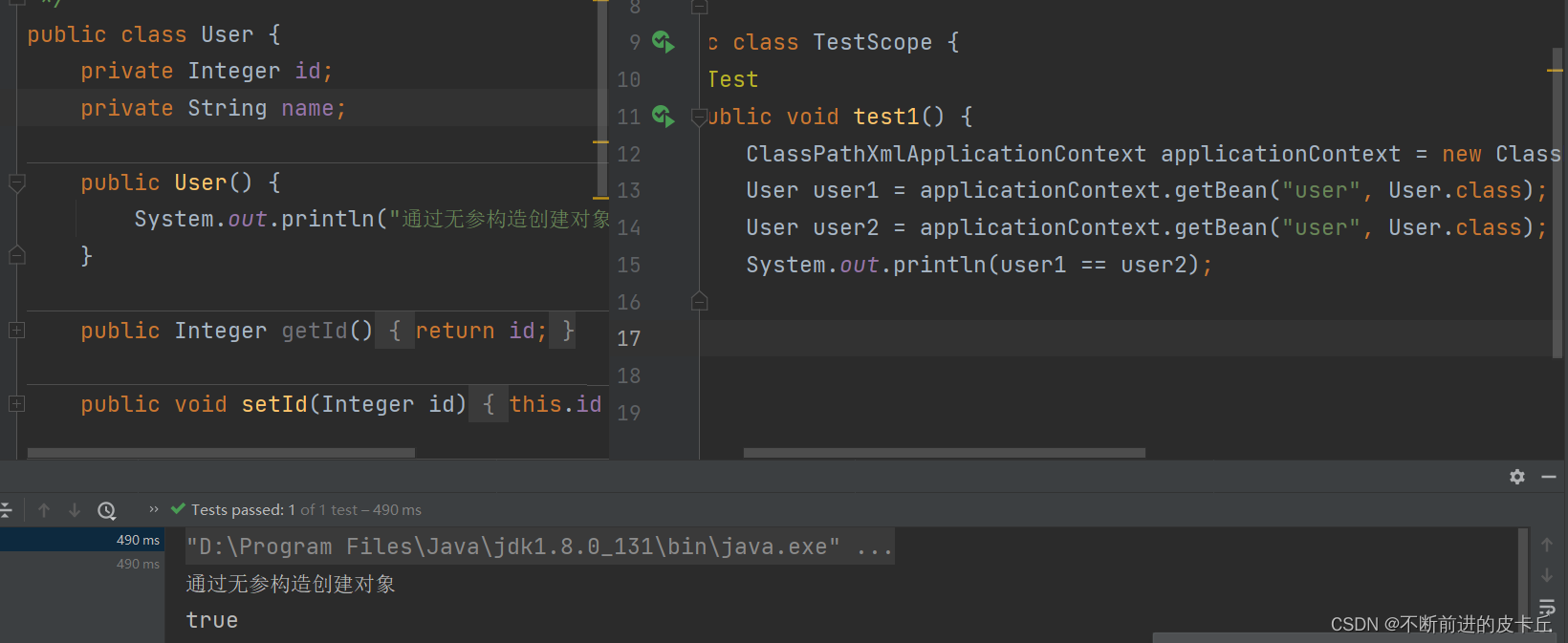
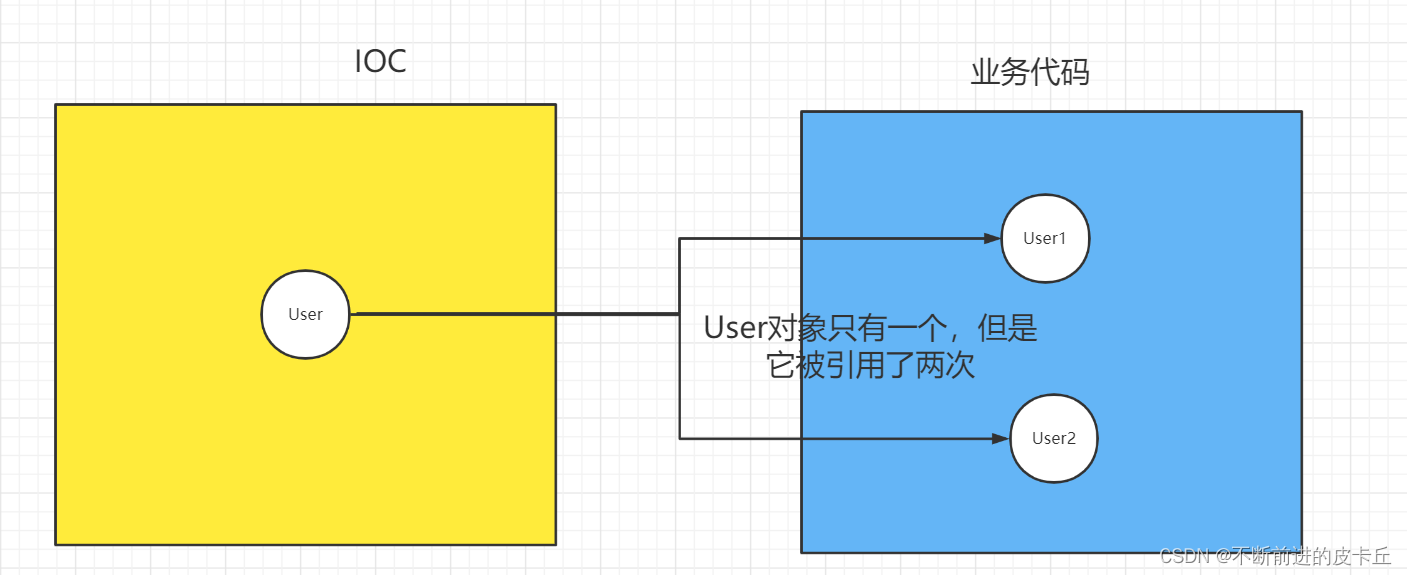
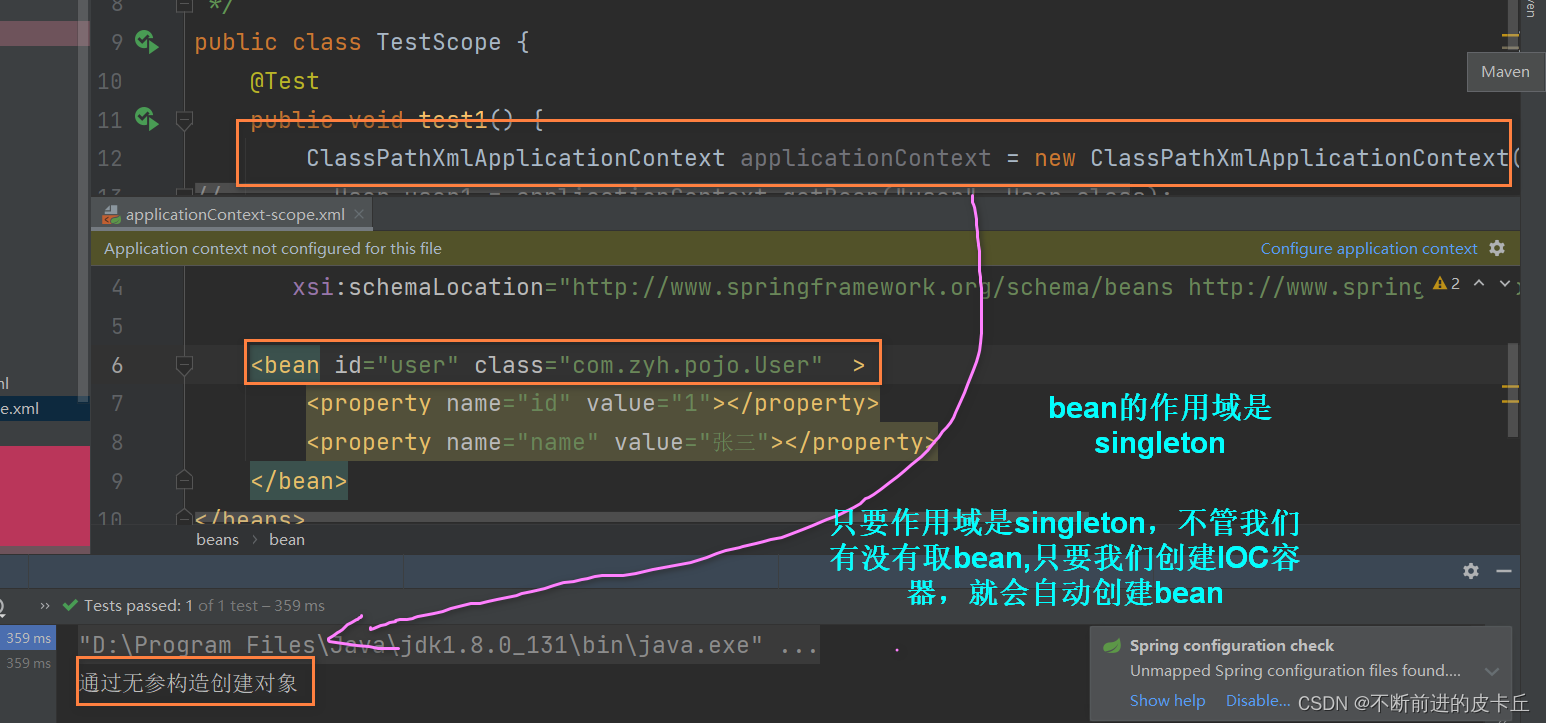
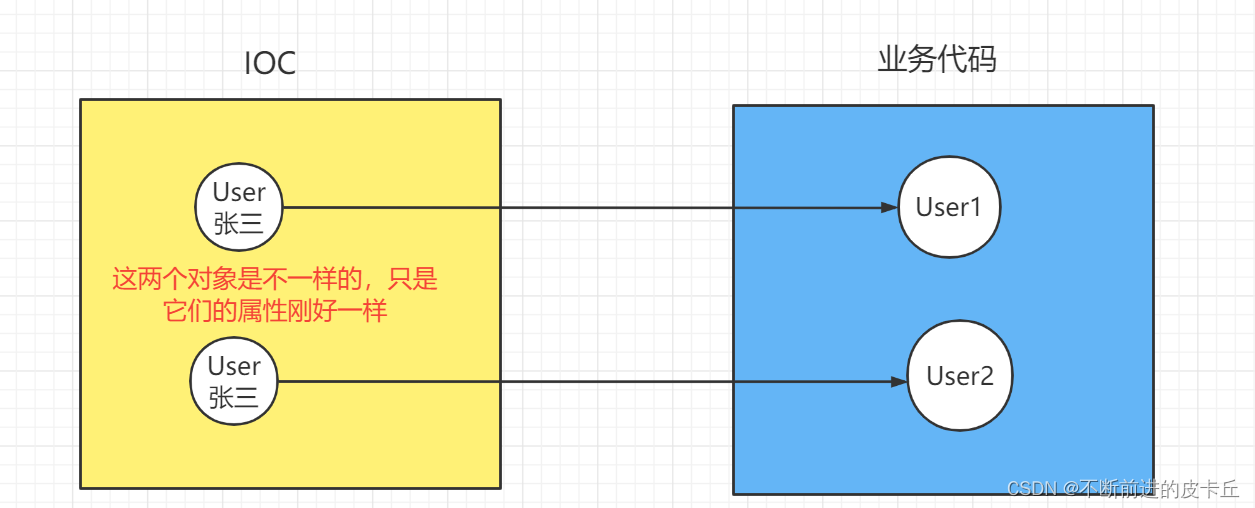
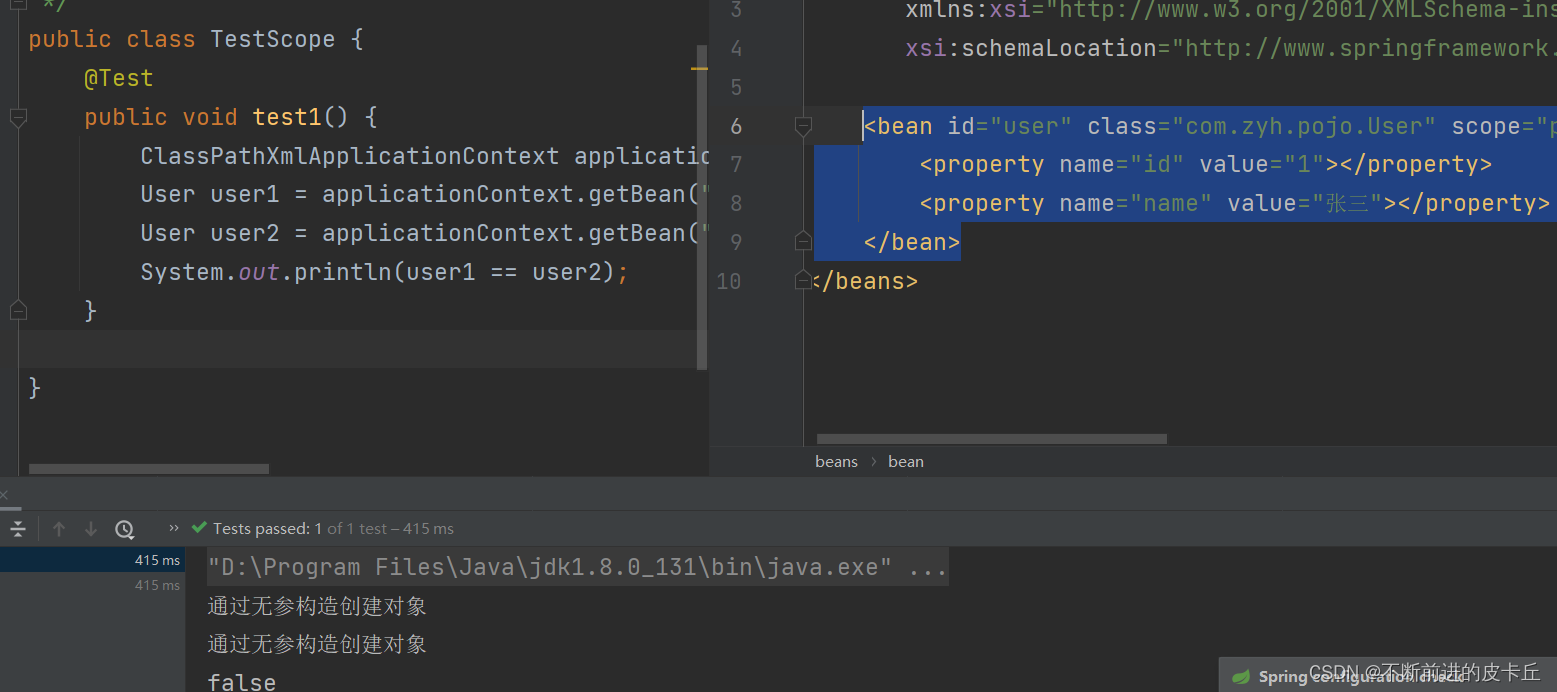
prototype,原型,表示通过Spring容器获取的对象是不同的
<bean id="user" class="com.zyh.pojo.User" scope="prototype">
        <property name="id" value="1"></property>
        <property name="name" value="张三"></property>
    </bean>
Spring中的继承不同于Java中的继承
Java中的继承是针对于类的
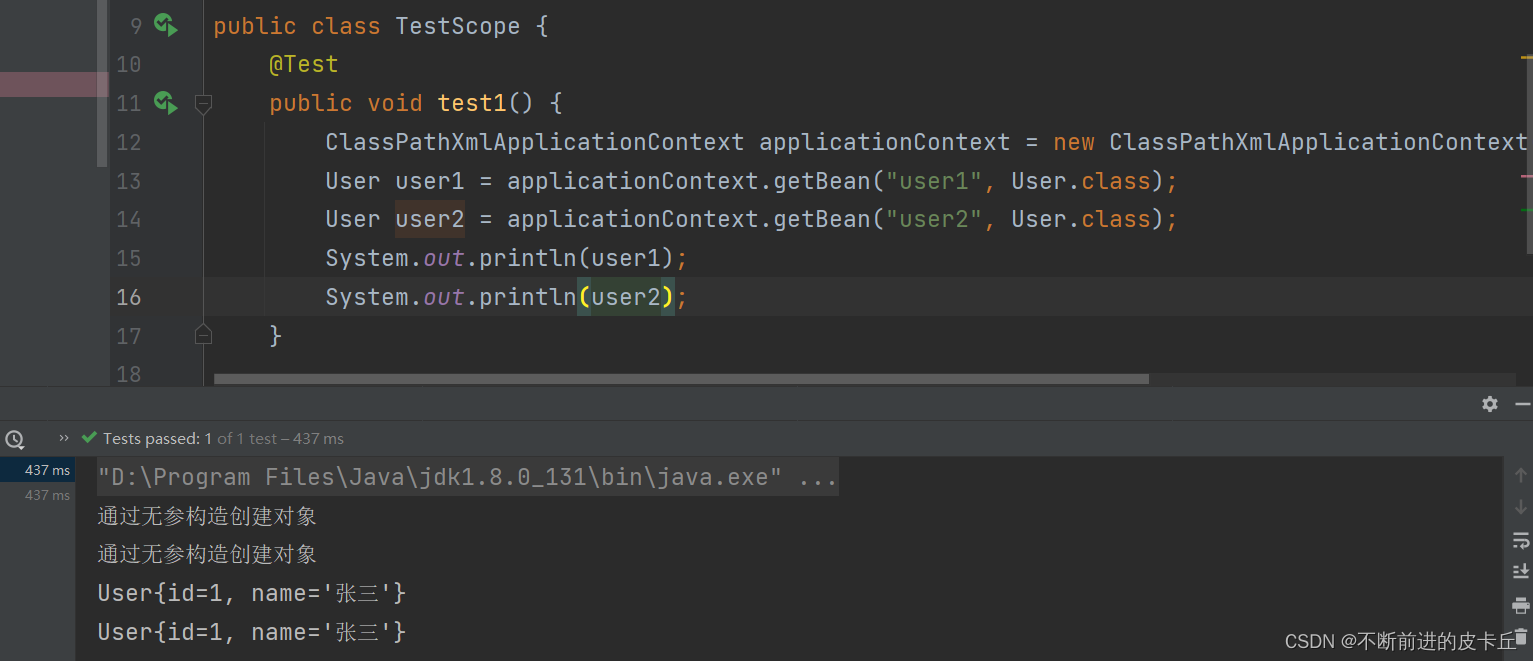
Spring中的继承是针对于对象(bean)
<?xml version="1.0" encoding="UTF-8"?>
<beans xmlns="http://www.springframework.org/schema/beans"
       xmlns:xsi="http://www.w3.org/2001/XMLSchema-instance"
       xsi:schemaLocation="http://www.springframework.org/schema/beans http://www.springframework.org/schema/beans/spring-beans.xsd">

    <bean id="user1" class="com.zyh.pojo.User"  >
        <property name="id" value="1"></property>
        <property name="name" value="张三"></property>
    </bean>
    <bean id="user2" class="com.zyh.pojo.User" parent="user1"></bean>
</beans>
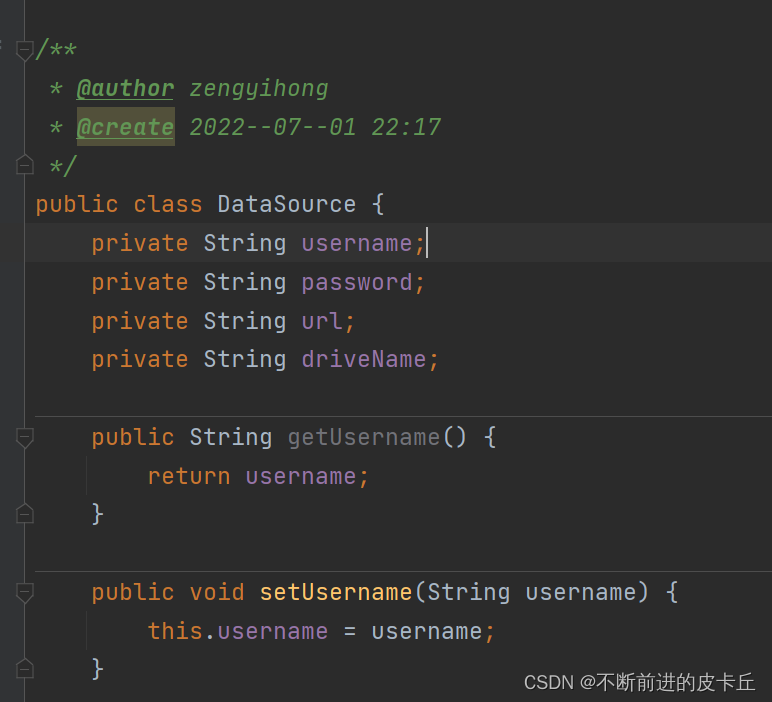
jdbc.properties
user=root
password=root
url=jdbc:mysql://localhost:3306/spring
driverName=com.mysql.cj.jdbc.Driver
spring-properties.xml
<?xml version="1.0" encoding="UTF-8"?>
<beans xmlns="http://www.springframework.org/schema/beans"
       xmlns:xsi="http://www.w3.org/2001/XMLSchema-instance"
       xmlns:context="http://www.springframework.org/schema/context"
       xsi:schemaLocation="http://www.springframework.org/schema/beans http://www.springframework.org/schema/beans/spring-beans.xsd http://www.springframework.org/schema/context https://www.springframework.org/schema/context/spring-context.xsd">

    <!--导入外部资源 -->
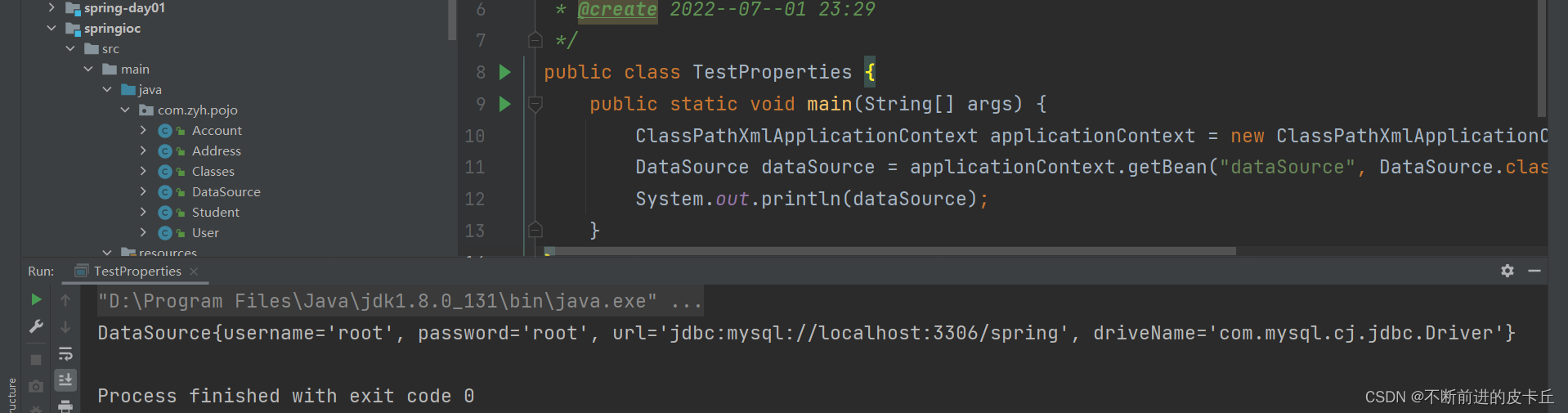
    <context:property-placeholder location="classpath:jdbc.properties"></context:property-placeholder>

    <bean id="dataSource" class="com.zyh.pojo.DataSource">
        <property name="username" value="${user}"></property>
        <property name="password" value="${password}"></property>
        <property name="url" value="${url}"></property>
        <property name="driveName" value="${driverName}"></property>

    </bean>

</beans>
<?xml version="1.0" encoding="UTF-8"?>
<beans xmlns="http://www.springframework.org/schema/beans"
       xmlns:xsi="http://www.w3.org/2001/XMLSchema-instance" xmlns:p="http://www.springframework.org/schema/p"
       xsi:schemaLocation="http://www.springframework.org/schema/beans http://www.springframework.org/schema/beans/spring-beans.xsd">

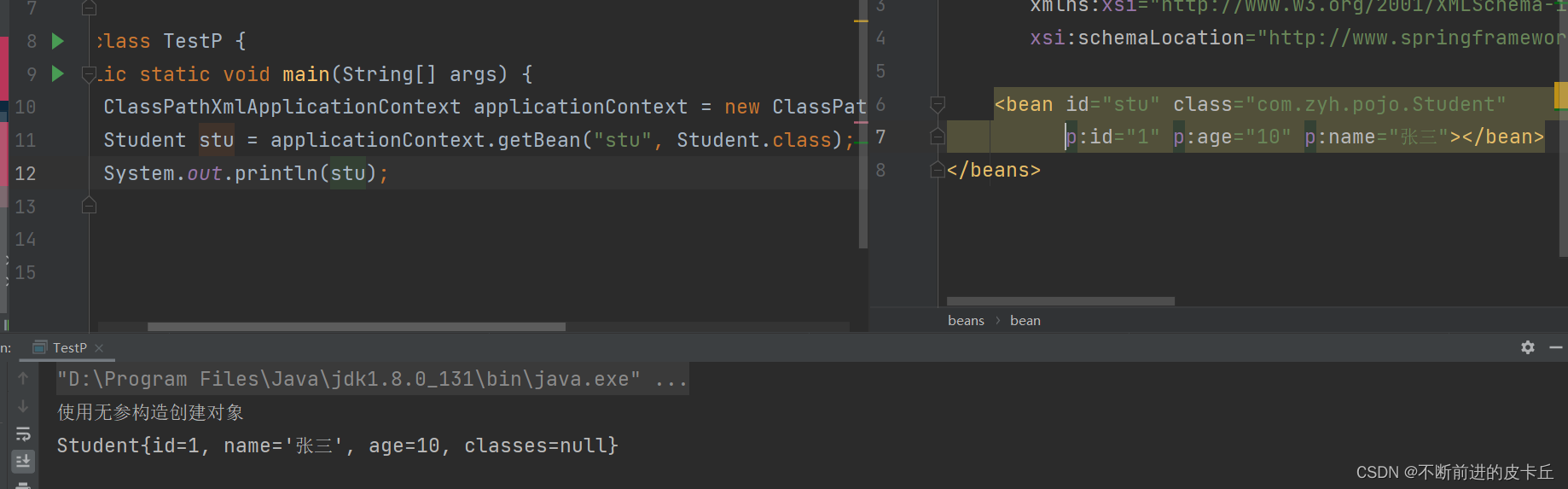
    <bean id="stu" class="com.zyh.pojo.Student" p:id="1" p:age="10" p:name="张三" p:classes-ref="classes"></bean>

    <bean id="classes" class="com.zyh.pojo.Classes" p:name="一班" p:id="1"></bean>

</beans>
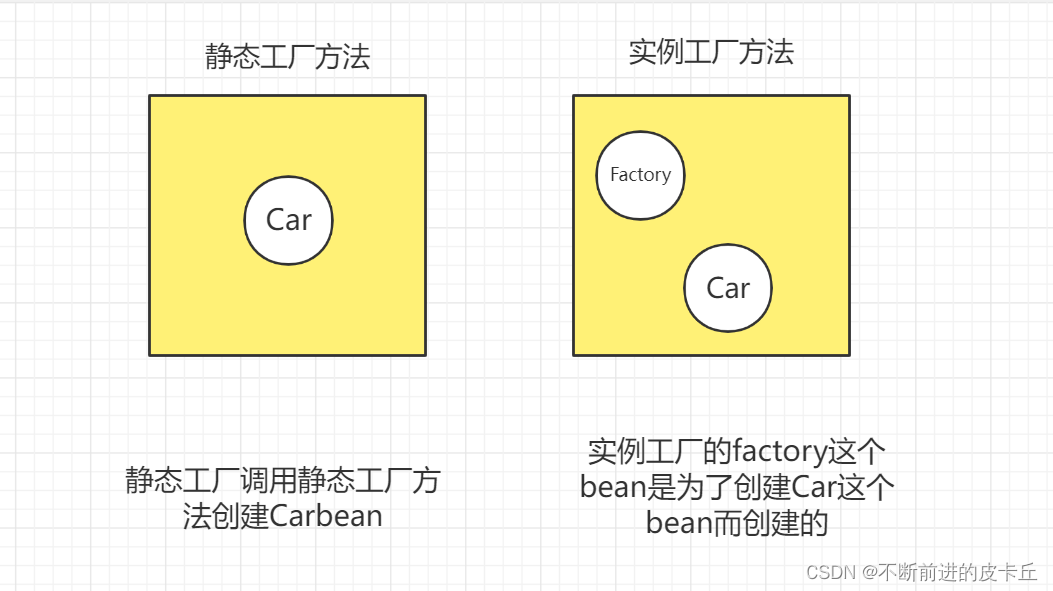
IOC通过工厂模式创建bean有两种方式:
public class Car {
    private Integer num;
    private String brand;

    public Car() {
    }

    public Car(Integer num, String brand) {
        this.num = num;
        this.brand = brand;
    }

    public Integer getNum() {
        return num;
    }

    public void setNum(Integer num) {
        this.num = num;
    }

    public String getBrand() {
        return brand;
    }

    public void setBrand(String brand) {
        this.brand = brand;
    }

    @Override
    public String toString() {
        return "Car{" +
                "num=" + num +
                ", brand='" + brand + '\'' +
                '}';
    }
}
public class StaticCarFactory {
    private static Map<Integer, Car> carMap;

    static {
        carMap = new HashMap<>();
        carMap.put(1, new Car(1, "奥迪"));
        carMap.put(2, new Car(2,"奥拓"));
    }
    /**
     * 写一个方法,从map集合取数据
     */
    public static Car getCar(Integer num ){
        return carMap.get(num);
    }
}
<?xml version="1.0" encoding="UTF-8"?>
<beans xmlns="http://www.springframework.org/schema/beans"
       xmlns:xsi="http://www.w3.org/2001/XMLSchema-instance"
       xsi:schemaLocation="http://www.springframework.org/schema/beans http://www.springframework.org/schema/beans/spring-beans.xsd">

    <bean id="car" class="com.zyh.factory.StaticCarFactory" factory-method="getCar">
        <constructor-arg  name="num" value="1"></constructor-arg>
    </bean>

</beans>
public class InstanceCarFactory {
    private Map<Integer, Car> carMap;

    public InstanceCarFactory() {
        carMap = new HashMap<>();
        carMap.put(1, new Car(1, "奥迪"));
        carMap.put(2, new Car(2, "奥拓"));
    }
    public Car getCar(Integer num){
        return carMap.get(num);
    }

}
<!--    实例工厂类-->
    <bean id="instanceCarFactory" class="com.zyh.factory.InstanceCarFactory"></bean>
<!--    通过实例工厂获取Car-->
    <bean id="car1"  factory-bean="instanceCarFactory" factory-method="getCar">
        <constructor-arg value="2"></constructor-arg>
    </bean>
区别:
byName的操作如下:
public class Person {
    private Integer id;
    private String name;
    private Car car;

    public Integer getId() {
        return id;
    }

    public void setId(Integer id) {
        this.id = id;
    }

    public String getName() {
        return name;
    }

    public void setName(String name) {
        this.name = name;
    }

    public Car getCar() {
        return car;
    }

    public void setCar(Car car) {
        this.car = car;
    }

    @Override
    public String toString() {
        return "Person{" +
                "id=" + id +
                ", name='" + name + '\'' +
                ", car=" + car +
                '}';
    }
}
<?xml version="1.0" encoding="UTF-8"?>
<beans xmlns="http://www.springframework.org/schema/beans"
       xmlns:xsi="http://www.w3.org/2001/XMLSchema-instance"
       xsi:schemaLocation="http://www.springframework.org/schema/beans http://www.springframework.org/schema/beans/spring-beans.xsd">

    <bean id="car2" class="com.zyh.pojo.Car">
        <constructor-arg name="num" value="1"></constructor-arg>
        <constructor-arg name="brand" value="奥迪"></constructor-arg>
    </bean>
    <bean id="car" class="com.zyh.pojo.Classes"></bean>
    <bean id="person" class="com.zyh.pojo.Person" autowire="byName" >
        <property name="name" value="张三"></property>
        <property name="id" value="2"></property>
    </bean>


</beans>
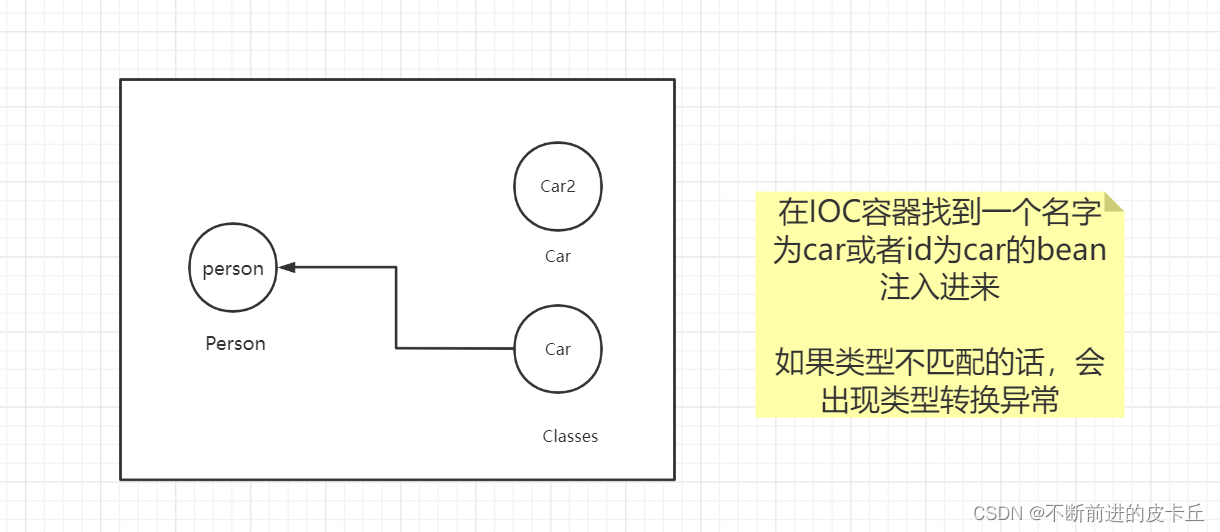
注:如果bean的id有多个一致的,会报错,如Bean name 'car' is already used in this <beans> element
byType的操作如下:
<?xml version="1.0" encoding="UTF-8"?>
<beans xmlns="http://www.springframework.org/schema/beans"
       xmlns:xsi="http://www.w3.org/2001/XMLSchema-instance"
       xsi:schemaLocation="http://www.springframework.org/schema/beans http://www.springframework.org/schema/beans/spring-beans.xsd">

    <bean id="car2" class="com.zyh.pojo.Car">
        <constructor-arg name="num" value="1"></constructor-arg>
        <constructor-arg name="brand" value="奥迪"></constructor-arg>
    </bean>
    <bean id="car" class="com.zyh.pojo.Classes"></bean>
    <bean id="person" class="com.zyh.pojo.Person" autowire="byType" >
        <property name="name" value="张三"></property>
        <property name="id" value="2"></property>
    </bean>

</beans>
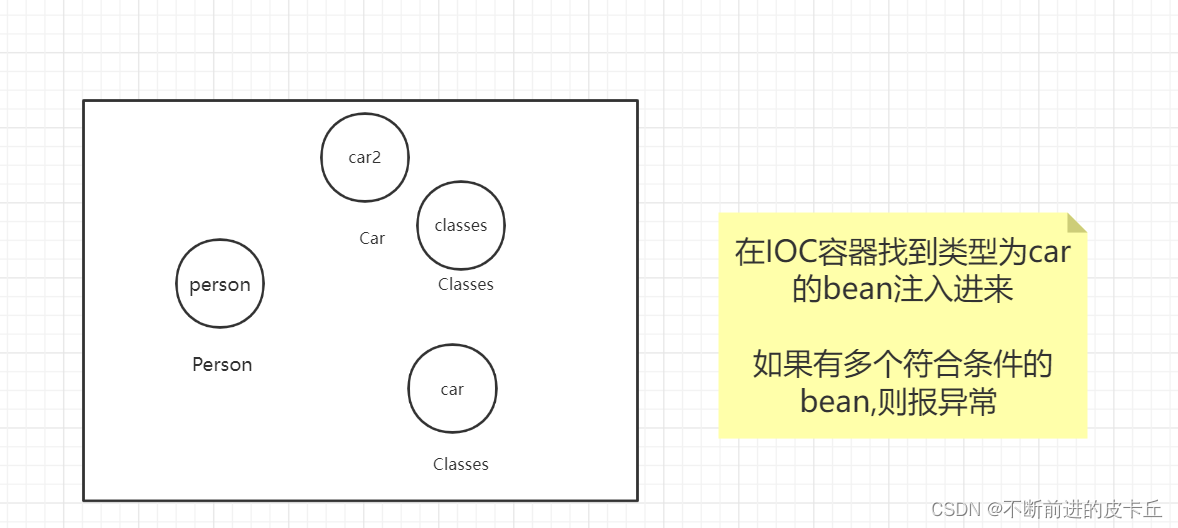
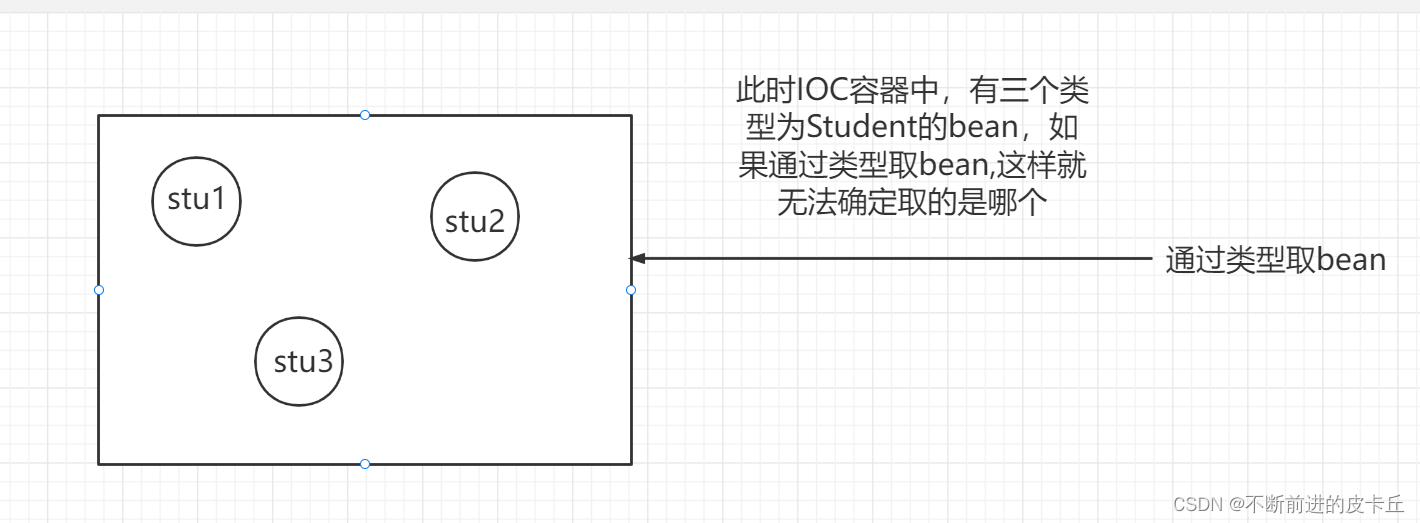
使用byType进行自动装配的时候,必须保证IOC中有且只有一个符合,如果有多个符合,则报下面的异常:

Spring IOC的作用是帮助开发者创建项目中所需要的bean,同时完成bean之间的依赖注入关系,DI
实现该功能有两种方式:
<?xml version="1.0" encoding="UTF-8"?>
<beans xmlns="http://www.springframework.org/schema/beans"
       xmlns:xsi="http://www.w3.org/2001/XMLSchema-instance"
       xmlns:context="http://www.springframework.org/schema/context"
       xsi:schemaLocation="http://www.springframework.org/schema/beans http://www.springframework.org/schema/beans/spring-beans.xsd http://www.springframework.org/schema/context https://www.springframework.org/schema/context/spring-context.xsd">

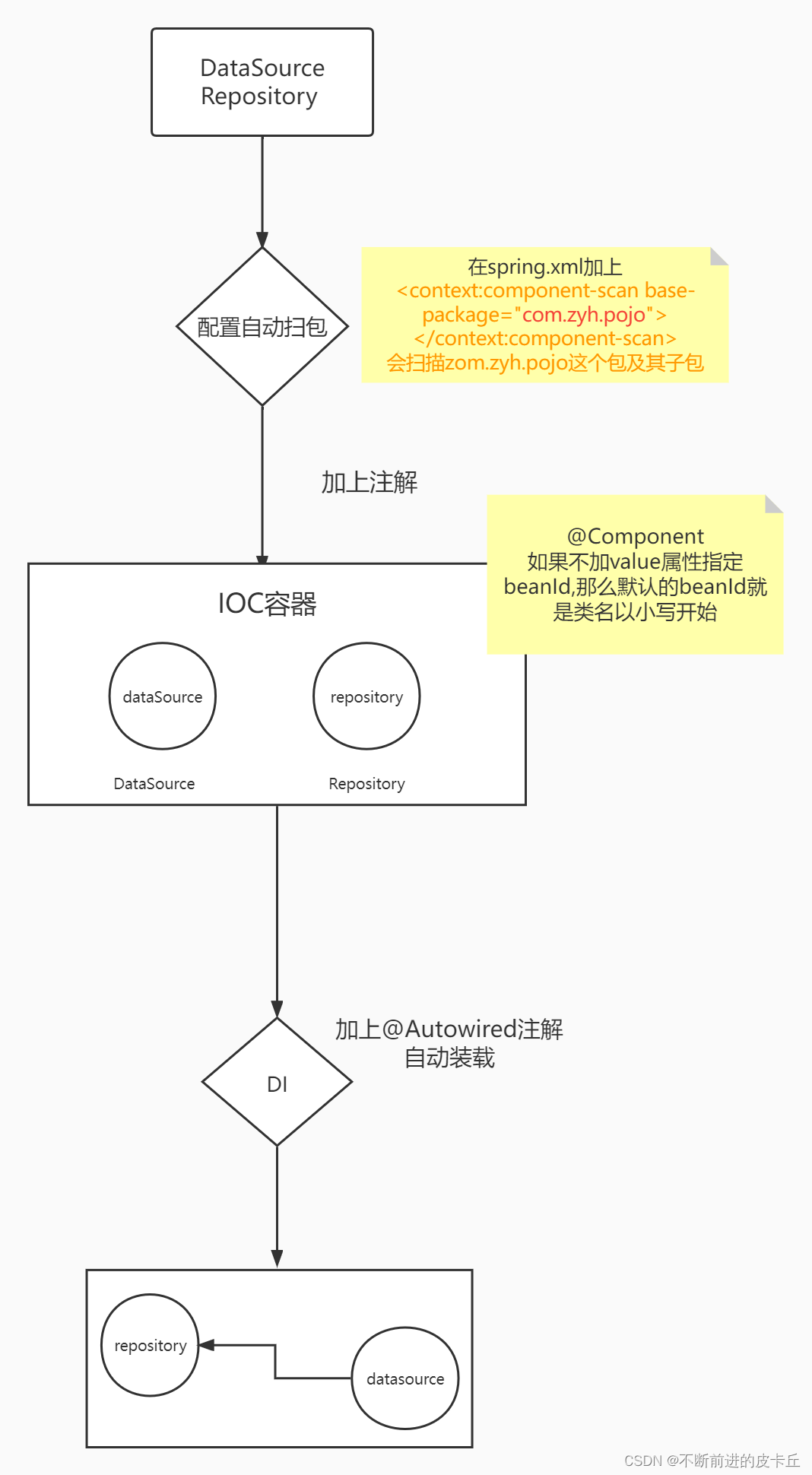
<!--    配置自动扫包-->
    <context:component-scan base-package="com.zyh.pojo"></context:component-scan>
<!--    <bean id="repository" class="com.zyh.pojo.Repository"></bean>-->

</beans>
@Component(value="repository")
public class Repository {
    private DataSource dataSource;

    public DataSource getDataSource() {
        return dataSource;
    }

    public void setDataSource(DataSource dataSource) {
        this.dataSource = dataSource;
    }

    @Override
    public String toString() {
        return "Repository{" +
                "dataSource=" + dataSource +
                '}';
    }
}
DI
注解默认的beanid是类名以小写开头,我们可以通过value来设置
如果我们想要把datasource也注入进来需要怎么做呢?
首先我们要把DataSource先扫进来
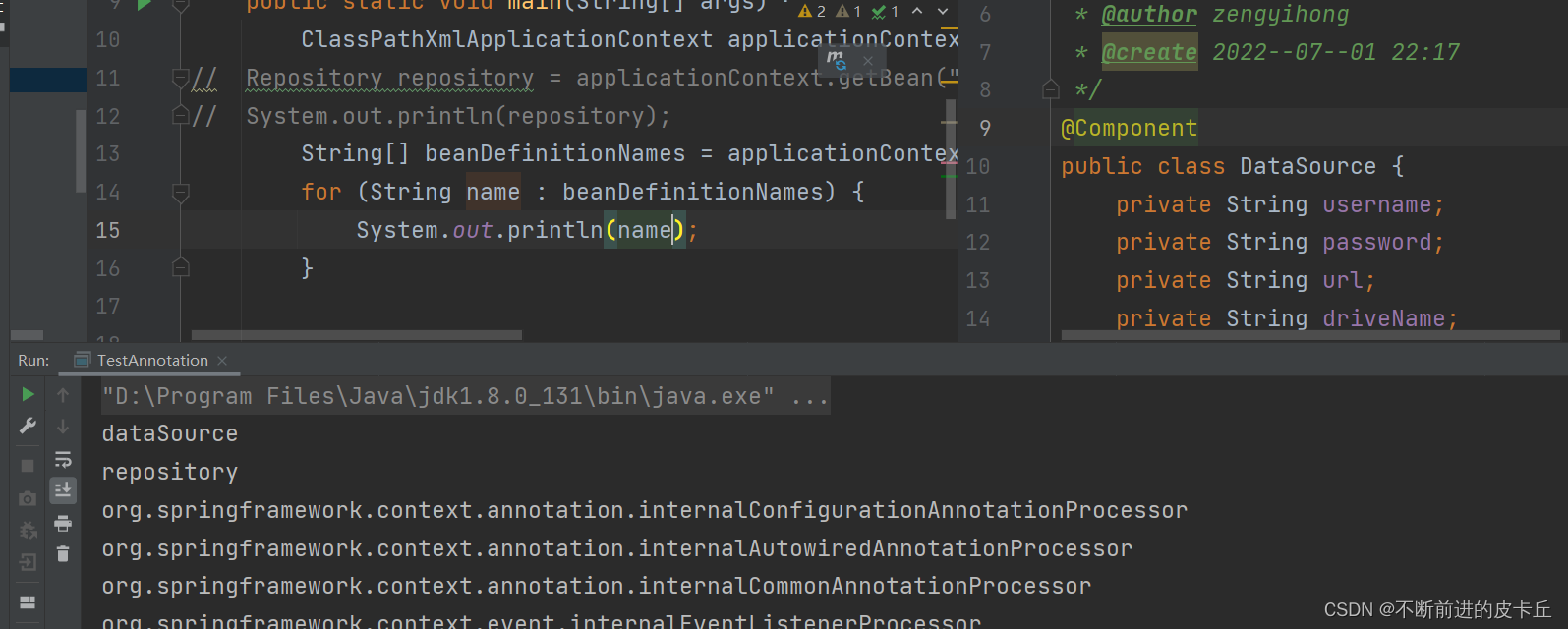
@Component
public class Repository {
    @Autowired
    private DataSource dataSource;

    public DataSource getDataSource() {
        return dataSource;
    }

    public void setDataSource(DataSource dataSource) {
        this.dataSource = dataSource;
    }

    @Override
    public String toString() {
        return "Repository{" +
                "dataSource=" + dataSource +
                '}';
    }
}
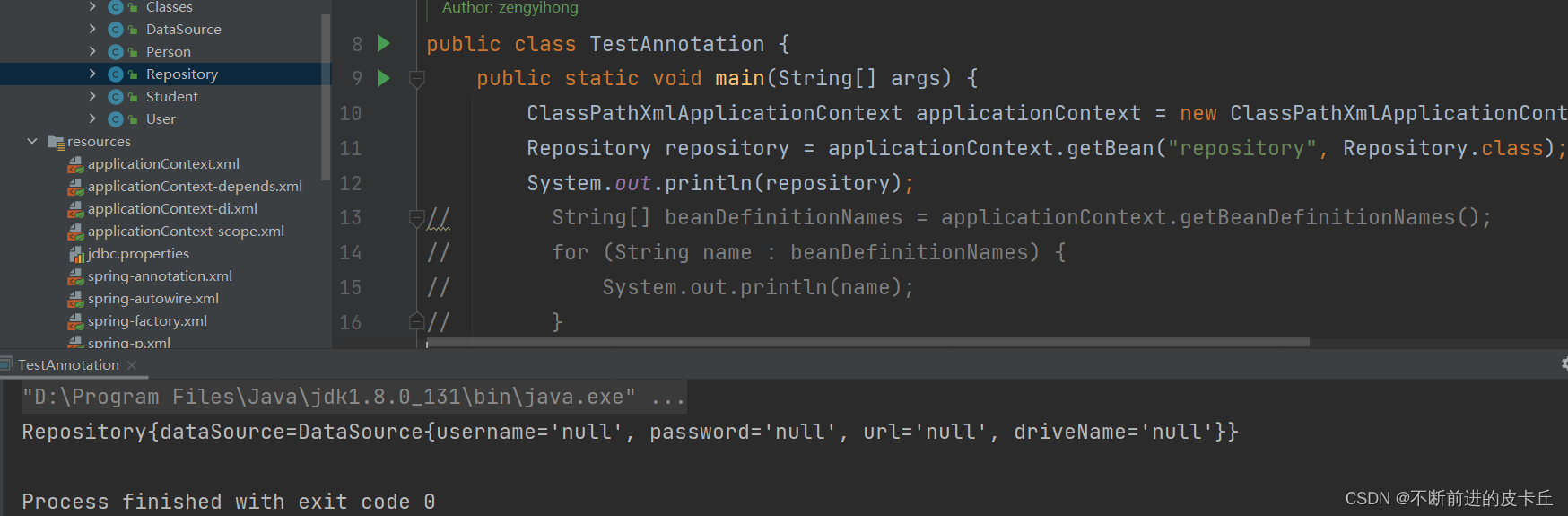
@Component
public class Repository {
    @Autowired
    @Qualifier(value = "datasource")
    private DataSource dataSource;

    public DataSource getDataSource() {
        return dataSource;
    }

    public void setDataSource(DataSource dataSource) {
        this.dataSource = dataSource;
    }

    @Override
    public String toString() {
        return "Repository{" +
                "dataSource=" + dataSource +
                '}';
    }
}
这表明把IOC中id为datasource的bean注入到repository中
实体类中普通的成员变量(String,包装类等),可以通过@Value注解来赋值
@Component
public class DataSource {
    @Value("root")
    private String username;
    @Value("123456")
    private String password;
    @Value("jdbc:mysql://localhost:3306/spring")
    private String url;
    @Value("com.mysql.cj.jdbc.Driver")
    private String driveName;
 }
实际开发中我们会把程序分成三层:

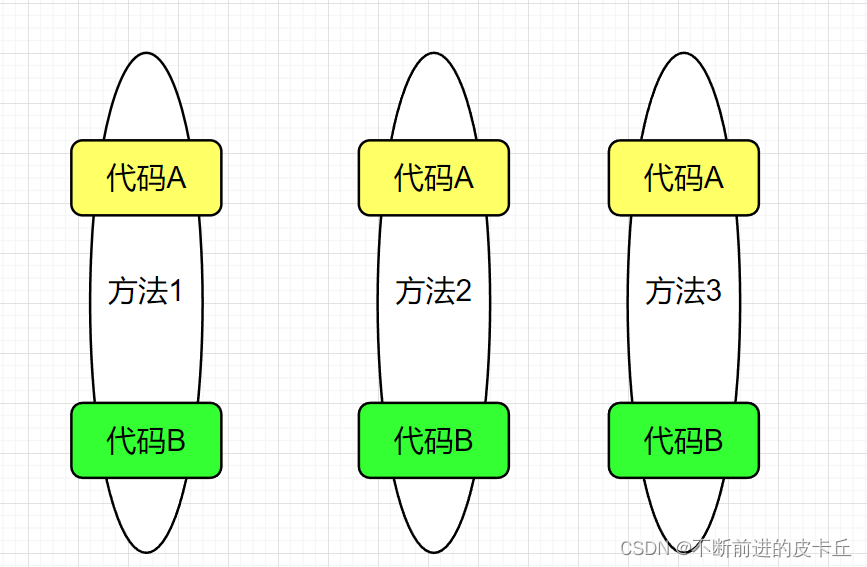
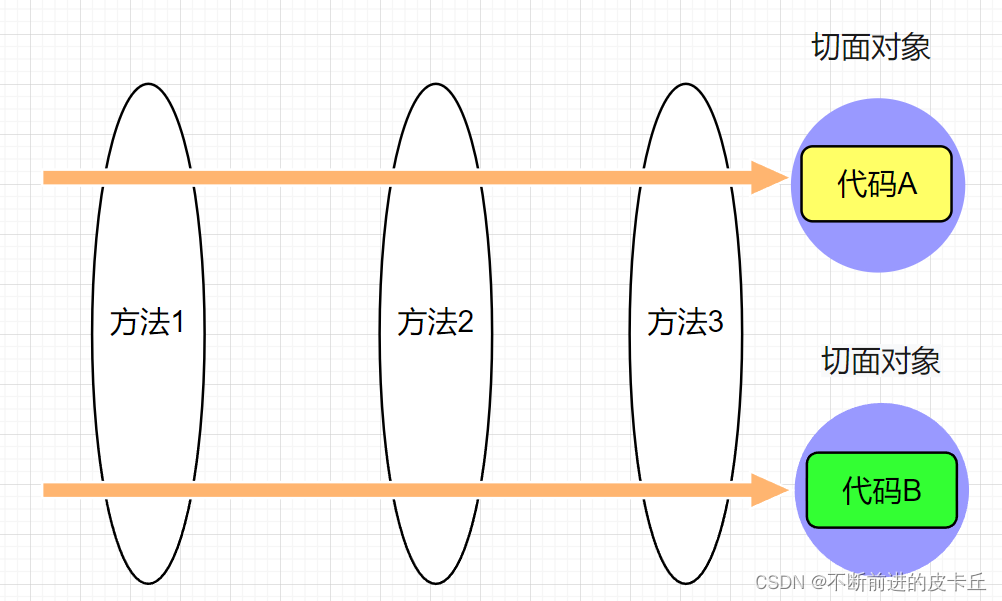
通过一个例子来理解AOP。
public interface Cal {
 public int add(int num1,int num2);
 public int sub(int num1,int num2);
 public int mul(int num1,int num2);
 public int div(int num1,int num2);
}
public class CalImpl implements Cal {
    @Override
    public int add(int num1, int num2) {
        int res = num1 + num2;
        return res;
    }

    @Override
    public int sub(int num1, int num2) {
        int res = num1 - num2;
        return res;
    }

    @Override
    public int mul(int num1, int num2) {
        int res = num1 * num2;
        return res;
    }

    @Override
    public int div(int num1, int num2) {
       int res=num1/num2;
       return res;
    }
}
日志打印
对于计算器来说,加减乘除就是业务代码,日志打印就是非业务代码
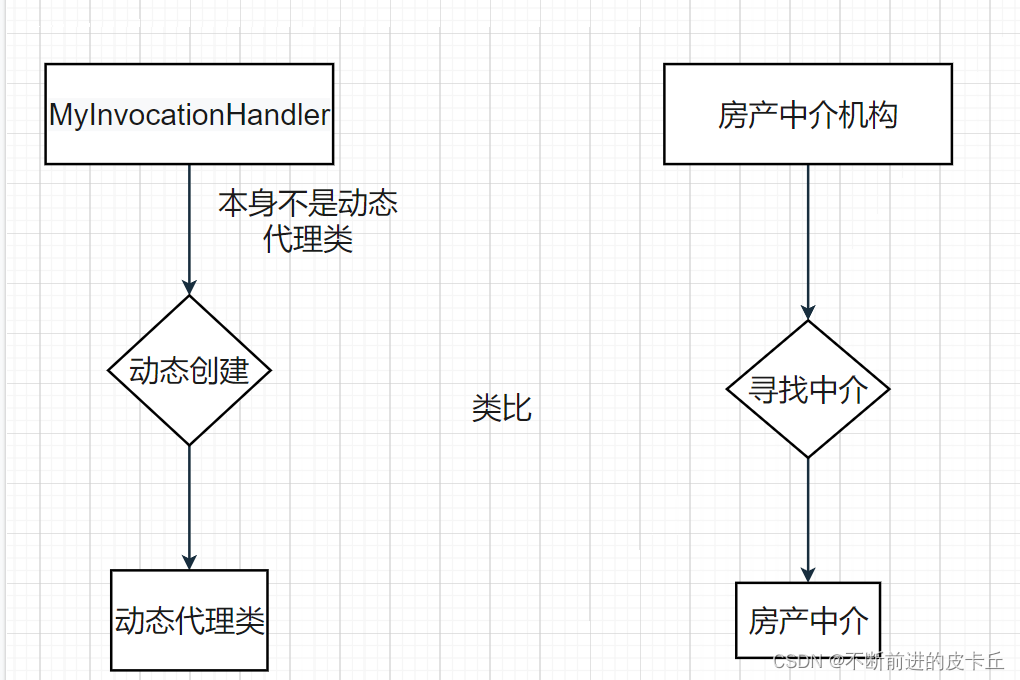
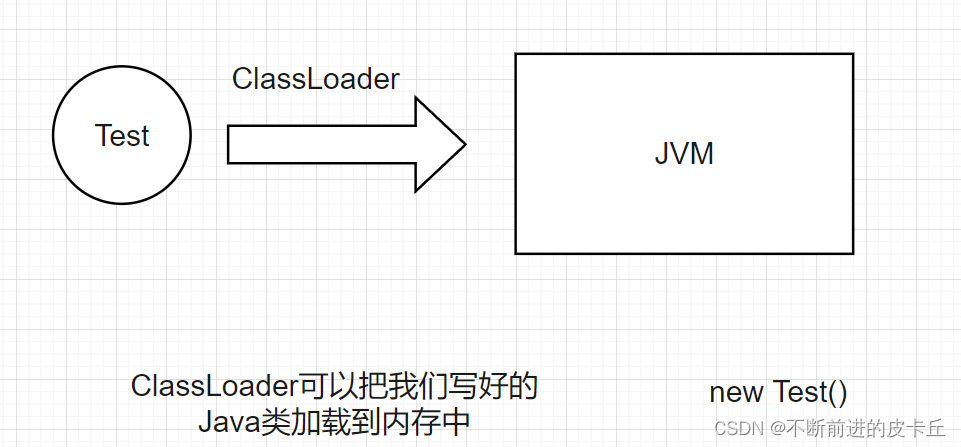
AOP如何实现? 使用动态代理的方式来实现
代理首先要具备CalImpl的所有功能(实现同一个接口),并且在这个基础上,扩展出打印日志的功能
public class MyInvocationHandler implements InvocationHandler {
    //委托对象
    private Object object = null;

    //返回代理对象
    public Object bind(Object object) {
        this.object = object;
        return Proxy.newProxyInstance(object.getClass().getClassLoader(),
                object.getClass().getInterfaces(),this);
    }

    @Override
    public Object invoke(Object proxy, Method method, Object[] args) throws Throwable {
        //实现业务代码和非业务代码的解耦合
        System.out.println(method.getName()+"方法的参数是:"+ Arrays.toString(args));
        Object res = method.invoke(this.object, args);
        System.out.println(method.getName()+"方法的结果是:"+res);
        return res;
    }
}
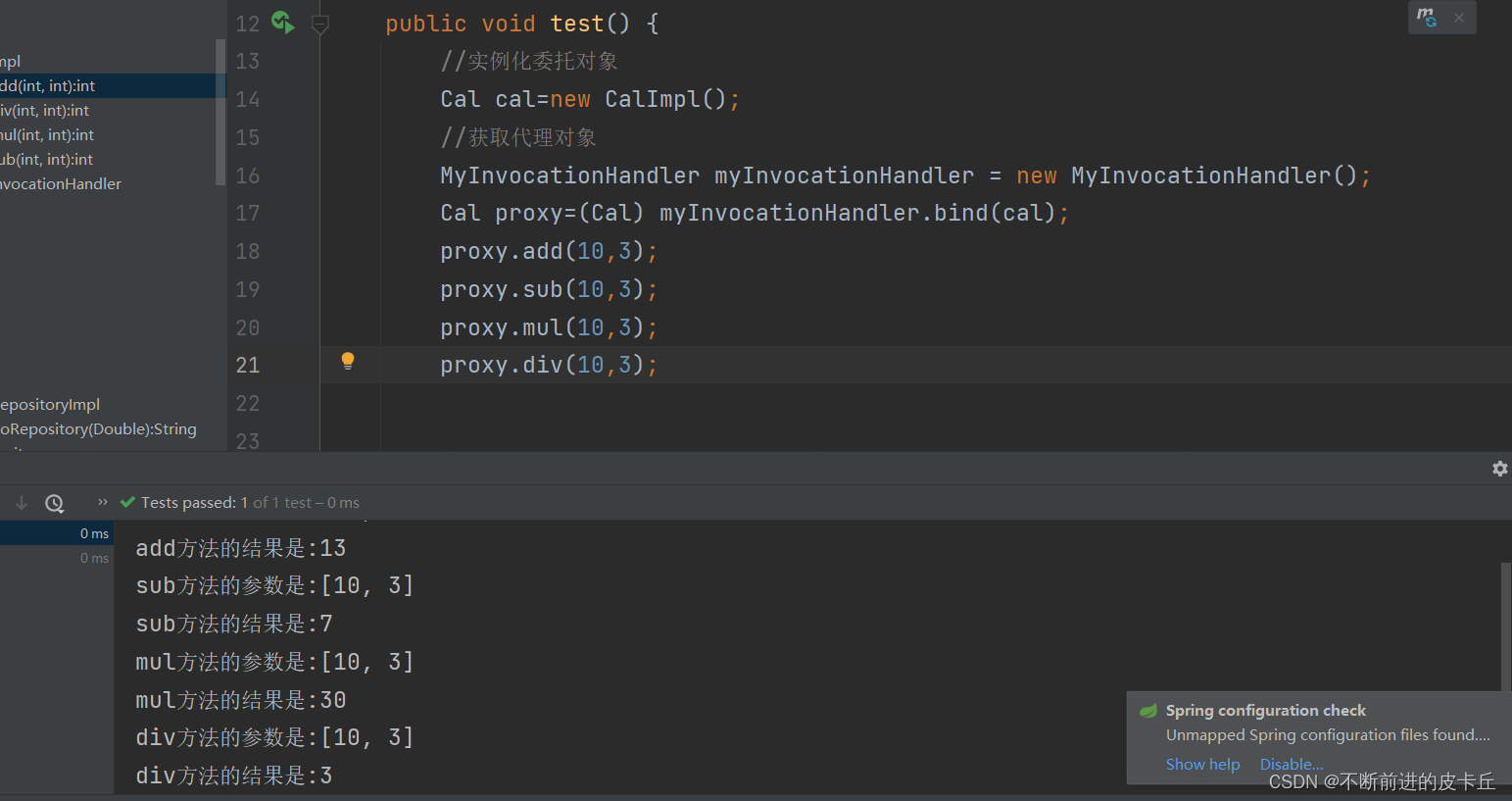
上述代码通过动态代理机制实现了业务代码和非业务代码的解耦合,这是Spring AOP的底层实现机制,真正使用 Spring AOP进行开发的时候,不需要这么复杂
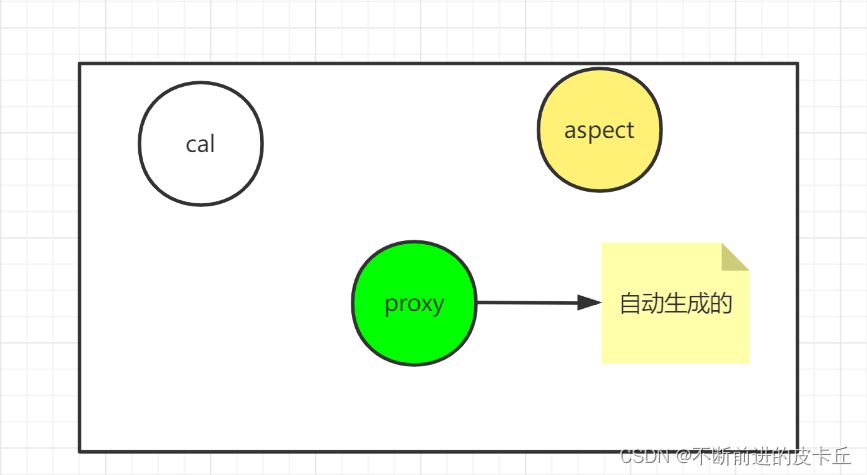
Spring AOP的开发步骤
@Component
@Aspect
public class LoggerAspect {
    @Before("execution(public int com.zyh.aop.impl.CalImpl.*(..))")
    public void before(JoinPoint joinPoint) {
        String name = joinPoint.getSignature().getName();
        Object[] args = joinPoint.getArgs();
        System.out.println(name + "方法的参数是:" + Arrays.toString(args));
    }

    @After("execution(* com.zyh.aop.impl.CalImpl.*(..))")
    public void after(JoinPoint joinPoint){
        String name = joinPoint.getSignature().getName();
        System.out.println(name+"方法执行完毕");
    }
    @AfterReturning(value = "execution(* com.zyh.aop.impl.CalImpl.*(..))",returning = "rs")
    public void afterReturning(JoinPoint joinPoint,Object rs){
        String name = joinPoint.getSignature().getName();
        System.out.println(name+"方法执行的结果是:"+rs);

    }
@AfterThrowing(value = "execution(* com.zyh.aop.impl.CalImpl.*(..))",throwing = "ex")
    public void afterThrowing(JoinPoint joinPoint,Exception ex){
    String name = joinPoint.getSignature().getName();
    System.out.println(name+"方法抛出异常"+ex);
}

}
@Component
public class CalcImpl implements Calc{
    @Override
    public int add(int a, int b) {
        int result=a+b;

        return result;
    }

    @Override
    public int sub(int a, int b) {
       int result=a-b;
       return result;
    }

    @Override
    public int mul(int a, int b) {
        int result= a*b;
        return result;
    }

    @Override
    public int div(int a, int b) {
        int result= a/b;
        return result;
    }
}
3.spring-aop.xml
<?xml version="1.0" encoding="UTF-8"?>
<beans xmlns="http://www.springframework.org/schema/beans"
       xmlns:xsi="http://www.w3.org/2001/XMLSchema-instance"
       xmlns:context="http://www.springframework.org/schema/context"
       xmlns:aop="http://www.springframework.org/schema/aop"
       xsi:schemaLocation="http://www.springframework.org/schema/beans http://www.springframework.org/schema/beans/spring-beans.xsd http://www.springframework.org/schema/context https://www.springframework.org/schema/context/spring-context.xsd http://www.springframework.org/schema/aop http://www.springframework.org/schema/aop/spring-aop.xsd">

    <!-- 自动扫包-->
    <context:component-scan base-package="com.zyh.aop"></context:component-scan>
<!--   为委托对象自动生成代理对象-->
   <aop:aspectj-autoproxy></aop:aspectj-autoproxy>
</beans>
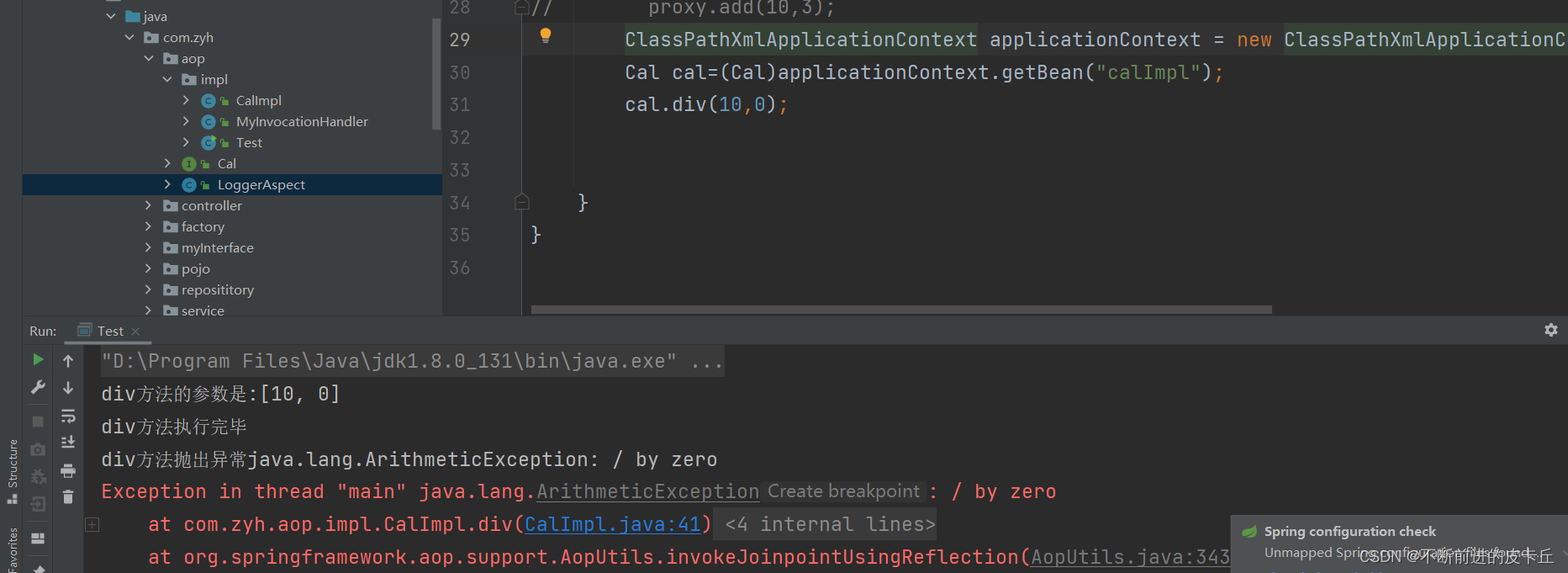
4.测试
AOP的概念
我正在使用Ruby2.1.1和Rails4.1.0.rc1。当执行railsc时,它被锁定了。使用Ctrl-C停止,我得到以下错误日志:~/.rvm/gems/ruby-2.1.1/gems/spring-1.1.2/lib/spring/client/run.rb:47:in`gets':Interruptfrom~/.rvm/gems/ruby-2.1.1/gems/spring-1.1.2/lib/spring/client/run.rb:47:in`verify_server_version'from~/.rvm/gems/ruby-2.1.1/gems/spring-1.1.
无论您是想搭建桌面端、WEB端或者移动端APP应用,HOOPSPlatform组件都可以为您提供弹性的3D集成架构,同时,由工业领域3D技术专家组成的HOOPS技术团队也能为您提供技术支持服务。如果您的客户期望有一种在多个平台(桌面/WEB/APP,而且某些客户端是“瘦”客户端)快速、方便地将数据接入到3D应用系统的解决方案,并且当访问数据时,在各个平台上的性能和用户体验保持一致,HOOPSPlatform将帮助您完成。利用HOOPSPlatform,您可以开发在任何环境下的3D基础应用架构。HOOPSPlatform可以帮您打造3D创新型产品,HOOPSSDK包含的技术有:快速且准确的CAD
目录前言滤波电路科普主要分类实际情况单位的概念常用评价参数函数型滤波器简单分析滤波电路构成低通滤波器RC低通滤波器RL低通滤波器高通滤波器RC高通滤波器RL高通滤波器部分摘自《LC滤波器设计与制作》,侵权删。前言最近需要学习放大电路和滤波电路,但是由于只在之前做音乐频谱分析仪的时候简单了解过一点点运放,所以也是相当从零开始学习了。滤波电路科普主要分类滤波器:主要是从不同频率的成分中提取出特定频率的信号。有源滤波器:由RC元件与运算放大器组成的滤波器。可滤除某一次或多次谐波,最普通易于采用的无源滤波器结构是将电感与电容串联,可对主要次谐波(3、5、7)构成低阻抗旁路。无源滤波器:无源滤波器,又称
SPI接收数据左移一位问题目录SPI接收数据左移一位问题一、问题描述二、问题分析三、探究原理四、经验总结最近在工作在学习调试SPI的过程中遇到一个问题——接收数据整体向左移了一位(1bit)。SPI数据收发是数据交换,因此接收数据时从第二个字节开始才是有效数据,也就是数据整体向右移一个字节(1byte)。请教前辈之后也没有得到解决,通过在网上查阅前人经验终于解决问题,所以写一个避坑经验总结。实际背景:MCU与一款芯片使用spi通信,MCU作为主机,芯片作为从机。这款芯片采用的是它规定的六线SPI,多了两根线:RDY和INT,这样从机就可以主动请求主机给主机发送数据了。一、问题描述根据从机芯片手
最近在学习CAN,记录一下,也供大家参考交流。推荐几个我觉得很好的CAN学习,本文也是在看了他们的好文之后做的笔记首先是瑞萨的CAN入门,真的通透;秀!靠这篇我竟然2天理解了CAN协议!实战STM32F4CAN!原文链接:https://blog.csdn.net/XiaoXiaoPengBo/article/details/116206252CAN详解(小白教程)原文链接:https://blog.csdn.net/xwwwj/article/details/105372234一篇易懂的CAN通讯协议指南1一篇易懂的CAN通讯协议指南1-知乎(zhihu.com)视频推荐CAN总线个人知识总
深度学习部署:Windows安装pycocotools报错解决方法1.pycocotools库的简介2.pycocotools安装的坑3.解决办法更多Ai资讯:公主号AiCharm本系列是作者在跑一些深度学习实例时,遇到的各种各样的问题及解决办法,希望能够帮助到大家。ERROR:Commanderroredoutwithexitstatus1:'D:\Anaconda3\python.exe'-u-c'importsys,setuptools,tokenize;sys.argv[0]='"'"'C:\\Users\\46653\\AppData\\Local\\Temp\\pip-instal
转自:spring.profiles.active和spring.profiles.include的使用及区别说明下文笔者讲述spring.profiles.active和spring.profiles.include的区别简介说明,如下所示我们都知道,在日常开发中,开发|测试|生产环境都拥有不同的配置信息如:jdbc地址、ip、端口等此时为了避免每次都修改全部信息,我们则可以采用以上的属性处理此类异常spring.profiles.active属性例:配置文件,可使用以下方式定义application-${profile}.properties开发环境配置文件:application-dev
我完全不是程序员,正在学习使用Ruby和Rails框架进行编程。我目前正在使用Ruby1.8.7和Rails3.0.3,但我想知道我是否应该升级到Ruby1.9,因为我真的没有任何升级的“遗留”成本。缺点是什么?我是否会遇到与普通gem的兼容性问题,或者甚至其他我不太了解甚至无法预料的问题? 最佳答案 你应该升级。不要坚持从1.8.7开始。如果您发现不支持1.9.2的gem,请避免使用它们(因为它们很可能不被维护)。如果您对gem是否兼容1.9.2有任何疑问,您可以在以下位置查看:http://www.railsplugins.or
如何学习ruby的正则表达式?(对于假人) 最佳答案 http://www.rubular.com/在Ruby中使用正则表达式时是一个很棒的工具,因为它可以立即将结果可视化。 关于ruby-我如何学习ruby的正则表达式?,我们在StackOverflow上找到一个类似的问题: https://stackoverflow.com/questions/1881231/
我无法运行Spring。这是错误日志。myid-no-MacBook-Pro:myid$spring/Users/myid/.rbenv/versions/1.9.3-p484/lib/ruby/gems/1.9.1/gems/spring-0.0.10/lib/spring/sid.rb:17:in`fiddle_func':uninitializedconstantSpring::SID::DL(NameError)from/Users/myid/.rbenv/versions/1.9.3-p484/lib/ruby/gems/1.9.1/gems/spring-0.0.10/li