这是一个自定义色盘,根据点,直线和圆的几何学加上hsv颜色模型完成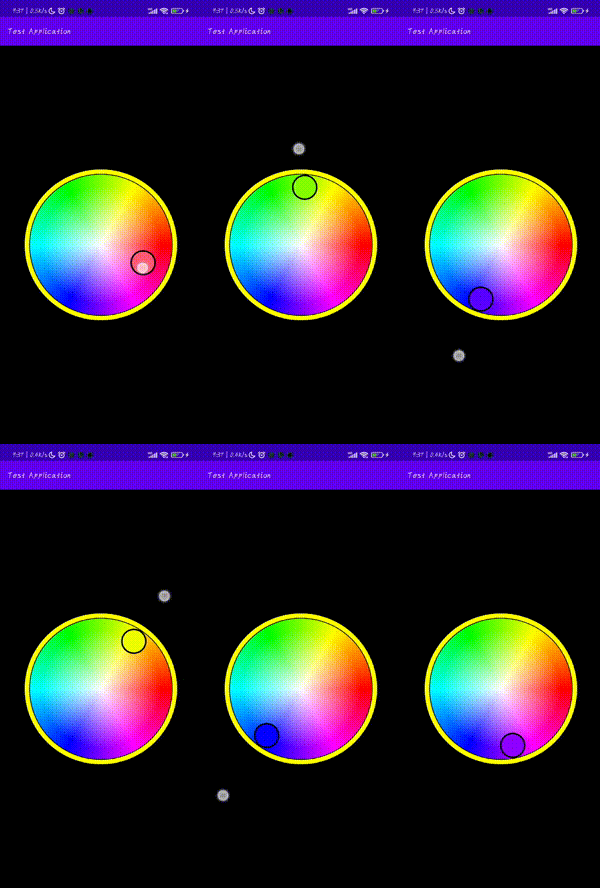
圆的标准方程式:
(x-a)²+(y-b)²=r²
直线一般方程式:
点与圆的位置关系:
点在圆内、点在圆上、点在圆外。假设圆的半径为r,点到圆心的距离为d,则有:d<r点在圆内,d=r点在圆上,d>r点在圆外。
点P(x1,y1) 与圆(x-a)²+(y-b)²=r²的位置关系:
当(x-a)²+(y-b)²>r²时,则点P在圆外。
当(x-a)²+(y-b)²=r²时,则点P在圆上。
当(x-a)²+(y-b)²<r²时,则点P在圆内。
直线的斜率:
一条直线与某平面直角坐标系横轴正半轴方向的夹角的正切值即该直线相对于该坐标系的斜率
斜率 k=tanα(α倾斜角)
与x轴垂直的直线不存在斜率
直线的斜率公式为:k=y2-y1)/(x2-x1)或(y1-y2)/(x1-x2)
象限:
记(x,y) 是象限中的一点
第一象限中的点:x > 0, y > 0
第二象限中的点:x < 0, y > 0
第三象限中的点:x < 0, y < 0
第四象限中的点:x > 0, y < 0
值得注意的是原点和坐标轴上的点不属于任何象限。
解方程:

自定义View、ComposeShader、SweepGradient、RadialGradient、Paint。
代码都比较简单这里就不介绍了
  1 class RoundColorPaletteHSV360 constructor(context: Context, attrs: AttributeSet?, defStyleAttr:Int): View(context,attrs,defStyleAttr) {
  2
  3     constructor(context: Context):this(context,null,0)
  4
  5     constructor(context: Context,attrs: AttributeSet?):this(context,attrs,0)
  6
  7     //取色范围半径
  8     var radius:Float = 0f
  9         private set(value){
 10             field = value-stroke-gap-colorRadius
 11         }
 12
 13     //取色圆半径
 14     var colorRadius = 50f
 15         set(value){
 16             if (value >= 0)
 17                 field = value
 18         }
 19
 20     //取色圆边框半径
 21     var colorStroke = 8f
 22         set(value){
 23             if (value >= 0)
 24                 field = value
 25         }
 26
 27     //取色圆边框颜色
 28     var colorStrokeColor = Color.BLACK
 29
 30     //取色颜色
 31     var color = Color.WHITE
 32
 33     //边框半径
 34     var stroke = 24f
 35         set(value){
 36             if (value >= 0)
 37                 field = value
 38         }
 39
 40     //边框颜色
 41     var strokeColor = Color.YELLOW
 42
 43     //间隙半径
 44     var gap = 4f
 45         set(value){
 46             if (value >= 0)
 47                 field = value
 48         }
 49
 50     var isOutOfBounds:Boolean = false
 51
 52     private val paint = Paint()
 53     private val colors1:IntArray
 54     private val positions1 :FloatArray
 55     private val colors2:IntArray
 56     private val positions2 :FloatArray
 57     private var xColor: Float = 0f
 58     private var yColor: Float = 0f
 59     private var colorChangeCallBack: ColorChangeCallBack? = null
 60
 61     init {
 62 //        <declare-styleable name="RoundColorPaletteHSV360">
 63 //        <attr name="colorRadius" format="dimension"/>
 64 //        <attr name="colorStroke" format="dimension"/>
 65 //        <attr name="gap" format="dimension"/>
 66 //        <attr name="stroke" format="dimension"/>
 67 //        <attr name="colorStrokeColor" format="color"/>
 68 //        <attr name="strokeColor" format="color"/>
 69 //        <attr name="isOutOfBounds" format="boolean"/>
 70 //        </declare-styleable>
 71         val  typedArray = context.obtainStyledAttributes(attrs, R.styleable.RoundColorPaletteHSV360)
 72         colorRadius = typedArray.getDimension(R.styleable.RoundColorPaletteHSV360_colorRadius,50f)
 73         colorStroke = typedArray.getDimension(R.styleable.RoundColorPaletteHSV360_colorStroke,8f)
 74         gap = typedArray.getDimension(R.styleable.RoundColorPaletteHSV360_gap,4f)
 75         stroke = typedArray.getDimension(R.styleable.RoundColorPaletteHSV360_stroke,24f)
 76         colorStrokeColor = typedArray.getColor(R.styleable.RoundColorPaletteHSV360_colorStrokeColor,Color.BLACK)
 77         strokeColor = typedArray.getColor(R.styleable.RoundColorPaletteHSV360_strokeColor,Color.YELLOW)
 78         isOutOfBounds = typedArray.getBoolean(R.styleable.RoundColorPaletteHSV360_isOutOfBounds,false)
 79         typedArray.recycle()
 80
 81         val colorCount1 = 360
 82         val colorCount2 = 255
 83         val colorAngleStep = 360 / colorCount1
 84         positions1 = FloatArray(colorCount1+1){i-> i/(colorCount1*1f)}
 85         var hsv = floatArrayOf(0f, 1f, 1f)
 86         colors1 = IntArray(colorCount1+1){ i->
 87             hsv[0] = 360 - i * colorAngleStep % 360f
 88             Color.HSVToColor(hsv)
 89         }
 90         hsv = floatArrayOf(0f, 0f, 1f)
 91         positions2 = FloatArray(colorCount2+1){i-> i/(colorCount2*1f)}
 92         colors2 = IntArray(colorCount2+1){ i->
 93             Color.HSVToColor(255 * (colorCount2 -i) / colorCount2 , hsv)
 94         }
 95
 96     }
 97
 98     override fun onMeasure(widthMeasureSpec: Int, heightMeasureSpec: Int) {
 99         val width = MeasureSpec.getSize(widthMeasureSpec)/2f
100         val height = MeasureSpec.getSize(heightMeasureSpec)/2f
101         radius = if(width-height<0) width else height
102         super.onMeasure(widthMeasureSpec, heightMeasureSpec)
103     }
104
105     @SuppressLint("DrawAllocation")
106     override fun onDraw(canvas: Canvas?) {
107         createColorWheel(canvas)
108         createColorRadius(canvas,xColor,yColor)
109         super.onDraw(canvas)
110     }
111
112     //色盘
113     private fun createColorWheel(canvas: Canvas?){
114         paint.reset()
115         paint.isAntiAlias = true
116         paint.shader = ComposeShader(
117             SweepGradient(
118                 width / 2f,
119                 height / 2f,
120                 colors1,
121                 positions1
122             ), RadialGradient(
123                 width / 2f,
124                 height / 2f,
125                 radius-colorRadius,
126                 colors2,
127                 positions2,
128                 Shader.TileMode.CLAMP
129             ),  PorterDuff.Mode.SRC_OVER)
130         canvas?.drawCircle(width / 2f,height / 2f,radius,paint)
131         paint.shader = null
132         paint.style = Paint.Style.STROKE
133         paint.strokeWidth = stroke.toFloat()
134         paint.color = strokeColor
135         canvas?.drawCircle(width / 2f,height / 2f,radius+gap+stroke/2,paint)
136     }
137
138     //取色圆
139     private fun createColorRadius(canvas: Canvas?, rx: Float, ry: Float){
140         var x = rx
141         var y = ry
142         if(x==0f || y==0f ){
143             x = width / 2f
144             y = height / 2f
145         }
146         paint.reset()
147         paint.isAntiAlias = true
148         paint.color = color
149         canvas?.drawCircle(x,y,colorRadius,paint)
150         paint.style = Paint.Style.STROKE
151         paint.color = colorStrokeColor
152         paint.strokeWidth = colorStroke
153         canvas?.drawCircle(x,y,colorRadius+colorStroke/2,paint)
154     }
155
156     fun setColorChangeCallBack(colorChangeCallBack: ColorChangeCallBack){
157         this.colorChangeCallBack = colorChangeCallBack
158     }
159
160     override fun onTouchEvent(event: MotionEvent?): Boolean {
161         event?.let {
162             val pointToCircle = pointToCircle(it.x, it.y)
163             if( pointToCircle <= radius - if(isOutOfBounds) 0f else (colorRadius-colorStroke)){
164                 xColor =  it.x
165                 yColor =  it.y
166                 color =  Color.HSVToColor(floatArrayOf((angdeg(it.x,it.y)),pointToCircle/radius,1f))
167                 colorChangeCallBack?.onChange(color)
168             }else{
169                 findPoint( it.x, it.y)
170             }
171             invalidate()
172         }
173         return true
174     }
175
176     //点到圆心距离
177     private fun pointToCircle(x: Float = width / 2f, y: Float = height / 2f ) =
178         sqrt((x - width / 2f)*(x - width / 2f) + (y-height / 2f)*(y-height / 2f))
179
180     //离目标最近的点 待开发
181     private fun findPoint(x1: Float = width / 2f, y1: Float = height / 2f ){
182 //      直线一般方程
183 //      以圆心为坐标0,0 重新计算点(a,b)坐标
184         val a = y1 - height / 2f
185         val b = x1 - width / 2f
186         val r = radius - if(isOutOfBounds) 0f else (colorRadius-colorStroke)
187         //r^2/((b/a)^2+1)的开平方
188         yColor = sqrt( (r * r) / ((b / a) * (b / a) + 1))
189         //判断开平方的正负值
190         if(a<0) yColor = -yColor
191         xColor =  (b*yColor)/a + width / 2f
192         yColor += height / 2f
193         color =  Color.HSVToColor(floatArrayOf((angdeg(xColor,yColor)),1f,1f))
194         colorChangeCallBack?.onChange(color)
195
196     }
197
198
199     //角度
200     private fun angdeg(x: Float = width / 2f, y: Float = height / 2f ):Float{
201         var angdeg = 0
202
203         //特殊角度, 与x轴垂直不存在斜率
204         if(x - width / 2f == 0f && y - height / 2f < 0){
205             angdeg = 90
206         }else{
207             //到圆心的斜率
208             val k = ((y-height / 2f)*(y-height / 2f))/((x - width / 2f)*(x - width / 2f))
209             //二分法
210             var min = 0.00
211             var max = 90.00
212             while(max-min>1){
213                 val deg = min + (max - min) / 2
214                 if(k>tan(toRadians(deg))) min = deg else max = deg
215             }
216             angdeg = (max-1).toInt()
217         }
218
219         if((x - width / 2f <= 0f && y - height / 2f <= 0f)) {//第二象限 90~180
220             angdeg = 180 - angdeg
221         }else if((x - width / 2f <= 0f && y - height / 2f >= 0f)) {//第三象限 180~270
222             angdeg += 180
223         }else if((x - width / 2f >= 0f && y - height / 2f >= 0f)) {//第四象限 270~360
224             angdeg = 360 - angdeg
225         }
226
227         return angdeg.toFloat()
228     }
229
230     interface ColorChangeCallBack{
231         fun onChange(@ColorInt color: Int)
232     }
233 }
# 圆形取色盘
#### 仓库地址
https://gitee.com/yangguizhong/circular-color-plate
#### 安装教程
gradle 7.0以上的在 settings.gradle 添加:
```
dependencyResolutionManagement {
repositoriesMode.set(RepositoriesMode.FAIL_ON_PROJECT_REPOS)
repositories {
google()
mavenCentral()
maven {url "https://gitee.com/yangguizhong/circular-color-plate/raw/master"}
jcenter() // Warning: this repository is going to shut down soon
}
}
```
gradle 7.0以下的在根 build.gradle 添加:
```
allprojects {
repositories {
google()
mavenCentral()
maven {url "https://gitee.com/yangguizhong/circular-color-plate/raw/master"}
}
}
```
build.gradle 添加:
```
implementation 'com.xiaotie.colorPicker:colorPicker:1.0.0'
```
#### 使用说明
```
<com.wifiled.ipixels.view.RoundColorPaletteHSV360
android:id="@+id/color_picker"
android:layout_width="300dp"
android:layout_height="300dp"
app:gap="1dp"//取色背景和背景边框的间隙
app:colorRadius="20dp"//取色圆的半径
app:colorStroke="3dp"//取色圆的边框宽度
app:stroke="8dp"//背景边框的宽度
app:strokeColor="#FFF7A6"//背景边框的颜色
app:isOutOfBounds="true"//是否超出边框
app:colorStrokeColor="#2E3C3C"//取色圆的边框宽度
app:layout_constraintBottom_toBottomOf="parent"
app:layout_constraintEnd_toEndOf="parent"
app:layout_constraintStart_toStartOf="parent"
app:layout_constraintTop_toTopOf="parent" />
```
```
colorPickerView.setColorChangeCallBack(object:RoundColorPaletteHSV360.ColorChangeCallBack{
override fun onChange(color: Int) {
//返回的颜色
}
})
```
我正在尝试设置一个puppet节点,但rubygems似乎不正常。如果我通过它自己的二进制文件(/usr/lib/ruby/gems/1.8/gems/facter-1.5.8/bin/facter)在cli上运行facter,它工作正常,但如果我通过由rubygems(/usr/bin/facter)安装的二进制文件,它抛出:/usr/lib/ruby/1.8/facter/uptime.rb:11:undefinedmethod`get_uptime'forFacter::Util::Uptime:Module(NoMethodError)from/usr/lib/ruby
我在我的项目中添加了一个系统来重置用户密码并通过电子邮件将密码发送给他,以防他忘记密码。昨天它运行良好(当我实现它时)。当我今天尝试启动服务器时,出现以下错误。=>BootingWEBrick=>Rails3.2.1applicationstartingindevelopmentonhttp://0.0.0.0:3000=>Callwith-dtodetach=>Ctrl-CtoshutdownserverExiting/Users/vinayshenoy/.rvm/gems/ruby-1.9.3-p0/gems/actionmailer-3.2.1/lib/action_mailer
我想向我的Controller传递一个参数,它是一个简单的复选框,但我不知道如何在模型的form_for中引入它,这是我的观点:{:id=>'go_finance'}do|f|%>Transferirde:para:Entrada:"input",:placeholder=>"Quantofoiganho?"%>Saída:"output",:placeholder=>"Quantofoigasto?"%>Nota:我想做一个额外的复选框,但我该怎么做,模型中没有一个对象,而是一个要检查的对象,以便在Controller中创建一个ifelse,如果没有检查,请帮助我,非常感谢,谢谢
我已经从我的命令行中获得了一切,所以我可以运行rubymyfile并且它可以正常工作。但是当我尝试从sublime中运行它时,我得到了undefinedmethod`require_relative'formain:Object有人知道我的sublime设置中缺少什么吗?我正在使用OSX并安装了rvm。 最佳答案 或者,您可以只使用“require”,它应该可以正常工作。我认为“require_relative”仅适用于ruby1.9+ 关于ruby-主要:Objectwhenrun
我有一些代码在几个不同的位置之一运行:作为具有调试输出的命令行工具,作为不接受任何输出的更大程序的一部分,以及在Rails环境中。有时我需要根据代码的位置对代码进行细微的更改,我意识到以下样式似乎可行:print"Testingnestedfunctionsdefined\n"CLI=trueifCLIdeftest_printprint"CommandLineVersion\n"endelsedeftest_printprint"ReleaseVersion\n"endendtest_print()这导致:TestingnestedfunctionsdefinedCommandLin
我有一个只接受一个参数的方法:defmy_method(number)end如果使用number调用方法,我该如何引发错误??通常,我如何定义方法参数的条件?比如我想在调用的时候报错:my_method(1) 最佳答案 您可以添加guard在函数的开头,如果参数无效则引发异常。例如:defmy_method(number)failArgumentError,"Inputshouldbegreaterthanorequalto2"ifnumbereputse.messageend#=>Inputshouldbegreaterthano
我使用Ember作为我的前端和GrapeAPI来为我的API提供服务。前端发送类似:{"service"=>{"name"=>"Name","duration"=>"30","user"=>nil,"organization"=>"org","category"=>nil,"description"=>"description","disabled"=>true,"color"=>nil,"availabilities"=>[{"day"=>"Saturday","enabled"=>false,"timeSlots"=>[{"startAt"=>"09:00AM","endAt"=>
我想获取模块中定义的所有常量的值:moduleLettersA='apple'.freezeB='boy'.freezeendconstants给了我常量的名字:Letters.constants(false)#=>[:A,:B]如何获取它们的值的数组,即["apple","boy"]? 最佳答案 为了做到这一点,请使用mapLetters.constants(false).map&Letters.method(:const_get)这将返回["a","b"]第二种方式:Letters.constants(false).map{|c
我正在阅读一本关于Ruby的书,作者在编写类初始化定义时使用的形式与他在本书前几节中使用的形式略有不同。它看起来像这样:classTicketattr_accessor:venue,:datedefinitialize(venue,date)self.venue=venueself.date=dateendend在本书的前几节中,它的定义如下:classTicketattr_accessor:venue,:datedefinitialize(venue,date)@venue=venue@date=dateendend在第一个示例中使用setter方法与在第二个示例中使用实例变量之间是
我正在使用RubyonRails3.0.9,我想生成一个传递一些自定义参数的link_toURL。也就是说,有一个articles_path(www.my_web_site_name.com/articles)我想生成如下内容:link_to'Samplelinktitle',...#HereIshouldimplementthecode#=>'http://www.my_web_site_name.com/articles?param1=value1¶m2=value2&...我如何编写link_to语句“alàRubyonRailsWay”以实现该目的?如果我想通过传递一些
