文章目录
你们好,我是oy,介绍一个简易日记APP。
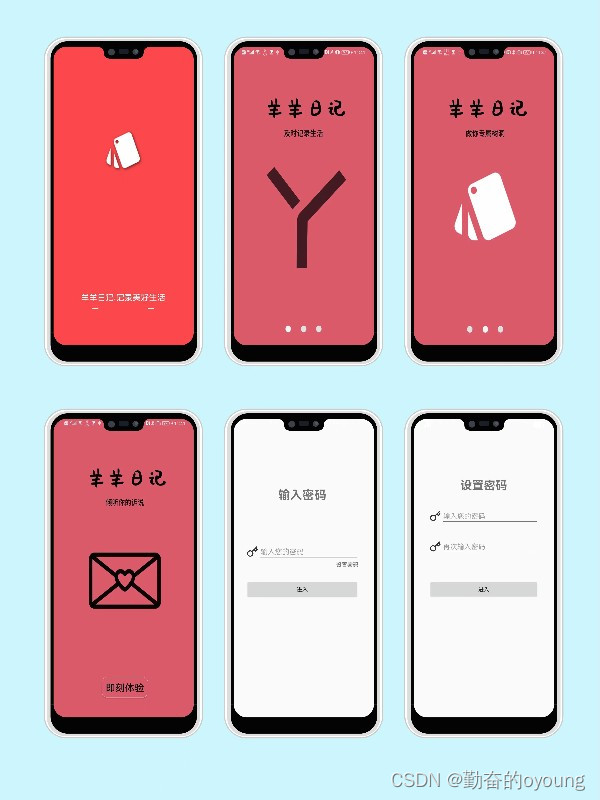
1.启动页、引导页及登陆注册
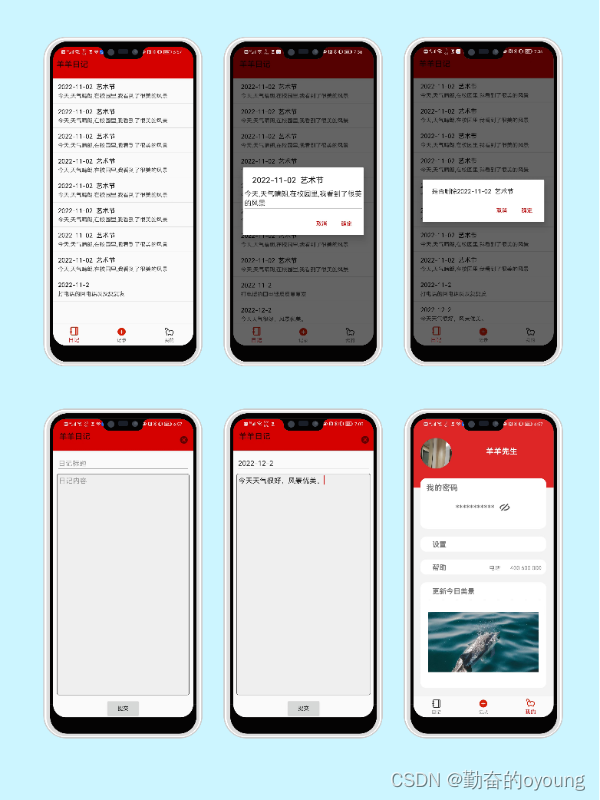
2.日记相关功能
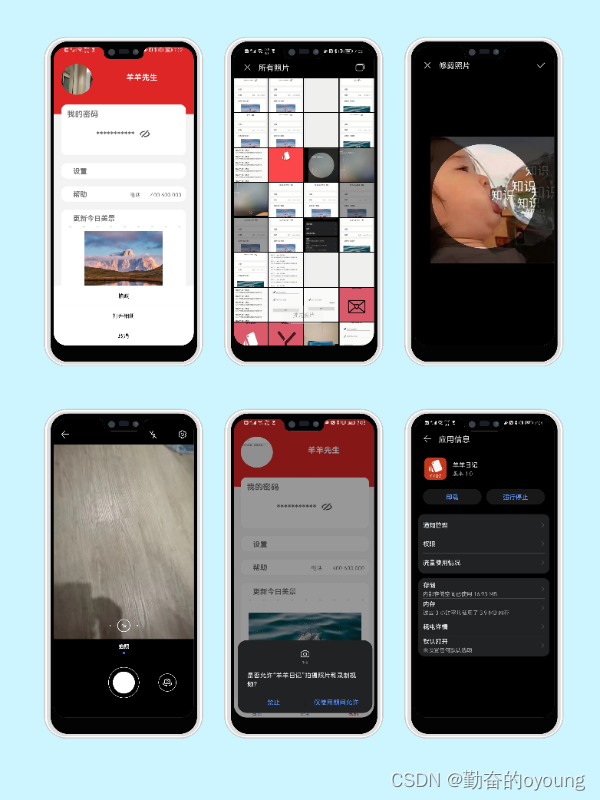
3.个人中心界面
public class MainActivity extends AppCompatActivity {
    private BottomNavigationView bottomNavigationView;

    @Override
    protected void onCreate(Bundle savedInstanceState) {
        super.onCreate(savedInstanceState);
        setContentView(R.layout.activity_main);
        initToolbar();
        initFragment();
        initNavigationBottom();
    }

    @SuppressLint("ResourceAsColor")
    private void initNavigationBottom() {
        bottomNavigationView = findViewById(R.id.navigation_bottom);
        bottomNavigationView.setItemIconTintList(null);
        bottomNavigationView.setOnNavigationItemSelectedListener(itemSelectedListener);
    }

    @Override
    public boolean onCreateOptionsMenu(Menu menu) {
        return super.onCreateOptionsMenu(menu);
    }

    private void initFragment() {
        DiariesFragment diariesFragment = getDiariesFragment();
        if (diariesFragment == null) {
            diariesFragment = new DiariesFragment();
            ActivityUtils.addFragmentToActivity(getSupportFragmentManager(), diariesFragment, R.id.content);
        }
    }

    private DiariesFragment getDiariesFragment() {
        return (DiariesFragment) getSupportFragmentManager().findFragmentById(R.id.content);
    }

    private void initToolbar() {
        //设置顶部状态栏为透明
        getWindow().addFlags(WindowManager.LayoutParams.FLAG_TRANSLUCENT_STATUS);
        Toolbar toolbar = findViewById(R.id.toolbar);
        setSupportActionBar(toolbar);
    }

    private final BottomNavigationView.OnNavigationItemSelectedListener itemSelectedListener = item -> {
        switch (item.getItemId()) {
            case R.id.menu_diary:
                MeController.setToolbarVisibility(this);
                ActivityUtils.removeFragmentTOActivity(getSupportFragmentManager(), getSupportFragmentManager().findFragmentById(R.id.content));
                ActivityUtils.addFragmentToActivity(getSupportFragmentManager(), new DiariesFragment(), R.id.content);
                break;
            case R.id.menu_me:
                findViewById(R.id.toolbar).setVisibility(View.GONE);
                ActivityUtils.removeFragmentTOActivity(getSupportFragmentManager(), getSupportFragmentManager().findFragmentById(R.id.content));
                ActivityUtils.addFragmentToActivity(getSupportFragmentManager(), new MeFragment(), R.id.content);
                break;
            case R.id.menu_new:
                bottomNavigationView.setVisibility(View.GONE);
                MeController.setToolbarVisibility(this);
                ActivityUtils.removeFragmentTOActivity(getSupportFragmentManager(), getSupportFragmentManager().findFragmentById(R.id.content));
                ActivityUtils.addFragmentToActivity(getSupportFragmentManager(), new AddDiaryFragment(), R.id.content);
                break;
        }
        return true;
    };
}
MainActivity的layout
<?xml version="1.0" encoding="utf-8"?>
<LinearLayout
    xmlns:android="http://schemas.android.com/apk/res/android"
    xmlns:app="http://schemas.android.com/apk/res-auto"
    xmlns:tools="http://schemas.android.com/tools"
    android:layout_width="match_parent"
    android:layout_height="match_parent"
    android:orientation="vertical"
    tools:context=".MainActivity">

    <com.google.android.material.appbar.AppBarLayout
        android:layout_width="match_parent"
        android:layout_height="wrap_content">
        <androidx.appcompat.widget.Toolbar
            android:id="@+id/toolbar"
            android:layout_width="match_parent"
            android:layout_height="wrap_content"
            android:background="?attr/colorPrimary"
            android:minHeight="?attr/actionBarSize"
            android:fitsSystemWindows="true"
            android:theme="@style/Widget.AppCompat.Toolbar"
            app:popupTheme="@style/ThemeOverlay.AppCompat.Light"/>
    </com.google.android.material.appbar.AppBarLayout>

    <FrameLayout
        android:id="@+id/content"
        android:layout_width="match_parent"
        android:layout_height="0dp"
        android:layout_weight="1"/>

    <com.google.android.material.bottomnavigation.BottomNavigationView
        android:id="@+id/navigation_bottom"
        android:layout_width="match_parent"
        android:layout_height="wrap_content"
        app:menu="@menu/menu_navigation"
        android:background="?android:attr/windowBackground"/>

</LinearLayout>
public class DiariesFragment extends Fragment {
    private DiariesController mController;
    @Override
    public void onCreate(@Nullable Bundle savedInstanceState) {
        super.onCreate(savedInstanceState);
        mController = new DiariesController(this);
    }

    @Nullable
    @Override
    public View onCreateView(@NonNull LayoutInflater inflater, @Nullable ViewGroup container, @Nullable Bundle savedInstanceState) {
        View root = inflater.inflate(R.layout.fragment_diaries, container, false);
        mController.setDiariesList(root.findViewById(R.id.diaries_list));
        return root;
    }

    @Override
    public void onResume() {
        super.onResume();
        mController.loadDiaries();
    }
}
DiariesFragment的layout
<?xml version="1.0" encoding="utf-8"?>
<RelativeLayout xmlns:android="http://schemas.android.com/apk/res/android"
    android:layout_width="match_parent" android:layout_height="match_parent"
    android:orientation="vertical">

    <androidx.recyclerview.widget.RecyclerView
        android:id="@+id/diaries_list"
        android:layout_width="match_parent"
        android:layout_height="wrap_content"/>

</RelativeLayout>
public class AddDiaryFragment extends Fragment implements View.OnClickListener {
    private AddDiaryController mController;
    private View edit_layout;
    private Button btn_confirm;
    private EditText edit_title;
    private EditText edit_desc;

    @Override
    public void onCreate(@Nullable Bundle savedInstanceState) {
        super.onCreate(savedInstanceState);
        mController = new AddDiaryController(this);
    }

    private void initView(View view) {
        btn_confirm = view.findViewById(R.id.add_diary_confirm);
        btn_confirm.setOnClickListener(this);
        edit_title = view.findViewById(R.id.edit_add_title);
        edit_desc = view.findViewById(R.id.edit_add_desc);
        edit_layout = view.findViewById(R.id.edit_layout);
        edit_layout.setOnClickListener(this);
    }


    @Override
    public void onCreateOptionsMenu(@NonNull Menu menu, @NonNull MenuInflater inflater) {
        inflater.inflate(R.menu.menu_cancel, menu);
    }

    @Override
    public boolean onOptionsItemSelected(@NonNull MenuItem item) {
        switch (item.getItemId()) {
            case R.id.menu_cancel:
                mController.closeWriteDiary(getActivity().getSupportFragmentManager(), this);
                mController.setNavigationVisibility();
                return true;
        }
        return false;
    }

    @Nullable
    @Override
    public View onCreateView(@NonNull LayoutInflater inflater, @Nullable ViewGroup container, @Nullable Bundle savedInstanceState) {
        View root = inflater.inflate(R.layout.fragment_add_diary, container, false);
        initView(root);
        return root;
    }

    @Override
    public void onDestroy() {
        super.onDestroy();
    }

    @Override
    public void onClick(View view) {
        switch (view.getId()) {
            case R.id.add_diary_confirm:
                mController.addDiaryToRepository(edit_title.getText().toString().trim(), edit_desc.getText().toString().trim());
                mController.setNavigationVisibility();
                mController.closeWriteDiary(getActivity().getSupportFragmentManager(), this);
                break;
            case R.id.edit_layout:
                mController.changeFocus(edit_desc);
                break;
        }
    }
}
AddDiaryFragment的layout
<?xml version="1.0" encoding="utf-8"?>
<LinearLayout
    xmlns:android="http://schemas.android.com/apk/res/android"
    android:layout_width="match_parent"
    android:layout_height="match_parent"
    android:orientation="vertical">
    <LinearLayout
        android:layout_width="match_parent"
        android:layout_height="wrap_content"
        android:layout_marginTop="10dp"
        android:layout_marginStart="10dp"
        android:layout_marginEnd="10dp"
        android:orientation="vertical">
        <EditText
            android:id="@+id/edit_add_title"
            android:hint="@string/add_title_hint"
            android:minLines="1"
            android:layout_width="match_parent"
            android:layout_height="wrap_content" />
    </LinearLayout>
    <LinearLayout
        android:id="@+id/edit_layout"
        android:layout_width="match_parent"
        android:layout_height="0dp"
        android:layout_weight="1"
        android:layout_marginTop="5dp"
        android:layout_marginStart="10dp"
        android:layout_marginEnd="10dp"
        android:layout_marginBottom="10dp">
        <LinearLayout
            android:layout_width="match_parent"
            android:layout_height="match_parent"
            android:paddingStart="5dp"
            android:paddingTop="5dp"
            android:paddingEnd="5dp"
            android:paddingBottom="5dp"
            android:background="@drawable/edit_background">
            <EditText
                android:id="@+id/edit_add_desc"
                android:hint="@string/add_title_description"
                android:gravity="top"
                android:layout_width="match_parent"
                android:layout_height="wrap_content"
                android:scrollbars="vertical"
                android:background="@null"/>
        </LinearLayout>
    </LinearLayout>
    <LinearLayout
        android:layout_width="match_parent"
        android:layout_height="wrap_content"
        android:gravity="center"
        android:orientation="horizontal">
        <Button
            android:id="@+id/add_diary_confirm"
            android:text="@string/btn_ok"
            android:layout_width="wrap_content"
            android:layout_height="wrap_content"/>
    </LinearLayout>
</LinearLayout>
public class LoginDirectActivity extends AppCompatActivity implements View.OnClickListener {
    private EditText edit_input_text;
    private Button btn_comeIn;
    private TextView tv_setPsw;
    private static final String TAG = "Login2Activity";
    @Override
    protected void onCreate(Bundle savedInstanceState) {
        super.onCreate(savedInstanceState);
        setContentView(R.layout.activity_direct_login);
        bindView();
    }

    private void bindView() {
        getWindow().addFlags(WindowManager.LayoutParams.FLAG_TRANSLUCENT_STATUS);
        edit_input_text = findViewById(R.id.edit_login2_input_text);
        btn_comeIn = findViewById(R.id.btn_login2_comeIn);
        btn_comeIn.setOnClickListener(this);
        tv_setPsw = findViewById(R.id.tv_setPsw);
        tv_setPsw.setOnClickListener(this);
    }


    @Override
    public void onClick(View v) {
        switch (v.getId()) {
            case R.id.tv_setPsw:
                Intent setPsw_intent = new Intent(LoginDirectActivity.this, LoginActivity.class);
                startActivity(setPsw_intent);
                LoginDirectActivity.this.finish();
//                overridePendingTransition(R.anim.out_to_left,R.anim.in_from_right);
                break;
            case R.id.btn_login2_comeIn:
                String psw = edit_input_text.getText().toString().trim();
                if (psw.isEmpty()) {
                    Toast.makeText(this, "密码不能为空!", Toast.LENGTH_SHORT).show();
                    return;
                }
                String readInfoByContext = FileUtils.readInfoByContext(this);
                if (psw.equals(readInfoByContext)) {
                    Toast.makeText(this, "登录成功!", Toast.LENGTH_SHORT).show();
                    Intent intent = new Intent(this, MainActivity.class);
                    startActivity(intent);
//                    overridePendingTransition(R.anim.out_to_left,R.anim.in_from_right);
                } else {
                    Toast.makeText(this, "密码不正确!", Toast.LENGTH_SHORT).show();
                }
                break;

        }
    }
}
LoginDirectActivity 的layout
<?xml version="1.0" encoding="utf-8"?>
<androidx.constraintlayout.widget.ConstraintLayout xmlns:android="http://schemas.android.com/apk/res/android"
    xmlns:app="http://schemas.android.com/apk/res-auto"
    xmlns:tools="http://schemas.android.com/tools"
    android:layout_width="match_parent"
    android:layout_height="match_parent"
    tools:context=".view.LoginDirectActivity">

    <Button
        android:id="@+id/btn_login2_comeIn"
        android:layout_width="match_parent"
        android:layout_height="wrap_content"
        android:layout_marginStart="40dp"
        android:layout_marginEnd="40dp"
        android:text="进入"
        app:layout_constraintBottom_toTopOf="@+id/guideline5"
        app:layout_constraintEnd_toEndOf="parent"
        app:layout_constraintStart_toStartOf="parent" />

    <LinearLayout
        android:id="@+id/linearLayout"
        android:layout_width="match_parent"
        android:layout_height="wrap_content"
        android:layout_marginStart="40dp"
        android:layout_marginEnd="40dp"
        android:gravity="center_vertical"
        android:orientation="horizontal"
        app:layout_constraintEnd_toEndOf="parent"
        app:layout_constraintStart_toStartOf="parent"
        app:layout_constraintTop_toTopOf="@+id/guideline7">

        <ImageView
            android:layout_width="32dp"
            android:layout_height="32dp"
            android:src="@mipmap/come_in_key" />

        <EditText
            android:id="@+id/edit_login2_input_text"
            android:hint="输入您的密码"
            android:inputType="textPassword"
            android:layout_width="match_parent"
            android:layout_height="wrap_content" />

    </LinearLayout>


    <androidx.constraintlayout.widget.Guideline
        android:id="@+id/guideline4"
        android:layout_width="wrap_content"
        android:layout_height="wrap_content"
        android:orientation="horizontal"
        app:layout_constraintGuide_percent="0.22" />

    <androidx.constraintlayout.widget.Guideline
        android:id="@+id/guideline5"
        android:layout_width="wrap_content"
        android:layout_height="wrap_content"
        android:orientation="horizontal"
        app:layout_constraintGuide_percent="0.58" />

    <TextView
        android:id="@+id/tv_login2_password_title"
        android:layout_width="match_parent"
        android:layout_height="wrap_content"
        android:gravity="center"
        android:text="输入密码"
        android:textSize="30sp"
        android:textStyle="bold"
        app:layout_constraintEnd_toEndOf="parent"
        app:layout_constraintStart_toStartOf="parent"
        app:layout_constraintTop_toTopOf="@+id/guideline4" />

    <androidx.constraintlayout.widget.Guideline
        android:id="@+id/guideline7"
        android:layout_width="wrap_content"
        android:layout_height="wrap_content"
        android:orientation="horizontal"
        app:layout_constraintGuide_percent="0.4" />

    <TextView
        android:id="@+id/tv_setPsw"
        android:layout_width="wrap_content"
        android:layout_height="wrap_content"
        android:text="设置密码"
        android:textStyle="bold"
        app:layout_constraintEnd_toEndOf="@+id/linearLayout"
        app:layout_constraintTop_toBottomOf="@+id/linearLayout" />


</androidx.constraintlayout.widget.ConstraintLayout>
public final class SharedPreferencesUtils {
    private static final SimpleArrayMap<String, SharedPreferencesUtils> mCaches = new SimpleArrayMap<>();
    private SharedPreferences mSharedPreferences;
    private SharedPreferencesUtils(final String spName, final int mode) {
        mSharedPreferences = YyApplication.get().getSharedPreferences(spName, mode);
    }

    public static SharedPreferencesUtils getInstance(String spName) {
        SharedPreferencesUtils utils = mCaches.get(spName);
        if (utils == null) {
            utils = new SharedPreferencesUtils(spName, Context.MODE_PRIVATE);
        }
        return utils;
    }

    public void put(final String key, final String value) {
        mSharedPreferences.edit().putString(key, value).apply();
    }

    public String get(final String key) {
        return mSharedPreferences.getString(key, "");
    }

    public void remove(final String key) {
        mSharedPreferences.edit().remove(key).apply();
    }
}
以上就是今天讲的内容,本文仅仅简单介绍了Android日记APP,需要掌握上述知识点,能够较好的理解此应用逻辑。
我有一个模型:classItem项目有一个属性“商店”基于存储的值,我希望Item对象对特定方法具有不同的行为。Rails中是否有针对此的通用设计模式?如果方法中没有大的if-else语句,这是如何干净利落地完成的? 最佳答案 通常通过Single-TableInheritance. 关于ruby-on-rails-Rails-子类化模型的设计模式是什么?,我们在StackOverflow上找到一个类似的问题: https://stackoverflow.co
我正在编写一个包含C扩展的gem。通常当我写一个gem时,我会遵循TDD的过程,我会写一个失败的规范,然后处理代码直到它通过,等等......在“ext/mygem/mygem.c”中我的C扩展和在gemspec的“扩展”中配置的有效extconf.rb,如何运行我的规范并仍然加载我的C扩展?当我更改C代码时,我需要采取哪些步骤来重新编译代码?这可能是个愚蠢的问题,但是从我的gem的开发源代码树中输入“bundleinstall”不会构建任何native扩展。当我手动运行rubyext/mygem/extconf.rb时,我确实得到了一个Makefile(在整个项目的根目录中),然后当
我将应用程序升级到Rails4,一切正常。我可以登录并转到我的编辑页面。也更新了观点。使用标准View时,用户会更新。但是当我添加例如字段:name时,它不会在表单中更新。使用devise3.1.1和gem'protected_attributes'我需要在设备或数据库上运行某种更新命令吗?我也搜索过这个地方,找到了许多不同的解决方案,但没有一个会更新我的用户字段。我没有添加任何自定义字段。 最佳答案 如果您想允许额外的参数,您可以在ApplicationController中使用beforefilter,因为Rails4将参数
我有一个用户工厂。我希望默认情况下确认用户。但是鉴于unconfirmed特征,我不希望它们被确认。虽然我有一个基于实现细节而不是抽象的工作实现,但我想知道如何正确地做到这一点。factory:userdoafter(:create)do|user,evaluator|#unwantedimplementationdetailshereunlessFactoryGirl.factories[:user].defined_traits.map(&:name).include?(:unconfirmed)user.confirm!endendtrait:unconfirmeddoenden
我已经在Sinatra上创建了应用程序,它代表了一个简单的API。我想在生产和开发上进行部署。我想在部署时选择,是开发还是生产,一些方法的逻辑应该改变,这取决于部署类型。是否有任何想法,如何完成以及解决此问题的一些示例。例子:我有代码get'/api/test'doreturn"Itisdev"end但是在部署到生产环境之后我想在运行/api/test之后看到ItisPROD如何实现? 最佳答案 根据SinatraDocumentation:EnvironmentscanbesetthroughtheRACK_ENVenvironm
我是Google云的新手,我正在尝试对其进行首次部署。我的第一个部署是RubyonRails项目。我基本上是在关注thisguideinthegoogleclouddocumentation.唯一的区别是我使用的是我自己的项目,而不是他们提供的“helloworld”项目。这是我的app.yaml文件runtime:customvm:trueentrypoint:bundleexecrackup-p8080-Eproductionconfig.ruresources:cpu:0.5memory_gb:1.3disk_size_gb:10当我转到我的项目目录并运行gcloudprevie
我们的git存储库中目前有一个Gemfile。但是,有一个gem我只在我的环境中本地使用(我的团队不使用它)。为了使用它,我必须将它添加到我们的Gemfile中,但每次我checkout到我们的master/dev主分支时,由于与跟踪的gemfile冲突,我必须删除它。我想要的是类似Gemfile.local的东西,它将继承从Gemfile导入的gems,但也允许在那里导入新的gems以供使用只有我的机器。此文件将在.gitignore中被忽略。这可能吗? 最佳答案 设置BUNDLE_GEMFILE环境变量:BUNDLE_GEMFI
当我在我的Rails应用程序根目录中运行rakedoc:app时,API文档是使用/doc/README_FOR_APP作为主页生成的。我想向该文件添加.rdoc扩展名,以便它在GitHub上正确呈现。更好的是,我想将它移动到应用程序根目录(/README.rdoc)。有没有办法通过修改包含的rake/rdoctask任务在我的Rakefile中执行此操作?是否有某个地方可以查找可以修改的主页文件的名称?还是我必须编写一个新的Rake任务?额外的问题:Rails应用程序的两个单独文件/README和/doc/README_FOR_APP背后的逻辑是什么?为什么不只有一个?
这似乎非常适得其反,因为太多的gem会在window上破裂。我一直在处理很多mysql和ruby-mysqlgem问题(gem本身发生段错误,一个名为UnixSocket的类显然在Windows机器上不能正常工作,等等)。我只是在浪费时间吗?我应该转向不同的脚本语言吗? 最佳答案 我在Windows上使用Ruby的经验很少,但是当我开始使用Ruby时,我是在Windows上,我的总体印象是它不是Windows原生系统。因此,在主要使用Windows多年之后,开始使用Ruby促使我切换回原来的系统Unix,这次是Linux。Rub
我正在玩HTML5视频并且在ERB中有以下片段:mp4视频从在我的开发环境中运行的服务器很好地流式传输到chrome。然而firefox显示带有海报图像的视频播放器,但带有一个大X。问题似乎是mongrel不确定ogv扩展的mime类型,并且只返回text/plain,如curl所示:$curl-Ihttp://0.0.0.0:3000/pr6.ogvHTTP/1.1200OKConnection:closeDate:Mon,19Apr201012:33:50GMTLast-Modified:Sun,18Apr201012:46:07GMTContent-Type:text/plain
