excel文件导入及导出,是日常开发中经常遇到的需求。本次笔者以EasyExcel为例,针对在项目中遇到的动态表头解析及导出的场景,详细介绍具体的代码实现过程。
https://github.com/alibaba/easyexcel
  const download = () => {
    axios({
      method: 'GET',
      url: config.http.baseUrl + '/templateDownload',
      responseType: 'blob',
    })
      .then(function (res) {
      const content = res.data
      const blob = new Blob([content], { type: "application/application/vnd.openxmlformats-officedocument.spreadsheetml.sheet" })
      const downloadElement = document.createElement("a");
      const href = window.URL.createObjectURL(blob);
      downloadElement.href = href;
      downloadElement.download = decodeURI(res.headers['filename']);
      document.body.appendChild(downloadElement);
      downloadElement.click();
      document.body.removeChild(downloadElement); // 下载完成移除元素
      window.URL.revokeObjectURL(href); // 释放掉blob对象
    })
  }
excel文件导入功能,常常需要进行模板下载,在springboot项目中,程序是以jar包的形式运行的,所以有很多小伙伴常常
遇到在本地开发中能够实现下载功能,但部署到服务器的时候,找不到模板文件的问题。
@Override
public void templateDownload(HttpServletResponse response, HttpServletRequest request) {
    //获取要下载的模板名称
    String fileName = "批量导入模板.xlsx";
    //获取文件下载路径
    String filePath = "/template/template.xlsx";
    TemplateDownloadUtil.download(response, request, fileName, filePath);
}
import lombok.extern.slf4j.Slf4j;
import org.springframework.core.io.ClassPathResource;

import javax.servlet.http.HttpServletRequest;
import javax.servlet.http.HttpServletResponse;
import java.io.InputStream;
import java.io.OutputStream;
import java.net.URLEncoder;

/**
 * 模板文件下载工具类
 * @author
 * @date 2021/05/20 9:20
 */
@Slf4j
public class TemplateDownloadUtil {

    public static void download(HttpServletResponse response, HttpServletRequest request,String fileName,String filePath){
        try {
            response.setContentType("application/application/vnd.openxmlformats-officedocument.spreadsheetml.sheet");
            response.setCharacterEncoding("utf-8");
            // 这里URLEncoder.encode可以防止中文乱码 当然和easyexcel没有关系
            response.setHeader("Content-Disposition", "attachment; filename=" + URLEncoder.encode(fileName, "UTF-8"));
            response.setHeader("filename", URLEncoder.encode(fileName, "UTF-8"));
            response.setHeader("Access-Control-Expose-Headers", "filename,Content-Disposition");

            //获取文件的路径,此方式本地开发可以运行,服务器无法获取文件
//            String filePath = getClass().getResource("/template/template.xlsx").getPath();
//            FileInputStream input = new FileInputStream(filePath);

          	//在服务器中能够读取到模板文件
            ClassPathResource resource = new ClassPathResource(filePath);
            InputStream input = resource.getInputStream();
            OutputStream out = response.getOutputStream();
            byte[] b = new byte[2048];
            int len;
            while ((len = input.read(b)) != -1) {
                out.write(b, 0, len);
            }
            //修正 Excel在“xxx.xlsx”中发现不可读取的内容。是否恢复此工作薄的内容?如果信任此工作簿的来源,请点击"是"
//            response.setHeader("Content-Length", String.valueOf(input.getChannel().size()));
            input.close();
        } catch (Exception e) {
            log.error("下载模板失败 :", e);
        }
    }

}
EasyExcel简单的读文件,官网中已经有详细的说明,本文不再赘述,详细操作参见
。
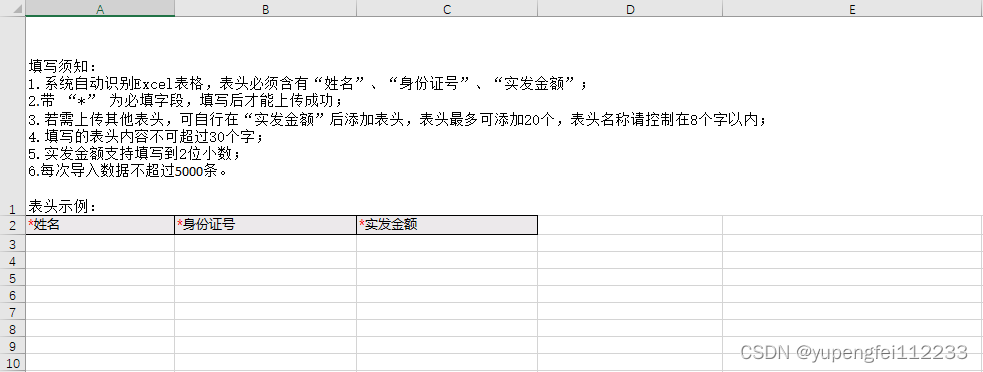
本文主要针对笔者遇到的复杂表头及动态表头进行讲解。
import com.alibaba.excel.context.AnalysisContext;
import com.alibaba.excel.event.AnalysisEventListener;
import com.alibaba.fastjson.JSON;
import com.alibaba.fastjson.JSONObject;
import lombok.Data;
import lombok.extern.slf4j.Slf4j;

import java.time.LocalDateTime;
import java.util.ArrayList;
import java.util.HashMap;
import java.util.List;
import java.util.Map;
import java.util.stream.Collectors;

/**
 * 发薪单上传excel读取类
 *
 * @author yupf
 * @description Listener 不能被spring管理,要每次读取excel都要new,然后里面用到spring可以构造方法传进去
 */
@Slf4j
@Data
public class BatchReadListener extends AnalysisEventListener<Map<Integer, String>> {

    /**
     * 每隔500条存储数据库,然后清理list ,方便内存回收
     */
    private static final int BATCH_COUNT = 500;
    //Excel数据缓存结构
    private List<Map<Integer, Map<Integer, String>>> list = new ArrayList<>();
    //Excel表头(列名)数据缓存结构
    private Map<Integer, String> headTitleMap = new HashMap<>();


    /**
     * 假设这个是一个DAO,当然有业务逻辑这个也可以是一个service。当然如果不用存储这个对象没用。
     */
    private DbFileBatchService dbFileBatchService;
    private DbFileContentService dbFileContentService;
    private FileBatch fileBatch;
    private int total = 0;

    /**
     * 如果使用了spring,请使用这个构造方法。每次创建Listener的时候需要把spring管理的类传进来
     */
    public BatchReadListener(DbFileBatchService dbFileBatchService, DbFileContentService dbFileContentService, FileBatch fileBatch) {
        this.dbFileBatchService = dbFileBatchService;
        this.dbFileContentService = dbFileContentService;
        this.fileBatch = fileBatch;
    }

    /**
     * 这个每一条数据解析都会来调用
     *
     * @param data    one row value. Is is same as {@link AnalysisContext#readRowHolder()}
     * @param context
     */
    @Override
    public void invoke(Map<Integer, String> data, AnalysisContext context) {
        log.info("解析到一条数据:{}", JSON.toJSONString(data));
        total++;
        Map<Integer, Map<Integer, String>> map = new HashMap<>();
        map.put(context.readRowHolder().getRowIndex(), data);
        list.add(map);
        // 达到BATCH_COUNT了,需要去存储一次数据库,防止数据几万条数据在内存,容易OOM
        if (list.size() >= BATCH_COUNT) {
            saveData();
            // 存储完成清理 list
            list.clear();
        }
    }

    /**
     * 所有数据解析完成了 都会来调用
     *
     * @param context
     */
    @Override
    public void doAfterAllAnalysed(AnalysisContext context) {
        // 这里也要保存数据,确保最后遗留的数据也存储到数据库
        saveData();
        log.info("所有数据解析完成!");
    }

    /**
     * 解析表头数据
     **/
    @Override
    public void invokeHeadMap(Map<Integer, String> headMap, AnalysisContext context) {
        log.info("表头数据:{}", JSONObject.toJSONString(headMap));
        headTitleMap = headMap;
    }

    /**
     * 加上存储数据库
     */
    private void saveData() {
        log.info("{}条数据,开始存储数据库!", list.size());
        FileContent fileContent = null;
        List<FileContent> fileContentList = list.stream().flatMap(
            integerMap -> integerMap.entrySet().stream().map(entrySet -> {
                //entrySet.getKey()获取的是内容的RowIndex,实际的行数需要根据表头数进行处理
                Integer rowIndex = entrySet.getKey();
                Map<Integer, String> value = entrySet.getValue();
                log.info(JSONObject.toJSONString(value));
                fileContent = new FileContent();
                fileContent.setBatchId(fileBatch.getId());
                fileContent.setBatchNo(fileBatch.getBatchNo());
                //固定字段入库
                fileContent.setName(value.get(0) != null ? value.get(0).trim() : "");
                fileContent.setCertNo(value.get(1) != null ? value.get(1).trim() : "");
                fileContent.setRealAmount(value.get(2) != null ? value.get(2).trim() : "");
                //所有动态表头数据转为JSON串入库
                fileContent.setFieldsValue(JSONObject.toJSONString(value));
                //取实际的内容rowIndex
                fileContent.setRowNum(rowIndex + 1);
                fileContent.setCreateTime(LocalDateTime.now());
                return xcSalaryFileContent;
        	}
        )).collect(Collectors.toList());
        log.info(JSONObject.toJSONString(fileContentList));
        dbFileContentService.saveBatch(fileContentList);
        log.info("存储数据库成功!");
    }

}
    BatchReadListener listener = new BatchReadListener(dbFileBatchService, dbFileContentService, fileBatch);
    try {
        //注:headRowNumber默认为1,现赋值为2,即从第三行开始读取内容
        EasyExcel.read(fileInputStream, listener).headRowNumber(2).sheet().doRead();
    } catch (Exception e) {
        log.info("EasyExcel解析文件失败,{}", e);
        throw new CustomException("文件解析失败,请重新上传");
    }
    //获取表头信息进行处理
    Map<Integer, String> headTitleMap = listener.getHeadTitleMap();
    //获取动态表头信息
    List<String> headList = headTitleMap.keySet().stream().map(key -> {
        String head = headTitleMap.get(key);
        log.info(head);
        return head == null ? "" : head.replace("*", "");
    }).collect(Collectors.toList());
    //可以对表头进行入库保存,方便后续导出
综上,动态表头即可完成解析。
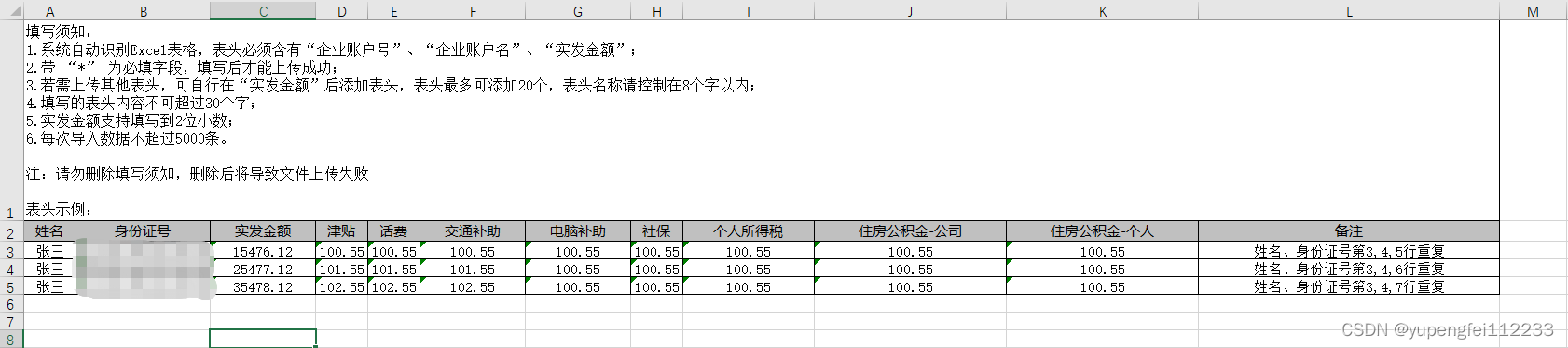
     private List<List<String>> getFileHeadList( FileBatch fileBatch) {
         String head = fileBatch.getFileHead();
         List<String> headList = Arrays.asList(head.split(","));
         List<List<String>> fileHead = headList.stream().map(item -> 	concatHead(Lists.newArrayList(item))).collect(Collectors.toList());
         fileHead.add(concatHead(Lists.newArrayList("备注")));
         return fileHead;
     }
    /**
     * 填写须知
     * @param headContent
     * @return
     */
	private List<String> concatHead(List<String> headContent) {
        String remake = "填写须知:                                                                                                \n" +
                "1.系统自动识别Excel表格,表头必须含有“企业账户号”、“企业账户名”、“实发金额”;\n" +
                "2.带 “*” 为必填字段,填写后才能上传成功;\n" +
                "3.若需上传其他表头,可自行在“实发金额”后添加表头,表头最多可添加20个,表头名称请控制在8个字以内;\n" +
                "4.填写的表头内容不可超过30个字;\n" +
                "5.实发金额支持填写到2位小数;\n" +
                "6.每次导入数据不超过5000条。\n" +
                "\n" +
                "注:请勿删除填写须知,删除后将导致文件上传失败\n" +
                "\n" +
                "表头示例:";
        headContent.add(0, remake);
        return headContent;
    }
    List<FileContent> fileContentList = dbFileContentService.list(
        Wrappers.<FileContent>lambdaQuery()
        .eq(FileContent::getBatchId, fileBatch.getId())
        .orderByAsc(FileContent::getRowNum)
    );
    List<List<Object>> contentList = fileContentList.stream().map(fileContent -> {
        List<Object> rowList = new ArrayList<>();
        String fieldsValue = fileContent.getFieldsValue();
        JSONObject contentObj = JSONObject.parseObject(fieldsValue);
        for (int columnIndex = 0 , length = headList.size(); columnIndex < length; columnIndex++) {
            Object content = contentObj.get(columnIndex);
            rowList.add(content == null ? "" : content);
        }
        rowList.add(fileContent.getCheckMessage());
        return rowList;
    }).collect(Collectors.toList());
import com.alibaba.excel.metadata.data.DataFormatData;
import com.alibaba.excel.metadata.data.WriteCellData;
import com.alibaba.excel.write.handler.context.CellWriteHandlerContext;
import com.alibaba.excel.write.metadata.style.WriteCellStyle;
import com.alibaba.excel.write.metadata.style.WriteFont;
import com.alibaba.excel.write.style.HorizontalCellStyleStrategy;
import org.apache.poi.ss.usermodel.BorderStyle;
import org.apache.poi.ss.usermodel.HorizontalAlignment;
import org.apache.poi.ss.usermodel.IndexedColors;

import java.util.List;

/**
 * 设置表头和填充内容的样式
 */
public class CellStyleStrategy extends HorizontalCellStyleStrategy {

    private final WriteCellStyle headWriteCellStyle;
    private final WriteCellStyle contentWriteCellStyle;

    /**
     * 操作列
     */
    private final List<Integer> columnIndexes;

    public CellStyleStrategy(List<Integer> columnIndexes,WriteCellStyle headWriteCellStyle, WriteCellStyle contentWriteCellStyle) {
        this.columnIndexes = columnIndexes;
        this.headWriteCellStyle = headWriteCellStyle;
        this.contentWriteCellStyle = contentWriteCellStyle;
    }

    //设置头样式
    @Override
    protected void setHeadCellStyle( CellWriteHandlerContext context) {
        // 获取字体实例
        WriteFont headWriteFont = new WriteFont();
        headWriteFont.setFontName("宋体");
        //表头不同处理
        if (columnIndexes.get(0).equals(context.getRowIndex())) {
            headWriteCellStyle.setFillForegroundColor(IndexedColors.WHITE.getIndex());
            headWriteCellStyle.setHorizontalAlignment(HorizontalAlignment.LEFT);
            headWriteFont.setFontHeightInPoints((short) 12);
            headWriteFont.setBold(false);
            headWriteFont.setFontName("宋体");
        }else{
            headWriteCellStyle.setFillForegroundColor(IndexedColors.GREY_25_PERCENT.getIndex());
            headWriteCellStyle.setHorizontalAlignment(HorizontalAlignment.CENTER);
            headWriteFont.setFontHeightInPoints((short) 11);
            headWriteFont.setBold(false);
            headWriteFont.setFontName("微软雅黑");
        }
        headWriteCellStyle.setWriteFont(headWriteFont);
        DataFormatData dataFormatData = new DataFormatData();
        dataFormatData.setIndex((short)49);
        headWriteCellStyle.setDataFormatData(dataFormatData);
        if (stopProcessing(context)) {
            return;
        }
        WriteCellData<?> cellData = context.getFirstCellData();
        WriteCellStyle.merge(headWriteCellStyle, cellData.getOrCreateStyle());
    }

    //设置填充数据样式
    @Override
    protected void setContentCellStyle(CellWriteHandlerContext context) {
        WriteFont contentWriteFont = new WriteFont();
        contentWriteFont.setFontName("宋体");
        contentWriteFont.setFontHeightInPoints((short) 11);
        //设置数据填充后的实线边框
        contentWriteCellStyle.setWriteFont(contentWriteFont);
        contentWriteCellStyle.setBorderLeft(BorderStyle.THIN);
        contentWriteCellStyle.setBorderTop(BorderStyle.THIN);
        contentWriteCellStyle.setBorderRight(BorderStyle.THIN);
        contentWriteCellStyle.setBorderBottom(BorderStyle.THIN);
        DataFormatData dataFormatData = new DataFormatData();
        dataFormatData.setIndex((short)49);
        contentWriteCellStyle.setDataFormatData(dataFormatData);
        contentWriteCellStyle.setHorizontalAlignment(HorizontalAlignment.CENTER);
        WriteCellData<?> cellData = context.getFirstCellData();
        WriteCellStyle.merge(contentWriteCellStyle, cellData.getOrCreateStyle());
    }
}
import com.alibaba.excel.write.style.row.AbstractRowHeightStyleStrategy;
import org.apache.poi.ss.usermodel.Row;

/**
 * 设置表头的自动调整行高策略
 */
public class CellRowHeightStyleStrategy extends AbstractRowHeightStyleStrategy {

    @Override
    protected void setHeadColumnHeight(Row row, int relativeRowIndex) {
        //设置主标题行高为17.7
        if(relativeRowIndex == 0){
            //如果excel需要显示行高为15,那这里就要设置为15*20=300
            row.setHeight((short) 3240);
        }
    }

    @Override
    protected void setContentColumnHeight(Row row, int relativeRowIndex) {
    }
}
如果是简单表头,可以使用EasyExcel中的LongestMatchColumnWidthStyleStrategy()来实现。
EasyExcel.write(fileName, LongestMatchColumnWidthData.class)
    .registerWriteHandler(new LongestMatchColumnWidthStyleStrategy()).sheet("模板").doWrite(dataLong());
如果是复杂表头,就需要自己来实现,代码如下:
import com.alibaba.excel.enums.CellDataTypeEnum;
import com.alibaba.excel.metadata.Head;
import com.alibaba.excel.metadata.data.CellData;
import com.alibaba.excel.metadata.data.WriteCellData;
import com.alibaba.excel.write.metadata.holder.WriteSheetHolder;
import com.alibaba.excel.write.style.column.AbstractColumnWidthStyleStrategy;
import lombok.extern.slf4j.Slf4j;
import org.apache.commons.collections.CollectionUtils;
import org.apache.poi.ss.usermodel.Cell;

import java.util.HashMap;
import java.util.List;
import java.util.Map;

/**
 * @author yupf
 * @description
 * @date 2022/9/7 18:48
 */
@Slf4j
public class CellWidthStyleStrategy extends AbstractColumnWidthStyleStrategy {
    private Map<Integer, Map<Integer, Integer>> CACHE = new HashMap<>();

    @Override
    protected void setColumnWidth(WriteSheetHolder writeSheetHolder, List<WriteCellData<?>> cellDataList, Cell cell, Head head, Integer relativeRowIndex, Boolean isHead) {
        Map<Integer, Integer> maxColumnWidthMap = CACHE.get(writeSheetHolder.getSheetNo());
        if (maxColumnWidthMap == null) {
            maxColumnWidthMap = new HashMap<>();
            CACHE.put(writeSheetHolder.getSheetNo(), maxColumnWidthMap);
        }
        if (isHead) {
            if(relativeRowIndex.intValue() == 1){
                Integer length = cell.getStringCellValue().getBytes().length;
                Integer maxColumnWidth = maxColumnWidthMap.get(cell.getColumnIndex());
                if (maxColumnWidth == null || length > maxColumnWidth) {
                    maxColumnWidthMap.put(cell.getColumnIndex(), length);
                    writeSheetHolder.getSheet().setColumnWidth(cell.getColumnIndex(), length * 300);
                }
            }
        }else{
            Integer columnWidth = this.dataLength(cellDataList, cell, isHead);
            if (columnWidth >= 0) {
                if (columnWidth > 255) {
                    columnWidth = 255;
                }
                Integer maxColumnWidth = maxColumnWidthMap.get(cell.getColumnIndex());
                if (maxColumnWidth == null || columnWidth > maxColumnWidth) {
                    maxColumnWidthMap.put(cell.getColumnIndex(), columnWidth);
                    writeSheetHolder.getSheet().setColumnWidth(cell.getColumnIndex(), columnWidth * 256);
                }
            }
        }
    }

    private Integer dataLength(List<WriteCellData<?>> cellDataList, Cell cell, Boolean isHead) {
        if (isHead) {
            return cell.getStringCellValue().getBytes().length;
        } else {
            CellData cellData = cellDataList.get(0);
            CellDataTypeEnum type = cellData.getType();
            if (type == null) {
                return -1;
            } else {
                switch (type) {
                    case STRING:
                        return cellData.getStringValue().getBytes().length;
                    case BOOLEAN:
                        return cellData.getBooleanValue().toString().getBytes().length;
                    case NUMBER:
                        return cellData.getNumberValue().toString().getBytes().length;
                    default:
                        return -1;
                }
            }
        }
    }
}
EasyExcel.write(response.getOutputStream())
    .head(head)
    .registerWriteHandler(new CellRowHeightStyleStrategy())   //设置行高的策略
    .registerWriteHandler(new CellStyleStrategy(Arrays.asList(0,1),new WriteCellStyle(), new WriteCellStyle()))
    .registerWriteHandler(new CellWidthStyleStrategy())
    .sheet(sheetName)
    .doWrite(list);
以上便是EasyExcel解析动态表头及导出的整个过程。
在使用过程中,笔者的感受是,上手难度很低,很适合新手去做简单的表格解析,当然,如果你的需求有复杂的格式,EasyExcel也提供了api,能够很好的满足需要。
我有一个字符串input="maybe(thisis|thatwas)some((nice|ugly)(day|night)|(strange(weather|time)))"Ruby中解析该字符串的最佳方法是什么?我的意思是脚本应该能够像这样构建句子:maybethisissomeuglynightmaybethatwassomenicenightmaybethiswassomestrangetime等等,你明白了......我应该一个字符一个字符地读取字符串并构建一个带有堆栈的状态机来存储括号值以供以后计算,还是有更好的方法?也许为此目的准备了一个开箱即用的库?
我主要使用Ruby来执行此操作,但到目前为止我的攻击计划如下:使用gemsrdf、rdf-rdfa和rdf-microdata或mida来解析给定任何URI的数据。我认为最好映射到像schema.org这样的统一模式,例如使用这个yaml文件,它试图描述数据词汇表和opengraph到schema.org之间的转换:#SchemaXtoschema.orgconversion#data-vocabularyDV:name:namestreet-address:streetAddressregion:addressRegionlocality:addressLocalityphoto:i
我正在使用ruby1.9解析以下带有MacRoman字符的csv文件#encoding:ISO-8859-1#csv_parse.csvName,main-dialogue"Marceu","Giveittohimóhe,hiswife."我做了以下解析。require'csv'input_string=File.read("../csv_parse.rb").force_encoding("ISO-8859-1").encode("UTF-8")#=>"Name,main-dialogue\r\n\"Marceu\",\"Giveittohim\x97he,hiswife.\"\
简而言之错误:NOTE:Gem::SourceIndex#add_specisdeprecated,useSpecification.add_spec.Itwillberemovedonorafter2011-11-01.Gem::SourceIndex#add_speccalledfrom/opt/local/lib/ruby/site_ruby/1.8/rubygems/source_index.rb:91./opt/local/lib/ruby/gems/1.8/gems/rails-2.3.8/lib/rails/gem_dependency.rb:275:in`==':und
我正在使用ruby2.1.0我有一个json文件。例如:test.json{"item":[{"apple":1},{"banana":2}]}用YAML.load加载这个文件安全吗?YAML.load(File.read('test.json'))我正在尝试加载一个json或yaml格式的文件。 最佳答案 YAML可以加载JSONYAML.load('{"something":"test","other":4}')=>{"something"=>"test","other"=>4}JSON将无法加载YAML。JSON.load("
有没有办法在Ruby中动态创建数组?例如,假设我想遍历用户输入的书籍数组:books=gets.chomp用户输入:"TheGreatGatsby,CrimeandPunishment,Dracula,Fahrenheit451,PrideandPrejudice,SenseandSensibility,Slaughterhouse-Five,TheAdventuresofHuckleberryFinn"我把它变成一个数组:books_array=books.split(",")现在,对于用户输入的每一本书,我想用Ruby创建一个数组。伪代码来做到这一点:x=0books_array.
我想在IRB中浏览文件系统并让提示更改以反射(reflect)当前工作目录,但我不知道如何在每个命令后进行提示更新。最终,我想在日常工作中更多地使用IRB,让bash溜走。我在我的.irbrc中试过这个:require'fileutils'includeFileUtilsIRB.conf[:PROMPT][:CUSTOM]={:PROMPT_N=>"\e[1m:\e[m",:PROMPT_I=>"\e[1m#{pwd}>\e[m",:PROMPT_S=>"FOO",:PROMPT_C=>"\e[1m#{pwd}>\e[m",:RETURN=>""}IRB.conf[:PROMPT_MO
我想用Nokogiri解析HTML页面。页面的一部分有一个表,它没有使用任何特定的ID。是否可以提取如下内容:Today,3,455,34Today,1,1300,3664Today,10,100000,3444,Yesterday,3454,5656,3Yesterday,3545,1000,10Yesterday,3411,36223,15来自这个HTML:TodayYesterdayQntySizeLengthLengthSizeQnty345534345456563113003664354510001010100000344434113622315
我使用的第一个解析器生成器是Parse::RecDescent,它的指南/教程很棒,但它最有用的功能是它的调试工具,特别是tracing功能(通过将$RD_TRACE设置为1来激活)。我正在寻找可以帮助您调试其规则的解析器生成器。问题是,它必须用python或ruby编写,并且具有详细模式/跟踪模式或非常有用的调试技术。有人知道这样的解析器生成器吗?编辑:当我说调试时,我并不是指调试python或ruby。我指的是调试解析器生成器,查看它在每一步都在做什么,查看它正在读取的每个字符,它试图匹配的规则。希望你明白这一点。赏金编辑:要赢得赏金,请展示一个解析器生成器框架,并说明它的
首先,我使用的是rails3.1.3和来自master的carrierwavegithub仓库的分支。我使用after_init钩子(Hook)来确定基于属性的字段页面模型实例并为这些字段定义属性访问器将值存储在序列化哈希中(希望它清楚我是什么谈论)。这是我正在做的事情的精简版:classPage省略mount_uploader命令让我可以访问我想要的属性。但是当我安装uploader时出现错误消息说“nil类的未定义新方法”我在源代码中读到有方法read_uploader和扩展模块中的write_uploader。我如何必须覆盖这些来制作mount_uploader命令使用我的“虚拟
