本次推荐三个插件。
目录
Verilog-HDL/SystemVerilog/Bluespec SystemVerilog
SystemVerilog and Verilog Formatter

如Verilog HDL/SystemVerilog插件欢迎页的说明,支持Ctags功能:
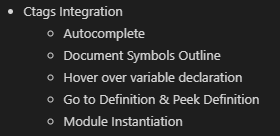
配置步骤:
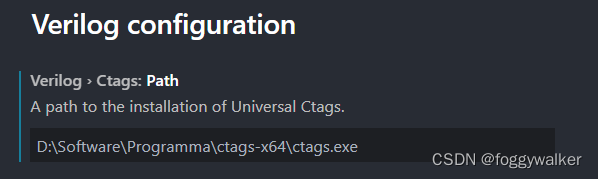
可以选择不同的编译器
包括:
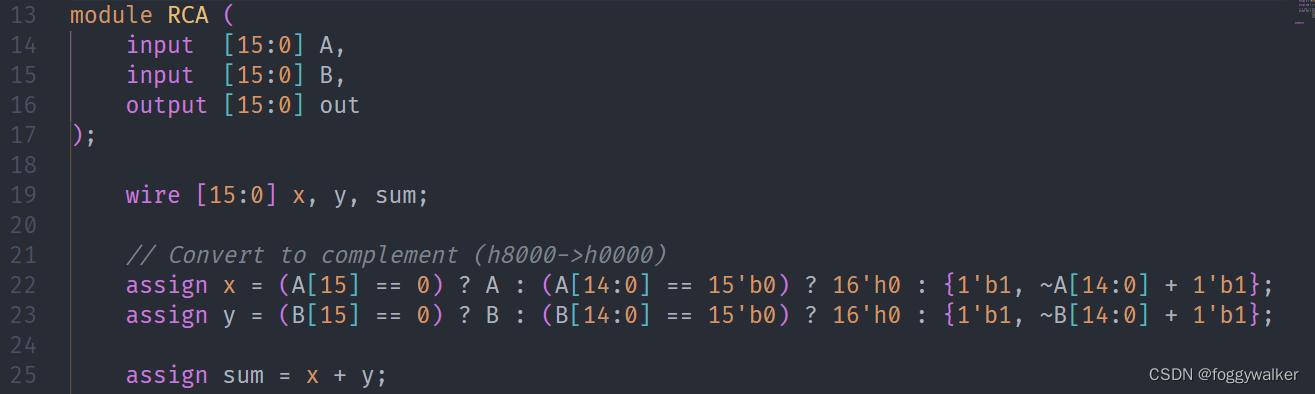 支持verilog、SV等语法高亮。

shift+ctrl+p输入verilog,可以直接自动例化模块。
 鼠标放在信号上,就会有声明显示在悬浮框中。Ctrl+左键,点击信号名,自动跳转到声明处。光标放在信号处,右键选择查看定义(快捷键可自行绑定),可以在此处展开声明处的代码,用于修改声明十分方便,就不用再来回跳转了。


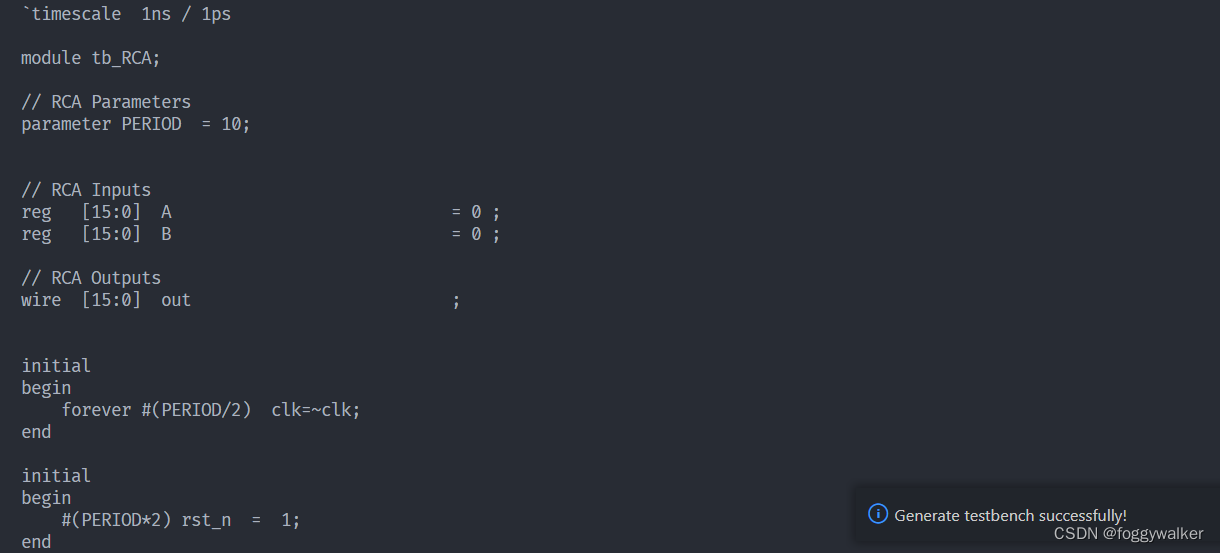
shift+ctrl+p输入testbench,可以直接生成tb。然后在终端复制即可。
 这款工具由谷歌推出,同时支持Verilog和System Verilog,效果非常好,支持自定义的格式化参数也很丰富。个人认为比verilog format好用。
verible-verilog-format: usage: bazel-bin/verilog/tools/formatter/verible-verilog-format [options] <file> [<file...>]
To pipe from stdin, use '-' as <file>.Flags from common/formatting/basic_format_style_init.cc:
--column_limit (Target line length limit to stay under when formatting.);
default: 100;
--indentation_spaces (Each indentation level adds this many spaces.);
default: 2;
--line_break_penalty (Penalty added to solution for each introduced line
break.); default: 2;
--over_column_limit_penalty (For penalty minimization, this represents the
baseline penalty value of exceeding the column limit. Additional penalty
of 1 is incurred for each character over this limit); default: 100;
--wrap_spaces (Each wrap level adds this many spaces. This applies when the
first element after an open-group section is wrapped. Otherwise, the
indentation level is set to the column position of the open-group
operator.); default: 4;
Flags from external/com_google_absl/absl/flags/parse.cc:
--flagfile (comma-separated list of files to load flags from); default: ;
--fromenv (comma-separated list of flags to set from the environment [use
'export FLAGS_flag1=value']); default: ;
--tryfromenv (comma-separated list of flags to try to set from the
environment if present); default: ;
--undefok (comma-separated list of flag names that it is okay to specify on
the command line even if the program does not define a flag with that
name); default: ;
Flags from verilog/formatting/format_style_init.cc:
--assignment_statement_alignment (Format various assignments:
{align,flush-left,preserve,infer}); default: infer;
--case_items_alignment (Format case items:
{align,flush-left,preserve,infer}); default: infer;
--class_member_variable_alignment (Format class member variables:
{align,flush-left,preserve,infer}); default: infer;
--compact_indexing_and_selections (Use compact binary expressions inside
indexing / bit selection operators); default: true;
--distribution_items_alignment (Aligh distribution items:
{align,flush-left,preserve,infer}); default: infer;
--enum_assignment_statement_alignment (Format assignments with enums:
{align,flush-left,preserve,infer}); default: infer;
--expand_coverpoints (If true, always expand coverpoints.); default: false;
--formal_parameters_alignment (Format formal parameters:
{align,flush-left,preserve,infer}); default: infer;
--formal_parameters_indentation (Indent formal parameters: {indent,wrap});
default: wrap;
--module_net_variable_alignment (Format net/variable declarations:
{align,flush-left,preserve,infer}); default: infer;
--named_parameter_alignment (Format named actual parameters:
{align,flush-left,preserve,infer}); default: infer;
--named_parameter_indentation (Indent named parameter assignments:
{indent,wrap}); default: wrap;
--named_port_alignment (Format named port connections:
{align,flush-left,preserve,infer}); default: infer;
--named_port_indentation (Indent named port connections: {indent,wrap});
default: wrap;
--port_declarations_alignment (Format port declarations:
{align,flush-left,preserve,infer}); default: infer;
--port_declarations_indentation (Indent port declarations: {indent,wrap});
default: wrap;
--port_declarations_right_align_packed_dimensions (If true, packed
dimensions in contexts with enabled alignment are aligned to the right.);
default: false;
--port_declarations_right_align_unpacked_dimensions (If true, unpacked
dimensions in contexts with enabled alignment are aligned to the right.);
default: false;
--struct_union_members_alignment (Format struct/union members:
{align,flush-left,preserve,infer}); default: infer;
--try_wrap_long_lines (If true, let the formatter attempt to optimize line
wrapping decisions where wrapping is needed, else leave them unformatted.
This is a short-term measure to reduce risk-of-harm.); default: false;
Flags from verilog/parser/verilog_parser.cc:
--verilog_trace_parser (Trace verilog parser); default: false;
Flags from verilog/tools/formatter/verilog_format.cc:
--failsafe_success (If true, always exit with 0 status, even if there were
input errors or internal errors. In all error conditions, the original
text is always preserved. This is useful in deploying services where
fail-safe behaviors should be considered a success.); default: true;
--inplace (If true, overwrite the input file on successful conditions.);
default: false;
--lines (Specific lines to format, 1-based, comma-separated, inclusive N-M
ranges, N is short for N-N. By default, left unspecified, all lines are
enabled for formatting. (repeatable, cumulative)); default: ;
--max_search_states (Limits the number of search states explored during line
wrap optimization.); default: 100000;
--show_equally_optimal_wrappings (If true, print when multiple optimal
solutions are found (stderr), but continue to operate normally.);
default: false;
--show_inter_token_info (If true, along with show_token_partition_tree,
include inter-token information such as spacing and break penalties.);
default: false;
--show_largest_token_partitions (If > 0, print token partitioning and then
exit without formatting output.); default: 0;
--show_token_partition_tree (If true, print diagnostics after token
partitioning and then exit without formatting output.); default: false;
--stdin_name (When using '-' to read from stdin, this gives an alternate
name for diagnostic purposes. Otherwise this is ignored.);
default: "<stdin>";
--verbose (Be more verbose.); default: false;
--verify_convergence (If true, and not incrementally formatting with
--lines, verify that re-formatting the formatted output yields no further
changes, i.e. formatting is convergent.); default: true;Try --helpfull to get a list of all flags or --help=substring shows help for
flags which include specified substring in either in the name, or description or
path.
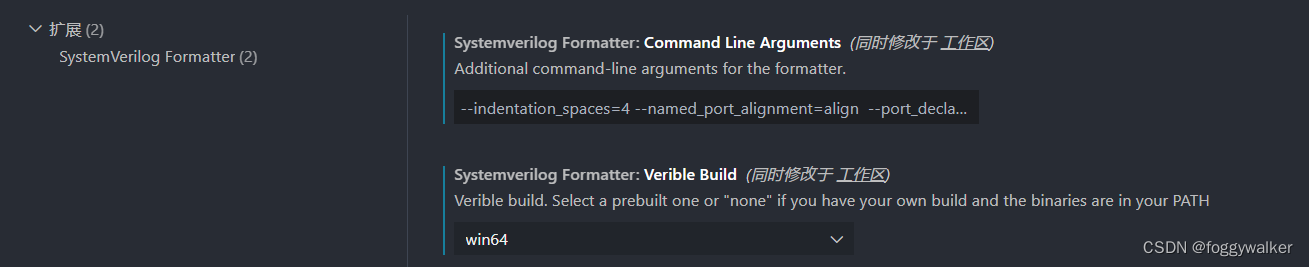
如果是windows,systemverilogFormatter.veribleBuild设置为win64
systemverilogFormatter.commandLineArguments可以自定义格式化参数,下面放上我自己用的参数,可以实现大部分常用代码段实现对齐。
--indentation_spaces=4 --named_port_alignment=align --ort_declarations_alignment=align --module_net_variable_alignment=align和vscode内置格式化一样,直接shift+ctrl+f就可以格式化文件,ctrl+k可以格式化选定内容。
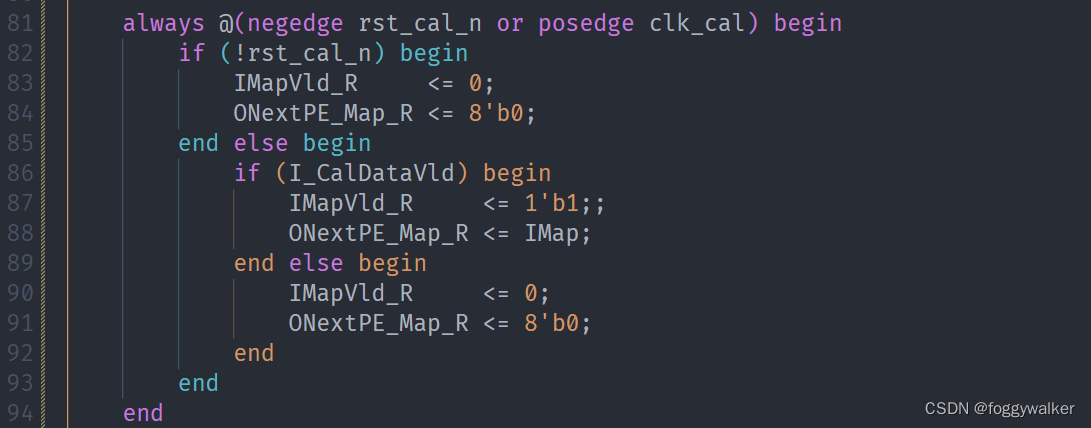
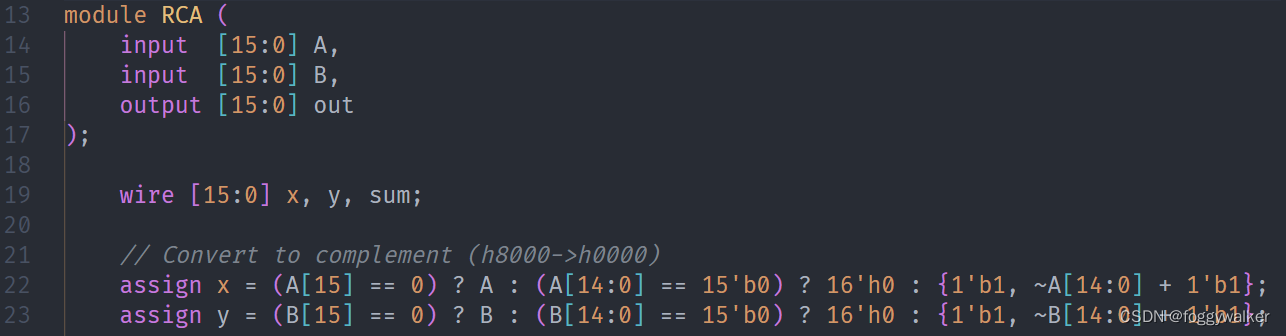 值得注意的是,由于这个插件也是在完善中,还是存在部分问题的。
比如else不会换行。
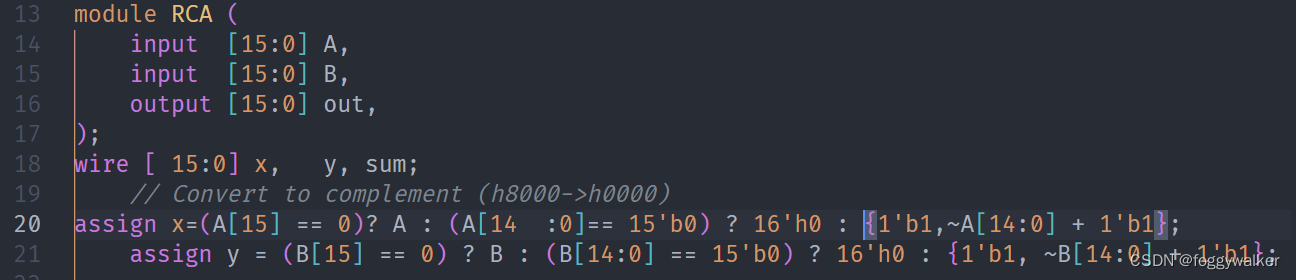
 比如,存在语法问题,或者不能识别语法的时候,格式化会使用不了。这里我将最后一个端口加上","就不能格式化了。
我想将html转换为纯文本。不过,我不想只删除标签,我想智能地保留尽可能多的格式。为插入换行符标签,检测段落并格式化它们等。输入非常简单,通常是格式良好的html(不是整个文档,只是一堆内容,通常没有anchor或图像)。我可以将几个正则表达式放在一起,让我达到80%,但我认为可能有一些现有的解决方案更智能。 最佳答案 首先,不要尝试为此使用正则表达式。很有可能你会想出一个脆弱/脆弱的解决方案,它会随着HTML的变化而崩溃,或者很难管理和维护。您可以使用Nokogiri快速解析HTML并提取文本:require'nokogiri'h
如何在buildr项目中使用Ruby?我在很多不同的项目中使用过Ruby、JRuby、Java和Clojure。我目前正在使用我的标准Ruby开发一个模拟应用程序,我想尝试使用Clojure后端(我确实喜欢功能代码)以及JRubygui和测试套件。我还可以看到在未来的不同项目中使用Scala作为后端。我想我要为我的项目尝试一下buildr(http://buildr.apache.org/),但我注意到buildr似乎没有设置为在项目中使用JRuby代码本身!这看起来有点傻,因为该工具旨在统一通用的JVM语言并且是在ruby中构建的。除了将输出的jar包含在一个独特的、仅限ruby
在rails源中:https://github.com/rails/rails/blob/master/activesupport/lib/active_support/lazy_load_hooks.rb可以看到以下内容@load_hooks=Hash.new{|h,k|h[k]=[]}在IRB中,它只是初始化一个空哈希。和做有什么区别@load_hooks=Hash.new 最佳答案 查看rubydocumentationforHashnew→new_hashclicktotogglesourcenew(obj)→new_has
我有一个在Linux服务器上运行的ruby脚本。它不使用rails或任何东西。它基本上是一个命令行ruby脚本,可以像这样传递参数:./ruby_script.rbarg1arg2如何将参数抽象到配置文件(例如yaml文件或其他文件)中?您能否举例说明如何做到这一点?提前谢谢你。 最佳答案 首先,您可以运行一个写入YAML配置文件的独立脚本:require"yaml"File.write("path_to_yaml_file",[arg1,arg2].to_yaml)然后,在您的应用中阅读它:require"yaml"arg
我已经在Sinatra上创建了应用程序,它代表了一个简单的API。我想在生产和开发上进行部署。我想在部署时选择,是开发还是生产,一些方法的逻辑应该改变,这取决于部署类型。是否有任何想法,如何完成以及解决此问题的一些示例。例子:我有代码get'/api/test'doreturn"Itisdev"end但是在部署到生产环境之后我想在运行/api/test之后看到ItisPROD如何实现? 最佳答案 根据SinatraDocumentation:EnvironmentscanbesetthroughtheRACK_ENVenvironm
我的主要目标是能够完全理解我正在使用的库/gem。我尝试在Github上从头到尾阅读源代码,但这真的很难。我认为更有趣、更温和的踏脚石就是在使用时阅读每个库/gem方法的源代码。例如,我想知道RubyonRails中的redirect_to方法是如何工作的:如何查找redirect_to方法的源代码?我知道在pry中我可以执行类似show-methodmethod的操作,但我如何才能对Rails框架中的方法执行此操作?您对我如何更好地理解Gem及其API有什么建议吗?仅仅阅读源代码似乎真的很难,尤其是对于框架。谢谢! 最佳答案 Ru
我的假设是moduleAmoduleBendend和moduleA::Bend是一样的。我能够从thisblog找到解决方案,thisSOthread和andthisSOthread.为什么以及什么时候应该更喜欢紧凑语法A::B而不是另一个,因为它显然有一个缺点?我有一种直觉,它可能与性能有关,因为在更多命名空间中查找常量需要更多计算。但是我无法通过对普通类进行基准测试来验证这一点。 最佳答案 这两种写作方法经常被混淆。首先要说的是,据我所知,没有可衡量的性能差异。(在下面的书面示例中不断查找)最明显的区别,可能也是最著名的,是你的
这个问题在这里已经有了答案:Railsformattingdate(4个答案)关闭4年前。我想格式化Time.Now函数以显示YYYY-MM-DDHH:MM:SS而不是:“2018-03-0909:47:19+0000”该函数需要放在时间中.现在功能。require‘roo’require‘roo-xls’require‘byebug’file_name=ARGV.first||“Template.xlsx”excel_file=Roo::Spreadsheet.open(“./#{file_name}“,extension::xlsx)xml=Nokogiri::XML::Build
几个月前,我读了一篇关于rubygem的博客文章,它可以通过阅读代码本身来确定编程语言。对于我的生活,我不记得博客或gem的名称。谷歌搜索“ruby编程语言猜测”及其变体也无济于事。有人碰巧知道相关gem的名称吗? 最佳答案 是这个吗:http://github.com/chrislo/sourceclassifier/tree/master 关于ruby-寻找通过阅读代码确定编程语言的rubygem?,我们在StackOverflow上找到一个类似的问题:
我喜欢使用Textile或Markdown为我的项目编写自述文件,但是当我生成RDoc时,自述文件被解释为RDoc并且看起来非常糟糕。有没有办法让RDoc通过RedCloth或BlueCloth而不是它自己的格式化程序运行文件?它可以配置为自动检测文件后缀的格式吗?(例如README.textile通过RedCloth运行,但README.mdown通过BlueCloth运行) 最佳答案 使用YARD直接代替RDoc将允许您包含Textile或Markdown文件,只要它们的文件后缀是合理的。我经常使用类似于以下Rake任务的东西:
