文章目录
(1)理解HDFS在Hadoop体系结构中的角色。
(2)熟练使用HDFS操作常用的Shell命令。
(3)熟悉HDFS操作常用的JavaAPI。
Windows操作系统
VMware Workstation Pro 15.5
远程终端工具Xshell7
Xftp7传输工具
CentOS7.5
(1) 向HDFS中上传任意文本文件,如果指定的文件在HDFS中已经存在,则由用户来指定是追加到原有文件末尾还是覆盖原有的文件;
Shell命令:
检查文件是否存在,可以使用如下命令:
cd /opt/module/hadoop-3.1.3/
$ ./bin/hdfs dfs -test -e weiguo.txt
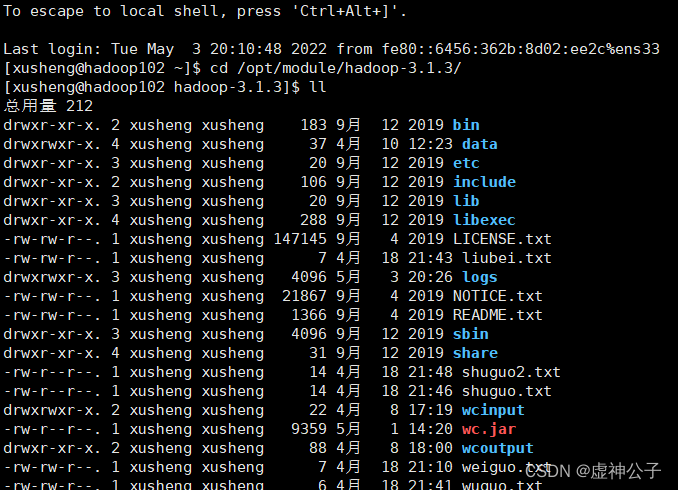
执行完上述命令不会输出结果,需要继续输入命令查看结果:
$ echo $?

如果结果显示文件已经存在,则用户可以选择追加到原来文件末尾或者覆盖原来文件,具体命令如下:
$ ./bin/hdfs dfs -appendToFile wuguo.txt weiguo.txt #追加到原文件末尾
$ ./bin/hdfs dfs -copyFromLocal -f wuguo.txt weiguo.txt#覆盖原来文件,第一种命令形式


代码:
package com.xusheng.hdfs;

//import org.apache.commons.configuration2.Configuration;
import org.apache.hadoop.fs.FSDataOutputStream;
import org.apache.hadoop.fs.FileSystem;
import org.apache.hadoop.fs.Path;

import java.io.FileInputStream;
import org.apache.hadoop.conf.Configuration;
import org.apache.hadoop.fs.*;
import java.io.*;


public class HDFSApi {
    /**
     * 判断路径是否存在
     */
    public static boolean test(Configuration conf, String path) throws IOException {
        FileSystem fs = FileSystem.get(conf);
        return fs.exists(new Path(path));
    }

    /**
     * 复制文件到指定路径
     * 若路径已存在,则进行覆盖
     */
    public static void copyFromLocalFile(Configuration conf, String localFilePath, String remoteFilePath) throws IOException {
        FileSystem fs = FileSystem.get(conf);
        Path localPath = new Path(localFilePath);
        Path remotePath = new Path(remoteFilePath);
        /* fs.copyFromLocalFile 第一个参数表示是否删除源文件,第二个参数表示是否覆盖 */
        fs.copyFromLocalFile(false, true, localPath, remotePath);
        fs.close();
    }

    /**
     * 追加文件内容
     */
    public static void appendToFile(Configuration conf, String localFilePath, String remoteFilePath) throws IOException {
        FileSystem fs = FileSystem.get(conf);
        Path remotePath = new Path(remoteFilePath);
        /* 创建一个文件读入流 */
        FileInputStream in = new FileInputStream(localFilePath);
        /* 创建一个文件输出流,输出的内容将追加到文件末尾 */
        FSDataOutputStream out = fs.append(remotePath);
        /* 读写文件内容 */
        byte[] data = new byte[1024];
        int read = -1;
        while ( (read = in.read(data)) > 0 ) {
            out.write(data, 0, read);
        }
        out.close();
        in.close();
        fs.close();
    }

    /**
     * 主函数
     */
    public static void main(String[] args) {
        Configuration conf = new Configuration();
        conf.set("fs.default.name"," hdfs://hadoop102:8020");
        //String localFilePath = "/home/hadoop/text.txt";    // 本地路径
        //String remoteFilePath = "/user/hadoop/text.txt";    // HDFS路径
        String localFilePath = "/user/xusheng/weiguo.txt";    // 本地路径
        String remoteFilePath = "/opt/module/hadoop-3.1.3/weiguo.txt";    // HDFS路径
        String choice = "append";    // 若文件存在则追加到文件末尾
//    String choice = "overwrite";    // 若文件存在则覆盖

        try {
            /* 判断文件是否存在 */
            Boolean fileExists = false;
            if (HDFSApi.test(conf, remoteFilePath)) {
                fileExists = true;
                System.out.println(remoteFilePath + " 已存在.");
            } else {
                System.out.println(remoteFilePath + " 不存在.");
            }
            /* 进行处理 */
            if ( !fileExists) { // 文件不存在,则上传
                HDFSApi.copyFromLocalFile(conf, localFilePath, remoteFilePath);
                System.out.println(localFilePath + " 已上传至 " + remoteFilePath);
            } else if ( choice.equals("overwrite") ) {    // 选择覆盖
                HDFSApi.copyFromLocalFile(conf, localFilePath, remoteFilePath);
                System.out.println(localFilePath + " 已覆盖 " + remoteFilePath);
            } else if ( choice.equals("append") ) {   // 选择追加
                HDFSApi.appendToFile(conf, localFilePath, remoteFilePath);
                System.out.println(localFilePath + " 已追加至 " + remoteFilePath);
            }
        } catch (Exception e) {
            e.printStackTrace();
        }
    }
}
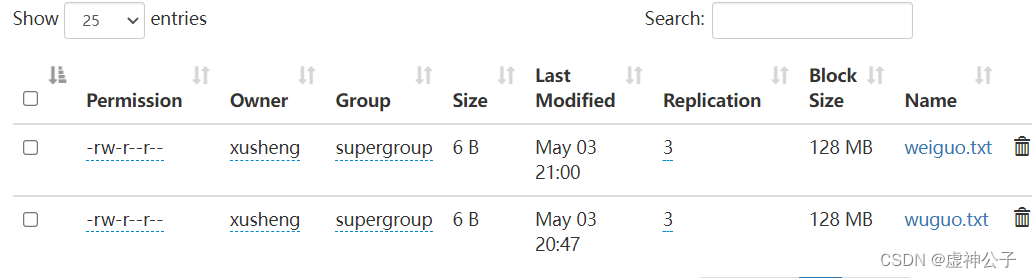
结果:
(2) 从HDFS中下载指定文件,如果本地文件与要下载的文件名称相同,则自动对下载的文件重命名;
Shell命令:
$ if $(hdfs dfs -test -e file:///home/hadoop/weiguo.txt);
$ then $(hdfs dfs -copyToLocal weiguo.txt ./ weiguo2.txt);
$ else $(hdfs dfs -copyToLocal weiguo.txt ./ weiguo.txt);
$ fi
代码:
package com.xusheng.hdfs;

import org.apache.hadoop.conf.Configuration;
import org.apache.hadoop.fs.*;
import java.io.*;

public class HDFSApi2 {
    /**
     * 下载文件到本地
     * 判断本地路径是否已存在,若已存在,则自动进行重命名
     */
    public static void copyToLocal(Configuration conf, String remoteFilePath, String localFilePath) throws IOException {
        FileSystem fs = FileSystem.get(conf);
        Path remotePath = new Path(remoteFilePath);
        File f = new File(localFilePath);
        /* 如果文件名存在,自动重命名(在文件名后面加上 _0, _1 ...) */
        if (f.exists()) {
            System.out.println(localFilePath + " 已存在.");
            Integer i = 0;
            while (true) {
                f = new File(localFilePath + "_" + i.toString());
                if (!f.exists()) {
                    localFilePath = localFilePath + "_" + i.toString();
                    break;
                }
            }
            System.out.println("将重新命名为: " + localFilePath);
        }

        // 下载文件到本地
        Path localPath = new Path(localFilePath);
        fs.copyToLocalFile(remotePath, localPath);
        fs.close();
    }

    /**
     * 主函数
     */
    public static void main(String[] args) {
        Configuration conf = new Configuration();
        conf.set("fs.default.name","hdfs://hadoop102:8020");
        String localFilePath = "/home/hadoop/weiguo.txt";    // 本地路径
        String remoteFilePath = "/user/xusheng/weiguo.txt";    // HDFS路径

        try {
            HDFSApi2.copyToLocal(conf, remoteFilePath, localFilePath);
            System.out.println("下载完成");
        } catch (Exception e) {
            e.printStackTrace();
        }
    }
}
结果:


(3) 将HDFS中指定文件的内容输出到终端中;
Shell命令:
$ hdfs dfs -cat weiguo.txt

代码:
package com.xusheng.hdfs;
import org.apache.hadoop.conf.Configuration;
import org.apache.hadoop.fs.*;
import java.io.*;

public class HDFSApi3 {
    /**
     * 读取文件内容
     */
    public static void cat(Configuration conf, String remoteFilePath) throws IOException {
        FileSystem fs = FileSystem.get(conf);
        Path remotePath = new Path(remoteFilePath);
        FSDataInputStream in = fs.open(remotePath);
        BufferedReader d = new BufferedReader(new InputStreamReader(in));
        String line = null;
        while ( (line = d.readLine()) != null ) {
            System.out.println(line);
        }
        d.close();
        in.close();
        fs.close();
    }

    /**
     * 主函数
     */
    public static void main(String[] args) {
        Configuration conf = new Configuration();
        conf.set("fs.default.name","hdfs://hadoop102:8020");
        String remoteFilePath = "/user/xusheng/weiguo.txt";    // HDFS路径

        try {
            System.out.println("读取文件: " + remoteFilePath);
            HDFSApi3.cat(conf, remoteFilePath);
            System.out.println("\n读取完成");
        } catch (Exception e) {
            e.printStackTrace();
        }
    }
}
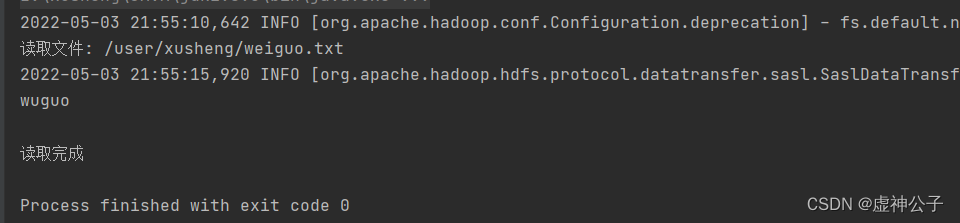
结果:
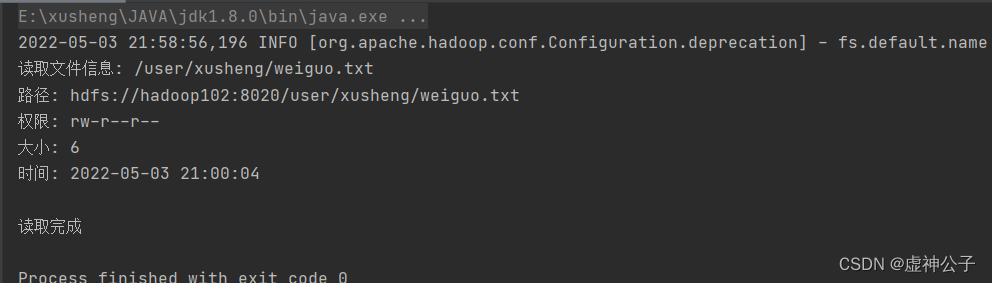
(4) 显示HDFS中指定的文件的读写权限、大小、创建时间、路径等信息;
Shell命令:
$ hdfs dfs -ls -h weiguo.txt

代码:
package com.xusheng.hdfs;
import org.apache.hadoop.conf.Configuration;
import org.apache.hadoop.fs.*;
import java.io.*;
import java.text.SimpleDateFormat;

public class HDFSApi4 {
    /**
     * 显示指定文件的信息
     */
    public static void ls(Configuration conf, String remoteFilePath) throws IOException {
        FileSystem fs = FileSystem.get(conf);
        Path remotePath = new Path(remoteFilePath);
        FileStatus[] fileStatuses = fs.listStatus(remotePath);
        for (FileStatus s : fileStatuses) {
            System.out.println("路径: " + s.getPath().toString());
            System.out.println("权限: " + s.getPermission().toString());
            System.out.println("大小: " + s.getLen());
            /* 返回的是时间戳,转化为时间日期格式 */
            Long timeStamp = s.getModificationTime();
            SimpleDateFormat format =  new SimpleDateFormat("yyyy-MM-dd HH:mm:ss");
            String date = format.format(timeStamp);
            System.out.println("时间: " + date);
        }
        fs.close();
    }

    /**
     * 主函数
     */
    public static void main(String[] args) {
        Configuration conf = new Configuration();
        conf.set("fs.default.name","hdfs://hadoop102:8020");
        String remoteFilePath = "/user/xusheng/weiguo.txt";    // HDFS路径

        try {
            System.out.println("读取文件信息: " + remoteFilePath);
            HDFSApi4.ls(conf, remoteFilePath);
            System.out.println("\n读取完成");
        } catch (Exception e) {
            e.printStackTrace();
        }
    }
}
结果:
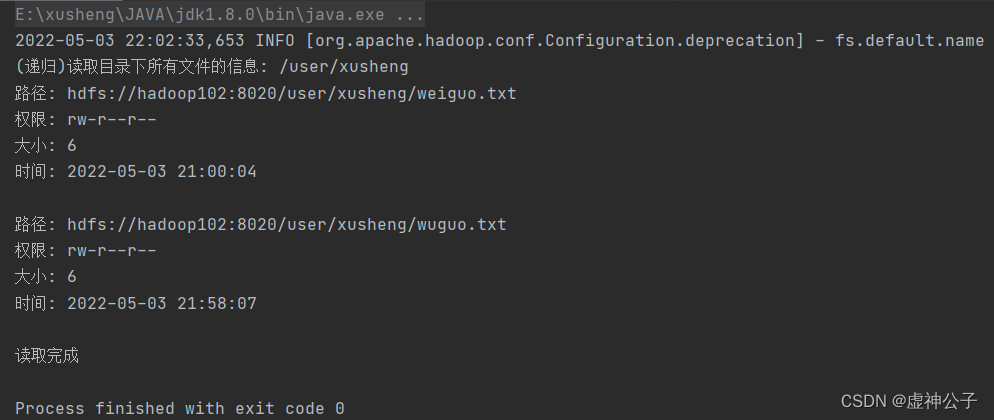
(5) 给定HDFS中某一个目录,输出该目录下的所有文件的读写权限、大小、创建时间、路径等信息,如果该文件是目录,则递归输出该目录下所有文件相关信息;
Shell命令:
$ ./bin/hdfs dfs -ls -R -h /user/xusheng

代码:
package com.xusheng.hdfs;
import org.apache.hadoop.conf.Configuration;
import org.apache.hadoop.fs.*;
import java.io.*;
import java.text.SimpleDateFormat;

public class HDFSApi5 {
    /**
     * 显示指定文件夹下所有文件的信息(递归)
     */
    public static void lsDir(Configuration conf, String remoteDir) throws IOException {
        FileSystem fs = FileSystem.get(conf);
        Path dirPath = new Path(remoteDir);
        /* 递归获取目录下的所有文件 */
        RemoteIterator<LocatedFileStatus> remoteIterator = fs.listFiles(dirPath, true);
        /* 输出每个文件的信息 */
        while (remoteIterator.hasNext()) {
            FileStatus s = remoteIterator.next();
            System.out.println("路径: " + s.getPath().toString());
            System.out.println("权限: " + s.getPermission().toString());
            System.out.println("大小: " + s.getLen());
            /* 返回的是时间戳,转化为时间日期格式 */
            Long timeStamp = s.getModificationTime();
            SimpleDateFormat format =  new SimpleDateFormat("yyyy-MM-dd HH:mm:ss");
            String date = format.format(timeStamp);
            System.out.println("时间: " + date);
            System.out.println();
        }
        fs.close();
    }

    /**
     * 主函数
     */
    public static void main(String[] args) {
        Configuration conf = new Configuration();
        conf.set("fs.default.name","hdfs://hadoop102:8020");
        String remoteDir = "/user/xusheng";    // HDFS路径

        try {
            System.out.println("(递归)读取目录下所有文件的信息: " + remoteDir);
            HDFSApi5.lsDir(conf, remoteDir);
            System.out.println("读取完成");
        } catch (Exception e) {
            e.printStackTrace();
        }
    }
}
结果:
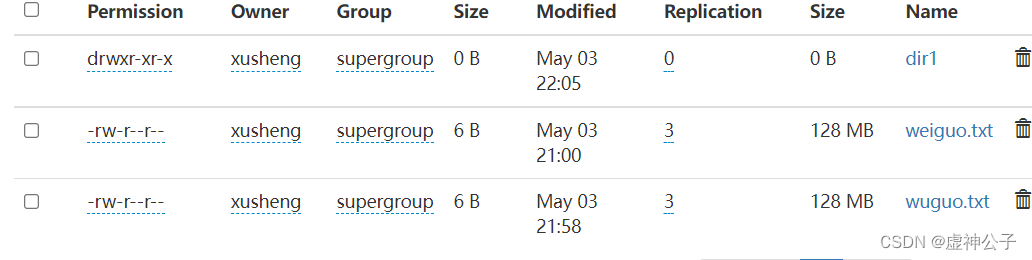
(6) 提供一个HDFS内的文件的路径,对该文件进行创建和删除操作。如果文件所在目录不存在,则自动创建目录;
Shell命令:
$ hdfs dfs -test -d dir1/dir2
$ hdfs dfs -touchz dir1/dir2/filename
$ hdfs dfs -mkdir -p dir1/dir2 && hdfs dfs -touchz dir1/dir2/filename
$ hdfs dfs -rm dir1/dir2/filename#删除文件

代码:
package com.xusheng.hdfs;

import org.apache.hadoop.conf.Configuration;
import org.apache.hadoop.fs.*;
import java.io.*;

public class HDFSApi6 {
    /**
     * 判断路径是否存在
     */
    public static boolean test(Configuration conf, String path) throws IOException {
        FileSystem fs = FileSystem.get(conf);
        return fs.exists(new Path(path));
    }

    /**
     * 创建目录
     */
    public static boolean mkdir(Configuration conf, String remoteDir) throws IOException {
        FileSystem fs = FileSystem.get(conf);
        Path dirPath = new Path(remoteDir);
        boolean result = fs.mkdirs(dirPath);
        fs.close();
        return result;
    }

    /**
     * 创建文件
     */
    public static void touchz(Configuration conf, String remoteFilePath) throws IOException {
        FileSystem fs = FileSystem.get(conf);
        Path remotePath = new Path(remoteFilePath);
        FSDataOutputStream outputStream = fs.create(remotePath);
        outputStream.close();
        fs.close();
    }

    /**
     * 删除文件
     */
    public static boolean rm(Configuration conf, String remoteFilePath) throws IOException {
        FileSystem fs = FileSystem.get(conf);
        Path remotePath = new Path(remoteFilePath);
        boolean result = fs.delete(remotePath, false);
        fs.close();
        return result;
    }

    /**
     * 主函数
     */
    public static void main(String[] args) {
        Configuration conf = new Configuration();
        conf.set("fs.default.name","hdfs://hadoop102:8020");
        String remoteFilePath = "/user/xusheng/input/text.txt";    // HDFS路径
        String remoteDir = "/user/xusheng/input";    // HDFS路径对应的目录


        try {
            /* 判断路径是否存在,存在则删除,否则进行创建 */
            if ( HDFSApi6.test(conf, remoteFilePath) ) {
                HDFSApi6.rm(conf, remoteFilePath); // 删除
                System.out.println("删除路径: " + remoteFilePath);
            } else {
                if ( !HDFSApi6.test(conf, remoteDir) ) { // 若目录不存在,则进行创建
                    HDFSApi6.mkdir(conf, remoteDir);
                    System.out.println("创建文件夹: " + remoteDir);
                }
                HDFSApi6.touchz(conf, remoteFilePath);
                System.out.println("创建路径: " + remoteFilePath);
            }
        } catch (Exception e) {
            e.printStackTrace();
        }
    }
}
(7) 提供一个HDFS的目录的路径,对该目录进行创建和删除操作。创建目录时,如果目录文件所在目录不存在,则自动创建相应目录;删除目录时,由用户指定当该目录不为空时是否还删除该目录;
Shell命令:
创建目录的命令如下:$ hdfs dfs -mkdir -p dir1/dir2
删除目录的命令如下:$ hdfs dfs -rmdir dir1/dir2
上述命令执行以后,如果目录非空,则会提示not empty,删除操作不会执行。如果要强制删除目录,可以使用如下命令:
$ hdfs dfs -rm -R dir1/dir2

代码:
package com.xusheng.hdfs;
import org.apache.hadoop.conf.Configuration;
import org.apache.hadoop.fs.*;
import java.io.*;

public class HDFSApi7 {
    /**
     * 判断路径是否存在
     */
    public static boolean test(Configuration conf, String path) throws IOException {
        FileSystem fs = FileSystem.get(conf);
        return fs.exists(new Path(path));
    }

    /**
     * 判断目录是否为空
     * true: 空,false: 非空
     */
    public static boolean isDirEmpty(Configuration conf, String remoteDir) throws IOException {
        FileSystem fs = FileSystem.get(conf);
        Path dirPath = new Path(remoteDir);
        RemoteIterator<LocatedFileStatus> remoteIterator = fs.listFiles(dirPath, true);
        return !remoteIterator.hasNext();
    }

    /**
     * 创建目录
     */
    public static boolean mkdir(Configuration conf, String remoteDir) throws IOException {
        FileSystem fs = FileSystem.get(conf);
        Path dirPath = new Path(remoteDir);
        boolean result = fs.mkdirs(dirPath);
        fs.close();
        return result;
    }

    /**
     * 删除目录
     */
    public static boolean rmDir(Configuration conf, String remoteDir) throws IOException {
        FileSystem fs = FileSystem.get(conf);
        Path dirPath = new Path(remoteDir);
        /* 第二个参数表示是否递归删除所有文件 */
        boolean result = fs.delete(dirPath, true);
        fs.close();
        return result;
    }

    /**
     * 主函数
     */
    public static void main(String[] args) {
        Configuration conf = new Configuration();
        conf.set("fs.default.name","hdfs://hadoop102:8020");
        String remoteDir = "/user/xusheng/dir1/dir2";    // HDFS目录
        Boolean forceDelete = false;  // 是否强制删除

        try {
            /* 判断目录是否存在,不存在则创建,存在则删除 */
            if ( !HDFSApi7.test(conf, remoteDir) ) {
                HDFSApi7.mkdir(conf, remoteDir); // 创建目录
                System.out.println("创建目录: " + remoteDir);
            } else {
                if ( HDFSApi7.isDirEmpty(conf, remoteDir) || forceDelete ) { // 目录为空或强制删除
                    HDFSApi7.rmDir(conf, remoteDir);
                    System.out.println("删除目录: " + remoteDir);
                } else  { // 目录不为空
                    System.out.println("目录不为空,不删除: " + remoteDir);
                }
            }
        } catch (Exception e) {
            e.printStackTrace();
        }
    }
}
(8) 向HDFS中指定的文件追加内容,由用户指定内容追加到原有文件的开头或结尾;
Shell命令:
$ hdfs dfs -appendToFile wuguo.txt weiguo.txt
追加到原文件的开头,在HDFS中不存在与这种操作对应的命令,因此,无法使用一条命令来完成。可以先移动到本地进行操作,再进行上传覆盖,具体命令如下:
$ hdfs dfs -get weiguo.txt
$ cat weiguo2.txt >> wuguo.txt
$ hdfs dfs -copyFromLocal -f weiguo2.txt weiguo2.txt

代码:
package com.xusheng.hdfs;

import org.apache.hadoop.conf.Configuration;
import org.apache.hadoop.fs.*;
import java.io.*;

public class HDFSApi8 {
    /**
     * 判断路径是否存在
     */
    public static boolean test(Configuration conf, String path) throws IOException {
        FileSystem fs = FileSystem.get(conf);
        return fs.exists(new Path(path));
    }

    /**
     * 追加文本内容
     */
    public static void appendContentToFile(Configuration conf, String content, String remoteFilePath) throws IOException {
        FileSystem fs = FileSystem.get(conf);
        Path remotePath = new Path(remoteFilePath);
        /* 创建一个文件输出流,输出的内容将追加到文件末尾 */
        FSDataOutputStream out = fs.append(remotePath);
        out.write(content.getBytes());
        out.close();
        fs.close();
    }

    /**
     * 追加文件内容
     */
    public static void appendToFile(Configuration conf, String localFilePath, String remoteFilePath) throws IOException {
        FileSystem fs = FileSystem.get(conf);
        Path remotePath = new Path(remoteFilePath);
        /* 创建一个文件读入流 */
        FileInputStream in = new FileInputStream(localFilePath);
        /* 创建一个文件输出流,输出的内容将追加到文件末尾 */
        FSDataOutputStream out = fs.append(remotePath);
        /* 读写文件内容 */
        byte[] data = new byte[1024];
        int read = -1;
        while ( (read = in.read(data)) > 0 ) {
            out.write(data, 0, read);
        }
        out.close();
        in.close();
        fs.close();
    }

    /**
     * 移动文件到本地
     * 移动后,删除源文件
     */
    public static void moveToLocalFile(Configuration conf, String remoteFilePath, String localFilePath) throws IOException {
        FileSystem fs = FileSystem.get(conf);
        Path remotePath = new Path(remoteFilePath);
        Path localPath = new Path(localFilePath);
        fs.moveToLocalFile(remotePath, localPath);
    }

    /**
     * 创建文件
     */
    public static void touchz(Configuration conf, String remoteFilePath) throws IOException {
        FileSystem fs = FileSystem.get(conf);
        Path remotePath = new Path(remoteFilePath);
        FSDataOutputStream outputStream = fs.create(remotePath);
        outputStream.close();
        fs.close();
    }

    /**
     * 主函数
     */
    public static void main(String[] args) {
        Configuration conf = new Configuration();
        conf.set("fs.default.name","hdfs://hadoop102:8020");
        String remoteFilePath = "/user/xusheng/weiguo.txt";    // HDFS文件
        String content = "新追加的内容\n";
        String choice = "after";      //追加到文件末尾
//    String choice = "before";    // 追加到文件开头

        try {
            /* 判断文件是否存在 */
            if ( !HDFSApi.test(conf, remoteFilePath) ) {
                System.out.println("文件不存在: " + remoteFilePath);
            } else {
                if ( choice.equals("after") ) { // 追加在文件末尾
                    HDFSApi8.appendContentToFile(conf, content, remoteFilePath);
                    System.out.println("已追加内容到文件末尾" + remoteFilePath);
                } else if ( choice.equals("before") )  { // 追加到文件开头
                    /* 没有相应的api可以直接操作,因此先把文件移动到本地*/
                    /*创建一个新的HDFS,再按顺序追加内容 */
                    String localTmpPath = "/user/xusheng/tmp.txt";
                    // 移动到本地
                    HDFSApi8.moveToLocalFile(conf, remoteFilePath, localTmpPath);
                    // 创建一个新文件
                    HDFSApi8.touchz(conf, remoteFilePath);
                    // 先写入新内容
                    HDFSApi8.appendContentToFile(conf, content, remoteFilePath);
                    // 再写入原来内容
                    HDFSApi.appendToFile(conf, localTmpPath, remoteFilePath);
                    System.out.println("已追加内容到文件开头: " + remoteFilePath);
                }
            }
        } catch (Exception e) {
            e.printStackTrace();
        }
    }
}
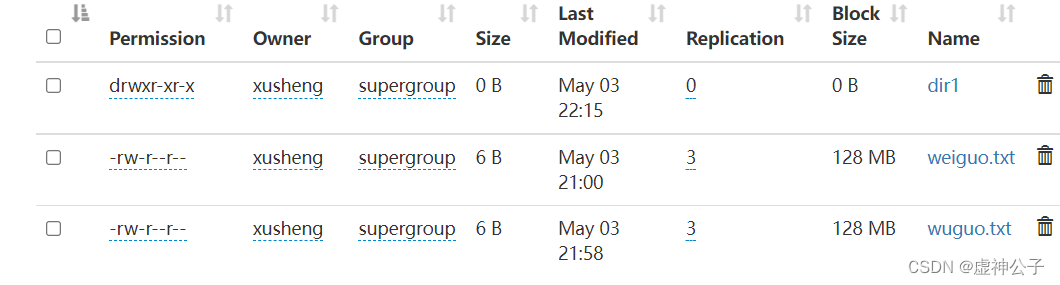
(9) 删除HDFS中指定的文件;
Shell命令:
$ hdfs dfs -rm weiguo2.txt
代码:
package com.xusheng.hdfs;
import org.apache.hadoop.conf.Configuration;
import org.apache.hadoop.fs.*;
import java.io.*;

public class HDFSApi9 {
    /**
     * 删除文件
     */
    public static boolean rm(Configuration conf, String remoteFilePath) throws IOException {
        FileSystem fs = FileSystem.get(conf);
        Path remotePath = new Path(remoteFilePath);
        boolean result = fs.delete(remotePath, false);
        fs.close();
        return result;
    }

    /**
     * 主函数
     */
    public static void main(String[] args) {
        Configuration conf = new Configuration();
        conf.set("fs.default.name","hdfs://hadoop102:8020");
        String remoteFilePath = "/user/xusheng/text.txt";    // HDFS文件

        try {
            if ( HDFSApi9.rm(conf, remoteFilePath) ) {
                System.out.println("文件删除: " + remoteFilePath);
            } else {
                System.out.println("操作失败(文件不存在或删除失败)");
            }
        } catch (Exception e) {
            e.printStackTrace();
        }
    }
}
结果:
(10) 在HDFS中,将文件从源路径移动到目的路径。
Shell命令:
$ hdfs dfs -mv weiguo.txt wuguo.txt
代码:
package com.xusheng.hdfs;
import org.apache.hadoop.conf.Configuration;
import org.apache.hadoop.fs.*;
import java.io.*;

public class HDFSApi10 {
    /**
     * 移动文件
     */
    public static boolean mv(Configuration conf, String remoteFilePath, String remoteToFilePath) throws IOException {
        FileSystem fs = FileSystem.get(conf);
        Path srcPath = new Path(remoteFilePath);
        Path dstPath = new Path(remoteToFilePath);
        boolean result = fs.rename(srcPath, dstPath);
        fs.close();
        return result;
    }

    /**
     * 主函数
     */
    public static void main(String[] args) {
        Configuration conf = new Configuration();
        conf.set("fs.default.name","hdfs://hadoop102:8020");
        String remoteFilePath = "hdfs:///user/xusheng/text.txt";    // 源文件HDFS路径
        String remoteToFilePath = "hdfs:///user/xusheng/new.txt";    // 目的HDFS路径

        try {
            if ( HDFSApi10.mv(conf, remoteFilePath, remoteToFilePath) ) {
                System.out.println("将文件 " + remoteFilePath + " 移动到 " + remoteToFilePath);
            } else {
                System.out.println("操作失败(源文件不存在或移动失败)");
            }
        } catch (Exception e) {
            e.printStackTrace();
        }
    }
}
(二)编程实现一个类“MyFSDataInputStream”,该类继承“org.apache.hadoop.fs.FSDataInputStream”,要求如下:实现按行读取HDFS中指定文件的方法“readLine()”,如果读到文件末尾,则返回空,否则返回文件一行的文本。
代码:
package com.xusheng.hdfs;
import org.apache.hadoop.conf.Configuration;
import org.apache.hadoop.fs.FSDataInputStream;
import org.apache.hadoop.fs.FileSystem;
import org.apache.hadoop.fs.Path;
import java.io.*;

public class MyFSDataInputStream extends FSDataInputStream {
    public MyFSDataInputStream(InputStream in) {
        super(in);
    }

    /**
     * 实现按行读取
     * 每次读入一个字符,遇到"\n"结束,返回一行内容
     */
    public static String readline(BufferedReader br) throws IOException {
        char[] data = new char[1024];
        int read = -1;
        int off = 0;
// 循环执行时,br 每次会从上一次读取结束的位置继续读取
//因此该函数里,off 每次都从0开始
        while ( (read = br.read(data, off, 1)) != -1 ) {
            if (String.valueOf(data[off]).equals("\n") ) {
                off += 1;
                break;
            }
            off += 1;
        }

        if (off > 0) {
            return String.valueOf(data);
        } else {
            return null;
        }
    }

    /**
     * 读取文件内容
     */
    public static void cat(Configuration conf, String remoteFilePath) throws IOException {
        FileSystem fs = FileSystem.get(conf);
        Path remotePath = new Path(remoteFilePath);
        FSDataInputStream in = fs.open(remotePath);
        BufferedReader br = new BufferedReader(new InputStreamReader(in));
        String line = null;
        while ( (line = MyFSDataInputStream.readline(br)) != null ) {
            System.out.println(line);
        }
        br.close();
        in.close();
        fs.close();
    }

    /**
     * 主函数
     */
    public static void main(String[] args) {
        Configuration conf = new Configuration();
        conf.set("fs.default.name","hdfs://hadoop102:8020");
        String remoteFilePath = "/user/xusheng/wuguo.txt";    // HDFS路径
        try {
            MyFSDataInputStream.cat(conf, remoteFilePath);
        } catch (Exception e) {
            e.printStackTrace();
        }
    }
}
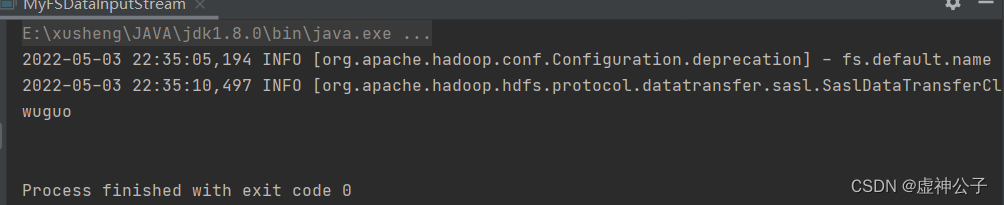
结果:
(三)查看Java帮助手册或其它资料,用“java.net.URL”和“org.apache.hadoop.fs.FsURLStreamHandlerFactory”编程完成输出HDFS中指定文件的文本到终端中。
代码:
package com.xusheng.hdfs;
import org.apache.hadoop.fs.*;
import org.apache.hadoop.io.IOUtils;
import java.io.*;
import java.net.URL;

public class HDFSApi11 {
    static{
        URL.setURLStreamHandlerFactory(new FsUrlStreamHandlerFactory());
    }

    /**
     * 主函数
     */
    public static void main(String[] args) throws Exception {
        String remoteFilePath = "hdfs://hadoop102:8020//user/xusheng/weiguo.txt";    // HDFS文件
        InputStream in = null;
        try{
            /* 通过URL对象打开数据流,从中读取数据 */
            in = new URL(remoteFilePath).openStream();
            IOUtils.copyBytes(in,System.out,4096,false);
        } finally{
            IOUtils.closeStream(in);
        }
    }
}
结果:

Hadoop 运行模式
1)Hadoop 官方网站:http://hadoop.apache.org/
2)Hadoop 运行模式包括: 本地模式、 伪分布式模式以及 完全分布式模式。
➢ 本地模式:单机运行,只是用来演示一下官方案例。生产环境不用。
➢ 伪分布式模式:也是单机运行,但是具备 Hadoop 集群的所有功能,一台服务器模
拟一个分布式的环境。个别缺钱的公司用来测试,生产环境不用。
➢ 完全分布式模式:多台服务器组成分布式环境。生产环境使用。
对于具有离线功能的智能手机应用程序,我正在为Xml文件创建单向文本同步。我希望我的服务器将增量/差异(例如GNU差异补丁)发送到目标设备。这是计划:Time=0Server:hasversion_1ofXmlfile(~800kiB)Client:hasversion_1ofXmlfile(~800kiB)Time=1Server:hasversion_1andversion_2ofXmlfile(each~800kiB)computesdeltaoftheseversions(=patch)(~10kiB)sendspatchtoClient(~10kiBtransferred)Cl
大约一年前,我决定确保每个包含非唯一文本的Flash通知都将从模块中的方法中获取文本。我这样做的最初原因是为了避免一遍又一遍地输入相同的字符串。如果我想更改措辞,我可以在一个地方轻松完成,而且一遍又一遍地重复同一件事而出现拼写错误的可能性也会降低。我最终得到的是这样的:moduleMessagesdefformat_error_messages(errors)errors.map{|attribute,message|"Error:#{attribute.to_s.titleize}#{message}."}enddeferror_message_could_not_find(obje
我主要使用Ruby来执行此操作,但到目前为止我的攻击计划如下:使用gemsrdf、rdf-rdfa和rdf-microdata或mida来解析给定任何URI的数据。我认为最好映射到像schema.org这样的统一模式,例如使用这个yaml文件,它试图描述数据词汇表和opengraph到schema.org之间的转换:#SchemaXtoschema.orgconversion#data-vocabularyDV:name:namestreet-address:streetAddressregion:addressRegionlocality:addressLocalityphoto:i
我构建了两个需要相互通信和发送文件的Rails应用程序。例如,一个Rails应用程序会发送请求以查看其他应用程序数据库中的表。然后另一个应用程序将呈现该表的json并将其发回。我还希望一个应用程序将存储在其公共(public)目录中的文本文件发送到另一个应用程序的公共(public)目录。我从来没有做过这样的事情,所以我什至不知道从哪里开始。任何帮助,将不胜感激。谢谢! 最佳答案 无论Rails是什么,几乎所有Web应用程序都有您的要求,大多数现代Web应用程序都需要相互通信。但是有一个小小的理解需要你坚持下去,网站不应直接访问彼此
我尝试运行2.x应用程序。我使用rvm并为此应用程序设置其他版本的ruby:$rvmuseree-1.8.7-head我尝试运行服务器,然后出现很多错误:$script/serverNOTE:Gem.source_indexisdeprecated,useSpecification.Itwillberemovedonorafter2011-11-01.Gem.source_indexcalledfrom/Users/serg/rails_projects_terminal/work_proj/spohelp/config/../vendor/rails/railties/lib/r
刚入门rails,开始慢慢理解。有人可以解释或给我一些关于在application_controller中编码的好处或时间和原因的想法吗?有哪些用例。您如何为Rails应用程序使用应用程序Controller?我不想在那里放太多代码,因为据我了解,每个请求都会调用此Controller。这是真的? 最佳答案 ApplicationController实际上是您应用程序中的每个其他Controller都将从中继承的类(尽管这不是强制性的)。我同意不要用太多代码弄乱它并保持干净整洁的态度,尽管在某些情况下ApplicationContr
我是一个Rails初学者,但我想从我的RailsView(html.haml文件)中查看Ruby变量的内容。我试图在ruby中打印出变量(认为它会在终端中出现),但没有得到任何结果。有什么建议吗?我知道Rails调试器,但更喜欢使用inspect来打印我的变量。 最佳答案 您可以在View中使用puts方法将信息输出到服务器控制台。您应该能够在View中的任何位置使用Haml执行以下操作:-puts@my_variable.inspect 关于ruby-on-rails-如何在我的R
有时我需要处理键/值数据。我不喜欢使用数组,因为它们在大小上没有限制(很容易不小心添加超过2个项目,而且您最终需要稍后验证大小)。此外,0和1的索引变成了魔数(MagicNumber),并且在传达含义方面做得很差(“当我说0时,我的意思是head...”)。散列也不合适,因为可能会不小心添加额外的条目。我写了下面的类来解决这个问题:classPairattr_accessor:head,:taildefinitialize(h,t)@head,@tail=h,tendend它工作得很好并且解决了问题,但我很想知道:Ruby标准库是否已经带有这样一个类? 最佳
是否可以在应用程序中包含的gem代码中知道应用程序的Rails文件系统根目录?这是gem来源的示例:moduleMyGemdefself.included(base)putsRails.root#returnnilendendActionController::Base.send:include,MyGem谢谢,抱歉我的英语不好 最佳答案 我发现解决类似问题的解决方案是使用railtie初始化程序包含我的模块。所以,在你的/lib/mygem/railtie.rbmoduleMyGemclassRailtie使用此代码,您的模块将在
我正在尝试使用Curbgem执行以下POST以解析云curl-XPOST\-H"X-Parse-Application-Id:PARSE_APP_ID"\-H"X-Parse-REST-API-Key:PARSE_API_KEY"\-H"Content-Type:image/jpeg"\--data-binary'@myPicture.jpg'\https://api.parse.com/1/files/pic.jpg用这个:curl=Curl::Easy.new("https://api.parse.com/1/files/lion.jpg")curl.multipart_form_
