QPython 3c在大佬的改进下,拥有了基于sl4a的FullScreenWrapper2全屏框架。文章将用该框架制作我们的可视化应用【ONE一个】。
以上应用在后台回复应用名称即可获取下载链接,如【AIDE】
在aide新建项目,在app/src/main/res/layout下新建xml,点击右上角的图片按钮进入设计界面,按照以下进行设计,在qpython中展示可能需要做调整。
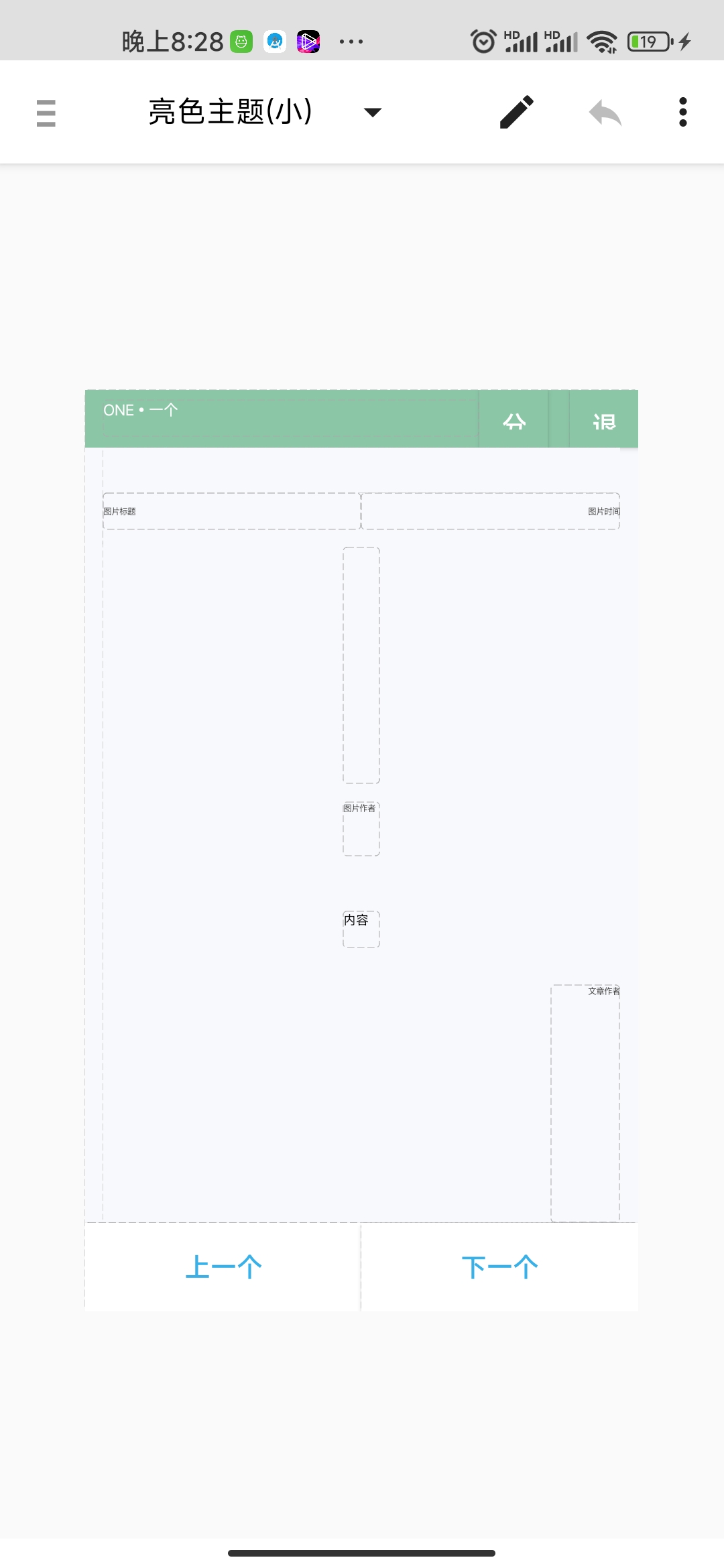
然后返回,复制xml代码,xml代码如下:
<?xml version="1.0" encoding="utf-8"?>
<LinearLayout
	xmlns:android="http://schemas.android.com/apk/res/android"
	android:layout_width="fill_parent"
	android:layout_height="fill_parent"
	android:gravity="top"
	android:orientation="vertical"
	android:background="#FFF8F9FD">

	<LinearLayout
		android:orientation="horizontal"
		android:layout_width="match_parent"
		android:layout_height="0dp"
		android:layout_weight="1"
		android:background="#FF8BC6A7">

		<TextView
			android:layout_width="wrap_content"
			android:layout_height="wrap_content"
			android:layout_weight="6"
			android:text="ONE•一个"
			android:id="@+id/bar_title"
			android:textSize="8sp"
			android:layout_gravity="left|center_vertical"
			android:textColor="#FFFFFFFF"
			android:layout_marginLeft="10dp"/>

		<Button
			android:layout_width="0dp"
			android:layout_height="wrap_content"
			android:layout_weight="1"
			android:text="分享"
			android:gravity="left"
			android:layout_gravity="right"
			android:id="@+id/btn_share"
			android:textColor="#FFFFFFFF"
			android:background="#FF8BC6A7"/>

		<Button
			android:layout_width="0dp"
			android:layout_height="wrap_content"
			android:layout_weight="1"
			android:layout_gravity="right"
			android:text="退出"
			android:gravity="left"
			android:id="@+id/btn_exit"
			android:textColor="#FFFFFFFF"
			android:background="#FF8BC6A7"
			android:layout_marginLeft="12dp"/>

	</LinearLayout>

<LinearLayout
		android:orientation="vertical"
		android:layout_width="match_parent"
		android:layout_height="0dp"
		android:layout_weight="19"
		android:background="#FFF8F9FD"
		android:gravity="center"
		android:layout_marginLeft="10dp"
		android:layout_marginRight="10dp">

		<LinearLayout
            android:layout_width="match_parent"
            android:layout_height="0dp"
            android:layout_weight="1"
            android:background="#FFF8F9FD"
            android:layout_marginTop="25dp">

            <TextView
                android:layout_width="0dp"
                android:layout_height="wrap_content"
                android:layout_weight="1"
                android:text="图片标题"
                android:textSize="5sp"
                android:textColor="#FF4B4B4B"
                android:id="@+id/title"
                android:gravity="left|center_vertical"/>

            <TextView
                android:layout_width="0dp"
                android:layout_height="wrap_content"
                android:layout_weight="1"
                android:text="图片时间"
                android:textSize="5sp"
                android:textColor="#FF4B4B4B"
                android:id="@+id/date"
                android:gravity="right|center_vertical"/>
		</LinearLayout>

		<ImageView
			android:src="@drawable/ic_delete"
			android:layout_width="wrap_content"
			android:layout_height="0dp"
			android:id="@+id/pic"
			android:scaleType="fitXY"
			android:layout_weight="6"/>

		<TextView
			android:layout_width="wrap_content"
			android:layout_height="0dp"
			android:layout_weight="1"
			android:text="图片作者"
			android:textSize="5sp"
			android:textColor="#FF4B4B4B"
			android:id="@+id/pic_author"
			android:layout_marginTop="10dp"
			android:layout_marginBottom="10dp"/>

		<TextView
			android:layout_width="wrap_content"
			android:layout_height="wrap_content"
			android:text="内容"
			android:textSize="7sp"
			android:textColor="#FF000000"
			android:id="@+id/content"
			android:gravity="top|left"
			android:layout_marginTop="20dp"
			android:layout_marginBottom="20dp"/>

		<TextView
			android:layout_width="wrap_content"
			android:layout_height="0dp"
			android:layout_weight="6"
			android:text="文章作者"
			android:textSize="5sp"
			android:textColor="#FF4B4B4B"
			android:layout_gravity="top|right"
			android:id="@+id/text_author"
			android:paddingLeft="20dp"/>

	</LinearLayout>


	<LinearLayout
	 android:background="#FFFFFFFF"
		android:orientation="horizontal"
		android:layout_width="match_parent"
		android:layout_height="wrap_content"
		android:layout_gravity="bottom">

		<Button
			android:layout_width="wrap_content"
			android:layout_height="wrap_content"
			android:text="上一个"
			android:textColor="#FF37B1E8"
			android:background="#FFFFFFFF"
			android:layout_gravity="bottom"
			android:layout_weight="1"
			android:shadowDy="2"
			android:id="@+id/btn_prev"/>

		<Button
			android:layout_width="wrap_content"
			android:layout_height="wrap_content"
			android:text="下一个"
			android:textColor="#FF37B1E8"
			android:background="#FFFFFFFF"
			android:layout_gravity="bottom"
			android:layout_weight="1"
			android:id="@+id/btn_next"/>

	</LinearLayout>

</LinearLayout>
将其中代码改写为python版本
class OneApi(object):
    def __init__(self):
        self.TOKEN=''
        self.API='http://m.wufazhuce.com/one/ajaxlist/'
        self.COOKIES=''

    def getToken(self):
        if self.TOKEN:
            return self.TOKEN
        url='http://m.wufazhuce.com/one'
        try:
            res=requests.get(url)
            if res.status_code==200:
                self.COOKIES=res.headers['Set-Cookie']
                _token=res.text.split("One.token = '")[1].split("'")[0]
                if _token and len(_token)==40:
                    self.TOKEN=_token
                    return _token
                else:
                    print('未获取到token')
                    return ""
        except Exception:
            pass

    def getData(self,page=0):
        token=self.getToken()
        url=self.API + str(page) + '?_token=' + token
        headers = {
            'Cookie':self.COOKIES
        }
        res=requests.get(url,headers=headers)
        if res.status_code==200:
            return json.loads(res.text)['data']
        else:
            return None
class OnePic(Layout):
    def __init__(self):
        self.api=api
        self.index=0
        self.page=0
        self.articles=self.api.getData(self.page)
        super(OnePic,self).__init__(xmldata,"ONE一个")


    def on_show(self):
        # 给按钮注册事件,以及初始化
        self.add_event(key_EventHandler(handler_function=self.close_app))
        self.views.btn_share.add_event(click_EventHandler(self.views.btn_share,self.share))
        self.views.btn_exit.add_event(click_EventHandler(self.views.btn_exit,self.close_app))
        self.views.btn_prev.add_event(click_EventHandler(self.views.btn_prev,self.btn_prev))
        self.views.btn_next.add_event(click_EventHandler(self.views.btn_next,self.btn_next))
        article=self.articles[self.index]
        self.views.title.text=article['title']
        self.views.date.text=article['date']
        url=api.getPic(article["id"], article["img_url"])
        self.views.pic.src="file://"+url
        self.views.pic_author.text=article["picture_author"]
        self.views.content.text=article["content"]
        self.views.text_author.text=article["text_authors"]

    def on_close(self):
        # 关闭应用时执行的
        pass

    def close_app(self,view,event):
        # 退出app
        FullScreenWrapper2App.exit_FullScreenWrapper2App()

    def btn_prev(self,view,event):
        # 按钮上一个的事件函数
        article=self.prev()
        if article:
            self.views.title.text=article['title']
            self.views.date.text=article['date']
            url=api.getPic(article["id"], article["img_url"])
            self.views.pic.src="file://"+url
            self.views.pic_author.text=article["picture_author"]
            self.views.content.text=article["content"]
            self.views.text_author.text=article["text_authors"]

    def btn_next(self,view,event):
        # 按钮下一个的事件函数
        article=self.next()
        if article:
            self.views.title.text=article['title']
            self.views.date.text=article['date']
            url=api.getPic(article["id"], article["img_url"])
            self.views.pic.src="file://"+url
            self.views.pic_author.text=article["picture_author"]
            self.views.content.text=article["content"]
            self.views.text_author.text=article["text_authors"]

    def share(self, view, event):
        # 按钮分享的事件函数,分享至微信
        action="android.intent.action.SEND"
        mime="text/plain"
        article=self.articles[self.index]
        extras={
            "android.intent.extra.SUBJECT":"分享",
            "android.intent.extra.TEXT":article["content"]+"——"+article["text_authors"]
        }
        flags=268435456
        packageName="com.tencent.mm"
        className="com.tencent.mm.ui.tools.ShareImgUI"
        intent=droid.makeIntent(action=action,type=mime,extras=extras,flags=flags,packagename=packageName,classname=className)
        droid.startActivityIntent(intent.result)


    def prev(self):
        if self.index==0:
            if self.page!=0:
                self.page=self.articles[0]['id']
                self.articles=self.api.getData()
                self.index=len(self.articles)-1
                return self.articles[self.index]
            else:
                droid.makeToast("暂无更多数据")
                return None
        else:
            self.index=self.index-1
            return self.articles[self.index]

    def next(self):
        if self.index==len(self.articles)-1:
            self.page=self.articles[len(self.articles)-1]["id"]
            self.articles=self.api.getData(self.page)
            self.index=0
            return self.articles[self.index]
        else:
            self.index=self.index+1
            return self.articles[self.index]
后台回复【one一个】即可获取源码下载链接。将
注意:将fullscreenwrapper2_py3.py放置在storage/emulated/0/qpython/lib/python3.11/site-packages
本文主要用于学习python知识,让大家在实操中完成技能学习。如有不足之处,请大家评论区留言评论。
本文由【产品经理不是经理】gzh同步发布,欢迎关注
对于具有离线功能的智能手机应用程序,我正在为Xml文件创建单向文本同步。我希望我的服务器将增量/差异(例如GNU差异补丁)发送到目标设备。这是计划:Time=0Server:hasversion_1ofXmlfile(~800kiB)Client:hasversion_1ofXmlfile(~800kiB)Time=1Server:hasversion_1andversion_2ofXmlfile(each~800kiB)computesdeltaoftheseversions(=patch)(~10kiB)sendspatchtoClient(~10kiBtransferred)Cl
使用带有Rails插件的vim,您可以创建一个迁移文件,然后一次性打开该文件吗?textmate也可以这样吗? 最佳答案 你可以使用rails.vim然后做类似的事情::Rgeneratemigratonadd_foo_to_bar插件将打开迁移生成的文件,这正是您想要的。我不能代表textmate。 关于ruby-使用VimRails,您可以创建一个新的迁移文件并一次性打开它吗?,我们在StackOverflow上找到一个类似的问题: https://sta
我需要从一个View访问多个模型。以前,我的links_controller仅用于提供以不同方式排序的链接资源。现在我想包括一个部分(我假设)显示按分数排序的顶级用户(@users=User.all.sort_by(&:score))我知道我可以将此代码插入每个链接操作并从View访问它,但这似乎不是“ruby方式”,我将需要在不久的将来访问更多模型。这可能会变得很脏,是否有针对这种情况的任何技术?注意事项:我认为我的应用程序正朝着单一格式和动态页面内容的方向发展,本质上是一个典型的网络应用程序。我知道before_filter但考虑到我希望应用程序进入的方向,这似乎很麻烦。最终从任何
我想要做的是有2个不同的Controller,client和test_client。客户端Controller已经构建,我想创建一个test_clientController,我可以使用它来玩弄客户端的UI并根据需要进行调整。我主要是想绕过我在客户端中内置的验证及其对加载数据的管理Controller的依赖。所以我希望test_clientController加载示例数据集,然后呈现客户端Controller的索引View,以便我可以调整客户端UI。就是这样。我在test_clients索引方法中试过这个:classTestClientdefindexrender:template=>
我构建了两个需要相互通信和发送文件的Rails应用程序。例如,一个Rails应用程序会发送请求以查看其他应用程序数据库中的表。然后另一个应用程序将呈现该表的json并将其发回。我还希望一个应用程序将存储在其公共(public)目录中的文本文件发送到另一个应用程序的公共(public)目录。我从来没有做过这样的事情,所以我什至不知道从哪里开始。任何帮助,将不胜感激。谢谢! 最佳答案 无论Rails是什么,几乎所有Web应用程序都有您的要求,大多数现代Web应用程序都需要相互通信。但是有一个小小的理解需要你坚持下去,网站不应直接访问彼此
我尝试运行2.x应用程序。我使用rvm并为此应用程序设置其他版本的ruby:$rvmuseree-1.8.7-head我尝试运行服务器,然后出现很多错误:$script/serverNOTE:Gem.source_indexisdeprecated,useSpecification.Itwillberemovedonorafter2011-11-01.Gem.source_indexcalledfrom/Users/serg/rails_projects_terminal/work_proj/spohelp/config/../vendor/rails/railties/lib/r
我正在查看instance_variable_set的文档并看到给出的示例代码是这样做的:obj.instance_variable_set(:@instnc_var,"valuefortheinstancevariable")然后允许您在类的任何实例方法中以@instnc_var的形式访问该变量。我想知道为什么在@instnc_var之前需要一个冒号:。冒号有什么作用? 最佳答案 我的第一直觉是告诉你不要使用instance_variable_set除非你真的知道你用它做什么。它本质上是一种元编程工具或绕过实例变量可见性的黑客攻击
在我的应用程序中,我需要能够找到所有数字子字符串,然后扫描每个子字符串,找到第一个匹配范围(例如5到15之间)的子字符串,并将该实例替换为另一个字符串“X”。我的测试字符串s="1foo100bar10gee1"我的初始模式是1个或多个数字的任何字符串,例如,re=Regexp.new(/\d+/)matches=s.scan(re)给出["1","100","10","1"]如果我想用“X”替换第N个匹配项,并且只替换第N个匹配项,我该怎么做?例如,如果我想替换第三个匹配项“10”(匹配项[2]),我不能只说s[matches[2]]="X"因为它做了两次替换“1fooX0barXg
刚入门rails,开始慢慢理解。有人可以解释或给我一些关于在application_controller中编码的好处或时间和原因的想法吗?有哪些用例。您如何为Rails应用程序使用应用程序Controller?我不想在那里放太多代码,因为据我了解,每个请求都会调用此Controller。这是真的? 最佳答案 ApplicationController实际上是您应用程序中的每个其他Controller都将从中继承的类(尽管这不是强制性的)。我同意不要用太多代码弄乱它并保持干净整洁的态度,尽管在某些情况下ApplicationContr
如果您尝试在Ruby中的nil对象上调用方法,则会出现NoMethodError异常并显示消息:"undefinedmethod‘...’fornil:NilClass"然而,有一个tryRails中的方法,如果它被发送到一个nil对象,它只返回nil:require'rubygems'require'active_support/all'nil.try(:nonexisting_method)#noNoMethodErrorexceptionanymore那么try如何在内部工作以防止该异常? 最佳答案 像Ruby中的所有其他对象
