分析:
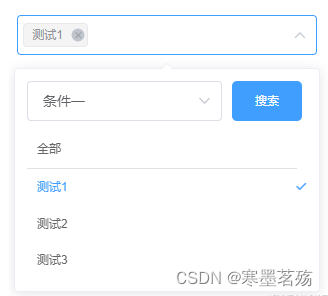
el-popover组件,然后使用它的v-model="visible"来实现控制显示el-popover的slot="reference" 放一个el-select
popper-append-to-body="false"不需要插入浮动元素popper-class="hide-popper"定义浮窗class为hide-popper,并设置display:none,这样选中了就不会存在el-select的下拉选项el-option 循环下面选择的list里面的元素,这样就可以在el-select展示选中的并存在删除el-select双向绑定的就是自定义选择的数组<template>
<div class="arrbox">
<!-- 通过visible控制显示还是隐藏 -->
<el-popover
v-model="visible"
placement="bottom-start"
width="auto"
>
<div slot="reference" class="check-select">
<!-- popper-append-to-body:不需要插入浮动元素,popper-class:设置类名并隐藏 -->
<el-select
ref="select"
v-model="currentval"
:style="{width:`${width}px`,height:`${height}`}"
multiple
:placeholder="placeholder"
:popper-append-to-body="false"
popper-class="hide-popper"
style="width:100%"
@visible-change="visibleChange"
@focus="getFocus"
> <el-option
v-for="item in selectItem"
:key="`${item.value}_k`"
:label="item.label"
:value="item.value"
/></el-select>
</div>
<!-- selectBxClick让select强制选中 -->
<div class="selectMain" :style="{'min-width':`${width-20}px`}" @click="selectBxClick">
<div class="seachButton">
<el-select
v-model="seachValue"
placeholder=" 请选择筛选"
style="width:70%;margin-right:10px;max-width:195px"
@visible-change="selectBxClick()"
>
<el-option
v-for="item in seachList"
:key="item.value"
:value="item.value"
:label="item.label"
/>
</el-select>
<div class="btn" @click="seachBtn">搜索</div>
</div>
<div class="selectDiv">
<div v-for="item in list.filter(n=>n.value=='all')" :key="item.value" class="list" :class="[currentval.indexOf(item.value)!=-1?'selected':'',item.value=='all'?'allCheck':'']" @click="clickItem(item)">{{ item.label }}</div>
<div class="selectDivAuto">
<div v-for="item in list.filter(n=>n.value!='all')" :key="item.value" class="list" :class="[currentval.indexOf(item.value)!=-1?'selected':'',item.value=='all'?'allCheck':'']" @click="clickItem(item)">{{ item.label }}</div>
</div>
</div>
</div>
</el-popover>
</div>
</template>
使用getFocus获取是否聚焦,聚焦了让visible=true,这样就可以显示出自定义的下拉选择项
通过visibleChange实施监听el-select,控制el-popover显示
在点击自定义的下拉选择项时,通过@click="selectBxClick"让el-select一直聚焦,这样箭头就会一直向上
通过 @click="seachBtn"和getList获取列表,具体需要自己去自定义
// 模拟获取的数据
	const seachClickList = [{value: '1',label: '测试1',type: '1'},{value: '2',label: '测试2',type: '1'},{value: '3',label: '测试3',type: '1'},{value: '4',label: '测试4',type: '2'},{value: '5',label: '测试5',type: '2'},{value: '6',label: '测试6',type: '2'},{value: '7',label: '测试7',type: '2'}]
	export default {
	model: {
		prop: 'parentArr',
		event: 'change-parentArr'
	},
	props: {
		parentArr: {
		type: Array,
		default() {
			return []
		}
		},
		// 传入选中的item,主要时防止list里面没有选中的数据
		parentSelectItem: {
		type: Array,
		default() {
			return []
		}
		},
		width: {
		type: Number,
		default: 300
		},
		height: {
		type: Number,
		default: 30
		},
		placeholder: {
		type: String,
		default: '请输入'
		}
	},
	data() {
		return {
		seachList: [
			{
			value: '1',
			label: '条件一'
			},
			{
			value: '2',
			label: '条件二'
			}
		],
		visible: false,
		currentval: [],
		list: [],
		selectItem: [],
		seachValue: '1'
		}
	},
	watch: {
		seachValue: {
		handler(value) {
			this.getList(value)
		},
		deep: true,
		immediate: true
		},
		parentArr: {
		handler(value) {
			this.currentval = value
		},
		deep: true,
		immediate: true
		},
		parentSelectItem: {
		handler(value) {
			this.selectItem =  value.map(n => {
                              if (n.value == 'all') {
                                n.label = '全部'
                              }
                              return n
                            })
		},
		deep: true,
		immediate: true
		},
		currentval: {
                        handler(value) {
                                this.$emit('change-parentArr', value)
                        }
		}
	},
	created() {
	},
	methods: {
		getList(value) {
                        this.list = [{
                                label: '全部',
                                value: 'all'
                        }, ...seachClickList.filter(n => n.type == value)]
                        this.getSelectItem()
		},
		// 获取选中的item
		getSelectItem() {
                        const noItemList = this.currentval.map(n => {
                                if (this.selectItem.findIndex(i => i.value == n) == -1) {
                                return n
                                }
                                return null
                        }).filter(n => n != null)
                        noItemList.forEach(item => {
                                const index = this.list.findIndex(i => i.value == item)
                                if (index != -1) {
                                this.selectItem.push(this.list[index])
                                }
                        })
		},
		getFocus() {
                        this.visible = true
		},
		visibleChange(data) {
                        this.visible = data
		},
		selectBxClick() {
                        // 避免点击框体时组件消失
                        this.$refs.select.visible = true
		},
		// 选择
		clickItem(item) {
                      const index = this.currentval.indexOf(item.value)
                      if (index == -1) {
                        if (item.value == 'all') {
                          this.currentval = ['all']
                          this.selectItem = [{
                            label: '全部',
                            value: 'all'
                          }]
                        } else {
                          this.currentval.push(item.value)
                          this.selectItem.push(item)
                          const currentvalIndex = this.currentval.indexOf('all')
                          const selectItemIndex = this.selectItem.findIndex(n => n.value == 'all')
                          if (currentvalIndex != -1 && selectItemIndex != -1) {
                            this.selectItem.splice(selectItemIndex, 1)
                            this.currentval.splice(currentvalIndex, 1)
                          }
                        }
                      } else {
                        const itemIndex = this.selectItem.findIndex(n => n.value == item.value)
                        this.selectItem.splice(itemIndex, 1)
                        this.currentval.splice(index, 1)
                      }
                    },
		// 搜索
		seachBtn() {
                        this.getList()
		}
	}
	}
css:
selected属性使用了el-select的样式,让样子尽量一致.arrbox {
display: inline-block;
}
.check-select{
::v-deep.hide-popper{
display: none;
}
}
::v-deep .el-input__suffix{
i:not(.el-select__caret){
display: none;
}
}
.selectMain {
width: 100%;
height: 100%;
.seachButton{
width: 100%;
align-items: center;
display: flex;
div.btn{
width: 25%;
max-width: 70px;
max-width: 80px;
height: 40px;
display: flex;
align-items: center;
justify-content: center;
font-size: 12px;
color: #fff;
background-color: #409EFF;
border-radius: 5px;
cursor: pointer;
}
}
.selectDiv{
width: 100%;
max-width: 500px;
margin-top: 10px;
padding: 0 10px 0 0;
.list{
width: 100%;
padding: 10px 20px 10px 10px;
color: #666;
cursor: pointer;
position: relative;
&.selected{
color: #409EFF;
&::after{
position: absolute;
right: 0px;
top: 50%;
transform: translateY(-50%);
font-family: element-icons;
content: "\e6da";
font-size: 12px;
font-weight: 700;
-webkit-font-smoothing: antialiased;
}
}
}
.selectDivAuto{
width: calc(100% + 15px);
max-height: 300px;
overflow-y: auto;
.list{
padding: 10px 30px 10px 10px;
&.selected::after{
right: 10px;
}
}
}
}
}
.allCheck{
border-bottom: 1px solid rgb(228, 225, 225);
}
使用
<template>
	<seachSelectInput v-model="from.tag" :parentSelectItem='selectItem' :width="302" placeholder="请选择标签" />
</template>
<script>
import seachSelectInput from ./seachSelectInput'
export default {
components: {
	seachSelectInput
},
data(){
	return{
		from:{
			tag:['1']
		},
		selectItem:[
			{
			value: '1',
			label: '测试1'
			}
		]
	}
}
}
很好奇,就使用rubyonrails自动化单元测试而言,你们正在做什么?您是否创建了一个脚本来在cron中运行rake作业并将结果邮寄给您?git中的预提交Hook?只是手动调用?我完全理解测试,但想知道在错误发生之前捕获错误的最佳实践是什么。让我们理所当然地认为测试本身是完美无缺的,并且可以正常工作。下一步是什么以确保他们在正确的时间将可能有害的结果传达给您? 最佳答案 不确定您到底想听什么,但是有几个级别的自动代码库控制:在处理某项功能时,您可以使用类似autotest的内容获得关于哪些有效,哪些无效的即时反馈。要确保您的提
在控制台中反复尝试之后,我想到了这种方法,可以按发生日期对类似activerecord的(Mongoid)对象进行分组。我不确定这是完成此任务的最佳方法,但它确实有效。有没有人有更好的建议,或者这是一个很好的方法?#eventsisanarrayofactiverecord-likeobjectsthatincludeatimeattributeevents.map{|event|#converteventsarrayintoanarrayofhasheswiththedayofthemonthandtheevent{:number=>event.time.day,:event=>ev
我正在编写一个包含C扩展的gem。通常当我写一个gem时,我会遵循TDD的过程,我会写一个失败的规范,然后处理代码直到它通过,等等......在“ext/mygem/mygem.c”中我的C扩展和在gemspec的“扩展”中配置的有效extconf.rb,如何运行我的规范并仍然加载我的C扩展?当我更改C代码时,我需要采取哪些步骤来重新编译代码?这可能是个愚蠢的问题,但是从我的gem的开发源代码树中输入“bundleinstall”不会构建任何native扩展。当我手动运行rubyext/mygem/extconf.rb时,我确实得到了一个Makefile(在整个项目的根目录中),然后当
是否有类似“RVMuse1”或“RVMuselist[0]”之类的内容而不是键入整个版本号。在任何时候,我们都会看到一个可能包含5个或更多ruby的列表,我们可以轻松地键入一个数字而不是X.X.X。这也有助于rvmgemset。 最佳答案 这在RVM2.0中是可能的=>https://docs.google.com/document/d/1xW9GeEpLOWPcddDg_hOPvK4oeLxJmU3Q5FiCNT7nTAc/edit?usp=sharing-知道链接的任何人都可以发表评论
这是一道面试题,我没有答对,但还是很好奇怎么解。你有N个人的大家庭,分别是1,2,3,...,N岁。你想给你的大家庭拍张照片。所有的家庭成员都排成一排。“我是家里的friend,建议家庭成员安排如下:”1岁的家庭成员坐在这一排的最左边。每两个坐在一起的家庭成员的年龄相差不得超过2岁。输入:整数N,1≤N≤55。输出:摄影师可以拍摄的照片数量。示例->输入:4,输出:4符合条件的数组:[1,2,3,4][1,2,4,3][1,3,2,4][1,3,4,2]另一个例子:输入:5输出:6符合条件的数组:[1,2,3,4,5][1,2,3,5,4][1,2,4,3,5][1,2,4,5,3][
我已经构建了一些serverspec代码来在多个主机上运行一组测试。问题是当任何测试失败时,测试会在当前主机停止。即使测试失败,我也希望它继续在所有主机上运行。Rakefile:namespace:specdotask:all=>hosts.map{|h|'spec:'+h.split('.')[0]}hosts.eachdo|host|begindesc"Runserverspecto#{host}"RSpec::Core::RakeTask.new(host)do|t|ENV['TARGET_HOST']=hostt.pattern="spec/cfengine3/*_spec.r
我们的git存储库中目前有一个Gemfile。但是,有一个gem我只在我的环境中本地使用(我的团队不使用它)。为了使用它,我必须将它添加到我们的Gemfile中,但每次我checkout到我们的master/dev主分支时,由于与跟踪的gemfile冲突,我必须删除它。我想要的是类似Gemfile.local的东西,它将继承从Gemfile导入的gems,但也允许在那里导入新的gems以供使用只有我的机器。此文件将在.gitignore中被忽略。这可能吗? 最佳答案 设置BUNDLE_GEMFILE环境变量:BUNDLE_GEMFI
我使用Nokogiri(Rubygem)css搜索寻找某些在我的html里面。看起来Nokogiri的css搜索不喜欢正则表达式。我想切换到Nokogiri的xpath搜索,因为这似乎支持搜索字符串中的正则表达式。如何在xpath搜索中实现下面提到的(伪)css搜索?require'rubygems'require'nokogiri'value=Nokogiri::HTML.parse(ABBlaCD3"HTML_END#my_blockisgivenmy_bl="1"#my_eqcorrespondstothisregexmy_eq="\/[0-9]+\/"#FIXMEThefoll
这似乎非常适得其反,因为太多的gem会在window上破裂。我一直在处理很多mysql和ruby-mysqlgem问题(gem本身发生段错误,一个名为UnixSocket的类显然在Windows机器上不能正常工作,等等)。我只是在浪费时间吗?我应该转向不同的脚本语言吗? 最佳答案 我在Windows上使用Ruby的经验很少,但是当我开始使用Ruby时,我是在Windows上,我的总体印象是它不是Windows原生系统。因此,在主要使用Windows多年之后,开始使用Ruby促使我切换回原来的系统Unix,这次是Linux。Rub
简而言之错误:NOTE:Gem::SourceIndex#add_specisdeprecated,useSpecification.add_spec.Itwillberemovedonorafter2011-11-01.Gem::SourceIndex#add_speccalledfrom/opt/local/lib/ruby/site_ruby/1.8/rubygems/source_index.rb:91./opt/local/lib/ruby/gems/1.8/gems/rails-2.3.8/lib/rails/gem_dependency.rb:275:in`==':und
