配置IDEA

在文件夹中创建配置文件login.properties
再创建login_zh_CN.properties
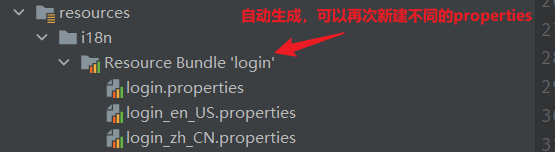
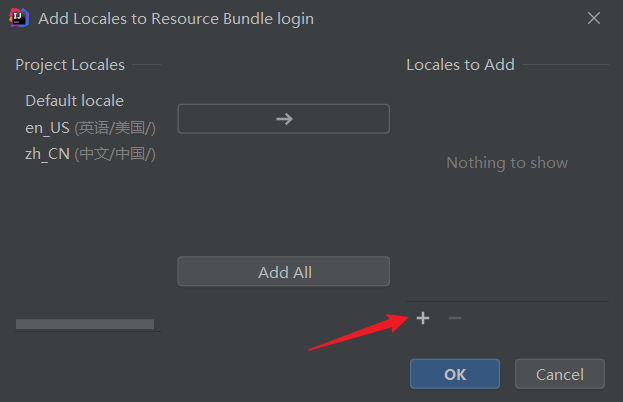
配置不同语言的properties
en-US 英国(美国)
zh-CN 中文(简体,中国大陆)
zh-SG 中文(简体,新加坡)
zh-HK 中文(繁体,香港)
zh-MO 中文(繁体,澳门)
zh-TW 中文(繁体,台湾)

IDEA同时配多语言
通过MessageSourceAutoConfiguration这个类
@Bean
public MessageSource messageSource(MessageSourceProperties properties) {
    ResourceBundleMessageSource messageSource = new ResourceBundleMessageSource();
    if (StringUtils.hasText(properties.getBasename())) {
        messageSource.setBasenames(StringUtils.commaDelimitedListToStringArray(StringUtils.trimAllWhitespace(properties.getBasename())));
    }

    if (properties.getEncoding() != null) {
        messageSource.setDefaultEncoding(properties.getEncoding().name());
    }

    messageSource.setFallbackToSystemLocale(properties.isFallbackToSystemLocale());
    Duration cacheDuration = properties.getCacheDuration();
    if (cacheDuration != null) {
        messageSource.setCacheMillis(cacheDuration.toMillis());
    }

    messageSource.setAlwaysUseMessageFormat(properties.isAlwaysUseMessageFormat());
    messageSource.setUseCodeAsDefaultMessage(properties.isUseCodeAsDefaultMessage());
    return messageSource;
}
进入MessageSourceProperties 得到需要配置 message

在application.properties中配置message 这里需要配置我们默认的位置
在i18n下的login
#我们的配置文件的真实位置
spring.messages.basename=i18n.login
HTML中对链接进行请求参数
         <a class="btn btn-sm" th:href="@{index.html(l='en_US')}">English</a>
         <a class="btn btn-sm" th:href="@{index.html(l='zh_CN')}">中文</a>
参考源码:AcceptHeaderLocaleResolver类中的重写方法,创建地域解析器
public class MyLocaleResolver implements LocaleResolver {

    //解析请求
    @Override
    public Locale resolveLocale(HttpServletRequest request) {
        //获得请求中的语言参数
        String language = request.getParameter("l");

        Locale locale = Locale.getDefault();//如果没有就使用默认的

        //如果请求的链接携带了国际化参数
        if(!StringUtils.isEmpty(language)){
            //zh_CN
            String[] split = language.split("_");
            //国家,地区
            locale  = new Locale(split[0], split[1]);
        }

        return locale;
    }

    @Override
    public void setLocale(HttpServletRequest request, HttpServletResponse response, Locale locale) {

    }
}
在config中通过Bean 注入
//自定义国际化组件生效
    @Bean
    public LocaleResolver localeResolver(){
        return new MyLocaleResolver();
    }
}
初始Html
<!DOCTYPE html>
<html lang="en">
   <head>
      <meta http-equiv="Content-Type" content="text/html; charset=UTF-8">
      <meta name="viewport" content="width=device-width, initial-scale=1, shrink-to-fit=no">
      <meta name="description" content="">
      <meta name="author" content="">
      <title>Signin Template for Bootstrap</title>
      <!-- Bootstrap core CSS -->
      <link href="../../../../../../../class资源/zzz/asserts/css/bootstrap.min.css" rel="stylesheet">
      <!-- Custom styles for this template -->
      <link href="../../../../../../../class资源/zzz/asserts/css/signin.css" rel="stylesheet">
   </head>

   <body class="text-center">
      <form class="form-signin" action="../../../../../../../class资源/zzz/dashboard.html">
         <img class="mb-4" src="../../../../../../../class资源/zzz/asserts/img/bootstrap-solid.svg" alt="" width="72" height="72">
         <h1 class="h3 mb-3 font-weight-normal">Please sign in</h1>
         <label class="sr-only">Username</label>
         <input type="text" class="form-control" placeholder="Username" required="" autofocus="">
         <label class="sr-only">Password</label>
         <input type="password" class="form-control" placeholder="Password" required="">
         <div class="checkbox mb-3">
            <label>
          <input type="checkbox" value="remember-me"> Remember me
        </label>
         </div>
         <button class="btn btn-lg btn-primary btn-block" type="submit">Sign in</button>
         <p class="mt-5 mb-3 text-muted">© 2017-2018</p>
         <a class="btn btn-sm">中文</a>
         <a class="btn btn-sm">English</a>
      </form>

   </body>

</html>
${...}*{...}#{...}@{...}~{...}'one text', 'Another one!',…0, 34, 3.0, 12.3,…true, falsenullone, sometext, main,…+|The name is ${name}|+, -, *, /, %-and, or!, not>, <, >=, <= (gt, lt, ge, le)==, != (eq, ne)(if) ? (then)(if) ? (then) : (else)(value) ?: (defaultvalue)_<!DOCTYPE html>
<html lang="en" xmlns="http://www.w3.org/1999/xhtml" xmlns:th="http://www.thymeleaf.org">
<head>
<meta http-equiv="Content-Type" content="text/html; charset=UTF-8">
<meta name="viewport" content="width=device-width, initial-scale=1, shrink-to-fit=no">
<meta name="description" content="">
<meta name="author" content="">
<title>Signin Template for Bootstrap</title>
<!-- Bootstrap core CSS -->
<link th:href="@{/css/bootstrap.min.css}" rel="stylesheet">
<!-- Custom styles for this template -->
<link th:href="@{/css/signin.css}" rel="stylesheet">
</head>
<body class="text-center">
<form class="form-signin" action="dashboard.html">
<img class="mb-4" th:src="@{/img/bootstrap-solid.svg}" alt="" width="72" height="72">
<h1 class="h3 mb-3 font-weight-normal" th:text="#{login.tip}">Please sign in</h1>
<label class="sr-only" th:text="#{login.username}">Username</label>
<input type="text" class="form-control" th:placeholder="#{login.username}" required="" autofocus="">
<label class="sr-only" th:text="#{login.password}">Password</label>
<input type="password" class="form-control" th:placeholder="#{login.password}" required="">
<div class="checkbox mb-3">
<label>
<input type="checkbox" value="remember-me" > [[#{login.remember}]]
</label>
</div>
<button class="btn btn-lg btn-primary btn-block" type="submit" th:text="#{login.btn}">Sign in</button>
<p class="mt-5 mb-3 text-muted">© 2017-2018</p>
<a class="btn btn-sm" th:href="@{index.html(l='zh_CN')}">中文</a>
<a class="btn btn-sm" th:href="@{index.html(l='en_US')}">English</a>
</form>
</body>
</html>


1.首页配置:所有静态资源都需要使用thymeleaf接管;
2页面国际化:
LocaleResolver@Bean我正在使用i18n从头开始构建一个多语言网络应用程序,虽然我自己可以处理一大堆yml文件,但我说的语言(非常)有限,最终我想寻求外部帮助帮助。我想知道这里是否有人在使用UI插件/gem(与django上的django-rosetta不同)来处理多个翻译器,其中一些翻译器不愿意或无法处理存储库中的100多个文件,处理语言数据。谢谢&问候,安德拉斯(如果您已经在rubyonrails-talk上遇到了这个问题,我们深表歉意) 最佳答案 有一个rails3branchofthetolkgem在github上。您可以通过在Gemfi
我有一个用户工厂。我希望默认情况下确认用户。但是鉴于unconfirmed特征,我不希望它们被确认。虽然我有一个基于实现细节而不是抽象的工作实现,但我想知道如何正确地做到这一点。factory:userdoafter(:create)do|user,evaluator|#unwantedimplementationdetailshereunlessFactoryGirl.factories[:user].defined_traits.map(&:name).include?(:unconfirmed)user.confirm!endendtrait:unconfirmeddoenden
华为OD机试题本篇题目:明明的随机数题目输入描述输出描述:示例1输入输出说明代码编写思路最近更新的博客华为od2023|什么是华为od,od薪资待遇,od机试题清单华为OD机试真题大全,用Python解华为机试题|机试宝典【华为OD机试】全流程解析+经验分享,题型分享,防作弊指南华为o
C#实现简易绘图工具一.引言实验目的:通过制作窗体应用程序(C#画图软件),熟悉基本的窗体设计过程以及控件设计,事件处理等,熟悉使用C#的winform窗体进行绘图的基本步骤,对于面向对象编程有更加深刻的体会.Tutorial任务设计一个具有基本功能的画图软件**·包括简单的新建文件,保存,重新绘图等功能**·实现一些基本图形的绘制,包括铅笔和基本形状等,学习橡皮工具的创建**·设计一个合理舒适的UI界面**注明:你可能需要先了解一些关于winform窗体应用程序绘图的基本知识,以及关于GDI+类和结构的知识二.实验环境Windows系统下的visualstudio2017C#窗体应用程序三.
MIMO技术的优缺点优点通过下面三个增益来总体概括:阵列增益。阵列增益是指由于接收机通过对接收信号的相干合并而活得的平均SNR的提高。在发射机不知道信道信息的情况下,MIMO系统可以获得的阵列增益与接收天线数成正比复用增益。在采用空间复用方案的MIMO系统中,可以获得复用增益,即信道容量成倍增加。信道容量的增加与min(Nt,Nr)成正比分集增益。在采用空间分集方案的MIMO系统中,可以获得分集增益,即可靠性性能的改善。分集增益用独立衰落支路数来描述,即分集指数。在使用了空时编码的MIMO系统中,由于接收天线或发射天线之间的间距较远,可认为它们各自的大尺度衰落是相互独立的,因此分布式MIMO
@raw_array[i]=~/[\W]/非常简单的正则表达式。当我用一些非拉丁字母(具体来说是俄语)尝试时,条件是错误的。我能用它做什么? 最佳答案 @raw_array[i]=~/[\p{L}]/使用西里尔字符进行测试。引用:http://www.regular-expressions.info/unicode.html#prop 关于ruby-正则表达式将非英文字母匹配为非单词字符,我们在StackOverflow上找到一个类似的问题: https://
作为新的阿里云用户,您可以50免费试用多种优惠,价值高达1,700美元(或8,500美元)。这将让您了解和体验阿里云平台上提供的一系列产品和服务。如果您以个人身份注册免费试用,您将获得价值1,700美元的优惠。但是,如果您是注册公司,您可以选择企业免费试用,提交基本信息通过企业实名注册验证,即可开始价值$8,500的免费试用!本教程介绍了如何设置您的帐户并使用您的免费试用版。关于免费试用在我们开始此试用之前,您还必须遵守以下条款和条件才能访问您的免费试用:只有在一年内创建的账户才有资格获得阿里云免费试用。通过此免费试用优惠,用户可以免费试用免费试用活动页面上列出的每种产品一次。如果您有多个帐
遍历文件夹我们通常是使用递归进行操作,这种方式比较简单,也比较容易理解。本文为大家介绍另一种不使用递归的方式,由于没有使用递归,只用到了循环和集合,所以效率更高一些!一、使用递归遍历文件夹整体思路1、使用File封装初始目录,2、打印这个目录3、获取这个目录下所有的子文件和子目录的数组。4、遍历这个数组,取出每个File对象4-1、如果File是否是一个文件,打印4-2、否则就是一个目录,递归调用代码实现publicclassSearchFile{publicstaticvoidmain(String[]args){//初始目录Filedir=newFile("d:/Dev");Datebeg
通常,数组被实现为内存块,集合被实现为HashMap,有序集合被实现为跳跃列表。在Ruby中也是如此吗?我正在尝试从性能和内存占用方面评估Ruby中不同容器的使用情况 最佳答案 数组是Ruby核心库的一部分。每个Ruby实现都有自己的数组实现。Ruby语言规范只规定了Ruby数组的行为,并没有规定任何特定的实现策略。它甚至没有指定任何会强制或至少建议特定实现策略的性能约束。然而,大多数Rubyist对数组的性能特征有一些期望,这会迫使不符合它们的实现变得默默无闻,因为实际上没有人会使用它:插入、前置或追加以及删除元素的最坏情况步骤复
在ruby中,你可以这样做:classThingpublicdeff1puts"f1"endprivatedeff2puts"f2"endpublicdeff3puts"f3"endprivatedeff4puts"f4"endend现在f1和f3是公共(public)的,f2和f4是私有(private)的。内部发生了什么,允许您调用一个类方法,然后更改方法定义?我怎样才能实现相同的功能(表面上是创建我自己的java之类的注释)例如...classThingfundeff1puts"hey"endnotfundeff2puts"hey"endendfun和notfun将更改以下函数定
