Android 意图的使用(Intent)
        Intent intent = new Intent(MainActivity.this,HomeActivity.class);
        startActivity(intent);
        Intent intent = new Intent();
        intent.setClass(MainActivity.this,HomeActivity.class);
        startActivity(intent);
        Intent intent = new Intent();
        ComponentName componentName = new ComponentName(MainActivity.this,HomeActivity.class);
        intent.setComponent(componentName);
        startActivity(intent);
startActivity(new Intent(MainActivity.this,HomeActivity.class));
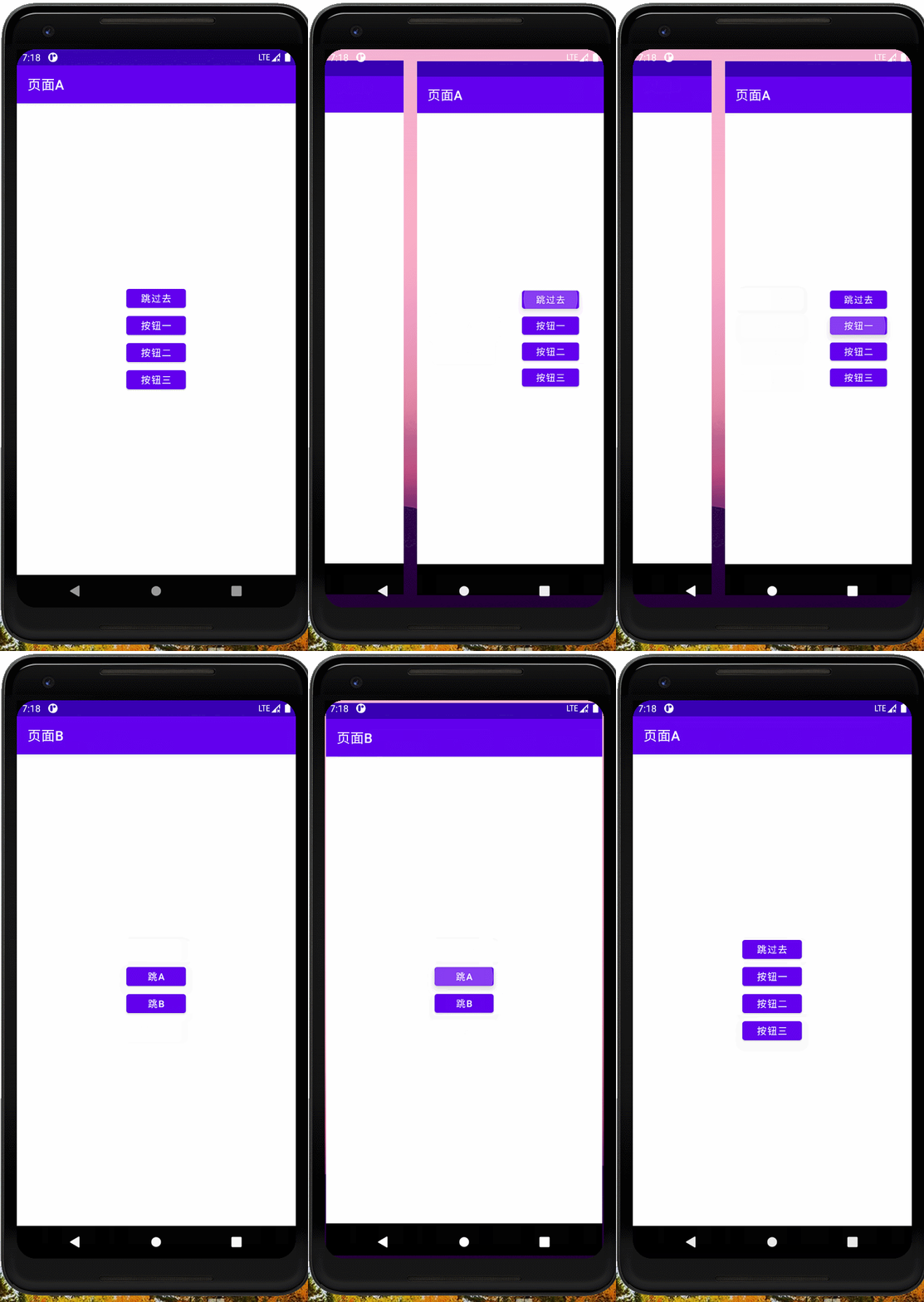
布局
<?xml version="1.0" encoding="utf-8"?>
<LinearLayout xmlns:android="http://schemas.android.com/apk/res/android"
    xmlns:app="http://schemas.android.com/apk/res-auto"
    xmlns:tools="http://schemas.android.com/tools"
    android:layout_width="match_parent"
    android:layout_height="match_parent"
    tools:context=".MainActivity"
    android:orientation="vertical"
    android:gravity="center">

    <Button
        android:id="@+id/bt_intentmain"
        android:layout_width="wrap_content"
        android:layout_height="40dp"
        android:text="跳过去"
        />
    <Button
        android:id="@+id/bt_intentOne"
        android:layout_width="wrap_content"
        android:layout_height="40dp"
        android:text="按钮一"
        />
    <Button
        android:id="@+id/bt_intentTwo"
        android:layout_width="wrap_content"
        android:layout_height="40dp"
        android:text="按钮二"
        />
    <Button
        android:id="@+id/bt_intentThree"
        android:layout_width="wrap_content"
        android:layout_height="40dp"
        android:text="按钮三"
        />

</LinearLayout>
代码
import androidx.appcompat.app.AppCompatActivity;

import android.content.ComponentName;
import android.content.Intent;
import android.os.Bundle;
import android.util.Log;
import android.view.View;
import android.widget.Button;

public class MainActivity extends AppCompatActivity implements View.OnClickListener {

    private  Button mBtIntent,mBtIntentOne,mBtIntentTwo,mBtIntentThree;
    @Override
    protected void onCreate(Bundle savedInstanceState) {
        Log.d("TAG","onCreate");
        super.onCreate(savedInstanceState);
        setContentView(R.layout.activity_main);
        initView();
        mBtIntent.setOnClickListener(this);
        mBtIntentOne.setOnClickListener(this);
        mBtIntentTwo.setOnClickListener(this);
        mBtIntentThree.setOnClickListener(this);
        setTitle("页面A");


    }


    private  void initView(){
        mBtIntent = findViewById(R.id.bt_intentmain);
        mBtIntentOne = findViewById(R.id.bt_intentOne);
        mBtIntentTwo = findViewById(R.id.bt_intentTwo);
        mBtIntentThree = findViewById(R.id.bt_intentThree);
    }

    @Override
    public void onClick(View v) {
        switch (v.getId()){
            case R.id.bt_intentmain:
                IntentOne();
                break;
            case R.id.bt_intentOne:
                IntentTwo();
                break;
            case R.id.bt_intentTwo:
                IntentThree();
                break;
            case R.id.bt_intentThree:
                IntentFour();
                break;
            default:
                break;
        }
    }


    private  void IntentOne(){
        Intent intent = new Intent(MainActivity.this,HomeActivity.class);
        startActivity(intent);
    }

    private  void IntentTwo(){
        Intent intent = new Intent();
        intent.setClass(MainActivity.this,HomeActivity.class);
        startActivity(intent);
    }

    private  void IntentThree(){
        Intent intent = new Intent();
        ComponentName componentName = new ComponentName(MainActivity.this,HomeActivity.class);
        intent.setComponent(componentName);
        startActivity(intent);

    }

    private  void IntentFour(){
        startActivity(new Intent(MainActivity.this,HomeActivity.class));
    }
}
隐式意图
没有明确指定组件名的Intent为隐式意图,系统会根据隐式意图中设置的动作(action)、类别(category)、数据UIL等来匹配最合适的组件。
首先在清单文件中使用意图过滤器设置活动的名字
< action android:name=“HomeActivity” />
< category android:name=“android.intent.category.DEFAULT” />
        <activity
            android:name=".HomeActivity"
            android:launchMode="singleInstance" >
            <intent-filter>
                <action android:name="HomeActivity" />

                <category android:name="android.intent.category.DEFAULT" />
            </intent-filter>

        </activity>
跳转
        Intent intent = new Intent();
        intent.setAction("HomeActivity");
        startActivity(intent);
Intent是Android的核心组件,利用消息实现应用程序间的交互机制,这种消息描述了应用中一次操作的动作、数据以及附加数据,系统通过该Intent的描述负责找到对应的组件,并将Intent传递给调用的组件,完成组件的调用。
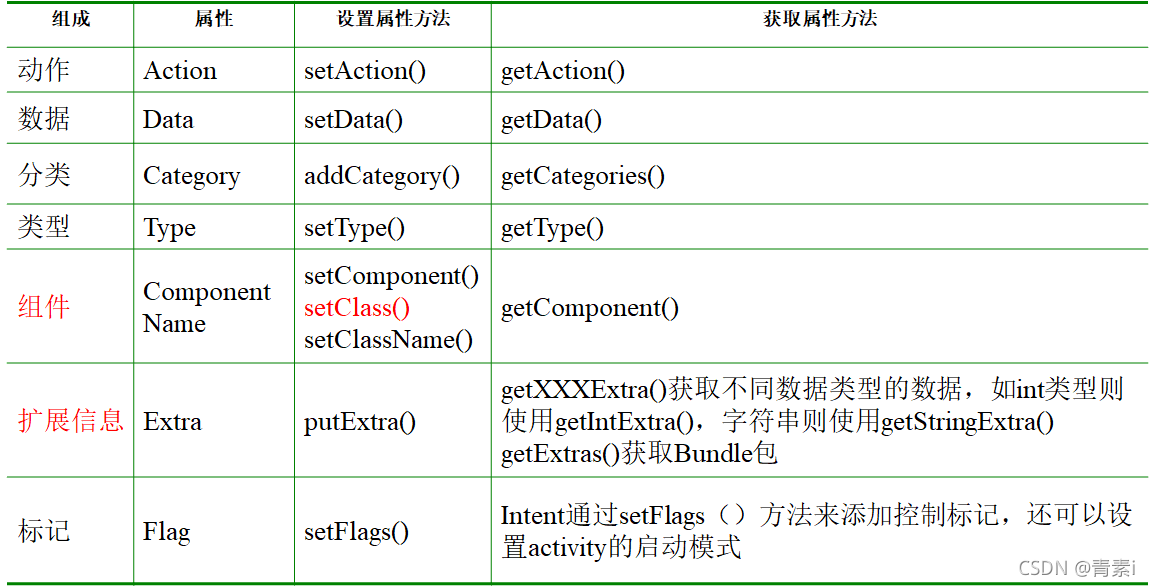
Intent由动作、数据、分类、类型、组件、扩展信息、标记等内容组成,每个组成都由相应的属性进行表示,并提供设置和获取相应属性的方法。
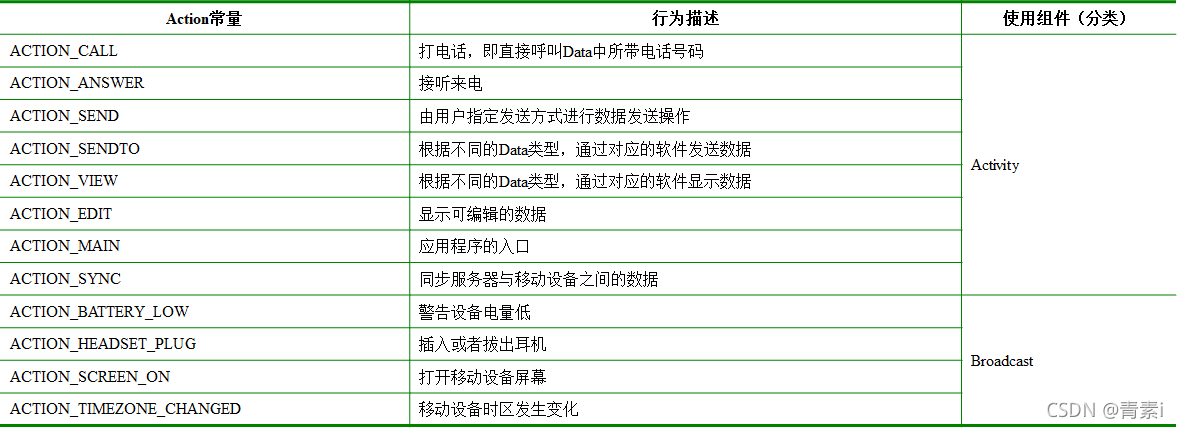
• Action属性用于描述Intent要完成的动作,对要执行的动作进行一个简要描述。Intent类定义了一系列Action属性常量,用来标识一套标准动作,如ACTION_CALL(打电话)等。
• 通常与Data一般匹配使用
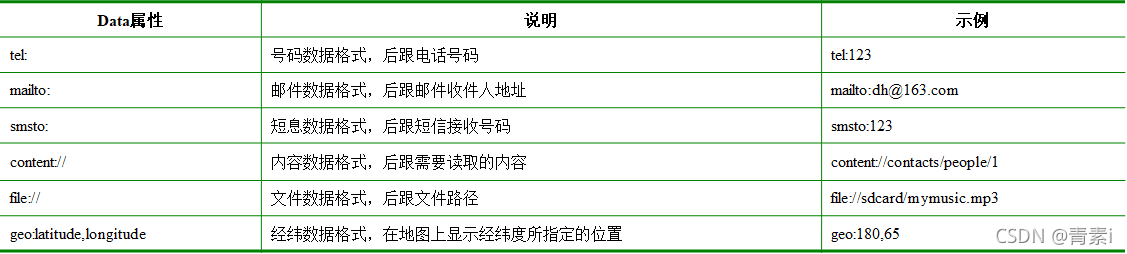
例如 短信发送
一、
Uri uri= Uri.parse(“tel:10086”);
Intent intent= new Intent(Intent.ACTION_CALL, uri);
//intent.setData(uri));//设置数据
startActivity(intent);
二、
Manifest里需要添加CALL_PHONE权限
三、
危险权限需要动态申请。
Action和Data一般匹配使用,不同的Action由不同的Data数据指定

• Category属性指明一个执行Action的分类
• Intent中定义了一系列Category属性常量
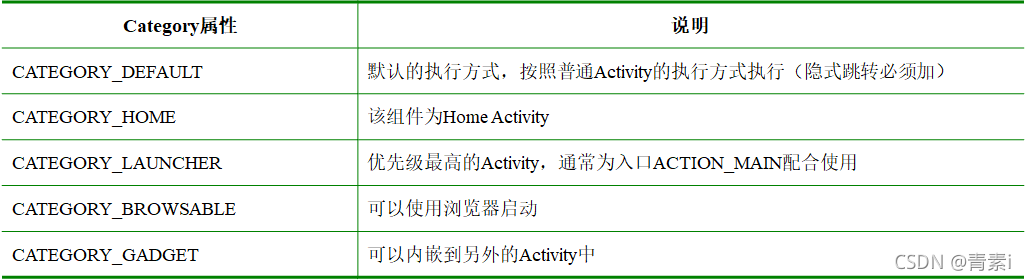
      <intent-filter>
            <category android:name="android.intent.category.HOME"/>
            <category android:name="android.intent.category.DEFAULT"/>
            <action android:name="android.intent.action.MAIN"/>
      </intent-filter>
一、Component属性用于指明Intent的目标组件的类名称。
二、通常Android会根据Intent中包含的其他属性的信息,比如Action、Data/Type、Category进行查找,最终找到一个与之匹配的目标组件。但是,如果指定了Component这个属性,Intent则会直接根据组件名查找到相应的组件,而不再执行上述查找过程。指定Component属性后,Intent的其他属性都是可选的。
三、根据Intent寻找目标组件时所采用的方式不同,可以将Intent分为两类:
显式Intent,这种方式通过直接指定组件名称Component来实现;
Intent intent = new Intent();
ComponentName name = new ComponentName(IntentActivity.this,MainActivity.class);
intent.setComponent(name);
startActivity(intent);
**隐式Intent,**这种方式通过Intent Filter过滤实现,过滤时通常根据Action、Data和Category属性进行匹配查找。
Intent intent = new Intent();
intent.setClassName(IntentActivity.this,"com.ugrow.day02.MainActivity");
显式Intent通过**setComponent()、setClassName()或setClass()**设置组件名
Intent intent = new Intent();
intent.setClass(IntentActivity.this,MainActivity.class);
通过使用Intent对象的putExtra()方法来添加附加信息、和信息传递
信息添加 方式类似于键值对
Intent intent= new Intent();
intent.putExtra("name","zhangsan");
信息取出 另一个页面
通过使用Intent对象的getXXXExtra()方法可以获取附加信息。
例如,将上面代码存入Intent对象中的人名获取出来,
因存入的是字符串,所以可以使用getStringExtra()方法获取数据
 Intent intent = getIntent();
 String name=intent.getStringExtra("name");
打包 当一个页面的数据会向多个页面传递的时候并且不是每个页面都会用到这些数据
比如A页面传到B页面 B页面不需要用数据 但需要将数据传递给C页面
进行多次使用 如果数据过多那么将会导致每一个页面都有大量的get方法 页面不整洁
因此使用Bundle打包
存
Intent intent = new Intent();
Bundle bundle = new Bundle();
bundle.putString("user",user.getText().toString());
bundle.putString("pwd",pwd.getText().toString());
intent.putExtras(bundle);
取
Bundle extras = getIntent().getExtras();
String user = extras.getString("user");
String pwd = extras.getString("pwd");
Javabean对象序列化后可以直接使用Extra方法传递对象
一、Javabean对象需要实现Serializable接口
CommentBean implements Serializable
二、传数据
intent.putExtra("bean",commentBean);
三、取数据
 CommentBean commentBean = new CommentBean();
 Intent intent=getIntent();
 commentBean = (CommentBean) intent.getSerializableExtra("bean");
Intent intent = new Intent();
Uri uri = Uri.parse("file:///data/vivo.mp4");
intent.setAction(Intent.ACTION_VIEW);
intent.setDataAndType(uri,"video/*");
startActivity(intent);
Flag属性用来设定Activity的启动模式,与清单文件中的设置launchMode属性值相同
Intent intent = new Intent();
intent.setFlags(Intent.FLAG_ACTIVITY_CLEAR_TOP);
Intent.FLAG_ACTIVITY_CLEAR_TOP = singleTask
Intent.FLAG_ACTIVITY_SINGLE_TOP = singleTop
Intent.FLAG_ACTIVITY_NEW_TASK = singleInstance
一、A页面传值给B页面
startActivity() (putExtra,Bundle)
二、B页面传值给A页面
startActivityForRestult()
setResult(resultCode,Intent)
onActivityResult
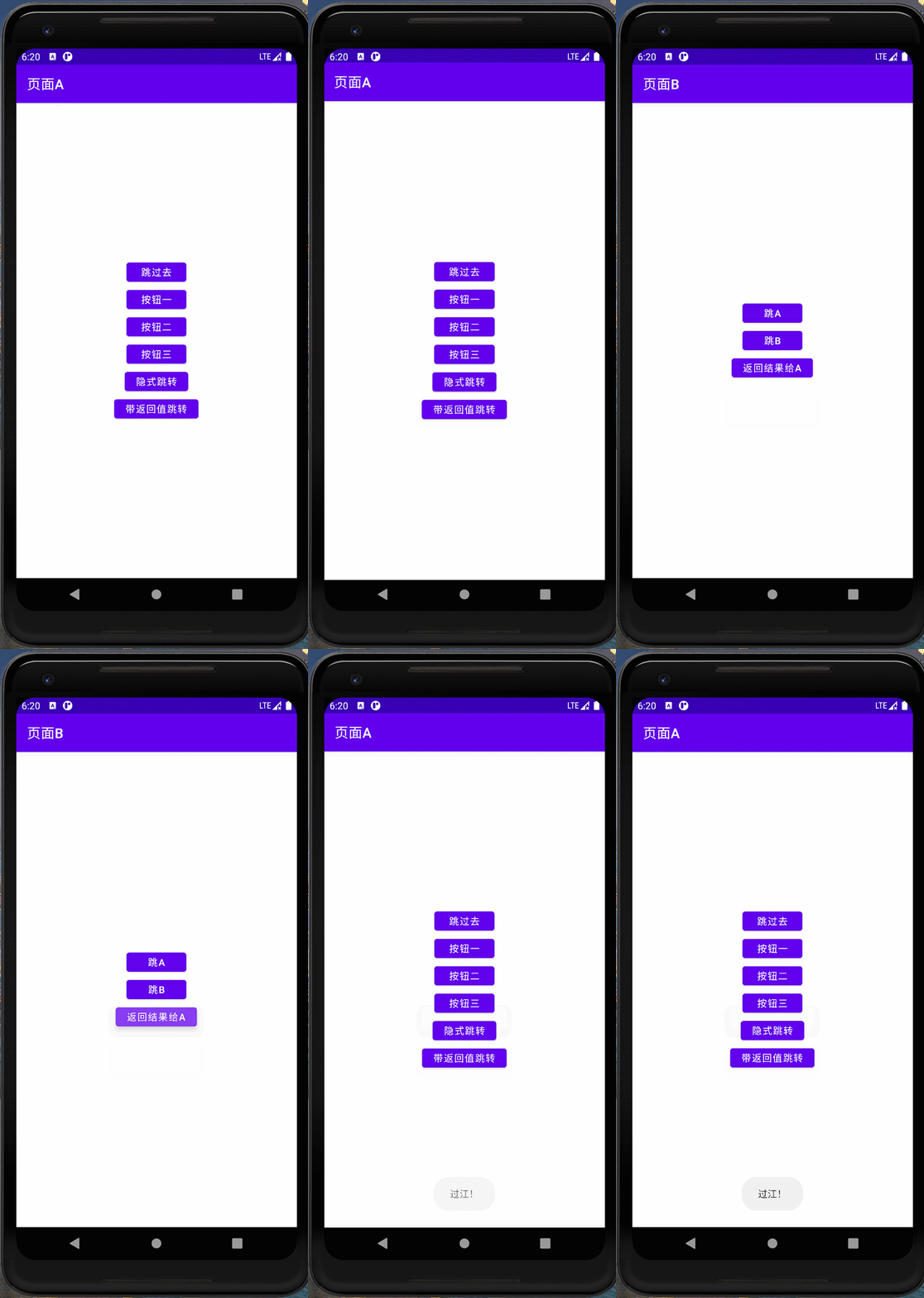
A页面跳转B页面 如果转账成功则返回过江 失败则返回有鬼
页面A
    Intent intent = new Intent(MainActivity.this,HomeActivity.class);
        intent.putExtra("money","转账100元");

        //有返回值的跳转
        /*
         * 第一个参数Intent对象
         * 第二个参数 RequestCode
         */
        startActivityForResult(intent,REQUSET_CODE);
    @Override
    //第一个参数 是不是我要的返回结果  第二个参数 是谁返回给我的 第三个参数 返回的附加信息

    protected void onActivityResult(int requestCode, int resultCode, @Nullable Intent data) {
        super.onActivityResult(requestCode, resultCode, data);

        if(requestCode == REQUSET_CODE && resultCode == HomeActivity.RESULT_CODE){
            String msg = data.getStringExtra("msg");

            Toast.makeText(MainActivity.this,msg,Toast.LENGTH_SHORT).show();
        }


    }
页面B
Intent intent = new Intent();
                Intent getIn = getIntent();
                String money = getIn.getStringExtra("money");
                if(TextUtils.isEmpty(money)){
                    intent.putExtra("msg","有鬼!");

                }else{
                    intent.putExtra("msg","过江!");
                }

                setResult(RESULT_CODE,intent);
                //关闭页面
                finish();
最近因为项目需要,需要将Android手机系统自带的某个系统软件反编译并更改里面某个资源,并重新打包,签名生成新的自定义的apk,下面我来介绍一下我的实现过程。APK修改,分为以下几步:反编译解包,修改,重打包,修改签名等步骤。安卓apk修改准备工作1.系统配置好JavaJDK环境变量2.需要root权限的手机(针对系统自带apk,其他软件免root)3.Auto-Sign签名工具4.apktool工具安卓apk修改开始反编译本文拿Android系统里面的Settings.apk做demo,具体如何将apk获取出来在此就不过多介绍了,直接进入主题:按键win+R输入cmd,打开命令窗口,并将路
require'mechanize'agent=Mechanize.newlogin=agent.get('http://www.schoolnet.ch/DE/HomeDE.htm')agent.clicklogin.link_withtext:/Login/然后我得到Mechanize::UnsupportedSchemeError。 最佳答案 Mechanize不支持javascript但您可以将搜索字段添加到表单并为其分配搜索词并使用mechanize提交表单form=page.forms.firstform.add_fie
我有可变数量的表格和可变数量的行,我想让它们一个接一个地显示,但如果表格不适合当前页面,请将其放在下一页,然后继续。我已将表格放入事务中,以便我可以回滚然后打印它(如果高度适合当前页面),但我如何获得表格高度?我现在有这段代码pdf.transactiondopdf.table@data,:font_size=>12,:border_style=>:grid,:horizontal_padding=>10,:vertical_padding=>3,:border_width=>2,:position=>:left,:row_colors=>["FFFFFF","DDDDDD"]pdf.
据我们所知,Jekyll默认分页仅支持index.html,我想创建blog.html并在那里包含分页。有什么解决办法吗? 最佳答案 如果您创建一个名为/blog的目录并在其中放置一个index.html文件,那么您可以向_config.yml表示paginate_path:"blog/page:num"。不是使用根文件夹中的默认index.html作为分页器模板,而是使用/blog/index.html。分页器将根据需要生成类似/blog/page2/和/blog/page3/的页面。这将使您到达yourwebsite.com/b
我正在寻找一种简单的方法来为我在RubyonRails上的项目实现简单的“即将推出”(预启动)页面。用户应该能够留下电子邮件以便在项目启动时收到通知。有没有这样的插件\gem?或者我应该自己做... 最佳答案 LaunchingSoon是一个Rails插件。它还集成了MailChimp或Campaignmonitor. 关于ruby-on-rails-RoR&&"comingsoon"页面,我们在StackOverflow上找到一个类似的问题: https:/
我有一个使用Jekyll托管在GitHub上的静态网站。问题是,我真的不需要master分支,因为存储库唯一包含的是网站。这样我就必须gitcheckoutgh-pages,然后gitmergemaster,然后gitpushorigingh-pages。有什么简单的方法可以摆脱gh-pages分支并直接从master推送? 最佳答案 Theproblemis,Idon'treallyneedthemasterbranch,astheonlythingtherepositorycontainsisthewebsite.Isthere
我试图通过点击一个链接获得一个带有ISO-8859-1编码的页面,所以代码类似于这样:page_result=page.link_with(:text=>'link_text').click到目前为止,我得到的结果编码错误,所以我看到的字符如下:'T�tulo:'insteadof'Título:'我尝试了几种方法,包括:使用代理在第一个请求中声明编码:@page_search=@agent.get(:url=>'http://www.server.com',:headers=>{'Accept-Charset'=>'ISO-8859-1'})说明页面本身的编码page_result.
我正在使用rails_xss运行Rails2.3.14插入。我有另一个用于创建管理仪表板View的插件。我的问题是rails_xss正在转义我的仪表板插件生成的所有HTML。有没有一种方法可以将rails_xss配置为不转义匹配example.com/admin或基于目录(app/views/admin)或任何类似的页面结果一样吗? 最佳答案 更新仪表板生成插件以使用raw或html_safe进行内容输出可能会更简单。 关于ruby-on-rails-仅在某些页面上使用rails_xss
我正在开发一个Rails2.3.1网站。在整个网站中,我需要一个用于在各种页面(主页、创建帖子页面、帖子列表页面、评论列表页面等)上创建帖子的表单——只要说这个表单需要在由各种Controller)。这些页面中的每一个都显示在相应的Controller/操作中检索到的各种其他信息。例如,主页列出了最新的10篇文章、从数据库中提取的内容等。因此,我已将帖子创建表单移动到它自己的部分中,并将该部分包含在所有必要的页面中。请注意,部分POST中的表单到/questions(路由到PostsController::create——这是默认的Rails行为)。我遇到的问题是当Posts表单没有正
我正在为Jekyll编写一个转换器插件,需要访问一些页眉(YAML前端)属性。只有内容被传递给主要的转换器方法,似乎无法访问上下文。例子:moduleJekyllclassUpcaseConverter关于如何在转换器插件中访问页眉数据有什么想法吗? 最佳答案 基于Jekyll源代码,无法在转换器中检索YAML前端内容。根据您的情况,我看到了两种可行的解决方案。您的文件扩展名可以具有足够的描述性,以提供您本应包含在前言中的信息。看起来Converter插件的设计就是这么基本的。如果修改Jekyll是一个选项,您可以更改Convert
