SQL Server全套教程全程干货
数据库创建语法
-- 创建数据库
1. create database 数据库名字

2. on primary(
 	name='数据文件名',
 	filename='完整路径\数据文件名.mdf',
 	size=初始大小,maxsize=最大大小,
 	filegrowth=文件增长比
 	)

 	--创建日志文件
3.log on (
	name='日志文件名',
	filename='完整路径\日志文件名.ldf',
	size=初始大小,
	maxsize=最大大小,
	filegrowth=文件增长比
)
数据库创建实例示范
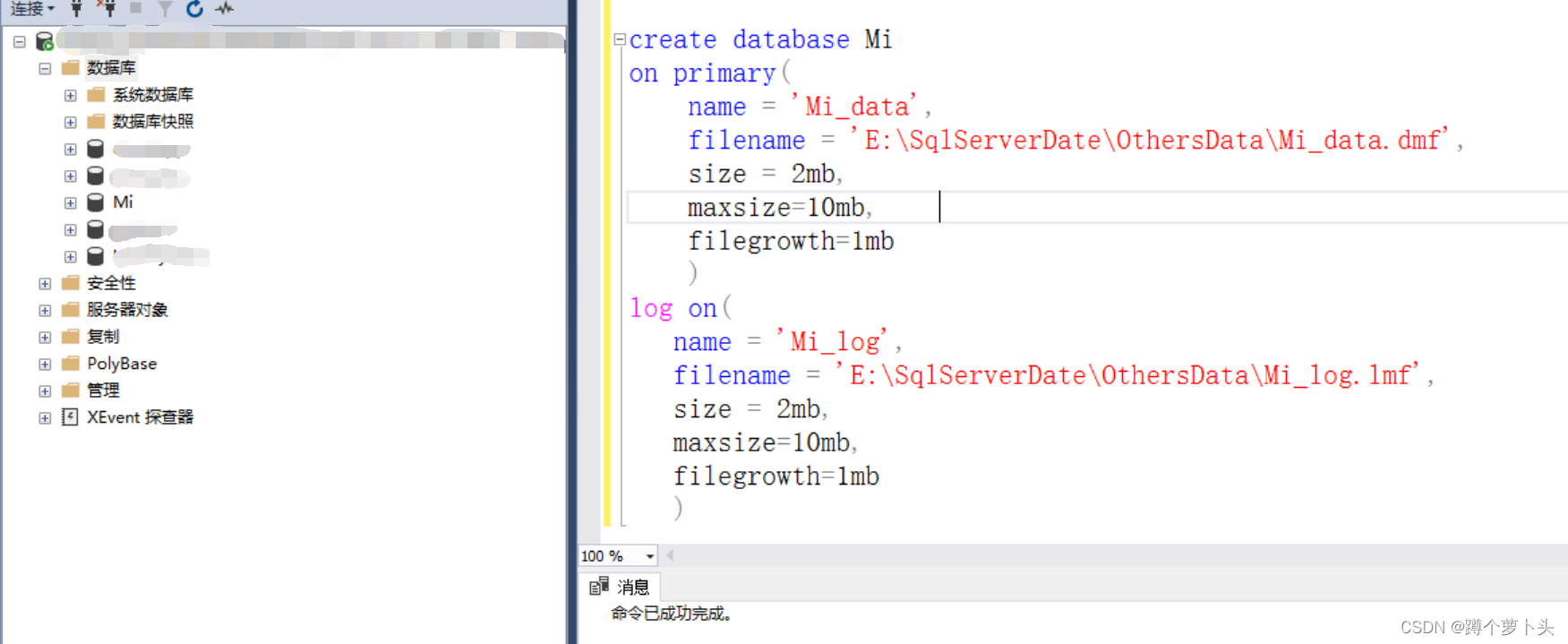
解说:
按上图SQL语法即可以创建名为Mi的数据库,数据主文件Mi_data.mdf,以及数据日志文件Mi_log.ldf等
拓展(三种文件类型):.mdf主数据文件 .ndf次数据文件 .ndf日志文件
数据库查看语法
--查看数据库
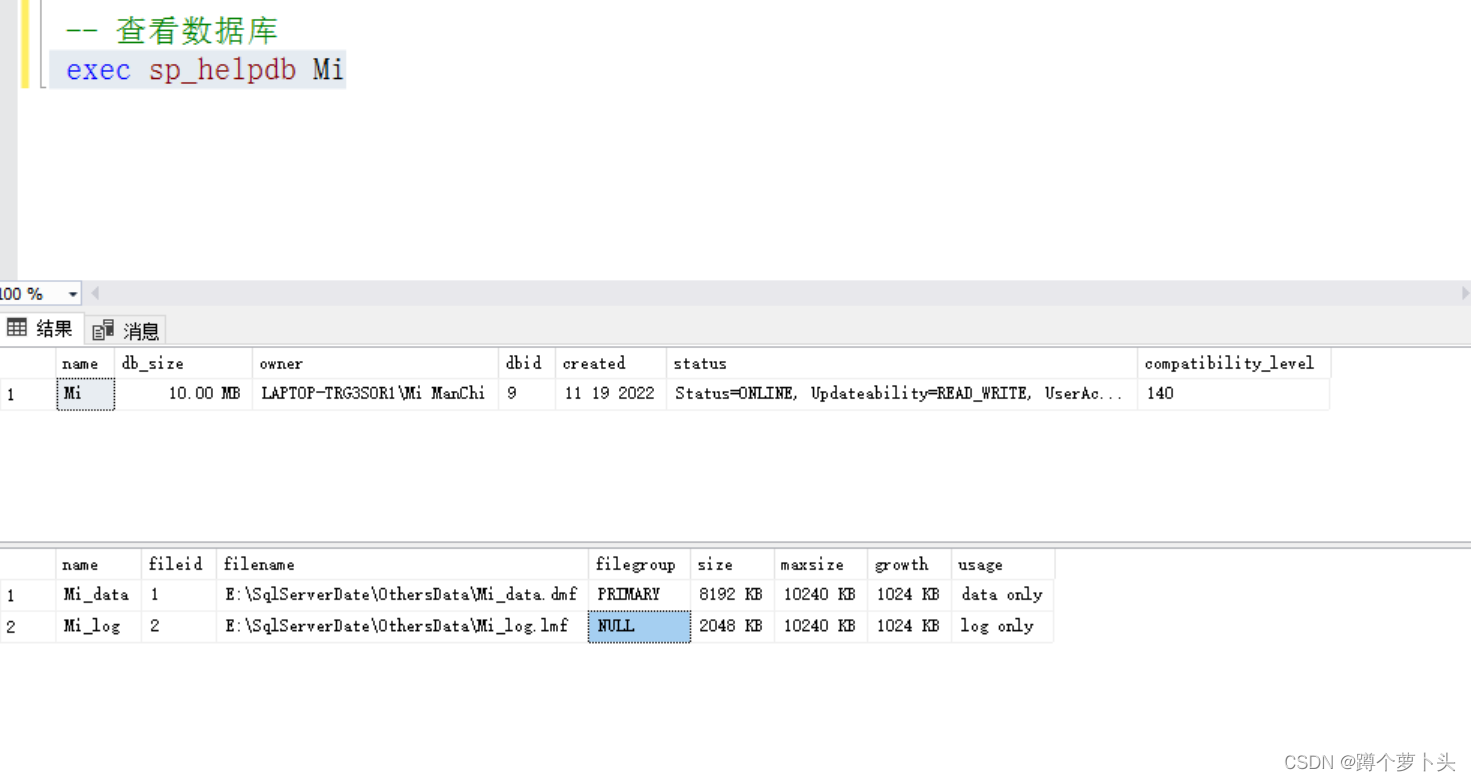
1. exec sp_helpdb 数据库名
数据库修改语法
--修改数据库
2. alter database 数据库名
   add file/add log file /modify file (file为数据库mdf文件名)
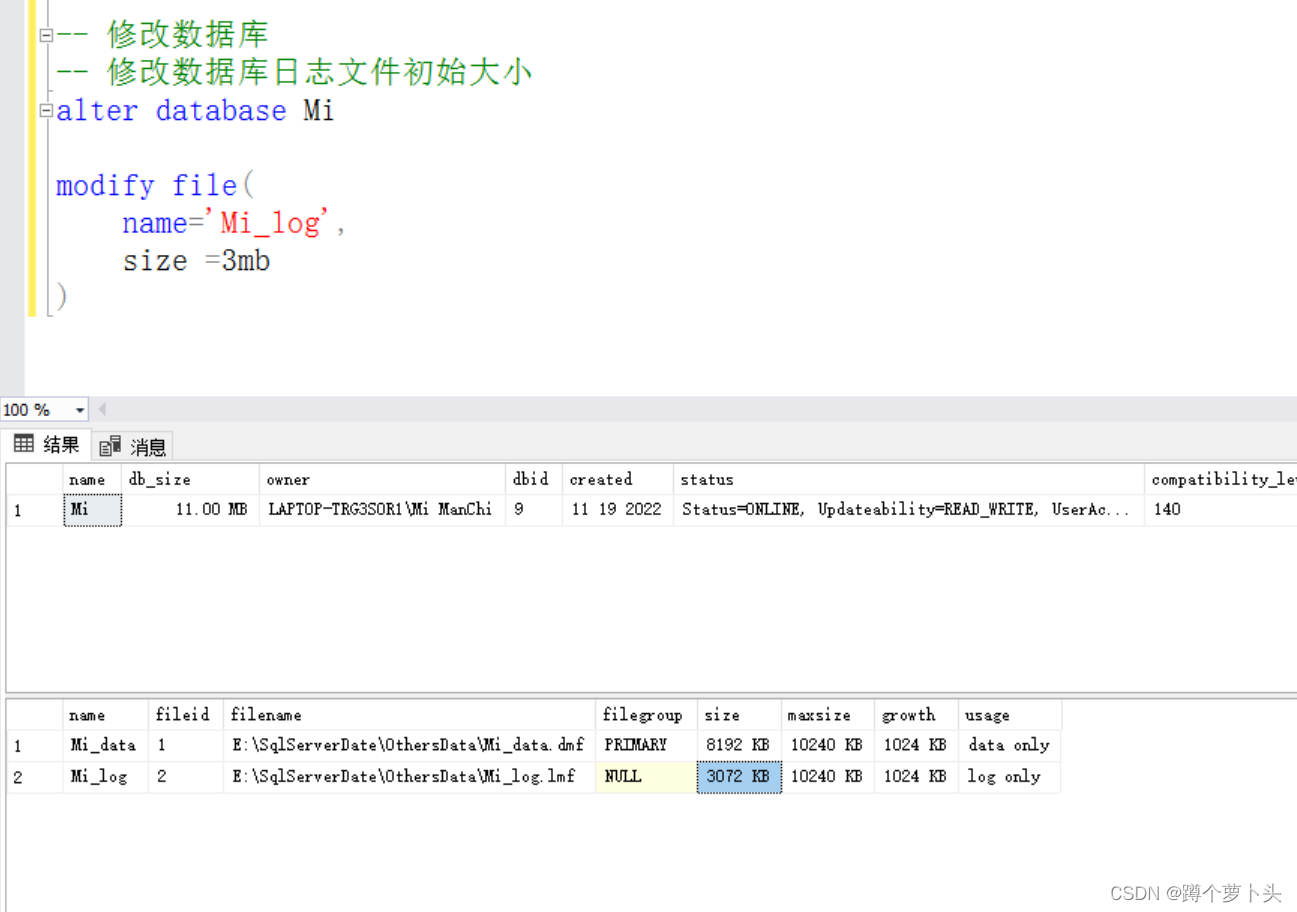
解说:
查看数据库可以看到当前数据库的一些基本信息,数据库名、文件大小、存放位置等;修改数据库,上图操作将初始日志文件2048KB大小Mi_log.ldf文件,增加至了3072KB。
数据库分离语法
目的:分离数据库是为了能够手动找到数据数据文件,将其物理拷贝到其他地方,进行备份。
-- 分离数据库
1.exec  sp_detach_db ' 数据库名'
数据库附加语法
目的:能够使用其他数据库文件,导入他人的数据库。
-- 附加数据库
2.exec sp_attach_db '数据库名','完整路径\数据文件名.mdf'
数据库删除语法
-- 删除数据库(注意哦,删除不可逆哦,当前使用库删除操作不能完成)
3.drop database 数据库名
数据库分离、附加及删除实例演示
1. 分离数据库
exec sp_detach_db Mi
2.附加数据库
exec sp_attach_db 'Mi','E:\SqlServerDate\OthersData\Mi_data.dmf'
3.删除数据库
drop database Mi--
4.判断加删除数据库
if exists (select * from sys.databases where name = 'Mi') drop database Mi
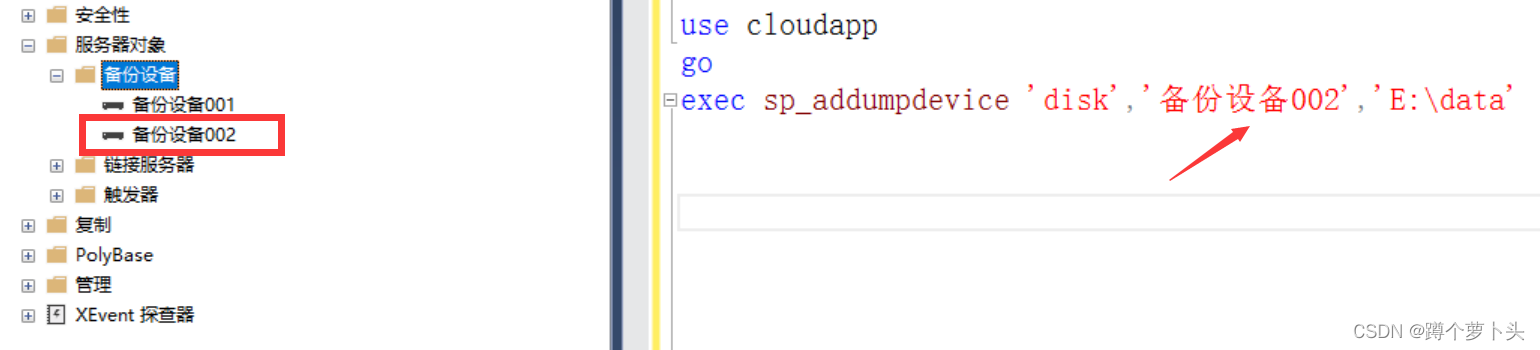
数据库备份设备创建
use 数据库名
go
exec sp_addumpdevice '磁盘设配','备份名称','设备名称物理存储路径'
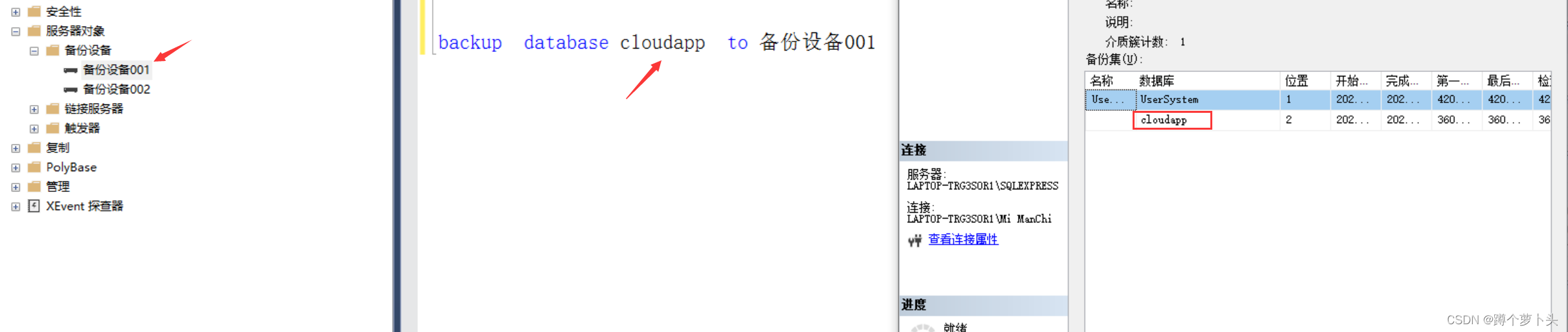
数据库备份
backup database 数据库名 to 备份设备名称
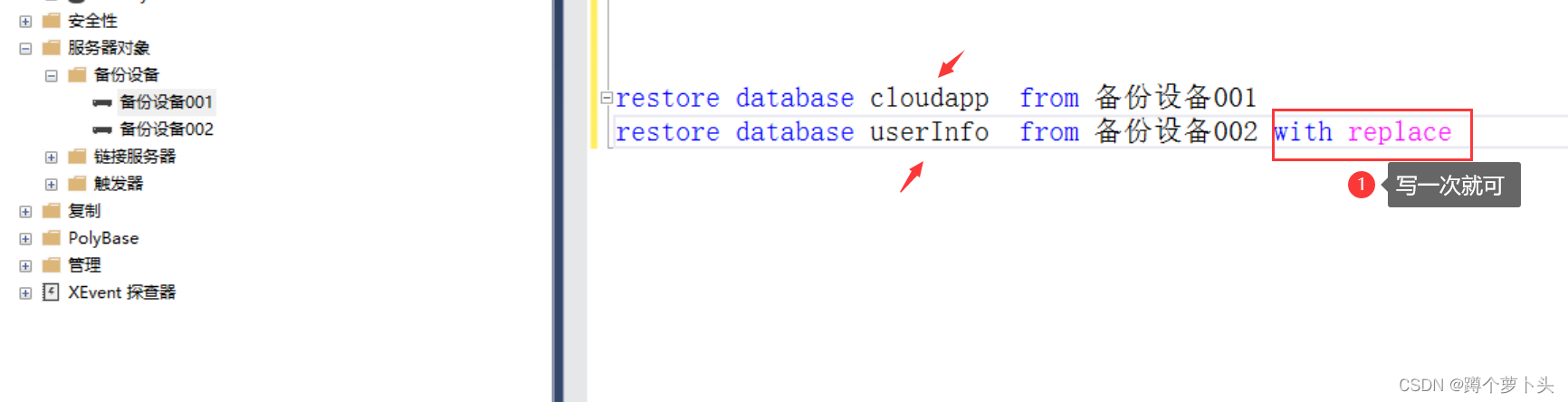
数据库还原(可以同时还原多个数据库,但结尾只需要一个with replace)
restore database 数据库名 from 备份设备名称 with replace
userId int primary key identity(1.1)
 userName char(10) not null
 -- char(10) 即使存入'ab'两个字节,但它仍然占用10个字节
  userName varchar(10) not mull
  -- varchar(10) 存入多少占用多少字节 最大为10个字节
   address text not null
   -- text是长文本类型,可以无限制写入,但是执行效率比较低
n userName nvarchar(100) not null
-- nvarchar(100) 存储unicode码
varchar(100) 存储100个字母,存储50汉字
nvarchar(100) 存储100个字母,存储100汉字
 -- datetime可以存储年月日时分秒,当前时间前后都可以
 userBirth datetime not null,
 -- date存储年月日
 userBirth date not null

 -- smalldatetime 表示在当前时间之前的时间
 userBirth smalldatetime not null
 salary decimal(12,2) check(salary >=1000 and salary <= 1000000) not null,-- 薪水
 decimal(总长度,小数位数)
 bit类型放0和1
数据表的创建语法
1.建表
-- 切换到目标数据库
use 目标数据库名
create table 表名(
	字段1  数据类型 ,
	字段2  数据类型
)
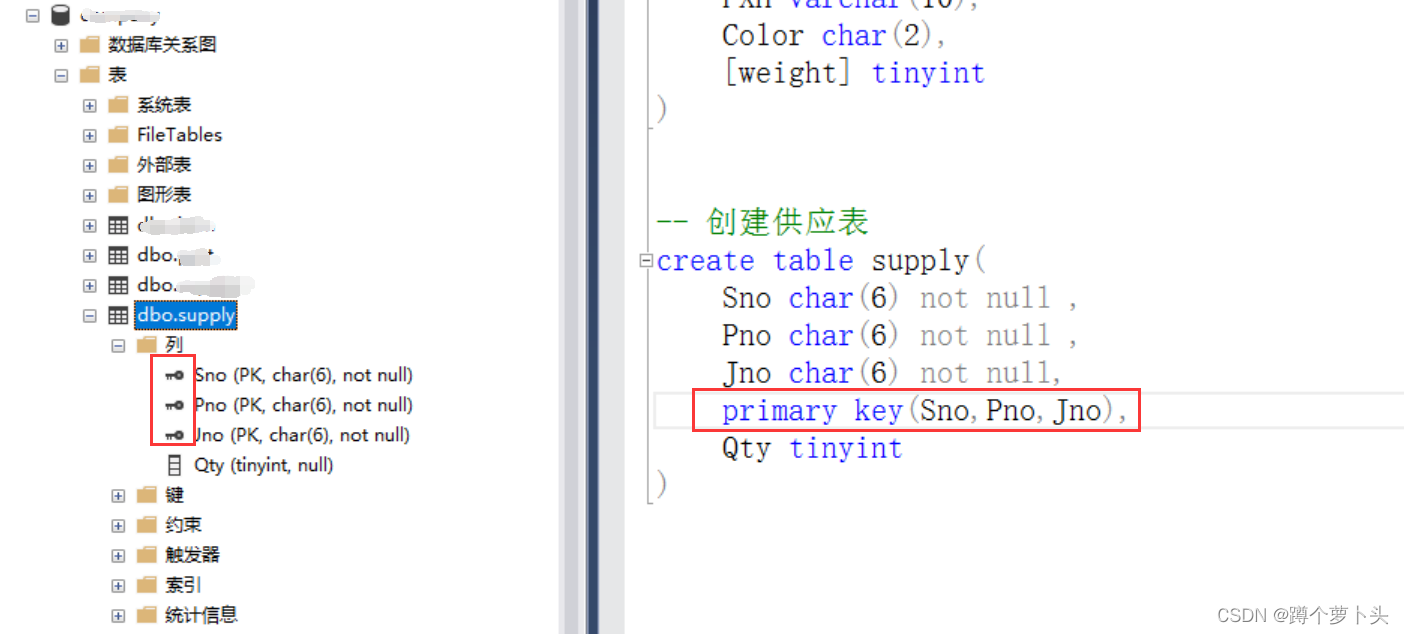
-- 创建组合主键
create table user(
	Sno char(6) not null ,
	Pno char(6) not null ,
	Jno char(6) not null,
	primary key(Sno,Pno,Jno),
)
数据表的创建实例
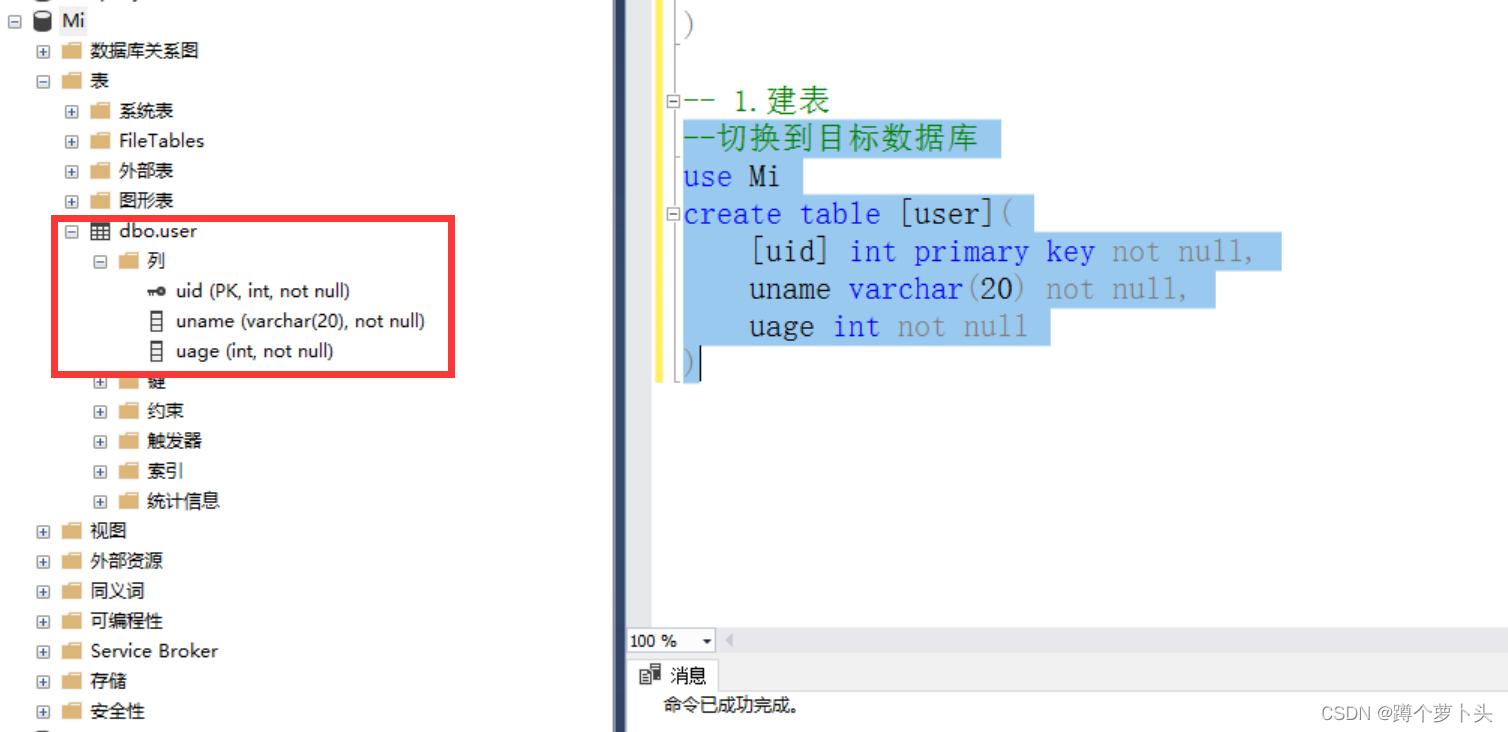
说明:
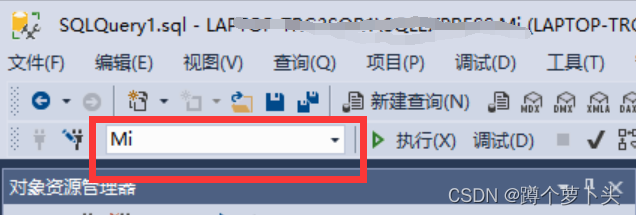
数据库表,也称二维关系表,对应具体的一个实体。针对于上文,数据库的切换,可以采用图形化界面操作,也可以使用SQL语句的方式切换,如何查看数据库是否已经切换为当期数据库。查看MSMS图形化管理工具的左上角一个下拉框。当数据表字段存在关键字时,可以采用[ ] 将字段名括起来,避免语法错误。
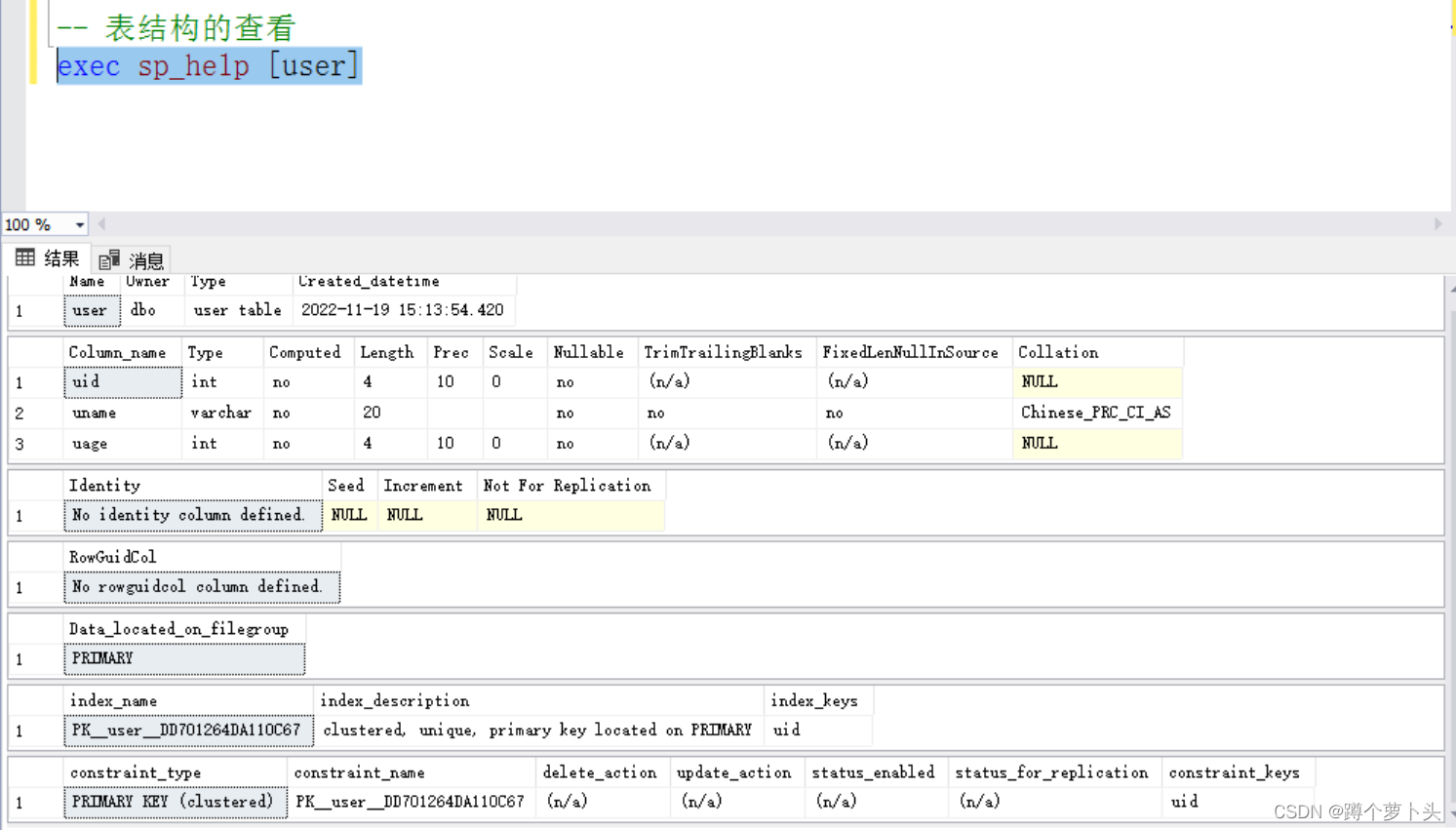
查看表结构:
-- 语法:
exec sp_help 表名
表结构的修改:
 -- 语法:alter table 表名 add 新列名 数据类型
 alter table userInfo add email nvarchar(20)
 -- 语法:alter table 表名 drop column 列名
 alter table userInfo drop email
 -- 语法:alter table 表名 alter column 列名 数据类型
 alter table userInfo alter coulumn phone nvarchar(13)
 -- 注意:如果该表数据,phone字段数据长度假设添加的是20位的,现在修改位13是会报错的
 列名1 数据类型(长度) not  null primary key
 -- 说明:列名2是被定义成了外键
 列名2 数据类型(长度) not  null references 主键表(主键)
 列名3 数据类型(长度) not  null check(列名3='' and 列名3='')
 列名4 数据类型(长度) not  null default '默认值'
 列名5 数据类型(长度) not  null unique
删除表约束:
-- 语法:alter table 表名 drop constraint 约束名
alter table UserInfo drop constraint CK__UserInfo__salary__7C4F7684
-- 约束名怎么找?
-- 1. 当前表右键设计表   2.计入设计表后任意位置右键 找到check约束,可以选择手动删除或命令删除
说明:
约束名如果是自定义的比较好书写,但是如果是系统自动生成的约束名比较复杂。可以按照上图方式进行约束名查找。
添加表约束:
-- 添加约束-- 为salary字段添加  check约束
alter table UserInfo add constraint  CK__UserInfo__salary66 check(salary >=1000 and salary <=200000)
常用的约束添加:
-- 添加(主键)
alter table UserInfo add constraint 约束名 primary key(列名)

-- 添加(唯一)
alter table UserInfo add constraint 约束名 unique(列名)

-- 添加(默认值)
alter table UserInfo add constraint 约束名 default 默认值 for(列名)

 添加(外键)
alter table UserInfo add constraint 约束名 foreign key(列名) references 关联表名(列名(主键))
添加数据的第一种方式:
语法:insert into 表名(字段1,字段2) value('值','值')
--向People表输入数据  ctrl+shift+r
insert into People(DepartmentId,RankId,PeopleName,PeopleGender,PeopleBirth,PeopleSalary,PeoplePhone,PeopleAddress,peopleAddTime,PeopleMail)
values(7,1,'徐宏','男','2000-05-6',6000,'19123929393','中国南昌',getdate(),'124144512@qq.com')
insert into People(DepartmentId,RankId,PeopleName,PeopleGender,PeopleBirth,PeopleSalary,PeoplePhone,PeopleAddress,peopleAddTime,PeopleMail)
values(3,2,'徐向前','男','1997-09-6',12000,'456346929393','中国广州',getdate(),'999999912@qq.com')
insert into People(DepartmentId,RankId,PeopleName,PeopleGender,PeopleBirth,PeopleSalary,PeoplePhone,PeopleAddress,peopleAddTime,PeopleMail)
values(1,2,'谢颖儿','女','2000-09-9',8000,'1994329393','中国四川',getdate(),'1888144512@qq.com')
insert into
添加数据的第二种方式:
-- 2.简写 前提:字段名对应位置不要打乱
insert into Department valuses('值','值')
添加数据的第三种方式:
-- 3.一次性插入多条数据
insert into Department(departmentName,departmentAddress,departmentLeader)
select '软件部','行政大楼2层202','Mr Xie' union
select '测试部','行政大楼2层206','Miss Liu'union
select '实施部','行政大楼2层207','mr Gong'
说明:如果添加的数据个数和表字段个数一一对应(字段顺序),则可以省略表后( )内的字段书写
修改:
-- 修改格式:
update 表名 set 字段1 = 值,字段2 = 值,....字段n =值 where 条件
update student
set scores= scores + 5 where scores between 60 and 70
-- 将选了计算机导论,Java程序设计的同学分数加一分
update student
set scores = scores + 1 where className in('计算机导论','Java程序设计')
删除
-- 删除数据
格式1:
delete from 表名 where 条件(也可以不带条件,不带条件默认清空表数据,请谨慎)
格式2:
drop table 表名
格式3:
truncate from 表名
delete / drop /truncate几种删除方式的区别?
delete删除数据可以带条件,清空数据但表的结构还在;如果表中数据为自动编号,使用delete删除后序号是从下一个开始。即原表序号1,2,3,4,5,6 删除记录第6条,再次向表新增一条数据,编号从7开始;也就是说表中不会存在编号为6的记录。例如:delete from 表名 where id = 1 and name= 'xxx'
truncate删除数据不可以带条件,清空数据但表结构还在;如果表中数据为自动编号,使用truncate删除后序号是从删除的当前序号开始。即原表序号1,2,3,4,5,6 删除记录第6条,再次向表新增一条数据,编号从6开始例如:truncate table 表名
drop删除数据,直接删除表结构和数据例如:drop table 表名
写给读者:本小节是整个数据库内容里面最为重要的内容,也是对前面所学知识的综合运用。希望每一位读者都可以自己建库建表进行实操,您可以选择使用下面的假数据,也可以使用您自己的数据。但涉及到真实的数据库的数据操作,请您慎重(因为数据删除是个危险操作哦)
伪数据
-- 创建Department部门数据表
create table Department(
	DpartmentId int primary key identity(1,1),
	DepartmentName nvarchar(10) not null,
	DepartmentRemark text
)

-- 创建等级数据表
create table [Rank](
	RankId int primary key identity(1,1),
	RankName nvarchar(10) not null,
	RankRemark text
)

-- 创建员工表
create table People(
	DepartmentId int references Department(DpartmentId) not null,-- 部门 引用外键
	RankId int references [Rank](RankId),--职级
	PeopleId int primary key identity(202200,1),-- 员工编号
	PeopleName nvarchar(50) not null,
	PeopleGender nvarchar(1) default('男') check(PeopleGender='男' or PeopleGender='女') not null,
	PeopleBirth smalldatetime not null,
	PeopleSalary decimal(12,2) check(PeopleSalary >=1000 and PeopleSalary <=1000000) ,
	PeoplePhone nvarchar(11)  unique not null,
	PeopleAddress nvarchar(100),
	peopleAddTime smalldatetime default(getdate()),

)

-- 数据添加

-- Department表插入数据
insert into Department(DepartmentName,DepartmentRemark)
values('软件部','........')
insert into Department(DepartmentName,DepartmentRemark)
values('策划部','........')
insert into Department(DepartmentName,DepartmentRemark)
values('市场部','........')
insert into Department(DepartmentName,DepartmentRemark)
values('设计部','........')
insert into Department(DepartmentName,DepartmentRemark)
values('后勤部','........')

 -- 向Rank表
insert into [Rank](RankName,RankRemark)
values('初级','.....')
insert into [Rank](RankName,RankRemark)
values('高级','.....')
insert into [Rank](RankName,RankRemark)
values('中级','.....')


select * from People
select * from [Rank]
select * from Department


--向People表输入数据  ctrl+shift+r
insert into People(DepartmentId,RankId,PeopleName,PeopleGender,PeopleBirth,PeopleSalary,PeoplePhone,PeopleAddress,peopleAddTime,PeopleMail)
values(7,1,'徐宏','男','2000-05-6',6000,'19123929393','南昌',getdate(),'124144512@qq.com')
insert into People(DepartmentId,RankId,PeopleName,PeopleGender,PeopleBirth,PeopleSalary,PeoplePhone,PeopleAddress,peopleAddTime,PeopleMail)
values(3,2,'徐向前','男','1997-09-6',12000,'456346929393','广州',getdate(),'999999912@qq.com')
insert into People(DepartmentId,RankId,PeopleName,PeopleGender,PeopleBirth,PeopleSalary,PeoplePhone,PeopleAddress,peopleAddTime,PeopleMail)
values(1,2,'谢颖儿','女','2000-09-9',8000,'1994329393','四川',getdate(),'1888144512@qq.com')
insert into People(DepartmentId,RankId,PeopleName,PeopleGender,PeopleBirth,PeopleSalary,PeoplePhone,PeopleAddress,peopleAddTime,PeopleMail)
values(4,3,'老王','男','1976-10-23',3000,'999939333','黑龙江',getdate(),'99999512@qq.com')
insert into People(DepartmentId,RankId,PeopleName,PeopleGender,PeopleBirth,PeopleSalary,PeoplePhone,PeopleAddress,peopleAddTime,PeopleMail)
values(2,1,'老六','男','1999-10-23',4500,'1291248143','山东',getdate(),'1244559512@qq.com')
--查询指定列(姓名,性别,出生日期) 先写表名会有提示
select PeopleName,PeopleGender,PeopleBirth from People
--查询指定列(姓名,性别,出生日期)并且用别名显示
select PeopleName 姓名,PeopleGender 性别,PeopleBirth 出生日期 from People
-- 查询所在城市(过滤重复)
select distinct PeopleAddress from People
--假设准备加工资(上调20%) 查询出加工资后的员工数据
select PeopleName,PeopleGender,PeopleSalary*1.2 加薪后工资 from People
--假设准备加工资(上调20%) 查询出加工资后和加工资前的员工数据对比
select PeopleName,PeopleGender,PeopleSalary, PeopleSalary*1.2 加薪后工资 from People
SQL常用运算符
= :等于,比较是否相等及赋值
!=:比较不等于 (<>)
>:比较大于
<:比较小于
>=:比较大于等于
<=:比较小于等于
IS NUll:比较为空(null是表示此时没写该字段,而不是空值null,如果是空值"" 用=)
IS NOt NUll :比较不为空
in:比较是否再其中
like:模糊查询
BETWEEN....AND.......:比较是否在两者之间
and:逻辑与(两个条件都满足)
or:逻辑或(两个有一个条件表达式成立)
not:逻辑非(条件成立,表达式则不成立;条件不成立,表达式则成立 )
-- 查询数据为女的信息
select * from People where PeopleGender = '女'
-- 查询数据为男的,工资大于8000的数据
select * from People where PeopleGender ='男' and PeopleSalary >=8000
-- 查询出出生年月在1990-1-1之后,月薪大于10000的女员工
select * from People where PeopleBirth >= '1990-1-1' and PeopleSalary >=10000 and PeopleGender = '女'
--查询月薪大于10000的,或者月薪大于8000的女员工
select * from People where PeopleSalary >=10000 or (PeopleSalary>=8000 and PeopleGender='女')
-- 查询月薪在8000-12000之的员工姓名、住址和电话(多条件)
select PeopleName,PeopleAddress,PeoplePhone from People where PeopleSalary >=8000 and PeopleSalary <=120000
-- 查询月薪在8000-12000之的员工姓名、住址和电话(多条件)
select PeopleName,PeopleAddress,PeoplePhone from People where PeopleSalary between 8000 and 120000
-- 查询出地址在南昌和贵州的员工信息
select * from People where PeopleAddress ='南昌' or PeopleAddress='贵州'
-- 如果涉及条件比较多用in(或者关系)
select * from People where PeopleAddress in('南昌','贵州','黑龙江')
-- 排序
--根据工资降序排序
select * from People order by PeopleSalary desc
--根据工资升序排序(asc默认值)
select * from People order by PeopleSalary asc
-- 根据名字长度降序排序
select * from People order by LEN(PeopleName) desc
-- 根据名字长度降序排序(显示前3条)
select top 3 * from People order by LEN(PeopleName) desc
-- 查看下数据表所有内容
select * from People
-- 查出工资最高的50%的员工信息
select top 50 percent * from People order by PeopleSalary desc
-- 插入一条数据
insert into People(DepartmentId,[RankId],[PeopleName],[PeopleGender],[PeopleBirth],[PeopleSalary],[PeoplePhone],[peopleAddTime],[PeopleMail])values(1,1,'老李头','男','1999-12-21',23000,19293459999,GETDATE(),'888883333@qq.com')
-- 查询地址为空值的为null 用is关键字
select * from People where PeopleAddress is null
-- 查询地址为不为空值的为null 用is not关键字
select * from People where PeopleAddress is not null
-- 查询出90后的员工信息
select * from People where PeopleBirth >= '1990-1-1' and PeopleBirth <='1999-1-1'select * from People where PeopleBirth between '1990-1-1' and '1999-1-1'select * from People where year(PeopleBirth) between 1990 and 1999
-- 查询年龄在20- 30之间,工资在15000-20000的员工信息-- 当前year(getdate())—year(peopelbirth)
select * from People where year(getdate())-year(PeopleBirth) <=30 and year(getdate())-year(PeopleBirth) >=20and PeopleSalary >= 15000 and PeopleSalary <=20000
-- 查询出星座为巨蟹座的员工信息(6.22-7.22)
select * from People where month(PeopleBirth) = 6 and day(PeopleBirth) >=22 or month(PeopleBirth) =7 and day(PeopleBirth) <=22
-- 子查询 查询出工资比胡九九高的员工信息
select * from People where PeopleSalary > (select PeopleSalary from People where PeopleName ='胡九九')
-- 查询出和老王同一城市的员工
select * from People where PeopleAddress = (select PeopleAddress from People where PeopleName ='老王')
-- 查询出生肖信息为老鼠的员工信息
-- 鼠牛虎兔龙 蛇马 羊猴鸡狗猪
-- 4 5 6 7 8 9 10 11 0 1 2 3
select * from People where year(PeopleBirth)% 12 = 8
-- 查询出所有员工信息的生肖信息
select * ,
case
when year(PeopleBirth) % 12 =4 then '鼠'
when year(PeopleBirth) % 12 =5 then '牛'
when year(PeopleBirth) % 12 =6 then '虎'
when year(PeopleBirth) % 12 =7 then '兔'
when year(PeopleBirth) % 12 =8 then '龙'
when year(PeopleBirth) % 12 =9 then '蛇'
when year(PeopleBirth) % 12 =10 then '马'
when year(PeopleBirth) % 12 =11 then '羊'
when year(PeopleBirth) % 12 =0 then '猴'
when year(PeopleBirth) % 12 =1 then '鸡'
when year(PeopleBirth) % 12 =2 then '狗'
when year(PeopleBirth) % 12 =3 then '猪'
else ''
end '生肖'
from People
-- 查询出所有员工信息的生肖信息
select * ,
case year(PeopleBirth) % 12
when 4 then '鼠'
when 5 then '牛'
when 6 then '虎'
when 7 then '兔'
when 8 then '龙'
when 9 then '蛇'
when 10 then '马'
when 11 then '羊'
when 0 then '猴'
when 1 then '鸡'
when 2 then '狗'
when 3 then '猪'
else ''
end '生肖'
from People
%:代表匹配0个,1个字符或者多个字符
_:代表匹配有且只有一个字符
[]:代表匹配范围内
[^]:代表匹配不在范围内
use UserSystem
select * from People
select * from [Rank]
select * from Department

-- 查询出姓老的员工信息
select * from People where PeopleName like '老%'

--查询出姓名中含有九字的员工信息
select * from People where PeopleName like '%九%'

-- 查询出名字中含有“老”或者是“六”的员工信息
select * from People where PeopleName like '%老'or PeopleName like '%六%'

-- 查询出名字为两个字的胡姓员工信息
select * from People where PeopleName like '胡_'
select * from People where SUBSTRING(PeopleName,1,1) ='胡' and
len(PeopleName) =2

-- 查询名字最后一个字为九的员工信息(假设表中名字长度都为3个)
select * from People where SUBSTRING(PeopleName,3,1)='九' and
len(PeopleName) =3
select * from People where PeopleName like '__九'(注意这里有两个下划线占位符)

-- 查询电话以191开头的员工信息
select * from People where PeoplePhone like '191%'
-- 查询电话以191开头,第四位是3或6的电话,最后一位是3的
select * from People where PeoplePhone like '191[3,6]%3'


-- 查询电话以192开头的,中间是7-9的数字一个,结尾不是以678结尾得
select * from People where PeoplePhone like '192[7,8,9]%[^6,7,8]'
select * from People where PeoplePhone like '192[7-9]%[^6-8]'
| 函数名 | 用例 |
|---|---|
| count( * ) | 查询当前记录的总数和符合条件的数目 |
| max()min()avg() | 最大值、最小值、平均值 |
| sum() | 求列和 |
| round(param1,param2) | 保留小数位数;参数1:源数据 参数2:保留小数位数 |
| year() | 返回年份 |
| datadiff(单位差,数据2,数据1) | 可以返回一个以年为单位的数据 |
select * from People
-- 求员工总人数
select count(*) '总人数' from People
-- 求最大值 最高工资
select max(PeopleSalary) '最高工资' from People
--求最小值 最低工资
select min(PeopleSalary) '最低工资' from People
-- 求和 求所有员工工资的总和
select SUM(PeopleSalary)'工资总和' from People
--求平均值 求所有员工的平均工资
select Round(avg(PeopleSalary),2)'平均工资' from People
-- 参数2表示保留几位小数
select Round(999.2222,1)
-- 求数量 最高工资 最低工资 平均工资 在一行显示
select count(*) '总人数',max(PeopleSalary) '最高工资',SUM(PeopleSalary)'工资总和'from Peoplewhere PeopleAddress = '中国南昌'
--求出比平均工资高的员工信息
select * from People where PeopleSalary > (select ROUND(AVG(PeopleSalary),2)平均工资 from People)
-- 求出数量 最大年龄 最小年龄 年龄总和 年龄平均值
select COUNT(*),MAX(year(GETDATE())-year(PeopleBirth))最高年龄,min(year(GETDATE())-year(PeopleBirth))最小年龄,sum(year(GETDATE())-year(PeopleBirth))年龄总和,avg(year(GETDATE())-year(PeopleBirth))年龄平均值from People
-- 方案二
select COUNT(*),MAX(DATEDIFF(year,PeopleBirth,getdate()))最高年龄,min(DATEDIFF(year,PeopleBirth,getdate()))最小年龄,sum(DATEDIFF(year,PeopleBirth,getdate()))年龄总和,avg(DATEDIFF(year,PeopleBirth,getdate()))年龄平均值from People
-- 求出月薪在10000以上的男员工的数量,年龄最大值 最小值
select '月薪10000以上'月薪,'男'性别, count(*)数量,max(year(GETDATE())-YEAR(PeopleBirth)) 年龄最大值,min(year(GETDATE())-YEAR(PeopleBirth)) 年龄最小值,avg(year(GETDATE())-YEAR(PeopleBirth))年龄平均值 from People where PeopleSalary >10000and PeopleGender ='男'
-- 求出年龄比平均年龄大的员工
select * from People where YEAR(GETDATE())-YEAR(PeopleBirth) > (select AVG(YEAR(getdate())-year(PeopleBirth))from People)
我注意到类定义,如果我打开classMyClass,并在不覆盖的情况下添加一些东西我仍然得到了之前定义的原始方法。添加的新语句扩充了现有语句。但是对于方法定义,我仍然想要与类定义相同的行为,但是当我打开defmy_method时似乎,def中的现有语句和end被覆盖了,我需要重写一遍。那么有什么方法可以使方法定义的行为与定义相同,类似于super,但不一定是子类? 最佳答案 我想您正在寻找alias_method:classAalias_method:old_func,:funcdeffuncold_func#similartoca
导读:随着叮咚买菜业务的发展,不同的业务场景对数据分析提出了不同的需求,他们希望引入一款实时OLAP数据库,构建一个灵活的多维实时查询和分析的平台,统一数据的接入和查询方案,解决各业务线对数据高效实时查询和精细化运营的需求。经过调研选型,最终引入ApacheDoris作为最终的OLAP分析引擎,Doris作为核心的OLAP引擎支持复杂地分析操作、提供多维的数据视图,在叮咚买菜数十个业务场景中广泛应用。作者|叮咚买菜资深数据工程师韩青叮咚买菜创立于2017年5月,是一家专注美好食物的创业公司。叮咚买菜专注吃的事业,为满足更多人“想吃什么”而努力,通过美好食材的供应、美好滋味的开发以及美食品牌的孵
C#实现简易绘图工具一.引言实验目的:通过制作窗体应用程序(C#画图软件),熟悉基本的窗体设计过程以及控件设计,事件处理等,熟悉使用C#的winform窗体进行绘图的基本步骤,对于面向对象编程有更加深刻的体会.Tutorial任务设计一个具有基本功能的画图软件**·包括简单的新建文件,保存,重新绘图等功能**·实现一些基本图形的绘制,包括铅笔和基本形状等,学习橡皮工具的创建**·设计一个合理舒适的UI界面**注明:你可能需要先了解一些关于winform窗体应用程序绘图的基本知识,以及关于GDI+类和结构的知识二.实验环境Windows系统下的visualstudio2017C#窗体应用程序三.
1.postman介绍Postman一款非常流行的API调试工具。其实,开发人员用的更多。因为测试人员做接口测试会有更多选择,例如Jmeter、soapUI等。不过,对于开发过程中去调试接口,Postman确实足够的简单方便,而且功能强大。2.下载安装官网地址:https://www.postman.com/下载完成后双击安装吧,安装过程极其简单,无需任何操作3.使用教程这里以百度为例,工具使用简单,填写URL地址即可发送请求,在下方查看响应结果和响应状态码常用方法都有支持请求方法:getpostputdeleteGet、Post、Put与Delete的作用get:请求方法一般是用于数据查询,
在VMware16.2.4安装Ubuntu一、安装VMware1.打开VMwareWorkstationPro官网,点击即可进入。2.进入后向下滑动找到Workstation16ProforWindows,点击立即下载。3.下载完成,文件大小615MB,如下图:4.鼠标右击,以管理员身份运行。5.点击下一步6.勾选条款,点击下一步7.先勾选,再点击下一步8.去掉勾选,点击下一步9.点击下一步10.点击安装11.点击许可证12.在百度上搜索VM16许可证,复制填入,然后点击输入即可,亲测有效。13.点击完成14.重启系统,点击是15.双击VMwareWorkstationPro图标,进入虚拟机主
需求:要创建虚拟机,就需要给他提供一个虚拟的磁盘,我们就在/opt目录下创建一个10G大小的raw格式的虚拟磁盘CentOS-7-x86_64.raw命令格式:qemu-imgcreate-f磁盘格式磁盘名称磁盘大小qemu-imgcreate-f磁盘格式-o?1.创建磁盘qemu-imgcreate-fraw/opt/CentOS-7-x86_64.raw10G执行效果#ls/opt/CentOS-7-x86_64.raw2.安装虚拟机使用virt-install命令,基于我们提供的系统镜像和虚拟磁盘来创建一个虚拟机,另外在创建虚拟机之前,提前打开vnc客户端,在创建虚拟机的时候,通过vnc
1.1.1 YARN的介绍 为克服Hadoop1.0中HDFS和MapReduce存在的各种问题⽽提出的,针对Hadoop1.0中的MapReduce在扩展性和多框架⽀持⽅⾯的不⾜,提出了全新的资源管理框架YARN. ApacheYARN(YetanotherResourceNegotiator的缩写)是Hadoop集群的资源管理系统,负责为计算程序提供服务器计算资源,相当于⼀个分布式的操作系统平台,⽽MapReduce等计算程序则相当于运⾏于操作系统之上的应⽤程序。 YARN被引⼊Hadoop2,最初是为了改善MapReduce的实现,但是因为具有⾜够的通⽤性,同样可以⽀持其他的分布式计算模
目录第1题连续问题分析:解法:第2题分组问题分析:解法:第3题间隔连续问题分析:解法:第4题打折日期交叉问题分析:解法:第5题同时在线问题分析:解法:第1题连续问题如下数据为蚂蚁森林中用户领取的减少碳排放量iddtlowcarbon10012021-12-1212310022021-12-124510012021-12-134310012021-12-134510012021-12-132310022021-12-144510012021-12-1423010022021-12-154510012021-12-1523.......找出连续3天及以上减少碳排放量在100以上的用户分析:遇到这类
我正在尝试查询我的Rails数据库(Postgres)中的购买表,我想查询时间范围。例如,我想知道在所有日期的下午2点到3点之间进行了多少次购买。此表中有一个created_at列,但我不知道如何在不搜索特定日期的情况下完成此操作。我试过:Purchases.where("created_atBETWEEN?and?",Time.now-1.hour,Time.now)但这最终只会搜索今天与那些时间的日期。 最佳答案 您需要使用PostgreSQL'sdate_part/extractfunction从created_at中提取小时
在添加一些空格以使代码更具可读性时(与上面的代码对齐),我遇到了这个:classCdefx42endendm=C.new现在这将给出“错误数量的参数”:m.x*m.x这将给出“语法错误,意外的tSTAR,期待$end”:2/m.x*m.x这里的解析器到底发生了什么?我使用Ruby1.9.2和2.1.5进行了测试。 最佳答案 *用于运算符(42*42)和参数解包(myfun*[42,42])。当你这样做时:m.x*m.x2/m.x*m.xRuby将此解释为参数解包,而不是*运算符(即乘法)。如果您不熟悉它,参数解包(有时也称为“spl
