在 Elasticsearch7.15版本之后,Elasticsearch官方将它的高级客户端 RestHighLevelClient标记为弃用状态。同时推出了全新的 Java API客户端 Elasticsearch Java API Client,该客户端也将在 Elasticsearch8.0及以后版本中成为官方推荐使用的客户端。
Elasticsearch Java API Client 支持除 Vector tile search API 和 Find structure API 之外的所有 Elasticsearch API。且支持所有API数据类型,并且不再有原始JsonValue属性。它是针对Elasticsearch8.0及之后版本的客户端,所以我们需要学习新的Elasticsearch Java API Client的使用方法。
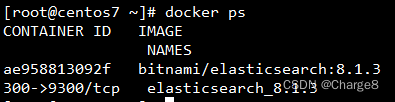
前面使用的是 ES 7.x的版本,这次使用 ES 8.1.3版本。使用Docker搭建环境还是蛮简单的。
引入依赖:
	<!-- Elasticsearch8.1版本(Java API Client)-->
    <dependency>
      <groupId>co.elastic.clients</groupId>
      <artifactId>elasticsearch-java</artifactId>
      <version>8.1.3</version>
    </dependency>

    <dependency>
      <groupId>com.fasterxml.jackson.core</groupId>
      <artifactId>jackson-databind</artifactId>
      <version>2.13.3</version>
    </dependency>
注意:
Java连接 Elasticsearch8的核心步骤:
RestClient。ElasticsearchTransport。ElasticsearchClient。不论是直连,还是带安全检查的连接,都是这个不变的核心步骤。根据业务可能会会加一点参数配置等。
// 配置的前缀
@ConfigurationProperties(prefix = "elasticsearch")
@Configuration
public class ESClientConfig {

	/**
	 * 多个IP逗号隔开
	 */
	@Setter
	private String hosts;

	/**
	 * 同步方式
	 *
	 * @return
	 */
	@Bean
	public ElasticsearchClient elasticsearchClient() {
		HttpHost[] httpHosts = toHttpHost();
		// Create the RestClient
		RestClient restClient = RestClient.builder(httpHosts).build();
		// Create the transport with a Jackson mapper
		RestClientTransport transport = new RestClientTransport(restClient, new JacksonJsonpMapper());
		// create the API client
		return new ElasticsearchClient(transport);
	}

	/**
	 * 异步方式
	 *
	 * @return
	 */
	@Bean
	public ElasticsearchAsyncClient elasticsearchAsyncClient() {
		HttpHost[] httpHosts = toHttpHost();
		RestClient restClient = RestClient.builder(httpHosts).build();
		RestClientTransport transport = new RestClientTransport(restClient, new JacksonJsonpMapper());
		return new ElasticsearchAsyncClient(transport);
	}

	/**
	 * 解析配置的字符串hosts,转为HttpHost对象数组
	 *
	 * @return
	 */
	private HttpHost[] toHttpHost() {
		if (!StringUtils.hasLength(hosts)) {
			throw new RuntimeException("invalid elasticsearch configuration. elasticsearch.hosts不能为空!");
		}

		// 多个IP逗号隔开
		String[] hostArray = hosts.split(",");
		HttpHost[] httpHosts = new HttpHost[hostArray.length];
		HttpHost httpHost;
		for (int i = 0; i < hostArray.length; i++) {
			String[] strings = hostArray[i].split(":");
			httpHost = new HttpHost(strings[0], Integer.parseInt(strings[1]), "http");
			httpHosts[i] = httpHost;
		}

		return httpHosts;
	}

}
在application.yml配置文件中添加 ES的服务地址等信息。
## ES配置:@ConfigurationProperties(prefix = "elasticsearch") //配置的前缀
elasticsearch:
  # 多个IP逗号隔开
  hosts: 192.168.xxx.xxx:9200
启动类没什么变化,和以前一样。我们直接写一个测试类来操作ES。
@RunWith(SpringRunner.class)
@SpringBootTest
public class ESClientConfigTest {

	@Autowired
	private ElasticsearchClient client;

	/**
	 * 创建索引
	 *
	 * @throws IOException
	 */
	@Test
	public void createIndex() throws IOException {

		CreateIndexResponse products = client.indices().create(c -> c.index("db_idx5"));
		System.out.println(products.acknowledged());

	}

	/**
	 * 判断索引是否存在
	 *
	 * @throws IOException
	 */
	@Test
	public void createExi() throws IOException {
		BooleanResponse exists = client.indices().exists(e -> e.index("db_idx5"));
		System.out.println(exists.value());

	}

}
测试ok,到此Springboot整合ES8就ok了。
1)接口
public interface IndexService {

	/**
	 * 新建索引,指定索引名称
	 *
	 * @param name
	 * @throws IOException
	 */
	void createIndex(String name) throws IOException;

	/**
	 * 创建索引,指定索引名称和setting和mapping
	 *
	 * @param name
	 *            - 索引名称
	 * @param settingFn
	 *            - 索引参数
	 * @param mappingFn
	 *            - 索引结构
	 * @throws IOException
	 */
	void createIndex(String name, Function<IndexSettings.Builder, ObjectBuilder<IndexSettings>> settingFn,
			Function<TypeMapping.Builder, ObjectBuilder<TypeMapping>> mappingFn) throws IOException;

	/**
	 * 删除索引
	 *
	 * @param name
	 * @throws IOException
	 */
	void deleteIndex(String name) throws IOException;

	/**
	 * 修改索引字段信息 <br/>
	 * 字段可以新增,已有的字段只能修改字段的 search_analyzer 属性。
	 *
	 * @param name
	 *            - 索引名称
	 * @param propertyMap
	 *            - 索引字段,每个字段都有自己的property
	 * @throws IOException
	 */
	void updateIndexProperty(String name, HashMap<String, Property> propertyMap) throws IOException;

	/**
	 * 查询索引列表
	 *
	 * @return
	 * @throws IOException
	 */
	GetIndexResponse getIndexList() throws IOException;

	/**
	 * 查询索引详情
	 *
	 * @param name
	 * @return
	 * @throws IOException
	 */
	GetIndexResponse getIndexDetail(String name) throws IOException;

	/**
	 * 检查指定名称的索引是否存在
	 *
	 * @param name
	 * @return - true:存在
	 * @throws IOException
	 */
	boolean indexExists(String name) throws IOException;

}
2)实现类
@Service
@Slf4j
public class IndexServiceImpl implements IndexService {

    @Autowired
    private ElasticsearchClient elasticsearchClient;

    @Override
    public void createIndex(String name) throws IOException {
        //ApplicationContext applicationContext;
        CreateIndexResponse response = elasticsearchClient.indices().create(c -> c.index(name));
        log.info("createIndex方法,acknowledged={}", response.acknowledged());
    }

    @Override
    public void createIndex(String name,
                       Function<IndexSettings.Builder, ObjectBuilder<IndexSettings>> settingFn,
                       Function<TypeMapping.Builder, ObjectBuilder<TypeMapping>> mappingFn) throws IOException {
        CreateIndexResponse response = elasticsearchClient
                .indices()
                .create(c -> c
                        .index(name)
                        .settings(settingFn)
                        .mappings(mappingFn)
                );
        log.info("createIndex方法,acknowledged={}", response.acknowledged());
    }

    @Override
    public void deleteIndex(String name) throws IOException {
        DeleteIndexResponse response = elasticsearchClient.indices().delete(c -> c.index(name));
        log.info("deleteIndex方法,acknowledged={}", response.acknowledged());
    }

    @Override
    public void updateIndexProperty(String name, HashMap<String, Property> propertyMap) throws IOException {
        PutMappingResponse response = elasticsearchClient.indices()
                .putMapping(typeMappingBuilder ->
                                typeMappingBuilder
                                .index(name)
                                .properties(propertyMap)
        );
        log.info("updateIndexMapping方法,acknowledged={}", response.acknowledged());
    }

    @Override
    public GetIndexResponse getIndexList() throws IOException {
        //使用 * 或者 _all都可以
        GetIndexResponse response = elasticsearchClient.indices().get(builder -> builder.index("_all"));
        log.info("getIndexList方法,response.result()={}", response.result().toString());
        return response;
    }

    @Override
    public GetIndexResponse getIndexDetail(String name) throws IOException {
        GetIndexResponse response = elasticsearchClient.indices().get(builder -> builder.index(name));
        log.info("getIndexDetail方法,response.result()={}", response.result().toString());
        return response;
    }

    @Override
    public boolean indexExists(String name) throws IOException {
        return elasticsearchClient.indices().exists(b -> b.index(name)).value();
    }
    @Autowired
    private IndexService indexService;

    @Test
    public void testCreateIndex() throws Exception {
        String indexName = "db_api_idx1";
        indexService.createIndex(indexName);

        //Assertions.assertTrue(indexService.indexExists(indexName));
        //indexService.createIndex(indexName);
        //Assertions.assertFalse(indexService.indexExists(indexName));
    }

    @Test
    public void testCreateIndex2() throws Exception {
        // 索引名
        String indexName = "db_api_idx2";

        // 构建setting
        Function<IndexSettings.Builder, ObjectBuilder<IndexSettings>> settingFn = sBuilder -> sBuilder
                .index(iBuilder -> iBuilder
                        // 三个分片
                        .numberOfShards("3")
                        // 一个副本
                        .numberOfReplicas("1")
                );


        // 索引字段,每个字段都有自己的property
        Property keywordProperty = Property.of(pBuilder -> pBuilder.keyword(keywordPropertyBuilder -> keywordPropertyBuilder.ignoreAbove(256)));
        Property integerProperty = Property.of(pBuilder -> pBuilder.integer(integerNumberPropertyBuilder -> integerNumberPropertyBuilder));
        Property textProperty = Property.of(pBuilder -> pBuilder.text(tBuilder -> tBuilder));

        // 构建mapping
        Function<TypeMapping.Builder, ObjectBuilder<TypeMapping>> mappingFn = mBuilder -> mBuilder
                .properties("name", keywordProperty)
                .properties("age", integerProperty)
                .properties("description", textProperty);

        // 创建索引,并指定setting和mapping
        indexService.createIndex(indexName, settingFn, mappingFn);
    }

    @Test
    public void testIndexExists() throws Exception {
        String indexName = "db_api_idx1";
        System.out.println(indexService.indexExists(indexName));
    }

    @Test
    public void testUpdateIndexProperty() throws Exception {
        String indexName = "db_api_idx2";

        // 索引字段,每个字段都有自己的property
        Property keywordProperty = Property.of(pBuilder -> pBuilder.keyword(keywordPropertyBuilder -> keywordPropertyBuilder.ignoreAbove(1024)));
        Property integerProperty = Property.of(pBuilder -> pBuilder.integer(integerNumberPropertyBuilder -> integerNumberPropertyBuilder));
        Property textProperty = Property.of(pBuilder -> pBuilder.text(tBuilder -> tBuilder));

        HashMap<String, Property> propertyMap = new HashMap<>();
        propertyMap.put("name", keywordProperty);
        propertyMap.put("description", textProperty);
        propertyMap.put("address", textProperty);

        // 构建mapping
        indexService.updateIndexProperty(indexName, propertyMap);
    }

    @Test
    public void testGetIndexList() throws Exception {
        indexService.getIndexList();
    }

    @Test
    public void testGetIndexDetail() throws Exception {
        String indexName = "db_api_idx2";
        indexService.getIndexDetail(indexName);
    }

    @Test
    public void testDeleteIndex() throws Exception {
        String indexName = "db_api_idx1";
        indexService.deleteIndex(indexName);
    }
注意:
1)接口
public interface DocumentDemoService {

    /**
     * 新增一个文档
     * @param idxName 索引名
     * @param idxId 索引id
     * @param document 文档对象
     * @return
     */
    IndexResponse createByFluentDSL(String idxName, String idxId, Object document) throws Exception;

    /**
     * 新增一个文档
     * @param idxName 索引名
     * @param idxId 索引id
     * @param document 文档对象
     * @return
     */
    IndexResponse createByBuilderPattern(String idxName, String idxId, Object document) throws Exception;

    /**
     * 用JSON字符串创建文档
     * @param idxName 索引名
     * @param idxId 索引id
     * @param jsonContent
     * @return
     */
    IndexResponse createByJson(String idxName, String idxId, String jsonContent) throws Exception;


    /**
     * 异步新增文档
     * @param idxName 索引名
     * @param idxId 索引id
     * @param document
     * @param action
     */
    void createAsync(String idxName, String idxId, Object document, BiConsumer<IndexResponse, Throwable> action);

    /**
     * 批量增加文档
     * @param idxName 索引名
     * @param documents 要增加的对象集合
     * @return 批量操作的结果
     * @throws Exception
     */
    BulkResponse bulkCreate(String idxName, List<Object> documents) throws Exception;


    /**
     * 根据文档id查找文档
     * @param idxName 索引名
     * @param docId 文档id
     * @return Object类型的查找结果
     * @throws Exception
     */
    Object getById(String idxName, String docId) throws IOException;

    /**
     * 根据文档id查找文档,返回类型是ObjectNode
     * @param idxName 索引名
     * @param docId 文档id
     * @return ObjectNode类型的查找结果
     */
    ObjectNode getObjectNodeById(String idxName, String docId) throws IOException;

    /**
     * 根据文档id删除文档
     * @param idxName 索引名
     * @param docId 文档id
     * @return Object类型的查找结果
     * @throws Exception
     */
    Boolean deleteById(String idxName, String docId) throws IOException;

    /**
     * 批量删除文档
     * @param idxName 索引名
     * @param docIds 要删除的文档id集合
     * @return
     * @throws Exception
     */
    BulkResponse bulkDeleteByIds(String idxName, List<String> docIds) throws Exception;

}
2)实现类
@Slf4j
@Service
public class DocumentDemoServiceImpl implements DocumentDemoService {

    @Autowired
    private ElasticsearchClient elasticsearchClient;

    @Autowired
    private ElasticsearchAsyncClient elasticsearchAsyncClient;

    @Override
    public IndexResponse createByFluentDSL(String idxName, String idxId, Object document) throws Exception {
        IndexResponse response = elasticsearchClient.index(idx -> idx
                .index(idxName)
                .id(idxId)
                .document(document));
        return response;
    }

    @Override
    public IndexResponse createByBuilderPattern(String idxName, String idxId, Object document) throws Exception {
        IndexRequest.Builder<Object> indexReqBuilder = new IndexRequest.Builder<>();

        indexReqBuilder.index(idxName);
        indexReqBuilder.id(idxId);
        indexReqBuilder.document(document);
        return elasticsearchClient.index(indexReqBuilder.build());
    }

    @Override
    public IndexResponse createByJson(String idxName, String idxId, String jsonContent) throws Exception {
        return elasticsearchClient.index(i -> i
                .index(idxName)
                .id(idxId)
                .withJson(new StringReader(jsonContent))
        );
    }

    @Override
    public void createAsync(String idxName, String idxId, Object document, BiConsumer<IndexResponse, Throwable> action) {
        elasticsearchAsyncClient.index(idx -> idx
                .index(idxName)
                .id(idxId)
                .document(document)
        ).whenComplete(action);
    }

    @Override
    public BulkResponse bulkCreate(String idxName, List<Object> documents) throws Exception {
        BulkRequest.Builder br = new BulkRequest.Builder();

        // TODO 可以将 Object定义为一个文档基类。比如 ESDocument类

        // 将每一个product对象都放入builder中
        //documents.stream()
        //        .forEach(esDocument -> br
        //                .operations(op -> op
        //                        .index(idx -> idx
        //                                .index(idxName)
        //                                .id(esDocument.getId())
        //                                .document(esDocument))));

        return elasticsearchClient.bulk(br.build());
    }

    @Override
    public Object getById(String idxName, String docId) throws IOException {
        GetResponse<Object> response = elasticsearchClient.get(g -> g
                        .index(idxName)
                        .id(docId),
                Object.class);
        return response.found() ? response.source() : null;
    }

    @Override
    public ObjectNode getObjectNodeById(String idxName, String docId) throws IOException {
        GetResponse<ObjectNode> response = elasticsearchClient.get(g -> g
                        .index(idxName)
                        .id(docId),
                ObjectNode.class);

        return response.found() ? response.source() : null;
    }

    @Override
    public Boolean deleteById(String idxName, String docId) throws IOException {
        DeleteResponse delete = elasticsearchClient.delete(d -> d
                .index(idxName)
                .id(docId));
        return delete.forcedRefresh();
    }

    @Override
    public BulkResponse bulkDeleteByIds(String idxName, List<String> docIds) throws Exception {
        BulkRequest.Builder br = new BulkRequest.Builder();

        // 将每一个对象都放入builder中
        docIds.stream().forEach(id -> br
                        .operations(op -> op
                                .delete(d -> d
                                        .index(idxName)
                                        .id(id))));

        return elasticsearchClient.bulk(br.build());
    }
}
    private final static String INDEX_NAME = "db_api_idx_uservo";

    @Autowired
    private DocumentDemoService documentDemoService;


    @Test
    public void testCreateByFluentDSL() throws Exception {
        // 构建文档数据
        UserVO userVO = new UserVO();
        userVO.setId(1L);
        userVO.setUserName("赵云2");
        userVO.setAge(11);
        userVO.setCreateTime(new Date());
        userVO.setUpdateTime(new Date());
        userVO.setEmail("ss.com");
        userVO.setVersion(1);
        userVO.setHeight(12D);

        // 新增一个文档
        IndexResponse response = documentDemoService.createByFluentDSL(INDEX_NAME, userVO.getId().toString(), userVO);

        System.out.println("response.forcedRefresh() -> " + response.forcedRefresh());
        System.out.println("response.toString() -> " + response.toString());
    }

    @Test
    public void testCreateByBuilderPattern() throws Exception {
        // 构建文档数据
        UserVO userVO = new UserVO();
        userVO.setId(2L);
        userVO.setUserName("赵云2");
        userVO.setAge(12);
        userVO.setCreateTime(new Date());
        userVO.setUpdateTime(new Date());
        userVO.setEmail("ss.com");
        userVO.setVersion(1);
        userVO.setHeight(12D);

        // 新增一个文档
        IndexResponse response = documentDemoService.createByBuilderPattern(INDEX_NAME, userVO.getId().toString(), userVO);

        System.out.println("response.toString() -> " + response.toString());
    }

    @Test
    public void testCreateByJSON() throws Exception {
        // 构建文档数据
        UserVO userVO = new UserVO();
        userVO.setId(3L);
        userVO.setUserName("赵云3");
        userVO.setAge(13);
        userVO.setCreateTime(new Date());
        userVO.setUpdateTime(new Date());
        userVO.setEmail("ss.com");
        userVO.setVersion(1);
        userVO.setHeight(12D);

        // 新增一个文档
        IndexResponse response = documentDemoService.createByJson(INDEX_NAME, userVO.getId().toString(), JSON.toJSONString(userVO));

        System.out.println("response.toString() -> " + response.toString());
    }

    @Test
    public void testCreateAsync() throws Exception {
        // 构建文档数据
        UserVO userVO = new UserVO();
        userVO.setId(4L);
        userVO.setUserName("赵云4");
        userVO.setAge(14);
        userVO.setCreateTime(new Date());
        userVO.setUpdateTime(new Date());
        userVO.setEmail("ss.com");
        userVO.setVersion(1);
        userVO.setHeight(12D);

        documentDemoService.createAsync(INDEX_NAME, userVO.getId().toString(), userVO, new BiConsumer<>() {
            @Override
            public void accept(IndexResponse indexResponse, Throwable throwable) {
                // throwable必须为空
                Assertions.assertNull(throwable);
                // 验证结果
                System.out.println("response.toString() -> " + indexResponse.toString());
            }
        });
    }

    @Test
    public void testBulkCreate() throws Exception {
        int start = 5;
        int end = 10;

        // 构造文档集合
        List<Object> list = new ArrayList<>();
        for (int i = 5; i <= 7; i++) {
            UserVO userVO = new UserVO();
            userVO.setId(Long.valueOf(i));
            userVO.setUserName("赵云batch" + i );
            userVO.setHeight(1.88D);
            userVO.setAge(10 + i);
            userVO.setCreateTime(new Date());
            list.add(userVO);
        }

        // 批量新增
        BulkResponse response = documentDemoService.bulkCreate(INDEX_NAME, list);
        List<BulkResponseItem> items = response.items();
        for (BulkResponseItem item : items) {
            System.out.println("BulkResponseItem.toString() -> " + item.toString());
        }
    }

    @Test
    public void testGetById() throws Exception {
        Long id = 1L;
        Object object = documentDemoService.getById(INDEX_NAME, id.toString());

        System.out.println("object ->" + object);
        // 无法直接强转,会报错
        //UserVO userVO = (UserVO) object;
        //System.out.println("userVO ->" + object);

    }

    @Test
    public void testGetObjectNode() throws Exception {
        Long id = 1L;
        ObjectNode objectNode = documentDemoService.getObjectNodeById(INDEX_NAME, id.toString());

        Assertions.assertNotNull(objectNode);
        System.out.println("id ->" + objectNode.get("id").asLong());
        System.out.println("userName ->" + objectNode.get("userName").asText());
    }
– 求知若饥,虚心若愚。
文章目录一、概述简介原理模块二、配置Mysql使用版本环境要求1.操作系统2.mysql要求三、配置canal-server离线下载在线下载上传解压修改配置单机配置集群配置分库分表配置1.修改全局配置2.实例配置垂直分库水平分库3.修改group-instance.xml4.启动监听四、配置canal-adapter1修改启动配置2配置映射文件3启动ES数据同步查询所有订阅同步数据同步开关启动4.验证五、配置canal-admin一、概述简介canal是Alibaba旗下的一款开源项目,Java开发。基于数据库增量日志解析,提供增量数据订阅&消费。Git地址:https://github.co
ES一、简介1、ElasticStackES技术栈:ElasticSearch:存数据+搜索;QL;Kibana:Web可视化平台,分析。LogStash:日志收集,Log4j:产生日志;log.info(xxx)。。。。使用场景:metrics:指标监控…2、基本概念Index(索引)动词:保存(插入)名词:类似MySQL数据库,给数据Type(类型)已废弃,以前类似MySQL的表现在用索引对数据分类Document(文档)真正要保存的一个JSON数据{name:"tcx"}二、入门实战{"name":"DESKTOP-1TSVGKG","cluster_name":"elasticsear
如果您希望在Spring中启用定时任务功能,则需要在主类上添加 @EnableScheduling 注解。这样Spring才会扫描 @Scheduled 注解并执行定时任务。在大多数情况下,只需要在主类上添加 @EnableScheduling 注解即可,不需要在Service层或其他类中再次添加。以下是一个示例,演示如何在SpringBoot中启用定时任务功能:@SpringBootApplication@EnableSchedulingpublicclassApplication{publicstaticvoidmain(String[]args){SpringApplication.ru
软件特点部署后能通过浏览器查看线上日志。支持Linux、Windows服务器。采用随机读取的方式,支持大文件的读取。支持实时打印新增的日志(类终端)。支持日志搜索。使用手册基本页面配置路径配置日志所在的目录,配置后按回车键生效,下拉框选择日志名称。选择日志后点击生效,即可加载日志。windows路径E:\java\project\log-view\logslinux路径/usr/local/XX历史模式历史模式下,不会读取新增的日志。针对历史文件可以分页读取,配置分页大小、跳转。历史模式下,支持根据关键词搜索。目前搜索引擎使用的是jdk自带类库,搜索速度相对较低,优点是比较简单。2G日志全文搜
1.依赖导入org.springframework.bootspring-boot-starter-weborg.springframework.bootspring-boot-starter-validation2.validation常用注解@Null被注释的元素必须为null@NotNull被注释的元素不能为null,可以为空字符串@AssertTrue被注释的元素必须为true@AssertFalse被注释的元素必须为false@Min(value)被注释的元素必须是一个数字,其值必须大于等于指定的最小值@Max(value)被注释的元素必须是一个数字,其值必须小于等于指定的最大值@D
我正在尝试找到一种更好的方法将IRB与我的常规ruby开发集成。目前我很少在我的代码中使用IRB。我只用它来验证语法或尝试一些小的东西。我知道我可以将我自己的代码加载到ruby中作为一个require'mycode'但这通常不符合我的编程风格。有时我要检查的变量超出范围或在循环内。有没有一种简单的方法可以启动我的脚本并在IRB内的某个点卡住?我想我正在寻找一种更简单的方法来调试我的ruby代码而不破坏我的F5(编译)键。也许有经验的ruby开发者可以和我分享一个更精简的开发方法。 最佳答案 安装ruby-debugg
我开始了一个小型网络项目并使用Drupal来构建它。到目前为止,还不错:您可以快速建立一个不错的面向CMS的网站,通过模块添加社交功能,并且您有一个广泛的API可以在一个架构良好的平台中进行自定义。现在问题来了:网站的增长超出了最初的计划,我发现自己正处于认真开始为它编写代码的境地。由于Drupal项目,我对PHP有了新的认识,但我想用Ruby来做。我会感觉更舒服,以后维护起来更容易,我可以在其他Ruby/Rails应用程序中重用它。随着时间的推移,我想我会用Ruby重写Drupal中的现有部分。基于此,问题是:是否有人将两者(成功或失败的故事)结合起来?这是一个相当大的决定,但我在G
文章目录查看ES信息查看节点信息查看分片信息实际场景下ES分片及副本数量应该怎么分关于ES的灵活使用查看ES信息查看版本kibana:GET/查看节点信息GET/_cat/nodes?v解释:ip:集群中节点的ip地址;heap.percent:堆内存的占用百分比;ram.percent:总内存的占用百分比,其实这个不是很准确,因为buff/cache和available也被当作使用内存;cpu:cpu占用百分比;load_1m:1分钟内cpu负载;load_5m:5分钟内cpu负载;load_15m:15分钟内cpu负载;node.role:上图的dilmrt代表全部权限master:*代表
elasticsearch查看当前集群中的master节点是哪个需要使用_cat监控命令,具体如下。查看方法es主节点确定命令,以kibana上查看示例如下:GET_cat/nodesv返回结果示例如下:ipheap.percentram.percentcpuload_1mload_5mload_15mnode.rolemastername172.16.16.188529952.591.701.45mdi-elastic3172.16.16.187329950.990.991.19mdi-elastic2172.16.16.231699940.871.001.03mdi-elastic4172
Iparking停车收费管理系统-可商用介绍Iparking是一款基于springBoot的停车收费管理系统,支持封闭车场和路边车场,支持微信支付宝多种支付渠道,支持多种硬件,涵盖了停车场管理系统的所有基础功能。技术栈Springboot,MybatisPlus,Beetl,Mysql,Redis,RabbitMQ,UniApp功能云端功能序号模块功能描述1系统管理菜单管理配置系统菜单2系统管理组织管理管理组织机构3系统管理角色管理配置系统角色,包含数据权限和功能权限配置4系统管理用户管理管理后台用户5系统管理租户管理多租户管理6系统管理公众号配置租户公众号配置7系统管理操作日志审计日志8系统
