在.NET开发生态中,我们以前开发定时任务都是用的Quartz.NET完成的。在这篇文章里,记录一下另一个很强大的定时任务框架的使用方法:Hangfire。两个框架各自都有特色和优势,可以根据参考文章里张队的那篇文章对两个框架的对比来进行选择。
引入Hangfire相关的Nuget包:
Hangfire.AspNetCore
Hangfire.MemoryStorage
Hangfire.Dashboard.Basic.Authentication
并对Hangfire进行服务配置:
builder.Services.AddHangfire(c =>
{
    // 使用内存数据库演示,在实际使用中,会配置对应数据库连接,要保证该数据库要存在
    c.UseMemoryStorage();
});

// Hangfire全局配置
GlobalConfiguration.Configuration
    .UseColouredConsoleLogProvider()
    .UseSerilogLogProvider()
    .UseMemoryStorage()
    .WithJobExpirationTimeout(TimeSpan.FromDays(7));

// Hangfire服务器配置
builder.Services.AddHangfireServer(options =>
{
    options.HeartbeatInterval = TimeSpan.FromSeconds(10);
});
使用Hangfire中间件:
// 添加Hangfire Dashboard
app.UseHangfireDashboard();
app.UseAuthorization();

app.MapControllers();

// 配置Hangfire Dashboard路径和权限控制
app.MapHangfireDashboard("/hangfire", new DashboardOptions
{
    AppPath = null,
    DashboardTitle = "Hangfire Dashboard Test",
    Authorization = new []
    {
        new HangfireCustomBasicAuthenticationFilter
        {
            User = app.Configuration.GetSection("HangfireCredentials:UserName").Value,
            Pass = app.Configuration.GetSection("HangfireCredentials:Password").Value
        }
    }
});
对应的配置如下:
appsettings.json"HangfireCredentials": {
"UserName": "admin",
"Password": "admin@123"
}
Hangfire免费版本支持以下类型的定时任务:
Recurring JobFire and ForgetContinouus JobSchedule Job这种类型的任务一般是在应用程序启动的时候执行一次结束后不再重复执行,最简单的配置方法是这样的:
using Hangfire;

BackgroundJob.Enqueue(() => Console.WriteLine("Hello world from Hangfire with Fire and Forget job!"));
这种类型的任务一般是进行顺序型的任务执行调度,比如先完成任务A,结束后执行任务B:
var jobId = BackgroundJob.Enqueue(() => Console.WriteLine("Hello world from Hangfire with Fire and Forget job!"));

// Continuous Job, 通过指定上一个任务的Id来跟在上一个任务后执行
BackgroundJob.ContinueJobWith(jobId, () => Console.WriteLine("Hello world from Hangfire using continuous job!"));
这种类型的任务是用于在未来某个特定的时间点被激活运行的任务,也被叫做Delayed Job:
// 指定5天后执行
BackgroundJob.Schedule(() => Console.WriteLine("Hello world from Hangfire using scheduled job!"), TimeSpan.FromDays(5));
这种类型的任务应该是我们最常使用的类型,使用Cron表达式来设定一个执行周期时间,每到设定时间就被激活执行一次。对于这种相对常见的场景,我们可以演示一下使用单独的类来封装任务逻辑:
IJob.csnamespace HelloHangfire;
public interface IJob
{
public Task<bool> RunJob();
}
Job.csusing Serilog;
namespace HelloHangfire;
public class Job : IJob
{
public async Task<bool> RunJob()
{
Log.Information($"start time: {DateTime.Now}");
// 模拟任务执行
await Task.Delay(1000);
Log.Information("Hello world from Hangfire in Recurring mode!");
Log.Information($"stop time: {DateTime.Now}");
return true;
}
}
在Program.cs中使用Cron来注册任务:
builder.Services.AddTransient<IJob, Job>();

// ...
var app = builder.Build();

// ...

var JobService = app.Services.GetRequiredService<IJob>();

// Recurring job
RecurringJob.AddOrUpdate("Run every minute", () => JobService.RunJob(), "* * * * *");
控制台输出:
info: Hangfire.BackgroundJobServer[0]
      Starting Hangfire Server using job storage: 'Hangfire.MemoryStorage.MemoryStorage'
info: Hangfire.BackgroundJobServer[0]
      Using the following options for Hangfire Server:
          Worker count: 20
          Listening queues: 'default'
          Shutdown timeout: 00:00:15
          Schedule polling interval: 00:00:15
info: Hangfire.Server.BackgroundServerProcess[0]
      Server b8d0de54-caee-4c5e-86f5-e79a47fad51f successfully announced in 11.1236 ms
info: Hangfire.Server.BackgroundServerProcess[0]
      Server b8d0de54-caee-4c5e-86f5-e79a47fad51f is starting the registered dispatchers: ServerWatchdog, ServerJobCancellationWatcher, ExpirationManager, CountersAggregator, Worker, DelayedJobScheduler, RecurringJobScheduler...
info: Hangfire.Server.BackgroundServerProcess[0]
      Server b8d0de54-caee-4c5e-86f5-e79a47fad51f all the dispatchers started
Hello world from Hangfire with Fire and Forget job!
Hello world from Hangfire using continuous job!
info: Microsoft.Hosting.Lifetime[14]
      Now listening on: https://localhost:7295
info: Microsoft.Hosting.Lifetime[14]
      Now listening on: http://localhost:5121
info: Microsoft.Hosting.Lifetime[0]
      Application started. Press Ctrl+C to shut down.
info: Microsoft.Hosting.Lifetime[0]
      Hosting environment: Development
info: Microsoft.Hosting.Lifetime[0]
      Content root path: /Users/yu.li1/Projects/asinta/Net6Demo/HelloHangfire/HelloHangfire/
[16:56:14 INF] start time: 02/25/2022 16:56:14
[16:57:14 INF] start time: 02/25/2022 16:57:14
[16:57:34 INF] Hello world from Hangfire in Recurring mode!
[16:57:34 INF] stop time: 02/25/2022 16:57:34
通过配置的dashboard来查看所有的job运行的状况:
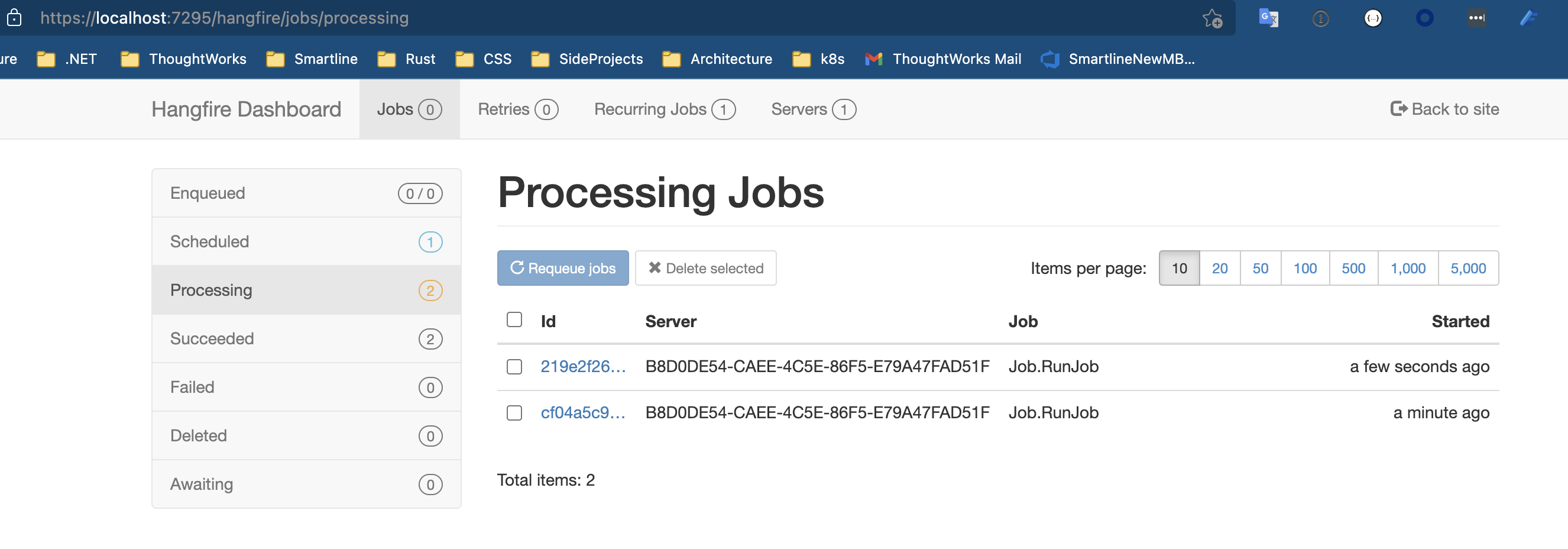
从上面的控制台日志可以看出来,使用Hangfire进行周期性任务触发的时候,如果执行时间大于执行的间隔周期,会产生任务的并发。如果我们不希望任务并发,可以在配置并发数量的时候配置成1,或者在任务内部去判断当前是否有相同的任务正在执行,如果有则停止继续执行。但是这样也无法避免由于执行时间过长导致的周期间隔不起作用的问题,比如我们希望不管在任务执行多久的情况下,前后两次激活都有一个固定的间隔时间,这样的实现方法我还没有试出来。有知道怎么做的小伙伴麻烦说一下经验。
有的时候我们希望记录Job运行生命周期内的所有事件,可以参考官方文档:Using job filters来实现该需求。
关于Hangfire更加详细和生产环境的使用,张队写过一篇文章:Hangfire项目实践分享。
我正在学习如何使用Nokogiri,根据这段代码我遇到了一些问题:require'rubygems'require'mechanize'post_agent=WWW::Mechanize.newpost_page=post_agent.get('http://www.vbulletin.org/forum/showthread.php?t=230708')puts"\nabsolutepathwithtbodygivesnil"putspost_page.parser.xpath('/html/body/div/div/div/div/div/table/tbody/tr/td/div
我有一个Ruby程序,它使用rubyzip压缩XML文件的目录树。gem。我的问题是文件开始变得很重,我想提高压缩级别,因为压缩时间不是问题。我在rubyzipdocumentation中找不到一种为创建的ZIP文件指定压缩级别的方法。有人知道如何更改此设置吗?是否有另一个允许指定压缩级别的Ruby库? 最佳答案 这是我通过查看rubyzip内部创建的代码。level=Zlib::BEST_COMPRESSIONZip::ZipOutputStream.open(zip_file)do|zip|Dir.glob("**/*")d
类classAprivatedeffooputs:fooendpublicdefbarputs:barendprivatedefzimputs:zimendprotecteddefdibputs:dibendendA的实例a=A.new测试a.foorescueputs:faila.barrescueputs:faila.zimrescueputs:faila.dibrescueputs:faila.gazrescueputs:fail测试输出failbarfailfailfail.发送测试[:foo,:bar,:zim,:dib,:gaz].each{|m|a.send(m)resc
很好奇,就使用rubyonrails自动化单元测试而言,你们正在做什么?您是否创建了一个脚本来在cron中运行rake作业并将结果邮寄给您?git中的预提交Hook?只是手动调用?我完全理解测试,但想知道在错误发生之前捕获错误的最佳实践是什么。让我们理所当然地认为测试本身是完美无缺的,并且可以正常工作。下一步是什么以确保他们在正确的时间将可能有害的结果传达给您? 最佳答案 不确定您到底想听什么,但是有几个级别的自动代码库控制:在处理某项功能时,您可以使用类似autotest的内容获得关于哪些有效,哪些无效的即时反馈。要确保您的提
假设我做了一个模块如下:m=Module.newdoclassCendend三个问题:除了对m的引用之外,还有什么方法可以访问C和m中的其他内容?我可以在创建匿名模块后为其命名吗(就像我输入“module...”一样)?如何在使用完匿名模块后将其删除,使其定义的常量不再存在? 最佳答案 三个答案:是的,使用ObjectSpace.此代码使c引用你的类(class)C不引用m:c=nilObjectSpace.each_object{|obj|c=objif(Class===objandobj.name=~/::C$/)}当然这取决于
我试图在一个项目中使用rake,如果我把所有东西都放到Rakefile中,它会很大并且很难读取/找到东西,所以我试着将每个命名空间放在lib/rake中它自己的文件中,我添加了这个到我的rake文件的顶部:Dir['#{File.dirname(__FILE__)}/lib/rake/*.rake'].map{|f|requiref}它加载文件没问题,但没有任务。我现在只有一个.rake文件作为测试,名为“servers.rake”,它看起来像这样:namespace:serverdotask:testdoputs"test"endend所以当我运行rakeserver:testid时
作为我的Rails应用程序的一部分,我编写了一个小导入程序,它从我们的LDAP系统中吸取数据并将其塞入一个用户表中。不幸的是,与LDAP相关的代码在遍历我们的32K用户时泄漏了大量内存,我一直无法弄清楚如何解决这个问题。这个问题似乎在某种程度上与LDAP库有关,因为当我删除对LDAP内容的调用时,内存使用情况会很好地稳定下来。此外,不断增加的对象是Net::BER::BerIdentifiedString和Net::BER::BerIdentifiedArray,它们都是LDAP库的一部分。当我运行导入时,内存使用量最终达到超过1GB的峰值。如果问题存在,我需要找到一些方法来更正我的代
我正在尝试使用ruby和Savon来使用网络服务。测试服务为http://www.webservicex.net/WS/WSDetails.aspx?WSID=9&CATID=2require'rubygems'require'savon'client=Savon::Client.new"http://www.webservicex.net/stockquote.asmx?WSDL"client.get_quotedo|soap|soap.body={:symbol=>"AAPL"}end返回SOAP异常。检查soap信封,在我看来soap请求没有正确的命名空间。任何人都可以建议我
关闭。这个问题是opinion-based.它目前不接受答案。想要改进这个问题?更新问题,以便editingthispost可以用事实和引用来回答它.关闭4年前。Improvethisquestion我想在固定时间创建一系列低音和高音调的哔哔声。例如:在150毫秒时发出高音调的蜂鸣声在151毫秒时发出低音调的蜂鸣声200毫秒时发出低音调的蜂鸣声250毫秒的高音调蜂鸣声有没有办法在Ruby或Python中做到这一点?我真的不在乎输出编码是什么(.wav、.mp3、.ogg等等),但我确实想创建一个输出文件。
我在我的项目目录中完成了compasscreate.和compassinitrails。几个问题:我已将我的.sass文件放在public/stylesheets中。这是放置它们的正确位置吗?当我运行compasswatch时,它不会自动编译这些.sass文件。我必须手动指定文件:compasswatchpublic/stylesheets/myfile.sass等。如何让它自动运行?文件ie.css、print.css和screen.css已放在stylesheets/compiled。如何在编译后不让它们重新出现的情况下删除它们?我自己编译的.sass文件编译成compiled/t
