本文主要讲述了在Anaconda环境的TensorFlow2.8.2安装教程。
# 我的版本:python3.10,pycharm 2021.3.1, anaconda 3-2021.11
这三个软件的安装与其他软件一样,在官网下载,版本没有刻意选择,都默认是最新版。
根据向导安装。

其中anaconda需要勾选:第一项Add Anaconda3 to my PATH environment variable。
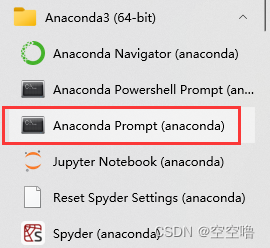
① 打开anaconda prompt
② 创建虚拟环境tensorflow_cpu
在命令行中输入代码,环境名可自己取。
conda create --name tensorflow_cpu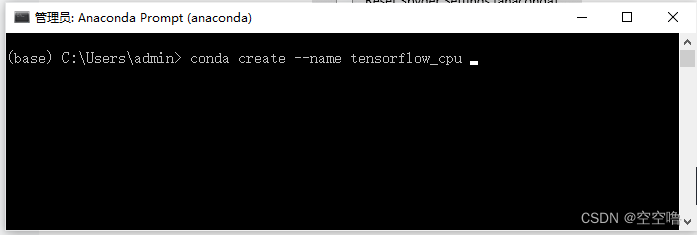
# 如果需要删除环境,在命令行中输入:
conda remove --name tensorflow_cpu --all③ 激活已有环境
activate tensorflow_cpu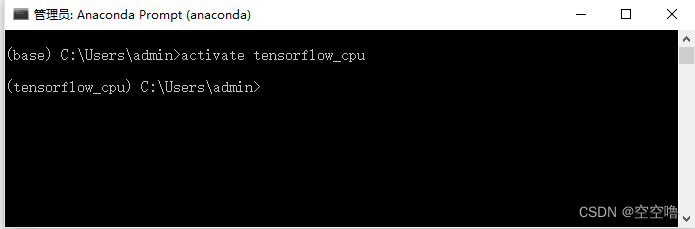
# 退出已有环境
conda deactivate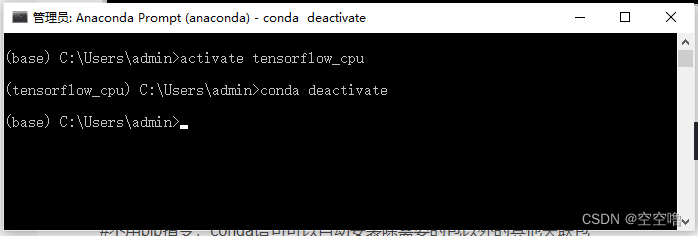
④ 安装tensorflow
# 不用pip指令,conda语句可以自动安装除需要的包以外的其他关联包
# 可以不使用镜像源,网上的镜像源也许过期,失效了。
conda install tensorflow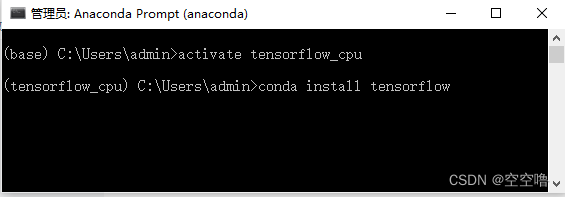
中途有一个选项,输入y, 点击enter。
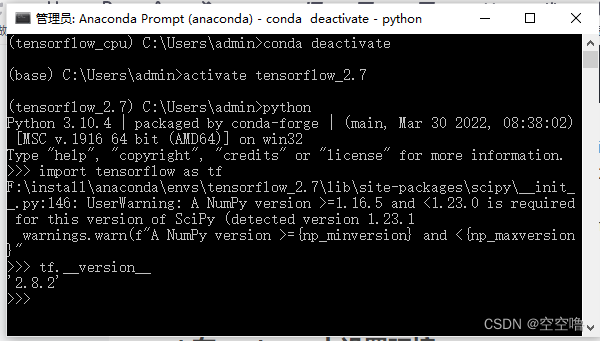
在anaconda prompt 的tensorflow_cpu环境中,输入
import tensorflow as tf
tf.__version__
## 我的tensorflow 版本信息: (tensorflow_cpu) C:\Users\admin>python
Python 3.10.4 | packaged by conda-forge | (main, Mar 30 2022, 08:38:02) [MSC v.1916 64 bit (AMD64)] on win32
Type "help", "copyright", "credits" or "license" for more information.
>>> import tensorflow as tf
>>> tf.__version__
'2.8.2'
参考网页:从第三步开始
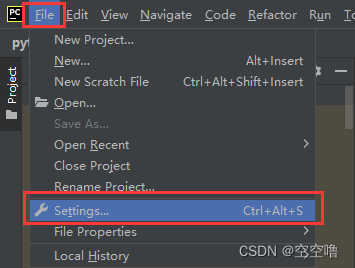
① 在Pycharm里面先新建一个项目,然后来到Setting界面选择“Project Interpreter”进行配置。
设置python Interpreter:
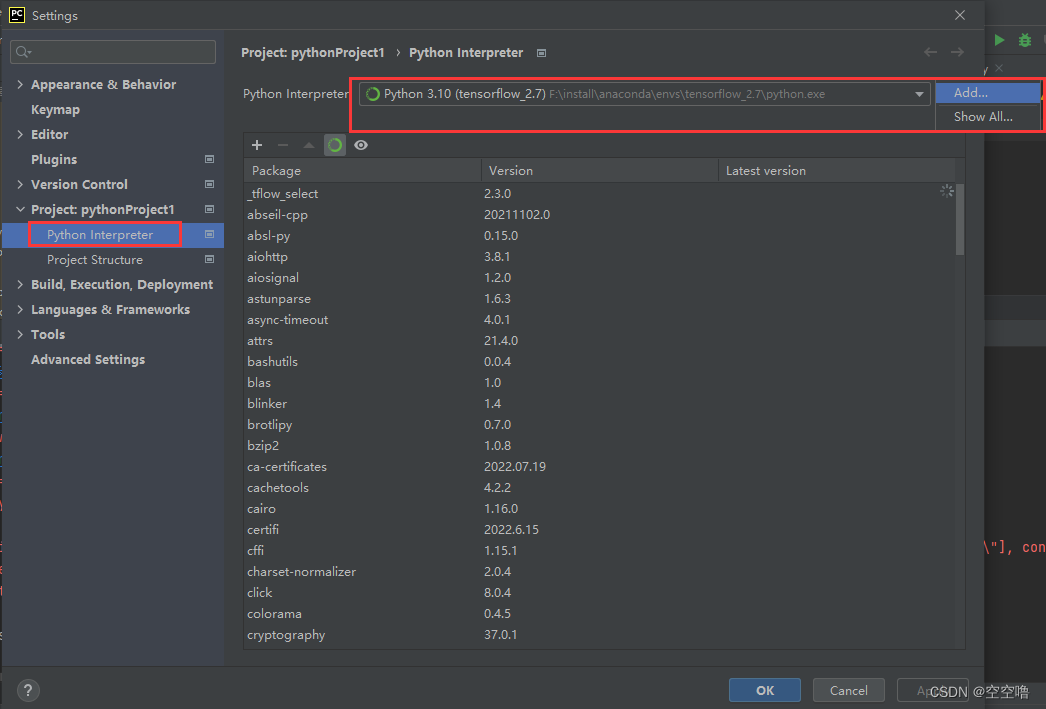
需要在第二个Existing Environment
找到你在Anaconda里面安装的Python35所在的位置,
这个怎么查呢,可以去Anaconda Prompt里面查看,依次输入下面的命令可以看到Python35里面Tensorflow的路径,因为我们要用的不只是Tensorflow的包还有其他的,所以直接选到Python35后面的python.exe。
>>> import tensorflow as tf
>>> tf.__path__
['F:\\install\\anaconda\\envs\\tensorflow_cpu\\lib\\site-packages\\tensorflow']
以我的电脑为例,路径是在F:\\install\\anaconda\\envs\\python.exe
最后点击OK保存,等环境重新更新。
② 在pycharm中运行Tensorflow的hello 测试程序:
import os
os.environ['TF_CPP_MIN_LOG_LEVEL'] = '3'
import tensorflow as tf

# 保证sess.run()能够正常运行
tf.compat.v1.disable_eager_execution()
hello = tf.constant('hello, TensorFlow!')

# 版本2.0的函数
sess = tf.compat.v1.Session()
print(sess.run(hello))如果在pycharm中使用tesorflow框架时,缺少某个包,需要在anaconda里安装包
仍需激活tensorflow_cpu环境,输入:
conda install ipykernel
conda install scikit-learn我想为Heroku构建一个Rails3应用程序。他们使用Postgres作为他们的数据库,所以我通过MacPorts安装了postgres9.0。现在我需要一个postgresgem并且共识是出于性能原因你想要pggem。但是我对我得到的错误感到非常困惑当我尝试在rvm下通过geminstall安装pg时。我已经非常明确地指定了所有postgres目录的位置可以找到但仍然无法完成安装:$envARCHFLAGS='-archx86_64'geminstallpg--\--with-pg-config=/opt/local/var/db/postgresql90/defaultdb/po
我打算为ruby脚本创建一个安装程序,但我希望能够确保机器安装了RVM。有没有一种方法可以完全离线安装RVM并且不引人注目(通过不引人注目,就像创建一个可以做所有事情的脚本而不是要求用户向他们的bash_profile或bashrc添加一些东西)我不是要脚本本身,只是一个关于如何走这条路的快速指针(如果可能的话)。我们还研究了这个很有帮助的问题:RVM-isthereawayforsimpleofflineinstall?但有点误导,因为答案只向我们展示了如何离线在RVM中安装ruby。我们需要能够离线安装RVM本身,并查看脚本https://raw.github.com/wayn
我有一个奇怪的问题:我在rvm上安装了rubyonrails。一切正常,我可以创建项目。但是在我输入“railsnew”时重新启动后,我有“程序'rails'当前未安装。”。SystemUbuntu12.04ruby-v"1.9.3p194"gemlistactionmailer(3.2.5)actionpack(3.2.5)activemodel(3.2.5)activerecord(3.2.5)activeresource(3.2.5)activesupport(3.2.5)arel(3.0.2)builder(3.0.0)bundler(1.1.4)coffee-rails(
我刚刚为fedora安装了emacs。我想用emacs编写ruby。为ruby提供代码提示、代码完成类型功能所需的工具、扩展是什么? 最佳答案 ruby-mode已经包含在Emacs23之后的版本中。不过,它也可以通过ELPA获得。您可能感兴趣的其他一些事情是集成RVM、feature-mode(Cucumber)、rspec-mode、ruby-electric、inf-ruby、rinari(用于Rails)等。这是我当前用于Ruby开发的Emacs配置:https://github.com/citizen428/emacs
我正在尝试在我的centos服务器上安装therubyracer,但遇到了麻烦。$geminstalltherubyracerBuildingnativeextensions.Thiscouldtakeawhile...ERROR:Errorinstallingtherubyracer:ERROR:Failedtobuildgemnativeextension./usr/local/rvm/rubies/ruby-1.9.3-p125/bin/rubyextconf.rbcheckingformain()in-lpthread...yescheckingforv8.h...no***e
我的最终目标是安装当前版本的RubyonRails。我在OSXMountainLion上运行。到目前为止,这是我的过程:已安装的RVM$\curl-Lhttps://get.rvm.io|bash-sstable检查已知(我假设已批准)安装$rvmlistknown我看到当前的稳定版本可用[ruby-]2.0.0[-p247]输入命令安装$rvminstall2.0.0-p247注意:我也试过这些安装命令$rvminstallruby-2.0.0-p247$rvminstallruby=2.0.0-p247我很快就无处可去了。结果:$rvminstall2.0.0-p247Search
我实际上是在尝试使用RVM在我的OSX10.7.5上更新ruby,并在输入以下命令后:rvminstallruby我得到了以下回复:Searchingforbinaryrubies,thismighttakesometime.Checkingrequirementsforosx.Installingrequirementsforosx.Updatingsystem.......Errorrunning'requirements_osx_brew_update_systemruby-2.0.0-p247',pleaseread/Users/username/.rvm/log/138121
由于fast-stemmer的问题,我很难安装我想要的任何rubygem。我把我得到的错误放在下面。Buildingnativeextensions.Thiscouldtakeawhile...ERROR:Errorinstallingfast-stemmer:ERROR:Failedtobuildgemnativeextension./System/Library/Frameworks/Ruby.framework/Versions/2.0/usr/bin/rubyextconf.rbcreatingMakefilemake"DESTDIR="cleanmake"DESTDIR=
当我尝试安装Ruby时遇到此错误。我试过查看this和this但无济于事➜~brewinstallrubyWarning:YouareusingOSX10.12.Wedonotprovidesupportforthispre-releaseversion.Youmayencounterbuildfailuresorotherbreakages.Pleasecreatepull-requestsinsteadoffilingissues.==>Installingdependenciesforruby:readline,libyaml,makedepend==>Installingrub
当我执行>rvminstall1.9.2时一切顺利。然后我做>rvmuse1.9.2也很顺利。但是当涉及到ruby-v时..sam@sjones:~$rvminstall1.9.2/home/sam/.rvm/rubies/ruby-1.9.2-p136,thismaytakeawhiledependingonyourcpu(s)...ruby-1.9.2-p136-#fetchingruby-1.9.2-p136-#downloadingruby-1.9.2-p136,thismaytakeawhiledependingonyourconnection...%Total%Rece

 http://在Win10上通过Anaconda来安装Tensorflow并在Pycharm中进行开发