目录
GeoJSON是一种对各种地理数据结构进行编码的格式,基于Javascript对象表示法(JavaScript Object Notation, 简称JSON)的地理空间信息数据交换格式。GeoJSON对象可以表示几何、特征或者特征集合。GeoJSON支持下面几何类型:点、线、面、多点、多线、多面和几何集合。GeoJSON里的特征包含一个几何对象和其他属性,特征集合表示一系列特征。
{
  "type": "Feature",
  "geometry": {
    "type": "Point",
    "coordinates": [125.6, 10.1]
  },
  "properties": {
    "name": "Dinagat Islands"
  }
}
一个完整的GeoJSON数据结构总是一个(JSON术语里的)对象。在GeoJSON里,对象由名/值对--也称作成员的集合组成。对每个成员来说,名字总是字符串。成员的值要么是字符串、数字、对象、数组,要么是下面文本常量中的一个:"true","false"和"null"。数组的值是上面所说的元素组成。
GeoJSON总是由一个单独的对象组成。这个对象(指的是下面的GeoJSON对象)表示几何、特征或者特征集合。
GeoJSON对象可能有任何数目成员(名/值对)。
GeoJSON对象必须有一个名字为"type"的成员。这个成员的值是由GeoJSON对象的类型所确定的字符串。
type成员的值必须是下面之一:"Point", "MultiPoint", "LineString", "MultiLineString", "Polygon", "MultiPolygon", "GeometryCollection", "Feature", 或者 "FeatureCollection"。
GeoJSON对象可能有一个可选的"crs"成员,它的值必须是一个坐标参考系统的对象。
GeoJSON对象可能有一个"bbox"成员,它的值必须是边界框数组。
GeoJSON特征集合:
{
    "type": "FeatureCollection",
    "features": [{
            "type": "Feature",
            "geometry": {
                "type": "Point",
                "coordinates": [102.0, 0.5]
            },
            "properties": {
                "prop0": "value0"
            }
        }, {
            "type": "Feature",
            "geometry": {
                "type": "LineString",
                "coordinates": [[102.0, 0.0], [103.0, 1.0], [104.0, 0.0], [105.0, 1.0]]
            },
            "properties": {
                "prop0": "value0",
                "prop1": 0.0
            }
        }, {
            "type": "Feature",
            "geometry": {
                "type": "Polygon",
                "coordinates": [[100.0, 0.0], [101.0, 0.0], [101.0, 1.0], [100.0, 1.0], [100.0, 0.0]]
            },
            "properties": {
                "prop0": "value0",
                "prop1": {
                    "this": "that"
                }
            }
        }
    ]
}可以通过阿里云DataV获取GeoJSON数据,也可以在其他地理信息平台获取数据并转换为GeoJson数据:
DataV.GeoAtlas地理小工具系列由阿里云DataV数据可视化团队出品,多年深耕数据可视化领域,数据大屏业务开拓者和领航者。致力用震撼而清晰的视觉语言,让更多人读懂大数据,受惠数据驱动的决策方式。 http://datav.aliyun.com/portal/school/atlas/area_selector#&lat=33.521903996156105&lng=104.29849999999999&zoom=4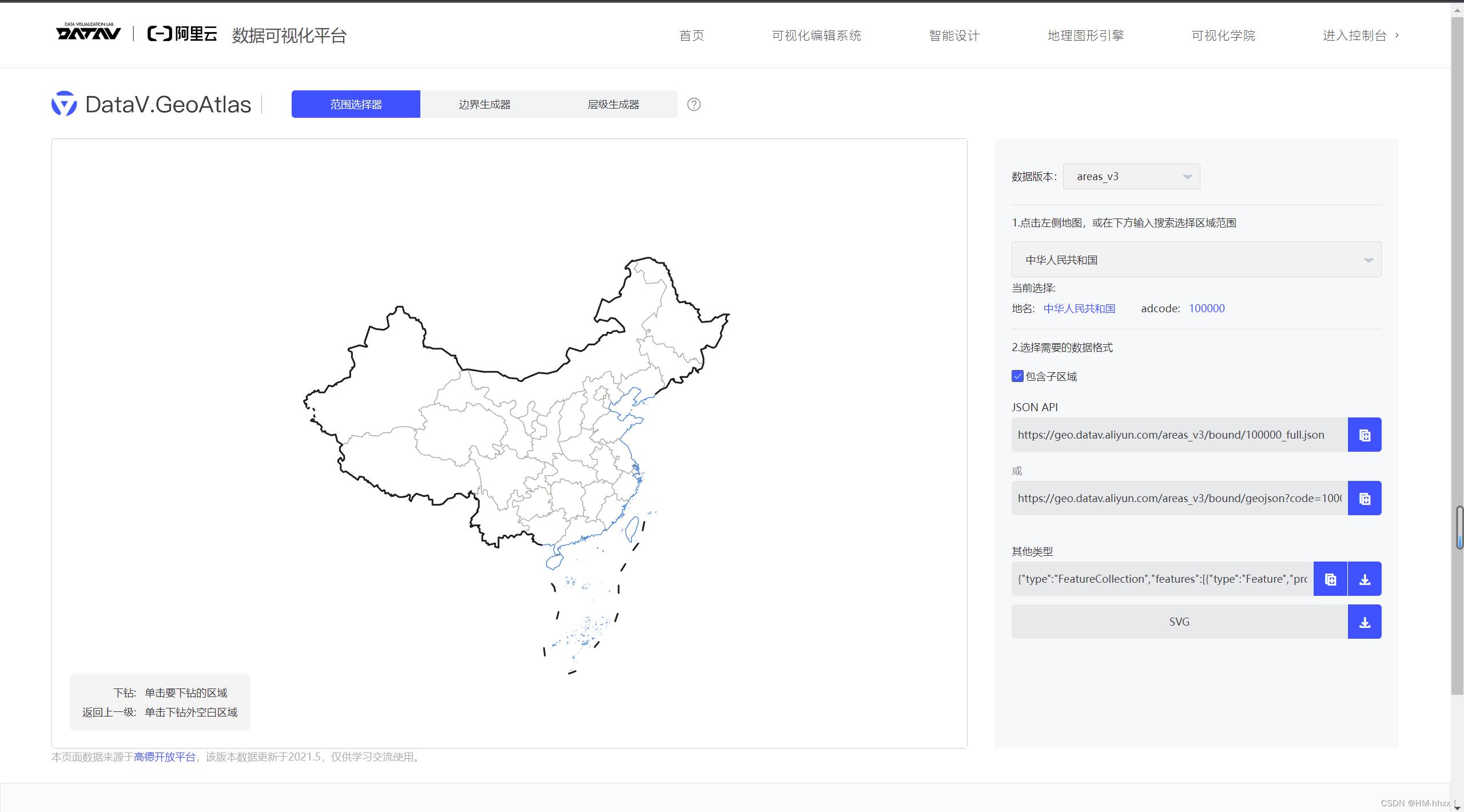
使用Three提供的FileLoader加载数据并对JSON数据进行解析:
const loader = new THREE.FileLoader();
loader.load("https://geo.datav.aliyun.com/areas_v3/bound/100000_full.json", (data) => {
  console.log(data);
  const jsonData = JSON.parse(data);
  operationData(jsonData);
  console.log(jsonData);
});
控制台输出如下:

安装d3并使用该插件将地理坐标转换为Three所支持的xyz坐标系:
1)d3.js安装
yarn add d3
or
npm install d3
2)导入d3
import * as d3 from "d3";3)使用d3转换坐标
// 以经纬度116,39为中心,进行投影的函数转换函数
const projection1 = d3.geoMercator().center([116, 39]).translate([0, 0, 0]);function operationData(jsondata) {
// 全国信息
const features = jsondata.features;
features.forEach((feature) => {
// 单个省份 对象
const province = new THREE.Object3D();
// 地址
province.properties = feature.properties.name;
const coordinates = feature.geometry.coordinates;
const color = "#99ff99";
if (feature.geometry.type === "MultiPolygon") {
// 多个,多边形
coordinates.forEach((coordinate) => {
// console.log(coordinate);
// coordinate 多边形数据
coordinate.forEach((rows) => {
const mesh = drawExtrudeMesh(rows, color, projection1);
const line = lineDraw(rows, color, projection1);
// 唯一标识
mesh.properties = feature.properties.name;
province.add(line);
province.add(mesh);
});
});
}
if (feature.geometry.type === "Polygon") {
// 多边形
coordinates.forEach((coordinate) => {
const mesh = drawExtrudeMesh(coordinate, color, projection1);
const line = lineDraw(coordinate, color, projection1);
// 唯一标识
mesh.properties = feature.properties.name;
province.add(line);
province.add(mesh);
});
}
map.add(province);
});
scene.add(map);
}
function lineDraw(polygon, color, projection) {
const lineGeometry = new THREE.BufferGeometry();
const pointsArray = new Array();
polygon.forEach((row) => {
const [x, y] = projection(row);
// 创建三维点
pointsArray.push(new THREE.Vector3(x, -y, 9));
});
// 放入多个点
lineGeometry.setFromPoints(pointsArray);
// 生成随机颜色
const lineColor = new THREE.Color(
Math.random() * 0.5 + 0.5,
Math.random() * 0.5 + 0.5,
Math.random() * 0.5 + 0.5
);
const lineMaterial = new THREE.LineBasicMaterial({
color: lineColor,
});
return new THREE.Line(lineGeometry, lineMaterial);
}
// 根据经纬度坐标生成物体
function drawExtrudeMesh(polygon, color, projection) {
const shape = new THREE.Shape();
// console.log(polygon, projection);
polygon.forEach((row, i) => {
const [x, y] = projection(row);
// console.log(row, [x, y]);
if (i === 0) {
// 创建起点,使用moveTo方法
// 因为计算出来的y是反过来,所以要进行颠倒
shape.moveTo(x, -y);
}
shape.lineTo(x, -y);
});
// 拉伸
const geometry = new THREE.ExtrudeGeometry(shape, {
depth: 5,
bevelEnabled: true,
});
// 随机颜色
const randomColor = (0.5 + Math.random() * 0.5) * 0xffffff;
const material = new THREE.MeshBasicMaterial({
color: randomColor,
transparent: true,
opacity: 0.5,
});
return new THREE.Mesh(geometry, material);
}实现效果:

// 监听鼠标
window.addEventListener("click", onRay);
// 全局对象
let lastPick = null;
function onRay(event) {
let pickPosition = setPickPosition(event);
const raycaster = new THREE.Raycaster();
raycaster.setFromCamera(pickPosition, camera);
// 计算物体和射线的交点
const intersects = raycaster.intersectObjects([map], true);
// 数组大于0 表示有相交对象
if (intersects.length > 0) {
if (lastPick) {
if (lastPick.object.properties !== intersects[0].object.properties) {
lastPick.object.material.color.set("#99ff99");
lastPick = null;
}
}
if (intersects[0].object.properties) {
intersects[0].object.material.color.set("red");
}
lastPick = intersects[0];
} else {
if (lastPick) {
// 复原
if (lastPick.object.properties) {
lastPick.object.material.color.set("yellow");
lastPick = null;
}
}
}
}
/**
* 获取鼠标在three.js 中归一化坐标
* */
function setPickPosition(event) {
let pickPosition = { x: 0, y: 0 };
// 计算后 以画布 开始为 (0,0)点
const pos = getCanvasRelativePosition(event);
// 数据归一化
pickPosition.x = (pos.x / canvas.width) * 2 - 1;
pickPosition.y = (pos.y / canvas.height) * -2 + 1;
return pickPosition;
}
// 计算 以画布 开始为(0,0)点 的鼠标坐标
function getCanvasRelativePosition(event) {
const rect = canvas.getBoundingClientRect();
return {
x: ((event.clientX - rect.left) * canvas.width) / rect.width,
y: ((event.clientY - rect.top) * canvas.height) / rect.height,
};
}
实现效果:

import * as THREE from "three";
import { OrbitControls } from "three/examples/jsm/controls/OrbitControls";
import * as d3 from "d3";
import Stats from "three/examples/jsm/libs/stats.module.js";
const stats = new Stats();
document.body.appendChild(stats.dom);
// console.log(THREE);
// 初始化场景
const scene = new THREE.Scene();
// console.log(d3);
// 创建透视相机
const camera = new THREE.PerspectiveCamera(
90,
window.innerHeight / window.innerHeight,
0.1,
100000
);
// 设置相机位置
// object3d具有position,属性是1个3维的向量
camera.position.set(0, 0, 1000);
// 更新摄像头
camera.aspect = window.innerWidth / window.innerHeight;
// 更新摄像机的投影矩阵
camera.updateProjectionMatrix();
scene.add(camera);
// 加入辅助轴,帮助我们查看3维坐标轴
const axesHelper = new THREE.AxesHelper(5);
scene.add(axesHelper);
// 加载纹理
const map = new THREE.Object3D();
const directionalLight = new THREE.DirectionalLight(0xffffff, 0.5);
scene.add(directionalLight);
const light = new THREE.AmbientLight(0xffffff, 0.5); // soft white light
scene.add(light);
// 初始化渲染器
const renderer = new THREE.WebGLRenderer({ alpha: true });
// renderer.shadowMap.enabled = true;
// renderer.shadowMap.type = THREE.BasicShadowMap;
// renderer.shadowMap.type = THREE.VSMShadowMap;
// 设置渲染尺寸大小
renderer.setSize(window.innerWidth, window.innerHeight);
// 监听屏幕大小改变的变化,设置渲染的尺寸
window.addEventListener("resize", () => {
// console.log("resize");
// 更新摄像头
camera.aspect = window.innerWidth / window.innerHeight;
// 更新摄像机的投影矩阵
camera.updateProjectionMatrix();
// 更新渲染器
renderer.setSize(window.innerWidth, window.innerHeight);
// 设置渲染器的像素比例
renderer.setPixelRatio(window.devicePixelRatio);
});
// 将渲染器添加到body
document.body.appendChild(renderer.domElement);
const canvas = renderer.domElement;
// 初始化控制器
const controls = new OrbitControls(camera, renderer.domElement);
// 设置控制器阻尼
controls.enableDamping = true;
// 设置自动旋转
// controls.autoRotate = true;
const clock = new THREE.Clock();
function animate(t) {
controls.update();
stats.update();
const deltaTime = clock.getDelta();
requestAnimationFrame(animate);
// 使用渲染器渲染相机看这个场景的内容渲染出来
renderer.render(scene, camera);
}
animate();
// 创建纹理加载器对象
const textureLoader = new THREE.TextureLoader();
const loader = new THREE.FileLoader();
loader.load("https://geo.datav.aliyun.com/areas_v3/bound/100000_full.json", (data) => {
//console.log(data);
const jsonData = JSON.parse(data);
operationData(jsonData);
console.log(jsonData);
});
// 以经纬度116,39为中心,进行投影的函数转换函数
const projection1 = d3.geoMercator().center([116, 39]).translate([0, 0, 0]);
function operationData(jsondata) {
  // 全国信息
  const features = jsondata.features;

  features.forEach((feature) => {
    // 单个省份 对象
    const province = new THREE.Object3D();
    // 地址
    province.properties = feature.properties.name;
    const coordinates = feature.geometry.coordinates;
    const color = "#99ff99";

    if (feature.geometry.type === "MultiPolygon") {
      // 多个,多边形
      coordinates.forEach((coordinate) => {
        // console.log(coordinate);
        // coordinate 多边形数据
        coordinate.forEach((rows) => {
          const mesh = drawExtrudeMesh(rows, color, projection1);
          const line = lineDraw(rows, color, projection1);
          // 唯一标识
          mesh.properties = feature.properties.name;

          province.add(line);
          province.add(mesh);
        });
      });
    }

    if (feature.geometry.type === "Polygon") {
      // 多边形
      coordinates.forEach((coordinate) => {
        const mesh = drawExtrudeMesh(coordinate, color, projection1);
        const line = lineDraw(coordinate, color, projection1);
        // 唯一标识
        mesh.properties = feature.properties.name;

        province.add(line);
        province.add(mesh);
      });
    }
    map.add(province);
  });
  scene.add(map);
}

function lineDraw(polygon, color, projection) {
  const lineGeometry = new THREE.BufferGeometry();
  const pointsArray = new Array();
  polygon.forEach((row) => {
    const [x, y] = projection(row);
    // 创建三维点
    pointsArray.push(new THREE.Vector3(x, -y, 9));
  });
  // 放入多个点
  lineGeometry.setFromPoints(pointsArray);
  // 生成随机颜色
  const lineColor = new THREE.Color(
    Math.random() * 0.5 + 0.5,
    Math.random() * 0.5 + 0.5,
    Math.random() * 0.5 + 0.5
  );

  const lineMaterial = new THREE.LineBasicMaterial({
    color: lineColor,
  });
  return new THREE.Line(lineGeometry, lineMaterial);
}

// 根据经纬度坐标生成物体
function drawExtrudeMesh(polygon, color, projection) {
  const shape = new THREE.Shape();
  // console.log(polygon, projection);
  polygon.forEach((row, i) => {
    const [x, y] = projection(row);
    // console.log(row, [x, y]);
    if (i === 0) {
      // 创建起点,使用moveTo方法
      // 因为计算出来的y是反过来,所以要进行颠倒
      shape.moveTo(x, -y);
    }
    shape.lineTo(x, -y);
  });

  // 拉伸
  const geometry = new THREE.ExtrudeGeometry(shape, {
    depth: 5,
    bevelEnabled: true,
  });

  // 随机颜色
  const randomColor = (0.5 + Math.random() * 0.5) * 0xffffff;
  const material = new THREE.MeshBasicMaterial({
    color: randomColor,
    transparent: true,
    opacity: 0.5,
  });
  return new THREE.Mesh(geometry, material);
}
// 监听鼠标
window.addEventListener("click", onRay);
// 全局对象
let lastPick = null;
function onRay(event) {
  let pickPosition = setPickPosition(event);
  const raycaster = new THREE.Raycaster();
  raycaster.setFromCamera(pickPosition, camera);
  // 计算物体和射线的交点
  const intersects = raycaster.intersectObjects([map], true);
  // 数组大于0 表示有相交对象
  if (intersects.length > 0) {
    if (lastPick) {
      if (lastPick.object.properties !== intersects[0].object.properties) {
        lastPick.object.material.color.set("#99ff99");
        lastPick = null;
      }
    }
    if (intersects[0].object.properties) {
      intersects[0].object.material.color.set("red");
    }
    lastPick = intersects[0];
  } else {
    if (lastPick) {
      // 复原
      if (lastPick.object.properties) {
        lastPick.object.material.color.set("yellow");
        lastPick = null;
      }
    }
  }
}

/**
 * 获取鼠标在three.js 中归一化坐标
 * */
function setPickPosition(event) {
  let pickPosition = { x: 0, y: 0 };
  // 计算后 以画布 开始为 (0,0)点
  const pos = getCanvasRelativePosition(event);
  // 数据归一化
  pickPosition.x = (pos.x / canvas.width) * 2 - 1;
  pickPosition.y = (pos.y / canvas.height) * -2 + 1;
  return pickPosition;
}

// 计算 以画布 开始为(0,0)点 的鼠标坐标
function getCanvasRelativePosition(event) {
  const rect = canvas.getBoundingClientRect();
  return {
    x: ((event.clientX - rect.left) * canvas.width) / rect.width,
    y: ((event.clientY - rect.top) * canvas.height) / rect.height,
  };
}
我得到了一个包含嵌套链接的表单。编辑时链接字段为空的问题。这是我的表格:Editingkategori{:action=>'update',:id=>@konkurrancer.id})do|f|%>'Trackingurl',:style=>'width:500;'%>'Editkonkurrence'%>|我的konkurrencer模型:has_one:link我的链接模型:classLink我的konkurrancer编辑操作:defedit@konkurrancer=Konkurrancer.find(params[:id])@konkurrancer.link_attrib
我主要使用Ruby来执行此操作,但到目前为止我的攻击计划如下:使用gemsrdf、rdf-rdfa和rdf-microdata或mida来解析给定任何URI的数据。我认为最好映射到像schema.org这样的统一模式,例如使用这个yaml文件,它试图描述数据词汇表和opengraph到schema.org之间的转换:#SchemaXtoschema.orgconversion#data-vocabularyDV:name:namestreet-address:streetAddressregion:addressRegionlocality:addressLocalityphoto:i
让我们计算MRI范围内的类别:defcount_classesObjectSpace.count_objects[:T_CLASS]endk=count_classes用类方法定义类:classAdefself.foonilendend然后运行:putscount_classes-k#=>3请解释一下,为什么是三个? 最佳答案 查看MRI代码,每次你创建一个Class时,在Ruby中它是Class类型的对象,ruby会自动为这个新类创建“元类”类,这是另一个单例类型的Class对象。C函数调用(class.c)是:rb_define
所以我在关注Railscast,我注意到在html.erb文件中,ruby代码有一个微弱的背景高亮效果,以区别于其他代码HTML文档。我知道Ryan使用TextMate。我正在使用SublimeText3。我怎样才能达到同样的效果?谢谢! 最佳答案 为SublimeText安装ERB包。假设您安装了SublimeText包管理器*,只需点击cmd+shift+P即可获得命令菜单,然后键入installpackage并选择PackageControl:InstallPackage获取包管理器菜单。在该菜单中,键入ERB并在看到包时选择
我试图在索引页中创建一个超链接,但它没有显示,也没有给出任何错误。这是我的index.html.erb代码。ListingarticlesTitleTextssss我检查了我的路线,我认为它们也没有问题。PrefixVerbURIPatternController#Actionwelcome_indexGET/welcome/index(.:format)welcome#indexarticlesGET/articles(.:format)articles#indexPOST/articles(.:format)articles#createnew_articleGET/article
我有一个用户工厂。我希望默认情况下确认用户。但是鉴于unconfirmed特征,我不希望它们被确认。虽然我有一个基于实现细节而不是抽象的工作实现,但我想知道如何正确地做到这一点。factory:userdoafter(:create)do|user,evaluator|#unwantedimplementationdetailshereunlessFactoryGirl.factories[:user].defined_traits.map(&:name).include?(:unconfirmed)user.confirm!endendtrait:unconfirmeddoenden
我是rails的新手,想在form字段上应用验证。myviewsnew.html.erb.....模拟.rbclassSimulation{:in=>1..25,:message=>'Therowmustbebetween1and25'}end模拟Controller.rbclassSimulationsController我想检查模型类中row字段的整数范围,如果不在范围内则返回错误信息。我可以检查上面代码的范围,但无法返回错误消息提前致谢 最佳答案 关键是您使用的是模型表单,一种显示ActiveRecord模型实例属性的表单。c
目前,Itembelongs_toCompany和has_manyItemVariants。我正在尝试使用嵌套的fields_for通过Item表单添加ItemVariant字段,但是使用:item_variants不显示该表单。只有当我使用单数时才会显示。我检查了我的关联,它们似乎是正确的,这可能与嵌套在公司下的项目有关,还是我遗漏了其他东西?提前致谢。注意:下面的代码片段中省略了不相关的代码。编辑:不知道这是否相关,但我正在使用CanCan进行身份验证。routes.rbresources:companiesdoresources:itemsenditem.rbclassItemi
华为OD机试题本篇题目:明明的随机数题目输入描述输出描述:示例1输入输出说明代码编写思路最近更新的博客华为od2023|什么是华为od,od薪资待遇,od机试题清单华为OD机试真题大全,用Python解华为机试题|机试宝典【华为OD机试】全流程解析+经验分享,题型分享,防作弊指南华为o
C#实现简易绘图工具一.引言实验目的:通过制作窗体应用程序(C#画图软件),熟悉基本的窗体设计过程以及控件设计,事件处理等,熟悉使用C#的winform窗体进行绘图的基本步骤,对于面向对象编程有更加深刻的体会.Tutorial任务设计一个具有基本功能的画图软件**·包括简单的新建文件,保存,重新绘图等功能**·实现一些基本图形的绘制,包括铅笔和基本形状等,学习橡皮工具的创建**·设计一个合理舒适的UI界面**注明:你可能需要先了解一些关于winform窗体应用程序绘图的基本知识,以及关于GDI+类和结构的知识二.实验环境Windows系统下的visualstudio2017C#窗体应用程序三.
