Catalogue
定时器和中断都是单片机中的重要的功能,使用中断功能可以完成很多更加复杂的控制,而定时器和中断常常搭配在一起使用,本文将通过几个示例程序简单快速的上手定时器和中断。
本文节选自笔者的仓库https://github.com/Undertone0809/arduino-uno-dev,欢迎star。
CPU执行时原本是按程序指令一条一条向下顺序执行的。 但如果此时发生了某一事件B请求CPU迅速去处理(中断发生),CPU暂时中断当前的工作,转去处理事件B(中断响应和中断服务). 待CPU将事件B处理完毕后, 再回到原来被中断的地方继续执行程序(中断返回),这一过程称为中断 。
arduino官方对中断的解释:
Interrupts are useful for making things happen automatically in microcontroller programs and can help solve timing problems. Good tasks for using an interrupt may include reading a rotary encoder, or monitoring user input.
If you wanted to ensure that a program always caught the pulses from a rotary encoder, so that it never misses a pulse, it would make it very tricky to write a program to do anything else, because the program would need to constantly poll the sensor lines for the encoder, in order to catch pulses when they occurred. Other sensors have a similar interface dynamic too, such as trying to read a sound sensor that is trying to catch a click, or an infrared slot sensor (photo-interrupter) trying to catch a coin drop. In all of these situations, using an interrupt can free the microcontroller to get some other work done while not missing the input.
中断对于使事情在微控制器程序中自动发生很有用,并且可以帮助解决定时问题。使用中断的好任务可能包括读取旋转编码器,或者监视用户输入。
如果你想确保一个程序总是捕获来自旋转编码器的脉冲,使它永远不会错过一个脉冲,那么写一个程序做任何其他事情都会变得非常棘手,因为程序需要不断地轮询编码器的传感器线,以便在脉冲发生时捕获脉冲。其他传感器也有类似的接口动态,比如试图读取一个声音传感器,它试图捕获一个点击,或者一个红外插槽传感器(照片中断)试图捕获一个硬币。在所有这些情况下,使用中断可以使微控制器在不丢失输入的情况下完成一些其他工作。
在你工作摸鱼的时候有电话来了,于是你停下手头正在摸的鱼,转头去接电话,等到电话打完了之后,回来继续摸刚才没摸玩的鱼,这就是中断。
电话来了就是中断的触发信号,接电话就是中断要执行的事情(函数),打完电话回来继续摸鱼就是中断函数执行完之后继续执行未执行完的主程序。
下面我们通过一个简单的demo来快速上手如何使用中断。
demo: 死循环执行+1串口打印程序,当手指触摸2号引脚时,打印一次finger touch,手指离开2号引脚的时候,打印一次finger leave
/**
 * @brief The purpose of this demo is to show how to use interrupt.
 * @author https://github.com/Undertone0809/arduino-uno-dev by zeeland
 * @createTime 2022/11/11 23:24:24
 * @File InterruptDemo.ino
 */

int pinInterrupt = 2; // 接中断信号的引脚

void onTouch()
{
  Serial.println("[info] finger touch");
}

void onLeave()
{
  Serial.println("[info] finger leave");
}

void setup()
{
  Serial.begin(9600);
  Serial.println("[info] begin to work");

  pinMode( pinInterrupt, INPUT);// 设置管脚为输入

  // Enable中断管脚, 中断服务程序为onTouch(), 监视引脚变化
  attachInterrupt(digitalPinToInterrupt(pinInterrupt), onLeave, FALLING);
  attachInterrupt(digitalPinToInterrupt(pinInterrupt), onTouch, RISING);
}

void loop()
{
  while(1);
}
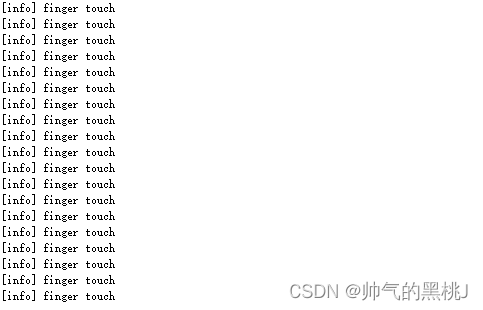
事实上,如果你跑过该示例,你会发现实际上2号引脚的触发并不怎么灵敏,以至于它没有办法很好地触发onLeave中断,如果你想要更准确的中断触发效果,那么你不应该拿手测试(狗头)。
对于attachInterrupt()这个函数,arduino提供了以下五种中断触发方案,使用者可以根据自己的需求去更换不同的中断触发方案。

定时器(Timer)就是定时器🐶,定时器用于设定特定时间触发中断。
Arduino UNO有三个定时器,
Actually,定时器的使用也有多种方式,常见的定时器使用方式有自定义触发、MsTimer2库、TimeOne库三种方式,但事实上,我们不推荐自定义编写定时器触发方式,如果你想使用操作寄存器这种复杂的方式,你就没必要使用arduino,所以下面只会MsTimer2和TimeOne两种方式。
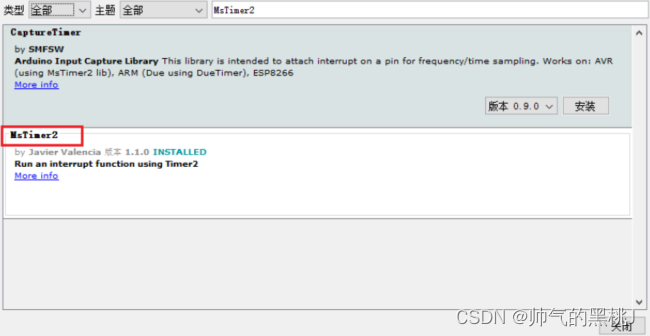
MsTimer2封装了Timer2的定时器,因为为第三方库,所以需要先安装MsTimer2库。
demo: 每500ms让13引脚的LED灯亮一下。
/**
 * @brief The purpose of this demo is to show how to toggle LED on pin 13 each second.
 * @author https://github.com/Undertone0809/arduino-uno-dev by zeeland
 * @createTime 2022/11/11 23:24:24
 * @File TimerInterruptDemo.ino
 */

#include <MsTimer2.h>

void flash() {
  static boolean output = HIGH;
  digitalWrite(13, output);
  output = !output;
}

void setup() {
  pinMode(13, OUTPUT);
  MsTimer2::set(500, flash); // 500ms period
  MsTimer2::start();  // enables the interrupt.
  // MsTimer2::stop();  // disables the interrupt.
}

void loop() {
}
该库使用 timer1 产生自定义载波频率下不同 pwm 占空比输出 和 定时器中断。同样,使用TimerOne时也需要先安装第三方库才能导入。
demo: 在引脚9上设置占空比为50%的PWM输出,并附加一个中断,使LED灯频闪,代码如下:
/**
 * @brief The purpose of this demo is to show Sets up PWM output on pin 9
 *     with a 50% duty cycle, and attaches an interrupt that toggles digital
 *     pin 10 every half second.
 * @author https://github.com/Undertone0809/arduino-uno-dev by zeeland
 * @createTime 2022/11/11 23:24:24
 * @File TimerInterruptDemo2.ino
 */

#include <TimerOne.h>

void callback()
{
    static boolean output = HIGH;
    digitalWrite(13, output);	// 状态翻转
    output = !output;
}

void setup()
{
    pinMode(13, OUTPUT);
    Timer1.initialize(500000); // initialize timer1, and set a 1/2 second period
    Timer1.pwm(9, 512); // setup pwm on pin 9, 50% duty cycle
    Timer1.attachInterrupt(callback); // attaches callback() as a timer overflow interrupt
}

void loop()
{

}
可以看出TimerOne不仅可以完成定时器的功能,也封装了PWM的功能,功能上更加丰富。不过在代码可读性上来说,MsTimer2更具优势,所以可以根据自己的需求选择。更多详细的讲解可以查看源代码或查看References中的official tutorial.
我正在学习如何使用Nokogiri,根据这段代码我遇到了一些问题:require'rubygems'require'mechanize'post_agent=WWW::Mechanize.newpost_page=post_agent.get('http://www.vbulletin.org/forum/showthread.php?t=230708')puts"\nabsolutepathwithtbodygivesnil"putspost_page.parser.xpath('/html/body/div/div/div/div/div/table/tbody/tr/td/div
我有一个Ruby程序,它使用rubyzip压缩XML文件的目录树。gem。我的问题是文件开始变得很重,我想提高压缩级别,因为压缩时间不是问题。我在rubyzipdocumentation中找不到一种为创建的ZIP文件指定压缩级别的方法。有人知道如何更改此设置吗?是否有另一个允许指定压缩级别的Ruby库? 最佳答案 这是我通过查看rubyzip内部创建的代码。level=Zlib::BEST_COMPRESSIONZip::ZipOutputStream.open(zip_file)do|zip|Dir.glob("**/*")d
类classAprivatedeffooputs:fooendpublicdefbarputs:barendprivatedefzimputs:zimendprotecteddefdibputs:dibendendA的实例a=A.new测试a.foorescueputs:faila.barrescueputs:faila.zimrescueputs:faila.dibrescueputs:faila.gazrescueputs:fail测试输出failbarfailfailfail.发送测试[:foo,:bar,:zim,:dib,:gaz].each{|m|a.send(m)resc
很好奇,就使用rubyonrails自动化单元测试而言,你们正在做什么?您是否创建了一个脚本来在cron中运行rake作业并将结果邮寄给您?git中的预提交Hook?只是手动调用?我完全理解测试,但想知道在错误发生之前捕获错误的最佳实践是什么。让我们理所当然地认为测试本身是完美无缺的,并且可以正常工作。下一步是什么以确保他们在正确的时间将可能有害的结果传达给您? 最佳答案 不确定您到底想听什么,但是有几个级别的自动代码库控制:在处理某项功能时,您可以使用类似autotest的内容获得关于哪些有效,哪些无效的即时反馈。要确保您的提
假设我做了一个模块如下:m=Module.newdoclassCendend三个问题:除了对m的引用之外,还有什么方法可以访问C和m中的其他内容?我可以在创建匿名模块后为其命名吗(就像我输入“module...”一样)?如何在使用完匿名模块后将其删除,使其定义的常量不再存在? 最佳答案 三个答案:是的,使用ObjectSpace.此代码使c引用你的类(class)C不引用m:c=nilObjectSpace.each_object{|obj|c=objif(Class===objandobj.name=~/::C$/)}当然这取决于
我正在尝试使用ruby和Savon来使用网络服务。测试服务为http://www.webservicex.net/WS/WSDetails.aspx?WSID=9&CATID=2require'rubygems'require'savon'client=Savon::Client.new"http://www.webservicex.net/stockquote.asmx?WSDL"client.get_quotedo|soap|soap.body={:symbol=>"AAPL"}end返回SOAP异常。检查soap信封,在我看来soap请求没有正确的命名空间。任何人都可以建议我
关闭。这个问题是opinion-based.它目前不接受答案。想要改进这个问题?更新问题,以便editingthispost可以用事实和引用来回答它.关闭4年前。Improvethisquestion我想在固定时间创建一系列低音和高音调的哔哔声。例如:在150毫秒时发出高音调的蜂鸣声在151毫秒时发出低音调的蜂鸣声200毫秒时发出低音调的蜂鸣声250毫秒的高音调蜂鸣声有没有办法在Ruby或Python中做到这一点?我真的不在乎输出编码是什么(.wav、.mp3、.ogg等等),但我确实想创建一个输出文件。
我正在尝试测试是否存在表单。我是Rails新手。我的new.html.erb_spec.rb文件的内容是:require'spec_helper'describe"messages/new.html.erb"doit"shouldrendertheform"dorender'/messages/new.html.erb'reponse.shouldhave_form_putting_to(@message)with_submit_buttonendendView本身,new.html.erb,有代码:当我运行rspec时,它失败了:1)messages/new.html.erbshou
我在从html页面生成PDF时遇到问题。我正在使用PDFkit。在安装它的过程中,我注意到我需要wkhtmltopdf。所以我也安装了它。我做了PDFkit的文档所说的一切......现在我在尝试加载PDF时遇到了这个错误。这里是错误:commandfailed:"/usr/local/bin/wkhtmltopdf""--margin-right""0.75in""--page-size""Letter""--margin-top""0.75in""--margin-bottom""0.75in""--encoding""UTF-8""--margin-left""0.75in""-
我在我的项目目录中完成了compasscreate.和compassinitrails。几个问题:我已将我的.sass文件放在public/stylesheets中。这是放置它们的正确位置吗?当我运行compasswatch时,它不会自动编译这些.sass文件。我必须手动指定文件:compasswatchpublic/stylesheets/myfile.sass等。如何让它自动运行?文件ie.css、print.css和screen.css已放在stylesheets/compiled。如何在编译后不让它们重新出现的情况下删除它们?我自己编译的.sass文件编译成compiled/t
