目录
目录
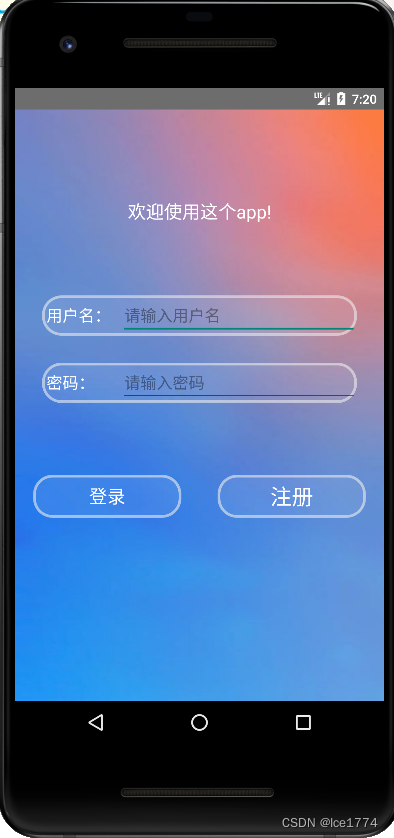
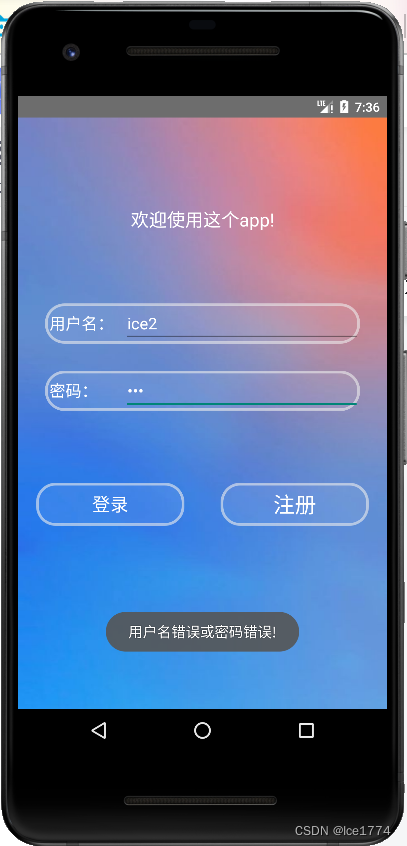
能够验证用户名是否已存在,并判断两次密码是否一致
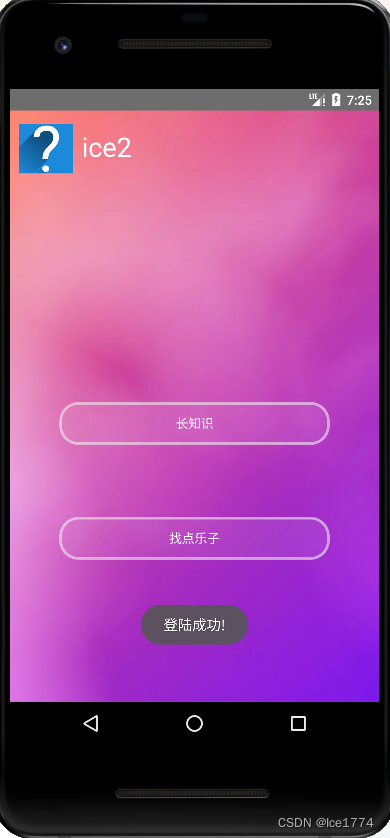
当前用户无信息
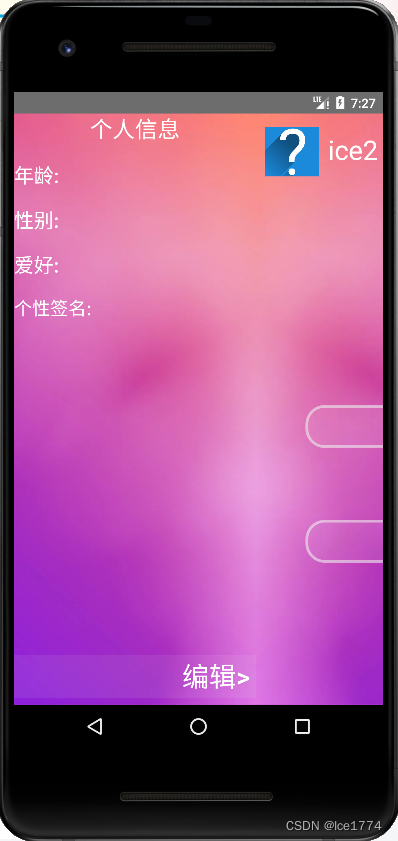
编辑信息
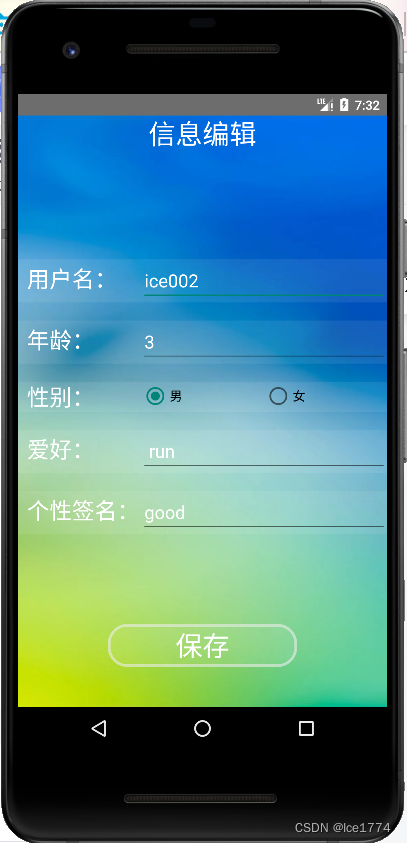
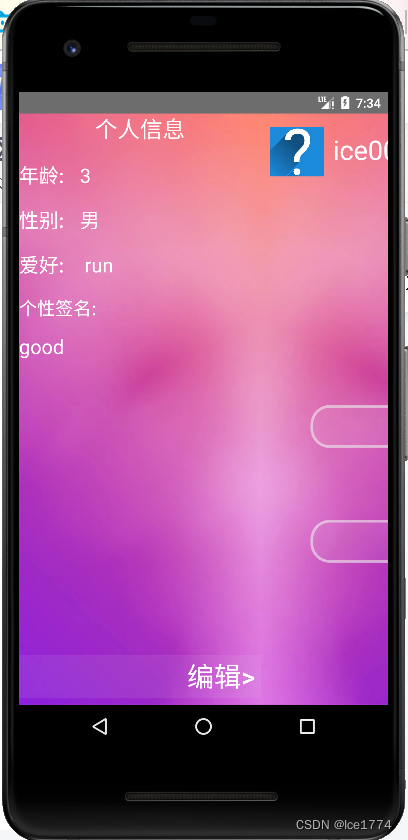
信息页面显示更改后的信息
修改用户名后,下次登录需要填写更改后的用户名
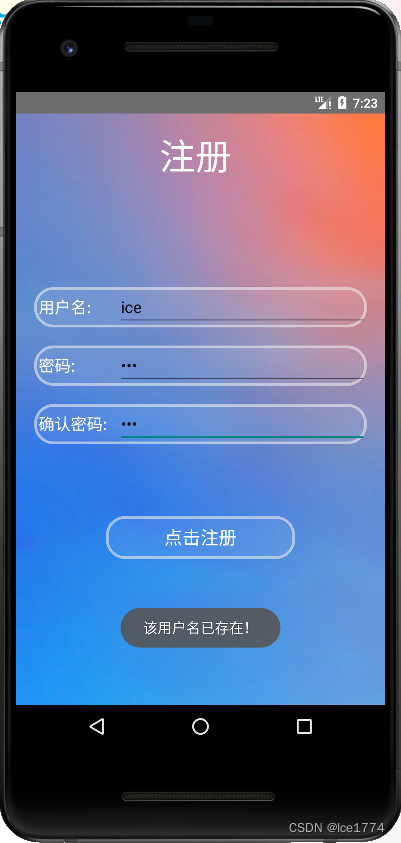
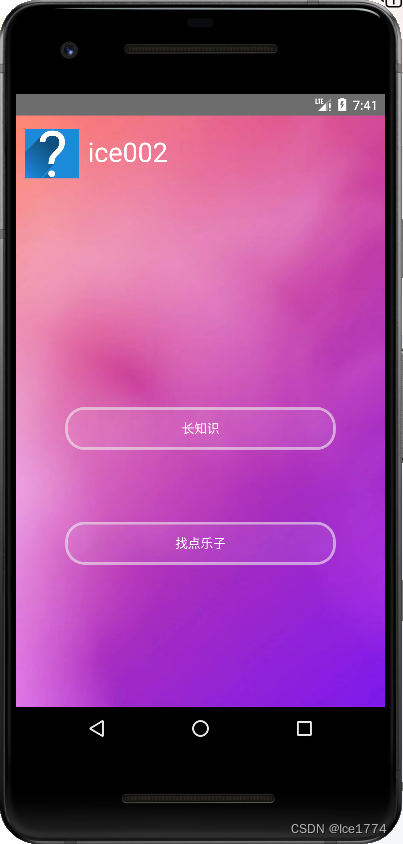
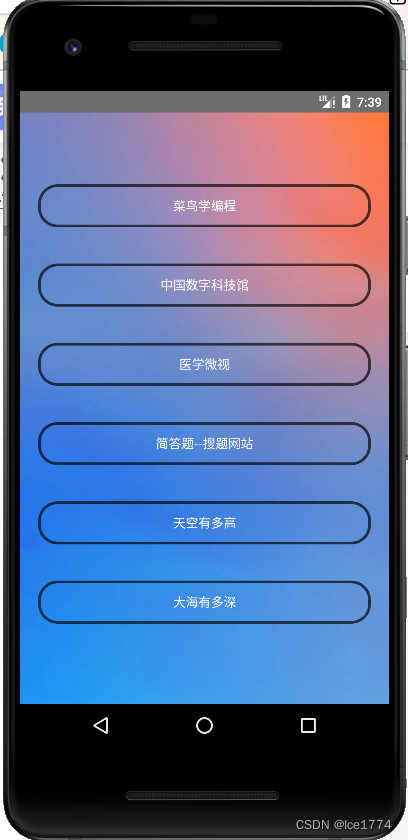
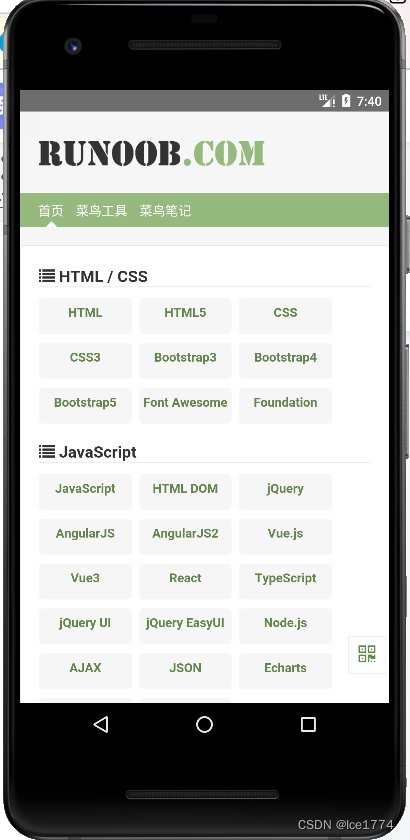
点击按钮进入相应的网页 ,这里点击 “长知识”>>“菜鸟学编程”
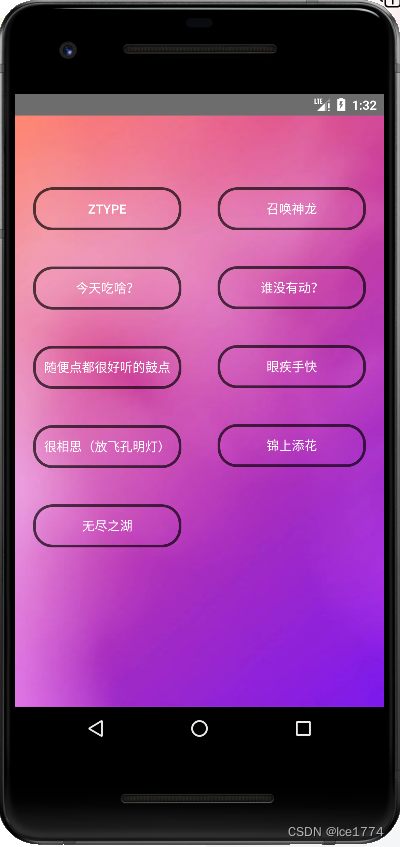
<?xml version="1.0" encoding="utf-8"?>
<LinearLayout xmlns:android="http://schemas.android.com/apk/res/android"
    xmlns:app="http://schemas.android.com/apk/res-auto"
    xmlns:tools="http://schemas.android.com/tools"
    android:layout_width="match_parent"
    android:layout_height="match_parent"
    android:background="@drawable/bg_blue_orange"
    android:orientation="vertical"
    tools:context=".LoginActivity">

    <TextView
        android:id="@+id/textView"
        android:layout_width="match_parent"
        android:layout_height="wrap_content"
        android:gravity="center"
        android:layout_marginTop="100dp"
        android:text="欢迎使用这个app!"
        android:textColor="@color/white"
        android:textSize="20sp" />

    <LinearLayout
        android:layout_width="match_parent"
        android:layout_height="wrap_content"
        android:layout_marginHorizontal="30dp"
        android:layout_marginTop="80dp"
        android:background="@drawable/bt_humditiy"
        android:orientation="horizontal">

        <TextView
            android:id="@+id/textView10"
            android:layout_width="match_parent"
            android:layout_height="wrap_content"
            android:layout_weight="3"
            android:text="用户名:"
            android:textColor="@color/white"
            android:layout_marginLeft="5dp"
            android:textSize="18dp" />

        <EditText
            android:id="@+id/Ed_username"
            android:layout_width="match_parent"
            android:layout_height="wrap_content"
            android:layout_weight="1"
            android:hint="@string/input_username"
            android:inputType="textPersonName"
            android:textColor="@color/white" />
    </LinearLayout>

    <LinearLayout
        android:layout_width="match_parent"
        android:layout_height="wrap_content"
        android:layout_marginHorizontal="30dp"
        android:layout_marginTop="30dp"
        android:background="@drawable/bt_humditiy"
        android:orientation="horizontal">

        <TextView
            android:id="@+id/textView11"
            android:layout_width="match_parent"
            android:layout_height="wrap_content"
            android:layout_weight="3"
            android:text="密码:"
            android:textColor="@color/white"
            android:layout_marginLeft="5dp"
            android:textSize="18dp" />

        <EditText
            android:id="@+id/Ed_password"
            android:layout_width="match_parent"
            android:layout_height="wrap_content"
            android:layout_weight="1"
            android:ems="10"
            android:hint="@string/input_password"
            android:inputType="textPassword"
            android:textColor="@color/white"
            android:textColorHighlight="@color/white" />
    </LinearLayout>

    <LinearLayout
        android:layout_width="match_parent"
        android:layout_height="wrap_content"
        android:layout_marginTop="80dp"
        android:orientation="horizontal">

        <Button
            android:id="@+id/bt_login"
            android:layout_width="0dp"
            android:layout_weight="1"
            android:layout_height="wrap_content"
            android:layout_gravity="center"
            android:background="@drawable/bt_humditiy"
            android:text="@string/login"
            android:textColor="@color/white"
            android:layout_marginLeft="20dp"
            android:layout_marginRight="20dp"
            android:textSize="20sp" />

        <Button
            android:id="@+id/bt_register"
            android:layout_width="0dp"
            android:layout_height="wrap_content"
            android:layout_weight="1"
            android:background="@drawable/bt_humditiy"
            android:text="@string/registered"
            android:textColor="@color/white"
            android:layout_marginRight="20dp"
            android:layout_marginLeft="20dp"
            android:textSize="24sp" />
    </LinearLayout>

</LinearLayout><?xml version="1.0" encoding="utf-8"?>
<androidx.constraintlayout.widget.ConstraintLayout xmlns:android="http://schemas.android.com/apk/res/android"
xmlns:app="http://schemas.android.com/apk/res-auto"
xmlns:tools="http://schemas.android.com/tools"
android:layout_width="match_parent"
android:layout_height="match_parent"
android:background="@drawable/bg_blue_orange"
tools:context=".RegisterActivity">
<LinearLayout
android:layout_width="match_parent"
android:layout_height="match_parent"
android:orientation="vertical">
<TextView
android:id="@+id/register_title"
android:layout_width="wrap_content"
android:layout_height="wrap_content"
android:text="注册"
android:textSize="40dp"
android:textColor="@color/white"
android:layout_marginTop="20dp"
android:layout_marginStart="160dp"/>
<LinearLayout
android:layout_width="match_parent"
android:layout_height="wrap_content"
android:layout_marginTop="120dp"
android:background="@drawable/bt_humditiy"
android:layout_marginHorizontal="20dp"
android:orientation="horizontal">
<TextView
android:id="@+id/textView7"
android:layout_width="match_parent"
android:layout_height="wrap_content"
android:layout_weight="3"
android:textColor="@color/white"
android:textSize="18dp"
android:layout_marginLeft="5dp"
android:text="用户名:" />
<EditText
android:id="@+id/set_username"
android:layout_width="match_parent"
android:layout_height="wrap_content"
android:layout_weight="1"
android:ems="10"
android:hint="请输入用户名:"
android:inputType="textPersonName" />
</LinearLayout>
<LinearLayout
android:layout_width="match_parent"
android:layout_height="wrap_content"
android:layout_marginTop="20dp"
android:background="@drawable/bt_humditiy"
android:layout_marginHorizontal="20dp"
android:orientation="horizontal">
<TextView
android:id="@+id/textView8"
android:layout_width="match_parent"
android:layout_height="wrap_content"
android:layout_weight="3"
android:textColor="@color/white"
android:textSize="18dp"
android:layout_marginLeft="5dp"
android:text="密码:" />
<EditText
android:id="@+id/set_userPassword1"
android:layout_width="match_parent"
android:layout_height="wrap_content"
android:layout_weight="1"
android:ems="10"
android:hint="请输入密码:"
android:inputType="textPassword" />
</LinearLayout>
<LinearLayout
android:layout_width="match_parent"
android:layout_height="wrap_content"
android:layout_marginTop="20dp"
android:background="@drawable/bt_humditiy"
android:layout_marginHorizontal="20dp"
android:orientation="horizontal">
<TextView
android:id="@+id/textView9"
android:layout_width="match_parent"
android:layout_height="wrap_content"
android:layout_weight="3"
android:textColor="@color/white"
android:textSize="18dp"
android:layout_marginLeft="5dp"
android:text="确认密码:" />
<EditText
android:id="@+id/set_userPassword2"
android:layout_width="match_parent"
android:layout_height="wrap_content"
android:layout_weight="1"
android:ems="10"
android:hint="再次输入密码:"
android:inputType="textPassword" />
</LinearLayout>
<Button
android:id="@+id/bt_startRegister"
android:layout_width="match_parent"
android:layout_height="wrap_content"
android:layout_marginTop="80dp"
android:layout_marginHorizontal="100dp"
android:background="@drawable/bt_humditiy"
android:textColor="@color/white"
android:textSize="20dp"
android:text="点击注册" />
</LinearLayout>
</androidx.constraintlayout.widget.ConstraintLayout><?xml version="1.0" encoding="utf-8"?>
<LinearLayout xmlns:android="http://schemas.android.com/apk/res/android"
android:layout_width="270dp"
android:layout_height="match_parent"
android:orientation="vertical"
android:background="@drawable/bg_purple_miror">
<TextView
android:id="@+id/tv_userInformation"
android:layout_width="match_parent"
android:layout_height="wrap_content"
android:gravity="center"
android:text="个人信息"
android:textColor="@color/white"
android:textSize="25dp" />
<LinearLayout
android:layout_width="match_parent"
android:layout_height="wrap_content"
android:orientation="horizontal">
<TextView
android:id="@+id/tv_age"
android:layout_width="match_parent"
android:layout_height="wrap_content"
android:layout_marginTop="20dp"
android:layout_weight="3"
android:text="年龄:"
android:textColor="@color/white"
android:textSize="22dp" />
<TextView
android:id="@+id/tv_userAge"
android:layout_width="match_parent"
android:layout_height="wrap_content"
android:textColor="@color/white"
android:layout_weight="1"
android:textSize="22dp"
android:layout_marginTop="20dp"
android:text="TextView" />
</LinearLayout>
<LinearLayout
android:layout_width="match_parent"
android:layout_height="wrap_content"
android:layout_marginTop="20dp"
android:orientation="horizontal">
<TextView
android:id="@+id/tv_sex"
android:layout_width="match_parent"
android:layout_height="wrap_content"
android:layout_weight="3"
android:text="性别:"
android:textColor="@color/white"
android:textSize="22dp" />
<TextView
android:id="@+id/tv_userSex"
android:layout_width="match_parent"
android:layout_height="wrap_content"
android:layout_weight="1"
android:textColor="@color/white"
android:textSize="22dp"
android:text="TextView" />
</LinearLayout>
<LinearLayout
android:layout_width="match_parent"
android:layout_height="wrap_content"
android:layout_marginTop="20dp"
android:orientation="horizontal">
<TextView
android:id="@+id/tv_favorite"
android:layout_width="match_parent"
android:layout_height="wrap_content"
android:layout_weight="3"
android:text="爱好:"
android:textColor="@color/white"
android:textSize="22dp" />
<TextView
android:id="@+id/tv_userFavorite"
android:layout_width="match_parent"
android:layout_height="wrap_content"
android:layout_weight="1"
android:textColor="@color/white"
android:textSize="22dp"
android:text="TextView" />
</LinearLayout>
<LinearLayout
android:layout_width="match_parent"
android:layout_height="200dp"
android:layout_marginTop="20dp"
android:orientation="vertical">
<TextView
android:id="@+id/tv_signature"
android:layout_width="match_parent"
android:layout_height="wrap_content"
android:layout_weight="1"
android:text="个性签名:"
android:textColor="@color/white"
android:textSize="20dp" />
<TextView
android:id="@+id/tv_userSignature"
android:layout_width="match_parent"
android:layout_height="wrap_content"
android:layout_weight="9"
android:textColor="@color/white"
android:textSize="22dp"
android:text="TextView" />
</LinearLayout>
<LinearLayout
android:layout_width="match_parent"
android:layout_height="wrap_content"
android:orientation="vertical">
<Button
android:id="@+id/bt_toEdit"
android:layout_width="match_parent"
android:layout_height="wrap_content"
android:layout_marginTop="200dp"
android:background="@color/bitGrey"
android:paddingLeft="180dp"
android:text="编辑>"
android:textColor="@color/white"
android:textSize="30dp" />
</LinearLayout>
</LinearLayout><?xml version="1.0" encoding="utf-8"?>
<LinearLayout xmlns:android="http://schemas.android.com/apk/res/android"
android:layout_width="match_parent"
android:layout_height="match_parent"
android:orientation="vertical"
android:background="@drawable/bg_purple">
<LinearLayout
android:layout_width="match_parent"
android:layout_height="60dp"
android:layout_marginTop="10dp">
<ImageView
android:id="@+id/iv_head"
android:layout_width="60dp"
android:layout_height="wrap_content"
android:src="@mipmap/head1"
android:layout_marginTop="5dp"
android:layout_marginLeft="10dp"
android:scaleType="centerCrop"/>
<TextView
android:id="@+id/tv_username"
android:layout_width="wrap_content"
android:layout_height="match_parent"
android:text="user_冰川"
android:textSize="30dp"
android:layout_margin="10dp"
android:textColor="@color/white"/>
</LinearLayout>
<LinearLayout
android:layout_width="match_parent"
android:layout_height="wrap_content"
android:padding="15dp"
android:layout_marginTop="200dp"
android:orientation="vertical">
<Button
android:id="@+id/btn_study"
android:layout_width="match_parent"
android:layout_height="wrap_content"
android:layout_margin="40dp"
android:text="长知识"
android:background="@drawable/bt_humditiy"
android:textColor="@color/white"/>
<Button
android:id="@+id/btn_relax"
android:layout_width="match_parent"
android:layout_height="wrap_content"
android:layout_margin="40dp"
android:text="找点乐子"
android:background="@drawable/bt_humditiy"
android:textColor="@color/white"/>
</LinearLayout>
</LinearLayout>
<?xml version="1.0" encoding="utf-8"?>
<LinearLayout xmlns:android="http://schemas.android.com/apk/res/android"
    xmlns:app="http://schemas.android.com/apk/res-auto"
    xmlns:tools="http://schemas.android.com/tools"
    android:layout_width="match_parent"
    android:layout_height="match_parent"
    android:orientation="vertical"
    tools:context=".SlideActivity">

    <com.example.myfirst.util.SlideMenu
        android:id="@+id/slideMenu"
        android:layout_width="wrap_content"
        android:layout_height="wrap_content">

        <!--        信息界面布局-->
        <include layout="@layout/layout_menu" />

        <!--        主界面布局-->
        <include
            layout="@layout/layout_main"
            android:layout_width="wrap_content"
            android:layout_height="743dp" />
    </com.example.myfirst.util.SlideMenu>

</LinearLayout>
<?xml version="1.0" encoding="utf-8"?>
<LinearLayout xmlns:android="http://schemas.android.com/apk/res/android"
    xmlns:app="http://schemas.android.com/apk/res-auto"
    xmlns:tools="http://schemas.android.com/tools"
    android:layout_width="match_parent"
    android:layout_height="match_parent"
    android:orientation="vertical"
    android:background="@drawable/bg_green_blue"
    tools:context=".EditInformationActivity">

    <TextView
        android:id="@+id/Tv_EditInformation"
        android:layout_width="match_parent"
        android:layout_height="wrap_content"
        android:gravity="center"
        android:text="信息编辑"
        android:textColor="@color/white"
        android:textSize="30sp" />

    <LinearLayout
        android:layout_width="match_parent"
        android:layout_height="wrap_content"
        android:background="@color/bitGrey"
        android:layout_marginTop="120dp"
        android:orientation="horizontal">

        <TextView
            android:id="@+id/textView2"
            android:layout_width="match_parent"
            android:layout_height="wrap_content"
            android:layout_weight="2"
            android:textColor="@color/white"
            android:textSize="25dp"
            android:layout_marginLeft="10dp"
            android:text="用户名:" />

        <EditText
            android:id="@+id/Et_EditUsername"
            android:layout_width="match_parent"
            android:layout_height="wrap_content"
            android:layout_weight="1"
            android:ems="10"
            android:inputType="textPersonName"
            android:textColor="@color/white"
            android:textSize="20dp" />
    </LinearLayout>

    <LinearLayout
        android:layout_width="match_parent"
        android:layout_height="wrap_content"
        android:background="@color/bitGrey"
        android:layout_marginTop="20dp"
        android:orientation="horizontal">

        <TextView
            android:id="@+id/textView3"
            android:layout_width="match_parent"
            android:layout_height="wrap_content"
            android:layout_weight="2"
            android:textColor="@color/white"
            android:textSize="25dp"
            android:layout_marginLeft="10dp"
            android:text="年龄:" />

        <EditText
            android:id="@+id/Et_editAge"
            android:layout_width="match_parent"
            android:layout_height="wrap_content"
            android:layout_weight="1"
            android:ems="10"
            android:inputType="textPersonName"
            android:textColor="@color/white"
            android:textSize="20dp" />
    </LinearLayout>

    <LinearLayout
        android:layout_width="match_parent"
        android:layout_height="wrap_content"
        android:background="@color/bitGrey"
        android:layout_marginTop="20dp"
        android:orientation="horizontal">

        <TextView
            android:id="@+id/textView4"
            android:layout_width="match_parent"
            android:layout_height="wrap_content"
            android:layout_weight="2"
            android:textColor="@color/white"
            android:textSize="25dp"
            android:layout_marginLeft="10dp"
            android:text="性别:" />

        <RadioGroup
            android:id="@+id/rg_sex"
            android:layout_width="match_parent"
            android:layout_height="match_parent"
            android:orientation="horizontal"
            android:layout_weight="1">

            <RadioButton
                android:id="@+id/rdB_male"
                android:layout_width="match_parent"
                android:layout_height="wrap_content"
                android:layout_weight="1"
                android:text="男" />

            <RadioButton
                android:id="@+id/rdB_female"
                android:layout_width="match_parent"
                android:layout_height="wrap_content"
                android:layout_weight="1"
                android:text="女" />

        </RadioGroup>

    </LinearLayout>

    <LinearLayout
        android:layout_width="match_parent"
        android:layout_height="wrap_content"
        android:background="@color/bitGrey"
        android:layout_marginTop="20dp"
        android:orientation="horizontal">

        <TextView
            android:id="@+id/textView5"
            android:layout_width="match_parent"
            android:layout_height="wrap_content"
            android:layout_weight="2"
            android:textColor="@color/white"
            android:textSize="25dp"
            android:layout_marginLeft="10dp"
            android:text="爱好:" />

        <EditText
            android:id="@+id/Et_editFavorite"
            android:layout_width="match_parent"
            android:layout_height="wrap_content"
            android:layout_weight="1"
            android:ems="10"
            android:inputType="textPersonName"
            android:textColor="@color/white"
            android:textSize="20dp" />
    </LinearLayout>

    <LinearLayout
        android:layout_width="match_parent"
        android:layout_height="wrap_content"
        android:background="@color/bitGrey"
        android:layout_marginTop="20dp"
        android:orientation="horizontal">

        <TextView
            android:id="@+id/textView6"
            android:layout_width="match_parent"
            android:layout_height="wrap_content"
            android:layout_weight="2"
            android:textColor="@color/white"
            android:textSize="25dp"
            android:layout_marginLeft="10dp"
            android:text="个性签名:" />

        <EditText
            android:id="@+id/Et_editSignature"
            android:layout_width="match_parent"
            android:layout_height="wrap_content"
            android:layout_weight="1"
            android:ems="10"
            android:inputType="textPersonName"
            android:textColor="@color/white"
            android:textSize="20dp" />
    </LinearLayout>
    <Button
        android:id="@+id/bt_saveInformation"
        android:layout_width="match_parent"
        android:layout_height="wrap_content"
        android:layout_marginTop="100dp"
        android:layout_marginHorizontal="100dp"
        android:background="@drawable/bt_humditiy"
        android:textColor="@color/white"
        android:textSize="30dp"
        android:text="保存" />


</LinearLayout>
<?xml version="1.0" encoding="utf-8"?>
<androidx.constraintlayout.widget.ConstraintLayout xmlns:android="http://schemas.android.com/apk/res/android"
    xmlns:app="http://schemas.android.com/apk/res-auto"
    xmlns:tools="http://schemas.android.com/tools"
    android:layout_width="match_parent"
    android:layout_height="match_parent"
    tools:context=".RunoobActivity">

    <LinearLayout
        android:layout_width="match_parent"
        android:layout_height="match_parent"
        android:orientation="vertical">

        <ProgressBar
            android:id="@+id/pb_run_oob"
            style="?android:attr/progressBarStyleHorizontal"
            android:max="100"
            android:layout_width="match_parent"
            android:layout_height="wrap_content" />

        <WebView
            android:id="@+id/wv_runOob"
            android:layout_width="match_parent"
            android:layout_height="match_parent" />
    </LinearLayout>
</androidx.constraintlayout.widget.ConstraintLayout><?xml version="1.0" encoding="utf-8"?>
<manifest xmlns:android="http://schemas.android.com/apk/res/android"
package="com.example.myfirst">
<uses-permission android:name="android.permission.INTERNET" />
<application
android:allowBackup="true"
android:icon="@mipmap/this_app"
android:label="@string/app_name"
android:roundIcon="@mipmap/this_app"
android:supportsRtl="true"
android:theme="@style/Theme.Myfirst"
android:usesCleartextTraffic="true">
<activity
android:name=".FlowerActivity"
android:exported="false" />
<activity
android:name=".EndlessLakeActivity"
android:exported="false" />
<activity
android:name=".SpaceActivity"
android:exported="false" />
<activity
android:name=".DeepSeaActivity"
android:exported="false" />
<activity
android:name=".AnswerActivity"
android:exported="false" />
<activity
android:name=".MedicineActivity"
android:exported="false" />
<activity
android:name=".TechnologyMuseumActivity"
android:exported="false" />
<activity
android:name=".RunoobActivity"
android:exported="false" />
<activity
android:name=".EditInformationActivity"
android:exported="false" />
<activity
android:name=".RegisterActivity"
android:exported="false" /> <!-- 防止net::ERR_CLEARTEXT_NOT_PERMITTED -->
<activity
android:name=".WhichoneActivity"
android:exported="false" />
<activity
android:name=".LoopTapActivity"
android:exported="false" />
<activity
android:name=".HenxiangsiActivity"
android:exported="false" />
<activity
android:name=".MikutapActivity"
android:exported="false" />
<activity
android:name=".SummondragonActivity"
android:exported="false" />
<activity
android:name=".EatwhatActivity"
android:exported="false" />
<activity
android:name=".WebZTypeActivity"
android:exported="false" />
<activity
android:name=".RelaxActivity"
android:exported="false" />
<activity
android:name=".StudyActivity"
android:exported="false" />
<activity
android:name=".SlideActivity"
android:exported="true" />
<activity
android:name=".LoginActivity"
android:exported="true">
<intent-filter>
<action android:name="android.intent.action.MAIN" />
<category android:name="android.intent.category.LAUNCHER" />
</intent-filter>
</activity>
</application>
</manifest>package com.example.myfirst;
import androidx.appcompat.app.AppCompatActivity;
import android.content.Intent;
import android.os.Bundle;
import android.text.TextUtils;
import android.view.View;
import android.widget.Button;
import android.widget.EditText;
import com.example.myfirst.util.DBHelper;
import com.example.myfirst.util.ToastUtil;
import com.example.myfirst.util.User;
import java.util.ArrayList;
public class LoginActivity extends AppCompatActivity implements View.OnClickListener {
//当需要用到新的onClick()时,要 implements View.OnClickListener
private Button mBtLogin; //声明变量
private EditText mEtUser;
private EditText mEtPassword;
private Button mBtRegister;
private DBHelper dbHelper;
public static int userId;
@Override
protected void onCreate(Bundle savedInstanceState) {
super.onCreate(savedInstanceState);
setContentView(R.layout.activity_login);
mBtLogin = findViewById(R.id.bt_login);
mEtPassword = findViewById(R.id.Ed_password);
mEtUser = findViewById(R.id.Ed_username);
mBtRegister = findViewById(R.id.bt_register);
dbHelper = new DBHelper(this);
mBtLogin.setOnClickListener(this); //当需要用到新的onClick()时,就用this
mBtRegister.setOnClickListener(this);
}
public void onClick(View view){
switch (view.getId()){
case R.id.bt_login:
String username = mEtUser.getText().toString().trim();
String password = mEtPassword.getText().toString().trim();
if(!TextUtils.isEmpty(username) && !TextUtils.isEmpty(password)){
ArrayList<User> userData = dbHelper.getData(); //在User list创建一个实例userData
boolean judge = false; //并让userData获取数据库里的数据
for (int i = 0; i < userData.size(); i++){
User user = userData.get(i);
if (username.equals(user.getName()) && password.equals(user.getPassword())){
judge = true;
userId = i;
break;
} //遍历user id,当输入的用户名和密码与数据库里的数据匹配则judge=true
else {
judge = false;
}
}
if (judge){
ToastUtil.showMsg(LoginActivity.this,"登陆成功!");
Intent intent2 = new Intent(this,SlideActivity.class);
startActivity(intent2);
finish();
}
else {
ToastUtil.showMsg(LoginActivity.this,"用户名错误或密码错误!");
}
}
else {
ToastUtil.showMsg(LoginActivity.this,"用户名或密码不能为空");
}
break;
case R.id.bt_register:
Intent intent1 = new Intent(LoginActivity.this,RegisterActivity.class);
startActivity(intent1);
break;
}
}
public static int getUserId(){
return userId;
}
}package com.example.myfirst;
import androidx.appcompat.app.AppCompatActivity;
import android.content.Intent;
import android.os.Bundle;
import android.text.TextUtils;
import android.view.View;
import android.widget.Button;
import android.widget.EditText;
import com.example.myfirst.util.DBHelper;
import com.example.myfirst.util.ToastUtil;
public class RegisterActivity extends AppCompatActivity implements View.OnClickListener{
private Button mBtToRegister;
private DBHelper dbHelper;
private EditText mEtSetUsername;
private EditText mEtSetUserPassword1;
private EditText mEtSetUserPassword2;
@Override
protected void onCreate(Bundle savedInstanceState) {
super.onCreate(savedInstanceState);
setContentView(R.layout.activity_register);
mEtSetUsername = findViewById(R.id.set_username);
mEtSetUserPassword1 = findViewById(R.id.set_userPassword1);
mEtSetUserPassword2 = findViewById(R.id.set_userPassword2);
mBtToRegister = findViewById(R.id.bt_startRegister);
dbHelper = new DBHelper(this);
mBtToRegister.setOnClickListener(this);
}
public void onClick(View view){
String username = mEtSetUsername.getText().toString().trim();
String password1 = mEtSetUserPassword1.getText().toString().trim();
String password2 = mEtSetUserPassword2.getText().toString().trim();
if (!TextUtils.isEmpty(username) && !TextUtils.isEmpty(password1)&& !TextUtils.isEmpty(password2) ) {
if ((password1.equals(password2))) {
if (dbHelper.add(username, password2)){
//将用户名和密码加入到数据库中
Intent intent2 = new Intent(this, LoginActivity.class);
startActivity(intent2);
finish();
ToastUtil.showMsg(RegisterActivity.this,"注册成功!");
}
else {
ToastUtil.showMsg(RegisterActivity.this,"该用户名已存在!");
}
}
else {
ToastUtil.showMsg(RegisterActivity.this,"密码输入不一致");
}
}
else {
ToastUtil.showMsg(RegisterActivity.this,"用户名和密码不能为空!");
}
}
}信息编辑activity
package com.example.myfirst;

import androidx.appcompat.app.AppCompatActivity;

import android.app.Activity;
import android.content.Intent;
import android.os.Bundle;
import android.view.View;
import android.widget.Button;
import android.widget.EditText;
import android.widget.RadioButton;
import android.widget.RadioGroup;

import com.example.myfirst.util.DBHelper;
import com.example.myfirst.util.ToastUtil;
import com.example.myfirst.util.User;

import java.util.ArrayList;

public class EditInformationActivity extends AppCompatActivity implements View.OnClickListener{

    private EditText mEtUsername,mEtAge,mEtFavorite,mEtSignature;
    private Button mBtSaveInformation;
    private DBHelper dbHelper;
    private RadioButton mRbMale,mRbFemale;
    private String sexString;

    @Override
    protected void onCreate(Bundle savedInstanceState) {
        super.onCreate(savedInstanceState);
        setContentView(R.layout.activity_edit_infor);

        mEtUsername = findViewById(R.id.Et_EditUsername);
        mEtAge = findViewById(R.id.Et_editAge);
        mRbMale = findViewById(R.id.rdB_male);
        mRbFemale = findViewById(R.id.rdB_female);
        mEtFavorite = findViewById(R.id.Et_editFavorite);
        mEtSignature = findViewById(R.id.Et_editSignature);
        mBtSaveInformation = findViewById(R.id.bt_saveInformation);

        dbHelper = new DBHelper(this);

        showRadioButtonIsCheck();

        mBtSaveInformation.setOnClickListener(this);
    }

    private void showRadioButtonIsCheck(){            //定义一个根据用户性别显示 哪个radiobutton被选中的方法
        ArrayList<User> userData = dbHelper.getData();
        User user = userData.get(LoginActivity.getUserId());

        if (!(user.getSex() == null)){
            if (user.getSex().equals("男")){
                mRbMale.setChecked(true);
            }else if (user.getSex().equals("女")){
                mRbFemale.setChecked(true);
            }
        }
    }

    @Override
    public void onClick(View view) {
        String username = mEtUsername.getText().toString().trim();
        String age = mEtAge.getText().toString();
        String favorite = mEtFavorite.getText().toString();
        String signature = mEtSignature.getText().toString();         //分别获取输入的用户信息

        if (!username.isEmpty()){
            dbHelper.updateUsername(username);
        }
        if (!age.isEmpty()){
            dbHelper.updateAge(age);
        }

        if (mRbMale.isChecked()){
            sexString = "男";
        }else if (mRbFemale.isChecked()){
            sexString = "女";
        }
        dbHelper.updateSex(sexString);

        if (!favorite.isEmpty()){
            dbHelper.updateFavorite(favorite);
        }
        if (!signature.isEmpty()){
            dbHelper.updateSignature(signature);        //分别保存到数据库中的User表,必须做一个是否为空的检查
        }                                               //否则表中数据可能会被覆盖

        SlideActivity.slideActivity.finish();              //更改后销毁原来的信息显示页面
        ToastUtil.showMsg(this,"更改成功");
        Intent intent = new Intent(EditInformationActivity.this,SlideActivity.class);
        startActivity(intent);
        finish();

    }
}娱乐
package com.example.myfirst;

import androidx.appcompat.app.AppCompatActivity;

import android.content.Intent;
import android.os.Bundle;
import android.view.View;
import android.widget.Button;

public class RelaxActivity extends AppCompatActivity {

    private Button btnGame1,btnGame2,btnGame3,btnGame4,btnGame5,btnGame6,btnGame7,btnGame8,btnGame9;
    @Override
    protected void onCreate(Bundle savedInstanceState) {
        super.onCreate(savedInstanceState);
        setContentView(R.layout.activity_relax);

        btnGame1 = findViewById(R.id.bt_game1);
        btnGame2 = findViewById(R.id.bt_game2);
        btnGame3 = findViewById(R.id.bt_game3);
        btnGame4 = findViewById(R.id.bt_game4);
        btnGame5 = findViewById(R.id.bt_game5);
        btnGame6 = findViewById(R.id.bt_game6);
        btnGame7 = findViewById(R.id.bt_game7);
        btnGame8 = findViewById(R.id.bt_game8);
        btnGame9 = findViewById(R.id.bt_game9);

        setClickListener();
    }
    private class OnClick implements View.OnClickListener{      //新建私有类OnClick,实现View.OnClickListener
        @Override                                               //重写onClick方法
        public void onClick(View view) {
            Intent intent = null;
            switch (view.getId()){
                case R.id.bt_game1:
                    intent = new Intent(RelaxActivity.this,WebZTypeActivity.class);
                    break;
                case R.id.bt_game2:
                    intent = new Intent(RelaxActivity.this,EatwhatActivity.class);
                    break;
                case R.id.bt_game3:
                    intent = new Intent(RelaxActivity.this, SummondragonActivity.class);
                    break;
                case R.id.bt_game4:
                    intent = new Intent(RelaxActivity.this,WhichoneActivity.class);
                    break;
                case R.id.bt_game5:
                    intent = new Intent(RelaxActivity.this,MikutapActivity.class);
                    break;
                case R.id.bt_game6:
                    intent = new Intent(RelaxActivity.this,HenxiangsiActivity.class);
                    break;
                case R.id.bt_game7:
                    intent = new Intent(RelaxActivity.this, LoopTapActivity.class);
                    break;
                case R.id.bt_game8:
                    intent = new Intent(RelaxActivity.this, FlowerActivity.class);
                    break;
                case R.id.bt_game9:
                    intent = new Intent(RelaxActivity.this, EndlessLakeActivity.class);
                    break;
            }
            startActivity(intent);
        }
    }
    //设计方法
    private void setClickListener(){
        OnClick onClick = new OnClick();       //在OnClick新建onClick实体,否则36行OnClick是灰色的,也就是没被调用
        btnGame1.setOnClickListener(onClick); //每个button都调用监听,并用上面的方法
        btnGame2.setOnClickListener(onClick);
        btnGame3.setOnClickListener(onClick);
        btnGame4.setOnClickListener(onClick);
        btnGame5.setOnClickListener(onClick);
        btnGame6.setOnClickListener(onClick);
        btnGame7.setOnClickListener(onClick);
        btnGame8.setOnClickListener(onClick);
        btnGame9.setOnClickListener(onClick);
    }
}学习
package com.example.myfirst;

import androidx.appcompat.app.AppCompatActivity;

import android.content.Intent;
import android.os.Bundle;
import android.view.SearchEvent;
import android.view.View;
import android.widget.Button;

public class StudyActivity extends AppCompatActivity {

    private Button btnStudy1,btnStudy2,btnStudy3,btnStudy4,btnStudy5,btnStudy6;

    @Override
    protected void onCreate(Bundle savedInstanceState) {
        super.onCreate(savedInstanceState);
        setContentView(R.layout.activity_study);

        btnStudy1 = findViewById(R.id.btn_study1);
        btnStudy2 = findViewById(R.id.btn_study2);
        btnStudy3 = findViewById(R.id.btn_study3);
        btnStudy4 = findViewById(R.id.btn_study4);
        btnStudy5 = findViewById(R.id.btn_study5);
        btnStudy6 = findViewById(R.id.btn_study6);

        setClickListener();
    }

    private class OnClick implements View.OnClickListener{     //新建私有类OnClick,与 View.OnClickListener接口对接
        @Override
        public void onClick(View view) {
            Intent intent = null;
            switch (view.getId()){
                case R.id.btn_study1:
                    intent = new Intent(StudyActivity.this,RunoobActivity.class);
                    break;
                case R.id.btn_study2:
                    intent = new Intent(StudyActivity.this,TechnologyMuseumActivity.class);
                    break;
                case R.id.btn_study3:
                    intent = new Intent(StudyActivity.this,MedicineActivity.class);
                    break;
                case R.id.btn_study4:
                    intent = new Intent(StudyActivity.this,AnswerActivity.class);
                    break;
                case R.id.btn_study5:
                    intent = new Intent(StudyActivity.this,SpaceActivity.class);
                    break;
                case R.id.btn_study6:
                    intent = new Intent(StudyActivity.this, DeepSeaActivity.class);
                    break;
            }
            startActivity(intent);
        }
    }
    private void setClickListener(){
        OnClick onClick = new OnClick();
        btnStudy1.setOnClickListener(onClick);
        btnStudy2.setOnClickListener(onClick);
        btnStudy3.setOnClickListener(onClick);
        btnStudy4.setOnClickListener(onClick);
        btnStudy5.setOnClickListener(onClick);
        btnStudy6.setOnClickListener(onClick);          //每个button都调用监听,并用上面的方法
    }
}侧滑
package com.example.myfirst;

import androidx.appcompat.app.AppCompatActivity;

import android.app.Activity;
import android.content.Intent;
import android.os.Bundle;
import android.view.View;
import android.widget.Button;
import android.widget.ImageView;
import android.widget.TextView;

import com.example.myfirst.util.DBHelper;
import com.example.myfirst.util.SlideMenu;
import com.example.myfirst.util.User;

import java.util.ArrayList;

public class SlideActivity extends AppCompatActivity {

    private ImageView mIvHead;
    private SlideMenu slideMenu;
    private Button buttonStudy;
    private Button buttonRelax;
    private Button buttonToEdit;
    private TextView mTvUsername,mTvSex,mTvAge,mTvFavorite,mTvSignature;
    private DBHelper dbHelper;

    public static SlideActivity slideActivity;

    @Override
    protected void onCreate(Bundle savedInstanceState) {
        super.onCreate(savedInstanceState);
        setContentView(R.layout.activity_slide);
        slideActivity = this;

        mIvHead = findViewById(R.id.iv_head);
        slideMenu = findViewById(R.id.slideMenu);
        buttonStudy = findViewById(R.id.btn_study);
        buttonRelax = findViewById(R.id.btn_relax);
        buttonToEdit = findViewById(R.id.bt_toEdit);

        mTvUsername = findViewById(R.id.tv_username);               //用户信息显示控件
        mTvSex = findViewById(R.id.tv_userSex);
        mTvAge = findViewById(R.id.tv_userAge);
        mTvFavorite = findViewById(R.id.tv_userFavorite);
        mTvSignature = findViewById(R.id.tv_userSignature);

        mIvHead.setOnClickListener(v -> slideMenu.switchMenu());

        setClickListener();

        dbHelper = new DBHelper(this);
        showUserInformation();
    }
//由于button太多,设计一个方法,设计方法之前写好要调用的类
    private class OnClick implements View.OnClickListener{      //新建私有类OnClick,实现View.OnClickListener
        @Override                                               //重写onClick方法
        public void onClick(View view) {
            Intent intent = null;
            switch (view.getId()){
                case R.id.btn_study:
                    intent = new Intent(SlideActivity.this,StudyActivity.class);
                    break;
                case R.id.btn_relax:
                    intent = new Intent(SlideActivity.this,RelaxActivity.class);
                    break;
                case R.id.bt_toEdit:
                    intent = new Intent(SlideActivity.this,EditInformationActivity.class);
            }
            startActivity(intent);
        }
    }
//设计方法
    private void setClickListener(){
        OnClick onClick = new OnClick();         //在OnClick新建onClick实体,否则36行OnClick是灰色的,也就是没被调用
        buttonStudy.setOnClickListener(onClick); //每个button都调用监听,并用上面的方法
        buttonRelax.setOnClickListener(onClick);
        buttonToEdit.setOnClickListener(onClick);
    }

    private void showUserInformation() {                          //建立获取用户信息的方法
        ArrayList<User> userData2 = dbHelper.getData();           //创建User队列 userData2
        User user = userData2.get(LoginActivity.getUserId());      //创建一个实体user,并获取当前用户id的数据
        mTvUsername.setText(user.getName());
        mTvAge.setText(user.getAge());
        mTvSex.setText(user.getSex());
        mTvFavorite.setText(user.getFavorite());                  //分别获取用户信息到TV控件
        mTvSignature.setText(user.getSignature());
    }
}这里是使用了别人封装好的类,👇(顺带一提,小姐姐在b站的教学视频很好) b站材料1-代码之侧滑界面的java文件_小小小白冷的博客-CSDN博客
package com.example.myfirst.util;

import android.content.Context;
import android.util.AttributeSet;
import android.view.MotionEvent;
import android.view.View;
import android.widget.FrameLayout;
import android.widget.Scroller;

public class SlideMenu extends FrameLayout {
    private View menuView,mainView;
    private int menuWidth;
    private Scroller scroller;
    public SlideMenu(Context context) {
        super(context);
        init();
    }
    public SlideMenu(Context context, AttributeSet attrs) {
        super(context, attrs);
        init();
    }
    private void init(){
        scroller = new Scroller(getContext());
    }
    /**
     * 当1级子view全部加载完调用,可以用初始化子view引用
     * 注意这里无法获取子view的宽高
     */
    @Override
    protected void onFinishInflate() {
        super.onFinishInflate();
        menuView = getChildAt(0);
        mainView = getChildAt(1);
        menuWidth = menuView.getLayoutParams().width;
    }
    //使Menu也具有滑动功能
    public boolean onInterceptTouchEvent(MotionEvent ev){
        switch (ev.getAction()) {
            case MotionEvent.ACTION_DOWN:
                downX = (int) ev.getX();
                break;
            case MotionEvent.ACTION_MOVE:
                int deltaX = (int) (ev.getX() - downX);
                if (Math.abs(deltaX) > 8){
                    return true;
                }
                break;
        }
        return super.onInterceptTouchEvent(ev);
    }

    /**
     * s设置两个子view在页面上的布局
     * @param l:当前子view的左边在父view的坐标系的x坐标
     * @param t:当前子view的顶边在父view的坐标系的y坐标
     * @param r:当前子view的宽
     * @param b:当前子view的高
     */
    @Override
    protected void onLayout(boolean changed, int l, int t, int r, int b) {
        menuView.layout(-menuWidth, 0, 0, b);
        mainView.layout(0, 0, r, b);
    }

    /**
     * 处理屏幕滑动事件
     */
    private int downX;
    public boolean onTouchEvent(MotionEvent event) {
        switch (event.getAction()) {
            case MotionEvent.ACTION_DOWN:
                downX = (int) event.getX();
                break;
            case MotionEvent.ACTION_MOVE:
                int moveX = (int) event.getX();
                int deltaX = moveX - downX;
                int newScrollX = getScrollX() - deltaX;
                if (newScrollX < -menuWidth) newScrollX = -menuWidth;
                if (newScrollX > 0) newScrollX = 0;
                scrollTo(newScrollX, 0);
                downX = moveX;
                break;
            case MotionEvent.ACTION_UP:
                //当滑动距离小于Menu宽度的一半时,平滑滑动到主页面
                if(getScrollX()>-menuWidth/2){
                    closeMenu();
                }else {
                    //当滑动距离大于Menu宽度的一半时,平滑滑动到Menu页面
                    openMenu();
                }
                break;
        }
        return true;
    }
    //关闭menu
    private void closeMenu(){
        scroller.startScroll(getScrollX(),0,0-getScrollX(),0,400);
        invalidate();
    }
    //打开menu
    private void openMenu(){
        scroller.startScroll(getScrollX(),0,-menuWidth-getScrollX(),0,400);
        invalidate();
    }
    /**
     * Scroller不主动去调用这个方法
     * 而invalidate()可以调用这个方法
     * invalidate->draw->computeScroll
     */
    public void computeScroll(){
        super.computeScroll();
        if(scroller.computeScrollOffset()){
            //返回true,表示动画没结束
            scrollTo(scroller.getCurrX(),0);
            invalidate();
        }
    }
    /**
     * 切换菜单的开和关
     */
    public void switchMenu(){
        if(getScrollX()==0){
            openMenu();
        }else {
            closeMenu();
        }
    }

}
每个网页activity的内容步骤都一样,这里以菜鸟编程为例
package com.example.myfirst;

import androidx.appcompat.app.AppCompatActivity;

import android.os.Bundle;
import android.webkit.WebSettings;
import android.webkit.WebView;
import android.webkit.WebViewClient;
import android.widget.ProgressBar;

import com.example.myfirst.util.SetProgressBar;
import com.example.myfirst.util.SetWebView;

public class RunoobActivity extends AppCompatActivity {

    private WebView webView;
    private String url = "https://www.runoob.com/";
    private ProgressBar progressBar;

    @Override
    protected void onCreate(Bundle savedInstanceState) {
        super.onCreate(savedInstanceState);
        setContentView(R.layout.activity_runoob);

        webView = findViewById(R.id.wv_runOob);
        progressBar = findViewById(R.id.pb_run_oob);

        SetProgressBar.setProgressBar(webView,progressBar);
        SetWebView.setWebView(webView,url);
    }
}
package com.example.myfirst.util;

import android.webkit.WebSettings;
import android.webkit.WebView;
import android.webkit.WebViewClient;

public class SetWebView {
    public static void setWebView(WebView webView,String url){

        webView.getSettings().setSupportZoom(true);                        //设置可以支持缩放

        webView.getSettings().setBuiltInZoomControls(true);                //设置出现缩放工具

        webView.getSettings().setUseWideViewPort(true);                    //扩大比例的缩放

        webView.getSettings().setLayoutAlgorithm(WebSettings.LayoutAlgorithm.SINGLE_COLUMN);
                                                                            //自适应屏幕,也就是不能左右滑动

        webView.getSettings().setLoadWithOverviewMode(true);                //加载完全缩小的WebView

        webView.getSettings().setJavaScriptEnabled(true);                  //支持JavaScript

        webView.getSettings().setAppCacheEnabled(true);                    //开启应用缓存

        webView.getSettings().setCacheMode(WebSettings.LOAD_DEFAULT);      //设置缓存模式

        webView.getSettings().setDomStorageEnabled(true);                  //开启 DOM storage API 功能

        webView.setWebViewClient(new WebViewClient(){       //防止访问网页时跳转到外部页面
            @Override
            public boolean shouldOverrideUrlLoading(WebView view, String url) {   //防止跳转到外部浏览器
                return false;
            }
        });
        webView.loadUrl(url);
    }
}
package com.example.myfirst.util;

import android.view.View;
import android.webkit.WebChromeClient;
import android.webkit.WebView;
import android.widget.ProgressBar;

public class SetProgressBar {                    //单独建立一个加载进度条的类和方法

    public static void setProgressBar(WebView webView,ProgressBar progressBar){

        webView.setWebChromeClient(new WebChromeClient(){
            @Override
            public void onProgressChanged(WebView view, int newProgress) {
                super.onProgressChanged(view, newProgress);

                if (newProgress == 100){
                    progressBar.setVisibility(View.GONE);           //加载完成后消失
                }else {
                    progressBar.setVisibility(View.VISIBLE);        //未加载完成则可见
                    progressBar.setProgress(newProgress);           //让控件获取当前加载进度
                }
            }
        });
    }
}
package com.example.myfirst.util;

import android.annotation.SuppressLint;
import android.content.Context;
import android.database.Cursor;
import android.database.sqlite.SQLiteDatabase;
import android.database.sqlite.SQLiteOpenHelper;

import java.util.ArrayList;

public class DBHelper extends SQLiteOpenHelper {
    private SQLiteDatabase db;

    public DBHelper(Context context){                  //构造函数
        super(context,"db_thisApp",null,1);
        db = getReadableDatabase();
    }

    @Override
    public void onCreate(SQLiteDatabase db) {
        db.execSQL("create table if not exists user(" +
                "_id integer primary key autoincrement,"+
                "name text,"+
                "password text," +
                "sex text," +
                "age text," +
                "favorite text," +
                "signature text" +
                ")");
    }

    @Override
    public void onUpgrade(SQLiteDatabase db, int oldVersion, int newVersion) {
        db.execSQL("drop table if exists user");
        onCreate(db);
    }

    public boolean add(String name, String password){           //验证用户名是否已存在并注册
        boolean judge2 = true;
        ArrayList<User> userData = this.getData(); //在User list创建一个实例userData,并让userData获取数据库里的数据
        for (int i = 0; i < userData.size(); i++){
            User user = userData.get(i);
            if (name.equals(user.getName())){
                judge2 = false;
                break;
            }              //遍历user id,当输入的用户名已存在则false
        }
        if (judge2){
            db.execSQL("insert into user(name,password) values(?,?)", new Object[]{name,password});
        }
        return judge2;
    }                                                     // 需要用Object[]把值传进 ?中

    public void delete(String name,String password){
        db.execSQL("delete from user where name = and password =" + name + password);
    }

    public void update(String name,String password){
        db.execSQL("update user set password = ?",new Object[]{password});
    }

    public void updateUsername(String name){
        db.execSQL("update user set name = ?", new Object[]{name});       //创建一个更新用户信息的DB方法
    }

    public void updateSex(String sex){
        db.execSQL("update user set sex = ?", new Object[]{sex});
    }

    public void updateAge(String age){
        db.execSQL("update user set age = ?", new Object[]{age});
    }

    public void updateFavorite(String favorite){
        db.execSQL("update user set favorite = ?", new Object[]{favorite});
    }

    public void updateSignature(String signature){
        db.execSQL("update user set signature = ?", new Object[]{signature});
    }

    public ArrayList<User> getData(){
        //从数据库获取数据到list中
        ArrayList<User> userList = new ArrayList<User>();             //队列,以User结构建立队列,也就是建立User队列
        Cursor cursor = db.query("user",null,null,
                                null,
                                null,
                                null,
                                "name desc");
        while (cursor.moveToNext()){                     //因为value must be>0,所以不能使用moveToFirst,否则程序会崩溃:
            @SuppressLint("Range") String name = cursor.getString(cursor.getColumnIndex("name"));
            @SuppressLint("Range") String password = cursor.getString(cursor.getColumnIndex("password"));
            @SuppressLint("Range") String sex = cursor.getString(cursor.getColumnIndex("sex"));
            @SuppressLint("Range") String age = cursor.getString(cursor.getColumnIndex("age"));
            @SuppressLint("Range") String favorite = cursor.getString(cursor.getColumnIndex("favorite"));
            @SuppressLint("Range") String signature = cursor.getString(cursor.getColumnIndex("signature"));
            userList.add(new User(name,password,sex,age,favorite,signature));
        }
        cursor.close();                      //游标一定要关掉!!!不然遍历过后会停留在最后一个位置,语句的位置也很讲究
        return userList;                        //从表中遍历的值依次存入list中
    }
}
这里考虑到真实情况下,用户进去可能只更新一种属性,所以把用户的每种属性实现了单独更新
package com.example.myfirst.util;

public class User {                          //构造User结构
    private String name;
    private String password;
    private String sex,age,favorite,signature;
    public User(String name,String password,String sex,String age,String favorite,String signature){
        this.name = name;
        this.password = password;
        this.sex = sex;
        this.age = age;
        this.favorite = favorite;
        this.signature = signature;
    }

    public String getName() {
        return name;
    }

    public String getPassword() {
        return password;
    }

    public String getSex(){
        return sex;
    }

    public String getAge(){
        return age;
    }

    public String getFavorite(){
        return favorite;
    }

    public String getSignature(){
        return signature;
    }

}这个是用来学习而创建的,上面的一些activity都用到了这里面的方法,无关紧要,可以直接Toast.makeText()
package com.example.myfirst.util;

import android.content.Context;
import android.widget.Toast;

public class ToastUtil {
    public static Toast mToast;
    public static void showMsg(Context context,String msg){
      if(mToast == null){
          mToast = Toast.makeText(context,msg,Toast.LENGTH_SHORT);
       }
       else{
          mToast.setText(msg);
       }
       mToast.show();

    }
}这个项目是边学边做的,所以有些注释看起来是多余的,而且有些地方肯定不够好,有时间再学习并实现 用户上传头像功能,搜索并添加好友功能
下面是整个项目的压缩包,需要的可以自取
链接:https://pan.baidu.com/s/1vvN-xUjXGXVjJri4RWofQQ?pwd=vjif
提取码:vjif
项目里还加了更换头像的功能,不过只适应较低的安卓版本,大概不超过安卓9吧,个别手机系统也不行,比如小米和vivo
这是7月弄的,很就没碰了,最近在弄微信小程序,所以要是有什么问题问我可能答不上来,请见谅
大约一年前,我决定确保每个包含非唯一文本的Flash通知都将从模块中的方法中获取文本。我这样做的最初原因是为了避免一遍又一遍地输入相同的字符串。如果我想更改措辞,我可以在一个地方轻松完成,而且一遍又一遍地重复同一件事而出现拼写错误的可能性也会降低。我最终得到的是这样的:moduleMessagesdefformat_error_messages(errors)errors.map{|attribute,message|"Error:#{attribute.to_s.titleize}#{message}."}enddeferror_message_could_not_find(obje
如何在buildr项目中使用Ruby?我在很多不同的项目中使用过Ruby、JRuby、Java和Clojure。我目前正在使用我的标准Ruby开发一个模拟应用程序,我想尝试使用Clojure后端(我确实喜欢功能代码)以及JRubygui和测试套件。我还可以看到在未来的不同项目中使用Scala作为后端。我想我要为我的项目尝试一下buildr(http://buildr.apache.org/),但我注意到buildr似乎没有设置为在项目中使用JRuby代码本身!这看起来有点傻,因为该工具旨在统一通用的JVM语言并且是在ruby中构建的。除了将输出的jar包含在一个独特的、仅限ruby
我主要使用Ruby来执行此操作,但到目前为止我的攻击计划如下:使用gemsrdf、rdf-rdfa和rdf-microdata或mida来解析给定任何URI的数据。我认为最好映射到像schema.org这样的统一模式,例如使用这个yaml文件,它试图描述数据词汇表和opengraph到schema.org之间的转换:#SchemaXtoschema.orgconversion#data-vocabularyDV:name:namestreet-address:streetAddressregion:addressRegionlocality:addressLocalityphoto:i
我在我的Rails项目中使用Pow和powifygem。现在我尝试升级我的ruby版本(从1.9.3到2.0.0,我使用RVM)当我切换ruby版本、安装所有gem依赖项时,我通过运行railss并访问localhost:3000确保该应用程序正常运行以前,我通过使用pow访问http://my_app.dev来浏览我的应用程序。升级后,由于错误Bundler::RubyVersionMismatch:YourRubyversionis1.9.3,butyourGemfilespecified2.0.0,此url不起作用我尝试过的:重新创建pow应用程序重启pow服务器更新战俘
我已经像这样安装了一个新的Rails项目:$railsnewsite它执行并到达:bundleinstall但是当它似乎尝试安装依赖项时我得到了这个错误Gem::Ext::BuildError:ERROR:Failedtobuildgemnativeextension./System/Library/Frameworks/Ruby.framework/Versions/2.0/usr/bin/rubyextconf.rbcheckingforlibkern/OSAtomic.h...yescreatingMakefilemake"DESTDIR="cleanmake"DESTDIR="
我收到这个错误:RuntimeError(自动加载常量Apps时检测到循环依赖当我使用多线程时。下面是我的代码。为什么会这样?我尝试多线程的原因是因为我正在编写一个HTML抓取应用程序。对Nokogiri::HTML(open())的调用是一个同步阻塞调用,需要1秒才能返回,我有100,000多个页面要访问,所以我试图运行多个线程来解决这个问题。有更好的方法吗?classToolsController0)app.website=array.join(',')putsapp.websiteelseapp.website="NONE"endapp.saveapps=Apps.order("
我是Google云的新手,我正在尝试对其进行首次部署。我的第一个部署是RubyonRails项目。我基本上是在关注thisguideinthegoogleclouddocumentation.唯一的区别是我使用的是我自己的项目,而不是他们提供的“helloworld”项目。这是我的app.yaml文件runtime:customvm:trueentrypoint:bundleexecrackup-p8080-Eproductionconfig.ruresources:cpu:0.5memory_gb:1.3disk_size_gb:10当我转到我的项目目录并运行gcloudprevie
当我在我的Rails应用程序根目录中运行rakedoc:app时,API文档是使用/doc/README_FOR_APP作为主页生成的。我想向该文件添加.rdoc扩展名,以便它在GitHub上正确呈现。更好的是,我想将它移动到应用程序根目录(/README.rdoc)。有没有办法通过修改包含的rake/rdoctask任务在我的Rakefile中执行此操作?是否有某个地方可以查找可以修改的主页文件的名称?还是我必须编写一个新的Rake任务?额外的问题:Rails应用程序的两个单独文件/README和/doc/README_FOR_APP背后的逻辑是什么?为什么不只有一个?
假设我有这个范围:("aaaaa".."zzzzz")如何在不事先/每次生成整个项目的情况下从范围中获取第N个项目? 最佳答案 一种快速简便的方法:("aaaaa".."zzzzz").first(42).last#==>"aaabp"如果出于某种原因你不得不一遍又一遍地这样做,或者如果你需要避免为前N个元素构建中间数组,你可以这样写:moduleEnumerabledefskip(n)returnto_enum:skip,nunlessblock_given?each_with_indexdo|item,index|yieldit
只是想确保我理解了事情。据我目前收集到的信息,Cucumber只是一个“包装器”,或者是一种通过将事物分类为功能和步骤来组织测试的好方法,其中实际的单元测试处于步骤阶段。它允许您根据事物的工作方式组织您的测试。对吗? 最佳答案 有点。它是一种组织测试的方式,但不仅如此。它的行为就像最初的Rails集成测试一样,但更易于使用。这里最大的好处是您的session在整个Scenario中保持透明。关于Cucumber的另一件事是您(应该)从使用您的代码的浏览器或客户端的角度进行测试。如果您愿意,您可以使用步骤来构建对象和设置状态,但通常您
