【Android】线性布局(LinearLayout)最全解析
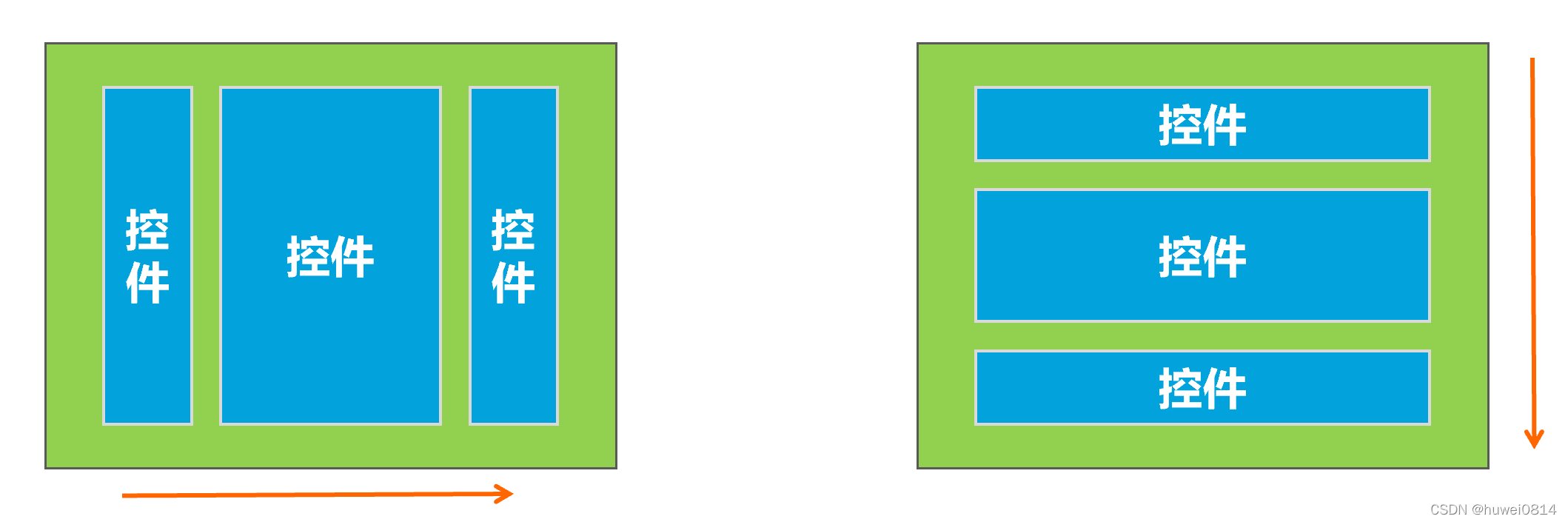
线性布局(LinearLayout)主要以水平或垂直方式来排列界面中的控件。并将控件排列到一条直线上。在线性布局中,如果水平排列,垂直方向上只能放一个控件,如果垂直排列,水平方向上也只能方一个控件。
使用线性布局,需要将布局节点改成LinearLayout,基本格式如下:
<LinearLayout xmlns:android="http://schemas.android.com/apk/res/android"
    xmlns:app="http://schemas.android.com/apk/res-auto"
    xmlns:tools="http://schemas.android.com/tools"
    android:layout_width="match_parent"
    android:layout_height="match_parent"
    tools:context=".MainActivity">
 ....

</LinearLayout>
在线性布局中,控件排列有水平和垂直两个方向,控件排列方向由android:orientation属性来控制,该属性需要加在LinearLayout标记的属性中。
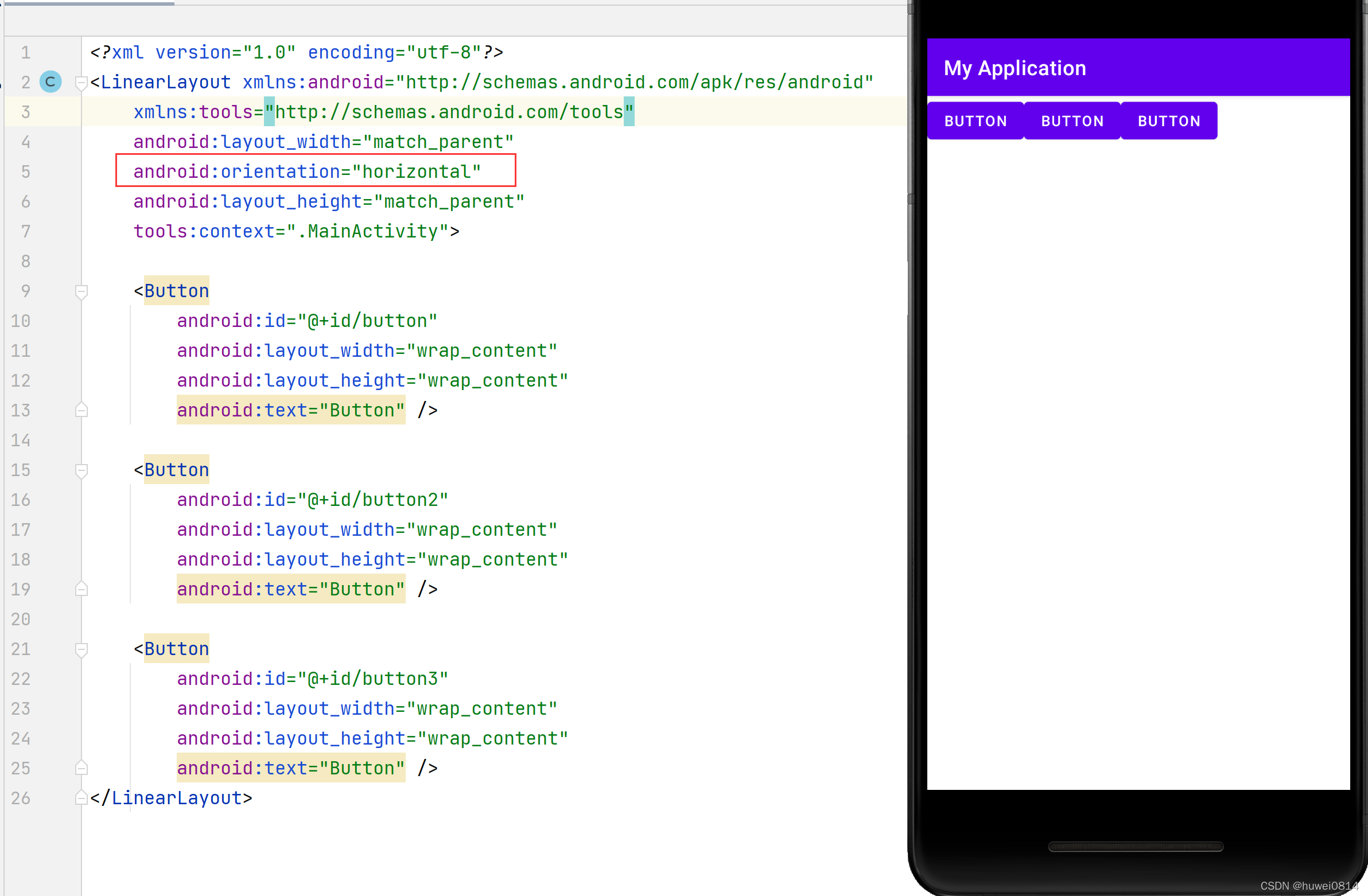
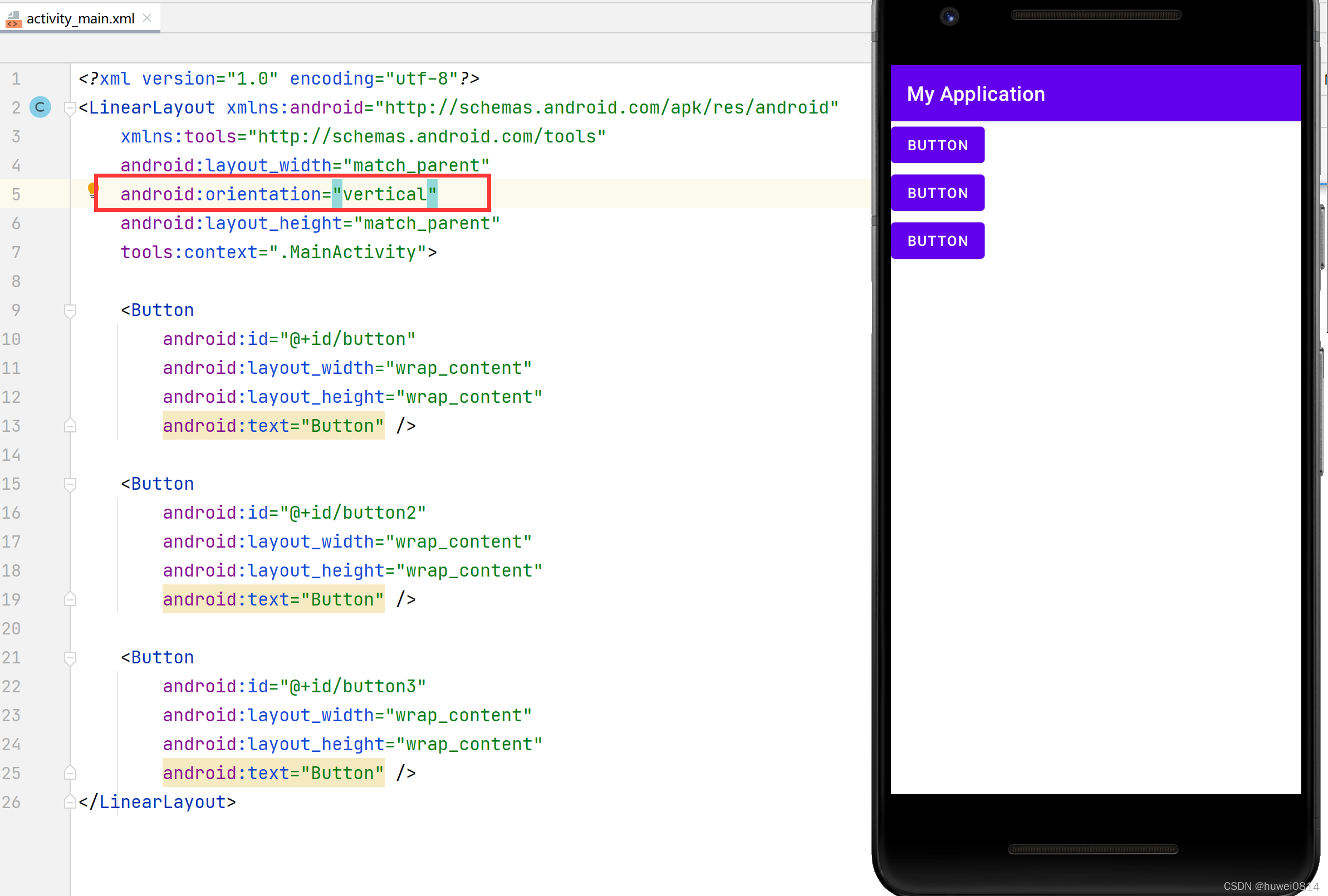
从上图可以看出,将orientation属性值设置成为horizontal,控件将从水平方向从左往右排列,将orientation属性值设置成为vertical控件将从垂直方向从上往下排列。
线性布局的控件默认是从左往右排列或从上往下排列,如果想让线性布局中的控件排列对齐右边缘或者底部,可以用gravity属性控制。
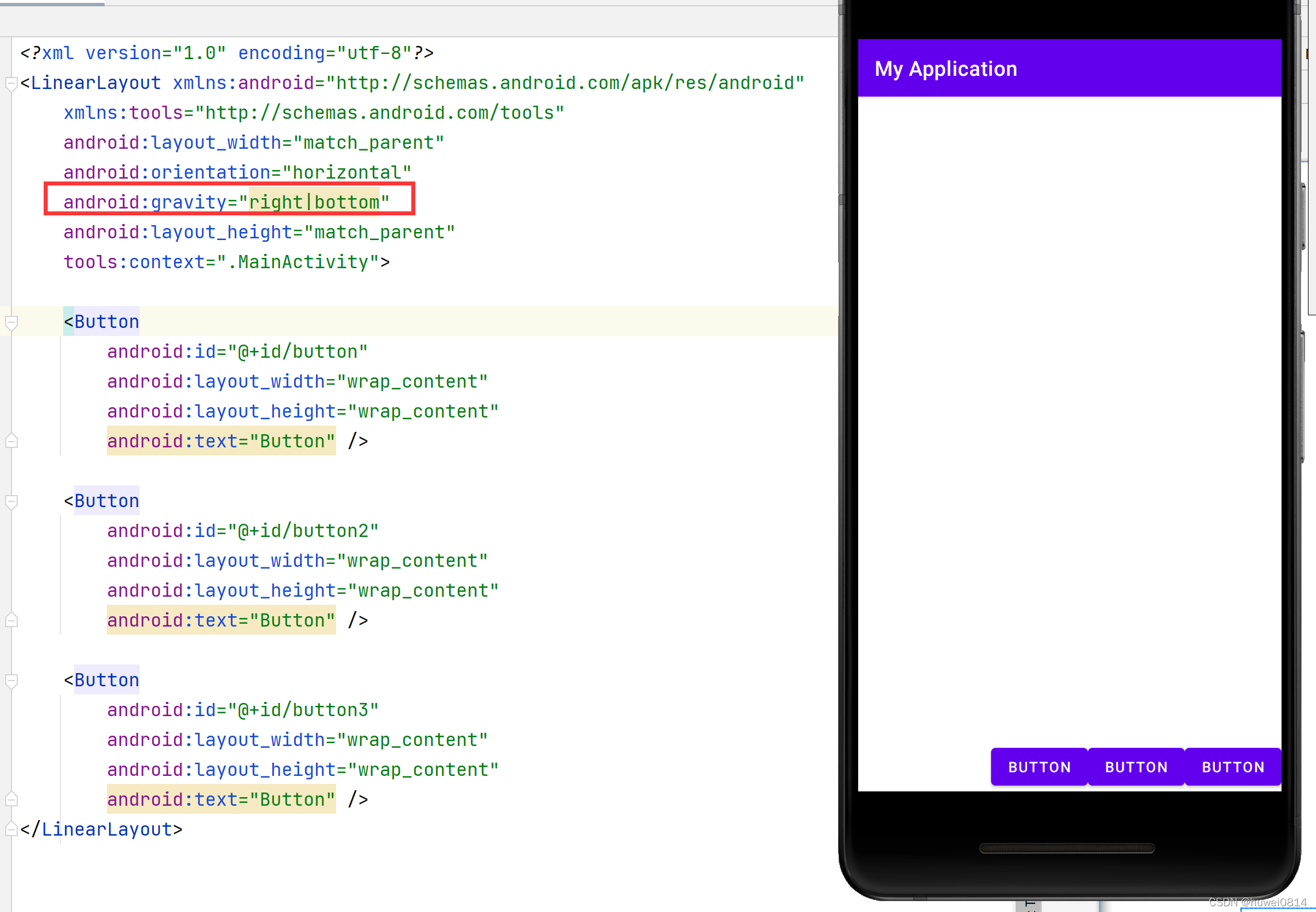
不过该属性值并不是只有在LinearLayout中才能使用,其他的布局用该属性同样能生效。
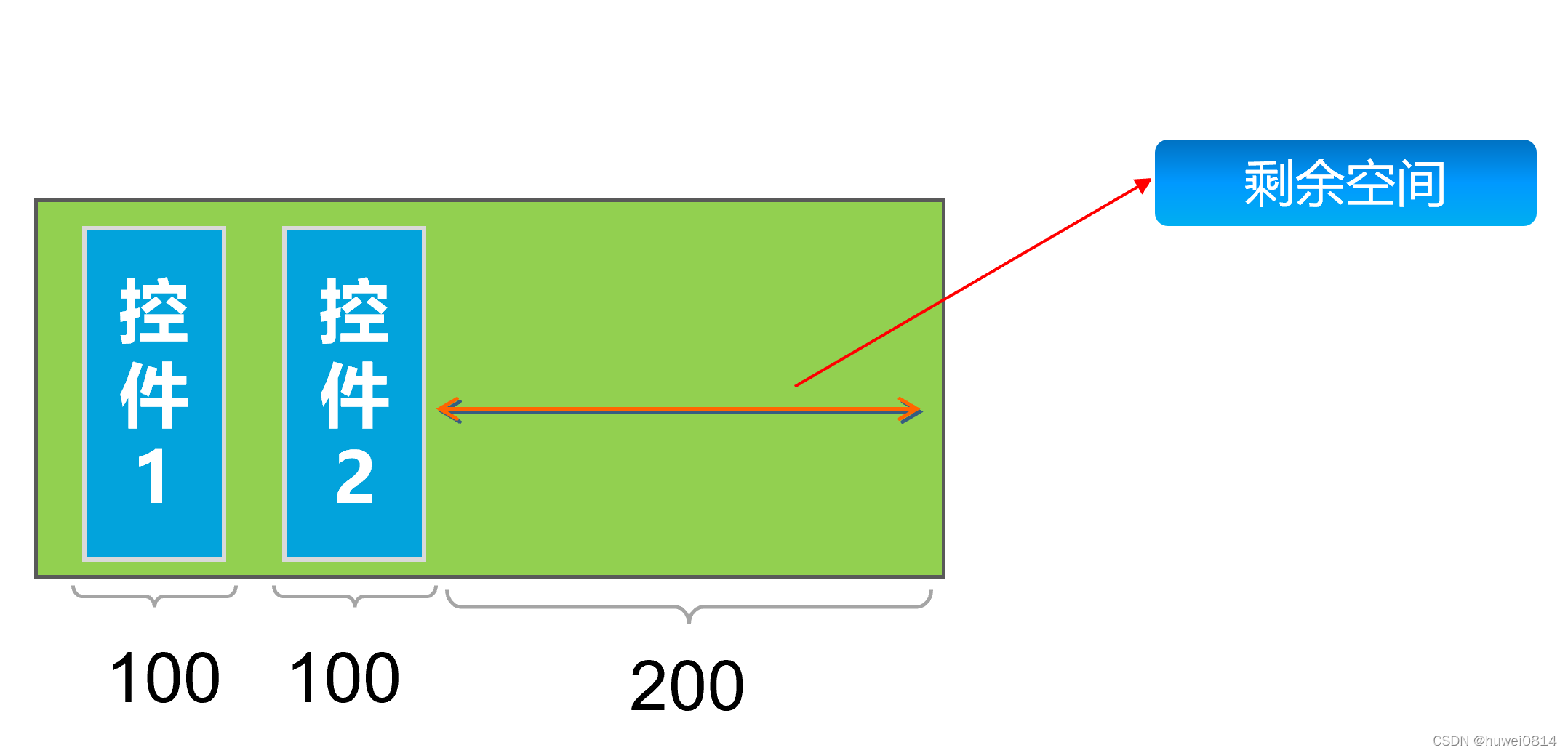
LinearLayout中另外一个常用的属性是layout_weight,该属性需要加在LinearLayout的子控件中。其作用是分配线性布局中的剩余空间到该控件上。
如下图所示,在控件没有添加layout_weight属性时,控件未占满线性布局的区域会空出来。
<?xml version="1.0" encoding="utf-8"?>
<LinearLayout xmlns:android="http://schemas.android.com/apk/res/android"
    xmlns:tools="http://schemas.android.com/tools"
    android:layout_width="400dp"
    android:layout_height="300dp"
    android:background="@color/teal_200"
    android:orientation="horizontal"
    tools:context=".MainActivity">

    <Button
        android:id="@+id/button"
        android:layout_width="100dp"
        android:layout_height="wrap_content"
        android:text="Button" />

    <Button
        android:id="@+id/button2"
        android:layout_width="wrap_content"
        android:layout_height="wrap_content"
        android:text="Button" />

</LinearLayout>
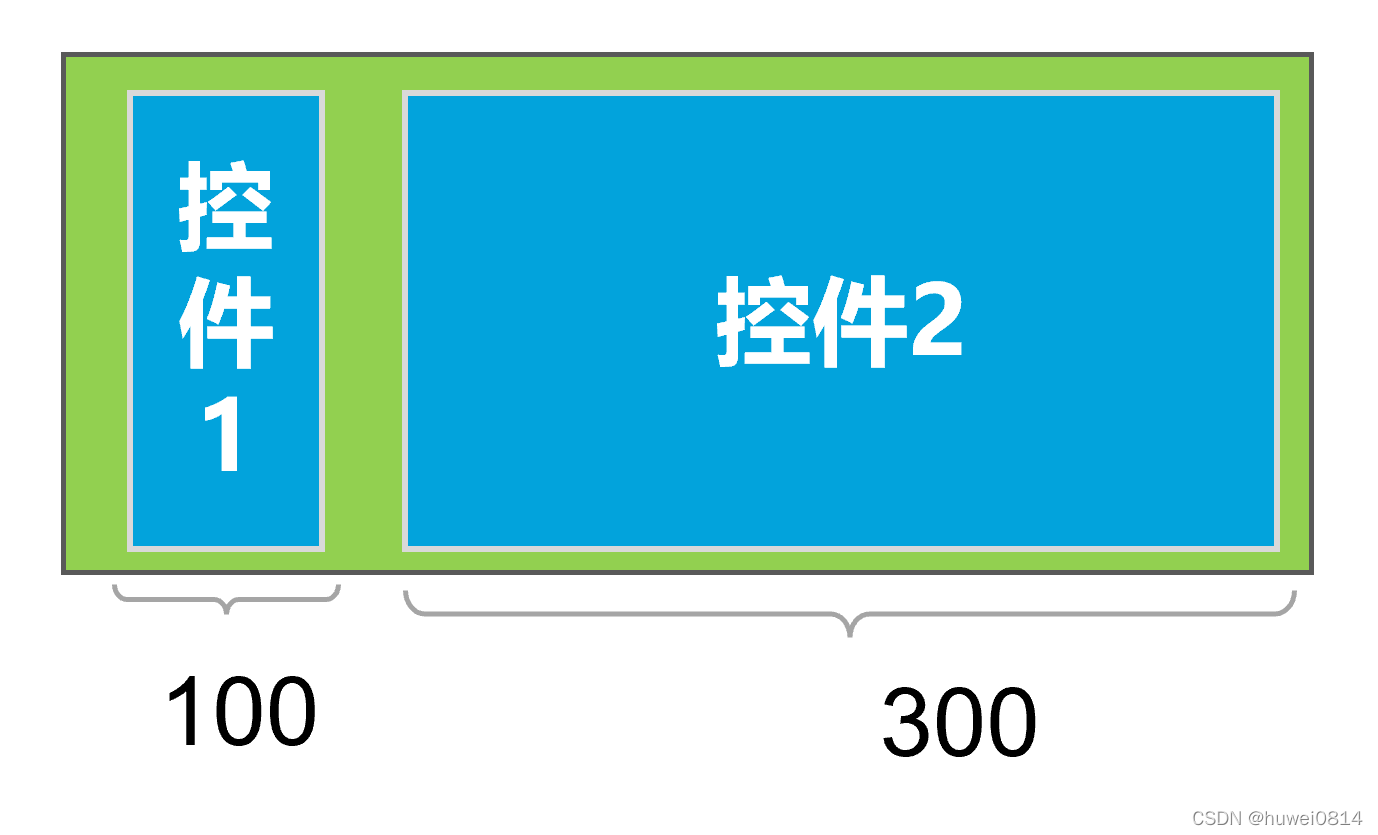
给控件button2加上android:layout_weight="1"后,会把线性布局剩余空间全部占满。
<?xml version="1.0" encoding="utf-8"?>
<LinearLayout xmlns:android="http://schemas.android.com/apk/res/android"
    xmlns:tools="http://schemas.android.com/tools"
    android:layout_width="400dp"
    android:layout_height="300dp"
    android:background="@color/teal_200"
    android:orientation="horizontal"
    tools:context=".MainActivity">
    <Button
        android:id="@+id/button"
        android:layout_width="100dp"
        android:layout_height="wrap_content"
        android:text="Button" />
    <Button
        android:id="@+id/button2"
        android:layout_weight="1"
        android:layout_width="wrap_content"
        android:layout_height="wrap_content"
        android:text="Button" />

</LinearLayout>
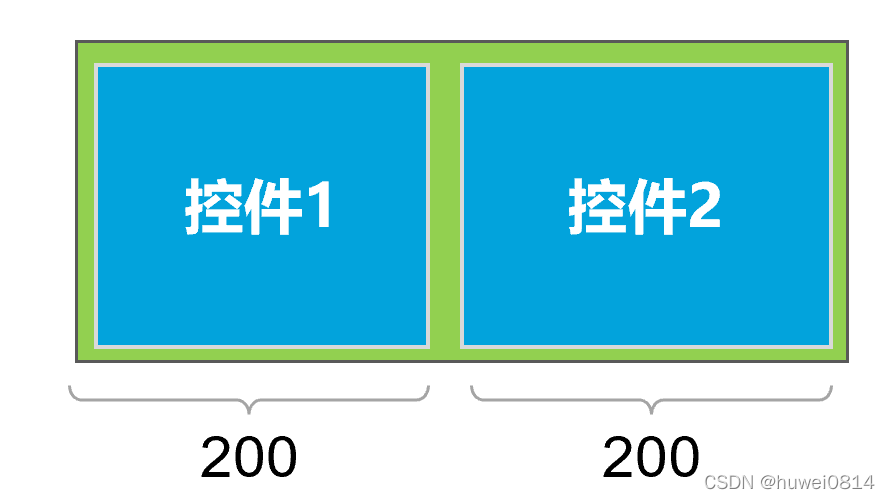
如果给button1和button2都加上android:layout_weight="1",则两个控件均匀分配剩余空间。
<?xml version="1.0" encoding="utf-8"?>
<LinearLayout xmlns:android="http://schemas.android.com/apk/res/android"
    xmlns:tools="http://schemas.android.com/tools"
    android:layout_width="400dp"
    android:layout_height="300dp"
    android:background="@color/teal_200"
    android:orientation="horizontal"
    tools:context=".MainActivity">

    <Button
        android:id="@+id/button1"
        android:layout_width="100dp"
        android:layout_weight="1"
        android:layout_height="wrap_content"
        android:text="Button" />

    <Button
        android:id="@+id/button2"
        android:layout_weight="1"
        android:layout_width="wrap_content"
        android:layout_height="wrap_content"
        android:text="Button" />

</LinearLayout>
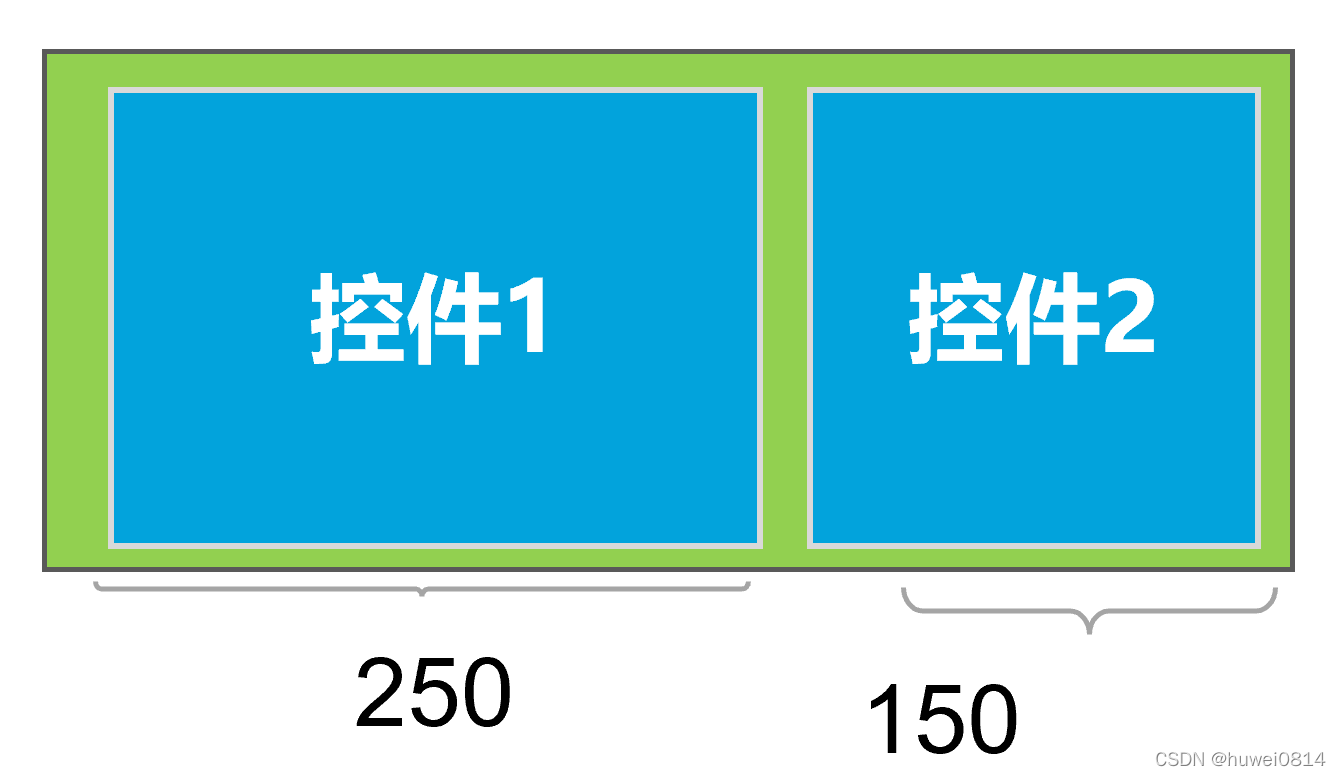
如果给button1加上android:layout_weight="3",button2加上android:layout_weight="1",由于剩余的空间是200,button1和button2会按照3:1的比例来分配剩余空间。
<?xml version="1.0" encoding="utf-8"?>
<LinearLayout xmlns:android="http://schemas.android.com/apk/res/android"
    xmlns:tools="http://schemas.android.com/tools"
    android:layout_width="400dp"
    android:layout_height="300dp"
    android:background="@color/teal_200"
    android:orientation="horizontal"
    tools:context=".MainActivity">

    <Button
        android:id="@+id/button1"
        android:layout_width="100dp"
        android:layout_weight="3"
        android:layout_height="wrap_content"
        android:text="Button" />

    <Button
        android:id="@+id/button2"
        android:layout_weight="1"
        android:layout_width="wrap_content"
        android:layout_height="wrap_content"
        android:text="Button" />

</LinearLayout>
我有一个字符串input="maybe(thisis|thatwas)some((nice|ugly)(day|night)|(strange(weather|time)))"Ruby中解析该字符串的最佳方法是什么?我的意思是脚本应该能够像这样构建句子:maybethisissomeuglynightmaybethatwassomenicenightmaybethiswassomestrangetime等等,你明白了......我应该一个字符一个字符地读取字符串并构建一个带有堆栈的状态机来存储括号值以供以后计算,还是有更好的方法?也许为此目的准备了一个开箱即用的库?
我主要使用Ruby来执行此操作,但到目前为止我的攻击计划如下:使用gemsrdf、rdf-rdfa和rdf-microdata或mida来解析给定任何URI的数据。我认为最好映射到像schema.org这样的统一模式,例如使用这个yaml文件,它试图描述数据词汇表和opengraph到schema.org之间的转换:#SchemaXtoschema.orgconversion#data-vocabularyDV:name:namestreet-address:streetAddressregion:addressRegionlocality:addressLocalityphoto:i
我正在使用ruby1.9解析以下带有MacRoman字符的csv文件#encoding:ISO-8859-1#csv_parse.csvName,main-dialogue"Marceu","Giveittohimóhe,hiswife."我做了以下解析。require'csv'input_string=File.read("../csv_parse.rb").force_encoding("ISO-8859-1").encode("UTF-8")#=>"Name,main-dialogue\r\n\"Marceu\",\"Giveittohim\x97he,hiswife.\"\
简而言之错误:NOTE:Gem::SourceIndex#add_specisdeprecated,useSpecification.add_spec.Itwillberemovedonorafter2011-11-01.Gem::SourceIndex#add_speccalledfrom/opt/local/lib/ruby/site_ruby/1.8/rubygems/source_index.rb:91./opt/local/lib/ruby/gems/1.8/gems/rails-2.3.8/lib/rails/gem_dependency.rb:275:in`==':und
是否可以为特定(或所有)项目使用多个布局?例如,我有几个项目,我想对其应用两种不同的布局。一个是绿色的,一个是蓝色的(但是)。我想将它们编译到我的输出目录中的两个不同文件夹中(例如v1和v2)。我一直在玩弄规则和编译block,但我不知道这是怎么回事。因为,每个项目在编译过程中只编译一次,我不能告诉nanoc第一次用layout1编译,第二次用layout2编译。我试过这样的东西,但它导致输出文件损坏。compile'*'doifitem.binary?#don’tfilterbinaryitemselsefilter:erblayout'layout1'layout'layout2'
最近因为项目需要,需要将Android手机系统自带的某个系统软件反编译并更改里面某个资源,并重新打包,签名生成新的自定义的apk,下面我来介绍一下我的实现过程。APK修改,分为以下几步:反编译解包,修改,重打包,修改签名等步骤。安卓apk修改准备工作1.系统配置好JavaJDK环境变量2.需要root权限的手机(针对系统自带apk,其他软件免root)3.Auto-Sign签名工具4.apktool工具安卓apk修改开始反编译本文拿Android系统里面的Settings.apk做demo,具体如何将apk获取出来在此就不过多介绍了,直接进入主题:按键win+R输入cmd,打开命令窗口,并将路
我正在使用ruby2.1.0我有一个json文件。例如:test.json{"item":[{"apple":1},{"banana":2}]}用YAML.load加载这个文件安全吗?YAML.load(File.read('test.json'))我正在尝试加载一个json或yaml格式的文件。 最佳答案 YAML可以加载JSONYAML.load('{"something":"test","other":4}')=>{"something"=>"test","other"=>4}JSON将无法加载YAML。JSON.load("
我想用Nokogiri解析HTML页面。页面的一部分有一个表,它没有使用任何特定的ID。是否可以提取如下内容:Today,3,455,34Today,1,1300,3664Today,10,100000,3444,Yesterday,3454,5656,3Yesterday,3545,1000,10Yesterday,3411,36223,15来自这个HTML:TodayYesterdayQntySizeLengthLengthSizeQnty345534345456563113003664354510001010100000344434113622315
我使用的第一个解析器生成器是Parse::RecDescent,它的指南/教程很棒,但它最有用的功能是它的调试工具,特别是tracing功能(通过将$RD_TRACE设置为1来激活)。我正在寻找可以帮助您调试其规则的解析器生成器。问题是,它必须用python或ruby编写,并且具有详细模式/跟踪模式或非常有用的调试技术。有人知道这样的解析器生成器吗?编辑:当我说调试时,我并不是指调试python或ruby。我指的是调试解析器生成器,查看它在每一步都在做什么,查看它正在读取的每个字符,它试图匹配的规则。希望你明白这一点。赏金编辑:要赢得赏金,请展示一个解析器生成器框架,并说明它的
我有这样的HTML代码:Label1Value1Label2Value2...我的代码不起作用。doc.css("first").eachdo|item|label=item.css("dt")value=item.css("dd")end显示所有首先标记,然后标记标签,我需要“标签:值” 最佳答案 首先,您的HTML应该有和中的元素:Label1Value1Label2Value2...但这不会改变您解析它的方式。你想找到s并遍历它们,然后在每个你可以使用next_element得到;像这样:doc=Nokogiri::HTML(
