参考资料:
《Spring Microservices in Action》
《Spring Cloud Alibaba 微服务原理与实战》
《B站 尚硅谷 SpringCloud 框架开发教程 周阳》
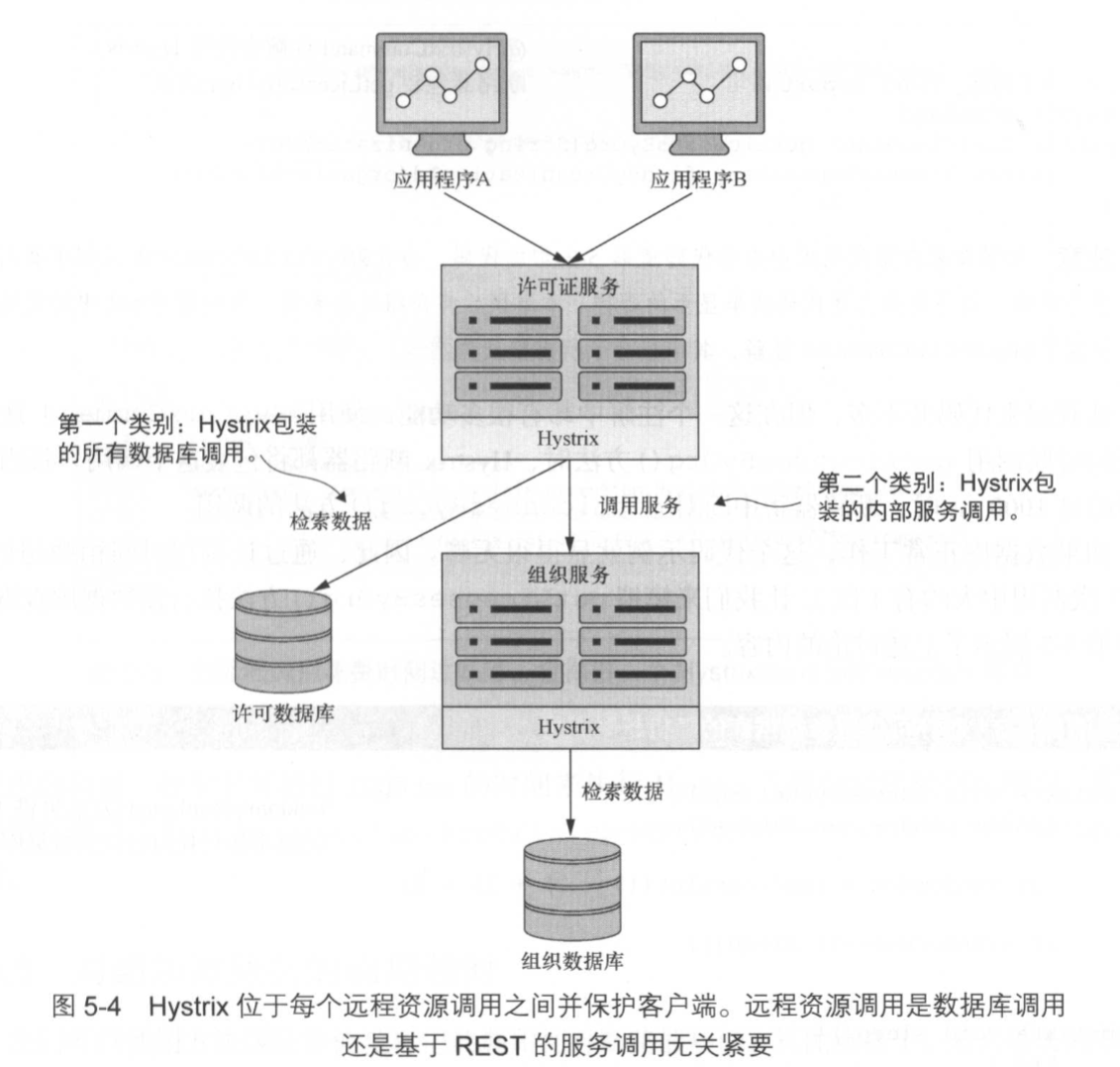
Hystrix 是一个延迟和容灾库,旨在隔离远程系统、服务和第三方库的访问点,停止级联故障,并在故障不可避免的复杂分布式系统中实现弹性;
@HystrixCommand(fallbackMethod = "str_fallbackMethod",
        groupKey = "strGroupCommand",
        commandKey = "strCommand",
        threadPoolKey = "strThreadPool",

        commandProperties = {
                // 设置隔离策略,THREAD 表示线程池 SEMAPHORE:信号池隔离
                @HystrixProperty(name = "execution.isolation.strategy", value = "THREAD"),
                // 当隔离策略选择信号池隔离的时候,用来设置信号池的大小(最大并发数)
                @HystrixProperty(name = "execution.isolation.semaphore.maxConcurrentRequests", value = "10"),
                // 配置命令执行的超时时间
                @HystrixProperty(name = "execution.isolation.thread.timeoutinMilliseconds", value = "10"),
                // 是否启用超时时间
                @HystrixProperty(name = "execution.timeout.enabled", value = "true"),
                // 执行超时的时候是否中断
                @HystrixProperty(name = "execution.isolation.thread.interruptOnTimeout", value = "true"),
                // 执行被取消的时候是否中断
                @HystrixProperty(name = "execution.isolation.thread.interruptOnCancel", value = "true"),
                // 允许回调方法执行的最大并发数
                @HystrixProperty(name = "fallback.isolation.semaphore.maxConcurrentRequests", value = "10"),
                // 服务降级是否启用,是否执行回调函数
                @HystrixProperty(name = "fallback.enabled", value = "true"),
                // 是否启用断路器
                @HystrixProperty(name = "circuitBreaker.enabled", value = "true"),
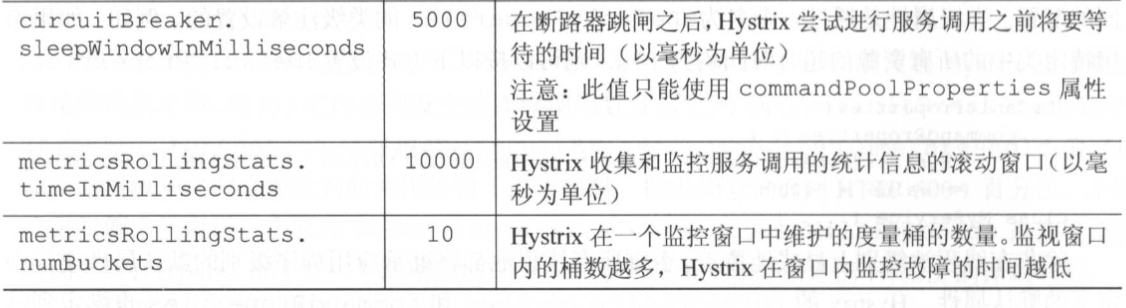
                // 该属性用来设置在滚动时间窗中,断路器熔断的最小请求数。例如,默认该值为 20 的时候,
                // 如果滚动时间窗(默认10秒)内仅收到了19个请求, 即使这19个请求都失败了,断路器也不会打开。
                @HystrixProperty(name = "circuitBreaker.requestVolumeThreshold", value = "20"),
                // 该属性用来设置在滚动时间窗中,表示在滚动时间窗中,在请求数量超过
                // circuitBreaker.requestVolumeThreshold 的情况下,如果错误请求数的百分比超过50,
                // 就把断路器设置为 "打开" 状态,否则就设置为 "关闭" 状态。
                @HystrixProperty(name = "circuitBreaker.errorThresholdPercentage", value = "50"),
                // 该属性用来设置当断路器打开之后的休眠时间窗。 休眠时间窗结束之后,
                // 会将断路器置为 "半开" 状态,尝试熔断的请求命令,如果依然失败就将断路器继续设置为 "打开" 状态,
                // 如果成功就设置为 "关闭" 状态。
                @HystrixProperty(name = "circuitBreaker.sleepWindowinMilliseconds", value = "5000"),
                // 断路器强制打开
                @HystrixProperty(name = "circuitBreaker.forceOpen", value = "false"),
                // 断路器强制关闭
                @HystrixProperty(name = "circuitBreaker.forceClosed", value = "false"),
                // 滚动时间窗设置,该时间用于断路器判断健康度时需要收集信息的持续时间
                @HystrixProperty(name = "metrics.rollingStats.timeinMilliseconds", value = "10000"),
                // 该属性用来设置滚动时间窗统计指标信息时划分"桶"的数量,断路器在收集指标信息的时候会根据
                // 设置的时间窗长度拆分成多个 "桶" 来累计各度量值,每个"桶"记录了一段时间内的采集指标。
                // 比如 10 秒内拆分成 10 个"桶"收集这样,所以 timeinMilliseconds 必须能被 numBuckets 整除。否则会抛异常
                @HystrixProperty(name = "metrics.rollingStats.numBuckets", value = "10"),
                // 该属性用来设置对命令执行的延迟是否使用百分位数来跟踪和计算。如果设置为 false, 那么所有的概要统计都将返回 -1。
                @HystrixProperty(name = "metrics.rollingPercentile.enabled", value = "false"),
                // 该属性用来设置百分位统计的滚动窗口的持续时间,单位为毫秒。
                @HystrixProperty(name = "metrics.rollingPercentile.timeInMilliseconds", value = "60000"),
                // 该属性用来设置百分位统计滚动窗口中使用 “ 桶 ”的数量。
                @HystrixProperty(name = "metrics.rollingPercentile.numBuckets", value = "60000"),
                // 该属性用来设置在执行过程中每个 “桶” 中保留的最大执行次数。如果在滚动时间窗内发生超过该设定值的执行次数,
                // 就从最初的位置开始重写。例如,将该值设置为100, 滚动窗口为10秒,若在10秒内一个 “桶 ”中发生了500次执行,
                // 那么该 “桶” 中只保留 最后的100次执行的统计。另外,增加该值的大小将会增加内存量的消耗,并增加排序百分位数所需的计算时间。
                @HystrixProperty(name = "metrics.rollingPercentile.bucketSize", value = "100"),
                // 该属性用来设置采集影响断路器状态的健康快照(请求的成功、 错误百分比)的间隔等待时间。
                @HystrixProperty(name = "metrics.healthSnapshot.intervalinMilliseconds", value = "500"),
                // 是否开启请求缓存
                @HystrixProperty(name = "requestCache.enabled", value = "true"),
                // HystrixCommand的执行和事件是否打印日志到 HystrixRequestLog 中
                @HystrixProperty(name = "requestLog.enabled", value = "true"),
        },
        threadPoolProperties = {
                // 该参数用来设置执行命令线程池的核心线程数,该值也就是命令执行的最大并发量
                @HystrixProperty(name = "coreSize", value = "10"),
                // 该参数用来设置线程池的最大队列大小。当设置为 -1 时,线程池将使用 SynchronousQueue 实现的队列,
                // 否则将使用 LinkedBlockingQueue 实现的队列。
                @HystrixProperty(name = "maxQueueSize", value = "-1"),
                // 该参数用来为队列设置拒绝阈值。 通过该参数, 即使队列没有达到最大值也能拒绝请求。
                // 该参数主要是对 LinkedBlockingQueue 队列的补充,因为 LinkedBlockingQueue
                // 队列不能动态修改它的对象大小,而通过该属性就可以调整拒绝请求的队列大小了。
                @HystrixProperty(name = "queueSizeRejectionThreshold", value = "5"),
        }
)
<!--拉取 Spring Cloud Hystrix 依赖项-->
<dependency>
    <groupId>org.springframework.cloud</groupId>
    <artifactId>spring-cloud-starter-hystrix</artifactId>
</dependency>
<dependency>
    <groupId>com.netflix.hystrix</groupId>
    <artifactId>hystrix-javanica</artifactId>
    <version>1.5.9</version>
</dependency>
feign:
  hystrix:
    #开启feign的hystrix支持,默认是false
    enabled: true
@EnableCircuitBreaker:表示激活使用服务降级相关策略;
@EnableHystrix:继承了@EnableCircuitBreaker,并对其进行了在封装;
如果忘记将该注解添加到主程序类中,那么 Hystrix 断路器不会处于活动状态。在服务启动时,也不会收到任何警告或错误消息;
在 service 包下的业务类里;方法级注解;
@HystrixCommand
private Xxx getXxx(String xxxId) {
    return xxxService.getXxx(xxxId);
}
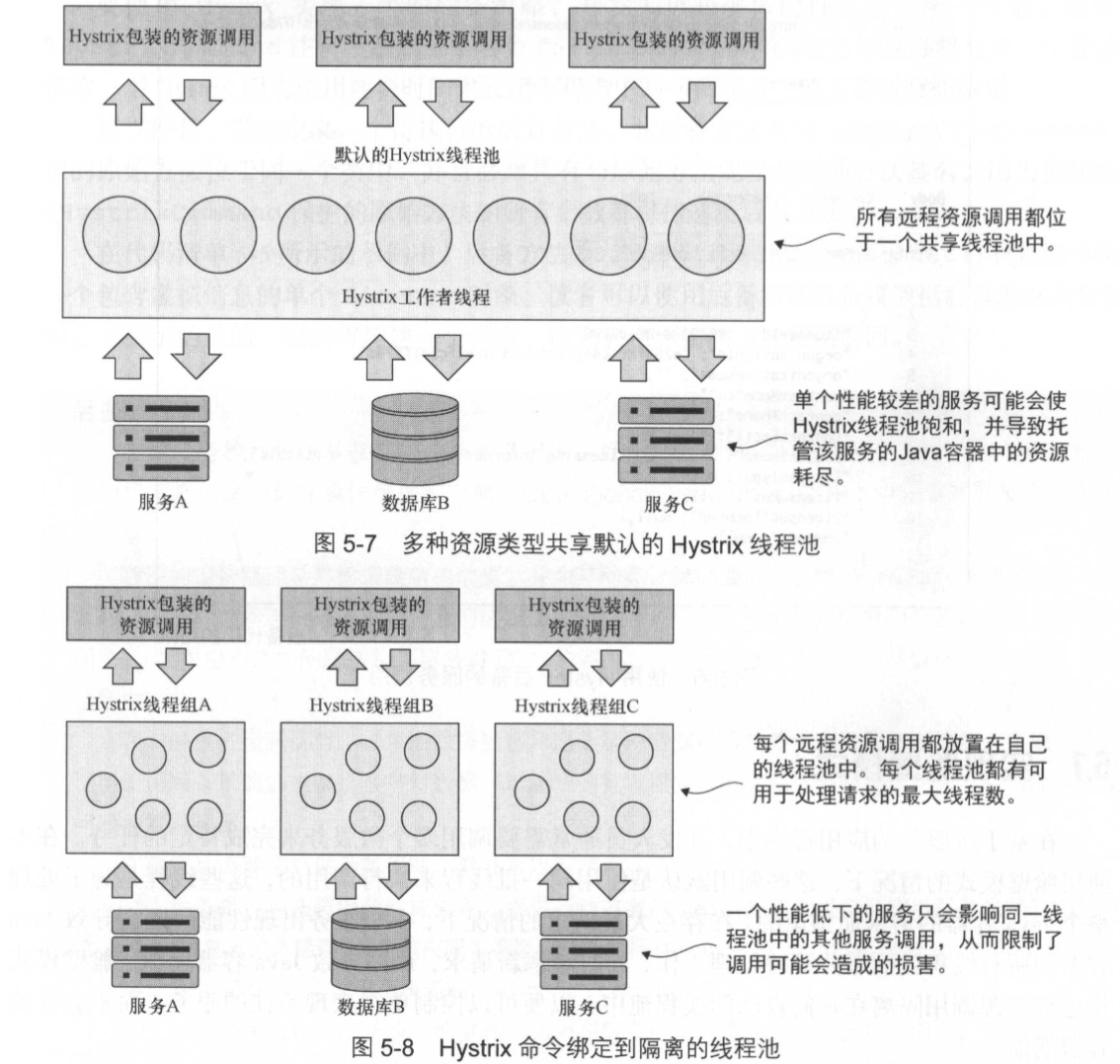
@HystrixCommand 注解将动态生成一个代理,该代理将包装该方法,并通过专门用于处理远程调用的线程池来管理对该方法的所有调用;@HystrixCommand 注解,会将所有远程服务调用都放在同一线程池下。可能会导致应用程序中出现问题;@HystrixCommand(
fallbackMethod="getYyy", //【可选】舱壁策略,定义线程池的唯一名称后备策略,如果 getXxx 调用失败,那么就会调用该方法。注意两个方法参数需保持一致
threadPoolKey="xxxThreadPool", //【可选】舱壁策略,定义线程池的唯一名称舱壁策略,定义线程池的唯一名称
threadPoolProperties={
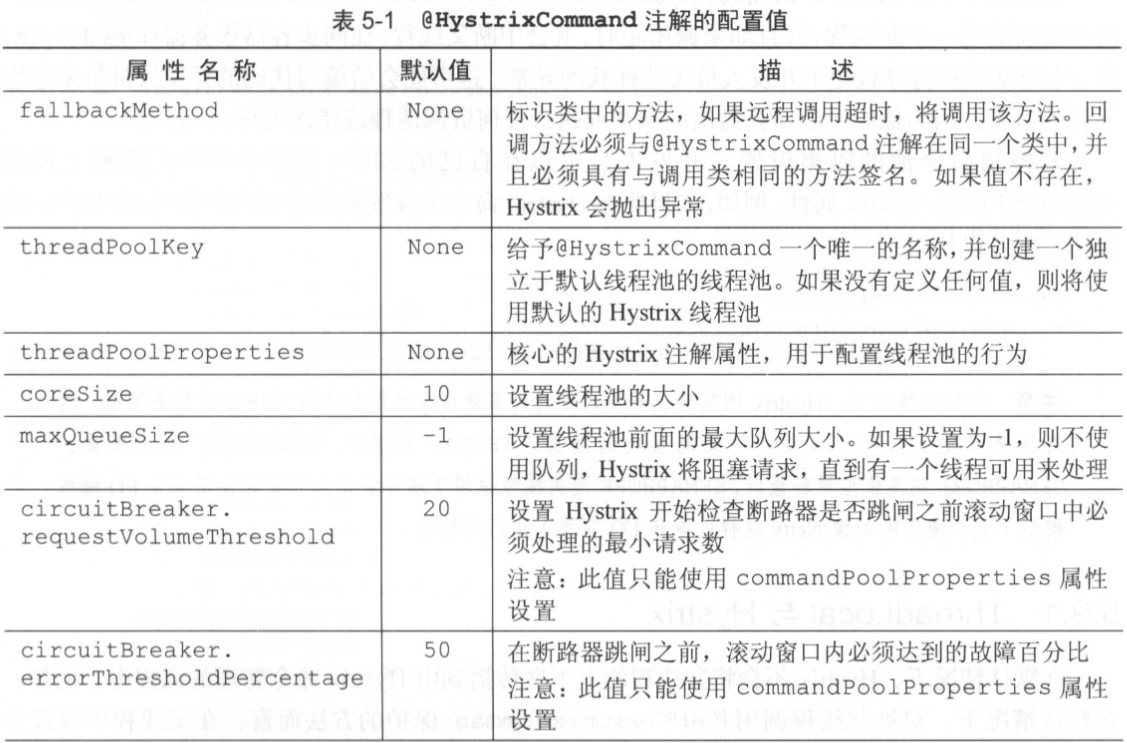
@HystrixProperty(name="coreSize",value="30"), //线程池中线程的最大数量
@HystrixProperty(name="maxQueueSize", value="10") //定义一个位于线程池前的队列,对传入的请求进行排队
},
//通过 commandProperties 属性来定制断路器的行为
commandProperties={
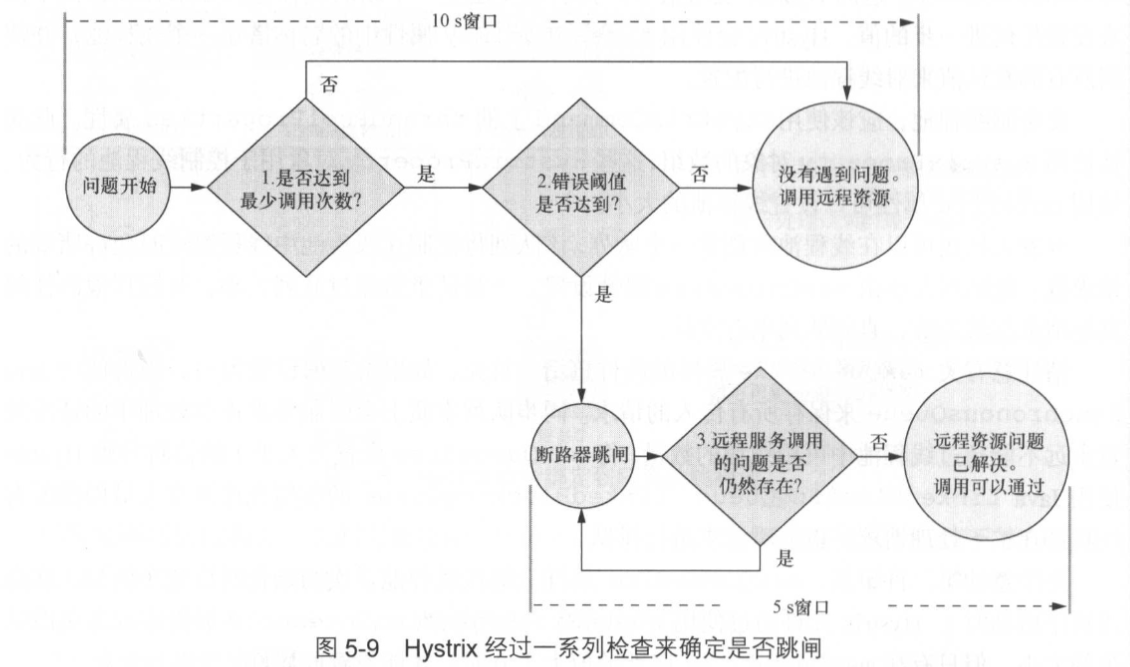
@HystrixProperty(name="circuitBreaker.requestVolumeThreshold", value="10"), //断路器触发前 10s 内需要发生的连续调用数量
@HystrixProperty(name="circuitBreaker.errorThresholdPercentage", value="75"), //在断路器跳闸之前必须达到的调用失败百分比
@HystrixProperty(name="circuitBreaker.sleepWindowInMilliseconds", value="7000"), //断路器跳闸之后, Hystrix 允许一个调用通过以便查看服务是否恢复健康之前 Hystrix 的休眠时间
@HystrixProperty(name="metrics.rollingStats.timeInMilliseconds", value="15000"), //Hystr ix 用来监视服务调用问题的窗口大小,其默认值为 10 000ms
@HystrixProperty(name="metrics.rollingStats.numBuckets", value="5"), //定义的滚动窗口中收集统计信息的次数
//@HystrixProperty(name="execution.isolation.thread.timeoutInMilliseconds",value="5000"), //设置断路器超时时间
@HystrixProperty(name="execution.isolation.strategy", value="SEMAPHORE"), //修改命令池的隔离设置
}
)
private Xxx getXxx(String xxxId) {
return xxxService.getXxx(xxxId);
}
private Yyy getYyy(String yyyId) {
return yyyService.getYyy(yyyId);
}
属性详解:
threadPoolProperties:
maxQueueSize:如果将其值设置为 -1,则将使用 Java SynchronousQueue 来保存所有传人的请求。同步队列本质上会强制要求正在处理中的请求数量永远不能超过线程池中可用线程的数量;maxQueueSize:设置为大于 1 的值将使用 Java LinkedBlockingQueue;LinkedBlockingQueue 的使用允许开发人员即使所有线程都在忙于处理请求,也能对请求进行排队;maxQueueSize 属性只能在线程池首次初始化时设置(例如,在应用程序启动时)。Hystrix 允许通过使用 queueSizeRejectionThreshold 属性来动态更改队列的大小,但只有在 maxQueueSize 属性的值大于 0 时,才能设置此属性;commandProperties:
execution.isolation.thread.timeoutInMilliseconds:设置断路器超时时间。在实际开发中应该把问题放在解决性能问题而不是增加默认超时。如果确实遇到一些比其他服务调用需要更长时间的服务调用,务必将这些服务调用隔离到单独的线程池中;metrics.rollingStats.numBuckets:其值需要被 metrics.rollingStats.timeInMilliseconds 整除。上例 Hystrix 使用 15s 的窗口,并将统计数据收集到长度为 3 s 的 5 个桶中。查的统计窗口越小且在窗口中保留的桶的数量越多,就越会加剧高请求服务的 CPU 利用率和内存使用率;execution.isolation.strategy:断路器执行时,有两种不同的隔离策略;
其他配置属性详情请见本篇《1.6 Hystrix 的所有配置》;
@DefaultProperties(
    commandProperties={
         @HystrixProperty(name="execution.isolation.thread.timeoutInMilliseconds",value="10000")}
class  MyService{
    ...
}
//扩展基本的 Hystrix ConcurrencyStrategy 类
public class ThreadLocalAwareStrategy extends HystrixConcurrencyStrategy{
    private HystrixConcurrencyStrategy existingConcurrencyStrategy;

    //将已存在的并发策略传入到构造器中
    public ThreadLocalAwareStrategy(HystrixConcurrencyStrategy existingConcurrencyStrategy) {
        this.existingConcurrencyStrategy = existingConcurrencyStrategy;
    }

    @Override
    public BlockingQueue<Runnable> getBlockingQueue(int maxQueueSize) {
        return existingConcurrencyStrategy != null
                ? existingConcurrencyStrategy.getBlockingQueue(maxQueueSize)
                : super.getBlockingQueue(maxQueueSize);
    }

    @Override
    public <T> HystrixRequestVariable<T> getRequestVariable(
            HystrixRequestVariableLifecycle<T> rv) {
        return existingConcurrencyStrategy != null
                ? existingConcurrencyStrategy.getRequestVariable(rv)
                : super.getRequestVariable(rv);
    }

    @Override
    public ThreadPoolExecutor getThreadPool(HystrixThreadPoolKey threadPoolKey,
                                            HystrixProperty<Integer> corePoolSize,
                                            HystrixProperty<Integer> maximumPoolSize,
                                            HystrixProperty<Integer> keepAliveTime, TimeUnit unit,
                                            BlockingQueue<Runnable> workQueue) {
        return existingConcurrencyStrategy != null
                ? existingConcurrencyStrategy.getThreadPool(threadPoolKey, corePoolSize,
                maximumPoolSize, keepAliveTime, unit, workQueue)
                : super.getThreadPool(threadPoolKey, corePoolSize, maximumPoolSize,
                keepAliveTime, unit, workQueue);
    }

    @Override
    public <T> Callable<T> wrapCallable(Callable<T> callable) {
         //注入 Callable 实现,用来设置 UserContext
        return existingConcurrencyStrategy != null
                ? existingConcurrencyStrategy
                .wrapCallable(new DelegatingUserContextCallable<T>(callable, UserContextHolder.getContext()))
                : super.wrapCallable(new DelegatingUserContextCallable<T>(callable, UserContextHolder.getContext()));
    }
}
public final class DelegatingUserContextCallable<V> implements Callable<V> {
    private final Callable<V> delegate;
    private UserContext originalUserContext;
    //传递原始 Callable 类,自定义 Callable 将调用 Hystrix 保护的代码与来自父线程的 UserContext
    public DelegatingUserContextCallable(Callable<V> delegate,
                                             UserContext userContext) {
        this.delegate = delegate;
        this.originalUserContext = userContext;
    }
    //call() 方法在被 @HystrixCommand 注解保护的方法之前调用
    public V call() throws Exception {
        //已设置 UserContext,存储 UserContext 的 ThreadLocal 变量与运行受 Hystrix 保护的方法的线程相关联
        UserContextHolder.setContext( originalUserContext );

        try {
            //在 Hystrix 保护的方法上调用 call() 方法
            return delegate.call();
        }
        finally {
            this.originalUserContext = null;
        }
    }

    public static <V> Callable<V> create(Callable<V> delegate,
                                         UserContext userContext) {
        return new DelegatingUserContextCallable<V>(delegate, userContext);
    }
}
@Configuration
public class ThreadLocalConfiguration {
        //当构造配置对象时,它将自动装配在现有的 HystrixConcurrencyStrategy 中
        @Autowired(required = false)
        private HystrixConcurrencyStrategy existingConcurrencyStrategy;

        @PostConstruct
        public void init() {
            // 保留现有的 Hystrix 插件的引用
            //因为要注册一个新的并发策略,所以要获取所有其他的 Hystrix 组件,然后重新设置 Hystrix 组件
            HystrixEventNotifier eventNotifier = HystrixPlugins.getInstance()
                    .getEventNotifier();
            HystrixMetricsPublisher metricsPublisher = HystrixPlugins.getInstance()
                    .getMetricsPublisher();
            HystrixPropertiesStrategy propertiesStrategy = HystrixPlugins.getInstance()
                    .getPropertiesStrategy();
            HystrixCommandExecutionHook commandExecutionHook = HystrixPlugins.getInstance()
                    .getCommandExecutionHook();

            HystrixPlugins.reset();

            //使用 Hystrix 插件注册自定义的 Hystrix 并发策略(ThreadConcurrency Strategy)
            HystrixPlugins.getInstance().registerConcurrencyStrategy(new ThreadLocalAwareStrategy(existingConcurrencyStrategy));
            //重新注册 Hystrix 插件使用的所有组件
            HystrixPlugins.getInstance().registerEventNotifier(eventNotifier);
            HystrixPlugins.getInstance().registerMetricsPublisher(metricsPublisher);
            HystrixPlugins.getInstance().registerPropertiesStrategy(propertiesStrategy);
            HystrixPlugins.getInstance().registerCommandExecutionHook(commandExecutionHook);
        }
}
<dependency>
    <groupId>org.springframework.cloud</groupId>
    <artifactId>spring-cloud-starter-netflix-hystrix-dashboard</artifactId>
</dependency>
主要是修改端口号;
server:
  port: 9001
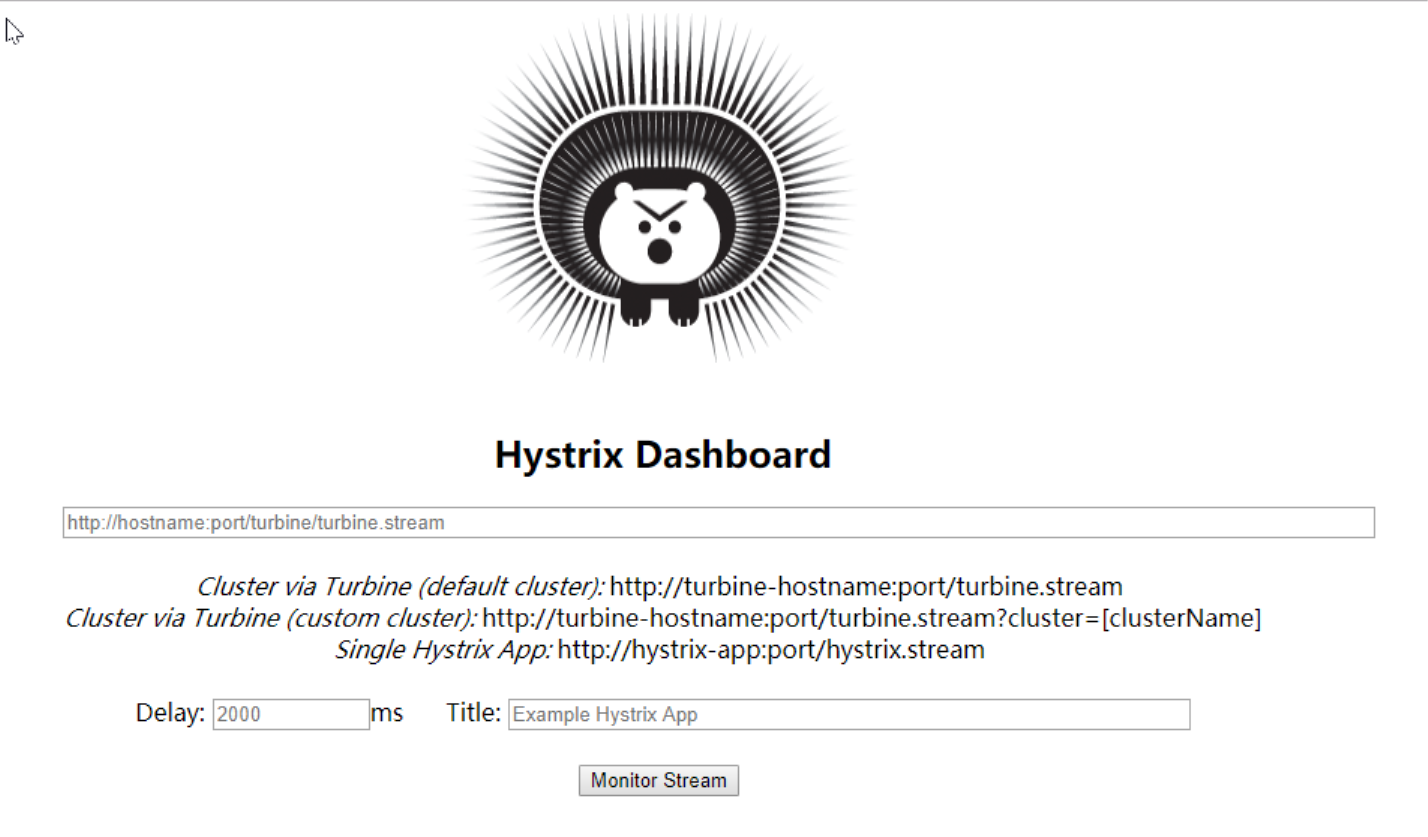
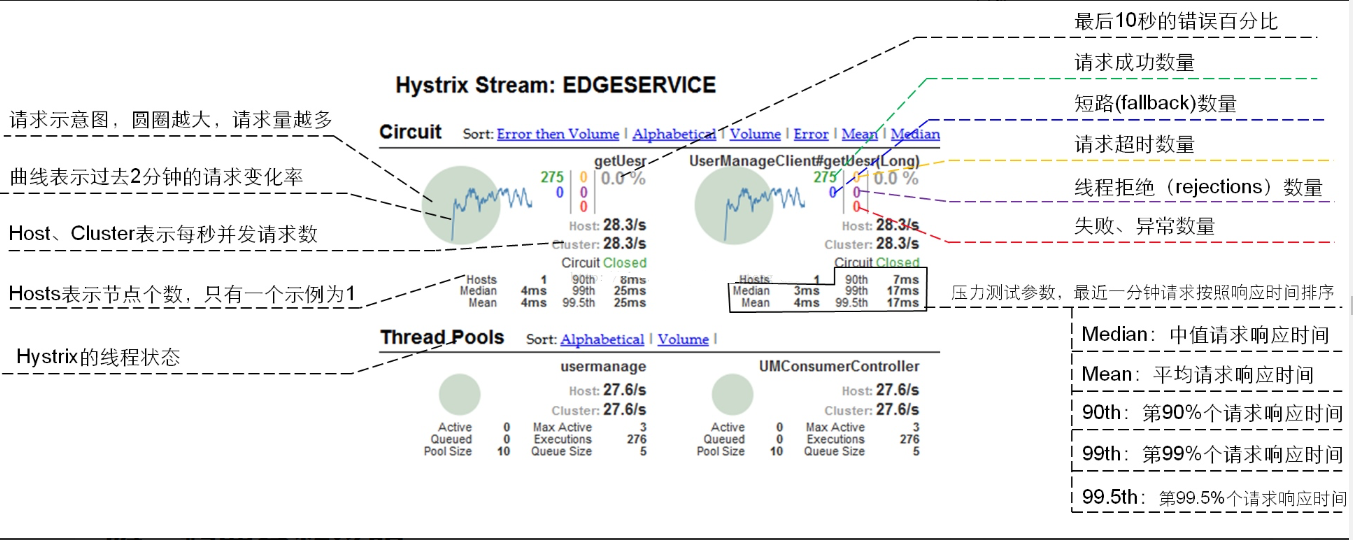
@EnableHystrixDashboard:表名启用 Hystrix Dashboard 对调用进行监控;
<dependency>
    <groupId>org.springframework.boot</groupId>
    <artifactId>spring-boot-starter-actuator</artifactId>
</dependency>
@SpringBootApplication
@EnableEurekaClient //本服务启动后会自动注册进eureka服务中
@EnableCircuitBreaker//对hystrixR熔断机制的支持
public class Application{
    public static void main(String[] args){
        SpringApplication.run(Application.class,args);
    }

/**
 *此配置是为了服务监控而配置,与服务容错本身无关,springcloud升级后的坑
 *ServletRegistrationBean因为springboot的默认路径不是"/hystrix.stream",
 *只要在自己的项目里配置上下面的servlet就可以了
 */
@Bean
public ServletRegistrationBean getServlet() {
    HystrixMetricsStreamServlet streamServlet = new HystrixMetricsStreamServlet();
    ServletRegistrationBean registrationBean = new ServletRegistrationBean(streamServlet);
    registrationBean.setLoadOnStartup(1);
    registrationBean.addUrlMappings("/hystrix.stream");
    registrationBean.setName("HystrixMetricsStreamServlet");
    return registrationBean;
}

我正在学习如何使用Nokogiri,根据这段代码我遇到了一些问题:require'rubygems'require'mechanize'post_agent=WWW::Mechanize.newpost_page=post_agent.get('http://www.vbulletin.org/forum/showthread.php?t=230708')puts"\nabsolutepathwithtbodygivesnil"putspost_page.parser.xpath('/html/body/div/div/div/div/div/table/tbody/tr/td/div
我有一个Ruby程序,它使用rubyzip压缩XML文件的目录树。gem。我的问题是文件开始变得很重,我想提高压缩级别,因为压缩时间不是问题。我在rubyzipdocumentation中找不到一种为创建的ZIP文件指定压缩级别的方法。有人知道如何更改此设置吗?是否有另一个允许指定压缩级别的Ruby库? 最佳答案 这是我通过查看rubyzip内部创建的代码。level=Zlib::BEST_COMPRESSIONZip::ZipOutputStream.open(zip_file)do|zip|Dir.glob("**/*")d
类classAprivatedeffooputs:fooendpublicdefbarputs:barendprivatedefzimputs:zimendprotecteddefdibputs:dibendendA的实例a=A.new测试a.foorescueputs:faila.barrescueputs:faila.zimrescueputs:faila.dibrescueputs:faila.gazrescueputs:fail测试输出failbarfailfailfail.发送测试[:foo,:bar,:zim,:dib,:gaz].each{|m|a.send(m)resc
很好奇,就使用rubyonrails自动化单元测试而言,你们正在做什么?您是否创建了一个脚本来在cron中运行rake作业并将结果邮寄给您?git中的预提交Hook?只是手动调用?我完全理解测试,但想知道在错误发生之前捕获错误的最佳实践是什么。让我们理所当然地认为测试本身是完美无缺的,并且可以正常工作。下一步是什么以确保他们在正确的时间将可能有害的结果传达给您? 最佳答案 不确定您到底想听什么,但是有几个级别的自动代码库控制:在处理某项功能时,您可以使用类似autotest的内容获得关于哪些有效,哪些无效的即时反馈。要确保您的提
假设我做了一个模块如下:m=Module.newdoclassCendend三个问题:除了对m的引用之外,还有什么方法可以访问C和m中的其他内容?我可以在创建匿名模块后为其命名吗(就像我输入“module...”一样)?如何在使用完匿名模块后将其删除,使其定义的常量不再存在? 最佳答案 三个答案:是的,使用ObjectSpace.此代码使c引用你的类(class)C不引用m:c=nilObjectSpace.each_object{|obj|c=objif(Class===objandobj.name=~/::C$/)}当然这取决于
我正在尝试使用ruby和Savon来使用网络服务。测试服务为http://www.webservicex.net/WS/WSDetails.aspx?WSID=9&CATID=2require'rubygems'require'savon'client=Savon::Client.new"http://www.webservicex.net/stockquote.asmx?WSDL"client.get_quotedo|soap|soap.body={:symbol=>"AAPL"}end返回SOAP异常。检查soap信封,在我看来soap请求没有正确的命名空间。任何人都可以建议我
关闭。这个问题是opinion-based.它目前不接受答案。想要改进这个问题?更新问题,以便editingthispost可以用事实和引用来回答它.关闭4年前。Improvethisquestion我想在固定时间创建一系列低音和高音调的哔哔声。例如:在150毫秒时发出高音调的蜂鸣声在151毫秒时发出低音调的蜂鸣声200毫秒时发出低音调的蜂鸣声250毫秒的高音调蜂鸣声有没有办法在Ruby或Python中做到这一点?我真的不在乎输出编码是什么(.wav、.mp3、.ogg等等),但我确实想创建一个输出文件。
我在我的项目目录中完成了compasscreate.和compassinitrails。几个问题:我已将我的.sass文件放在public/stylesheets中。这是放置它们的正确位置吗?当我运行compasswatch时,它不会自动编译这些.sass文件。我必须手动指定文件:compasswatchpublic/stylesheets/myfile.sass等。如何让它自动运行?文件ie.css、print.css和screen.css已放在stylesheets/compiled。如何在编译后不让它们重新出现的情况下删除它们?我自己编译的.sass文件编译成compiled/t
我想将html转换为纯文本。不过,我不想只删除标签,我想智能地保留尽可能多的格式。为插入换行符标签,检测段落并格式化它们等。输入非常简单,通常是格式良好的html(不是整个文档,只是一堆内容,通常没有anchor或图像)。我可以将几个正则表达式放在一起,让我达到80%,但我认为可能有一些现有的解决方案更智能。 最佳答案 首先,不要尝试为此使用正则表达式。很有可能你会想出一个脆弱/脆弱的解决方案,它会随着HTML的变化而崩溃,或者很难管理和维护。您可以使用Nokogiri快速解析HTML并提取文本:require'nokogiri'h
我想为Heroku构建一个Rails3应用程序。他们使用Postgres作为他们的数据库,所以我通过MacPorts安装了postgres9.0。现在我需要一个postgresgem并且共识是出于性能原因你想要pggem。但是我对我得到的错误感到非常困惑当我尝试在rvm下通过geminstall安装pg时。我已经非常明确地指定了所有postgres目录的位置可以找到但仍然无法完成安装:$envARCHFLAGS='-archx86_64'geminstallpg--\--with-pg-config=/opt/local/var/db/postgresql90/defaultdb/po
