安装tensorrt前,需要先了解自己的显卡算力、架构等,点击 算力列表链接 对号入座。
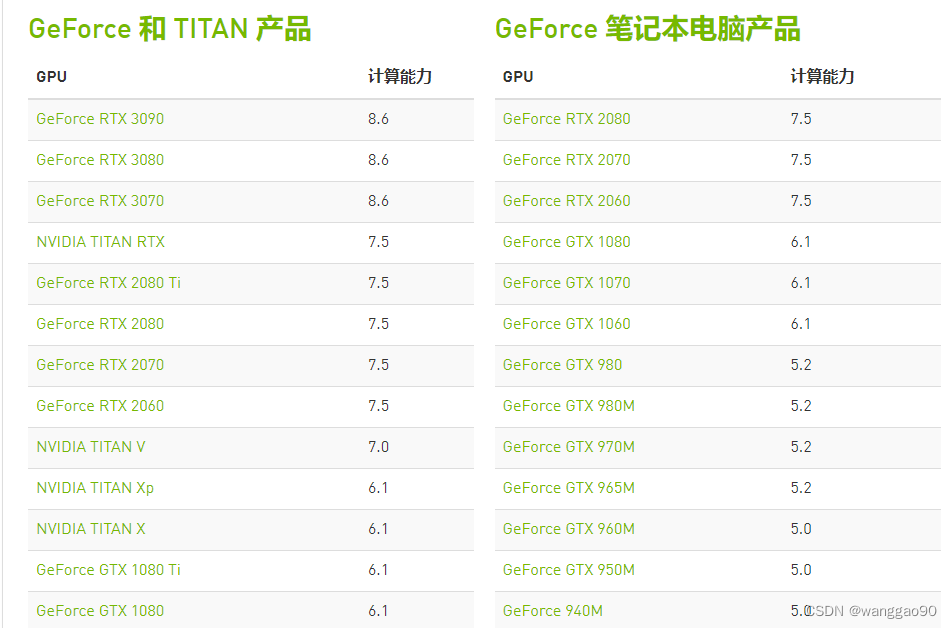
这里仅展示RTX和Titan系列,其他系列可在当前网页选择。
首先需要安装cuda,其版本并不是最新就好,需要选择合适的架构的版本。建议选择合适的版本,基本上可以按照显卡发售的最近的时间选择。
cuda下载需要注册账号,地址链接为 https://developer.nvidia.com/cuda-toolkit-archive
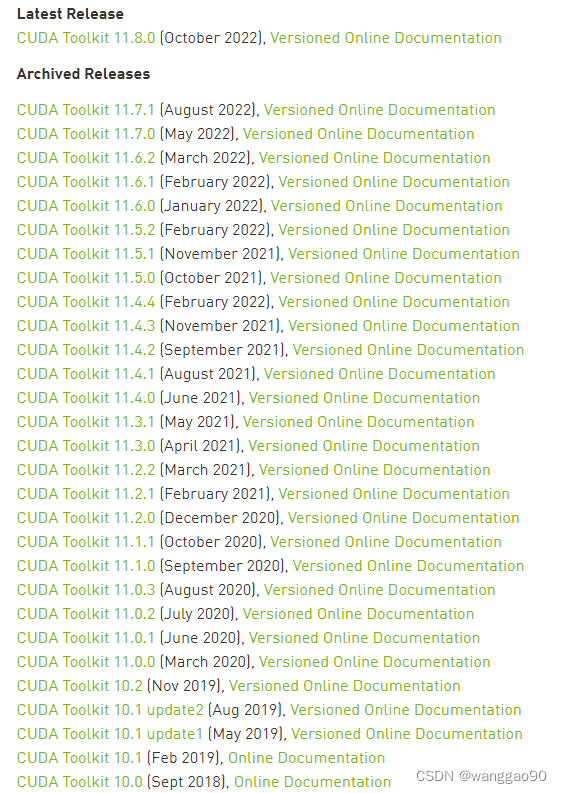
例如,最新的RTX 40系列,2022年10月发售,使用ada架构,就必须使用cuda11.8版本。RTX20系列,采用Turing架构,最早于2018年12月发售2060,虽然cuda 11.8也是兼容可以使用,但是建议使用合适的10.x版本。在各个版本对应的version online documentation中可以看到算力的兼容性,
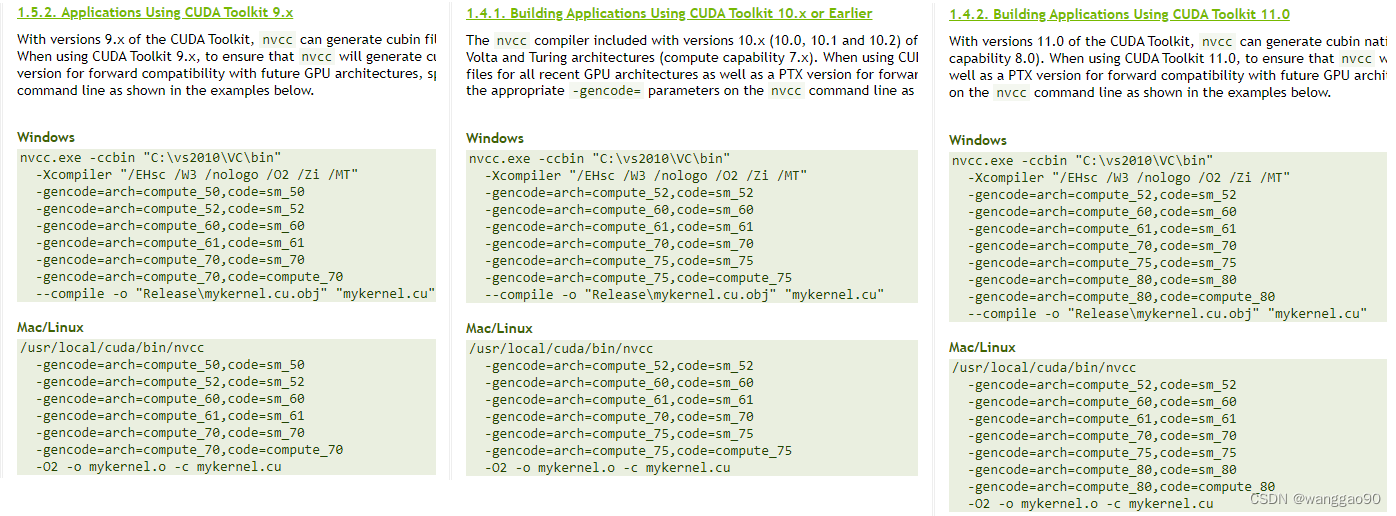
本机显卡为RTX 2060,方便起见,直接最新版本的cuda 11.8版本。
nvidia TensorRt 官网地址为 https://github.com/NVIDIA/TensorRT,提供编译好的包下载两个地址选择:
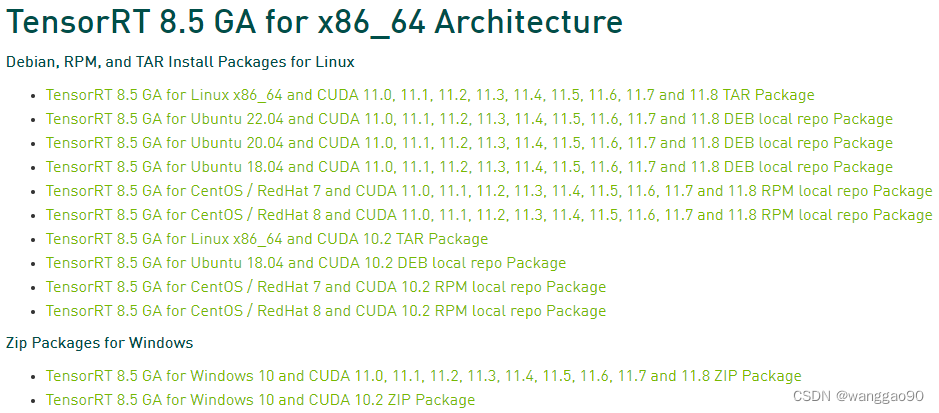
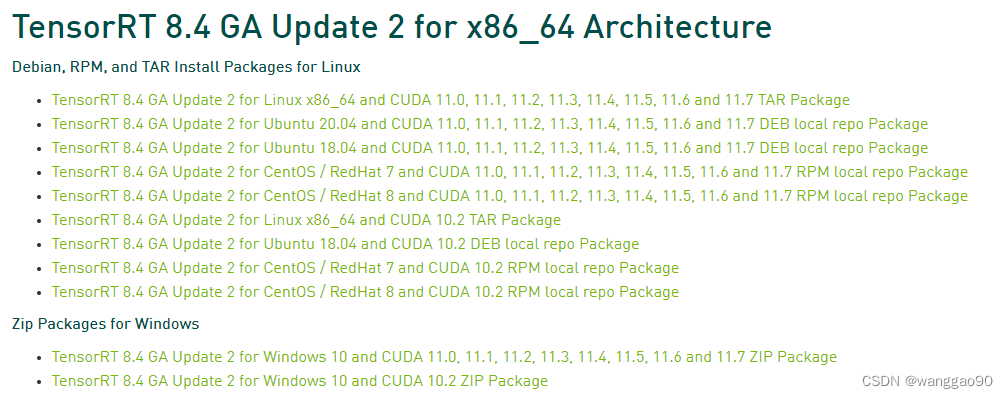 注意,选择了cuda11.8,就应该下载TensorRt 8.5版本的。
TensorRt 8.5 cuda11.8对应的cudnn版本为8.6。由于学习原因,TensorRt 8.4版本中的中的sample较多,就直接选择了TensorRt 8.4版本,也是可以运行的。
下载后可以得到 TensorRT-8.4.3.1.Windows10.x86_64.cuda-11.6.cudnn8.4.zip ,可以看到使用cudnn8.4。 继续安装cudnn,选择cudnn 8.4.x最新就可。
下载链接为 https://developer.nvidia.com/rdp/cudnn-download,历史版本下载地址为
https://developer.nvidia.com/rdp/cudnn-archive
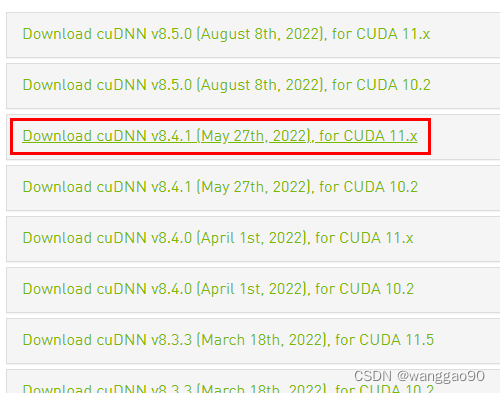
下载后解压cudnn的文件到cuda目录即可。
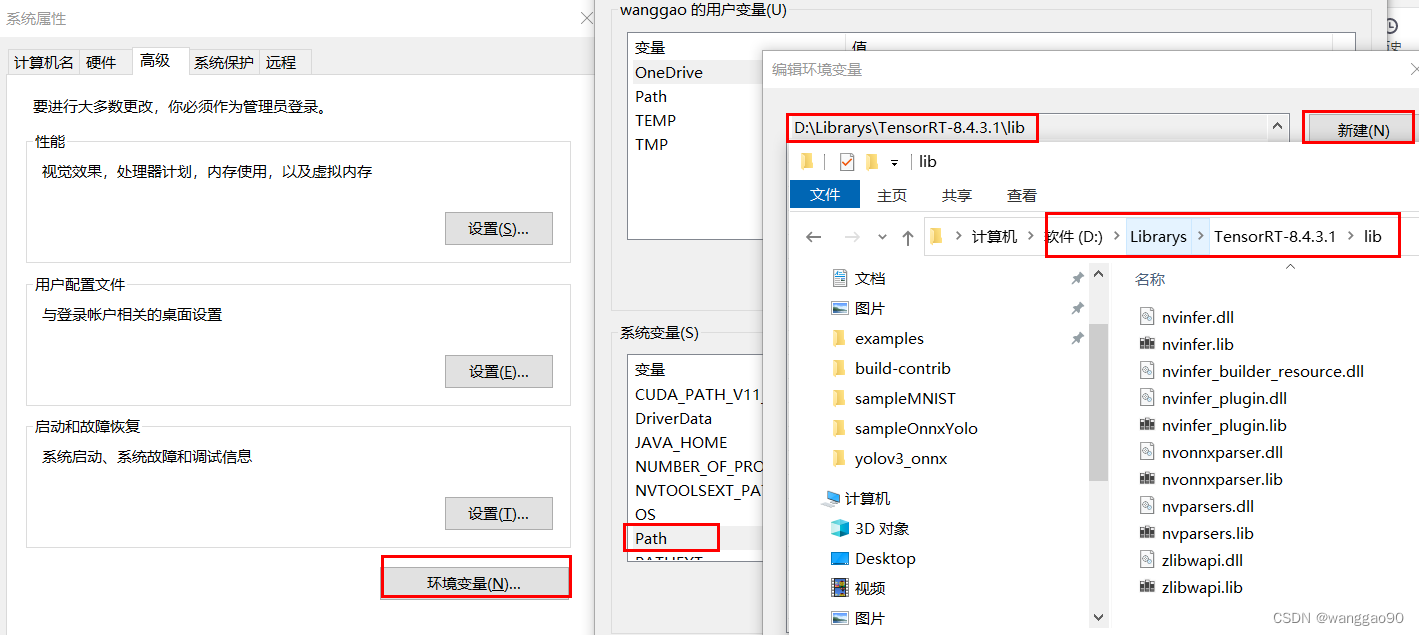
解压后,需要将安装目录添加到PATH环境变量中,
windows下后续某些程序运行可能提示缺少 zlibwapi.dll 库,官方也给出了下载地址,https://docs.nvidia.com/deeplearning/cudnn/install-guide/index.html#install-zlib-windows
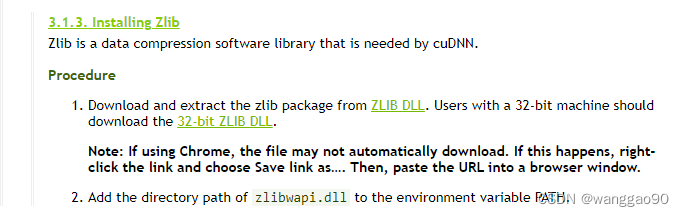
例如,选择x64的版本,将解压对应的lib和dll到环境变量的目录下,如直接放在D:\Librarys\TensorRT-8.4.3.1\lib下即可。
前面安装好环境之后,就可以进行测试,简单的就是使用trtexec.exe工具测试。后续可以选择python、c++进行代码开发。
在bin目录下有一个可执行程序 trtexec.exe,能够在不进行编程的情况快捷的利用TensorRt,主要表现在
具体命令行可以使用 trtexec.exe --help 查看,或者参看 trtexec 文档 。这里直接进行测试data目录下mnist的onnx模型,在bin目录下执行trtexec.exe --onnx=../data/mnist/mnist.onnx,结果为
D:\Librarys\TensorRT-8.4.3.1\bin>trtexec.exe --onnx=../data/mnist/mnist.onnx
&&&& RUNNING TensorRT.trtexec [TensorRT v8403] # trtexec.exe --onnx=../data/mnist/mnist.onnx
[11/06/2022-13:54:02] [I] === Model Options ===
[11/06/2022-13:54:02] [I] Format: ONNX
[11/06/2022-13:54:02] [I] Model: ../data/mnist/mnist.onnx
[11/06/2022-13:54:02] [I] Output:
[11/06/2022-13:54:02] [I] === Build Options ===
[11/06/2022-13:54:02] [I] Max batch: explicit batch
[11/06/2022-13:54:02] [I] Memory Pools: workspace: default, dlaSRAM: default, dlaLocalDRAM: default, dlaGlobalDRAM: default
[11/06/2022-13:54:02] [I] minTiming: 1
[11/06/2022-13:54:02] [I] avgTiming: 8
[11/06/2022-13:54:02] [I] Precision: FP32
[11/06/2022-13:54:02] [I] LayerPrecisions:
[11/06/2022-13:54:02] [I] Calibration:
[11/06/2022-13:54:02] [I] Refit: Disabled
[11/06/2022-13:54:02] [I] Sparsity: Disabled
[11/06/2022-13:54:02] [I] Safe mode: Disabled
[11/06/2022-13:54:02] [I] DirectIO mode: Disabled
[11/06/2022-13:54:02] [I] Restricted mode: Disabled
[11/06/2022-13:54:02] [I] Build only: Disabled
[11/06/2022-13:54:02] [I] Save engine:
[11/06/2022-13:54:02] [I] Load engine:
[11/06/2022-13:54:02] [I] Profiling verbosity: 0
[11/06/2022-13:54:02] [I] Tactic sources: Using default tactic sources
[11/06/2022-13:54:02] [I] timingCacheMode: local
[11/06/2022-13:54:02] [I] timingCacheFile:
[11/06/2022-13:54:02] [I] Input(s)s format: fp32:CHW
[11/06/2022-13:54:02] [I] Output(s)s format: fp32:CHW
[11/06/2022-13:54:02] [I] Input build shapes: model
[11/06/2022-13:54:02] [I] Input calibration shapes: model
[11/06/2022-13:54:02] [I] === System Options ===
[11/06/2022-13:54:02] [I] Device: 0
[11/06/2022-13:54:02] [I] DLACore:
[11/06/2022-13:54:02] [I] Plugins:
[11/06/2022-13:54:02] [I] === Inference Options ===
[11/06/2022-13:54:02] [I] Batch: Explicit
[11/06/2022-13:54:02] [I] Input inference shapes: model
[11/06/2022-13:54:02] [I] Iterations: 10
[11/06/2022-13:54:02] [I] Duration: 3s (+ 200ms warm up)
[11/06/2022-13:54:02] [I] Sleep time: 0ms
[11/06/2022-13:54:02] [I] Idle time: 0ms
[11/06/2022-13:54:02] [I] Streams: 1
[11/06/2022-13:54:02] [I] ExposeDMA: Disabled
[11/06/2022-13:54:02] [I] Data transfers: Enabled
[11/06/2022-13:54:02] [I] Spin-wait: Disabled
[11/06/2022-13:54:02] [I] Multithreading: Disabled
[11/06/2022-13:54:02] [I] CUDA Graph: Disabled
[11/06/2022-13:54:02] [I] Separate profiling: Disabled
[11/06/2022-13:54:02] [I] Time Deserialize: Disabled
[11/06/2022-13:54:02] [I] Time Refit: Disabled
[11/06/2022-13:54:02] [I] Inputs:
[11/06/2022-13:54:02] [I] === Reporting Options ===
[11/06/2022-13:54:02] [I] Verbose: Disabled
[11/06/2022-13:54:02] [I] Averages: 10 inferences
[11/06/2022-13:54:02] [I] Percentile: 99
[11/06/2022-13:54:02] [I] Dump refittable layers:Disabled
[11/06/2022-13:54:02] [I] Dump output: Disabled
[11/06/2022-13:54:02] [I] Profile: Disabled
[11/06/2022-13:54:02] [I] Export timing to JSON file:
[11/06/2022-13:54:02] [I] Export output to JSON file:
[11/06/2022-13:54:02] [I] Export profile to JSON file:
[11/06/2022-13:54:02] [I]
[11/06/2022-13:54:03] [I] === Device Information ===
[11/06/2022-13:54:03] [I] Selected Device: NVIDIA GeForce RTX 2060
[11/06/2022-13:54:03] [I] Compute Capability: 7.5
[11/06/2022-13:54:03] [I] SMs: 30
[11/06/2022-13:54:03] [I] Compute Clock Rate: 1.2 GHz
[11/06/2022-13:54:03] [I] Device Global Memory: 6143 MiB
[11/06/2022-13:54:03] [I] Shared Memory per SM: 64 KiB
[11/06/2022-13:54:03] [I] Memory Bus Width: 192 bits (ECC disabled)
[11/06/2022-13:54:03] [I] Memory Clock Rate: 5.501 GHz
[11/06/2022-13:54:03] [I]
[11/06/2022-13:54:03] [I] TensorRT version: 8.4.3
[11/06/2022-13:54:03] [I] [TRT] [MemUsageChange] Init CUDA: CPU +428, GPU +0, now: CPU 7897, GPU 1147 (MiB)
[11/06/2022-13:54:04] [I] [TRT] [MemUsageChange] Init builder kernel library: CPU +257, GPU +68, now: CPU 8347, GPU 1215 (MiB)
[11/06/2022-13:54:04] [I] Start parsing network model
[11/06/2022-13:54:04] [I] [TRT] ----------------------------------------------------------------
[11/06/2022-13:54:04] [I] [TRT] Input filename:   ../data/mnist/mnist.onnx
[11/06/2022-13:54:04] [I] [TRT] ONNX IR version:  0.0.3
[11/06/2022-13:54:04] [I] [TRT] Opset version:    8
[11/06/2022-13:54:04] [I] [TRT] Producer name:    CNTK
[11/06/2022-13:54:04] [I] [TRT] Producer version: 2.5.1
[11/06/2022-13:54:04] [I] [TRT] Domain:           ai.cntk
[11/06/2022-13:54:04] [I] [TRT] Model version:    1
[11/06/2022-13:54:04] [I] [TRT] Doc string:
[11/06/2022-13:54:04] [I] [TRT] ----------------------------------------------------------------
[11/06/2022-13:54:04] [W] [TRT] onnx2trt_utils.cpp:369: Your ONNX model has been generated with INT64 weights, while TensorRT does not natively support INT64. Attempting to cast down to INT32.
[11/06/2022-13:54:04] [I] Finish parsing network model
[11/06/2022-13:54:05] [I] [TRT] [MemUsageChange] Init cuBLAS/cuBLASLt: CPU +514, GPU +192, now: CPU 8667, GPU 1407 (MiB)
[11/06/2022-13:54:05] [I] [TRT] [MemUsageChange] Init cuDNN: CPU +132, GPU +52, now: CPU 8799, GPU 1459 (MiB)
[11/06/2022-13:54:05] [I] [TRT] Local timing cache in use. Profiling results in this builder pass will not be stored.
[11/06/2022-13:54:06] [I] [TRT] Detected 1 inputs and 1 output network tensors.
[11/06/2022-13:54:06] [I] [TRT] Total Host Persistent Memory: 7552
[11/06/2022-13:54:06] [I] [TRT] Total Device Persistent Memory: 0
[11/06/2022-13:54:06] [I] [TRT] Total Scratch Memory: 0
[11/06/2022-13:54:06] [I] [TRT] [MemUsageStats] Peak memory usage of TRT CPU/GPU memory allocators: CPU 0 MiB, GPU 0 MiB
[11/06/2022-13:54:06] [I] [TRT] [BlockAssignment] Algorithm ShiftNTopDown took 0.0236ms to assign 3 blocks to 6 nodes requiring 31748 bytes.
[11/06/2022-13:54:06] [I] [TRT] Total Activation Memory: 31748
[11/06/2022-13:54:06] [I] [TRT] [MemUsageChange] TensorRT-managed allocation in building engine: CPU +0, GPU +0, now: CPU 0, GPU 0 (MiB)
[11/06/2022-13:54:06] [W] [TRT] The getMaxBatchSize() function should not be used with an engine built from a network created with NetworkDefinitionCreationFlag::kEXPLICIT_BATCH flag. This function will always return 1.
[11/06/2022-13:54:06] [W] [TRT] The getMaxBatchSize() function should not be used with an engine built from a network created with NetworkDefinitionCreationFlag::kEXPLICIT_BATCH flag. This function will always return 1.
[11/06/2022-13:54:06] [I] Engine built in 3.05504 sec.
[11/06/2022-13:54:06] [I] [TRT] [MemUsageChange] Init CUDA: CPU +0, GPU +0, now: CPU 9095, GPU 1543 (MiB)
[11/06/2022-13:54:06] [I] [TRT] Loaded engine size: 0 MiB
[11/06/2022-13:54:06] [I] [TRT] [MemUsageChange] TensorRT-managed allocation in engine deserialization: CPU +0, GPU +0, now: CPU 0, GPU 0 (MiB)
[11/06/2022-13:54:06] [I] Engine deserialized in 0.0020684 sec.
[11/06/2022-13:54:06] [I] [TRT] [MemUsageChange] TensorRT-managed allocation in IExecutionContext creation: CPU +0, GPU +0, now: CPU 0, GPU 0 (MiB)
[11/06/2022-13:54:06] [I] Using random values for input Input3
[11/06/2022-13:54:06] [I] Created input binding for Input3 with dimensions 1x1x28x28
[11/06/2022-13:54:06] [I] Using random values for output Plus214_Output_0
[11/06/2022-13:54:06] [I] Created output binding for Plus214_Output_0 with dimensions 1x10
[11/06/2022-13:54:06] [I] Starting inference
[11/06/2022-13:54:09] [I] Warmup completed 2019 queries over 200 ms
[11/06/2022-13:54:09] [I] Timing trace has 32116 queries over 3.00011 s
[11/06/2022-13:54:09] [I]
[11/06/2022-13:54:09] [I] === Trace details ===
[11/06/2022-13:54:09] [I] Trace averages of 10 runs:
[11/06/2022-13:54:09] [I] Average on 10 runs - GPU latency: 0.0410919 ms - Host latency: 0.055571 ms (enqueue 0.054744 ms)
[11/06/2022-13:54:09] [I] Average on 10 runs - GPU latency: 0.0387924 ms - Host latency: 0.0540939 ms (enqueue 0.0451706 ms)
。。。。。
- 中间省略
。。。。。
[11/06/2022-13:54:10] [I] Average on 10 runs - GPU latency: 0.0338623 ms - Host latency: 0.0516113 ms (enqueue 0.0414185 ms)
[11/06/2022-13:54:11] [I] Average on 10 runs - GPU latency: 0.0352783 ms - Host latency: 0.0510498 ms (enqueue 0.0429199 ms)
[11/06/2022-13:54:11] [I]
[11/06/2022-13:54:11] [I] === Performance summary ===
[11/06/2022-13:54:11] [I] Throughput: 10704.9 qps
[11/06/2022-13:54:11] [I] Latency: min = 0.0288086 ms, max = 0.373047 ms, mean = 0.0534397 ms, median = 0.0523682 ms, percentile(99%) = 0.100342 ms
[11/06/2022-13:54:11] [I] Enqueue Time: min = 0.0231323 ms, max = 0.29541 ms, mean = 0.0426776 ms, median = 0.0424805 ms, percentile(99%) = 0.0822754 ms
[11/06/2022-13:54:11] [I] H2D Latency: min = 0.00415039 ms, max = 0.122131 ms, mean = 0.0132315 ms, median = 0.0090332 ms, percentile(99%) = 0.0356445 ms
[11/06/2022-13:54:11] [I] GPU Compute Time: min = 0.017334 ms, max = 0.302734 ms, mean = 0.0350428 ms, median = 0.0380859 ms, percentile(99%) = 0.0758057 ms
[11/06/2022-13:54:11] [I] D2H Latency: min = 0.00195313 ms, max = 0.0830078 ms, mean = 0.00516533 ms, median = 0.00463867 ms, percentile(99%) = 0.0202637 ms
[11/06/2022-13:54:11] [I] Total Host Walltime: 3.00011 s
[11/06/2022-13:54:11] [I] Total GPU Compute Time: 1.12544 s
[11/06/2022-13:54:11] [W] * Throughput may be bound by Enqueue Time rather than GPU Compute and the GPU may be under-utilized.
[11/06/2022-13:54:11] [W]   If not already in use, --useCudaGraph (utilize CUDA graphs where possible) may increase the throughput.
[11/06/2022-13:54:11] [W] * GPU compute time is unstable, with coefficient of variance = 33.1687%.
[11/06/2022-13:54:11] [W]   If not already in use, locking GPU clock frequency or adding --useSpinWait may improve the stability.
[11/06/2022-13:54:11] [I] Explanations of the performance metrics are printed in the verbose logs.
[11/06/2022-13:54:11] [I]
&&&& PASSED TensorRT.trtexec [TensorRT v8403] # trtexec.exe --onnx=../data/mnist/mnist.onnx
最后测试成功PASS,打印了模型信息、构建信息、设备信息、infer测试信息等。后续就可以使用sample中的示例进行学习。
很好奇,就使用rubyonrails自动化单元测试而言,你们正在做什么?您是否创建了一个脚本来在cron中运行rake作业并将结果邮寄给您?git中的预提交Hook?只是手动调用?我完全理解测试,但想知道在错误发生之前捕获错误的最佳实践是什么。让我们理所当然地认为测试本身是完美无缺的,并且可以正常工作。下一步是什么以确保他们在正确的时间将可能有害的结果传达给您? 最佳答案 不确定您到底想听什么,但是有几个级别的自动代码库控制:在处理某项功能时,您可以使用类似autotest的内容获得关于哪些有效,哪些无效的即时反馈。要确保您的提
我想为Heroku构建一个Rails3应用程序。他们使用Postgres作为他们的数据库,所以我通过MacPorts安装了postgres9.0。现在我需要一个postgresgem并且共识是出于性能原因你想要pggem。但是我对我得到的错误感到非常困惑当我尝试在rvm下通过geminstall安装pg时。我已经非常明确地指定了所有postgres目录的位置可以找到但仍然无法完成安装:$envARCHFLAGS='-archx86_64'geminstallpg--\--with-pg-config=/opt/local/var/db/postgresql90/defaultdb/po
我想用ruby编写一个小的命令行实用程序并将其作为gem分发。我知道安装后,Guard、Sass和Thor等某些gem可以从命令行自行运行。为了让gem像二进制文件一样可用,我需要在我的gemspec中指定什么。 最佳答案 Gem::Specification.newdo|s|...s.executable='name_of_executable'...endhttp://docs.rubygems.org/read/chapter/20 关于ruby-在Ruby中编写命令行实用程序
我打算为ruby脚本创建一个安装程序,但我希望能够确保机器安装了RVM。有没有一种方法可以完全离线安装RVM并且不引人注目(通过不引人注目,就像创建一个可以做所有事情的脚本而不是要求用户向他们的bash_profile或bashrc添加一些东西)我不是要脚本本身,只是一个关于如何走这条路的快速指针(如果可能的话)。我们还研究了这个很有帮助的问题:RVM-isthereawayforsimpleofflineinstall?但有点误导,因为答案只向我们展示了如何离线在RVM中安装ruby。我们需要能够离线安装RVM本身,并查看脚本https://raw.github.com/wayn
我正在编写一个包含C扩展的gem。通常当我写一个gem时,我会遵循TDD的过程,我会写一个失败的规范,然后处理代码直到它通过,等等......在“ext/mygem/mygem.c”中我的C扩展和在gemspec的“扩展”中配置的有效extconf.rb,如何运行我的规范并仍然加载我的C扩展?当我更改C代码时,我需要采取哪些步骤来重新编译代码?这可能是个愚蠢的问题,但是从我的gem的开发源代码树中输入“bundleinstall”不会构建任何native扩展。当我手动运行rubyext/mygem/extconf.rb时,我确实得到了一个Makefile(在整个项目的根目录中),然后当
我有一个奇怪的问题:我在rvm上安装了rubyonrails。一切正常,我可以创建项目。但是在我输入“railsnew”时重新启动后,我有“程序'rails'当前未安装。”。SystemUbuntu12.04ruby-v"1.9.3p194"gemlistactionmailer(3.2.5)actionpack(3.2.5)activemodel(3.2.5)activerecord(3.2.5)activeresource(3.2.5)activesupport(3.2.5)arel(3.0.2)builder(3.0.0)bundler(1.1.4)coffee-rails(
我刚刚为fedora安装了emacs。我想用emacs编写ruby。为ruby提供代码提示、代码完成类型功能所需的工具、扩展是什么? 最佳答案 ruby-mode已经包含在Emacs23之后的版本中。不过,它也可以通过ELPA获得。您可能感兴趣的其他一些事情是集成RVM、feature-mode(Cucumber)、rspec-mode、ruby-electric、inf-ruby、rinari(用于Rails)等。这是我当前用于Ruby开发的Emacs配置:https://github.com/citizen428/emacs
我有一个围绕一些对象的包装类,我想将这些对象用作散列中的键。包装对象和解包装对象应映射到相同的键。一个简单的例子是这样的:classAattr_reader:xdefinitialize(inner)@inner=innerenddefx;@inner.x;enddef==(other)@inner.x==other.xendenda=A.new(o)#oisjustanyobjectthatallowso.xb=A.new(o)h={a=>5}ph[a]#5ph[b]#nil,shouldbe5ph[o]#nil,shouldbe5我试过==、===、eq?并散列所有无济于事。
我有一些Ruby代码,如下所示:Something.createdo|x|x.foo=barend我想编写一个测试,它使用double代替block参数x,这样我就可以调用:x_double.should_receive(:foo).with("whatever").这可能吗? 最佳答案 specify'something'dox=doublex.should_receive(:foo=).with("whatever")Something.should_receive(:create).and_yield(x)#callthere
我正在尝试在我的centos服务器上安装therubyracer,但遇到了麻烦。$geminstalltherubyracerBuildingnativeextensions.Thiscouldtakeawhile...ERROR:Errorinstallingtherubyracer:ERROR:Failedtobuildgemnativeextension./usr/local/rvm/rubies/ruby-1.9.3-p125/bin/rubyextconf.rbcheckingformain()in-lpthread...yescheckingforv8.h...no***e
