好家伙,
我们先来尝试完成一个最简单的功能
正面buff:
1.消灭全图敌机
我们要先找一个好看一点的素材

把背景弄成透明的(搞了好久),感谢度娘的技术支持Photoshop中如何把图片的背景变成透明的-百度经验 (baidu.com)
你问我为什么是篮球?
只因你太美
为了方便测试,我们先弄个测试版本出来
// 全局函数 隔一段时间就来初始化一架敌机/奖励
    function createComponent() {
      const currentTime = new Date().getTime();
      if (currentTime - ENEMY_LASTTIME >= ENEMY_CREATE_INTERVAL) {
        let ran = Math.floor(Math.random() * 100);
        // if (ran < 55) {
        //   enemies.push(new Enemy(E1));
        // } else if (ran < 85 && ran > 55) {
        //   enemies.push(new Enemy(E2));
        // } else if (ran < 95 && ran > 85) {
        //   enemies.push(new Enemy(E3));
        // } else if (ran > 95) {
        //   awards.push(new award(C1));

        // }
        if (ran < 30) {
          enemies.push(new Enemy(E1));
        } else {
          awards.push(new award(C1));
        }
        ENEMY_LASTTIME = currentTime;
      }
    }
(将原本的敌机生产流程,变成只生产小敌机和奖励类)
这么做是为了方便测试
来吧,
c1: "img/lanqiu.jpg"const c1 = createImage(IMAGES.c1);
const C1 = {
      type: 4,
      width: 75,
      height: 75,
      life: 1,
      score: 1,
      img: c1,
      minSpeed: 5,
      maxSpeed: 10
    };
这个奖励类的实现逻辑其实和敌机一样(没有动画渲染,甚至比敌机类更简单一点)
//初始化奖励类
    class award {
      constructor(config) {
        this.type = config.type;
        this.width = config.width;
        this.height = config.height;
        this.x = Math.floor(Math.random() * (480 - config.width));
        this.y = -config.height;
        this.life = config.life;
        this.score = config.score;
        this.img = config.img;
        this.live = true;
        this.speed = Math.floor(Math.random() * (config.minSpeed - config.maxSpeed + 1)) + config.maxSpeed;
        this.lastTime = new Date().getTime();
        this.deathIndex = 0;
        this.destory = false;
      }
      move() {
        const currentTime = new Date().getTime();
        if (currentTime - this.lastTime >= this.speed) {
          if (this.live) {
            this.y = this.y + 6;
            this.lastTime = currentTime;
          } else {
            this.destory = true;

          }
        }
      }
      paint(context) {
        context.drawImage(this.img, this.x, this.y, this.width, this.height);
      }
      outOfBounds() {
        if (this.y > 650) {
          return true;
        }
      }
      hit(o) {
        let ol = o.x;
        let or = o.x + o.width;
        let ot = o.y;
        let ob = o.y + o.height;
        let el = this.x;
        let er = this.x + this.width;
        let et = this.y;
        let eb = this.y + this.height;
        if (ol > er || or < el || ot > eb || ob < et) {
          return false;
        } else {
          return true;
        }
      }
      // collide() {
      //   this.life--;
      //   if (this.life === 0) {
      //     this.live = false;
      //     score += this.score;
      //   }
      // }
    }
// 全局函数 来绘制所有的子弹/敌人组件 绘制score&life面板
    function paintComponent() {
      for (let i = 0; i < hero.bulletList.length; i++) {
        hero.bulletList[i].paint(context);
      }
      for (let i = 0; i < enemies.length; i++) {
        enemies[i].paint(context);
      }
      for (let i = 0; i < awards.length; i++) {
        awards[i].paint(context);
      }
      context.font = "20px 微软雅黑";
      context.fillStyle = "red";
      context.textAlign = "left";
      context.fillText("score: " + score, 10, 20);
      context.textAlign = "right";
      context.fillText("life: " + life, 480 - 10, 20);
      //重置样式
      context.fillStyle = "black";
      context.textAlign = "left";
    }
// 全局函数 来判断所有的子弹/敌人组件 "负责移动"
    function judgeComponent() {
      for (let i = 0; i < hero.bulletList.length; i++) {
        hero.bulletList[i].move();
      }
      for (let i = 0; i < enemies.length; i++) {
        enemies[i].move();
      }
      for (let i = 0; i < awards.length; i++) {
        awards[i].move();
      }
    }
// 碰撞检测函数
    //此处的碰撞检测包括
    //1.子弹与敌机的碰撞
    //2.英雄与敌机的碰撞
    //3.英雄与随机奖励的碰撞
    function checkHit() {
      // 遍历所有的敌机
      for (let i = 0; i < awards.length; i++) {
        //检测英雄是否碰到奖励类
        if (awards[i].hit(hero)) {
          //当然了,这个随机奖励的样式也要删了
          awards.splice(i,1);
          //清除所有的敌机
          // for (let i = 0; i < enemies.length; i++) {
          //   enemies.splice(i, 1);
          // }
          enemies.length =0;

        }
      }
      for (let i = 0; i < enemies.length; i++) {
        //检测英雄是否撞到敌机
        if (enemies[i].hit(hero)) {
          //将敌机和英雄的destory属性改为true
          enemies[i].collide();
          hero.collide();
        }
        for (let j = 0; j < hero.bulletList.length; j++) {
          enemies[i].hit(hero.bulletList[j]);
          //检测子弹是否撞到敌机
          if (enemies[i].hit(hero.bulletList[j])) {
            //将敌机和子弹的destory属性改为true
            enemies[i].collide();
            hero.bulletList[j].collide();
          }
        }
      }
    }
看这里就好
for (let i = 0; i < awards.length; i++) {
        //检测英雄是否碰到奖励类
        if (awards[i].hit(hero)) {
          //当然了,这个随机奖励的样式也要删了
          awards.splice(i,1);
          //清除所有的敌机
          // for (let i = 0; i < enemies.length; i++) {
          //   enemies.splice(i, 1);
          // }
          enemies.length =0;

        }
      }
(全删了不就好了,刚开始是想着一个个删的)
来看看效果:
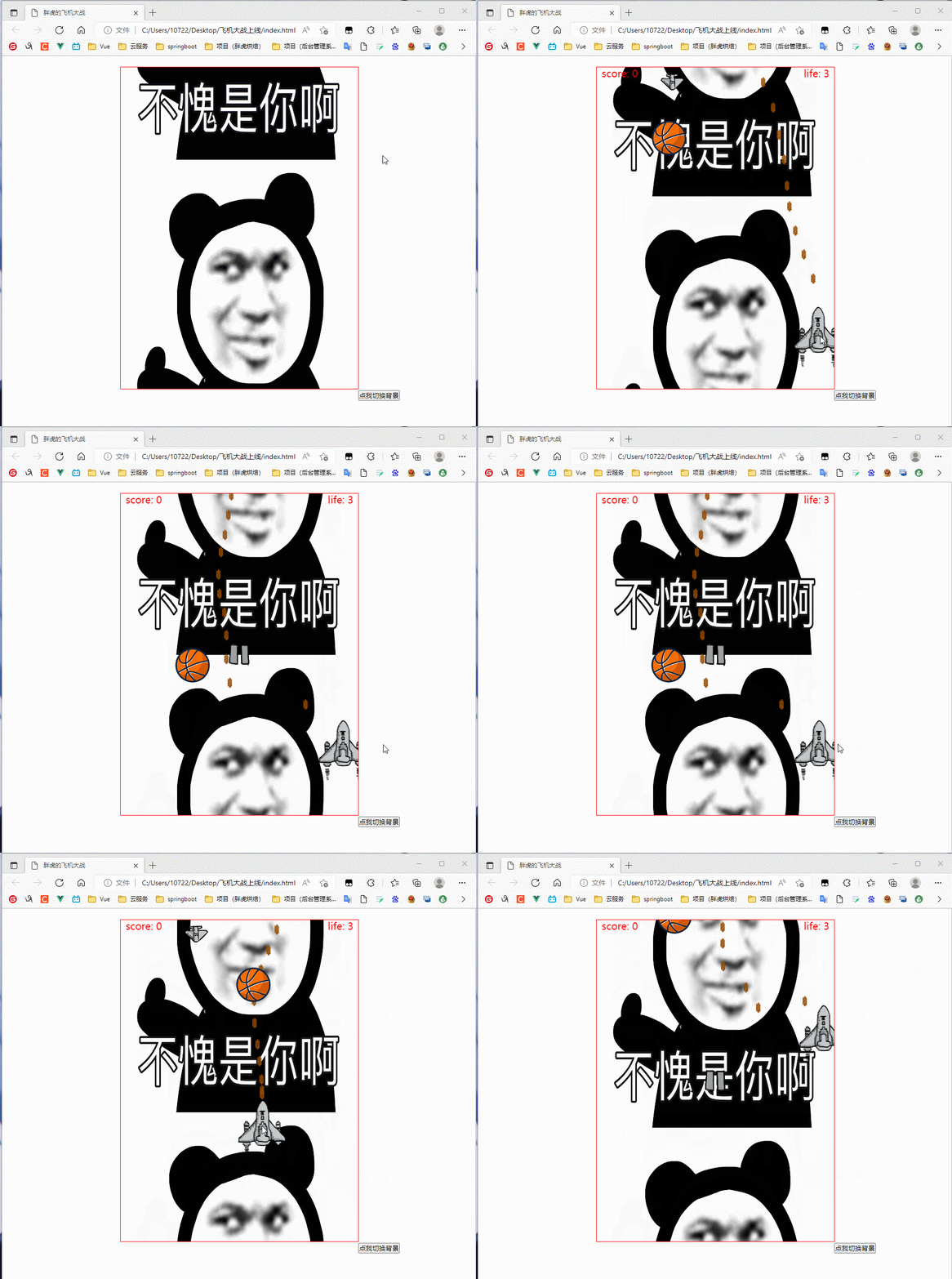
(非常nice)
现在我们调回上线版本
function createComponent() {
      const currentTime = new Date().getTime();
      if (currentTime - ENEMY_LASTTIME >= ENEMY_CREATE_INTERVAL) {
        let ran = Math.floor(Math.random() * 100);
        if (ran < 55) {
          enemies.push(new Enemy(E1));
        } else if (ran < 85 && ran > 55) {
          enemies.push(new Enemy(E2));
        } else if (ran < 95 && ran > 85) {
          enemies.push(new Enemy(E3));
        } else if (ran > 95) {
          awards.push(new award(C1));

        }

        ENEMY_LASTTIME = currentTime;
      }
    }
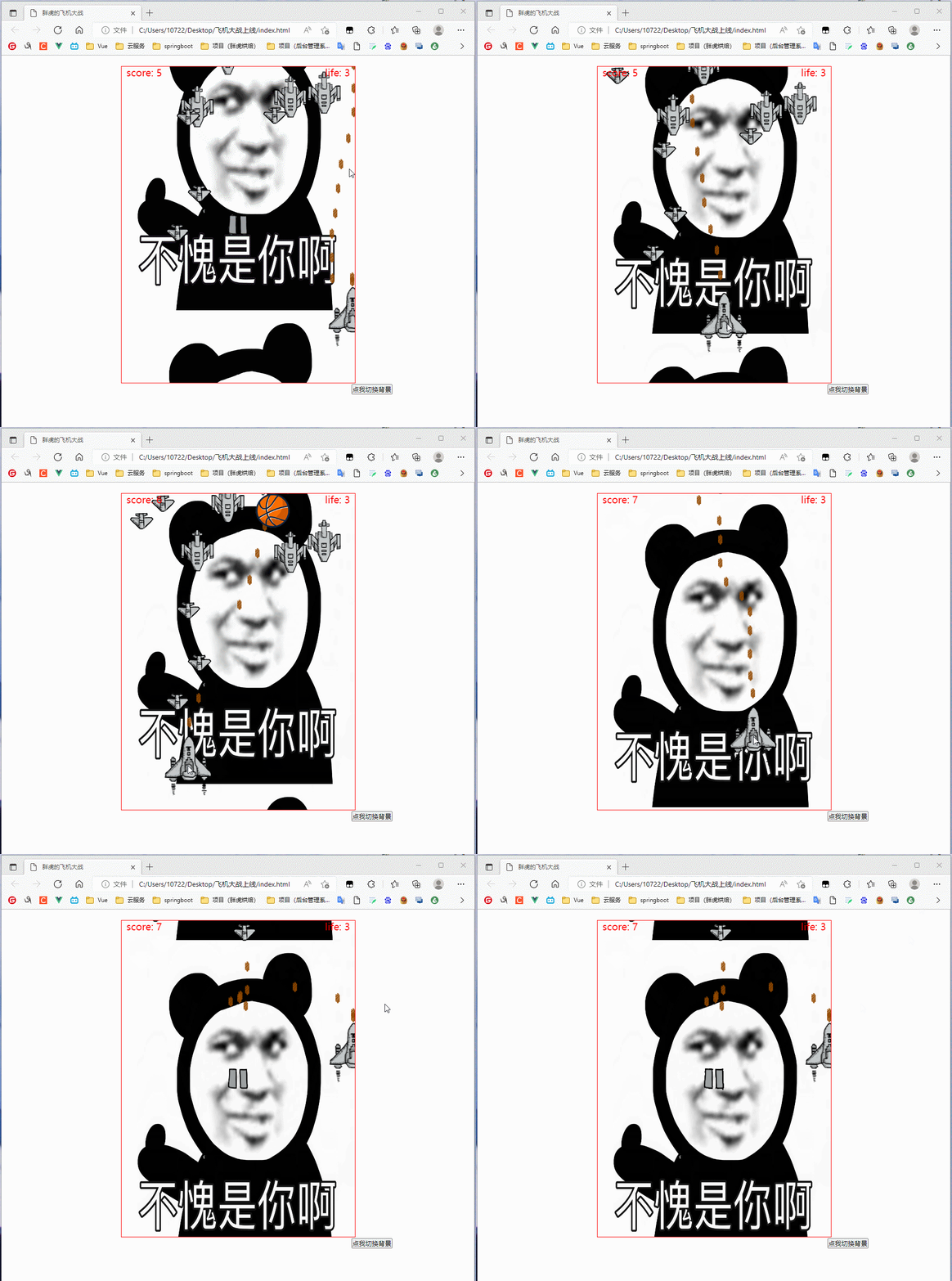
(随机奖励给个百分之五吧,不然太bug了)
来看看效果:
我想将html转换为纯文本。不过,我不想只删除标签,我想智能地保留尽可能多的格式。为插入换行符标签,检测段落并格式化它们等。输入非常简单,通常是格式良好的html(不是整个文档,只是一堆内容,通常没有anchor或图像)。我可以将几个正则表达式放在一起,让我达到80%,但我认为可能有一些现有的解决方案更智能。 最佳答案 首先,不要尝试为此使用正则表达式。很有可能你会想出一个脆弱/脆弱的解决方案,它会随着HTML的变化而崩溃,或者很难管理和维护。您可以使用Nokogiri快速解析HTML并提取文本:require'nokogiri'h
在我的Controller中,我通过以下方式在我的index方法中支持HTML和JSON:respond_todo|format|format.htmlformat.json{renderjson:@user}end在浏览器中拉起它时,它会自然地以HTML呈现。但是,当我对/user资源进行内容类型为application/json的curl调用时(因为它是索引方法),我仍然将HTML作为响应。如何获取JSON作为响应?我还需要说明什么? 最佳答案 您应该将.json附加到请求的url,提供的格式在routes.rb的路径中定义。这
所以我在关注Railscast,我注意到在html.erb文件中,ruby代码有一个微弱的背景高亮效果,以区别于其他代码HTML文档。我知道Ryan使用TextMate。我正在使用SublimeText3。我怎样才能达到同样的效果?谢谢! 最佳答案 为SublimeText安装ERB包。假设您安装了SublimeText包管理器*,只需点击cmd+shift+P即可获得命令菜单,然后键入installpackage并选择PackageControl:InstallPackage获取包管理器菜单。在该菜单中,键入ERB并在看到包时选择
我试过重新启动apache,缓存的页面仍然出现,所以一定有一个文件夹在某个地方。我没有“公共(public)/缓存”,那么我还应该查看哪些其他地方?是否有一个URL标志也可以触发此效果? 最佳答案 您需要触摸一个文件才能清除phusion,例如:touch/webapps/mycook/tmp/restart.txt参见docs 关于ruby-如何在Ubuntu中清除RubyPhusionPassenger的缓存?,我们在StackOverflow上找到一个类似的问题:
我正在使用Rails构建一个简单的聊天应用程序。当用户输入url时,我希望将其输出为html链接(即“url”)。我想知道在Ruby中是否有任何库或众所周知的方法可以做到这一点。如果没有,我有一些不错的正则表达式示例代码可以使用... 最佳答案 查看auto_linkRails提供的辅助方法。这会将所有URL和电子邮件地址变成可点击的链接(htmlanchor标记)。这是文档中的代码示例。auto_link("Gotohttp://www.rubyonrails.organdsayhellotodavid@loudthinking.
我正在学习http://ruby.railstutorial.org/chapters/static-pages上的RubyonRails教程并遇到以下错误StaticPagesHomepageshouldhavethecontent'SampleApp'Failure/Error:page.shouldhave_content('SampleApp')Capybara::ElementNotFound:Unabletofindxpath"/html"#(eval):2:in`text'#./spec/requests/static_pages_spec.rb:7:in`(root)'
我正在尝试将一个简单的CSV文件读入HTML表格以在浏览器中显示,但我遇到了麻烦。这就是我正在尝试的:Controller:defshow@csv=CSV.open("file.csv",:headers=>true)end查看:输出:NameStartDateEndDateQuantityPostalCode基本上我只获取标题,而不会读取和呈现CSV正文。 最佳答案 这最终成为最终解决方案:Controller:defshow#OpenaCSVfile,andthenreaditintoaCSV::Tableobjectforda
在我做的一些网络开发中,我有多个操作开始,比如对外部API的GET请求,我希望它们同时开始,因为一个不依赖另一个的结果。我希望事情能够在后台运行。我找到了concurrent-rubylibrary这似乎运作良好。通过将其混合到您创建的类中,该类的方法具有在后台线程上运行的异步版本。这导致我编写如下代码,其中FirstAsyncWorker和SecondAsyncWorker是我编写的类,我在其中混合了Concurrent::Async模块,并编写了一个名为“work”的方法来发送HTTP请求:defindexop1_result=FirstAsyncWorker.new.async.
我想用Nokogiri解析HTML页面。页面的一部分有一个表,它没有使用任何特定的ID。是否可以提取如下内容:Today,3,455,34Today,1,1300,3664Today,10,100000,3444,Yesterday,3454,5656,3Yesterday,3545,1000,10Yesterday,3411,36223,15来自这个HTML:TodayYesterdayQntySizeLengthLengthSizeQnty345534345456563113003664354510001010100000344434113622315
考虑一下:现在这些情况:#output:http://domain.com/?foo=1&bar=2#output:http://domain.com/?foo=1&bar=2#output:http://domain.com/?foo=1&bar=2#output:http://domain.com/?foo=1&bar=2我需要用其他字符串输出URL。我如何保证&符号不会被转义?由于我无法控制的原因,我无法发送&。求助!把我的头发拉到这里:\编辑:为了澄清,我实际上有一个像这样的数组:@images=[{:id=>"fooid",:url=>"http://
