目录
布局是指组件在容器中的排列方式,主要有:
FlowLayout 流式布局
BorderLayout 边界布局
GridLayout 网格布局
CardLayout 卡片布局
BoxLayout 盒式布局
GridBagLayout 网格包布局
null 空布局(不使用布局)
注:对于一些复杂的情况,往往需要使用容器的嵌套,各容器可使用不同的布局。当容器的尺寸改变时,布局管理器会自动调整组件的排列

FlowLayout();
FlowLayout(int align); //align一般取值有:CENTER、LEFT、RIGHT
FlowLayout(int align, int hgap, int vgap);//hgap和vgap指定组件与容器起始边界以及组件间的水平和垂直间距,默认值为5个像素

import javax.swing.*;
import java.awt.*;

public class JFrame_MainClass  {
    public static void main(String[] args) {
        new MyJFrame();
    }
}
class MyJFrame extends JFrame{
    private JPanel panel;
    private JButton button1,button2;
    public MyJFrame(){
        super("JPanel默认布局:FlowLayout");
    //    panel = new JPanel(); //  默认居中对齐
        panel = new JPanel(new FlowLayout(FlowLayout.LEFT)); // 设置左对齐
        button1 = new JButton("button1");
        button2 = new JButton("button2");
        panel.add(button1);
        panel.add(button2);
        this.add(panel);
        this.setSize(300,200);
        this.setLocation(200,100);
        this.setDefaultCloseOperation(JFrame.EXIT_ON_CLOSE);
        this.setVisible(true);
    }
}


BorderLayout( );
BorderLayout(int hgap,int vgap);//hgap和vgap指定组件间的水平和垂直间距,默认值为0个像素
BorderLayout lay1 = new BorderLayout( );
BorderLayout lay2 = new BorderLayout(10, 10);
BorderLayout.EAST 或 “East”
BorderLayout.WEST 或 “West”
BorderLayout.SOUTH 或 “South”
BorderLayout.NORTH 或 “North”
BorderLayout.CENTER 或 “Center”(默认)
设置容器布局:setLayout(方位);
import javax.swing.*;
import java.awt.*;

public class MainClass{
    public static void main(String[] args) {
        new BorderLayout_3();
    }
}
class BorderLayout_3 extends JFrame {
    public BorderLayout_3(){
       super("JFrame默认布局:BorderLayout");
       JPanel panel = new JPanel(new BorderLayout());
       JButton button1 = new JButton("按钮1");
       JButton button2 = new JButton("按钮2");
       JButton button3 = new JButton("按钮3");
       JButton button4 = new JButton("按钮4");
       JButton button5 = new JButton("按钮5");
       panel.add(button1,BorderLayout.EAST);
       panel.add(button2,BorderLayout.WEST);
       panel.add(button3,BorderLayout.SOUTH);
       panel.add(button4,BorderLayout.NORTH);
       panel.add(button5,BorderLayout.CENTER);
       this.add(panel);
       this.setSize(400,360);
       this.setLocation(300,200);
       this.setDefaultCloseOperation(JFrame.EXIT_ON_CLOSE);
       this.setVisible(true);
    }

}


GridLayout();//一行、每个组件一列
GridLayout(int rows,int cols);//行列数
GridLayout(int rows, int cols, int hgap, int vgap);//行行、列列的间距,默认值为0个像素
GridLayout lay1 = new GridLayout(3,3);
GridLayout lay2 = new GridLayout(5,2,10,10);

import javax.swing.*;
import java.awt.*;

public class MainClass{
    public static void main(String[] args) {
        new GridLayout_5();
    }
}
class GridLayout_5 extends JFrame {
    private JPanel panel;
    public GridLayout_5(){
       super("GridLayout布局");
       panel = new JPanel(new GridLayout(2,3));
       for (int i = 0; i < 6; i++) {
            panel.add(new JButton("按钮"+(i+1)));
       }
       this.add(panel);
       this.setSize(400,360);
       this.setLocation(300,200);
       this.setDefaultCloseOperation(JFrame.EXIT_ON_CLOSE);
       this.setVisible(true);
    }
}

构造方法
例如:
| 显示方法 | 功能 |
| first(Container con) | 显示容器中的第一张卡片 |
| last(Container con) | 显示容器中的最后一张卡片 |
| previous(Container con) | 显示容器中当前卡片的上一张卡片 |
| next(Container con) | 显示容器中当前卡片的下一张卡片 |
| show(Container con, String name) | 显示容器中指定名称的卡片 |
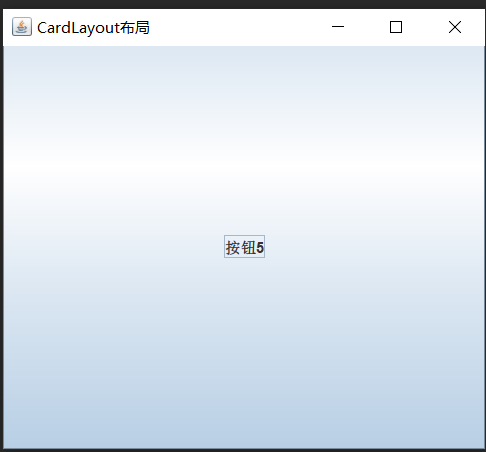
import javax.swing.*;
import java.awt.*;

class MainClass{
    public static void main(String[] args) {
        new CardLayout_4();
    }
}
class CardLayout_4 extends JFrame {
    private JPanel panel;
    private CardLayout cardLayout;
    public CardLayout_4(){
       super("CardLayout布局");
       panel = new JPanel();
       cardLayout = new CardLayout();
       panel.setLayout(cardLayout);

       for (int i = 0; i < 5; i++) {
           panel.add(new JButton("按钮"+(i+1)));
       }
       cardLayout.last(panel);  // 显示最后一张卡片(按钮)
       this.add(panel);
       this.setSize(400,360);
       this.setLocation(300,200);
       this.setDefaultCloseOperation(JFrame.EXIT_ON_CLOSE);
       this.setVisible(true);
    }
}
构造方法:
| 常量 | 描述 |
| BorderLayout.X_AXIS | X轴(横轴)排列 |
| BorderLayout.Y_AXIS | Y轴(纵轴)排列 |
| LINE_AXIS | 根据容器的Component Oriebtation属性,按照文字在一行中的排列方式布置组件 |
| PAGE_AXIS | 根据容器的Component Oriebtation属性,按照文本行在一页中的排列方式布置组件 |
import javax.swing.*;

public class MainClass{
    public static void main(String[] args) {
        new BoxLayout_6();
    }
}
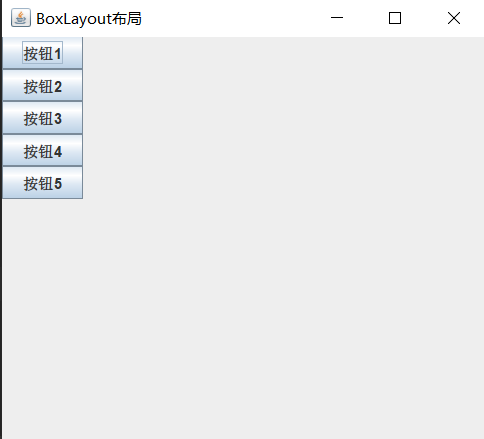
class BoxLayout_6 extends JFrame {
    private JPanel panel;
    public BoxLayout_6(){
       super("BoxLayout布局");
       panel = new JPanel();
       panel.setLayout(new BoxLayout(panel, BoxLayout.Y_AXIS)); //  沿Y轴布置组件

       for (int i = 0; i < 5; i++) {
            panel.add(new JButton("按钮"+(i+1)));
       }
       this.add(panel);
       this.setSize(400,360);
       this.setLocation(300,200);
       this.setDefaultCloseOperation(JFrame.EXIT_ON_CLOSE);
       this.setVisible(true);
    }
}
空布局的使用:
import javax.swing.*;

public class MainClass{
    public static void main(String[] args) {
        new null_7();
    }
}
class null_7 extends JFrame {
     private Jpanel panel;
     private JButton button1,button2,button3,button4,button5;
     public null_7(){
       super("null布局");
       panel = new JPanel();
       panel.setLayout(null);
       button1 = new JButton("按钮1");
       button2 = new JButton("按钮2");
       button3 = new JButton("按钮3");
       button4 = new JButton("按钮4");
       button5 = new JButton("按钮5");

       button1.setBounds(35,25,75,30);
       button2.setBounds(135,25,75,30);
       button3.setBounds(235,25,75,30);
       button4.setBounds(35,65,75,30);
       button5.setBounds(135,65,75,30);

       panel.add(button1);
       panel.add(button2);
       panel.add(button3);
       panel.add(button4);
       panel.add(button5);

       this.add(panel);
       this.setSize(400,360);
       this.setLocation(300,200);
       this.setDefaultCloseOperation(JFrame.EXIT_ON_CLOSE);
       this.setVisible(true);
    }
}

(27条消息) Swing UI——容器(一)_Stuttering Guy的博客-CSDN博客 https://blog.csdn.net/Mr_Morgans/article/details/125109643?csdn_share_tail=%7B%22type%22%3A%22blog%22%2C%22rType%22%3A%22article%22%2C%22rId%22%3A%22125109643%22%2C%22source%22%3A%22Mr_Morgans%22%7D&ctrtid=l9JMT(27条消息) Swing UI——基本组件(二)_Stuttering Guy的博客-CSDN博客https://blog.csdn.net/Mr_Morgans/article/details/125110881?csdn_share_tail=%7B%22type%22%3A%22blog%22%2C%22rType%22%3A%22article%22%2C%22rId%22%3A%22125110881%22%2C%22source%22%3A%22Mr_Morgans%22%7D&ctrtid=Kzbcx(27条消息) Swing UI——高级组件(三)_Stuttering Guy的博客-CSDN博客https://blog.csdn.net/Mr_Morgans/article/details/125115383?csdn_share_tail=%7B%22type%22%3A%22blog%22%2C%22rType%22%3A%22article%22%2C%22rId%22%3A%22125115383%22%2C%22source%22%3A%22Mr_Morgans%22%7D&ctrtid=81Bbq(27条消息) Swing UI——事件处理(五)_Stuttering Guy的博客-CSDN博客https://blog.csdn.net/Mr_Morgans/article/details/125115417?spm=1001.2014.3001.5501
我正在使用i18n从头开始构建一个多语言网络应用程序,虽然我自己可以处理一大堆yml文件,但我说的语言(非常)有限,最终我想寻求外部帮助帮助。我想知道这里是否有人在使用UI插件/gem(与django上的django-rosetta不同)来处理多个翻译器,其中一些翻译器不愿意或无法处理存储库中的100多个文件,处理语言数据。谢谢&问候,安德拉斯(如果您已经在rubyonrails-talk上遇到了这个问题,我们深表歉意) 最佳答案 有一个rails3branchofthetolkgem在github上。您可以通过在Gemfi
我需要在客户计算机上运行Ruby应用程序。通常需要几天才能完成(复制大备份文件)。问题是如果启用sleep,它会中断应用程序。否则,计算机将持续运行数周,直到我下次访问为止。有什么方法可以防止执行期间休眠并让Windows在执行后休眠吗?欢迎任何疯狂的想法;-) 最佳答案 Here建议使用SetThreadExecutionStateWinAPI函数,使应用程序能够通知系统它正在使用中,从而防止系统在应用程序运行时进入休眠状态或关闭显示。像这样的东西:require'Win32API'ES_AWAYMODE_REQUIRED=0x0
我有一个模型:classItem项目有一个属性“商店”基于存储的值,我希望Item对象对特定方法具有不同的行为。Rails中是否有针对此的通用设计模式?如果方法中没有大的if-else语句,这是如何干净利落地完成的? 最佳答案 通常通过Single-TableInheritance. 关于ruby-on-rails-Rails-子类化模型的设计模式是什么?,我们在StackOverflow上找到一个类似的问题: https://stackoverflow.co
Rackup通过Rack的默认处理程序成功运行任何Rack应用程序。例如:classRackAppdefcall(environment)['200',{'Content-Type'=>'text/html'},["Helloworld"]]endendrunRackApp.new但是当最后一行更改为使用Rack的内置CGI处理程序时,rackup给出“NoMethodErrorat/undefinedmethod`call'fornil:NilClass”:Rack::Handler::CGI.runRackApp.newRack的其他内置处理程序也提出了同样的反对意见。例如Rack
我想用ruby编写一个小的命令行实用程序并将其作为gem分发。我知道安装后,Guard、Sass和Thor等某些gem可以从命令行自行运行。为了让gem像二进制文件一样可用,我需要在我的gemspec中指定什么。 最佳答案 Gem::Specification.newdo|s|...s.executable='name_of_executable'...endhttp://docs.rubygems.org/read/chapter/20 关于ruby-在Ruby中编写命令行实用程序
我构建了两个需要相互通信和发送文件的Rails应用程序。例如,一个Rails应用程序会发送请求以查看其他应用程序数据库中的表。然后另一个应用程序将呈现该表的json并将其发回。我还希望一个应用程序将存储在其公共(public)目录中的文本文件发送到另一个应用程序的公共(public)目录。我从来没有做过这样的事情,所以我什至不知道从哪里开始。任何帮助,将不胜感激。谢谢! 最佳答案 无论Rails是什么,几乎所有Web应用程序都有您的要求,大多数现代Web应用程序都需要相互通信。但是有一个小小的理解需要你坚持下去,网站不应直接访问彼此
我尝试运行2.x应用程序。我使用rvm并为此应用程序设置其他版本的ruby:$rvmuseree-1.8.7-head我尝试运行服务器,然后出现很多错误:$script/serverNOTE:Gem.source_indexisdeprecated,useSpecification.Itwillberemovedonorafter2011-11-01.Gem.source_indexcalledfrom/Users/serg/rails_projects_terminal/work_proj/spohelp/config/../vendor/rails/railties/lib/r
刚入门rails,开始慢慢理解。有人可以解释或给我一些关于在application_controller中编码的好处或时间和原因的想法吗?有哪些用例。您如何为Rails应用程序使用应用程序Controller?我不想在那里放太多代码,因为据我了解,每个请求都会调用此Controller。这是真的? 最佳答案 ApplicationController实际上是您应用程序中的每个其他Controller都将从中继承的类(尽管这不是强制性的)。我同意不要用太多代码弄乱它并保持干净整洁的态度,尽管在某些情况下ApplicationContr
我将应用程序升级到Rails4,一切正常。我可以登录并转到我的编辑页面。也更新了观点。使用标准View时,用户会更新。但是当我添加例如字段:name时,它不会在表单中更新。使用devise3.1.1和gem'protected_attributes'我需要在设备或数据库上运行某种更新命令吗?我也搜索过这个地方,找到了许多不同的解决方案,但没有一个会更新我的用户字段。我没有添加任何自定义字段。 最佳答案 如果您想允许额外的参数,您可以在ApplicationController中使用beforefilter,因为Rails4将参数
我真的很习惯使用Ruby编写以下代码:my_hash={}my_hash['test']=1Java中对应的数据结构是什么? 最佳答案 HashMapmap=newHashMap();map.put("test",1);我假设? 关于java-等价于Java中的RubyHash,我们在StackOverflow上找到一个类似的问题: https://stackoverflow.com/questions/22737685/
